Grand Touring GTS180 - Receiver JBL - Free user manual and instructions
Find the device manual for free Grand Touring GTS180 JBL in PDF.


| Type | Car Stereo Receiver |
| Brand | JBL |
| Model | Grand Touring GTS180 |
| Form Factor | Single-DIN (approx. 180 x 50 mm) |
| Weight | 0.6 kg |
| Power Supply | 12 V DC (negative ground) |
| Maximum Power Output | 4 x 45 watts |
| Tuner Bands | FM 87.5–108 MHz, AM 530–1710 kHz |
| Disc Playback | CD, CD-R, CD-RW |
| Audio Formats | MP3, WMA |
| Inputs | Front USB, Front 3.5 mm Aux |
| Connectivity | Bluetooth (optional adapter), Wired remote input |
| Display | LCD with white illumination |
| Equalizer | Preset EQ modes (Rock, Pop, Classic, etc.) |
| Cleaning | Wipe front panel with soft, dry cloth; use CD lens cleaner periodically |
| Safety | Disconnect negative battery terminal before installation; avoid short circuits |
| Spare Parts & Repairability | Contact JBL service center for replacement parts; user-replaceable fuse |
| General Information | Manual available in PDF; model number on back panel |
Frequently Asked Questions - Grand Touring GTS180 JBL
User questions about Grand Touring GTS180 JBL
0 question about this device. Answer the ones you know or ask your own.
Ask a new question about this device
Download the instructions for your Receiver in PDF format for free! Find your manual Grand Touring GTS180 - JBL and take your electronic device back in hand. On this page are published all the documents necessary for the use of your device. Grand Touring GTS180 by JBL.
USER MANUAL Grand Touring GTS180 JBL
JBL Consumer Products, Inc.
80 Crossways Park West
Woodbury, NY 11797
8500 Balboa Blvd.
Northridge, CA 91329
800-336-4JB
H A Harman International Company
Part No. JBLGTS1800M
JBL
GTS180
2/1-CHANNEL AUTOMOTIVE POWER AMPLIFIER OWNER'S MANUAL
JBL
081S180
1.1 Features
• Made in USA
• Bridgeable 2 or 1 Channel Operation
• Simultaneous Stereo + Mono Operation
• Built-in 18dB/Octave Frequency Selectable High-Pass and Low-Pass Crossover
- Preamp Output with Frequency Selectable High-Pass and Low-Pass Crossover
- No Current Limiting
• Oversized Floating Rail (OFR)
MOSFET Switch-Mode Power Supply
• Common Sense 2-Way Turn-On
- Switchable Bass Boost
- Mute Input – accepts standard noise gate inputs to silence the amp during no music conditions
- Stealth Remote Silent Turn-On Circuitry with Power-On Indicator
• Continuously Adjustable Gain Controls
- Capable of Single-Ended Operation Into 2-Ohm Loads
• Full Complementary, Direct-Coupled, Discrete Power Amplifier Circuitry
• Gold-Plated RCA Input Connectors
• Gold-Plated Power and Speaker Connectors
• Third Order, (18dB per Octave)
Capacitive/Inductive
Power-Supply Filtering
- Input Mode Switching
- Speaker Output Short Circuit Protection Circuitry
1.2 About Installation
Although the GTS180 is designed to make installation as easy as possible, it is a sophisticated product that requires proper installation to realize its full performance potential. Skill with tools, an understanding of basic electronics, and experience with car stereo installation are needed to properly install this amplifier. If you feel you do not have the necessary knowledge and skills we strongly recommend that the installation be done by your authorized JBL dealer. If the GTS180 is installed by an authorized JBL dealer, we will double the length of your warranty to two years from date of purchase. Please retain a copy of your bill of sale to insure this additional coverage.
If you choose to install the GTS180 yourself, read all of the information in this manual before you start the installation. Pay particular attention to the safety precautions and notes.
It will save potential problems later if you take a few minutes to plan the complete installation before you start. The routing of wires, the power supply connection points, and the mechanical installation of the unit should be completely thought out before you begin. Work carefully and check each step as it is performed. Before operating the amplifier, recheck the entire installation to be sure that each connection is correct, properly insulated and secure.
2. Quick Start
Recommended for experienced professional installers only!
Refer to the "Crossover Frequency Adjustments" and "Speaker Level Input Impedance Adjustments" sections of this manual to see if you will need to make alterations to their factory settings. If you are not using the built-in crossover, or the speaker level inputs, you may skip this step.
- Disconnect the negative cable from the battery. Note: If the vehicle's radio features a code type security system, make certain you know the code before disconnecting the battery!
- Run a minimum AWG #10 (maximum: AWG #8) power cable complete with a 30 amp fuse (not included) for the GTS180 directly from the positive +12V battery terminal to the desired amplifier location. Keep the fuse to within 6" of the battery terminal, and before the wire runs through any metal partition.
Note: All wiring connections should be made either by soldering with heatshrink tubing insulation or with high-quality crimp-type insulated connectors installed with a professional, articulated crimping tool. Soldering crimp-type terminals is recommended for additional security. Never use wire-nuts, insulation-displacement connectors (i.e. ScotchLok type), or "twist and tape" connections. Do not use electrical tape; it will loosen with age and extreme temperatures.
JBL
- Mount amplifier in the desired location using four screws.
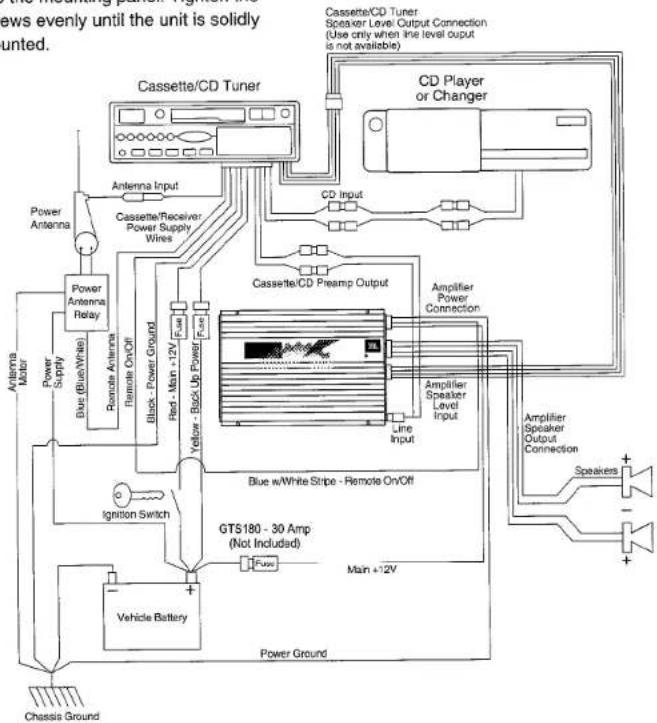
- Connect power wiring as shown in the Wiring Diagram on page 14.
- Connect the outputs from the head unit to the appropriate inputs of the amplifier according to the Wiring Diagram (page 14) with either high quality low-level signal cables (twisted pair is best) with RCA plugs, with the supplied speaker-level input connector, or both.
- Connect the speakers to the amplifier according to the wiring diagrams in section 3.4.
- Turn the input gain adjustment to the 14 position.
- Set the crossover switches as desired.
- Set the input mode switch to stereo, left + right or right input only operation.
- Set the bass boost switch to the desired position.
- Reconnect the negative battery cable.
- Turn on the signal source at a low volume level and check for the correct output from each speaker.
- Adjust the amplifier gain control using the procedure described in the "Adjusting the Gain" section (page 21).
- Read the rest of the manual to get maximum use and enjoyment from your amplifier.
3. System Design Using the GTS180
3.1 Speaker Requirements
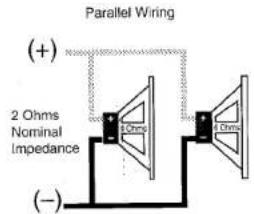
When used in the non-bridged mode the GTS180 can easily drive 2 ohm speaker loads. When only one speaker is connected to each channel, virtually any conventional speaker may be used. When two speakers are connected in parallel to a given channel, each speaker must have a minimum impedance of at least 4 ohms. This ensures that the combined load will not drop below 2 ohms. Although the amplifier will not be damaged, load impedances lower than 2 ohms will eventually cause the amplifier to overheat, activating the protection circuits and causing the unit to shut off until it cools down sufficiently.
text_image
Parallel Wiring (+) 2 Ohms Nominal Impedance (-)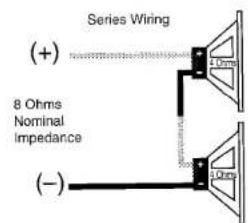
text_image
Series Wiring (+) 8 Ohms Nominal Impedance (-)When the GTS180 is in bridged mode, the combined impedance of the speaker (or speakers) connected to the bridged channel should be at least 4 ohms. Sustained operation of the GTS180 in bridged mode with less than 4 ohms will likely cause overheating. If monaural operation is desired, and two 4-ohm speakers are used, it is best to connect each speaker to an individual amplifier channel and use the "L+R" mode on the input-mode switch to provide monaural operation.
The GTS180 must not be used with speakers that have either one of their input terminals wired to the frame of the speaker or to the chassis of the vehicle.
3.2 Signal Sources
The low level preamp outputs of any radio/tape deck, CD player or preamp/ equalizer so equipped can drive the GTS180. The gain control of the GTS180 is used to match the amplifier's input sensitivity to the output voltage of the source. This matching is important to keep noise low and is explained in the "Adjusting the Gain" section of this manual (see page 21).
Thanks to Universal Interface Circuitry, the GTS180 can also be connected to power amplifiers, radios or equalizers that are equipped with only speaker outputs by connecting them through the speaker level input connector. Inside the GTS180, the speaker-level and preamp-level inputs are connected through a mixing circuit, which allows them to be used simultaneously. Therefore a low level source, such as a CD player equipped with a volume
control may be connected to the preamp-level inputs at the same time as a powered radio/tape unit is connected to the speaker-level inputs. This provides a higher performance alternative to an FM modulator connection when you wish to add CD capability to a factory cassette stereo. Switching from one source to the other is as simple as turning the desired source on and turning the undesired one off – no additional switches or relay connections are needed.
3.3 Other Components
The system options of the GTS180 are numerous. All JBL amplifiers are
designed with sufficient adjustment range to match with the accepted "normal" voltages and impedances used by virtually all car audio components. With very few exceptions, the GTS180 will match up with nearly any equipment you already have.
3.4 Typical Applications
The following diagrams show the most common basic system configurations of the GTS180. A combination of one or more of these "building blocks" may be combined to form elaborate system designs. For additional ideas, refer to the "Add-On and Upgrade" section (see page 23).
Application 1
Stereo Full-Range or Subwoofer Operation
Full-Range Operation
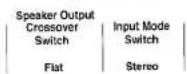
Subwoofer Operation
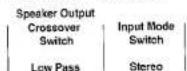
Main speakers are driven by head unit or additional amplifier.
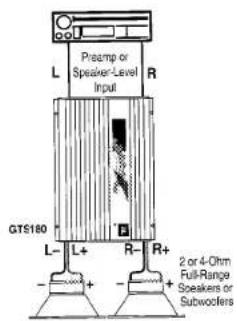
text_image
Preamp or Speaker-Level Input L R GTS180 L- L+ R- R+ 2 or 4-Ohm Full-Range Speakers or Subcoolers
flowchart
graph TD
    A["Application 2 Bridge-Mode Operation"] --> B["Single Amplifier: Subwoofer-Operation (Mono)"]
    A --> C["Dual Amplifier: Subwoofer-Operation (Stereo)"]
    A --> D["Full-Range Operation (Stereo)"]

    B --> E["Speaker Output"]
    B --> F["Crossover Switch"]
    B --> G["Input Mode Switch"]
    B --> H["L + R"]
    B --> I["B Low Pass"]
    B --> J["Main speakers are driven by head unit or additional amplifier."]

    C --> K["Speaker Output"]
    C --> L["Crossover Switch"]
    C --> M["Input Mode Switch"]
    C --> N["A + S Low Pass"]
    C --> O["R Full-Range"]
    C --> P["GTS100 A 4-Ohm"]
    C --> Q["Full-Range"]
    C --> R["Speaker or Subwoofer"]
    C --> S["A + S Flat"]

    D --> T["Speaker Output"]
    D --> U["Crossover Switch"]
    D --> V["Input Mode Switch"]
    D --> W["R Full-Range"]
    D --> X["GTS100 B 4-Ohm"]
    D --> Y["Full-Range"]
    D --> Z["Speaker or Subwoofer"]
    D --> AA["R Full-Range"]
    D --> AB["R Full-Range"]

    E --> AC["For Dual-Amplifier: Full-Range or Subwoofer Use"]
    F --> AD["For Single Amplifier: Subwoofer Use"]

    AC --> AE["L Preamp or Speaker Level"]
    AD --> AF["L"]
    AE --> AG["R"]
    AF --> AH["R"]

    subgraph Stereo
        AI["Ammp A + S Low Pass"] --> AJ["Speaker Output"]
        AK["Ammp A + S Flat"] --> AL["Speaker Output"]
        AM["Speaker Output"] --> AN["Speaker Output"]
        AO["Speaker Output"] --> AP["Speaker Output"]
        AQ["Speaker Output"] --> AR["Speaker Output"]
        AS["Speaker Output"] --> AT["Speaker Output"]
        AU["Speaker Output"] --> AV["Speaker Output"]
        AW["Speaker Output"] --> AX["Speaker Output"]
        AY["Speaker Output"] --> AZ["Speaker Output"]
        BA["Speaker Output"] --> BB["Speaker Output"]
        BC["Speaker Output"] --> BD["Speaker Output"]
        BE["Speaker Output"] --> BF["Speaker Output"]
        BG["Speaker Output"] --> BH["Speaker Output"]
        BI["Speaker Output"] --> BJ["Speaker Output"]
        BK["Speaker Output"] --> BL["Speaker Output"]
        BM["Speaker Output"] --> BN["Speaker Output"]
        BO["Speaker Output"] --> BP["Speaker Output"]
        BQ["Speaker Output"] --> BR["Speaker Output"]
        BS["Speaker Output"] --> BT["Speaker Output"]
        BU["Speaker Output"] --> BV["Speaker Output"]
        BW["Speaker Output"] --> BX["Speaker Output"]
        BY["Speaker Output"] --> BZ["Speaker Output"]
        CA["Speaker Output"] --> CB["Speaker Output"]
        CC["Speaker Output"] --> CD["Speaker Output"]
        DE["Speaker Output"] --> DF["Speaker Output"]
        DG["Speaker Output"] --> DH["Speaker Output"]
        DI["Speaker Output"] --> DJ["Speaker Output"]
        DK["Speaker Output"] --> DL["Speaker Output"]
        DM["Speaker Output"] --> DJ
        DB["Speaker Output"] --> DJ
        DC["Speaker Output"] --> DJ
        DD["Speaker Output"] --> DJ
        DJ --> DJ
        DJ --> DJ
        DJ --> DJ
        DJ --> DJ
    end

    subgraph Stereo
        CK["Amp A + S Low Pass"] --> CL["Speaker Output"]
        CM["Amp A + S Flat"] --> CN["Speaker Output"]
        CO["Amp A + S Flat"] --> CP["Speaker Output"]
        CR["Amp A + S Flat"] --> CS["Speaker Output"]
        CT["Amp A + S Flat"] --> CU["Speaker Output"]
        CX["Amp A + S Flat"] --> CY["Speaker Output"]
        CZ["Amp A + S Flat"] --> CE["Speaker Output"]
        CF["Amp A + S Flat"] --> CG["Speaker Output"]
        CH["Amp A + S Flat"] --> CI["Speaker Output"]
        CJ["Amp A + S Flat"] --> CJ
        CK --> CJ
        CL --> CJ
        CN --> CJ
        CP --> CJ
        CU --> CJ
        CU --> CJ
        CU --> CJ
        CU --> CJ
    end

text_image
Application 3 Bi-amplified, Three-channel Subwoofer/Satellite System. Amp | Speaker Output | Input Mode Switch | Crossover | Switch | A | High Pass | Stereo B | Low Pass | L + R Stereo Subwoofers may be used by configuring Amp B as shown in Application #1. GTS180 L R+ L- R+ 2 or 4-Ohm Full-Range Soleakers Front R P-tamp or Speaker-Level Input L R GTS180 L R+ L- R+ 4-Ohm Subwoofer
text_image
Application 4 Bi-amplified System Using Preamp Output Capability. Speaker Output Crossover Switch Input Mode Switch A B High Pass Low Pass Stereo L = R Flat Doesn't Matter GTS160 L- R+ R- 2 or 4-Ohm Full-Range Speakers GTS180 L- R+ R+ Preamp or Speaker-Level Input R L R Preamp Output Crossover L R Preamp Output R L R Preamp Input GTS180 L- R+ 4-Ohm Subwoofer4. Warnings and Tips
4.1 Installation Precautions
Before beginning the installation of the amplifier read the following points carefully. Failure to heed these warnings could result in personal injury or damage to properly.
- The GTS180 should be installed only in vehicles that have 12-volt negative ground electrical systems. Connection to other types of electrical systems may damage the amplifier and/or the vehicle's electrical system.
- Before beginning the installation, disconnect the negative (ground) cable from the vehicle's battery. This will prevent accidental short circuits while working on the installation. Reconnect the cable only after the installation is complete and the wiring has been carefully checked to be sure there are no exposed wires or short circuits and everything is properly and securely connected. Note: If the vehicle's radio features a code type security system, make certain you know the code before disconnecting the battery!
• Work in an area that is well ventilated.
- Wear eye protection whenever cutting, drilling or filing any parts of the vehicle.
- Wear ear protection when using high speed drills, saws, sanders, or grinders. We want you to be able to enjoy the system once it is installed.
- Before cutting or drilling any holes in the vehicle, inspect the area carefully to be sure there are no electrical wires, hydraulic brake lines, fuel lines, or fuel tanks that may be damaged while doing so. Such components may be hidden
within double-walled panels or structural members of the vehicle, so be extremely cautious.
- Do not bypass or modify the fuse on the chassis of the amplifier. Do not replace the fuse with one rated for higher current levels. Doing so could result in damage to the amplifier and the vehicle's electrical system. Repeated blowing of the power supply fuse indicates a problem within the amplifiers or improper installation.
- An additional power supply fuse (not included) must be located as close as possible to the battery on the +12V wire to minimize the chance of electrical system damage or fire in the event of a short circuit in the power supply wire. This precaution is extremely important; do not ignore it! If the heavy gauge power wire required with the GTS180 ever becomes shorted to ground, the wire will get extremely hot, causing the insulation to burn off and will likely cause a fire if not properly fused.
4.2 Mounting Locations
There are several factors to consider when selecting a mounting location for the GTS180.
- It must be solidly mounted in a place where it will not be subjected to excessive shock and vibration.
• Under no circumstances should the amplifier be mounted where it will be exposed to moisture or extreme heat. - Try to mount the amplifier where the main +12 volt power supply terminal, which must be connected directly to the battery, can be kept relatively short.
- The GTS180 must be mounted in a place where air can circulate around the fins on the chassis. Good air circulation around the amplifier will make it operate at lower temperatures and reduce the chance of the thermal protection circuits being triggered. The installation positions that provide the most efficient air circulation around the amplifier are shown below.
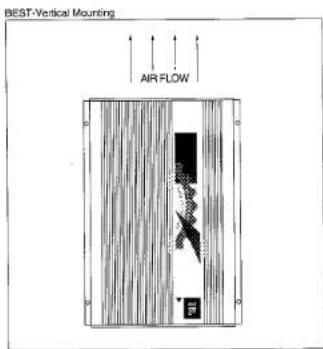
text_image
BEST-Vertical Mounting AIR FLOW
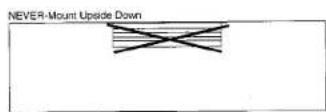
- Use a mounting location that allows access to the wiring connections and level adjustments. This allows the unit to be mounted before these connections and adjustments are made. If the
amplifier must be mounted in an inaccessible location, it may be easier to mount it after the wiring connections and level adjustments are complete.
- Installation and Use
5.1 Controls and Connectors

text_image
① Mate Input ② Battery Ground ③ Battery (+12k) In ④ Remote In/Out ⑤ Fuse ⑥ Speaker Outputs ⑦ High Level Speaker Inputs ⑧ Preamp Level RCA Outputs ⑨ Preamp Level RCA Inputs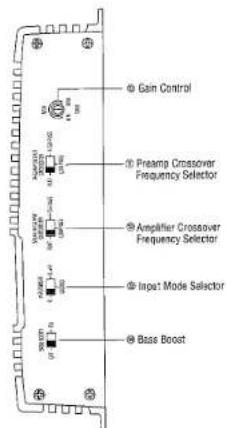
text_image
Gain Control Preamp Crossover Frequency Selector Amplifier Crossover Frequency Selector Input Mode Selector Base Boost- Preamp-Level Input Connector – Use these connectors for line (preamp) level input to the amplifier.
- Preamp-Level Output Connector—Use these outputs to send line level signal to additional amplifiers.
- Speaker-Level Input Connector – Use this connector for speaker level input signals. A wire harness is supplied for use with this connector. See "Speaker Level Input Connections" section (page 19) for wiring instructions. This input also includes JBL's Common Sense input circuitry which turns the amplifier on as soon as the high powered head unit connected to this input is turned on.
- Speaker Output Connector – Connect speaker wiring to this connector. See "Wiring" directions for more information.
5., 6., 7., 8. Power Connector – Connection for power, remote, and muting wires. See "Power Connections" for information on proper connections (page 15).
-
Fuse - 30 Amp ATC type.
-
Gain Control – Use this control to adjust the input sensitivity of the amplifier. See the "Adjusting the Gain" section for tips on proper setup.
-
Preamp-Output Crossover Switch – This switch controls the built-in crossover that is directed to the preamp-output connectors. Set the switch to "Flat" for full band operation. Set this switch to "Low-Pass" to activate the low-pass filter on the preamp output (for subwoofer use). Set the switch to "High-Pass" to activate the high-pass filter for use with satellite speakers on the preamp outputs.
-
Speaker Output Crossover Switch - This switch controls the built-in crossover that is connected to the power amplifier circuitry. Set the switch to "Flat" for full band operation. Set this switch to "Low Pass" to activate the low pass filter on the amplifier (for subwoofer use). Set the switch to "High Pass" to activate the high pass filter for use with satellite speakers.
-
Input Mode Selector - This switch is used to set the input mode for both preamp and speaker-level inputs. Set this switch to Stereo for normal operation using both left and right inputs. Set this switch to "R" to drive both the left and right output channels with only a single input on the right channel. Set this switch to "L+R" to sum the left and right inputs for a mono output on both amplifier channels. The input mode selection switch does not effect the preamp outputs.
-
Bass Boost Switch – This activates a built-in Bass Boost circuit used to increase low-bass output.
Power Indicator LED (on chassis top) – LED steadily illuminates for normal operation. LED blinks when protection circuitry or muting is engaged and during initial power-up.
5.2 Internal Adjustments
Speaker-Level Input Impedance Adjustments
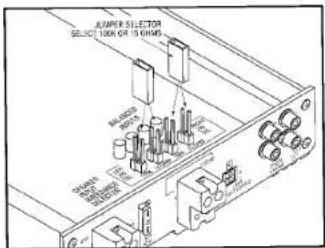
The speaker level inputs of the GTS180 come factory set with 100K ohm input impedance. This will provide the lowest distortion operation from the speaker outputs of most modern head units by
reducing the power the amplifier in the head unit must deliver to practically nothing. The resulting signal will practically be as free from noise and distortion as a preamp-level connection. On some older, or lower-priced head units, this load will not facilitate proper fader operation. To allow for this, we have provided the ability to change the input impedance of the speaker-level inputs to 15 ohms. This is accomplished by setting the jumpers shown in the diagram below.
text_image
JUMPER SELECTOR SELECT 100K OR 15 CHMS Control knobs Control knobs Control knobs Control knobs Control knobs Control knobs Control knobs Control knobs Control knobs Control knobs Control knobs Control knobs Control knobs Control knobs Control knobs Control knobs Control knobs Control knobs Control knobs Control knobs Control knobs Control knobs Control knobs Control knobs Control knobs Control knobs Control knobs Control knobs Control knobs Control knobs Control knobs Control knobs Control knobs Control knobs- If the head unit has 4 channels of built-in amplification and/or an electronic fader control, you should leave the jumpers in the factory set position (100K ohm).
- If the head unit has 2 channels of amplification, with a speaker-level fader, the jumpers should be set to the 15-ohm position. This will always be a rotary-type control, not one controlled by electronic pushbuttons.
If you are not certain of the type of fader control your unit has, measure the resistance across one set of speaker outputs with an ohmmeter (with the head-unit off). Adjust the fader control through its entire adjustment range. If there is a change in the resistance as the control
is adjusted, set the jumpers to the 15-ohm position.
Crossover Frequency Adjustments
The GTS180 amplifier includes built-in frequency selectable crossovers. One crossover is connected in series with the amplifier circuitry and the other crossover is connected to the preamp level output jacks. These crossovers can be set in either the "flat" (full bandwidth operation), Low Pass (subwoofer operation), or High Pass (satellite operation). More details on the use of these crossovers are given in the "Add-On and Upgrade Steps" section.
- The crossover frequencies are set by "chips" inside the amplifier. These "chips" are simply a set of resistors, connected across the pins and molded into a single package. The crossover frequencies may be changed to any value desired by changing the resistor network. JBL has "chips" available in the popular values listed in the table below. If none of these suit your system, you may purchase compatible resistor networks from a local electronics store, or you may build your own custom values from discrete resistors mounted on a 14-pin "DIP Header" using the instructions which follow.
| Frequency | Resistor Value | JBL Part Number |
| 50Hz | 47k Ω | 1-23-750 |
| 80Hz | 33k Ω | 1-23-817 |
| 120Hz | 22k Ω | 1-23-820 |
| 200Hz | 12k Ω | 1-23-821 |
| 250Hz | 10k Ω | 1-23-810 |
| 375Hz | 6.8k Ω | 1-23-822 |
| 500Hz | 4.7k Ω | 1-23-815 |
| 650Hz | 3.9k Ω | 1-23-823 |
| 2.5kHz | 1k Ω | 1-23-824 |
| 5kHz | 470 Ω | 1-23-816 |
Regardless of whether you build or buy it, the necessary resistor network has the following configuration:
Custom "Chip" Construction

natural_image
Diagram of a multi-layered cylindrical device with no visible text or symbols• Each resistor in the package has the same value.
- If you know the crossover frequency you want, you can calculate the resistor value necessary by solving the following equation:
$$ \begin{array}{l} \text { Resistor } \ \text { Value } \ \text { in Ohms } \end{array} = \frac {\frac {2 , 5 0 0 , 0 0 0}{\text { Crossover }}}{\text { Frequency in Hz }} $$
- Use the following equation if you have a resistor pack of a known value, and want to find its crossover frequency:
$$ \begin{array}{l} \text { Crossover } \ \text { Frequency } \ \text { in Hz } \end{array} = \frac {\text { 2,500,000 }}{\text { Crossover }} \text { Resistor Value in Ohms } $$
- To build "chips" from discrete resistors, solder the resistors to a standard 14-pin "DIP Header" according to the diagram. If a DIP Header is not available, you may bend the leads of 12 "-watt resistors 90 degrees, trim them to 12 "-length, and insert them directly into the chip sockets.
To change the crossover frequency change the resistor network as follows:
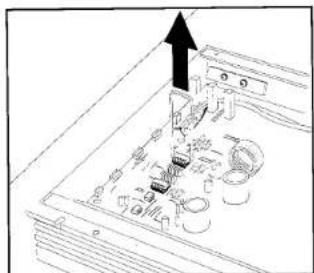
- Remove the screws from the bottom panel as shown next.

- Select which resistor module, high pass or low pass, that you wish to change.
- A chip puller, which can be obtained from any electronics store, is used to remove the resistor chip. Pull the resistor chip from the socket as shown in the figure below.
- Place the new module in the socket making sure all pins are lined up with the socket holes. Press the module firmly into the socket.
natural_image
Diagram of an electronic device with circuit board and connectors, no visible text or symbols- Replace the bottom lid. For further information on how to use the speaker output and preamp output crossovers for system building see the "Typical Applications" and "Add-On and Upgrade" sections.
5.3 Mounting Positions
Place the amplifier in the installation location. Use a pen or pencil to mark the four mounting screw hole locations. Set the amplifier aside and drill the
holes for the mounting screws. (Note: If the surface you are mounting the amp to is covered with carpeting or upholstery, cut a small "x" in the material at each screw hole location before drilling the holes. This will help prevent tearing or stretching of the material and carpet fibers from being pulled out.) Set the amplifier in position and align the holes on its side with the holes previously drilled. Put washers on the four sheet metal screws provided and drive them into the mounting panel. Tighten the screws evenly until the unit is solidly mounted.
5.4 Wiring
Proper wiring of the GTS180 and the associated components is extremely important for proper performance and long term reliability. Using the proper type of wire is very important. If a specific type of wire is required for a certain application, it will be noted.
Route the wiring through the car carefully. Do not allow wires to lay against sharp sheet metal edges or any other surfaces that might wear away or cut
flowchart
graph TD
    A["Cassette/CD Tuner"] --> B["Antenna Input"]
    A --> C["CD Player or Changer"]
    B --> D["Cassette/CD Preamp Output"]
    C --> E["CD Player or Changer"]
    D --> F["Blue w/White Stripe - Remote On/Off"]
    E --> G["GTS180 - 30 Amp (Not Included)"]
    F --> H["Ignition Switch"]
    G --> I["Vehicle Battery"]
    H --> J["Chassis Ground"]
    I --> K["Power Ground"]
    J --> L["Power Antenna"]
    K --> M["Power Antenna Relay"]
    L --> N["Remote Antenna"]
    M --> O["Remote On/Off"]
    N --> P["Black - Power Ground"]
    O --> Q["Red - Main +12V / Full Power"]
    P --> R["Yellow - Back Up Power"]
    Q --> S["Fuse"]
    R --> T["Fuse"]
    S --> U["Line Input"]
    T --> V["Line Input"]
    U --> W["Amplifier Speaker Level Input"]
    V --> X["Amplifier Speaker Level Connection"]
    W --> Y["Speakers"]
    X --> Z["Speakers"]
through the insulation of the wire. Use insulated strain reliefs, rubber grommets and plastic tubing to protect the wires whenever they are run through sheet metal panels or are placed where they might be pulled or damaged.
Power Connections
The power input, remote turn-on, and mute wires are connected to the GTS180 via the power connector on the end of the amplifier.
+12V Battery Wire
- Connect a wire directly from the +12 volt terminal of the battery to the (+) Battery terminal on the amplifier. For the GTS180, use a minimum of AWG #10. Use wire that is heat and oil resistant whenever running wires through the engine compartment. All wire-to-wire connections should be soldered and insulated with heat shrink tubing, or connected through a high quality insulated crimp-on connector or secure set-screw type terminal blocks. Never leave bare wire exposed. Terminate wires with crimp or solder-on lug terminals whenever appropriate.
- The GTS180 will draw as much as 30 amps from the vehicle's electrical system, enough to overload conventional vehicle wiring. Therefore the +12 volt power supply must be taken directly from the positive side of the battery. Do not connect to the vehicle's fuse block or to a wire feeding other accessories.
• To prevent electrical system damage or fire, a fuseholder and fuse (not included), maximum 30A, must be installed in the power supply wire, as close to the battery as possible, and
before the wire travels through the fire-wall or other metal panel.
Ground Wire
- Proper grounding is extremely important. Use a heat and oil-resistant stranded copper automotive wire equivalent to the size used for the +12V connection.
Crimp or solder and insulate any wire-to-wire connections. Keep the ground wire as short as possible. A ground wire must be solidly connected to a major sheet metal structure of the vehicle such as a panel near the amp mounting location. Scrape all paint and primer off the sheet metal at the grounding point to ensure a good electrical connection. Attach the wire to the grounding point with a nut, bolt and star washer. The high current demanded by high-powered amplifiers requires a more secure ground than the typical sheet-metal screw will provide. - In some vehicles, such as those that have non-metal bodies, it may be necessary to extend the power supply ground wire and connect it to a frame rail or even directly to the negative (-) terminal of the battery.
- When used in elaborate systems with multiple components, it is common practice to ground all of the amplifiers and signal processors to the same point to prevent noise pickup from a ground loop. With the extremely high peak current demands of high powered amplifiers, this can result in unstable power delivery to the components, due to modulation of the power ground point by the high power demands. The advanced, isolated power supplies used in the GTS180 make common ground installation
unnecessary. To prevent ground loops, they can be grounded close to their mounting positions. Use of heavy gauge wire for all grounding, even signal processors and head units, can minimize possible noise pickup.
Remote In/Out Connection
- The remote power control system turns the GTS180 off when not in use to prevent discharging of the vehicle's battery. Because the JBL GTS180 includes Common Sense 2-way turn on, when using the speaker level inputs with a head unit that includes a BTL power amp it is not necessary to connect the remote wire. The amplifier will automatically activate whenever you turn on the head unit. If you are using the line level inputs, or the speaker level inputs with a head unit that does not have a BTL power amp, follow the remote wire connections listed below.
- Using the REM IN feature — When +12 volts is applied to the remote IN/OUT terminal the amplifier is turned on. A red LED on the top panel of the amplifier will illuminate to indicate the amplifier is on. If the head unit has a +12 volt automatic antenna or amplifier remote activation wire, connect it to the "REM IN/OUT" connector on the GTS180. When the amplifier is turned on, there is a time delay of several seconds (longer in cold weather) before the amplifier will produce sound. This eliminates the chance of annoying noises produced by the radio or signal processors being amplified and passed to the speakers when the system is first activated.
- Some head units have no automatic antenna or power amp activation wire.
Others have automatic antenna wires that are "on" only when the radio is used but not when a tape is played. In such cases, connect the remote in turn-on terminal to an unused accessory terminal in the fuse block, or any other +12 volt source that is turned on and off with the vehicle's ignition switch. The remote on/off system draws negligible current so a relatively small (18 or 20 gauge) wire may be used.
- Using the REM OUT feature — The "REM IN/OUT" terminal of the GTS180 may be used to turn on other amplifiers when the GTS180 is being turned on by the Common Sense Circuitry in the speaker level input. Simply connect the head unit speaker level outputs to the GTS180 speaker level inputs and connect the "REM IN/OUT" terminal to the remote in terminal of other amplifiers or signal processors. The GTS180 will turn on the other amps or processors whenever the Common Sense circuitry turns on the GTS180.
Mute Connection
The GTS180 includes a mute input terminal. This amplifier will mute when a 5 to 12V DC signal is applied to the "mute" input and will be in normal operation mode with either a ground or nothing connected to the "mute" input. This "mute" input is compatible with any aftermarket noise gate that puts out a control voltage of 5 to 12V DC.
Speaker Connections
- When connecting speaker wires, be sure that no uninsulated wire remains exposed and no loose strands of wire touch either an adjoining wire or terminal or a metal surface. Securely crimp or sol-
der all connections and insulate them with heatshrink tubing.
- Use high quality 16 gauge or larger (12 gauge maximum) speaker wire for the amplifier to speaker connections. Larger wire or special high-performance speaker cables may improve the performance of some systems.
- Be very careful when speaker wire is routed through a door hinge area to door-mounted speakers. Use grommets and strain reliefs wherever necessary to prevent damage to the wires.
- The proper speaker connection depends on whether the GTS180 is used bridged or stereo. The speakers are connected to the speaker output connector.
- To get proper bass response and stereo imaging, all the speakers in the system must be "in phase." The input terminals of the speakers will be marked in some way to identify positive and negative polarity. Make sure that the positive (+) speaker terminal is attached to the positive (+) amplifier connection in every speaker-to-amp connection. All two-conductor speaker wire has one conductor marked in some way so it can be easily traced.
- Stereo Connection – Connect each speaker to appropriately labeled terminals of the speaker output connector.
- Bridged-Mode Connection – Connect the loudspeaker positive (+) terminal to the RIGHT channel positive amplifier speaker output terminal. Connect the loudspeaker negative (−) terminal to the LEFT channel negative amplifier speaker output terminal. The input-mode switch should be set to "RIGHT" or "L+R."
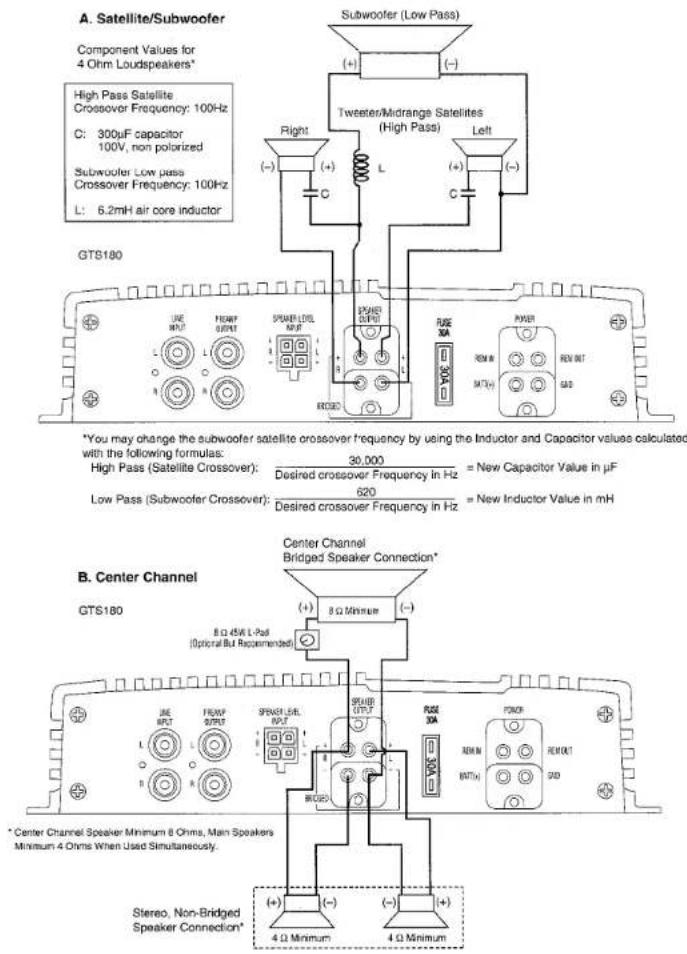
- Simultaneous Stereo + Mono Connection – The GTS180 may be used to drive a stereo pair of speakers with a mono speaker at the same time. This is sometimes used for center-channel applications or for inexpensive subwoofer addition, essentially creating a 3-channel system. Unlike a true bi-amplified subwoofer connection however, this type of system configuration does not provide fine control of subwoofer-satellite balance. It requires the use of a passive subwoofer crossover instead of the superior active circuitry already built-in to the GTS180, and it does not separate the power amps driving the satellites from the amps driving the subwoofer. Therefore this connection is best used for addition of a center-channel, or as an interim step as you build up to a true bi-amplified subwoofer/satellite system. Connect the main pair of stereo speakers as in the stereo mode; connect the mono speaker as described above for bridge-mode connection. For use in center channel applications, a high-power "L-Pad" or power fader can be used to attenuate the center channel for proper level matching. For subwoofer-satellite use, connect a non-polarized capacitor in series with each main speaker, and a high-power inductor (coil) in series with the subwoofer. Your authorized JBL dealer will help you choose the correct values for your particular components. In this configuration, each speaker should have an impedance which is equal or greater than 4 Ohms. The input-mode switch should be set to "STEREO" (See page 18).
Simultaneous Stereo-Mono Connection Diagrams
text_image
A. Satellite/Subwoofer Component Values for 4 Ohm Loudspeakers* High Pass Satellite Crossover Frequency: 100Hz C: 300μF capacitor 100V, non polarized Subwoofer Low pass Crossover Frequency: 100Hz L: 6.2mH air core inductor GTS180 Subwoofer (Low Pass) (+) (-) Tweeter/Midrange Satellites (High Pass) Left Right (+) C L (-) C C *You may change the subwoofer satellite crossover frequency by using the Inductor and Capacitor values calculated with the following formulas: High Pass (Satellite Crossover): 30,000 Desired crossover Frequency in Hz = New Capacitor Value in μF Low Pass (Subwoofer Crossover): 620 Desired crossover Frequency in Hz = New Inductor Value in mH Center Channel Bridged Speaker Connection* GTS180 8 Ω Minimum (+) - (−) 8 Ω 4Wk L-Psd (Optional But Recommended) *Center Channel Speaker Minimum 8 Ohms, Main Speakers Minimum 4 Ohms When Used Simultaneously. Stereo, Non-Bridged Speaker Connection* (+) (-) (−) (+) + 4 Ω Minimum 4 Ω MinimumAudio Input Connections
Line Level Input Connections
- Proper wiring between the signal source, any other components in the system and the GTS180 will help keep noise levels in the system low. Use high-quality, low capacitance shielded wire. Keep the wire as short as possible. Do not splice together shielded wires. Do not run audio signal wires alongside power wires either for the amp or the vehicle's standard power wires for an extended length. When wires are run for long distances, separate the audio signal wires from power supply wires or vehicle wiring harnesses as much as possible. When signal wires and power wires must cross, try to keep them perpendicular. Avoid routing any wires near accessories such as ignition control modules, tachometers, fuel pumps or fan motors.
• The line level inputs of the GTS180 accept standard phono plugs (also called RCA plugs). The outputs of most head units, equalizers or crossovers also accept phono plugs. If another type of connector is used, adapters or special cables may be needed. Proper wire and connectors can be obtained from any JBL authorized installation specialist. - NOTE: The GTS180 has a built-in frequency selectable low-pass (subwoofer) crossover and a frequency selectable high-pass (satellite) crossover. Be sure the crossover switch is properly set for the chosen system configuration (See Add-On and Upgrade Steps section for suggestions). If you have any questions about how to set this switch, contact your local JBL dealer.
Speaker Level Input Connections
When speaker level signal is used to drive the GTS180, the signal goes into the amp through a special four-wire harness/connector (see the "Controls and Connectors" section). If extension wires are needed between the head unit output and the amplifier unit, use conventional speaker wire. Keep the wiring inside the passenger and trunk compartments and make the wires as short as possible. All connections should be securely crimped or soldered and insulated with heatshrink tubing.
- Use the color code of the input harness wires and the identification on the radio/tape deck output wires to be sure that left and right channels are correctly connected and the positive/negative polarity of each channel is observed. For example, the left positive output of the head unit must be connected to the left positive input of the GTS180. The color code for the speaker level input harness is as follows:
Speaker Level Input Harness Color Codes
Left (+): White
Left (−): White with Black Stripe
Right (+): Gray
Right (−): Gray with Black Stripe
Simultaneous Speaker Level + Line Level
In some systems it may be desirable to use both the speaker level inputs and line level inputs simultaneously. For instance, if you have a stock head unit in your car you may connect the speaker level inputs of the head unit to the GTS180. You may simultaneously connect a CD player equipped with a
volume control to the preamp-level inputs of the GTS180. The Universal Interface circuitry of the GTS180 will isolate the inputs from each other while mixing both signals. Therefore switching from one source to the other is as simple as turning the unused source off, and turning the desired source on. No other switches or relay boxes are needed.
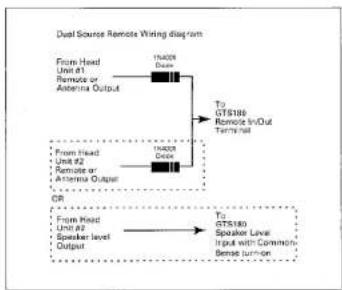
When using this setup it is also possible, using the wiring setup shown below, to allow either of the two sources to remotely turn on the amplifier. Whenever you are using two sources to turn on the amplifier it is necessary to put diodes in series with the remote line as shown in the diagram below. The Common Sense turn-on circuit will activate the GTS180 when using the powered source, and the conventional remote connection of the preamp-level source will activate the amp when it is used.
flowchart
graph TD
    A["From Head\nUnit #1\nRemote or\nAntenna Output"] --> B["15000\nDoor"]
    B --> C["To GTS180\nRemote In/Out\nTerminal"]
    D["From Head\nUnit #2\nRemote or\nAntenna Output"] --> E["15000\nDoor"]
    E --> F["To GTS180\nSpeaker Level\nInput with Common\nBensal turn-on"]
    G["From Head\nUnit #3\nSpeaker level\nOutput"] --> H["To GTS180\nSpeaker Level\nInput with Common\nBensal turn-on"]
Using the Rem-Out Capability
When the GTS180 amplifier is driven by a BTL head unit into the speaker level inputs and is remotely turned on with the Common-Sense circuit instead of a remote in wire, the "REMOTE IN/OUT" terminal is turned on to a +12V so that
other amplifiers or signal processors can be remotely turned on by the GTS180 without the need for an additional remote on off wire. See diagram below:

flowchart
graph LR
    A["Using a remote cut connection to turn on other signal processors or amps"] --> B["From the Head Unit Speaker level Output"]
    B --> C["To GTS180 Speaker Level Input with Common Sense turn-on"]
    A --> D["From the GTS180 REM INOUT terminal"]
    D --> E["To the other amplifier or signal processors remote in terminals"]
5.5 Input-Mode Switch
This switch is set according to the number of input channels connected to the amplifier and the desired mode of operation. See the diagrams on pages 7 and 8 and the descriptions below for options.
- Conventional Stereo Operation – Set the input-mode switch to "stereo." Connect the preamp-level head unit outputs either to the two gold line input connectors or connect the head unit speaker outputs to the speaker-level inputs. When using two head units, both the speaker and preamp-level inputs may be used simultaneously. Be sure to maintain left and right channel consistency. (See the note in section 5.4 for details.)
- Bridged Mode Operation – To select bridge mode operation, set the input mode switch in either the "R" only or "L+R" position. In the "R" position, signal from the right channel input is fed to both amplifier channels. In the "L+R" position, the signal from both channels is summed internally. When using a single GTS180 for mono mode fed with a stereo signal it is best to use the "L+R" mode. When
using a GTS180 for each channel, or when feeding a single GTS180 with a mono signal from an outboard crossover, use the "R" mode and connect your source input to the right channel input.
- Simultaneous Stereo + Mono - Set the Input Mode switch to the stereo position. Main speakers are connected normally to the left and right stereo outputs, and a center-channel or subwoofer speaker is connected as in bridged mode. Refer to the diagram on page 18 for connection details.
6. Input Gain Adjustment
Before operating the GTS180, recheck all wiring connections to make sure they are correct and secure. Be sure that a fuse (30 Amp, not included) is installed in the +12V line near the battery. Reconnect the negative ground (-) terminal of the battery. Make sure that the input mode selector, speaker output crossover switch, crossover frequency modules, and preamp output crossover switch are properly set.
Adjusting the Gain
- The setting of the gain control on the GTS180 is important to ensure proper performance, low noise levels, and maximum reliability in the system. As a general rule, controls on components at the front-end of the system (source, equalizers, electronic crossovers, etc.) should be set as high as possible, with the amplifier gain control set as low as possible while still providing adequate volume levels. Using a high signal level from the source and a low gain setting on the amplifier will help keep background noise levels in the system low.
- To adjust a system using a single amplifier, start with the amplifier input gain controls fully counterclockwise. Some head units have additional output level controls or switches. Set those to their maximum position. Set the level controls on any associated equipment such as equalizers and electronic crossovers as recommended by their manufacturers. Set all Bass/Treble or equalizer controls to their centered or bypassed positions. While listening carefully to the system output, adjust the volume control of the radio/tape deck to the point where you first begin to hear audible distortion.* Reduce the level just to the point where the distortion goes away. This is the maximum undistorted output level of your head unit and signal processors, and should not be exceeded during use. If audible distortion does not occur, continue to increase the level until the head unit is turned all the way up. If this setting does not provide adequate volume levels, gradually increase (turn clockwise) the gain control on the GTS180 until the system plays as loud as necessary or when the first signs of distortion are heard.
- When multiple amplifiers are used in the system, it is best to adjust the gain of the amplifier driving the main (usually front) speakers first. Then turn down the head unit's volume control to a comfortable level, and adjust the remaining amplifiers for the desired system balance. You will find this easiest to do by adjusting the amplifiers in the following order: 1) front-channels, 2) rear-channels, 3) sub-woofers. Elaborate systems incorporating tri-or quad-amplification can be complex to adjust. Your local authorized JBL installation specialist is the best person to help with such adjustment.
* USE CAUTION – excessive distortion can damage loudspeakers.
7. Other Important Characteristics
Power Consumption – Operating the GTS180 when the vehicle is not running may discharge the battery. At high volumes, the amplifier can draw as much as 30 amps during brief bursts. After even a short period of time, this current drain can discharge the battery to the point that it will not start the vehicle. Although power consumption under "no signal" conditions is less than a few amperes, even this small power usage can discharge a battery over several hours time. When the GTS180 is turned off, there is no current drawn from the battery despite the direct-to-battery power connection.
Overload Protection – The GTS180 incorporates elaborate protection circuitry to prevent damage to the amplifier circuitry and ensure reliable operation. This circuitry will turn the amplifier off and cause the power indicator to blink in the event of a short circuit on the speaker output wiring, or improper power supply connections. If the amplifier cycles on and off, or does not work at all, a problem in installation or an abnormal electrical condition is indicated. Check speaker wiring for short circuits or impedance loads significantly below 2 ohms (4 ohms in bridged mode). Check the power supply voltage at the input of the amplifier to be sure that it is normal, between 11 and 16 volts. Check that the power wires are not reversed.
If the GTS180 is operated at very high power levels in a high ambient temperature situation, the unit may not be able
to radiate all the heat generated by such operation. If the temperature of the amplifier reaches a level that could cause damage, the thermal overload protection circuit will turn the amplifier and the power indicator off. It will turn the amp back on again when it cools off. Repeated activation of the protection circuits indicates that the system is being improperly operated or that the amplifier should be relocated to an area that either has a lower ambient temperature or one which allows more air circulation around the unit.
Fuse Replacement – If the fuse on the GTS180 must be replaced, DO NOT use a fuse rated for higher current levels. The maximum fuse size for the GTS180 is 30 amps. Exceeding the standard fuse size or bypassing the fuseholder will void the warranty and may cause serious damage. It is extremely rare for this fuse to blow. If it blows repeatedly, it is most likely that the amplifier has an internal problem that will need to be repaired by an authorized service center. The only external cause for this fuse to blow is reversed polarity of the power wire connections.
8. Maintenance
The GTS180 does not require any regular maintenance. Periodically checking the main power supply and grounding points and terminal connections is advisable. Be sure the connections are solid and corrosion free. Loose or corroded connections can cause annoying intermittent noise or unusual operational problems. Do not allow dust to accumulate on the amplifier heat sinks. It will reduce the amplifier's ability to dissipate heat. Occasional vacuum-cleaning will prevent dust accumulation.
9. Add-On and Upgrade Steps
System 1
Add Power to Main Speakers
Add a GTS to the main (usually front) outputs of an existing head unit. Secondary speakers (usually rear-fill) connect to the head unit's internal amplification.
Next Step: Add a second GTS to amplify the other set of speakers or a subwoofer (see System 3).

text_image
Front Outputs GTS Front Full-Range Speakers R- R+ R- R+ R- R+ R- R+System 2A
Add a Subwoofer (Active)
Use the GTS to drive 1 or 2 subwoofers with the head unit powering the main speakers. This is an excellent way to upgrade a good stock system.
Next Step: Add power to Front and Rear Full-Range Speakers.

text_image
Front Outputs GTS Rear Outputs Front Full-Range Speakers 1 or 2 Subscribers L- R- R- R- + - + - + - + - + - + - + - + - + - + - + - + - + - + - + - + - + - + - + - + - + - + - + - + - + - + - + - + - + - + - + - + - + - + - + - + - + - + - + - + - + - + - + - + - + - + - + - + - + - + - +System 2B
Add a Subwoofer (Passive)
Use the GTS in Simultaneous Stereo + Mono mode to drive main speakers with subwoofers. A passive crossover is needed for this as described on page 17.
Next Step: Add a second GTS to power subwoofers and main speakers individually.

text_image
Front Outputs GTS Front Speakers L- L+ R- Subcoiler R+ R- L- L+ R- R+ R- R- R- R- R- R- R- R- R- L- L+ R- R- R- R- R- R- R- R- R- R- R- R- R- R- R- R- R- R- R- R- R- R- R- R- R- R- R- R- R- R- R- R- R- R- R- R- R- R- R- R- R- R- R- R- R- R- R- R- R- R- R R R R R R R R R R R R R R R R R R R R R R R R R R R R R R R R R R R R R R R R R R R R R R R R R R RSystem 3
Add a Second GTS
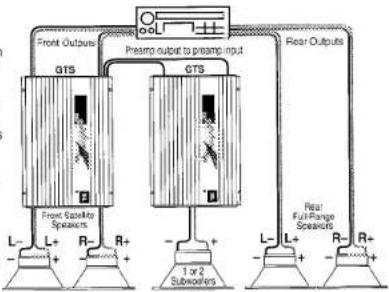
Get more power and system control by adding a second GTS to power the main speakers and subwoofers individually. Use the built-in crossover to high-pass the front speakers and low-pass the subwoofers.
Next Step: Add power to the Rear Full-Range Speakers. Note: For Non-Fading bass, also connect the rear-channel head unit speaker output to the speaker level input of the subwoofer GTS.
flowchart
graph TD
    A["Front Outputs"] --> B["GTS"]
    C["Preamp output to preamp input"] --> D["GTS"]
    E["Rear Outputs"] --> F["Rear Full-Range Scaes"]
    B --> G["Front Cablester Speakers"]
    D --> H["1 or 2 Subscribers"]
    F --> I["+"]
    style A fill:#f9f,stroke:#333
    style C fill:#f9f,stroke:#333
    style E fill:#f9f,stroke:#333
    style B fill:#ccf,stroke:#333
    style D fill:#ccf,stroke:#333
    style F fill:#ccf,stroke:#333
    style G fill:#dfd,stroke:#333
    style H fill:#dfd,stroke:#333
    style I fill:#dfd,stroke:#333
System 4
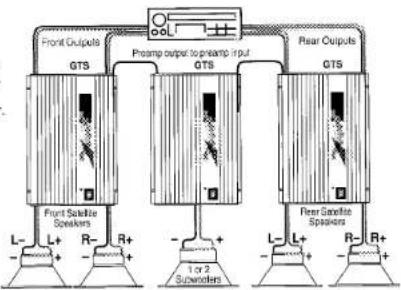
Add Power to the Rear
Add an amp to the rear speakers for higher volume capability and more control. Next Step:
Add more subwoofer power.
flowchart
graph TD
    A["Front Satellite Speakers"] --> B["GTS"]
    C["Preamp output to preamp input"] --> D["GTS"]
    E["Rear Satellite Speakers"] --> F["GTS"]
    B --> G["1 or 2 Subscribers"]
    D --> H["1 or 2 Subscribers"]
    F --> I["1 or 2 Subscribers"]
System 5
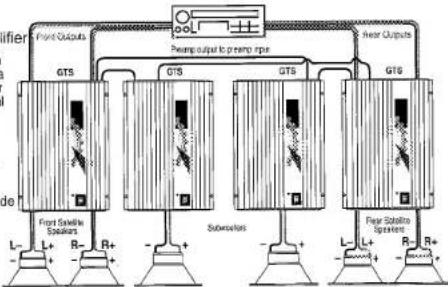
Add a Second
Subwoofer Ampli
For the ultimate in bass output, add a second subwoofer amplifier for a total system power of 600 Watts RMS!
Note the cross-linking of preamp inputs for the
two subwoofer amplifiers to provide non-fading bass.
Next Step:
Add additional amplifiers in bridge-mode to the front and
rear main speakers. Then add electronic
crossovers and bi-amp front and rear speakers.
flowchart
graph TD
    A["Front Output"] --> B["GTS"]
    C["After Output"] --> D["GTS"]
    E["Substation"] --> F["GTS"]
    G["Power Supply"] --> H["L-"]
    I["Ground"] --> J["R-"]
    K["Ground"] --> L["R+"]
    M["Ground"] --> N["L+"]
    O["Ground"] --> P["R+"]
    Q["Pump output to pre-pump input"] --> R["GTS"]
    S["Pump output to pre-pump input"] --> T["GTS"]
    U["Pump output to pre-pump input"] --> V["GTS"]
10. In Case of Difficulty
Power-on light does not come on
Power light is on, but no sound is heard from some or all of the speakers
- Head unit not on; turn the head unit on.
- Ground wire is disconnected or defective; check for continuity with an ohmmeter between the amplifier's ground terminal and a known chassis ground point.
- Battery wire is disconnected or defective; check for approximately +12 volts between the amplifier's battery and ground terminals.
- Blown fuse; check amplifier's fuse located on the endpanel near the power connector. If it is blown replace it with an identical one. If the new fuse blows immediately, then check all the wiring connections. If no fault is found, consult your JBL dealer.
- Remote-on wire between the head unit and the amplifier is disconnected or defective; check for +12 volts between amplifier's remote-on input terminal and the ground input terminal with the head unit on.
- Amplifier is in thermal protection mode due to overheating; relocate amp for more air flow and check wiring.
- Incorrect switch settings; make sure that all switches (input mode and crossover) are in their correct positions for your system configuration.
- Incorrectly connected or shorted speaker wires; check for shorts in wiring.
- Defective or disconnected audio cables; check for continuity and replace if necessary.
- Incorrect Gain Adjustment; verify that the amplifier gain controls are not turned completely down. If they are, sound out-
| put level may be very low and may give the impression that the system (or part of the system) is dead.Defective head unit or signal processor; check each component for proper wiring and operation.Defective GTS180; if there is audio signal present at the inputs of the amplifier and there is no output, the GTS180 may be defective. | |
| Power On light is blinking, indicating a fault condition, and sound is intermittent or off | Incorrectly connected or shorted speaker wires; check for shorts, frayed wiring, damaged wiring insulation or incorrect wiring.The speaker combination connected to the amplifier is less than the minimum requirement; reconfigure speaker connection after consulting with section 3.1 "Speaker Requirements."Amplifier is damaged; consult your JBL Dealer. |
| Alternator whine through the audio system with the engine running | Ground loops; follow the wiring suggestions in the section called "Solving Noise Problems." Also, verify that the chassis grounding point you have chosen is true ground by checking for continuity between the chassis ground point and battery ground. |
| Bass output from speakers too low | Speaker wired out of phase; check for proper polarity on all speaker wiring (+ amp terminal to + speaker terminal and - amp terminal to - speaker terminal). |
If you want to talk to us about any problems, call JBL Customer Service at 1-800-336-4JBL between 9AM and 5PM Eastern time.
11. Solving Noise Problems 11.1 System Noise
System noise, generally appearing as hiss, is usually the result of improper amplifier input gain adjustment. With proper setting, your JBL amplifier will not create this noise, but will amplify any noise generated ahead of it as part of the signal. Refer to section 6, "Input Gain Adjustment" for Instructions on how to minimize this noise.
11.2 Vehicle Noise
Every vehicle has some electrical "noise" that is generated by the ignition system, the alternator, the accessories, and the wiring. High performance audio equipment is more likely to pick up such noise than conventional equipment because it has wide frequency bandwidth and high gain (amplification) circuits. The GTS180 has built-in power supply filters to help prevent noise problems. If noise occurs it is probably the result of improper installation. The following suggestions will help you eliminate most noise problems.
Source Noise – Often noise in a system is picked up by the signal source. Before attempting to eliminate noise from the "amp" be sure it is not being picked up by the signal source and then passed on to other components. To do this, connect the signal source output to an external amplifier which has no other connection to the vehicle except for the audio signal leads. A battery-powered amplified portable speaker, such as those sold for use with computers or Walkman type portables, works well for this. Listen to see if the noise is present in the signal from the source unit. If so,
consult the manufacturer of the source unit, or your JBL dealer, for help in reducing this noise. If there is no noise in this signal, it can be eliminated as the source of your problems.
Ground Loops – The vast majority of ncise problems are caused by inadequate or improper grounding. The head unit, the amplifier and any other compon- ents must be grounded to a major metal member of the vehicle's frame. Make sure to choose a solid metal ground point, as some new vehicles contain structural elements made of plastic.
Most often the noise level in the system will be lower if any amplifiers and signal processors which do not have isolated supplies, are all grounded to the same point on the chassis. Amplifiers such as the GTS180, which internally isolate the signal ground connection from the power ground connection, generally do not benefit from this. Usually the head unit does not need to be grounded to the same point as the rest of the system, but in some instances, depending on the design of the signal processors involved, grounding signal processors to the same point as the head unit will also help. If this does not adequately reduce the noise level, try another ground point on the car frame. Because of current flow patterns within the vehicle chassis, some ground points are noisier than others. As a general rule, try to keep grounds away from the main flow of current between the battery and alternator. For example, in a vehicle with a battery at the right rear, and an alternator at the left front, you are most likely to find a
quiet ground at the far left rear than anywhere between the battery and alternator. In some rare instances with plastic-bodied vehicles, grounding the equipment directly to the battery will provide the best results, although usually this provides poor results with most cars and is not recommended.
In complex systems involving components from different manufacturers, it helps to know the type of power supplies used in each component. For low-level signal processors such as equalizers or electronic crossovers, a manufacturer may use either a power supply which is isolated through a DC-to-DC converter, or a simple regulated supply from the +12V vehicle battery. The important characteristic to know is how well the power ground is isolated from the signal ground (phono-plug shield) in each component. Many simple signal processors or low-powered amplifiers have no isolation. These can be identified by a direct connection from power ground to the shield of the RCA jacks (measured with an ohmmeter with no other connections present). For these components, the best ground connection may be one where the power ground wire is not connected at all! The RCA cables will provide the ground connection to the source unit. Please note that this is only appropriate for units which draw less than 500mA of current. Higher power units of this type, such as amplifiers, are best connected with their ground wires connected directly to the chassis of the head unit.
The trickiest grounding task is created when some components of this type are mixed with other components using isolated supplies. For this type of system, the following grounding scheme will usually work:
- Connect the head unit chassis to a solid vehicle ground using a short, heavy gauge wire (AWG #10). Do not connect this to the vehicle's wiring harness, but go directly to a metal part of the vehicle.
- Connect all signal-processor grounds directly to the head unit chassis at the same point. Run each wire individually. Due to wire resistance, connecting multiple wires to a single wire, then running the single wire to the head unit, is not the same!
- Connect all amplifier grounds directly to the vehicle chassis but not necessarily to the same point as the head unit.
Power-line noise – The built-in power supply filter of the amplifier makes external filters unnecessary. In some cases, power supply noise can enter the system through the head unit power supply or the supply of an equalizer or other signal processor. Putting a filter on the head unit or signal processor power supply input may then be helpful. Using a portable powered speaker as described in the "Source Noise" section can help you isolate an individual component which may be sensitive to this. Start at the head unit, and work back, checking each component individually.
Power wires carrying high currents may induce noise in nearby signal wires. Make sure that power wires and signal wires do not run together for long distances. When power and signal leads must cross, they should cross at right angles. If you suspect that power line noise is being induced in the signal leads, you can repeat the test for source noise described previously, but perform the test at the amplifier end of the signal cables. One power wire that it will be impossible to stay away from is the vehicle chassis. The chassis is one giant ground wire! Use high quality shielded cables or a balanced-line system for the long front-to-rear signal runs to reduce the likelihood of noise pickup from this source.
Other Noise Sources – Common noise problems will be solved by proper grounding and power supply connections. However, there are impulse type noise sources which may require suppression at the noise source. Many noise suppression devices (such as spark plug and coil lead suppressors and rotor and coil bypass capacitors) are available at auto parts or car stereo stores. There are also noise suppressors that can be connected directly to the alternator that are effective in some situations. The use of any such suppressor should be discussed with a JBL authorized installation specialist after the basic grounding scheme and power connections are confirmed correct.
Certain vehicles are particularly "noisy," especially models that have solid state ignition systems or that have non-metal bodies. Such vehicles may require electrical noise suppression devices which are not normally required.
Antenna - A common noise problem is generated by a "ground loop" produced by the antenna shielded cable being grounded at both the antenna mounting point and at the head unit input. In this instance, insulate the antenna ground from the chassis of the vehicle at the antenna mounting point so the antenna shield is grounded only at the radio's antenna input. Commercial antenna ground-loop isolators are also available.
Switching Noise – The GTS180 has a highly developed switching power supply which generates some RF interference as a result of its switch-mode operation. Although this is internally filtered and shielded by the GTS180 chassis, some unusually sensitive installations may pick up switching noise, especially when listening to weak AM radio stations. If this unusual situation occurs, one of the following installation corrections will typically eliminate the problem. 1) Relocate the amplifier to a position farther away from the radio or radio antenna. 2) Move the electrical ground of the head unit and/or amp to a different point on the vehicle's chassis. 3) Keep the amplifier power supply wiring away from the radio or antenna wiring. 4) Wrap the +12 volt power supply wires for the radio/tape deck with metallized shielding tape or ground traid, and ground the tape to the chassis of the vehicle.
- Specifications
| Power Output(20Hz – 20kHz,14.4V Battery Voltage) | 60 Watts x 2(4 Ohms, 0.05% THD) |
| 90 Watts x 2(2 Ohms, 0.08% THD) | |
| 180 Watts x 1(4 Ohms, 0.08% THD) | |
| Signal to Noise Ratio | 100dBA |
| Frequency Response | 10Hz – 50kHz (+0, -1dB)20Hz – 20kHz (+0, -0.1dB) |
| Damping Factor | >200 |
| Slew Factor | >5 |
| Line Level Input Sensitivity(For Rated Power) | 100mV – 4V RMS(500mV at Center Detent) |
| Speaker Level Input Sensitivity(For Rated Power) | 200mV – 8V RMS(1V at Center Detent) |
| Preamp Output Sensitivity | |
| Preamp Input: | 4V in for 4V out |
| Speaker Input: | 4V in for 2V out |
| Maximum Preamp Output Voltage | 4V |
| Line Level Input Impedance | 10k Ohms |
| Speaker Level Input Impedance | 15 Ohm or 100k Ohm(Selectable by Internal Jumpers) |
| Minimum Speaker Impedance | |
| Single Ended (Non-Bridged) | 2 Ohms |
| Bridged | 4 Ohms |
JBL
Specifications
| Built-in Electronic Crossover Frequency and Slope | 18dB per Octave Low-Pass Filter, Frequency Chips Available from 50-5kHz Factory Setting: 80Hz |
| 18dB per Octave High-Pass Filter, Frequency Chips Available from 50-5kHz Factory Setting: 80Hz | |
| Bass Boost Frequency and Magnitude | +4dB at 40Hz |
| Power Requirement | 11 to 16V DC Negative Ground |
| Fuse Size | 30 Amp ATC Type Fuse |
| Size (L x W x H) | 11-1/8" x 9-1/4" x 2" (282 mm x 235 mm x 51 mm) |
| Weight | 8 lbs 12 oz (4 kg) |
| Speaker Level Input Mating Connector | Molex Mini-Fit Jr.# 39-01-2045-P Metal Pins: 39-00-0039 |
Staple or clip your original bill of sale here. ▼