Master M111 - Tripod Cartoni - Free user manual and instructions
Find the device manual for free Master M111 Cartoni in PDF.


User questions about Master M111 Cartoni
0 question about this device. Answer the ones you know or ask your own.
Ask a new question about this device
Download the instructions for your Tripod in PDF format for free! Find your manual Master M111 - Cartoni and take your electronic device back in hand. On this page are published all the documents necessary for the use of your device. Master M111 by Cartoni.
USER MANUAL Master M111 Cartoni
CARTONT S.p.A. warrants that this fluid head will be free of defects in workmanship and materials and agrees that it will, at its option, either repair or replace any defective part within 5 years from date of first purchase with no labor charge. Tripole, dollies and all other relevant accessories are guaranteed 1 year from the date of purchase.
This warranty does not apply to any CARTONI equipment that is subject to misuse, abnormal service or handling or which has been modified or changed in design or construction. Warranty claims must be submitted to the factory for verification or to an authorized distributor designated by CARTONI S.p.A. in writing.
Repairs by any unauthorized parties will void this warranty. CARTONI S.p.A. shall not be liable for incidental or consequential damages. All shipments of CARTONI S.p.A. equipment must be prepaid and insured during the warranty period. ALL IMPLIED WARRANTIES ARE LIMITED TO THE TIME PERIOD SET FORTIHEREIN.
Garanzia
natural_image
Close-up of a blue industrial robotic device with yellow components and control knobs (no visible text or symbols)MASTER • FLUID HEAD USER'S MANUAL
Thank you for choosing Cartoni. The CARTONI MASTER is ideal for cameras from 10 to 30 kg.
The following set-up instructions are for the achievement of precise pan, tilt and diagonal movement. To get optimum results from your Master system, the equipment set up is very important.
Before using the patented fluid drag system, you will need to accurately counterbalance your camera in order to allow the tilt drag unit to operate in total freedom without gravity interference.
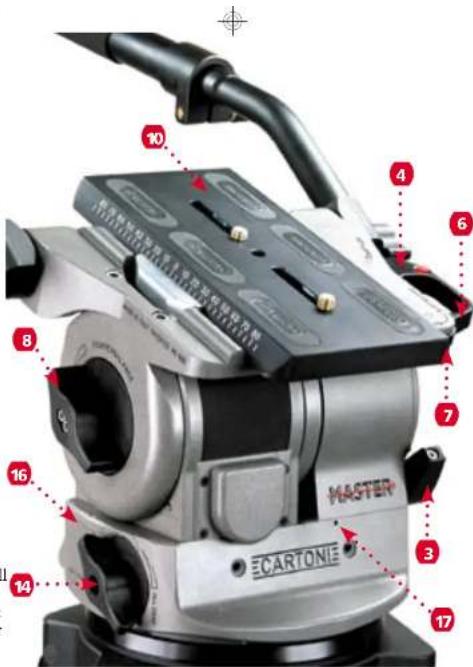
Please remember that the tilt and pan locks (5) and (3) must be set in lock position before any attempt is made to fit or remove equipment mounted on the head. It is advisable to lock pan and tilt sections when the camera is left unattended.
-
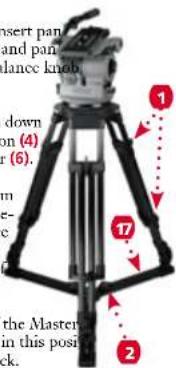
Before opening the tripod, release all tripod knobs (1) and lift up the system at the desired height.
-
Lock the knobs (1) and spread the tripod. Set the desired leg angle by adjusting the extendible floor (17) or mid-level spreader and tighten the knobs (2). With mid-level spreader check spreader attachment to tripod.
-
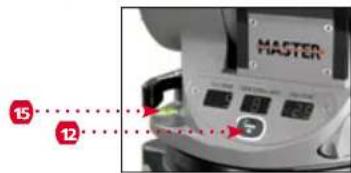
Place the Master head on your tripod, if you have a fl at Mitchell base support, rotate it until you match the steel notch. Tighten the head fl rimly screwing in the lock nut underneath the fl at base. In case of a 150 mm bowl base just tighten the knob under the bowl. Check the spirit bubble (15) and level the head. Press button (12) for light and digital displays. Light will turn off by itself after approximately 30 seconds.
-
Lock tilt movement with lever (3), insert pan lock (5), turn tilt fl uid selector (13) and pan fl uid selector (14) and set counterbalance kn (8) to "0".
-
To release the camera plate (10) push down the slide release (7) and the safety button (4) to completely open the slide lock lever (6).
-
Attach the camera plate to the bottom of the camera assembly and firmly secure it with both screws. Try to place the camera plate centered under the camera system, keeping the center of gravity position in mind.
-
Place the camera sideways on top of the Master the wedge plate will lock into place; in this position the camera can slide front to back.
-
Hold the camera in horizontal position with the pan bar and release the lever (3). Find correct center of gravity position by sliding the head plate (10 or 11) front to back until you feel you have achieved the desired balance. Lock the slide lever (6).
-
Set the counterbalance system by turning the balance knob (8) to appropriate tension. The camera has to stay at any tilt angle. Fine tune by adjusting the sliding plate.
-
Push button (12) to activate digital displays, set fluid drag control by adjusting selectors (13) and (14).
-
When display light becomes unstable it is time to change the 9 Voltsbattery (16). To reset electronic displays press in reset button (17) once, turn all knobs to "0", then to "10" and re-press in button (17).
NB: When the camera has been removed from the head please close the safety lock lever (6) pushing on the wedge (9) to prevent accidental misuse.
ISTRUZIONI PER L'USO DELLA TESTATA FLUIDA MASTER