
Star SDA02001W0 - Wristwatch ORIENT - Free user manual and instructions
Find the device manual for free Star SDA02001W0 ORIENT in PDF.


| Product Type | Automatic mechanical watch |
| Movement | Automatic winding with hand winding mechanism |
| Caliber | Varies by model (see case back) |
| Power Reserve | More than 40 hours |
| Jewels | 22 |
| Vibrations | 21,600 per hour |
| Daily Accuracy | +25 to -15 seconds |
| Crystal | Mineral (assumed) |
| Water Resistance | 3 bar (30m) for daily life (check case back) |
| Case Material | Stainless steel (assumed) |
| Case Diameter | Approx. 40 mm (typical for Star series) |
| Weight | Approx. 100 g (with metal bracelet) |
| Strap Material | Stainless steel or leather (varies by model) |
| Crown Type | Push/pull or screw-down (varies by model) |
| Functions | Date, 24-hour hand (dual time on some models), second hand halt |
| Shock Protection | Shock-proof balance bearings |
| Magnetic Resistance | Susceptible to magnetization; avoid strong magnetic fields |
| Temperature Range | 5°C to 35°C for optimal accuracy |
| Cleaning | Wipe with dry soft cloth; avoid chemicals |
| Warranty | See guarantee card |
Frequently Asked Questions - Star SDA02001W0 ORIENT
User questions about Star SDA02001W0 ORIENT
0 question about this device. Answer the ones you know or ask your own.
Ask a new question about this device
Download the instructions for your Wristwatch in PDF format for free! Find your manual Star SDA02001W0 - ORIENT and take your electronic device back in hand. On this page are published all the documents necessary for the use of your device. Star SDA02001W0 by ORIENT.
USER MANUAL Star SDA02001W0 ORIENT

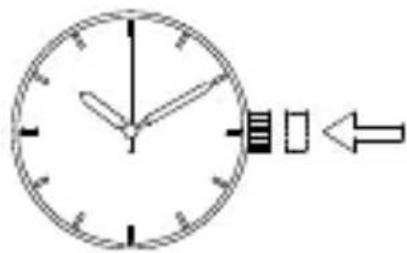
◆ 日付の合わせ方 [EL(40N)]
![ORIENT Star SDA02001W0 - ◆ 日付の合わせ方 [EL(40N)] - 1](/content/2026/06/1147395/images/bbbc67a404ab159db1b4e5f80d0feb127a5af62494bdebefca432e73191cbdf4.jpg)
注意


◆ 日付の合わせ方 [DJ(40P)]


◆ 日付の合わせ方 [EJ(40G)]
![ORIENT Star SDA02001W0 - ◆ 日付の合わせ方 [EJ(40G)] - 1](/content/2026/06/1147395/images/9562679f92a9cd5b7f219b084515e399a28d2d500028388adacdc4b806b8b45c.jpg)
注意
◎ 月末の日付修正について
②りゅうずをゆっくり左に回して、任意の
時刻に 24 時針を合わせます。
◆ 標準時比較一覧
(3) 磁気について
(5) 温度について
WITH AUTOMATIC & HAND WINDING MECHANISM
INSTRUCTION MANUAL
Thank you for choosing our product. To ensure prolonged use and optimum performance, please read this instruction manual carefully and familiarize your-self with the terms of the guarantee.
Please keep this Instruction Manual handy for future reference.
◆ SAFETY PRECAUTIONS
Make absolutely sure to observe the demarcated contents indicated below to prevent any possible physical danger and property damage to you as well as other people concerned.

... A demarcation with this symbol represents the contents assuming possibility for death or serious injury when the product is used in any manner different from given instructions.

... A demarcation with this symbol represents the contents assuming possibility of causing human injury or material damage only when a product is used in any manner different from given instructions.
◆ IN HANDLING THE WATCH
(1) Water-resistance
| Type\Conditions of use | Exposure to small amounts of water (facewashing, rain, etc.) | Water sports (swimming, etc.), frequent contact with water (car-washing, etc.) | Skin diving (air tanks are not used) | Scuba diving (air tanks are used) | Underwater operation of crown and operation of crown with drops of water on it | |
 |  |  |  |  | ||
| Non water resistant | Watch without WATER RESIST-ANT on back cover of watchcase. | × | × | × | × | × |
| Water resistant for daily life | Watch with WATER RESISTANT on back cover of watchcase. | ○ | × | × | × | × |
| Reinforced water resistance for daily life I | Watch with 50M (5BAR) on back cover or dial face along with WATER RESISTANT on back cover of watchcase. | ○ | ○ | × | × | × |
| Reinforced water resistance for daily life II | Watch with 100M (10BAR), 150M (15BAR), 200M (20BAR) on back cover or dial face along with WATER RESISTANT on back cover of watchcase. | ○ | ○ | ○ | × | × |
* It is recommended that you use the watch correctly following the above-mentioned scope of usage after ascertaining water resistance precautions marked on the dial face of the watch or on the back of the watchcase.
WARNING
① A watch with water resistance for daily life 30M (3 bar) can be used during face-washing, etc. but cannot be used in an environment in which it will be submerged in water.
② A watch with reinforced water resistance for daily life I 50M (5 bar) can be used while swimming, etc. but cannot be used during any type of diving including skin diving.
③ A watch with reinforced water resistance for daily life II 100M or 200M (10 or 20 bar) can be used while skin diving, but cannot be used while scuba diving using oxygen tanks or saturation diving using helium gas, etc.
CAUTION
④ Keep the crown pushed in at all times (in the normal position) while using the watch. If the crown is the screwed-down type, check that it is securely screwed down.
⑤ Do not operate the crown underwater, or while the watch is wet. Water may enter the interior of the watch and defeat the water resistance.
⑥ If your watch is non-water resistant, beware of splashes of water (during face washing, rain, etc.) and sweat. If the watch becomes wet from water or sweat, wipe the moisture off with a dry, soft cloth.
⑦ Even with a water resistant watch for everyday use, avoid directing strong jets of mains water onto the watch. Water pressure above the limit can apply, which may defeat the water resistance.
⑧ With a water resistant watch for everyday use, rinse sea water off the case after exposure, then wipe it thoroughly to avoid corrosion and other effects.
⑨ The interior of the watch contains some amount of moisture, which may cause fogging on the inside of the glass when the outside air is cooler than the internal temperature of the watch. If the fogging is temporary it causes no harm inside the watch, but if prolonged, or if water enters the watch, consult your place of purchase and do not leave the problem untreated.
(2) Shock
① Be sure not to carry the watch when you engage in strenuous sports, whereas playing such light sports as golf, etc., will not adversely influence the watch.
② Avoid a violent shock such as dropping the watch on the floor.
(3) Magnetism
① If the watch is left at a location with strong magnetism for an extended period of time, the components may be magnetized, resulting in malfunction. Be careful.
② The watch may temporarily speed up or slow down when exposed to magnetism. Precision is restored when placed away from magnetism. In such a case, reset the time.
(4) Vibration
The watch may lose precision if subjected to strong vi - brations such as from riding motorcycles, using jackham- mers, chain saws, etc.

(5) Temperature
In environments below and above normal temperatures (5°C-35°C), the watch may malfunction and stop.

Do not use the watch at high temperatures, such as in a sauna. The watch may heat and cause burns.
(6) Chemicals, Gases, etc.
Utmost caution must be exercised when coming into contact with gases, mercury, chemicals (paint thinner, gasoline, various solvents, detergents containing such components, adhesives, paint, drugs, perfumes, cosmetics, etc.), and so forth. Such may cause discoloration of the watchcase, watchband, and dial face. Discoloration, deformation, and damage to various resin-based component parts may also occur.

(7) About this product and accessory parts

Do not attempt to disassemble or modify this product.
Store the bracelet/strap pin and other small parts out of the reach of children. If any small parts are swallowed, immediately contact a doctor.
(8) Allergic reactions

If you develop a skin rash or your skin becomes abnormally irritated due to contact with the watch or strap, stop wearing the watch immediately and consult a doctor.
(9) About "luminous light"
Some products have luminous light on the hands and dial.
The luminous light is a safe paint that stores sunlight and artificial light without using any radioactive material, and emits that light in a dark setting. As the paint discharges the stored light, it will become dimmer over time. The amount of light emitted and the time that light is emitted depends on various factors when the light is stored, such as the shape of the glass, the thickness of the paint, surrounding brightness level, the distance from the watch to the light source, and the light absorption level. Please note that when not enough light energy is stored, the watch may emit weak light or emit light for only a short time.
(10) Water resistant watchband
Some products employ leather and nylon bands on which a special treatment to resist perspiration and water absorption have been applied. Please understand that the water resisting effect of this watchband can be lost depending on the period and conditions of use.
◆ HOW TO IDENTIFY THE CALIBER NUMBER
Check the caliber number by referring to the model number of your watch or the case code on the watch's case back.
1. Searching by 10-digit model number
Check the 10-digit model number on the guarantee supplied with your watch. You can also see the number on the product tag put on the watch. Its second and third digits indicate the caliber number of your watch.
Example: If the model number is “☐DJ02002B☐”, the caliber number is “DJ”.
2. Searching by the case code
See the case code on the case back of your watch.
The first two digits indicate the caliber number.
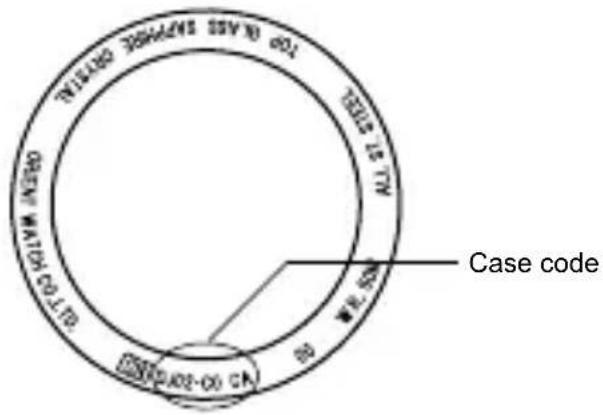
Example:
When the case code is "DJ02-C0", the caliber number is "DJ".
* The place of case code may vary and its letter size may be small and difficult to see depending on the characteristics of watches.
* The pictures and illustrations on this manual may differ from the actual appearance of your watch but the functions and operation procedures are the same.
◆ FEATURES
(1) This product is an automatic winding mechanical watch (with a hand winding mechanism).
(2) It comes with a second hand halt mechanism.
(3) Shock-proof bearings to protect the balance with hairspring from shocks.
(4) The time for other cities can be shown using the 24-hour hand. (Dual-time function)
*DJ (40P) only
(5) The day of the week is shown using retrograde display.
*DE (40A) only
◆ SPECIFICATIONS
| Caliber | Power reserve | Date indicator | Day of the week | 24-hour hand | Second hand halt mechanism | Click button | |
| DA 40R | ○ | - | - | - | ○ | - | |
| DE 40A | ○ | Hand indicating type | Hand indicating type | - | ○ | - | |
| DG 405 - - - - | ○ | - | |||||
| DJ 40P | ○ | ○ | - | Hand indicating type | ○ | - | |
| EJ 40G | ○ | ○ | - | - | ○ | ○ | |
| EL 40N | ○ | ○ | - | - | ○ | - | |
(1) Vibrations: 21,600 vibrations/1 hour
(2) Daily accuracy : 25 sec. to -15 sec.
(3) Drive system : Mainspring Winding
(4) Number of jewels : 22
(5) Running time: More than 40 hours
The stated daily accuracy is in the following conditions:
• After 24 hours at room temperature with the mainspring wound fully and the dial facing up.
- Due to the characteristics of the automatic winding watch, the time may deviate from the stated “daily accuracy” depending on the following conditions: amount of time the watch is worn each day, position of the watch, movement of your arm, winding condition of the main-spring.
Product specifications may change without notice, for improvement.
◆ NAMES AND FUNCTIONS OF INDIVIDUAL COMPONENT PARTS
A: Hour hand
B: Minute hand
C: Second hand
D: Date hand / Date indicator
E: Day of week indicator
F: Power reserve hand
G: 24 hours hand
H: Crown
I: Click Button
J: Dial
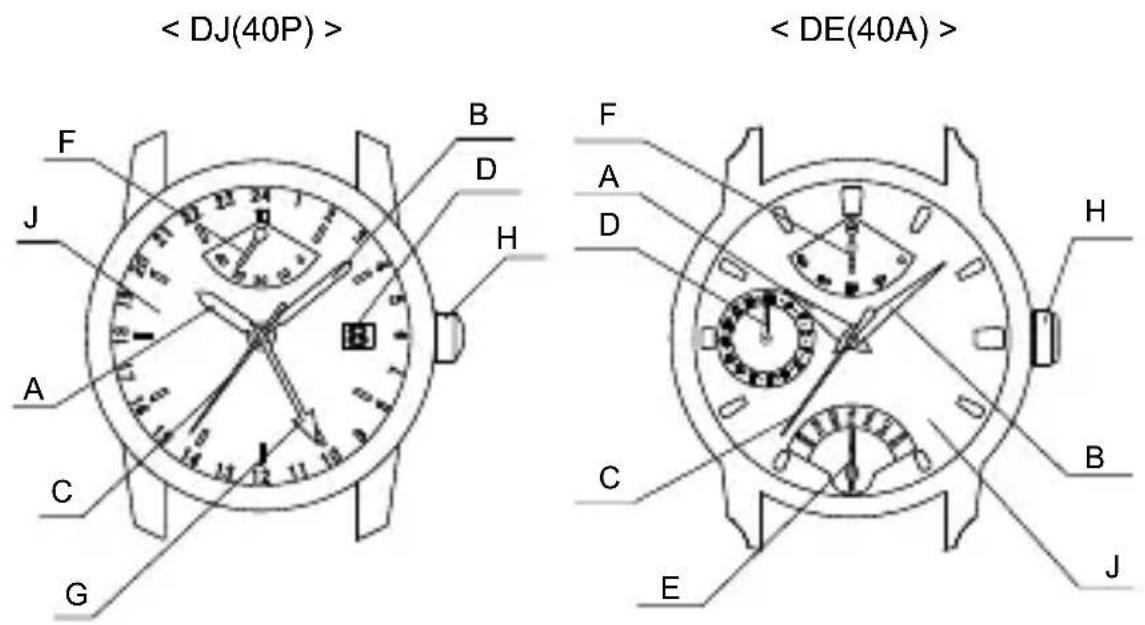
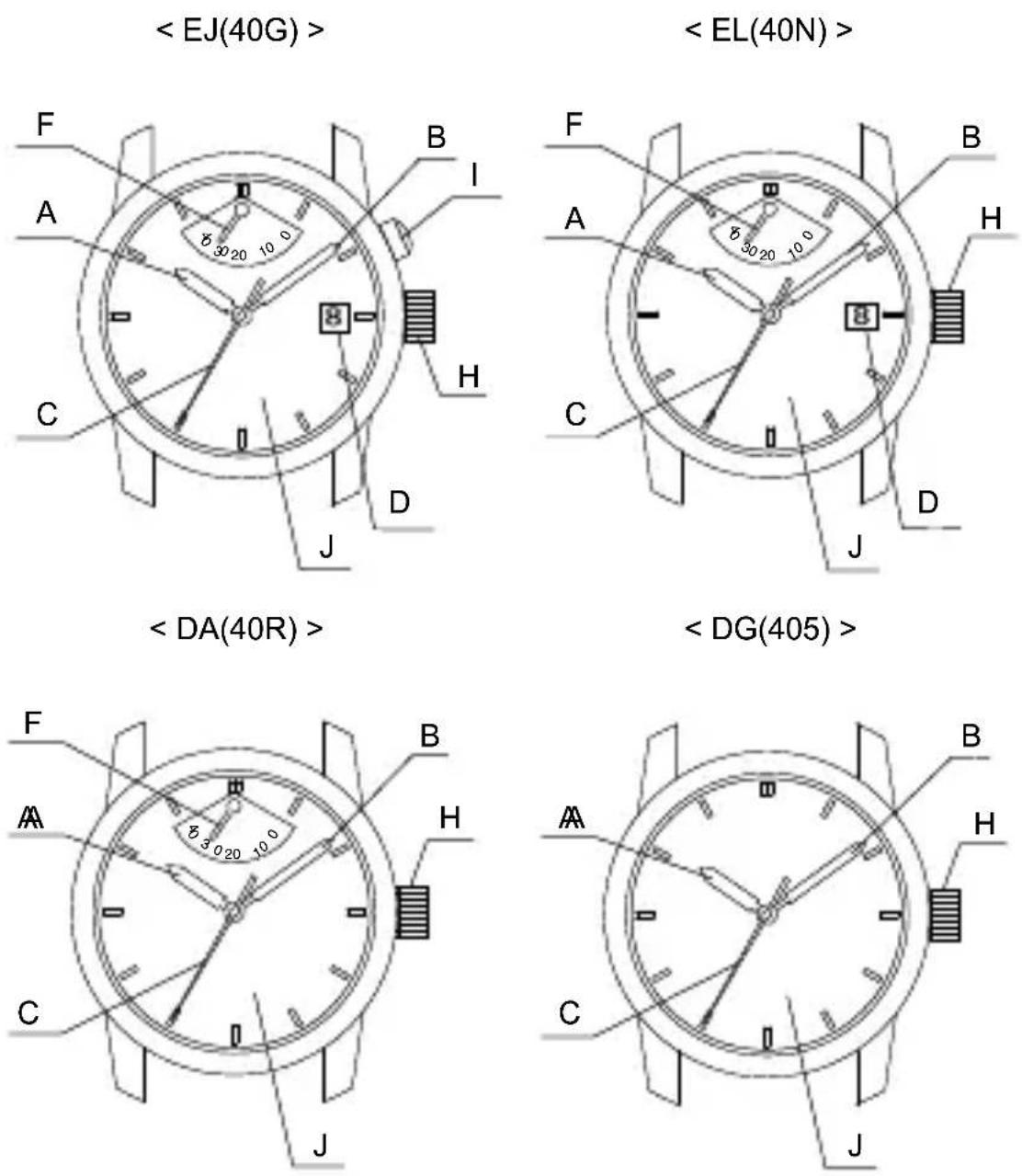
* Positions of the crown, click button, date indicator/day of week indicator, power reserve hand, and other component parts may vary by model.
* The day of the week first displayed may vary. *DE (40A) only
◆ AUTOMATIC WINDING AND HAND WINDING MECHANISM
(1) This is an automatic winding (hand winding) mechanical watch.
(2) The mainspring is wound by natural movements of your arm when wearing the watch on your wrist.
It is also wound by rotating the crown.
(3) If your watch stops, winding the mainspring by rotating the crown or swing the watch back and forth ten or more times to re-start the second hand. After it starts moving, set the date and time.
(4) To wind the mainspring, ensure that the crown is in its normal position and slowly turn it to the right (clockwise).
Turning the crown to the left (counterclockwise) will have no effect.
When the watch is in a stopped state, the mainspring can be wound sufficiently by rotating the crown approximately 20 times. In order to the crown will still rotate even when the mainspring is fully wound. (This is not a fault). Avoid winding the watch more than necessary.
Since the crown will rotate even when winding is complete, wind the watch using the scale on the power reserve indicator as a guide.
(5) This watch will run approximately 40 hours after it is fully wound. If it is not wound enough, the watch may lose accuracy. In order to maintain the watch's accuracy, we recommend wearing the watch at least 8 hours a day.
◆ MODELS WITH SCREWED-DOWN CROWN
Depending on the model, you may not be able to pull the crown out without unscrewing it (models with screwed-down crown).
Operate this type of watch as follows:
(1) Before setting the date and time (dual time), first turn the crown to the left to loosen the screw lock.
(2) After setting the date and time (dual time), turn the crown to the right while pressing in, until it stops turning to securely tighten the screw.
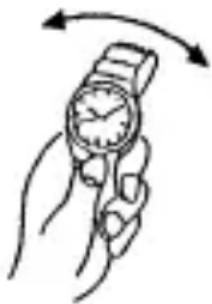
◆ MODELS WITH A SCREWED-DOWN BUTTON RING *EJ (40G) only
Depending on the product, some models may have a configuration that allows the button ring (ring on the outer periphery) to be locked (fixed) into place by being screwed down.
Use the following operating method for this type of watch.
- When wanting to use the buttons, first turn the button ring to the left, and then loosen it until the screw stops.
* The buttons may not be able to be used if the button ring cannot be loosened enough. Do not turn it more forcefully than necessary. - After finishing using the buttons, turn the button ring to the right, and firmly tighten it until the screw stops.
* Do not tighten it more forcefully than necessary.
◆ POWER RESERVE INDICATOR
The power reserve indicator shows how much the watch is wound, allowing you to see how much longer the watch will run at a glance. The time pointed to by the power reserve hand is the remaining time.
The remaining time shown is only an approximation. The time shown may be different from actual remaining time.

Power reserve hand
This product has an automatic-winding system which comes with a power reserve indicator function. The mainspring will be automatically wound by your natural arm movements while you wear it on your wrist. The power reserve hand is pointing to the fully-wound position (40H). The amount the watch is wound will change with the frequency of your arm movements and the length of time you wear the watch, so the hand will not always point to the fully wound position. If you remove the watch from your arm and do not wind manually, the power reserve hand will move toward zero as time passes.
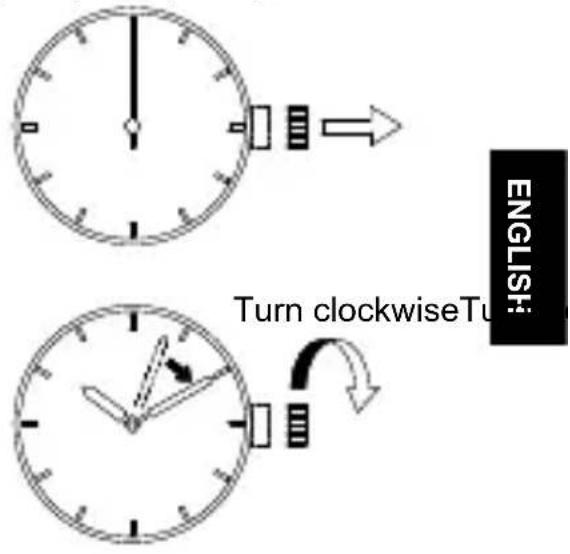
◆ HOW TO SET THE TIME [ DE(40A), DJ(40P), EL(40N)]
(1) Pull out the crown to the second click when the second hand reaches the 12 o'clock position.
(The second hand will stop.)
(2) Turn the crown clockwise and set the current time.
* Since this watch comes with a calendar, make sure that you set either a.m. or p.m. without fail. The date changes at [twelve o'clock midnight].
* When setting the time, first bring the hand back slightly later the actual time and then move it forward to the actual time.
(3) Press the crown in to the normal position.


◆ HOW TO SET THE TIME [ DA(40R), DG(405), EJ(40G)]
(1) Pull the crown out when the second hand reaches the 12 o'clock position. (The second hand stops.)
(2) Turn the crown clockwise and set the current time.
* Since this watch comes with a calendar, make sure that you set either a.m. or p.m. without fail. The date changes at [twelve o'clock midnight].
* When setting the time, first bring the hand back slightly later the actual time and then move it forward to the actual time.
(3) Press the crown in to the normal position.

◆ HOW TO SET THE DATE [ EL(40N)]
![ORIENT Star SDA02001W0 - ◆ HOW TO SET THE DATE [ EL(40N)] - 1](/content/2026/06/1147395/images/e3d85f84485d569101a834223d60c61c9d2679f0be0727bd13d385bd90cf15f3.jpg)
CAUTION
* Do not set the date during the period from 10 p.m. to 2 a.m., as the date on the watch switches over during this time.
Setting the date during this time period may cause the date to fail to change even after the day switches over and may cause the watch to malfunction.
* When setting the date, move the hour hand to a time outside of this period before proceeding.
(1) Pull the crown out to the first click. * The crown on this watch can be pulled out to either of two clicks.
(2) Turn the crown to the left, and set the date to that for the current day.
(3) Push the crown in to return it to its normal position (no clicks).

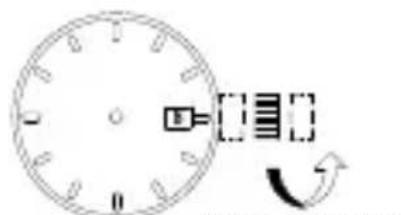
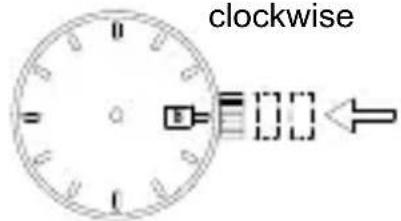
** Correcting the date at the end of the month The date will have to be corrected for months that have 30 days, or those that have less than 30 days. After the date switches over to the first day of the succeeding month, set the date to the [First (1)].
◆ HOW TO SET THE DATE [ DJ(40P)]
![ORIENT Star SDA02001W0 - ◆ HOW TO SET THE DATE [ DJ(40P)] - 1](/content/2026/06/1147395/images/06f990319e71c992283bbe4f9ac44665d478ea62cdc7b3becccf366dfa85c7ca.jpg)
* Do not set the date during the period from 9 p.m. to 2 a.m., as the date on the watch switches over during this time.
Setting the date during this time period may cause the date to fail to change even after the day switches over and may cause the watch to malfunction.
* When setting the date, move the hour hand to a time outside of this period before proceeding.
(1) Pull the crown out to the first click.
* The crown on this watch can be pulled out to either of two clicks.
(2) Turn the crown to the right, and set the date to that for the current day.
(3) Push the crown in to return it to its normal position (no clicks).
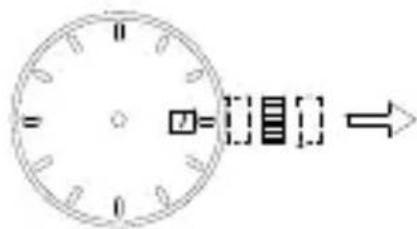
Turn clockwise


** Correcting the date at the end of the month
The date will have to be corrected for months that have 30 days, or those that have less than 30 days. After the date switches over to the first day of the succeeding month, set the date to the [First (1)].
◆ HOW TO SET THE DATE [ EJ(40G)]
![ORIENT Star SDA02001W0 - ◆ HOW TO SET THE DATE [ EJ(40G)] - 1](/content/2026/06/1147395/images/56543a0d6beb6d60427910b65dc9692702d2fea33d99814bed17891cd120b4d7.jpg)
CAUTION
* Do not set the date during the period from 9 p.m. to 2 a.m., as the date on the watch switches over during this time.
Setting the date during this time period may cause the date to fail to change even after the day switches over and may cause the watch to malfunction.
* When setting the date, move the hour hand to a time outside of this period before proceeding.
(1) Push the click button, and set the date.
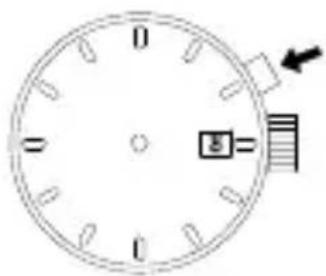
* Some watches may come with a click button that cannot be pressed with a finger.
To change the date on these models, push the button using a tool with a fine tip (such as a precision screw driver, a pair of tweezers, a toothpick, etc.), and then set the date.
** Correcting the date at the end of the month
The date will have to be corrected for months that have 30 days, or those that have less than 30 days. After the date switches over to the first day of the succeeding month, set the date to the [First (1)].
◆ HOW TO SET THE DATE [ DE (40A)]
![ORIENT Star SDA02001W0 - ◆ HOW TO SET THE DATE [ DE (40A)] - 1](/content/2026/06/1147395/images/c534abc8954d9cbd1d1c57775228c987663a64e22628383422b867bccabe6133.jpg)
* Do not set the date during the period from 10 p.m. to 4 a.m., as the date and day of the week set on the watch switches over during this time. Setting the date and day of the week during this time period may cause the date and day of the week to fail to change even after the day switches over and may cause the watch to malfunction. When setting the date and day of the week, move the hour hand to a time outside of this period before proceeding.
(1) Pull the crown out to the first click.
* The crown on this watch can be pulled out to either of two clicks.
(2) Turn the crown to the left, and set the date to that for the current day.
(3) Push the crown in to return it to its normal position (no clicks).
* If next setting the day of the week, first set the date without pushing in the crown.
For procedures on how to do this, refer to "♦ HOW TO SET THE DAY OF THE WEEK [DE (40A)]."
** Correcting the date at the end of the month
The date will have to be corrected for months that have 30 days, or those that have less than 30 days. After the date switches over to the first day of the succeeding month, set the date to the [First (1)].
◆ HOW TO SET THE DAY OF THE WEEK [ DE (40A)]
* Movement of the day of the week hand
A feature of the retrograde display is that the hand moves instantaneously when returning to the first day of the week in the display from the last day. When setting the day of the week, slowly turn the crown to set it to the day of the week.
(1) Pull the crown out to the first click.
* The crown on this watch can be pulled out to either of two clicks.
(2) Turn the crown to the right, and set the day of the week to that for the current day.
(3) Push the crown in to return it to its normal position (no clicks).

Turn clockwise


* The positions of the day of the week display and crown may differ depending on the model.
In addition, the day of the week first displayed may differ from that shown.
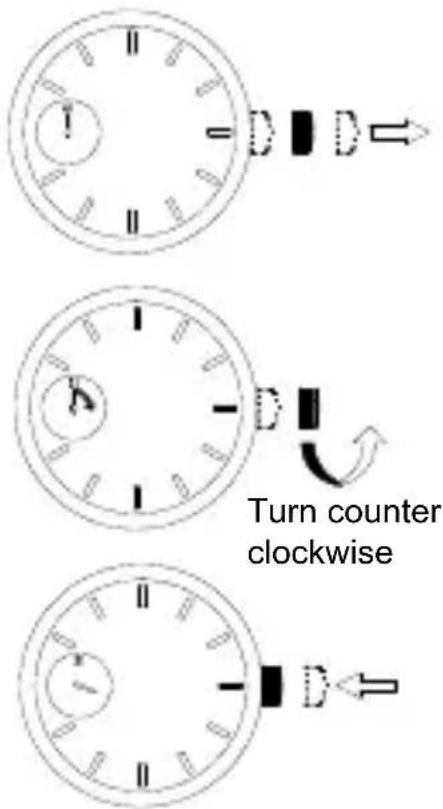
◆ USING THE DUAL-TIME FUNCTION [ DJ (40P)]
* The Dual-Time Function is a function that allows two different times to be displayed simultaneously.
Two different times can be displayed simultaneously with this model using time display with the hour and second hands and using a 24-hour hand that can be set separately. Only cities with time differences set in increments of whole hours can be selected for the Dual-Time Function.
◆ HOW TO SET THE 24-HOUR HAND
Before setting the 24-hour hand, first make sure that the time displayed is set to the current time.
The hour/minute hands and 24-hour hand move in conjunction with each other. Set the time before setting the 24-hour hand. (Refer to “◆ Setting the Time [DJ (40P)].”)
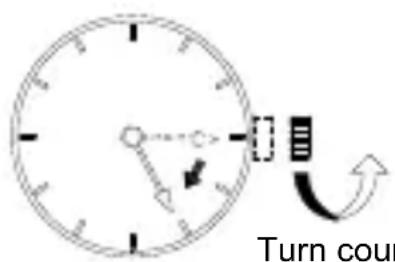
(1) Pull the crown out to the first click.
* The crown on this watch can be pulled out to either of two clicks.

(2) Slowly turn the crown to the left, and set the 24-hour hand to a given time.
* The 24-hour hand will turn in the clock wise direction in increments of whole hours.
* Slowly turn the crown while checking the movement of the 24-hour hand in increments of whole hours.
* While the 24-hour hand is being set, other hands may also move slightly. This is not a malfunction.
Turn counter clockwise
(3) Push in the crown.


* The position of the crown may differ depending on the model.
* Examples of uses of the Dual-Time Function
Displaying the time for New York in Dual-Time when the time in Japan is 5 p.m.
There is a difference of -14 hours between Japan and New York (Refer to ◆ COMPARISON TABLE OF STANDARD TIMES), so the 24-hour hand should be set to 3 a.m.
(Refer to HOW TO SET THE 24-HOUR HAND)
Refer to the COMPARISON TABLE OF STANDARD TIMES for time zone differences.

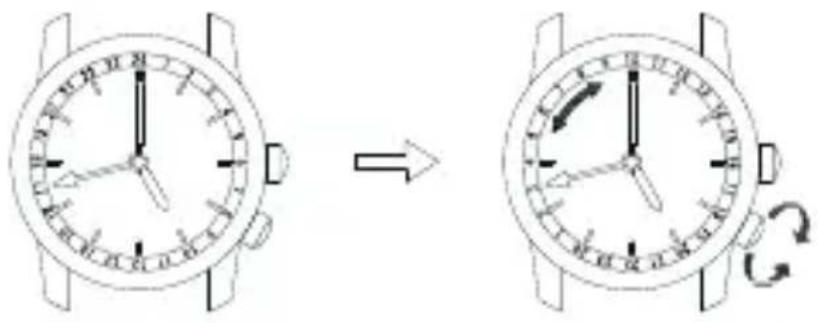
◆ HOW TO USE THE 24-HOUR INDICATOR RING (ROTATING BEZEL OR INTERNAL ROTATING RING)
Some models come with a 24-hour indicator ring (rotating bezel or internal rotating ring). First, confirm that the watch you purchased comes with such function, and make sure to use it correctly if it does.
Use the 24-hour indicator ring by reading the marking on the 24-hour indicator ring at which the 24-hour hand is pointing.
The 24-hour hand was set in ◆ HOW TO SET THE 24-HOUR HAND. However, it can also be set in the same way by rotation of the 24-hour indicator ring (rotating bezel or internal rotating ring).
Ex.) Displaying the time for New York in Dual-Time when the time in Japan is 5 p.m.
There is a difference of -14 hours between Japan and New York (Refer to ◆ COMPARISON TABLE OF STANDARD TIMES), so the 24-hour hand should be set to 3 a.m.
◆ COMPARISON TABLE OF STANDARD TIMES
| NAMES OF CITIES Other cities | Time differences with GMT | ||
| GMT Greenwich Mean Time | London, Casablanca, Dakar 0 | ||
| PARIS (PAR) Paris Rome, A | Amsterdam, Tripoli, Frankfurt, Berlin +1 | ||
| CAIRO (CIA) Cairo Athens, I | Istanbul, Cape Town +2 | ||
| MOSCOW (MOW) Moscow M | Mecca, Nairobi, Kiev +3 | ||
| DUBAI (DXB) Dubai +4 | |||
| KARACHI (KHI) Karachi +5 | |||
| DHAKA (DAC) | Dhaka | Tashkent | +6 |
| BANGKOK (BKK) | Bangkok | Phnom Penh, Jakarta | +7 |
| HONG KONG (HKG) | Hong Kong | Singapore, Peking, Manila | +8 |
| TOKYO (TYO) | Tokyo | Seoul, Pyongyang | +9 |
| SYDNEY (SYD) Sydney | Guam, Khabarovsk | +10 | |
| NOUMEA (NOU) | Noumea (New Caledonia) | Solomon Islands | +11 |
| WELLINGTON (WLG) | Wellington | Auckland, Fiji Islands | +12 |
| MIDWAY (MDY) | Midway | -11 | |
| HONOLULU (HNL) | Honolulu | -10 | |
| ANCHORAGE (ANC) Anchorage Dawson (Canada) -9 | |||
| LOS ANGELES (LAX) | Los Angeles | San Francisco, Vancouver | -8 |
| DENVER (DEN) | Denver | Edmonton (Canada) | -7 |
| CHICAGO (CHI) | Chicago Mexico City | -6 | |
| NEW YORK (NYC) | New York | Washington, Montreal | -5 |
| Santiago (Chile) | Santiago (Chile) | -4 | |
| RIO DE JANEIRO (RIO) | Rio de Janeiro | Buenos Aires | -3 |
| Cape Verde | Cape Verde | -2 | |
| AZORES | Azores | -1 | |
* Some countries use daylight savings time. There may be cases where the time difference and daylight savings time change to suit the country's convenience.
* The city names are major cities in the various countries of the world. Please understand in advance that some specifications of our product are subject to change for the purpose of improvement.
◆ USING THE ROTATING INDICATOR BEZEL
Please notice that some models come with a rotating indicator bezel, which should be used properly.
Turn the bezel by pointing the ▽ mark to the minute-hand. While certain time goes by, you can measure the elapsed time from the distance between minute-hand and figures on the rotating indicator bezel. You can also set the ▽ mark as a desired time to remind you how long time is still remain for an appointment.
You cannot turn the bezel reversely since it comes with a protection mechanism for preventing wrong operation by force or shock. Figures on the bezel could also help you to read the current time easily.
Rotating indicator bezel
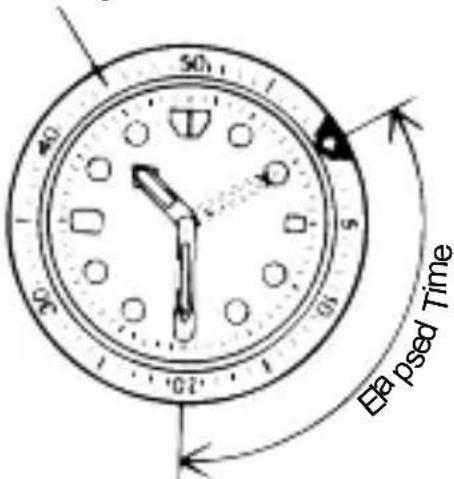
The above shows that 20 minutes have elapsed from 10:10.
中文
自动 / 手动上弦机械表
使用说明书
(5) 温度


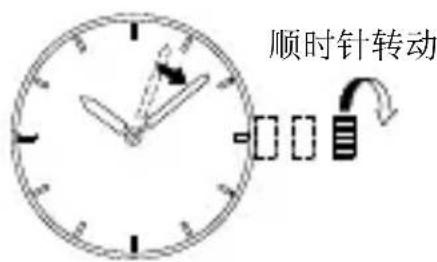
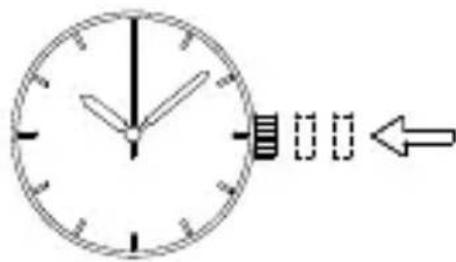

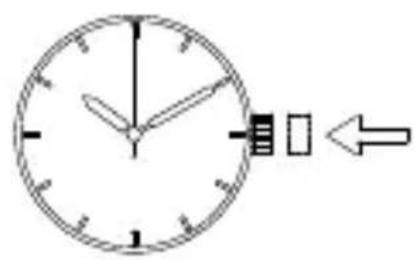
◆ 日期的设置方法 [EL(40N)]

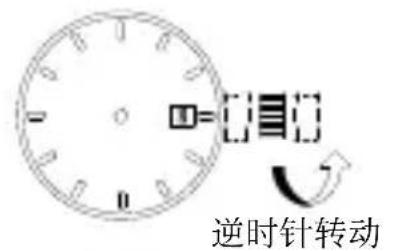

◆ 日期的设置方法 [DJ(40P)]

◆ 日期的设置方法 [EJ(40G)]

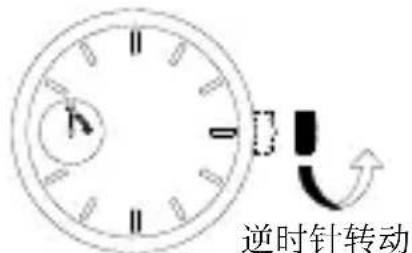
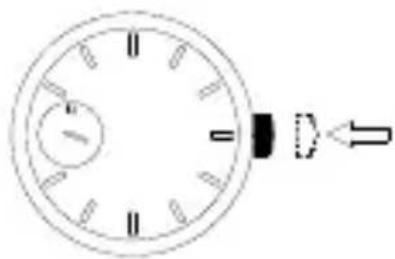
**关于月末日期修正
* 把头的位置会因型号不同而有差异。
* 第二时间段(双时显示)的应用示例
◆ 各地区标准时间比较表
(5) Температура

![ORIENT Star SDA02001W0 - ◆ 日期的设置方法 [EJ(40G)] - 5](/content/2026/06/1147395/images/3ec75eaba5ae889c3803e706441c79f030c2c6b390ec1036e2704cd2479a2697.jpg)


◆ УСТАНОВКА ВРЕМЕНИ [DA(40R), DG(405), EJ(40G)]
◆ УСТАНОВКА ДАТЫ [EL(40N)]
![ORIENT Star SDA02001W0 - ◆ УСТАНОВКА ДАТЫ [EL(40N)] - 1](/content/2026/06/1147395/images/769386f454c3e3f144907d6c9fd16592d7b4aa15fc2411ab1af5637751b8ac50.jpg)
ВНИМАНИЕ
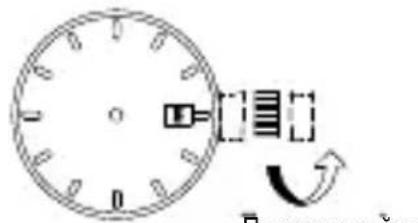
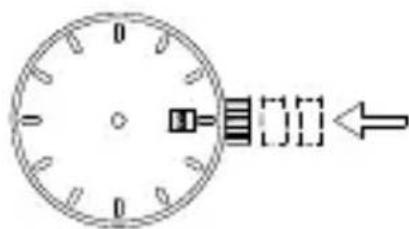
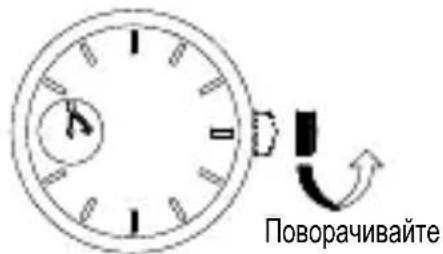
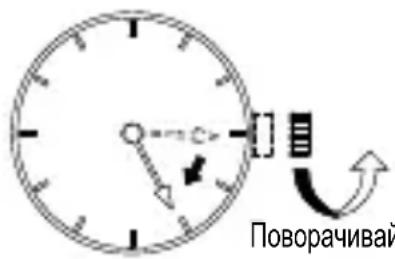
◆ СРАВНИТЕЛЬНАЯ ТАБЛИЦА СТАНДАРТНОГО ВРЕМЕНИ
- ◆ 日付の合わせ方 [EL(40N)]
- 注意
- ◆ 日付の合わせ方 [DJ(40P)]
- ◆ 日付の合わせ方 [EJ(40G)]
- 磁気について
- 温度について
- WITH AUTOMATIC & HAND WINDING MECHANISM
- INSTRUCTION MANUAL
- ◆ SAFETY PRECAUTIONS
- ◆ IN HANDLING THE WATCH
- WATER-RESISTANCE
- WARNING
- CAUTION
- SHOCK
- MAGNETISM
- VIBRATION
- TEMPERATURE
- CHEMICALS, GASES, ETC
- ◆ HOW TO IDENTIFY THE CALIBER NUMBER
- SEARCHING BY 10-DIGIT MODEL NUMBER
- SEARCHING BY THE CASE CODE
- EXAMPLE
- ◆ FEATURES
- ◆ SPECIFICATIONS
- ◆ NAMES AND FUNCTIONS OF INDIVIDUAL COMPONENT PARTS
- ◆ AUTOMATIC WINDING AND HAND WINDING MECHANISM
- ◆ MODELS WITH SCREWED-DOWN CROWN
- ◆ MODELS WITH A SCREWED-DOWN BUTTON RING *EJ (40G) ONLY
- ◆ POWER RESERVE INDICATOR
- ◆ HOW TO SET THE TIME [ DE(40A), DJ(40P), EL(40N)]
- ◆ HOW TO SET THE TIME [ DA(40R), DG(405), EJ(40G)]
- ◆ HOW TO SET THE DATE [ EL(40N)]
- ◆ HOW TO SET THE DATE [ DJ(40P)]
- ◆ HOW TO SET THE DATE [ EJ(40G)]
- ◆ HOW TO SET THE DATE [ DE (40A)]
- ◆ HOW TO SET THE DAY OF THE WEEK [ DE (40A)]
- ◆ USING THE DUAL-TIME FUNCTION [ DJ (40P)]
- ◆ HOW TO SET THE 24-HOUR HAND
- ◆ HOW TO USE THE 24-HOUR INDICATOR RING (ROTATING BEZEL OR INTERNAL ROTATING RING)
- ◆ USING THE ROTATING INDICATOR BEZEL
- 中文
- 自动 / 手动上弦机械表
- 使用说明书
- ◆ 日期的设置方法 [EL(40N)]
- ◆ 日期的设置方法 [DJ(40P)]
- ◆ 日期的设置方法 [EJ(40G)]
- ◆ УСТАНОВКА ВРЕМЕНИ [DA(40R), DG(405), EJ(40G)]
- ◆ УСТАНОВКА ДАТЫ [EL(40N)]
- ВНИМАНИЕ
Brand : ORIENT
Model : Star SDA02001W0
Category : Wristwatch