
LEDLIS - Flashlight STANLEY - Free user manual and instructions
Find the device manual for free LEDLIS STANLEY in PDF.


| Product Type | LED Flashlight |
| Model | LEDLIS |
| Brand | Stanley |
| Light Source | LED |
| Dimensions | Approx. 15 cm x 3 cm |
| Weight | Approx. 150 g |
| Power Source | 3 x AAA batteries (not included) |
| Lumen Output | Up to 200 lumens |
| Beam Distance | Up to 100 meters |
| Modes | High, Low, Strobe |
| Switch Type | Push button on tail cap |
| Body Material | Aluminum alloy with anodized finish |
| Water Resistance | IPX4 (splash resistant) |
| Drop Resistance | 1 meter |
| Included Accessories | None |
| Cleaning | Wipe with dry cloth; do not use solvents |
| Safety | Do not look directly into the beam; keep away from children |
| Spare Parts | Batteries, replacement LED (if available) |
| Reparability | Limited; replace batteries only; LED is non-replaceable |
| General Information | Designed for everyday carry and outdoor use |
Frequently Asked Questions - LEDLIS STANLEY
User questions about LEDLIS STANLEY
0 question about this device. Answer the ones you know or ask your own.
Ask a new question about this device
Download the instructions for your Flashlight in PDF format for free! Find your manual LEDLIS - STANLEY and take your electronic device back in hand. On this page are published all the documents necessary for the use of your device. LEDLIS by STANLEY.
USER MANUAL LEDLIS STANLEY
natural_image
Exterior view of a handheld electric shaver with black and white casing (no visible text or symbols)FEATURES
CARACTERÍSTICAS
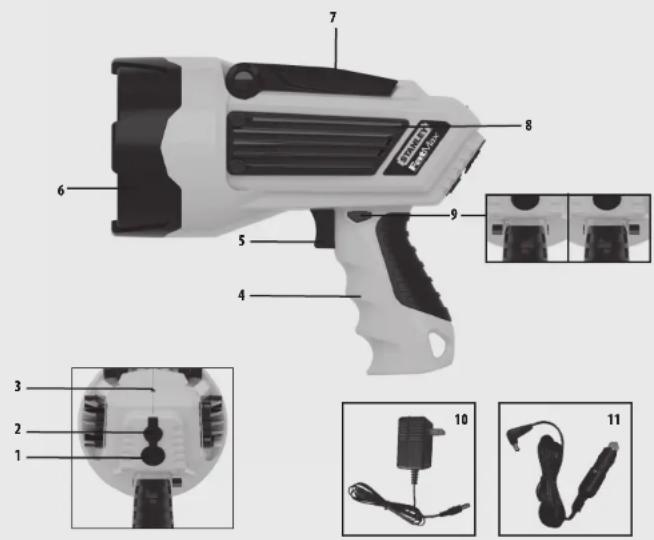
FEATURES
- Light Mode Select Button
- 12VDC Charging Port (under protective cover)
- Battery/Charge Status LED Indicator
- Pistol Grip Handle
- On/Off Trigger
- Rubber Bezel
- Locking Adjustable Stand
- Aluminum heat sink
9 TriggerLock - 120 Volt AC Adapter
- 12 Volt DC Adapter (optional accessory)
CARACTERÍSTICAS
This device complies with part 15 of the FCC Rules. Operation is subject to the following two conditions: (1) this device may not cause harmful interference, and (2) this device must accept any interference received, including interference that may cause undesired operation. This equipment has been tested and found to comply with the limits for a Class B digital device, pursuant to part 15 of the FCC Rules. These limits are designed to provide reasonable protection against harmful interference in a residential installation. This equipment generates, uses and can radiate radio frequency energy and, if not installed and used in accordance with the instructions, may cause harmful interference to radio communications. However, there is no guarantee that interference will not occur in a particular installation. If equipment does cause harmful interference to radio or television reception, which can be determined by turning the equipment off and on, the user is encouraged to try to correct the interference by one or more of the following measures:
• Reorient or relocate the receiving antenna.
- Increase the separation between equipment and receiver.
- Connect the equipment into an outlet on a circuit different from that to which the receiver is connected.
- Consult the dealer or an experienced radio/TV technician for help.
Changes or modifications not approved by the party responsible for compliance could void user's authority to operate the equipment.
GENERAL SAFETY WARNINGS AND INSTRUCTIONS
READ ALL INSTRUCTIONS
WARNING: Read all instructions before operating spotlight. Failure to follow all instructions listed below may result in electric shock, fire and/or serious injury.
SAFETy gUIDELINES / DEFINITIONS
DANGER: Indicates an imminently hazardous situation which, if not avoided, will result in death or serious injury.
WARNING: Indicates a potentially hazardous situation which, if not avoided, could result in death or serious injury.
■ CAUTION: Indicates a potentially hazardous situation which, if not avoided, may result in minor or moderate injury.
CAUTION: Used without the safety alert symbol indicates potentially hazardous situation which, if not avoided, may result in property damage.
RISK OF UNSAFE OPERATION. When using tools or equipment, basic safety precautions should always be followed to reduce the risk of personal injury. Improper operation, maintenance or modification of tools or equipment could result in serious injury and property damage. There are certain applications for which tools and equipment are designed. Manufacturer strongly recommends that this product NOT be modified and/or used for any application other than for which it was designed. Read and understand all warnings and operating instructions before using any tool or equipment.
IMPORTANT SAFETY INSTRUCTIONS
INSTRUCTIONS PERTAINING TO RISK OF FIRE, ELECTRIC SHOCK, OR INJURY TO PERSONS
■ WARNING – WHEN USING ELECTRICAL APPLIANCES, BASIC PRECAUTIONS SHOULD ALWAYS BE FOLLOWED, INCLUDING THE FOLLOWING:
• To reduce the risk of injury, close supervision is necessary when the spotlight is used near children.
- Use only attachments recommended or sold by the manufacturer.
WARNING: TO REDUCE THE RISK OF ELECTRIC SHOCK:
- Do not put spotlight in water or other liquid. Do not place or store appliance where it can fall or be pulled into a tub or sink.
- Charge indoors only. Do not expose chargers to water or any other liquid.
- Do not clean this appliance with a water spray or the like.
- Use only the charger supplied by the manufacturer to recharge.
- When an extension cord is used:
– The marked rating of the detachable power supply cord or extension cord should be at least as great as the electrical rating of this appliance.
- The cord should be arranged so that it will not drape over the countertop or tabletop where it can be tripped over, snagged, or pulled on unintentionally (especially by children).
– The extension cord should be kept dry and off the ground.
WARNING: FIRE HAZARD:
- Keep spotlight lamp and heat sink away from materials that may burn.
- Never contact combustible material to the lens or heat sink.
CAUTION: TO REDUCE THE RISK OF INJURY OR PROPERTY DAMAGE: -
The LED gets hot quickly. Do not touch hot lens, guard, heat sink, or enclosure. Never look directly into the light or shine the light into another person's eyes.
-
Keep sharp objects away from lens — it is glass and can break.
• Do not immerse spotlight in water. - Do not expose this unit to extremely high temperatures.
- Do not drop or throw spotlight. It contains glass and a lithium-ion battery pack.
- Use only with AC or DC charging adapters that are provided with unit. Plug in the charging adapter at the spotlight first, then plug into the charging source.
• After charging/recharging, disconnect charging adapter and wait 5 minutes before use. - Do not crush, cut, pull or expose charging adapter cords to extreme heat.
- Position charging adapter cords so they do not become entangled or become a safety hazard. Keep charging adapter cords away from sharp edges.
• Use in a dry location only. - Do not open body casing. There are no user-serviceable parts inside.
- Do not operate the spotlight without the lens in place.
• To reduce risk of damage to electric plug and cord, pull by plug rather than cord when disconnecting. - Do not attempt to charge the unit if the charger is damaged – return the charger to manufacturer for repair or replacement.
SPECIFIC SAFETY INSTRUCTIONS FOR LITHIUM-ION BATTERIES
WARNING: TO REDUCE THE RISK OF FIRE, ELECTRIC SHOCK, BURST HAZARD, OR INJURY TO PERSONS OR PROPERTY:
Lithium-ion batteries are small, compact and ideal for providing long-lasting power to this unit. However, they must be used and charged properly. Improper use can result in serious injury, fire, or death.
- Lithium-ion batteries can explode in the presence of a source of ignition. Do not use the product in the presence of an open flame.
- Do not place this lithium-ion battery powered unit in fire or apply heat to it.
- Do not subject this lithium-ion battery powered unit to strong impacts or shocks. The battery in this unit contains safety and protection devices which, if damaged, may cause the battery to generate heat, rupture or ignite.
- Do not expose this lithium-ion battery powered unit to water or salt water, or allow the battery to get wet.
- Avoid storing this lithium-ion battery powered unit in the basement, bathroom or other areas of the house that are or may become wet.
- Do not leave this lithium-ion battery powered unit in direct sunlight, or use or store the unit inside cars in hot weather. Doing so may cause the battery to generate heat, rupture, or ignite. Using the battery in this manner may also result in a loss of performance and a shortened life expectancy.
- Never charge this unit near heat or flammable objects.
- NEVER THROW WATER ON A BURNING LI-ION BATTERY! If a lithium-ion battery does catch on fire, it will burn even more violently if it comes in contact with water or even moisture in the air. A fire extinguisher must be used.
Battery Charging and Capacity
This unit is delivered in a partially charged state – you must fully charge it before using it for the first time.
When stored at room temperature with a full charge, Li-ion batteries will begin to discharge from the time they are manufactured, even when unused. Deep discharges also decrease their capacity. Battery life can be extended by the following: • Charge battery to full capacity before storage.
- Store this unit at temperatures between 5°C and 20°C (41°F and 68°F).
• Never discharge the battery fully.
- Charge after each use.
• Always charge at least once every 3-6 months if not in frequent use to prevent overdischarge.
Transportation of Lithium-Ion Batteries
• Always check all applicable local, national, and international regulations before transporting a unit containing a Lithium-Ion battery.
- Transporting an end-of-life, damaged, or recalled battery may, in certain cases, be specifically limited or prohibited.
SAVE THESE INSTRUCTIONS
INTRODUCTION
Congratulations on purchasing your new spotlight. Read this Instruction Manual and follow the instructions carefully before using your new spotlight.
READING THE BATTERY/CHARGE STATUS LED INDICATOR
The battery and charging status LED indicator is located on the back of the unit. It lights or flashes in three colors to indicate the following:
When charging:
Green: Battery is in a fully charged state.
Orange (flashing): Battery is in a partially charged state.
Red (flashing): Battery needs to be recharged.
Green & Red (flashing alternately):
-
The battery of the unit is overheated due to extensive use or recharging. The charging process will stop at this stage and will automatically resume after a cool down period.
-
The battery voltage of your vehicle or other 12 volt DC power source has dropped to a level that is too low when charging using the 12 volt DC adapter. The charging process will stop at this stage and will automatically resume after the battery level of the 12 volt DC power source returns to normal.
When operating:
Green: Battery is operating at full voltage.
Orange: Battery is operating at partial voltage.
Red: Battery is operating at low voltage, and should be recharged.
This unit is shipped in a partially charged state. Charge unit after purchase and BEFORE first use using the 120 Volt AC Adapter for 6 hours or until the battery/charge status LED indicator lights green.
Recharge after each use until the battery/charge status LED indicator lights green.
IMPORTANT: When the unit is not in use, we recommend that the battery is charged at least every 3 to 6 months.
Charging/recharging using the 120 Volt AC Adapter
• Make sure the spotlight is off (the trigger lock is in the off position and the trigger is not depressed).
- Insert the barrel connector of the AC Adapter into the 12 Volt DC Charging Port on the back of the unit. Insert the plug end into a (powered) standard North American 120 volt 60Hz outlet.
- Charge until the battery/charge status LED indicator lights green (approximately 6 hours).
Charging/recharging using the 12 Volt DC Adapter (optional accessory)
- Make sure the spotlight is off (the trigger lock is in the off position and the trigger is not depressed).
- Insert the barrel tip of the supplied 12 Volt DC Adapter into the 12 Volt DC Charging Port on the back of the unit.
- Insert the 12 volt DC plug end into the accessory outlet of your vehicle or other 12 volt DC power source.
- Charge until the battery/charge status LED indicator lights green (approximately 4-6 hours).
Notes: When using a vehicle's 12 volt DC accessory outlet as a charging source, be aware that some vehicles require you to turn on the ignition to power the accessory outlet.
WARNING: TO AVOID THE RISK OF PROPERTY DAMAGE:
- NEVER CONNECT THE UNIT TO A POSITIVE GROUNDED VEHICLE.
- The 12 Volt DC Adapter must only be connected to batteries with a nominal output voltage of 12 volts. The unit will not operate from a 6 volt battery and will sustain permanent damage if connected to a 24 volt battery.
OPERATING INSTRUCTIONS
Operating the spotlight
- Disconnect from charger
- The On/Off trigger is located in the front of the handle of the spotlight.
- To turn the spotlight on, squeeze the trigger.
- To turn off the spotlight, release the trigger.
Note: The On/Off trigger can be locked in the on position using the trigger lock bar on the side of the unit.
The battery/charge status LED indicator will light in one of three colors (as described in the "Reading the Battery/Charge Status LED Indicator" section) to
indicate the battery status.
Locking the spotlight
To lock the spotlight in the on position, depress the On/Off Trigger, then press the trigger lock bar. The spotlight will stay on until the trigger unlock bar is pressed and the On/Off Trigger is released.
If the On/Off Trigger is released when the trigger lock bar is pressed, the spotlight will be locked in the off position. To turn the spotlight on again, press the trigger unlock bar before pressing the On/Off Trigger.
Using the light mode select button
The spotlight offers two brightness modes.
When the spotlight is first turned on, the light is operating at maximum brightness. To operate the spotlight at medium brightness, press the Light Mode Select Button on the back of unit once. Press it again to switch back to maximum brightness.
Operating the unit corded
Plug the barrel tip of the supplied 12 volt DC adapter into the 12 volt DC power and charging port at the back of the unit. Insert the plug end into the accessory outlet of your vehicle or other 12 volt DC power source. Operate the unit as outlined in the previous section.
IMPORTANT: The spotlight will operate while the 120 Volt AC Adapter is attached, but will continue to draw power from the unit's Lithium-Ion battery while the spotlight operates. This may cause the low voltage protection to activate and shut the spotlight down. Manufacturer recommends only operating the unit in corded mode using the 12 Volt DC Adapter.
Using the Locking Adjustable Stand
Snap the Locking Adjustable Stand up, invert the unit and set it upon a flat, stable surface for hands-free operation.
Using the carry lanyard (optional accessory)
The carry lanyard may be used to carry the unit or to hang it for storage. Always adjust the slide on the cords to keep the lanyard secure around any supporting object.
■ CAUTION: TO REDUCE THE RISK OF PRODUCT DAMAGE:
- When light is hung by the carry lanyard, do not shake the spotlight or object that it is hanging from. Do not hang the spotlight from any electrical wires or anything that it is not secure.
- Only use the carry lanyard for hanging this spotlight. The carry lanyard is not intended to support additional weight. Do not attach or hang anything additional to the spotlight or risk of breakage may occur.
CARE AND MAINTENANCE
All batteries lose energy from self-discharge over time and more rapidly at higher temperatures. When the unit is not in use, we recommend that the battery is charged at least every 3 to 6 months.
Never submerge the unit in water. If the unit gets dirty, gently clean the outer surfaces of the spotlight unit with a soft cloth moistened with a mild solution of water and detergent.
There are no user-replaceable parts. Periodically inspect the condition of adapters, connectors and wires. Contact manufacturer to replace any components that have become worn or broken.
Battery replacement/disposal
BATTERY REPLACEMENT
The battery should last the service life of the unit. Contact manufacturer for any information you may need.
SAFE BATTERY DISPOSAL
Contains a lithium-ion battery, which must be disposed of properly. Recycling is required, contact your local authority for information. Failure to comply with local, state and federal regulations can result in fines, or imprisonment.
Contact your local waste management authority to dispose of this product.

!WARNINGS:
- Do not dispose of the battery in fire as this may result in an explosion.
- Before disposing of the battery, protect exposed terminals with heavy-duty electrical tape to prevent shorting (shorting can result in injury or fire).
- Do not expose battery to fire or intense heat as it may explode.
12 volt DC Adapter plug fuse replacement
The fuse in the plug end of the 12 Volt DC Adapter protects the adapter's charging circuit. If the 120 Volt AC Adapter operates, but the DC charging adapter does not, then this fuse may be opened (blown).
To replace the fuse:
-
Unscrew the end cap of the DC plug (counterclockwise).
-
Remove spring center contact and fuse
-
Check fuse with a continuity checker.
-
If blown, locate a replacement 5 amp fuse.
-
Replace the fuse, spring, contact and end cap.
-
Screw end cap clockwise until it is finger tight - DO NOT OVER-TIGHTEN.
-
Test for proper operation of the 12 volt DC adapter.
TROUBLESHOOTING
The battery/charge status LED indicator does not light when charging
- Check connection to the 12 Volt DC Charging Port.
- Check connection to AC or DC power source.
- Confirm there is a functioning AC or DC current.
- Check that the fuse in the 12 Volt DC Adapter is not blown.
Unit will not operate
- The unit may have shut down to protect the battery from overheating after long term operation or charging/recharging. Allow the spotlight to cool down for several minutes before resuming operation.
- The battery may be completely discharged. Charge the unit following the directions.
ONE-YEAR LIMITED WARRANTY
The manufacturer warrants this product against defects in materials and workmanship for a period of ONE (1) YEAR from the date of retail purchase by the original end-user purchaser ("Warranty Period").
If there is a defect and a valid claim is received within the Warranty Period, the defective product can be replaced or repaired in the following ways: (1) Return the product to the manufacturer for repair or replacement at manufacturer's option. Proof of purchase may be required by manufacturer. (2) Return the product to the retailer where product was purchased for an exchange (provided that the store is a participating retailer). Returns to retailer should be made within the time period of the retailer's return policy for exchanges only (usually 30 to 90 days after the sale). Proof of purchase may be required. Please check with the retailer for their specific return policy regarding returns that are beyond the time set for exchanges.
This warranty does not apply to accessories, bulbs, fuses and batteries; defects resulting from normal wear and tear, accidents; damages sustained during shipping; alterations; unauthorized use or repair; neglect, misuse, abuse; and failure to follow instructions for care and maintenance for the product.
This warranty gives you, the original retail purchaser, specific legal rights and you may have other rights which vary from state to state or province to province. This product is not intended for commercial use.
SPECIFICATIONS
Spotlight
Bulb:
10 watt LED bulb
Battery:
Lithium-Ion, 7.4 V DC
120 Volt AC Adapter
Charger
UL Listed Class 2, 12 volts DC (500mA)
12 volt DC Adapter (optional
Voltage:
12 volts DC
DC Plug Fuse:
5A
- FEATURES
- CARACTERÍSTICAS
- GENERAL SAFETY WARNINGS AND INSTRUCTIONS
- READ ALL INSTRUCTIONS
- SAFETy gUIDELINES / DEFINITIONS
- IMPORTANT SAFETY INSTRUCTIONS
- WARNING: TO REDUCE THE RISK OF FIRE, ELECTRIC SHOCK, BURST HAZARD, OR INJURY TO PERSONS OR PROPERTY:
- SAVE THESE INSTRUCTIONS
- INTRODUCTION
- READING THE BATTERY/CHARGE STATUS LED INDICATOR
- Green & Red (flashing alternately):
- IMPORTANT: When the unit is not in use, we recommend that the battery is charged at least every 3 to 6 months.
- WARNING: TO AVOID THE RISK OF PROPERTY DAMAGE:
- - NEVER CONNECT THE UNIT TO A POSITIVE GROUNDED VEHICLE.
- OPERATING INSTRUCTIONS
- ■ CAUTION: TO REDUCE THE RISK OF PRODUCT DAMAGE:
- CARE AND MAINTENANCE
- BATTERY REPLACEMENT
- !WARNINGS:
- TROUBLESHOOTING
- The battery/charge status LED indicator does not light when charging
- Unit will not operate
- ONE-YEAR LIMITED WARRANTY
- SPECIFICATIONS
- Spotlight
- Volt AC Adapter
- volt DC Adapter (optional
Brand : STANLEY
Model : LEDLIS
Category : Flashlight