
QS-1760H - Calculator SHARP - Free user manual and instructions
Find the device manual for free QS-1760H SHARP in PDF.
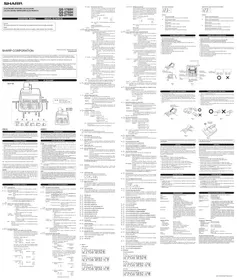


| Product Type | Desktop Printing Calculator |
| Model | Sharp QS-1760H |
| Display | 12-digit fluorescent display |
| Printing | 2-color (red/black) ink roller printing on standard 57mm paper roll |
| Power Source | AC 120V (US model) / 220V (export model) via detachable power cord |
| Dimensions (Approx.) | 280 x 210 x 65 mm (W x D x H) |
| Weight (Approx.) | 1.2 kg (2.65 lbs) |
| Key Functions | Addition, Subtraction, Multiplication, Division, Percent, Square Root, Memory (M+, M-, MR, MC), Grand Total (GT), Item Count, Non-Add/Date, Right Shift, Subtotal, Total, Clear Entry, Clear, All Clear, Decimal Selector (0,1,2,3,4,F), Rounding Selector (5/4, Cut, Up), Constant Mode (K), Power |
| Decimal Selector | F, 0, 1, 2, 3, 4 positions |
| Rounding Selector | 5/4 round, cut-off, and up modes |
| Item Counter | Counts entries stored in grand total memory |
| Grand Total Memory | Accumulates results of additions and subtractions; accessible via GT key |
| Constant Mode | Automatic constant for multiplication and division when K selector is on |
| Paper Feed | Manual paper advance button |
| Non-Add / Date Key | Prints entry on left, useful for numbering or dates |
| Right Shift Key | Shifts displayed value one digit to the right (correction) |
| Change Sign Key | Changes sign of displayed number |
| Square Root Key | Calculates square root of displayed number |
| Percent Key | Calculates percentage and percent change |
| Ink Ribbon | Standard two-color ink roller (replaceable) |
| Paper Roll Width | 57 mm (2.25 inches) standard adding machine roll |
| Operating Environment | Indoor use, avoid extreme temperatures and humidity |
| Safety Compliance | FCC Part 15 (US), meets applicable safety standards |
Frequently Asked Questions - QS-1760H SHARP
User questions about QS-1760H SHARP
0 question about this device. Answer the ones you know or ask your own.
Ask a new question about this device
Download the instructions for your Calculator in PDF format for free! Find your manual QS-1760H - SHARP and take your electronic device back in hand. On this page are published all the documents necessary for the use of your device. QS-1760H by SHARP.
USER MANUAL QS-1760H SHARP
The socket outlet shall be installed near the equipment and shall be easily accessible.
This device complies with Part 15 of the FCC Rules. Operation is subject to the following two conditions: (1) This device may not cause
harmful interference, and (2) this device must accept any interference received, including interference that may cause undesired operation.
WARNING - FCC Regulations state that any unauthorized changes or modifications to this equipment not expressly approved by the
manufacturer could void the user's authority to operate this equipment.
Note: This equipment has been tested and found to comply with the limits for a Class B digital device, pursuant to Part 15 of the FCC Rules.
These limits are designed to provide reasonable protection against harmful interference in a residential installation. This equipment
generates, uses, and can radiate radio frequency energy and, if not installed and used in accordance with the instructions, may cause harmful interference to radio communications. However, there is no guarantee that interference will not occur in a particular installation.
If this equipment does cause harmful interference to radio or television reception, which can be determined by turning the equipment off and
on, the user is encouraged to try to correct the interference by one or more of the following measures:
- Reorient or relocate the receiving antenna.
- Increase the separation between the equipment and receiver. - Connect the equipment into an outlet on a circuit different from that to which the receiver is connected.
- Consult the dealer or an experienced radio/TV technician for help.
THE KEYBOARD
QS-2770H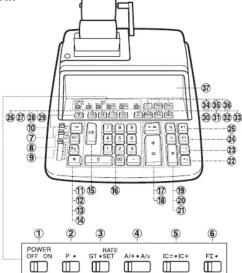


ENGLISH
INTRODUCTION
INTRODUCTION
Thank you for your purchase of the SHARP electronic calculator, model QS-1760H/2760H/2770H. Your SHARP calculator is specially designed to save work and increase efficiency in all business applications and general office calculations. Careful reading of this manual will enable you to use your new SHARP to its fullest capability.
OPERATIONAL NOTES
To insure trouble-free operation of your SHARP calculator, we recommend the following:
- The calculator should be kept in areas free from extreme temperature changes, moisture, and dust.
A soft dry cloth should be used to clean the calculator. Do not use solvents or a wet cloth.
- A soft, dry cloth should be used to clean the calculator. Do not use solvents or a wet cloth.
- Turn off the power switch prior to connecting or disconnecting the AC cord.
- Since this product is not waterproof, do not use it or store it where fluids, for example water, can splash onto it. Raindrops, water spray, juice, coffee, steam, perspiration,
etc. will also cause malfunction.
- If you pull out the power cord to cut electricity completely, the presently stored tax rate will be cleared.
- If service should be required on this equipment, use only a SHARP servicing dealer,
a SHARP approved service facility or SHARP repair service where available. 7. Do not wind the AC cord around the body or otherwise forcibly hand or twist it
- So not, with the 40 cord above the body of otherwise strictly band or thick.
Note: Unless otherwise specified, the text material applies to all three models.
SHARP will not be liable nor responsible for any incidental or consequential economic or property damage caused by misuse and/or malfunctions of this product
and its peripherals, unless such liability is acknowledged by law.
WARNING
THE VOLTAGE USED MUST BE THE SAME AS SPECIFIED ON THIS
THE VOLTAGE USES MOST BE THE SAME AS SPECIFIED ON THIS CALCULATOR. USING THIS CALCULATOR WITH A VOLTAGE HIGHER THANTHAT SPECIFIED IS DANGEROUS AND MAY RESULT IN A FIRE OR OTHERTYPE OF ACCIDENT CAUSING DAMAGE. SHARP WILL NOT BE HELD RESPONSIBLE FOR ANY DAMAGE RESULTING FROM USE OF THIS
CALCULATOR WITH OTHER THAN THE SPECIFIED VOLTAGE.
SPANISH
INTRODUCTION
INTRODUCTION
The Ground Truth image displays a single, solid horizontal line, which is a stylistic or background element (like a ruled paper line or separator), not a placeholder for text. According to Rule 2, such stylistic/background lines must be ignored by the OCR result. The OCR content provided is "", which consists of no characters. This correctly represents the absence of any textual content in the GT and correctly ignores it as a hallucination. Therefore, the OCR output should have been empty or contained no text. Hence, the OCR result is consistent with the Ground Truth.
When the power switch is turned on, the calculator is ready for operation.
② PRINT MODE SELECTOR:
a P position: The calculator functions as a print/display calculator. (Print
** position: The calculator functions as a display calculator. (Non-print
mode)
Made changes print
Mode change print: When changing the print mode selector, the following print will appear
••• •••—P' (red print): When changing the selector from P to *.
*... ... *+P* (red print): When changing the selector from - to P:
RATE GT = SET
③ GRAND TOTAL / RATE SETTING MODE SELECTOR:
This selector will accumulate the following (the symbol(s) will be printed):
(The symbol 34 will be primed.) 1. Addition and subtraction totals obtained with the
- Addition and subtraction totals obtained with the [4] key
- Product and quotient totals obtained with the ⓣ or =
key.
- Answers obtained with the □ or □ key
Neutral, GT OFF
- Enter the adding tax rate, then press =. - To enter a discount rate, press □ before opening
- To store a discount rate, press ☐ before pressing
- A maximum of 4 digits can be stored (decimal point is
A maximum of 4 digits can be stored (not counted as a digit).
re to set this selector to the “->” position after storing an
2016.
one rate can be stored. If you enter a new rate, the previous
will be cleared.
② A is A is AND MORE SELECTED:
Effective only in addition and subtraction:
Use of the A/+ mode permits addition and subtraction of
numbers without an entry of the decimal point. When the
A/+ mode is activated, the decimal point is automatically
positioned according to the decimal selector setting.
EXAMPLES: Set A/+- + -A/x to A/+
A. Set decimal to 2
Enter 123456 Tape print
B. Set decimal to 3
Enter 123456 📄 tape prints 123-456 +
Use of the ☐, ☒, and ☑ keys will automatically override
the Add mode and decimally correct answers will be
printed at the preset decimal position.
EXAMPLES: Set A/++·A/x to A/+, 5/4
A. Set decimal to 2
Enter .1234 ✗ Tape prints 0-1234 ✗
100 Ⓛ 100- =
12:34 *
B. Set decimal to 3
Enter 2 + Tape prints 2-+
5 ± 3 = 0.657
- This manual is for reference only.
C. Set decimal to 2 Enter 123 (+) Tape prints 1/23 +
12 □ [■] 13:00 ↑ [■] 11:23
Note that decimal point was entered.
① OFF ON INTERRUPTOR DE CORRIENTE:
"A/x" position - Multiplication and division
When the A/x mode is activated, the number entered
before ☒ or ⊕ key will override the add mode. But the
number entered following ☒ or ☐ key and before ☑ (or
→, -1, -1, →, → key will obey the decimal setting. This
is useful for invoicing.
EXAMPLE: Set A++ - -A/x to A/x
Set decimal to 2
Enter 7 ✗ Tape prints 7·×
3 0-03 =
0-21 *
Note: Use of the □ key will automatically override the A/x
made.
Addition and subtraction:
The A/x mode functions same as the A/+ mode
Neutral
MODE SELECTOR:
1) The counter will count the number of times that the
key has been pressed in addition.
Note: • Each time the ☐ key is used in subtraction, 1
will be subtracted from the count.
- The count is printed when the calculated result is obtained.
Result is obtained. A. Dressing of the X, X, and 20 or 31 key
- Pressing of the [3], [4], [5] or [6] key clears the counter.
2) When the grand total mode selector is in the ON
position (GT), the counter will count the number of
times that the calculation results have been stored in
the grand total memory. To print and clear the count,
press the ☐ Key. (2) The memory item counter will count the number of
3) The memory item counter will count the number of times that, like (1), how has been agreed in the edifies.
Notes: * Each time the 🔒 key is used in the
subtraction, 1 will be subtracted from the
count.
• The count is printed when the memory is
recalled.
- Pressing of the [+] key cleans the counter. 1) The counter will count the number of times that the [+]
1) The counter will count the number of times that the or has been pressed in addition and subtraction
or □ has been pressed in addition and dissection. Note: • The count is printed when the calculated
Result is obtained.
- Pressing of the 8 , , + , 0 or 1 key
clears the counter.
2) When the grand total mode selector is in the ON
position (GT), the counter will count the number of
times that the calculation results have been stored in
the grand total memory. To print and clear the count, press the [17] key
3) The memory item counter will count the number of
times that the → or → key has been pressed in
addition and subtraction.
Note: • The count is printed when the memory is
recalled.
- Pressing of the ▶i key clears the counter. Neutral, counter is turned off
Neutral, counter is turned off.
inter has a maximum capacity of 3 digits (up to ±999). If the
ceeds the maximal, the counter will recoup from zero.
ACCUMULATION SELECTOR: (Only QS-2770H)
he first factor is automatically added to or subtracted from
the memory. A first factor means the first number in multiplication and division and each number is printed with "XF"
ication and division and each number is printed with AC and "tF" respectively.
2×3×5+6=
12+7×9=
-56×4×0.5=
Neutral
DE SELECTOR:
The following constant functions will be performed:
The calculator will automatically remember the first
the candidate that systematically remains the first number entered (the multiplicand) and the × instruction.
The calculator will automatically remember the second
number entered (the divisor) and the + instruction.
Count/Mark up:
The calculator will automatically remember the first
entered number and key functions for Add-on/Discount/
Mark up calculation.
Neutral
VECTOR:
The answer is rounded up.
in answer is rounded off.
in answer is rounded down.
EXAMPLE: 10.005 + 5 = 2.001
Set decimal to 2, †
10.005 5 = 2-01 *
Set decimal to 2, 5/4
10.005 ÷ 6 (±) → 2-00 *
Note: The decimal point floats during successive calculation by the use of
☒ or ☐ key. The function derived point option, on every is rounded down.
In floating decimal point system, an answer is rounded down.
④ □□ DECIM
H Presets the number of decimal places in the answer.
In the "F" position, the answer is displayed in the floating decimal system.
When pressed, advances the paper roll.
Note: You can also pull the paper manually.
⑪ → RIGHT SHIFT KEY:
Operation of this key in entered numbers or calculated results shifts the
number one digit to the right together with the decimal point. Used for one
digit correction.
CALCULATION EXAMPLES
1. Set the decimal selector as specified in each example. The executive selector should be in the 6 position, allowing specified
The rounding selector should be in the "5/4" position unless otherwise specified. 2. The grand total / rate setting mode selector, constant mode, add mode, item count mode and first factor accumulation selectors (QS-2770H only) should be in the "4" mode.
position (off position) unless otherwise specified. 3. Print mode selector should be in the "P" position unless otherwise specified. 4. If an error is made while setting a number, press the (a) or (b) key and notes the
- If an error is made while entering a number, press the ⏻ or ⏻ key and enter the correct number.
- Negative values are printed with *.* numlet is and
- Negative values are priced with - symbol priced.
- Set the decimal selector as specified in each example.
Note: All totals and sub-totals may be used for further calculations. RE-ENTER the
DATE MEMORY (QS-2770H only)
This machine, provided with date memory, allows date, numbers etc. to be stored once and then recalled and printed as necessary.
Note: The date memory can also be used as a constant memory.
Stockholders' compensation benefits
EXAMPLE: Print the date of April 5, 2003
| Selector Selector (1) | Operation Operación (2) | Display Exhibición (3) | Print Impresión (4) |
| 4.05-2003 | 4.05-2003 | 4.05-2003(red) (nojo) | |
| 0. | |||
| 20 | 20.00 | 20-00 + | |
| 30 | 50.00 | 30-00 + | |
| 50-00 + | |||
| 50.00 | |||
| 4.05-2003 | 4.05-2003(red) (nojo) |
EXAMPLE: 2×12.34=
| (1) | (2) | (3) | (4) |
| 12.34 2 * | 12.342. | 12.34 2 × (red) (mjo) | |
| 12.34 | 12.34 12:34 = 24-68 * | ||
| 24.68 | |||
| 4 + | 4. | 4 * | |
| 12.34 | 12.34 12:34 = 0.32 * | ||
| 0.32 |
ADDITION / ADDITION
| 12.45+36.62-93.20= | |||
| (1) | (2) | (3) | (4) |
| 12.45 | 12.45 | 12.45 + | |
| 36.62 | 49.07 | 36.62 + | |
| 93.20 | 44.13- | 93.20 - | |
| 44.13 * | |||
REPEAT ADDITION AND SUBTRACTION /
ADDITION AND SUBTRACTION WITH ADD MODE
ADDITION AND SUBTRACTION WITH ADD MODE
| (1) | (2)*1 | (3) | (4) |
| 1245 | 12.45 | 12.45 + | |
| 1624 | 28.69 | 16.24 + | |
| 1935 | 48.04 | 19.35 + | |
| 521 | 42.83 | 5.21 - | |
| 42.83 * |
*1: The □ key was not used in the entries.
| (1) | (2) | (3) | (4) |
| 12.36 × | 12.36 | 12.36 × | |
| 3.33 × | 41.1588 | 3.33 × | |
| 53.21 ‡ | 53.21 = | ||
| 2:190.06 * | |||
| 2,190.06 |
DIVISION / DIVISION
| (1) | (2) | (3) | (4) |
| 256 | 256. | 256 + | |
| 12 | 21.3333333333 | 12 + | |
| (21.33333333: QS-1760H) | |||
| .56 | 0.56 = | ||
| 38.095 * | |||
| 38.095 |
MIXED CALCULATIONS / MIXED CALCULATIONS
A. (10+2)×5=
| (1) | (2) | (3) | (4) |
| 10 12 8 6 | 10. | 10- + 2- + 12- 0 | |
| 12. | |||
| 12. | 12- × 5- = 60- * | ||
| 5 4 | |||
| 60. |
| (1) | (2) | (3) | (4) |
| 5 [IMAGE] | 5. | 5- × | |
| 2 [IMAGE] | 2- = | ||
| 10- * | |||
| 10. | |||
| [IMAGE] | 10. | 10- + | |
| 12 [IMAGE] | 22. | 12- + | |
| [IMAGE] | 22- * | ||
| 22. |
c. (5+12)×3.2×6.7
| (1) | (2) | (3) | (4) |
| 5 [2] | 5.00 | 5.00 + | |
| 12 [2] | 17.00 | 12.00 + | |
| [×] | 17.00 0 | ||
| 17.00 | 17.00 × | ||
| 3.2 [×] | 54.4 | 3.2 × | |
| 6.7 [×] | 364.48 | 6.7 + | |
| 2 [×] | 2 = | ||
| 162.24 * | |||
| 182.24 |
CONSTANT CALCULATIONS / CÁLCULOS CON CONSTANTES
RECIPROCAL CALCULATIONS / CÁLCULOS RECÍPROCOS
1/2 = (1) 1/2 = (2)
| (1) | (2) | (3) | (4) |
| 7 7 7 7 7 7 7 7 7 7 7 7 7 7 7 7 7 7 7 7 7 7 7 7 7 7 7 7 7 7 7 7 7 7 7 7 7 7 7 7 7 7 7 7 7 7 7 7 7 7 7 | 7. 1. 0.14285714285 (0.142857142 - QS-1760H) | 7. + 7. + 7. + 7. + 7. + 7. + 7. + 7. + 7. + 7. + 7. + 7. + 7. + 7. + 7. + 7. + 7. + 7. + 7. + 7. + 7. + 7. + 7. + 7. + 7. + 7. + | |
| 7 7 7 7 7 7 7 7 7 7 7 7 7 7 7 7 7 7 7 7 7 7 7 7 7 7 7 7 7 7 7 7 7 7 7 7 7 7 7 7 7 7 7 7 7 7 7 7 7 6 14285714285 (0.142857142 - QS-1760H) (0.02040816329 (0.0204081633 (QS-1760H) (0.020408163 (QS-1760H) (0.02091545189 (0.00291545181 + QS-1760H) (0.002915451 (QS-1760H) (0.002915451 (QS-1760H) (0.002915451 (QS-1760H) (0.002915451 (QS-1760H) (0.002915451 (QS-1760H) (0.002914541 (QS-1760H) (0.002915451 (QS-1760H) (0.002915451 (QS-1760H) (0.002915451 (QS-1760H) (0.002915451 (QS-1760H) (0.00315451 (QS-1760H) (0.00315451 (QS-1760H) (0.00315451 (QS-1760H) (0.00315451 (QS-1760H) (0.00315451 (QS-1760H) (0.002915451 (QS-1760H) (0.002915451 (QS-1760H) (0.002915451 (QS-1760H) (0.002915451 (QS-1760H) (Q.002915451 (QS-1760H) (0.002915451 (QS-1760H) (0.002915451 (QS-1760H) (0.002915451 (QS-1760H) (0.002915451 (QS-1700H) (0.002915451 (QS-1760H) (0.002915451 (QS-1760H) (0.002915451 (QS-1760H) (0.002915451 (QS-1760H) (0.002915451+ (QS-1760H) (0.002915451 (QS-1760H) (0.002915451 (QS-1760H) (0.002915451 (QS-1760H) (0.002915451 (QS-1760H) (0.0028915451 (QS-1760H) (0.0028915451 (QS-1760H) (0.0028915451 (QS-1760H) (0.0028915451 (QS-1760H) (0.0028915451 (QS-1700H) (0.0028915451 (QS-1760H) (0.0028915451 (QS-1760H) (0.0028915451 (QS-1760H) (0.0028915451 (QS-1760H) (0.00289015451 (QS-1760H) (0.00289015451 (QS-1760H) (0.00289015451 (QS-1760H) (0.00289015451 (QS-1760H) (0.00289015451 (QS+1760H) (0.00289015451 (QS-1760H) (0.00289015451 (QS-1760H) (0.00289015451 (QS-1760H) (0.00289015451 (QS-1760H) (Q.0028915451 (QS-1760H) (0.0028915451 (QS-1760H) (0.0028915451 (QS-1760H) (0.0028915451 (QS-1760H) (0.0028915451+ (QS-1760H) (0.0028915451 (QS-1760H) (0.0028915451 (QS-1760H) (0.0028915451 (QS-1760H) (0.0028915451 (QS-1760H) (0,0028915451 (QS-1760H) (0.0028915451 (QS-1760H) (0.0028915451 (QS-1760H) (0.0028915451 (QS-1760H) (0.0028915451 (QT-1760H) (0.0028915451 (QT-1760H) (0.0028915451 (QT-1760H) (0.0028915451 (QT-1760H) (0.0028915451 (QT-1760H) (0.014285714285 (0.14285714285 (0.14285714285 (0.14285714285 (0.14285714285 (0.14285714285 (0.14285714285 (0.14285714285 (0.1028915451+ (QS-1760H) (0.0028915451 (QS-1760H) (0.0028915451 (QS-1760H) (0.0028915451 (QS-1760H) (0.0028915451 (QT-1760H) (0,0028915451 (QT-1760H) (0.0028915451 (QT-1760H) (0.0028915451 (QT-1760H) (0.0028915451 (QT-1760H) (0.0028915451 (QS-1760H) (0.0028915451 (QS-1760H) (0.0028915451 (QS-1760H) (0.0028915451 (QS-1760H) (0.014285714285 (0.14285714285 (0.14285714285 (0.14285714285 (0.14285714285 (0.14285714285 (0.1428 514285714285 (0.14285714285 (0.14285714285 (0.14285714285 (0.14285714285 (0.14285714285 (0.14285714285 (0.1228915451+ (QS-1760H) (0.0028915451 (QS-1760H) (0.0028915451 (QS-1760H) (0.0028915451 (QS-1760H) (0.0028915451 (QS+1760H) (0.0028915451 (QS-1760H) (0.0028915451 (QS-1760H) (0.0028915451 (QS-1760H) (0.0028915451 (QS-1760H) (0.00315451 (QS-1760H) (0.00315451 (QS-1760H) (0.00315451 (QS-1760H) (0.00315451 (QS-1760H) (0.014285714285 (0.14285714285 (0.14285714285 (0.14285714285 (0.14285714285 (0.14285714285(0.14285714285 (0.14285714285 (0.14285714285 (0.14285714285 (0.14285714285 (0.14285714285 (0.14285714285 (0,0028915451+ (QS-1760H) (0.0028915451 (QS-1760H) (0.0028915451 (QS-1760H) (0.0028915451 (QS-1760H) (0.0028915451+ (QS-1760H) (Q.0028915451 (QS-1760H) (Q.0028915451 (QS-1760H) (Q.0028915451 (QS-1760H) (Q.0028915451 (QS-1760H) (Q.0028915451 (QS-1760H) (Q,0028915451 (QS-1760H) (Q.0028915451 (QS-1760H) (Q.0028915451 (QS-1760H) (Q.0028915451 (QS-1760H) (Q.0028915451 (QT-1760H) (Q.0028915451 (QT-1760H) (Q.0028915451 (QT-1760H) (Q.0028915451 (QT-1760H) (Q.0028915451 (QT-1760H) (Q.014285714285 (0.14285714285 (0.14285714285 (0.14285714285 (0.14285714285 (0.14285714285 (0.14285714285 (0,0.0028915451+ (QS-1760H) (Q.0028915451+ (QS-1760H) (Q.0028915451+ (QS-1760H) (Q.0028915451+ (QS-1760H) (Q.0028915451+ (QS-1760H) (Q.002891 5451+ (QS-1760H) (Q.0028915451+ (QS-1760H) (Q.0028915451+ (QS-1760H) (Q.0028915451+ (QS-1760H) (Q.0028915451+ (QS+1760H) (Q.0028915451+ (QS+1760H) (Q.0028915451+ (QS+1760H) (Q.0028915451+ (QS+1760H) (Q.0028915451+ (QS+1760H) (0.0028915451+ (QS+1760H) (Q.0028915451+ (QS+1760H) (Q.0028915451+ (QS+1760H) (Q.0028915451+ (QS+1760H) (Q.002891 5451+ (QS+1760H) (Q.0028915451+ (QS+1760H) (Q.0028915451+ (QS+1760H) (Q.0028915451+ (QS+1760H) (Q.0028915451+ (QS-1760H) (Q.0028915451+ (QS-1760H) (Q.0028915451+ (QS-1760H) (Q.0028915451+ (QS-1760H) (0.0028915451+ (QS-1760H) (Q.0028915451+ (QS-1760H) (Q.0028915451+ (QS-1760H) (Q.0028915451+ (QS-1760H) (Q.00289 5451+ (QS+1760H) (Q.0028915451+ (QS+1760H) (Q.0028915451+ (QS+1760H) (Q.0028915451+ (QS+1760H) (Q.0028915451+ (OS+1760H) (Q.0028915451+ (QS+1760H) (Q.0028915451+ (QS+1760H) (Q.0028915451+ (QS+1760H) (Q.0028915451+ (QS+1760H) |
PERCENT MULTIPLICATION - DIVISION
ADD-ON AND DISCOUNT / RECARGOS Y DESCUENTOS
EXAMPLE: 1 A 5% add-on to 100.
EXAMPLE: 1 A 5% surcharge on 100.
EXAMPLE: 2 A 10% discount on 100.
Markup and Profit Margin are both ways of calculating perce
The difference is: Profit margin in personal staff up, selling price
- Profit margin is percent; profit vs. Markup is percent profit vs. cost
Note: In some cases, negative percentages will be shown for margin or markup.
EXAMPLE: Calculate the selling price (a) and the gross profit (b) from a cost of \$8,160 on the basis of a 15% profit on the selling price.
COST (USING MARGIN) / COSTE (UTILIZANDO MARGIN) EXAMPLE 5: Calculate the cost (a) and the gross profit (b) from a rolling price of \$500
EXAMPLE: Calculate the cost (a) and the gross profit (b) from a selling price of $500 on the basis of a 35% profit on the selling price.
EXAMPLE: Calculate the markup of a 150.00 item being sold at200.00.
EXAMPLE: Calculate the selling price (a) and gross profit (b) from a cost of $6,950 on
the basis of a 25% profit on the cost.
EXAMPLE: Calculate the cost (a) and the gross profit (b) from a selling price of $8,780
on the basis of a 20% profit on the cost.
EXAMPLE: Calculate the dollar difference (a) and the percent change (b) between two
yearly sales figures 1,500 in one year and1,300 in the previous year.
*2: Press the □ key to clear the memory before starting a memory calculation.
| Bill No. N° de factura | Number of bills Carietà de facturas | Amount importe |
| 1 | 1 | 100.55 |
| 2 | 1 | 200.00 |
| 3 | 1 | 200.00 |
| 4 | 1 | 400.55 |
| 5 | 1 | $900.65 |
| Total Total | (a) | (b) |
| (1) | (2) | (3) | (4) | |
| (3-1)* | (3-2)* | |||
| 100.55 1/2 | 100.55 | 001 | 100-55 * | |
| 200 1/2 | 300.55 | 002 | 200-00 * | |
| 500.55 | 003 | 200-00 * | ||
| 400.55 1/2 | 901.10 | 004 | 400-55 * | |
| 500.65 1/2 | 1,401.75 | 005 | 500-65 * | |
| 0051:401-75 (a)(b) | ||||
2.10. Main Teacher
(3-1): MainPrincipal
(3-2): 800rSecundante OS-2770H only
20.1.1.1.
GRAND TOTAL CALCULATION / CÁLCULO DE TOTAL GLOBAL
EXAMPLE: 100 + 200 + 300 = ①
EXAMPLE: +) 300 + 400 + 500 = ②
*) 500 - 600 + 700 = ②
Grand total / Total global ④
| (1) | (2) | (3) | (4) |
| 100 1 | 100 | 100+ | |
| 200 1 | 300 | 200+ | |
| 300 1 | 600 | 300+ | |
| 600.. | 600++ 1 | ||
| 300 1 | 300.. | 300+ | |
| 400 1 | 700.. | 400+ | |
| 500 1 | 1,200.. | 500+ | |
| 1,200.. | 1,200++ 2 | ||
| 500 1 | 500.. | 500+ | |
| 600 2 | 1002.. | 600- | |
| 700 1 | 600.. | 700+ | |
| 600.. | 600++ 3 | ||
| 600.. | |||
| 100 | 2,400 | 2,400+G 4 |
MARGIN / MARGIN
EXAMPLE: Calculate the profit margin of a 65.00 item being sold at89.00.
*3: Press the +1 key to clear the memory before starting a memory calculation.
*4: Press 📋 then 📋 to clear the contents of the First and Second memories before
starting the operation.
ET AND CT CALCULATION (05.377W, ppb) /
FZ AND GT CALCULATION (QS-2770H only) CÁLCULO DE FZ Y DE TOTAL GENERAL (solo en la QS-2770H)
EXAMPLE 5: Calculation of closing inventory (sales orders, pts.)
EXAMPLE: Calculation of closing inventory (sales register, etc.) EXAMPLE: Calculation for the closing inventory (sales ledger, etc.)
EXAMPLE 1: Set a 5% tax rate. Calculate the total amount for adding a 5% tax to
$800.
EXAMPLE 2: Calculate the total amount for adding a 5% tax to the sum of $500 and
$460.
EXAMPLE 3: Calculate the total amount for the sum of $500 with tax already included
and $460 with 5% tax to be added.
EXAMPLE 4: Calculate the before-tax value of $800 in which a 5% tax has been
included.
- Set the decimal selector as specified in each example.
The rounding selector should be in the "5/4" position unless otherwise specified.
- The grand total / rate setting mode selector, constant mode, add mode, item count
mode and first factor accumulation selectors (QS-2770H only) should be in the "*" position.
position (aff position) unless otherwise specified.
- Print mode selector should be in the "P" position unless otherwise specified.
AVERAGING
Calculate the average of a series of values.
SOLUTION: 1. Add the values to calculate the TOTAL VALUES.
- Determine the NUMBER OF VALUES
- Calculate the average
- Calculate the average
FORMULA: Average = Total of the values
| Number of values | ||
| EXAMPLE: | Day | Sales |
| # | Monday | 123.15 |
| Tuesday | 118.00 | |
| Wednesday | 131.58 | |
| Thursday | 125.02 | |
| Friday | 158.25 | |
| Total Sales | 656.90 for 5 days | |
Then Average Sales = \$131
| Note: If you are working in dollars and cents, use the "Add Mode." If not, set the decimal as desired. |
Calculate the new balance on a deposit which is compounded quarterly for 4 years at a given annual interest rate.
given annual interest rate. SOLUTION: 1. Calculate the quarterly interest rate
- Calculate the new balance (principe
FORMULA: New balance = P(1 + i)^n
Where P = amount of deposit (principal)
i = interest rate per period
n = number of years > 4
If P = $6,150, i = 5% per annum + 4 periods
n = 16 (4 years × 4)
Then 6,150 (1.0125)^16 = $7,502.32 (New Balance)
(QS-2760H/2770H):
| OPERATION | DISPLAY | |||
| .0543 | 0.05 | 0-05 | • Annual int. rate | |
| 0-0125 | • Quarterly int. rate | |||
| 0-0125 | ||||
| 0-0125 + | ||||
| 18 | 1-0125 | 1-0125 | • | |
| 1-0125 (1 + 1) | ||||
| 1-0125 | 1-0125 × | |||
| 1-0125 | 1-0125 × | |||
| 3 | 1-025162525 | (1 + 1)2 | ||
| 1-025162525 | 1-025162525 | |||
| 1-025162525 | ||||
| 1-000045333691 | (1 + 1)2 | |||
| 1-000045333691 | 1-000045333691 | |||
| 1-000045333691 | ||||
| 1-10448610117 | 1-10448610117 | |||
| 1-10448610117 | 1-10448610117 | |||
| 1-21988954767 | (1 + 1)2 | |||
| 1-21988954767 | 1-21988954767 | |||
| 6-150 | • Principal | |||
| 7-502-32071671 | • New Balance | |||
| 7,502-32071671 | ||||
(QS-1760H):
| OPERATION | DISPLAY | |||
| .05 | .05 | 0:05 | × Annual int. rate | |
| 4 | 3 | 4 | = | |
| 0:0125 | × Quarterly int. rate | |||
| 0:0125 | ||||
| 1 | 0:0125 | 0:0125 | + | |
| 1:0125 | 1 | + | ||
| 1:0125 | (1 + 1) | |||
| 1:0125 | 1:0125 | × | ||
| A | 1:0125 | = | ||
| 1:02519625 | (1 + 1)2 | |||
| 1:02519625 | 1:02519625 | × | ||
| 1:02519625 | = | |||
| 1:009493336 | (1 + 1)2 | |||
| 1:009493336 | 1:009493336 | × | ||
| 1:009493336 | = | |||
| 1:104480099 | (1 + 1)2 | |||
| 1:104480099 | 1:104480099 | × | ||
| 1:104480099 | = | |||
| 1:219899542 | (1 + 1)2)2 | |||
| 1:219899542 | ||||
| 1:219899542 | × | |||
| 6190 | 3 | 6.150 | Principal | |
| 7.002 32/30683 | * New balance | |||
| 7.502 320683 | ||||
VICTOR TECHNOLOGY LLC warrants to the first consumer purchaser that this Sharp brand product (the "Product"), when shipped in its original container, will be free from defective workmanship and materials.
and agrees that it will, at its option, either repair the defect or replace the defective Product or part thereof with a new or remanufactured equivalent of no charge to the purchaser for parts or labor for the period(s)
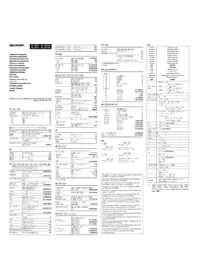
- THE KEYBOARD
- ENGLISH
- INTRODUCTION
- OPERATIONAL NOTES
- SPANISH
- CALCULATION EXAMPLES
- DATE MEMORY (QS-2770H ONLY)
- REPEAT ADDITION AND SUBTRACTION
- ADDITION AND SUBTRACTION WITH ADD MODE
- MIXED CALCULATIONS / MIXED CALCULATIONS
- RECIPROCAL CALCULATIONS / CÁLCULOS RECÍPROCOS
- PERCENT MULTIPLICATION - DIVISION
- ADD-ON AND DISCOUNT / RECARGOS Y DESCUENTOS
- GRAND TOTAL CALCULATION / CÁLCULO DE TOTAL GLOBAL
- MARGIN / MARGIN
- ET AND CT CALCULATION (05.377W, PPB)
Brand : SHARP
Model : QS-1760H
Category : Calculator