PLMRMP2A - Receiver Pyle - Free user manual and instructions
Find the device manual for free PLMRMP2A Pyle in PDF.


| Product Type | Car Stereo Receiver |
| Brand | Pyle |
| Model | PLMRMP2A |
| Color | Black |
| Dimensions (W x H x D) | 7.1 x 2.0 x 6.1 inches |
| Weight | 1.3 lbs |
| Power Source | 12V DC (negative ground) |
| Peak Power Output | 4 x 50 Watts |
| RMS Power Output | 4 x 22 Watts |
| Frequency Range AM | 530 – 1710 kHz |
| Frequency Range FM | 87.5 – 107.9 MHz |
| Bluetooth Version | 4.2 |
| Bluetooth Range | Up to 30 feet |
| Supported Audio Formats | MP3, WMA, FLAC |
| Input Options | USB, SD card, AUX 3.5mm, Bluetooth |
| Output Options | 4-channel RCA preamp, subwoofer output |
| Display | LCD with adjustable backlight |
| Remote Control | Included |
| Installation Type | Single-DIN |
| Included Accessories | Mounting sleeve, wiring harness, remote control, installation hardware |
| Maintenance | Clean with soft dry cloth; avoid liquids |
| Safety | Use appropriate fuse; disconnect battery during installation |
| Spare Parts & Repairability | Contact Pyle customer service for replacement parts |
| Water Resistance | Not specified (avoid water contact) |
Frequently Asked Questions - PLMRMP2A Pyle
User questions about PLMRMP2A Pyle
0 question about this device. Answer the ones you know or ask your own.
Ask a new question about this device
Download the instructions for your Receiver in PDF format for free! Find your manual PLMRMP2A - Pyle and take your electronic device back in hand. On this page are published all the documents necessary for the use of your device. PLMRMP2A by Pyle.
USER MANUAL PLMRMP2A Pyle
Thank you for making a PLYE your choice marine for audio entertainment!
It's compact, waterproof design allows for flexible mounting possibilities, and makes it simple to expand the audio system capabilities for vehicle.
PLMRMP2A
FEATURES:
- 2 x 150 Watts RMS at 4 ohm
- 2 x 300 Watts MAX at 4 ohm
- 2 x 500 Watts RMS at 2 ohm
●Electronic Crossover Network - 2 Ohm Stereo Stable
- Anti-Thump Turn- On
- Soft Turn On / Off
- Adjustable High / Low Level Inputs
- RCA Line Input
●Power Protection Circuitry
•Volume Gain Remote Control
•T.H.D S/N Ratio : > 95 dB - Channel Separation : > 65 dB
●Frequency Response : 10 – 40K Hz - Fuse : 10 A
●Dimensions : 4.21"(L) x 3.50"(W) x 2.05"(H)
Accessories:
- IPod / MP3 / Waterproof 3.5mm Stereo to RCA Adaptor
- Remote Control for Volume Gain
- Sold as : Unit
PLMRMP4A
FEATURES:
- 4 x 150 Watts RMS at 4 ohm
- 4 x 300 Watts MAX at 4 ohm
- 4 x 500 Watts RMS at 2 ohm
●Electronic Crossover Network - 2 Ohm Stereo Stable
- Anti-Thump Turn- On
- Soft Turn On / Off
- Adjustable High / Low Level Inputs
- RCA Line Input
●Power Protection Circuitry
●Volume Gain Remote Control
•T.H.D S/N Ratio : > 95 dB
●Channel Separation : > 65 dB
●Frequency Response : 10 – 40K Hz - Fuse : 10 A
- Dimensions : 6.18"(L) x 3.50"(W) x 2.05"(H)
Accessories:
- IPod / MP3 / Waterproof 3.5mm Stereo to RCA Adaptor
- Remote Control for Volume Gain
- Sold as : Unit
What is included?
When first unpacking your new amplified marine speaker system, Please check first that the package contains all of the items below. If something is missing, contact the store where you purchased the product.
PLMRMP2A
• One Piece 2 Channel Waterproof Marine Power Amplifier
• One Piece iPod / MP3 Waterproof 3.5mm Stereo to RCA Adaptor
• One Piece Remote Control for Volume Gain
PLMRMP4A
• One Piece 4 Channel Waterproof Marine Power Amplifier
• One Piece iPod / MP3 Waterproof 3.5mm Stereo to RCA Adaptor
• One Piece Remote Control for Volume Gain
Installation precautions
Before you drill or cut any holes, investigate your vessel's layout very carefully. Take special care when you work near the gas tank, fuel lines, hydraulic lines and electrical wiring.
Never operate the amplifier when it is unmoured. Attach all audio system components securely within the amplifier to prevent damage, especially in an accident.
Do not mount this amplifier so that wire connections are unprotected. in a pinched condition, in contact with any metal surfaces in your marine vessel, or likely to be damaged by nearby objects.
Before making or breaking power connections in your system, disconnect the marine vessel battey. Confirm that your heaf unit or other equipment is turned off whine connecting the input jacks and speaker terminals.
If you need to teplace the power fuse, replace it only with a fuse idenetical to that supplied with the amplifier, Using a fuse of a different type or rating may result in damage to your audio system or your amplifier which is not covered by the manufacturer's warranty.
Don't misuse the level control!
Do not mistake the input level control for a volume control! It is designed ONLY to match the output level of your audio source to the input level of your amplifier.
Do not adjust this input level of maximum unless your input level requires it. Ignoring these instructions will result in an input overload to the amplifier, and excessive audio distortion. It can also cause the protection circuit to engage.
Controls, Input and Output Cables:
text_image
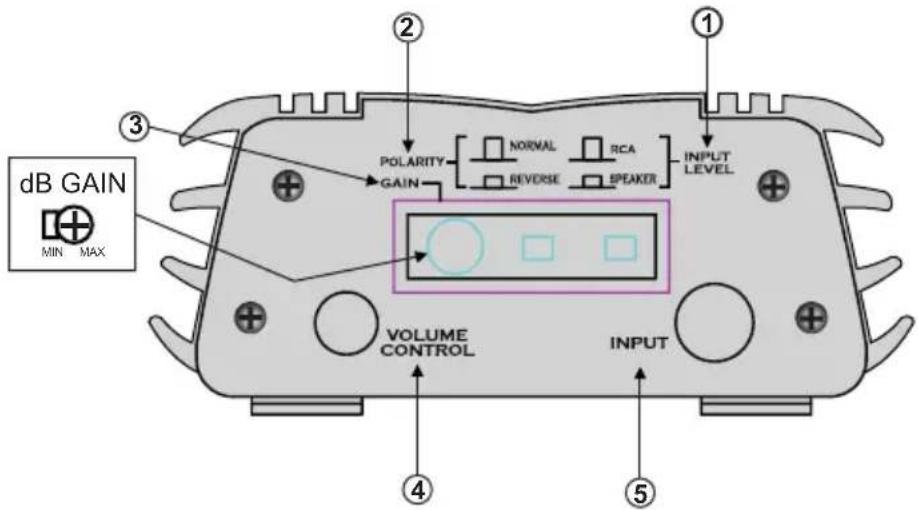
dB GAIN MIN MAX POLARITY GAIN NORMAL RCA REVERSE SPEAKER INPUT LEVEL VOLUME CONTROL INPUT ① ② ③ ④ ⑤The switches and gain settings are located behind a watertight pulg, which also lights up when the amplifier is on. Be sure to replace the plug when finished with adjustments
① The INPUT LEVEL switch selects the input sensitivity of the amplifier. If you are connecting to a LINE level source (typically any RCA type connection) then the switch should be in the LINE (out) position. When connecting to loudspeaker outputs or headphone or high level sources then set the switch to the SPEAKER (in) position.
② The POLARITY switch allows the user to optimize bass performance in the case that there are more than 1 set of loudspeakers producing bass in the system. Play some music with strong bass content and listen with the switch alternately in the NORMAL and REVERSE position until it can be determined which setting results in more pleasing bass response. If in doubt, or if any interaction with other speakers is unlikely, then leave the switch in the NORMAL position.
③ The GAIN control adjusts the overall level of the amplifier. When using the amplifier without volume control the level should beset to achieve a balance with other loudspeakers in the system. As arule, keep the gain setting as low as possible while still insuring that thesystem will reach full output power. When using the system with external volume control, set the external Volume Control to FULL (clockwise) and adjust the gain on the amplifier until full output power is reached. Full output power level can be determined by turning the gain control clockwise until the apparent loudness does not appear to increase any more. Leave the control at the setting where this begins to become apparent.
④ VOLUME CONTROL Plug for the waterproof remote volume control. When installed, this control will turn off the PLMRMP3A Amp when turned all the way down.
⑤ INPUT Stereo RCA audio input for connecting other audio devices
Power and Speaker Wiring
text_image
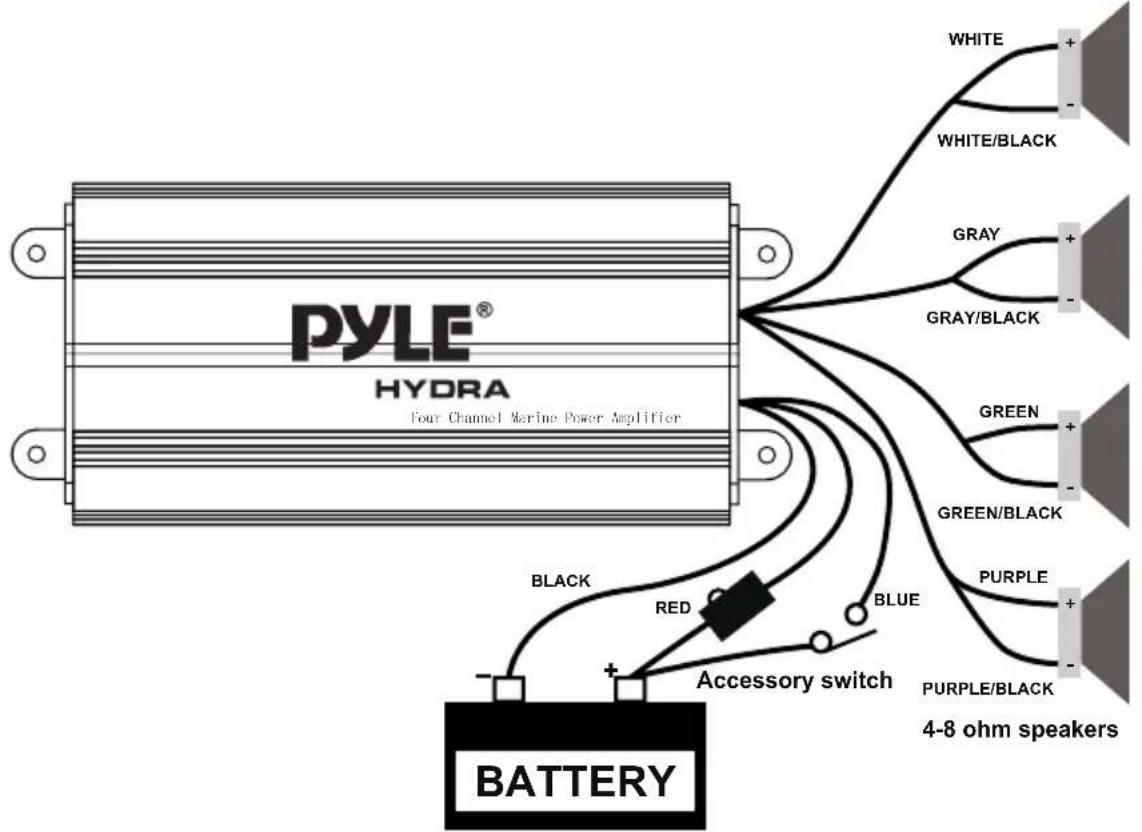
PYLE® HYDRA Four Channel Marine Power Amplifier WHITE WHITE/BLACK GRAY GRAY/BLACK GREEN GREEN/BLACK PURPLE PURPLE/BLACK 4-8 ohm speakers BLACK RED BLUE Accessory switch BATTERYwire color
Red
Black
Blue
White
Whire/Black
Gray
Gray/Black
Green
Green/Black
Purple
Purple/Black
Description
Battery (+), 12dc
Barrery (-), Ground
Remote Turn On, 12vdc = ON
CH1 (+)
CH1 (-)
CH2 (+)
CH2 (-)
CH3 (+)
CH3 (-)
CH4 (+)
CH4 (-)