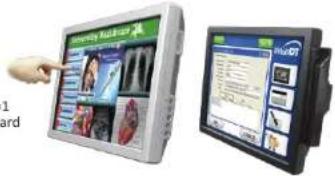
DT515T - Desktop computer DT Research - Free user manual and instructions
Find the device manual for free DT515T DT Research in PDF.


User questions about DT515T DT Research
0 question about this device. Answer the ones you know or ask your own.
Ask a new question about this device
Download the instructions for your Desktop computer in PDF format for free! Find your manual DT515T - DT Research and take your electronic device back in hand. On this page are published all the documents necessary for the use of your device. DT515T by DT Research.
USER MANUAL DT515T DT Research
Integrated LCD Systems
Mounting
The DT Research Integrated LCD System is designed to be secured to VESA-compliant mounting arms or stands. This is accomplished by equipping the standard metal base on the rear of the display unit. The VESA-compliant mounting holes at the rear of the device will mate with VESA mounts or arms to meet the requirements of the deployment.
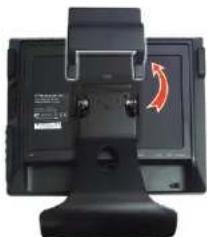
natural_image
Close-up of a black electronic device with a red circular arrow indicator on the screen (no visible text or symbols)- Remove the detachable base by pressing upward to remove the cover, then unscrewing the four screws attaching the base to the display.
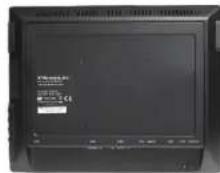
2. The display without the base.
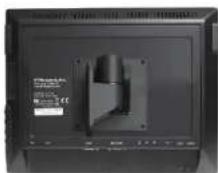
3. Attach the new VESA-compliant mounting device or stand to the display.
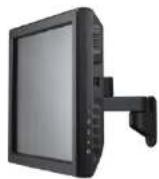
4. The display successfully mounted on a VESA-compliant mounting arm.

ENGLISH
DT Research, Inc.
2000 Concourse Drive, San Jose, CA 95131 http://www.dlnsearch.com
Copyright © 2015, II (Director), Inc. All Rights Reserved. II (Director) is a registered trademark of CI Research, Inc.
DT Research
Integrated LCD System
text_image
Computer desktop screenshot showing Windows logo and a monitor displaying a data table with Chinese textENGLISH
INTRODUCTION
Thank you for acquiring the DT Research Integrated LCD System, a 15-inch/17-inch/19-inch/21.5-inch/24-inch TFT display-integrated, thin computing platform, offering adaptability to mounting configurations and applications, including information appliance, thin client for server computing, and disk drive-equipped options.
Please take a few moments to review the contents of this document to ensure that the setup and startup proceed smoothly. The DT Research Integrated LCD System is ready for use, out of the box, in its default configuration when powered by the power source provided. The following discussion offers guidance on the hardware elements and features of the DT Research Integrated LCD System. Please refer to your device provider for information pertaining to the software operating system or software applications.
Package Contents
• One DT Research Integrated LCD System with desktop stand
• AC/DC power adapter with power cord
- Basic operation guide
Precautions
- Always exercise care when operating and handling the DT Research Integrated LCD System.
- Never disassemble any portion of the enclosure, as this will void any product warranty on the DT Research Integrated LCD System.
- Do not use any AC/DC adapter other than the one provided with the device or a replacement acquired from the manufacturer.
- In the unlikely event that smoke, abnormal noise, or strange odor is present, immediately power down the DT Research Integrated LCD System and disconnect all power sources. Please report the problem to your device provider immediately.
Integrated LCD Systems
Packaging
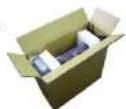
The DT Research Integrated LCD System is packaged with recyclable materials and designed for maximum protection in transportation and handling.
- When possible, please save the packaging carton and protective inserts for re-use if there is ever a need to ship the DT ResearchIntegrated LCD System.
Cleaning the anti-microbial enclosure (DT500 MD series)
- Use a soft/non-abrasive cloth moistened with water to clean the enclosure.
- If using a cleaner, an alcohol-free and oxide-free cleaning liquid is recommended.
• To prevent scratching the anti-microbial coating, please wipe gently.
I/O Panels & Function Buttons
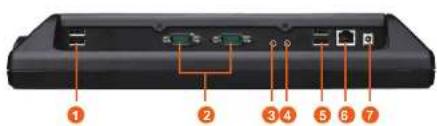
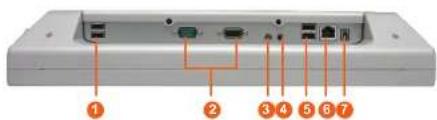
The DT Research Integrated LCD System has a comprehensive set of I/O ports. The following ports are located along the lower rear edge of the display unit.
DT515T/ DT517T/ DT519T/ DT519S/ DT519S-MD
text_image
Diagram of a device rear panel with numbered labels pointing to ports and connectors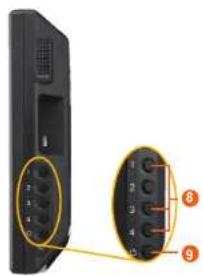
natural_image
Close-up of a black remote control panel with labeled buttons and ports (no text or symbols visible)DT522S-MD/ DT524S-MD
text_image
① ② ③ ④ ⑤ ⑥ ⑦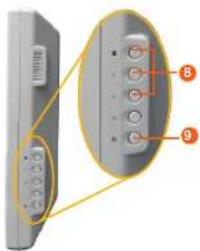
text_image
Diagram of a mobile phone rear panel with labeled buttons and connectors, showing front and back views with numbered annotations.Two USB 2.0 ports1.
COM ports2.
Audio-out jack3.
Microphone-in jack4.
Two USB 2.0 ports5.
Ethernet port (RJ45)6.
DC-in jack7.
Button Description
| 8. Programmable | The three buttons are intended to be user programmable via software in applicable operating systems. |
| 9. Power | · May be configured to perform different functions, depending on the software operating system. · Depending on the OS, a brief, firm push will trigger software-enabled entry into Shutdown or Standby modes. Push in similar manner to Restart or to exit Standby mode. · Push and hold for over 4 seconds to forcefully shut down the device. This method of powering off should only be used when proper shutdown through software is not possible. |
Options
The DT Research Integrated LCD System has a number of optional configurations in both software and hardware. These include:
- SSD or HDD storage
- IR touch screen display
- Magnetic card reader
- Built-in 802.11a/b/g/n WLAN module
- Smart card reader; supports ISO 7816 T=0, T=1 smart card, 3V/5V smart card and memory card