
PRIMERGY S2 - Server FUJITSU - Free user manual and instructions
Find the device manual for free PRIMERGY S2 FUJITSU in PDF.


| Product Type | Server |
| Brand | Fujitsu |
| Model | PRIMERGY S2 |
| Form Factor | Ultra-compact, vertical or horizontal placement |
| Dimensions (W x D x H) | 98 x 383 x 340 mm |
| Weight | Approx. 8 kg |
| Power Supply | 250W, 85% efficiency |
| Voltage Range | 100 V – 240 V AC, 50-60 Hz |
| Processor Options | AMD Sempron, Athlon II, Phenom II, Opteron 3200 Series |
| Memory Capacity | 2 GB to 16 GB DDR3 ECC |
| Storage Bays | Up to 4x 3.5-inch or 6x 2.5-inch HDDs |
| RAID Support | Onboard RAID 0/1/10 |
| Networking | 1x Gb Ethernet (BCM 57780) |
| USB Ports | 12 (2 front, 6 rear, 4 internal) |
| Graphics | ATI Radeon HD 4250 via DVI-I (VGA adapter included) |
| Noise Level | 20 dB(A) typical |
| Operating Temperature | 10°C to 35°C |
| Warranty | 1 year on-site service |
| Operating Systems Supported | Windows Server 2008 R2, Hyper-V Server, SBS 2011, Linux derivatives |
| Maintenance & Cleaning | Keep ventilation clear; clean exterior with dry cloth. No user-serviceable internal parts. |
| Safety Compliance | CE, FCC Class A, CSA, CCC, RoHS |
| Spare Parts & Repairability | Contact Fujitsu or authorized service providers for spare parts. Designed for easy drive and memory upgrades. |
Frequently Asked Questions - PRIMERGY S2 FUJITSU
User questions about PRIMERGY S2 FUJITSU
0 question about this device. Answer the ones you know or ask your own.
Ask a new question about this device
Download the instructions for your Server in PDF format for free! Find your manual PRIMERGY S2 - FUJITSU and take your electronic device back in hand. On this page are published all the documents necessary for the use of your device. PRIMERGY S2 by FUJITSU.
USER MANUAL PRIMERGY S2 FUJITSU
Micro server for macro results
With limited budgets and resources, small businesses must focus on maximizing productivity at minimum cost. PRIMERGY MX servers increase the productivity of small businesses. How? By providing affordable, uncomplicated, reliable server technology on which to centralize their IT services. PRIMERGY MX servers are ultra-compact and whisper quiet, making them perfect for small offices. Their reliability is proven by testing through 5000 boot cycles – far more than other vendors do. The servers also minimize their environmental impact and operating costs through power supplies with a best-in-class energy efficiency of 85%.
PRIMERGY MX servers let you focus on your top priority: your customer – not the IT!
PRIMERGY MX130 S2
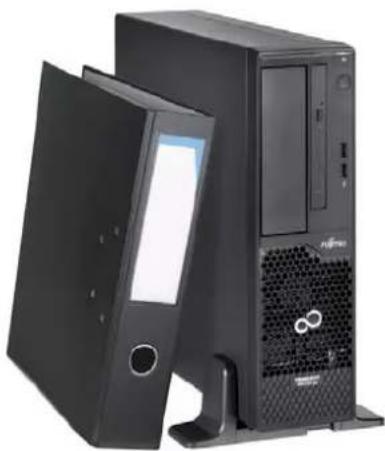
The PRIMERGY MX130 S2 micro server is just what small businesses need. The MX130 S2 is a solid platform on which to base your file, web or print services. It increases your company's potential by offering server reliability, efficiency and great value. The running costs and environmental impact are micro too, thanks to the 85% efficient power supply unit. If you think of servers as complicated, space-eating machines, then think again. The MX130 S2 comes in an ultra-compact chassis which can also be used horizontally. And, best of all, it is so silent you will hardly know it is there. PRIMERGY MX130 S2 – the micro server for macro results.
natural_image
Black desktop computer tower with open file folder and ventilation grille (no visible text or symbols)Features and Benefits
Main Features Benefits
■ 24x7 performance, server ECC memory, onboard RAID 0/1/10 and optional Trusted Platform Module (TPM)
■ Up to 16 GB DDR3 ECC RAM
■ Can integrate up to 4x 3.5-inch HDDs or up to 6x 2.5-inch HDDs
■ Ultra-compact form factor with less than 13 liters volume - can be used everywhere in either vertical or horizontal position
■ High energy efficiency with 85% efficiency power supply unit (PSU)
■ Higher data safety and reliability than using PCs with external USB drives or optical media
■ Share information by running office server applications
■ Flexible and expandable base unit
■ Ideal for all environments where space is scarce, e.g. small offices, retail environments or education
■ Benefit from Fujitsu's pioneering experience in Green IT - save money and minimize environmental impact
Technical details
| Mainboard | |
| Mainboard type D3090 | |
| Chipset AMD 880G | |
| Processor quantity and type | 1 x AMD SempronTM / AMD AthlonTM II / AMD PhenomTM II (only available in Continental Europe, Middle East, Africa and India) / AMD OpteronTM 3200 Series (available on project request in Continental Europe, Middle East, Africa and India) |
| Processor AMD AthlonTM II X2 220 | (2 Cores, 2.8 GHz, SLC: 1 MB) |
| AMD AthlonTM II X2 265(2 Cores, 3.3 GHz, SLC: 2 MB) | |
| AMD FX 4100(4 Cores, 3.6 GHz, SLC: 8 MB) | |
| AMD PhenomTM II X6 1065T(6 Cores, 2.9 GHz, SLC: 9 MB) | |
| AMD SempronTM 145(1 Core, 2.8 GHz, SLC: 1 MB) | |
| Memory slots 4 | |
| Memory slot type DIMM (DDR3) ECC | |
| Memory capacity (min. - max.) 2 GB - 16 GB | |
| Memory protection ECC | |
| Memory notes | Mix and match possible, with dual channel operation better performance (2 modules with equal capacity necessary). Single channel (1 module) configuration possible. |
| Memory options 2 GB (1 module(s) 2 GB) DDR3, ECC, 1333 MHz, PC3-10600, DIMM | |
| 4 GB (1 module(s) 4 GB) DDR3, ECC, 1333 MHz, PC3-10600, DIMM | |
| Interfaces | |
| USB ports 12 (2 x front, 6 x back, 4 x internal) | |
| DVI | 1 (Dual link DVI-I), ATI Radeon® HD 4250 (up to 2811MB) on board |
| Graphics (15-pin) | 1 No dedicated 15-pin VGA port available. VGA is available via the supplied DVI to VGA adapter. |
| Audio: line-in | 1 |
| Audio: line-out | 1 |
| Audio: microphone | 1 |
| Audio: comments | For projects only |
| Serial connection | 1 9pin, 16 byte FIFO, 16550 compatible |
| Mouse / Keyboard (PS/2) | 2 |
| LAN / Ethernet (RJ-45) | 1 Gbit/s Ethernet |
| Status LEDs | Power (green) |
| I/O controller on board | |
| RAID controller | 6 port SATA with RAID 0/1/10 for HDDs |
| SATA Controller | SATA II |
| LAN Controller BCM 57780, 10/100/1000 Mbit/s Ethernet, PXE-Boot by LAN via PXE-Server | |
| Trusted Platform Module (TPM) | Infineon / 1.2 (option) |
| Slots | |
| PCI-Express 2.0 x4 | 1 x Low profile max. length 180mm |
| PCI-Express 2.0 x16 | 1 x Low profile max. length 180mm |
| PCI-Express x1 1 x Low profile max length 85mm | |
| PCI-slots | 1 x Low profile max. length 180mm |
| Slot Notes | PCI 32/33 MHz, 3.3V/5V |
| Storage drive bays | 4 x 3.5-inch non hot-plug SATA |
Storage drive bay configuration Maximum 4x 3.5" HDDs possible.
2x HDD with easy change, 2x with screw-in.
Alternatively 2.5" HDDs possible, max. 6x 2.5" possible.
2.5-inch HDDs available on project request.
Accessible drive bays 1 x 5.25/1.6-inch for backup devices or CD-RW/DVD
Notes accessible drives 1x slimline DVD accessible.
Alternatively to slimline DVD a 4th 3.5" HDD can be used.
Number of fans 3
Fan configuration Front-fan, CPU-fan, PSU-fan
Operating buttons On/off switch
Status LEDs Power (green)
Operating systems
Certified or supported operating Microsoft® Hyper-V™ Server 2008 R2
systems and virtualization software Microsoft® Windows Server® 2008 R2 Standard
Microsoft® Windows Server® 2008 R2 Foundation
Microsoft® Windows® Small Business Server Essentials 2011
Operating system release link http://docs.ts.fujitsu.com/dl.aspx?id=a9e600b9-e4cb-4f48-aa41-632f69058421
Operating system notes Novell® certification
Red Hat® certification
Support of other Linux derivatives on demand
Server Management
Dimensions / Weight
Floor-stand (W x D x H) 98 x 383 x 340 mm
Dimension notes Dimensions in vertical position (excluding feet)
Weight approx. 8 kg
Weight notes Actual weight may vary depending on configuration
Environmental
Operating ambient temperature 10 - 35°C
Operating environment FTS 04230 – Guideline for Data Center (installation locations)
Operating environment Link http://docs.ts.fujitsu.com/dl.aspx?id=d4ebd846-aa0c-478b-8f58-4cfbf3230473
Noise emission According to ISO9296
Sound pressure (LpAm) 20 dB(A) (idle)/ 20 dB(A) (operating); may vary according to configuration.
Sound power (LWAd; 1B = 10dB) 3.5B (idle) / 3.5B (operating); may vary according to configuration.
Electrical values
Power supply configuration 1
Max. output of single power supply 250 W
Power supply efficiency 85%
Rated voltage range 100 V - 240 V
Rated frequency range 50 Hz - 60 Hz
Rated current max. 3.5 A - 1.5 A (100 V / 240 V)
Active power (max. configuration) 159 W
Heat emission 572.4 kJ/h (542.5 BTU/h)
Compliance
Product PRIMERGY MX130 S2
Model DT8-D3090
Germany GS
Europe CE Class A *
USA/Canada FCC Class A
CSAc/us
Compliance
| Global CB | |
| RoHS (Restriction of hazardous substances)WEEE (Waste electrical and electronical equipment) | |
| Japan VCCI | |
| Russia GOST-R | |
| South Korea KC | |
| China | CCC |
| Australia/New Zealand C-Tick | |
| Taiwan | BSMI |
| Saudi Arabia | SASO |
| Compliance notes | There is general compliance with the safety requirements of all European countries and North America. National approvals required in order to satisfy statutory regulations or for other reasons can be applied for on request. |
| Compliance link | http://sp.ts.fujitsu.com/sites/certificates/ |
Components
| Storage disks HDD SATA, 1000 GB, 7200 rpm, 3.5-inch, economic | |
| HDD SATA, 500 GB, 7200 rpm, 3.5-inch, economic | |
| HDD SATA, 250 GB, 7200 rpm, 3.5-inch, economic | |
| HDD SATA, 3 Gb/s, 2000 GB, 7200 rpm, non hot plug, 3.5-inch, business critical | |
| HDD SATA, 3 Gb/s, 1000 GB, 7200 rpm, non hot plug, 3.5-inch, business critical | |
| HDD SATA, 3 Gb/s, 500 GB, 7200 rpm, non hot plug, 3.5-inch, business critical | |
| Backup Drives RDX Drive, 160 GB, 320 GB, 500 GB, 1 TB, 25 MB/s, half height, USB 2.0 | |
| Optical drives DVD-ROM, SATA I | |
| DVD Super Multi, SATA I | |
| LAN Controller Ethernet Ctrl. 1 x 1 Gb Gigabit PCIe x1, DS | |
| Ethernet Ctrl. 4 x 1 Gb Fujitsu Eth Ctrl 4x1Gbit PCIe x4 D2745 Cu | |
| Warranty | |
| Standard Warranty 1 year | |
| Service level On-site Service | |
| Maintenance and Support Services - the perfect extension | |
| Recommended Service 5x9, Onsite Response Time: next business day | |
| Service Lifecycle 5 years | |
| Service Weblink http://www.fujitsu.com/fts/services | |
More information
Fujitsu platform solutions
In addition to Fujitsu PRIMERGY MX130 S2, Fujitsu provides a range of platform solutions. They combine reliable Fujitsu products with the best in services, know-how and worldwide partnerships.
Dynamic Infrastructures
With the Fujitsu Dynamic Infrastructures approach, Fujitsu offers a full portfolio of IT products, solutions and services, ranging from clients to datacenter solutions, Managed Infrastructure and Infrastructure as-a-Service. How much you benefit from Fujitsu technologies and services depends on the level of cooperation you choose. This takes IT flexibility and efficiency to the next level.
Computing Products
www.fujitsu.com/global/services/computing/
Software
www.fujitsu.com/software/
More information
Learn more about Fujitsu PRIMERGY MX130 S2, please contact your Fujitsu sales representative or Fujitsu Business partner, or visit our website. www.fujitsu.com/fts
Fujitsu green policy innovation
Fujitsu Green Policy Innovation is our worldwide project for reducing burdens on the environment. Using our global know-how, we aim to resolve issues of environmental energy efficiency through IT. Please find further information at http://www.fujitsu.com/global/about/environment/

Green Policy Innovation
Copyrights
All rights reserved, including intellectual property rights. Changes to technical data reserved. Delivery subject to availability. Any liability that the data and illustrations are complete, actual or correct is excluded. Designations may be trademarks and/or copyrights of the respective manufacturer, the use of which by third parties for their own purposes may infringe the rights of such owner. For further information see http://www.fujitsu.com/fts/resources/navigation/terms-of-use.html Copyright © Fujitsu Technology Solutions
Disclaimer
Technical data are subject to modification and delivery subject to availability. Any liability that the data and illustrations are complete, actual or correct is excluded. Designations may be trademarks and/or copyrights of the respective manufacturer, the use of which by third parties for their own purposes may infringe the rights of such owner.
CONTACT
FUJITSU LIMITED
Website: www.ts.fujitsu.com
2012-05-30 CE-EN
All rights reserved, including intellectual property rights. Changes to technical data reserved. Delivery subject to availability. Any liability that the data and illustrations are complete, actual or correct is excluded.
Designations may be trademarks and/or copyrights of the respective manufacturer, the use of which by third parties for their own purposes may infringe the rights of such owner.
For further information see http://www.fujitsu.com/fts/resources/navigation/terms-of-use.html
Copyright © Fujitsu Technology Solutions
Brand : FUJITSU
Model : PRIMERGY S2
Category : Server