
VL-GM001A - Intercom PANASONIC - Free user manual and instructions
Find the device manual for free VL-GM001A PANASONIC in PDF.
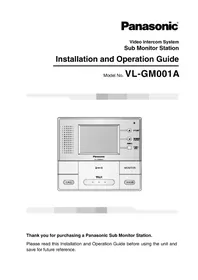


| Product Type | Sub Monitor Station for Intercom System |
| Brand | Panasonic |
| Model | VL-GM001A |
| Display | 3.5-inch color LCD screen |
| Microphone | Built-in |
| Speaker | Built-in |
| Power Supply | 24 V DC (via included AC adaptor) |
| AC Adaptor Input | 100 V – 240 V AC, 50/60 Hz |
| Current Consumption (Standby) | Approximately 38 mA |
| Current Consumption (Operation) | Approximately 210 mA |
| Dimensions (H × W × D) | 145 mm × 165 mm × 44 mm (5.75" × 6.5" × 1.75") |
| Weight | Approximately 600 g (1.32 lb) |
| Operating Temperature | 0 °C to 40 °C (32 °F to 104 °F) |
| Operating Humidity | Up to 90% RH (non-condensing) |
| Installation Method | Surface mount; optional flush mount (requires sold-separately kit) |
| Housing Material | Flame retardant ABS resin (panel: acrylic resin) |
| Max Units per System | Up to 2 sub monitor stations per monitor station |
| Connection Wiring | Daisy chain; CAT-3 24 AWG wire, max 100 m between stations |
| Power Cable Type / Distance | ∅1.2 fire alarm cable 16 AWG, max 30 m to AC adaptor |
| Cleaning | Soft dry cloth; avoid alcohol, thinners, or abrasives |
| Safety Certifications | FCC Part 15 Class B compliant |
| Included Accessories | Sub monitor station, AC adaptor, power cord, power cable, wood screws |
| Warranty | Refer to sales receipt |
Frequently Asked Questions - VL-GM001A PANASONIC
User questions about VL-GM001A PANASONIC
0 question about this device. Answer the ones you know or ask your own.
Ask a new question about this device
Download the instructions for your Intercom in PDF format for free! Find your manual VL-GM001A - PANASONIC and take your electronic device back in hand. On this page are published all the documents necessary for the use of your device. VL-GM001A by PANASONIC.
USER MANUAL VL-GM001A PANASONIC
Installation and Operation Guide
Model No. VL-GM001A

Thank you for purchasing a Panasonic Sub Monitor Station.
Please read this Installation and Operation Guide before using the unit and save for future reference.
Important Information
FCC and Other Information 2
Important safety instructions .... 3
Additional safety information 4
For best performance 5
Introduction and Installation
Included items....6
Location of controls 7
Before installation 8
Installing the sub monitor station 10
Help
Cleaning 17
General Information
Technical data about this product 18
FCC and Other Information
This device complies with Part 15 of the FCC Rules. Operation is subject to the following two conditions:
(1) This device may not cause harmful interference. (2) This device must accept any interference received, including interference that may cause undesired operation.
CAUTION:
Any changes or modifications not expressly approved by the party responsible for compliance could void the user's authority to operate this equipment.
NOTE:
This equipment has been tested and found to comply with the limits for a Class B digital device, pursuant to Part 15 of the FCC Rules. These limits are designed to provide reasonable protection against harmful interference in a residential installation. This equipment generates, uses, and can radiate radio frequency energy and, if not installed and used in accordance with the instructions, may cause harmful interference to radio communications.
However, there is no guarantee that interference will not occur in a particular installation.
If this equipment does cause harmful interference to radio or television reception, which can be determined by turning the equipment off and on, the user is encouraged to try to correct the interference by one or more of the following measures:
- Reorient or relocate the receiving antenna.
- Increase the separation between the equipment and receiver.
- Connect the equipment into an outlet on a circuit different from that to which the receiver is connected.
- Consult the dealer or an experienced radio/TV technician for help.

CAUTION
RISK OF ELECTRIC SHOCK DO NOT OPEN


The lightning flash with arrowhead within a triangle is intended to tell the user that parts inside the product are a risk of electric shock to persons.

The exclamation point within a triangle is intended to tell the user that important operating and servicing instructions are in the papers with the appliance.
Important safety instructions
1) Read these instructions. All the safety and operating instructions should be read before the appliance is operated. 2) Keep these instructions. The safety and operating instructions should be retained for future reference. 3) Heed all warnings. All warnings on the appliance and in the operating instructions should be adhered to. 4) Follow all instructions. All operating and use instructions should be followed. 5) Do not use this apparatus near water. For example, near a bathtub, wash bowl, kitchen sink, or laundry tub, in a wet basement, or near a swimming pool, and the like. 6) Clean only with dry cloth. Do not use liquid cleaners or aerosol cleaners. Use a dry cloth for cleaning. 7) Do not block any ventilation openings. Install in accordance with the manufacturer's instructions. Slots and openings in the cabinet are provided for ventilation and to ensure reliable operation of the product and to protect it from overheating. The openings should never be blocked by placing the product on a bed, sofa, rug, or other similar surface. 8) Do not install near any heat sources such as radiators, heat registers, stoves, or other apparatus (including amplifiers) that produce heat. This product should not be placed in a built-in installation such as a bookcase or rack unless proper ventilation is provided or the manufacturer's instructions have been adhered to.
9) Do not defeat the safety purpose of the polarized or grounding-type plug. A polarized plug has two blades with one wider than the other. A grounding type plug has two blades and a third grounding prong. The wide blade or the third prong are provided for your safety. If the provided plug does not fit into your outlet, consult an electrician for replacement of the obsolete outlet. 10) Protect the power cord from being walked on or pinched particularly at plugs, convenience receptacles, and the point where they exit from the apparatus. 11) Only use attachments/accessories specified by the manufacturer. 12) Unplug this apparatus during lightning storms or when unused for long periods of time. This will prevent damage to the product due to lightning and power-line surges. 13) Refer all servicing to qualified service personnel. Servicing is required when the apparatus has been damaged in any way, such as power-supply cord or plug is damaged, liquid has been spilled or objects have fallen into the apparatus, the apparatus has been exposed to rain or moisture, does not operate normally, or has been dropped.
Additional safety information
- Use only the power source marked on the unit. If you are not sure of the type of power supplied to your home, consult your dealer or local power company.
- Use only the specified AC adaptor.
- Do not tamper with the plug.
- Make sure the plug is securely inserted.
- Do not touch the plug with wet hands.
- Do not place objects on the power cord. Install the unit where no one can step or trip on the cord.
- To reduce the risk of electric shock, do not disassemble this unit. Take the unit to an authorized service center when service is required. Opening or removing covers may expose you to dangerous voltages or other risks. Incorrect reassembly can cause electric shock when the unit is subsequently used.
- Unplug this unit from power outlets and refer servicing to an authorized service center when the following conditions occur:
A. If smoke rises, or an unaccustomed noise or smell is discharged from the unit. B. If metal objects have been dropped inside the sub monitor station.
- Do not put your ear(s) near the speaker, as loud sounds emitted from the speaker may cause hearing impairment.
- Only a qualified technician is allowed to connect a power cable to the unit. Contact an authorized service center.
- Do not make any wiring connections when the power supply is turned on.
- Never install wiring during a lightning storm.
- Do not connect a power cable other than the specified voltage.
- Do not connect the power cable to any terminal other than the one specified.
- When existing chime wires are used, it is possible that they contain AC voltage. Electric shock or unit damage could result. Contact an authorized service center.
- Never touch the inside of the sub monitor station. High voltage is present.
- Make certain when mounting the unit to any wall surface that the method used will hold the weight of the unit properly.
- If the wiring is outdoors, use a protection tube or a surge protector.
- If the wiring is underground, do not make any connections underground.
- WARNING – To Reduce The Risk Of Fire Or Electric Shock, Do Not Expose This Apparatus To Rain Or Moisture.
- WARNING – Unplug this unit from power outlets if it emits smoke, an abnormal smell or makes unusual noise. These conditions can cause fire or electric shock. Confirm that smoke has stopped and contact an authorized service center.
Note:
- This product has a fluorescent lamp that contains a small amount of mercury. It also contains lead in some components. Disposal of these materials may be regulated in your community due to environmental considerations. For disposal or recycling information please contact your local authorities, or the Electronics Industries Alliance: http://www.eiae.org
For best performance
- If a power failure occurs, the unit will not function.
- Do not place any object within 20 cm (8 inches) of the sub monitor station. This may cause communication errors or malfunction.

Included items
①
②
③
④
⑤
⑥
| No. | Item Notes | Quantity | |
| 1 | Sub Monitor station | 1 ---- | |
| 2 | Wood screws | 4 | For the sub monitor station. 4 mm × 35 mm (3/16" × 13/8") |
| 3 | AC adaptor | 1 | Enclosed in the AC adaptor case. |
| 4 | Wood screws 2 | For the AC adaptor case. 4 mm × 16 mm (3/16" × 5/8") | |
| 5 | Power cord 1 ---- | ||
| 6 | Power cable | 1 | ---- |
Sub Monitor Station:
A Sub Monitor Station is an optional unit which, when used through the Monitor Station, operates just like the Monitor Station. Up to two of these units can be connected to the system.
Location of controls
Front view
① Display (3.5-inch color LCD screen) ② Microphone
- Speak into the microphone when talking to a visitor.
③ SELECT (▲) button / BRIGHT button ④ SELECT (▼) button / RECEIVE VOLUME button ⑤ MENU button / PRESS TALK button ⑥ MONITOR button
- Allows you to monitor the sound and camera image from the door station.
⑦ DOOR button - Allows you to open the door. ⑧ TALK button - To answer a door call and/or speak to the visitor. ⑨ CALL button • To call another monitor unit. ⑩ Speaker
Before installation
To avoid malfunction or communication disturbance, do not install the sub monitor station in the following locations:
- Places where vibration or any other kind of impact occurs.
- Places where echoing is frequent.
- Places where a high concentration of dust, hydrogen sulfide, phosphorus, ammonia, sulfur, carbon, acid, or noxious fumes occur.
- Within 2 m (6'7") of a TV, microwave, personal computer, air conditioner or any other electrical device.
The sub monitor station and AC adaptor are for indoor use only.
Do not use it outdoors, otherwise it may malfunction.
- Use the flush mount unit (sold separately) when installing the sub monitor station into a wall.
- Refer to the Installation and Operation Guide that is included with the flush mount unit for details on installing the flush mount unit.
Standard installation position of the sub monitor station
Place the sub monitor station in a location so that your eyes are the same height as the center of the display.
Note:
- In areas surrounded by high electrical field, disturbance may occur in the sub monitor station's image or sound.
- Be sure to install the sub monitor station more than 5 m (16'5") away from the door station.
- Please check that there is a partition of a wall etc. between a monitor station and sub monitor station and attach them.
- Do not place any objects within 20 cm (8 inches) of the sub monitor station. This may cause communication errors or malfunction.
- Do not install the sub monitor station inside a wall, without using the flush mount unit.
Wiring schematic diagram
All monitor stations and sub monitor stations should be connected by daisy chain wiring method.
The connection of 2nd sub monitor station (the last end terminal) and monitor station is NOT required.
![graph TD A["Sub Monitor station VL-GM001A"] --> B["Chime"] A --> C["AC adaptor"] C --> D["120 V AC"] B --> E["Connect to terminals H11 and H12 of the monitor station."] C --> F["Connect to terminals H21 and H22 of the sub monitor station."]](/content/2026/05/1144284/images/a6a2a0f92ff9115028b58ef74fa1583e9de4e929153f3beb2a68ac5e17ef7972.jpg)
NOTE:
- This chime wiring schematic diagram is only an example. Refer to the wiring instruction provided with your chime for detail.
- Refer to the technical data on page 18 when connecting to a chime.
- All connections are non polar.
Power cable/wire type and distance
- Power cable (between the sub monitor station and the AC adaptor): Type: ∅1.2 Fire alarm cable 16 AWG Distance: Maximum 30 m (about 98 feet)
- Wire (between the monitor station and the last sub monitor station): Type: General cable CAT-3 24 AWG Distance: Maximum 100 m (about 328 feet)
Installing the sub monitor station
1 Remove the sub monitor station from the box, and then remove the padding material from between the front case and the bottom case. - The front case and the bottom case are not joined together, so be careful not to drop them when taking them out of the box.

2 Remove the terminal cover.

3 Install the bottom case to a wall using the wood screws (4 mm x 35 mm, 3/ 16'' x 13/ 8'' ).
- Before drilling, see page 8 for installation location.


Floor surface
4 Attach the power cable to the terminal. See page 16 for details on how to attach the power cable.
- If you want to use your own power cable, see page 9 for the type and distance.

5 Attach the wires that connect to the monitor station and sub monitor station to the terminal. See page 16 for details on how to attach the wires.
• See page 9 for the wire type and distance. • See the wiring schematic diagram on page 9.

- When the front case is attached, the power switch will be pressed and power will be supplied.
6 Remove the sheet covering the connector. Next, after installing the terminal cover in the bottom case, attach the connector by tightening the connector screw. Next, align the lower portion of the bottom case with the lower portion of the front case and press on the panel area just above the screen until the tabs lock in place.


- Check that there are no scraps from the board or other debris in the connector before installing it.
■ Remove the front case from the bottom case
① While pushing the tabs at the top of the front case, pull the top of the front case forward to disengage the front tabs one by one, and then pull the top of front case forward to remove it.


② Remove the connector screw, and then remove the connector.


Do not pull the wire when removing the connector.
7 Take out the AC adaptor and the DC terminal from the case.
- Push the arrow mark on the front case, then release from the rear case. • Take out the cardboard and wood screws. The wood screws are necessary when attaching the AC adaptor and the DC terminal to a wall (page 15).

8 Connect the power cable to the DC terminal, the power cord to the AC adaptor, then connect the power cord to the AC outlet (100 V – 240 V, 50 Hz / 60 Hz).
- Be sure to connect the power cable to the 2 holes on the left side of the DC terminal.
- For details on how to attach the power cable, see page 16.
DC terminal AC adaptor Power cord
9 Attach the DC cord to the clamp on the rear of the DC terminal.
- This will help to avoid the DC cord to disconnect from the DC terminal.

To attach the AC adaptor and the DC terminal to a wall
By placing the AC adaptor and the DC terminal in the case and mounting the case to the wall, you can protect the AC adaptor and the DC terminal from tampering and exposure.
Note:
- Disconnect the DC cord from the clamp on the rear of the DC terminal beforehand. See step 9 on page 14 for details. • Take out the cardboard and wood screws from the AC case beforehand.
1 Attach the rear part of the case to a wall using the wood screws (4 mm x 16 mm, 3/ 16'' × 5/ 8'' ).

2 Pack the AC adaptor and DC terminal as shown.
① Pack the AC adaptor in the rear case.
- Be sure to run the power cord through the power cord hole.
② Pack the DC cord in the rear case.
- Be sure to bundle the DC cord so that it will not touch the bottom of the case.
③ Pack the DC terminal in the rear case.
- Be sure to run the wires through the wire hole, then under the wire rib.

3 Attach the front of the case.

Note:
- To open the case again, push the bottom of the front case, then release from the rear case.

To attach the power cable
Sub Monitor station
DC terminal
- While pressing on the button hard with a pointed object such as a screwdriver, insert the power cable into the terminal connector.
- To disconnect the power cable, press on the button hard while pulling out.
- To attach an optional power cable, cut off about 12 mm (1/2 inch) of the cable cover (①), then push in firmly until the end of the cable is securely inserted into the power connection terminal (②).
①
② Power cable cross section Correct Incorrect
To attach the wires

- Strip off the wire cover so that about 9 mm (3/8") of the wire is exposed.
- While pressing on the button with a pointed object such as a screwdriver, insert the wire into the terminal connector.
- To disconnect a wire, press on the button while pulling out.
Cleaning
Clean the unit with a soft, dry cloth when cleaning. For excessive dirt, wipe the unit with a slightly damp cloth.

Important information:
- Do not use anything containing alcohol, polish powder, powder soap, benzine, thinner, wax, petroleum, or boiling water. Also do not spray with insecticide, glass cleaner, or hair spray. This could cause a change in color or quality.
Technical data about this product
Sub Monitor station
Power supply: 24 V DC
Current consumption: Standby: Approximately 38 mA
At operation: Approximately 210 mA
Dimensions: Approximately height 145 mm x width 165 mm x depth 44 mm (5 3/4" x 6 1/2" x 1 3/4")
Mass (Weight): Approximately 600 g (1.32 lb.)
Operating environment: 0 °C to 40 °C (32 °F to 104 °F), Up to 90 % RH
(Relative Humidity) non condensing
Installation method: Exposure mount
Flush mount (Optional Flush mount unit is required.)
External material: Flame retardant ABS resin (panel: acrylic resin)
Note:
- To connect to a chime, make sure the chime is:
– Normal open (Low active)
- Less than 30 V AC (1 A), 24 V DC (1 A)
AC adaptor (Part number: PFAP1014)
Power supply: 100 V – 240 V AC, 50 Hz / 60 Hz
Output voltage: 24 V DC
Output current: 2 A
Dimensions: Approximately height 120 mm x width 60 mm x depth 35 mm
(4 3/4" x 2 3/8" x 1 3/8")
Mass (Weight): Approximately 310 g (0.68 lb.)
Operating environment: 0 °C to 40 °C (32 °F to 104 °F), up to 90% RH
(Relative Humidity) non-condensing
Note:
- Design and specifications are subject to change without notice.
- The pictures and illustrations in these instructions may vary slightly from the actual product.
For your future reference
Date of purchase
Serial number (found on the rear of the unit)
Dealer's name and address
Dealer's telephone number
Attach your sales receipt here.
Panasonic Consumer Electronics Company,
Division of Panasonic Corporation of North America
One Panasonic Way, Secaucus, New Jersey 07094, U.S.A.
Panasonic Puerto Rico, Inc.
San Gabriel Industrial Park, Ave. 65 de Infantería, Km. 9.5, Carolina, Puerto Rico 00985, U.S.A.
Copyright:
This material is copyrighted by Panasonic Communications Co., Ltd., and may be reproduced for internal use only. All other reproduction, in whole or in part, is prohibited without the written consent of Panasonic Communications Co., Ltd.
© 2005 Panasonic Communications Co., Ltd. All Rights Reserved.
- INSTALLATION AND OPERATION GUIDE
- IMPORTANT INFORMATION
- INTRODUCTION AND INSTALLATION
- HELP
- GENERAL INFORMATION
- FCC AND OTHER INFORMATION
- CAUTION
- NOTE
- RISK OF ELECTRIC SHOCK DO NOT OPEN
- IMPORTANT SAFETY INSTRUCTIONS
- ADDITIONAL SAFETY INFORMATION
- FOR BEST PERFORMANCE
- INCLUDED ITEMS
- SUB MONITOR STATION
- LOCATION OF CONTROLS
- BEFORE INSTALLATION
- STANDARD INSTALLATION POSITION OF THE SUB MONITOR STATION
- WIRING SCHEMATIC DIAGRAM
- POWER CABLE/WIRE TYPE AND DISTANCE
- INSTALLING THE SUB MONITOR STATION
- REMOVE THE FRONT CASE FROM THE BOTTOM CASE
- TO ATTACH THE AC ADAPTOR AND THE DC TERMINAL TO A WALL
- TO ATTACH THE POWER CABLE
- TO ATTACH THE WIRES
- CLEANING
- TECHNICAL DATA ABOUT THIS PRODUCT
- AC ADAPTOR (PART NUMBER: PFAP1014)
- FOR YOUR FUTURE REFERENCE
- ATTACH YOUR SALES RECEIPT HERE
- PANASONIC PUERTO RICO, INC
- COPYRIGHT
Brand : PANASONIC
Model : VL-GM001A
Category : Intercom