INT785 - Stove Montpellier - Free user manual and instructions
Find the device manual for free INT785 Montpellier in PDF.


User questions about INT785 Montpellier
0 question about this device. Answer the ones you know or ask your own.
Ask a new question about this device
Download the instructions for your Stove in PDF format for free! Find your manual INT785 - Montpellier and take your electronic device back in hand. On this page are published all the documents necessary for the use of your device. INT785 by Montpellier.
USER MANUAL INT785 Montpellier
Installation and Operating Instructions
Models: MON-INT785 & MON-INT901
77cm & 90cm 5 Zone Induction Hobs
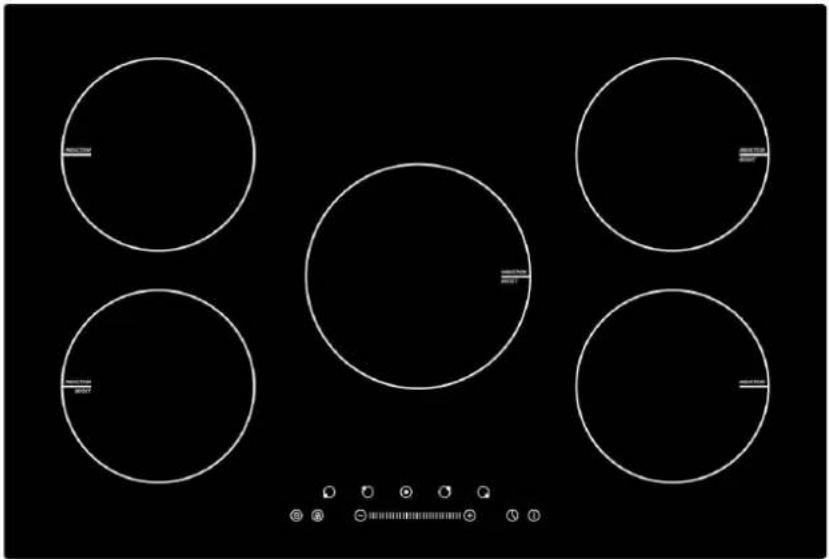
natural_image
Five white circular outlines on a black background, no text or symbols present(MON-INT785 shown - Picture indicative of model supplied)
Please read these instructions carefully before attempting to install or use this appliance. It is advisable to keep these instructions in a safe place for future reference.
N.B. Should your appliance require attention, our service agents will not be able to book a service call without your unique serial number which can be found on the last page of this manual.
Introduction
Thank you for choosing this Montpellier branded appliance. It has been designed to give years of trouble-free use provided it is installed and maintained correctly.
Please read these instructions carefully before installing or using your appliance. It is advisable to keep your purchase and installation receipts with these instructions in a safe place for future reference. Included is some important safety information in addition to guidelines and recommendations that will enable you to take full advantage of all the functions available.
This quality appliance has been tested and certified to meet all applicable UK electrical and safety standards.
This appliance must be installed and connected in accordance with current regulations.
After unpacking the appliance ensure that there is no visible damage. If the appliance has been damaged during transit, do not use it, contact your retailer immediately.
Your 2 year Manufacturer's guarantee
THIS DOES NOT AFFECT YOUR STATUTORY RIGHTS.
Your new Montpellier appliance carries a free guarantee which protects you against the cost of repairs during the first 24 months from date of purchase provided that:
Any claim is accompanied by evidence of the model reference, model serial number and proof of purchase, such as a Sales Receipt, showing that the appliance was purchased within the 24 months prior to the date of claim.
What is not covered under the Guarantee:
Any appliance not correctly installed and operated in accordance with the manufacturer's instructions.
Any appliance that is used for anything other than domestic purposes.
Any defect caused by accident, misuse, unauthorized modification or inexpert repair.
Cost of Call-out where a fault cannot be found with the appliance.
Cost of Call-out for work covering routine maintenance, such as, but not exclusively, cleaning of filters or defrosting.
Cost of Call-out for work required to correct the alignment of doors following door reversal procedures carried out by you.
Use of the appliance by anyone other than the Householder. Use in any commercial environment.
Consumable items, such as, but not exclusively, fuses in plugs, bulbs and breakable items which require routine replacement.
Repair costs incurred that have not been authorised by Repairtech and/or carried out by a non-approved Repairtech engineer.
YOUR GUARANTEE IS VALID ONLY IN THE UK & SOUTHERN IRELAND.
To Register your Appliance simply complete the card in your appliance pack and return it with a stamp affixed or Alternatively you can Register online at www.repairtechuk.com
SERVICE HELP-LINE
Should your appliance develop a fault, please call the
Repairtech Service Helpline on:
01527-888133
Description Of The Appliance
flowchart
graph TD
    A["1."] --> B["2."]
    B --> C["3."]
    C --> D["4."]
    D --> E["5."]
    E --> F["6."]
    F --> G["7."]
    G --> H["8."]
    H --> I["9."]
    I --> J["10."]
    J --> K["11."]
    K --> L["12."]
    L --> M["13."]
    M --> N["14."]
    N --> O["15."]
    O --> P["16."]
    P --> Q["17."]
    Q --> R["18."]
    R --> S["19."]
    S --> T["20."]
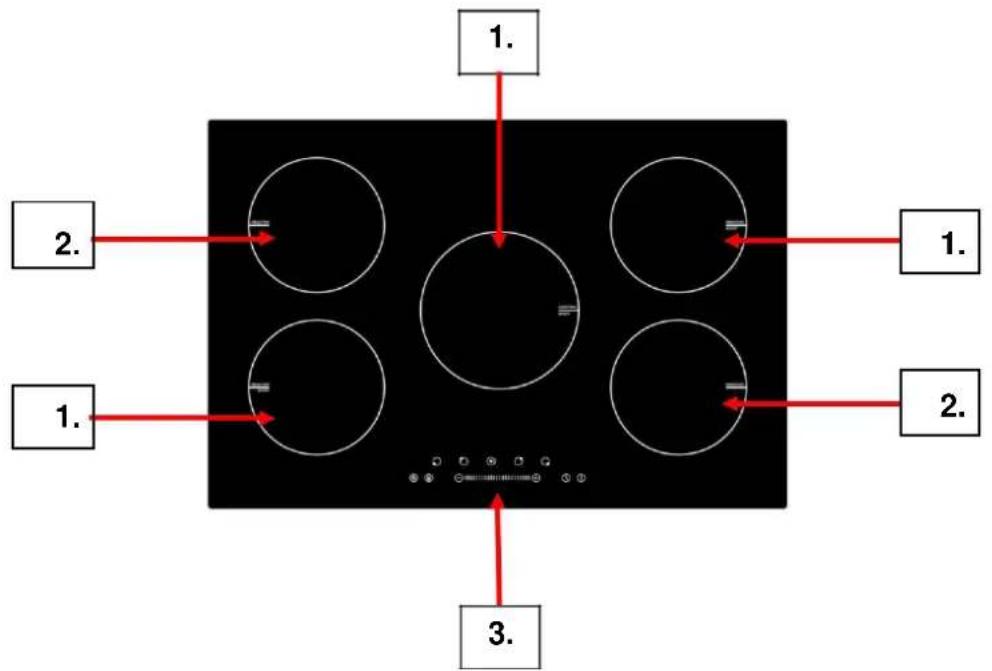
(INT-785 Shown for indicative purposes only)
1.) 2000W Cook Zone (With 'Boost' Function)
2.) 1500W Cook Zone (With 'Boost' - INT901 only)
3.) Main Function Controls
CONTENTS:
Section 1. Installation
Section 2. Safety Advice
Section 3. Operating the Appliance
Section 4. Maintenance
Section 1. Installation
- Remove all packaging, protective film and securing tape from the appliance.
- Position the appliance in a dry atmosphere.
- The following dimensions are provided as a guide for installation – your installer will carry out the installation in accordance with the current regulations.
- Your installer will connect the power cable in accordance with the current regulations.
To install this appliance, please proceed as follows:
1.1. Work-Surface Cut-Out
- Cut out the work-top as shown in the drawing below, ensuring that the actual sizes used are as per the chart below.
- For installation and use, a minimum of 5cm must be maintained around the cut-out.
- The work surface must have a thickness of at least 30mm.
- The work surface must be heat resistant.
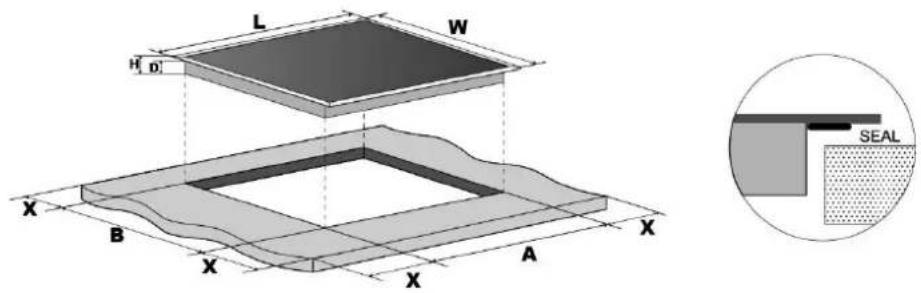
| Model | L(mm) | W(mm) | H(mm) | D(mm) | A(mm) | B(mm) | X(mm) |
| MON-INT785 | 770 | 520 | 62 | 58 | 740 | 490 | 50 mini |
| MON-INT901 | 900 | 520 | 62 | 58 | 740 | 490 | 50 mini |
1.2. Space to Rear or Side Wall
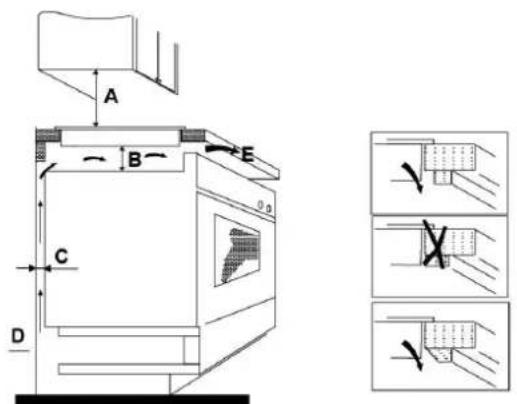
A = 760mm
B = 50mm (min)
C = 20mm (min)
D = Air Gap/Intake
E = Air Exit (5mm)
1.3. Fixing Brackets
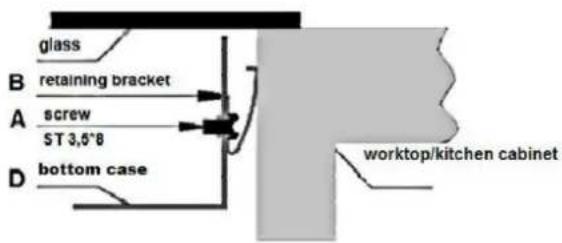
- Fix the brackets as shown below:
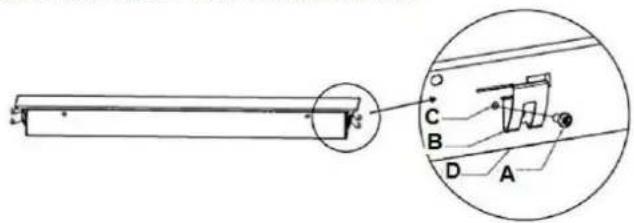
a) Screw
b) Bracket
c) Screw Hole
d) Base of hotplate
1.4.1. Electrical Connection
These appliances have a total Power Rating of 7200W and must be ‘hard wired’ into a suitable fused spur adjacent to the appliance housing. The product must be installed by a Qualified Electrician.
Please note that a switchable spur should be accessible above the work surface in order that the power can be turned off.
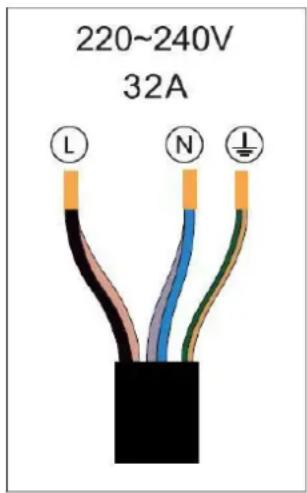
N.B. This hob uses a Power Management system – see 1.4.2. below.
Hob voltage ____
Total power
5 Zone 220-240 7.2KW
1.4.2. Power Management
Cooking zones are divided into two groups. Each group has a maximum electricity loading of 3700 W.
Group (b) has the power management function which activates when the total electricity loading of the cooking zones exceeds 3700W.
The power management function decreases the power to the
other cooking zones and changes the displayed power level accordingly. The heat setting display of the reduced zone(s) changes between four levels, e.g. if all zones are on, the highest power levels of three zones are decrease to level 5 (1000W), level 5 (1000W) and level 7 (1500W).
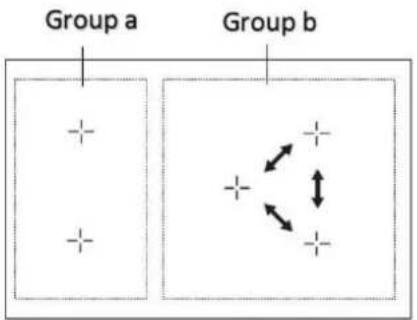
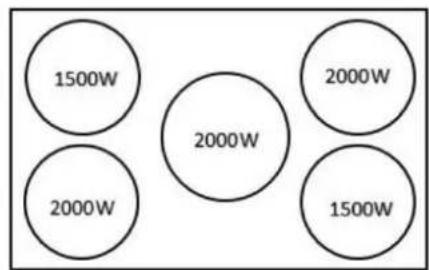
In Group (a) both cook zones can work at full power any time as the maximum combined power is 3500W.
In Group (b) if two zones are working and you switch on the third zone, the power of the third zone will be reduced to level 7 (1500W) and the other two zones will drop to level 5 (1000W) automatically. If you want the third zone to work at level 9 (2000W) you must turn off the other two zones.
Section 2. Safety Advice
- Please read this booklet thoroughly before installing and switching on the appliance. The manufacturer accepts no responsibility for incorrect installation and usage.
- This appliance is guaranteed for Domestic Use Only. This appliance shall not be used by children aged from 8 years and above and persons with reduced physical, sensory or mental capabilities, or lack of experience and knowledge, unless they have been given supervision or instruction on how to use the appliance in a safe way and understand the hazards involved. Children shall not play with the appliance. Cleaning and user maintenance shall not be made by children without supervision.
- This appliance must only be used for cooking/heating foods and liquids. Do not use it for any other purpose.
- It is important that you use only metal pans specifically designed and/or approved for use on Induction Hobs. Never allow melamine or plastic containers to come in contact with the heat zones.
- If using an adaptor, this must be used in accordance with the manufacturers instructions and ensure that the electrical circuit is not overloaded as this could cause overheating.
- Do not twist or bend the cables, and keep them away from hot surfaces. Following installation make sure that the power cable is not trapped underneath the appliance.
- Keep the appliance surfaces clean. Failure to do this could lead to the appliance malfunctioning.
- The surface of this appliance will get extremely hot during use. The surface of this appliance will remain hot after it has been turned off. Do not touch or clean the heating zone until it has completely cooled down.
- If the power supply cord is damaged, it must be replaced by the manufacturer, it's service agent or similarly qualified persons in order to avoid a hazard.
Important Message for Cardiac Pacemaker Implant Patients!
THIS INDUCTION HOB GENERATES MAGNETIC FIELDS IN ITS IMMEDIATE SURROUNDINGS. Your pacemaker must be designed in compliance with the corresponding regulations in order for no interference to be caused between it and the hotplate. Consult the pacemaker manufacturer or your doctor to determine whether it complies with the regulations in force or whether any incompatibilities exist.
Section 3. Operating the Appliance
3.1. Cookware Suitable for Induction
Induction hobs are made from smooth, ceramic glass, the heat comes from a magnetic induction coil which heats the cookware but not the cooking surface. The heat from the cookware is transferred to the food.
Pans suitable for induction hob use must be made from magnetisable metal such as cast iron or steel. Pure aluminium, copper or glass pans will not work with this type of hob unless the base is bonded with a magnetic metal.
Check that pans are attracted to a magnet - this ensures that they are suitable for use with an induction hob.
It is important that you use only metal pans specifically designed and/or approved for use on Induction Hobs. Never allow melamine or plastic containers to come in contact with the cook zones.
3.2. Control Panel
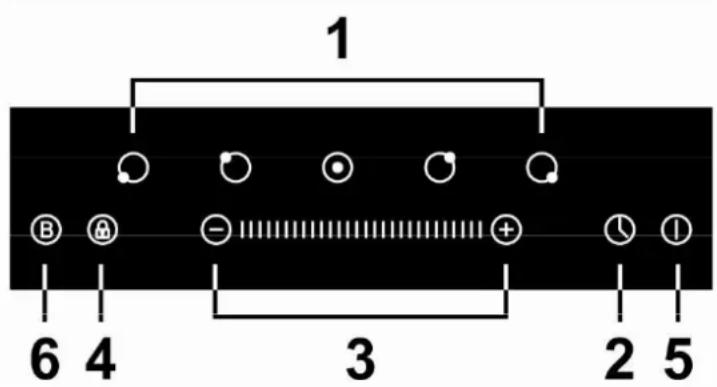
- Cook Zone Selection Controls
- Timer Control
- Power & Timer Slide Control
- Child Lock Control
- Power On/Off Control
- Boost Control
3.3. Power, Cooking & Timer Functions
3.3.1. On-Off
To turn the appliance on or off, press and hold the Power On/Off control (5) until you hear a 'beep'. When the appliance powers up, the cook zone indicators will display “-”.
Place a suitable pan on the cook zone to be used.
3.3.2. Setting the Zone Temperature
Press the required zone (1) and then use the ‘+’ or ‘-’ (3) to increase or decrease the power for the required zone, or ‘slide’ your finger along the ‘+’ or ‘-’ bar, or touch any point along the slide bar. Power settings range from ‘0’ lowest to ‘9’ highest setting.
N.B. If the display flashes your pan may not be positioned correctly on the cook zone, or positioned on the wrong cook zone or is not suitable for induction hob use.
Press the cook zone control 'Off' when you have finished and then turn the appliance off by pressing the Power Control (5).
N.B. The display will show until the cook zone(s) has cooled completely.
Note the Power Management notes in section 1.4.2. (Page 8/9)
3.3.3. Power Boost
You can use the ‘Boost’ function to boost the power of the relevant cook zones for a maximum of 5 minutes. N.B. The symbol ‘P’ will be displayed during the Boost function.
- To operate, press the cook zone selection button (those fitted with boost zone only) and then press the Boost function control (6).
- The cook zone will operate at full power for 5 minutes.
- During operation the display will show P O
- If you want to cancel the Boost function earlier than 5 minutes, simply press the relevant cook zone selection button and then press the Boost function button.
Points to note regarding the Boost Function:
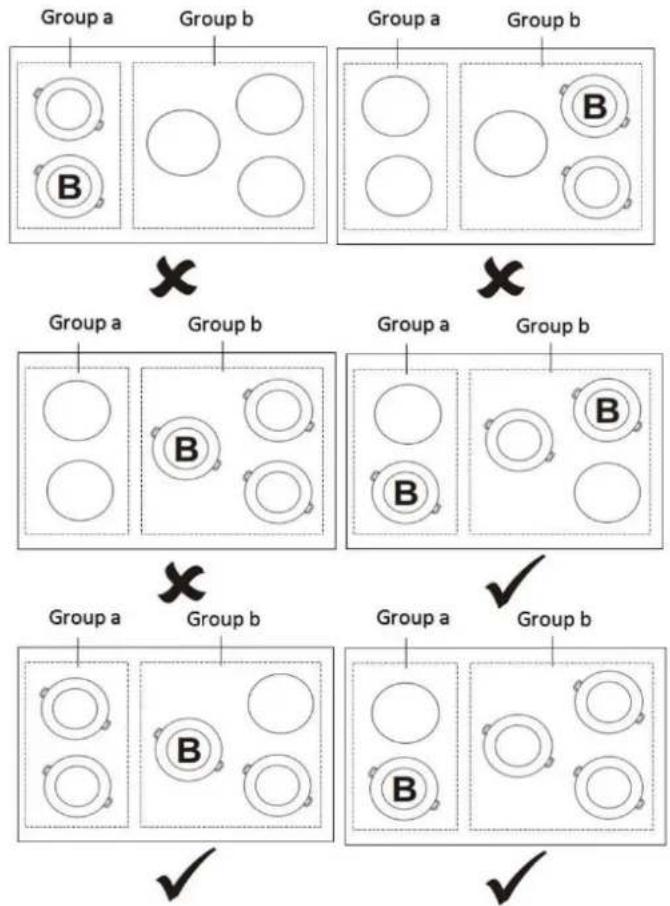
- For group (a), if you want to boost the front cook zone you must switch off the other cook zone otherwise the symbols P & 9 will flash in the display and power level 9 will automatically be set. (See diagrams below).
- For group (b), if you want to boost the centre cook zone you must switch off one of the other two cook zones. If you want to boost the rear right cook zone you must first switch off the front right cook zone. (See diagrams below).
flowchart
graph TD
    A["Group a"] --> B["○"]
    A --> C["○"]
    D["Group b"] --> E["○"]
    D --> F["○"]
    G["Group a"] --> H["○"]
    G --> I["○"]
    J["Group b"] --> K["○"]
    J --> L["○"]
    M["Group a"] --> N["○"]
    M --> O["○"]
    P["Group b"] --> Q["○"]
    P --> R["○"]
    S["Group a"] --> T["○"]
    S --> U["○"]
    V["Group b"] --> W["○"]
    V --> X["○"]
    Y["Group a"] --> Z["○"]
    Y --> AA["○"]
    AB["Group b"] --> AC["○"]
    AB --> AD["○"]
    AE["Group a"] --> AF["○"]
    AE --> AG["○"]
    AH["Group b"] --> AI["○"]
    AH --> AJ["○"]
3.3.4. Timer (1 to 99 Minutes) & Minute Minder
You can use the Timer to operate one or more of the cook zones for a time period of between 1 and 99 minutes:
- Press the cook zone button that you want to operate the timer on and select the heat setting level.
- Press the Timer Control (2).
- Select the required time between 1 and 99 minutes by using the '+' or '-' or slide bar controls (3).
- A display will show a 'count down' of the set time.
- Now the cook zone will operate for the selected time and automatically turn off at the end of the period. An audible signal will also be heard at the end of the time period.
- If you need to cancel prior to the end of the set time, simply press the cook zone control and then the Timer Control.
If you want to use the timer as a simple Minute Minder, proceed as follows:
- Ensure that the hob is tuned on
- Press the Timer control (2), the timer will start flashing and 30 will show in the display
- Set the required time by using the ‘+’ or ‘-’ or slide bar controls (3) to increase or decrease the time
- The timer will now count-down and an audible signal will sound when zero is reached.
3.3.5. Child Lock
To activate the Child Lock, press and hold the Child Lock control (4) until 'Lo' is displayed. The lock will now be set and the appliance will not operate. To unlock the Child Lock, simply press and hold the Child Lock control again until the display is removed.
3.3.6. Warning Indicators
Please note, a hot surface indicator (H) will show when one or more of the cook zones has been used – it will go out when the zone(s) is completely cool.
In addition, 'U' will be displayed if the pan is not positioned on the zone correctly, or if the pan is not suitable for Induction Hobs.
Section 4. Maintenance
Before any maintenance or cleaning work is carried out, DISCONNECT the appliance from the ELECTRICITY supply and ensure that the appliance is completely cool.
4.1. Cleaning the Hob Surface
Clean spillages from the hob surface as soon as possible after use. Always ensure that the surface has cooled down before cleaning.
Use a soft cloth or kitchen paper to clean the surface. If the spillage has dried on the surface you may need to use a specialist vitro-ceramic glass cleaner, available from all good supermarkets.
Do not use other abrasive cleaners and/or wire wool etc as this may scratch the surface of the hob.
4.2. What to do if something goes wrong
There is no power to the appliance:
- Check there is not a power cut
- Check there is power to the electric socket/appliance
- Has the auto time elapsed? – see section 3.3.4.
After cooking the letter 'H' is displayed:
- This is the hot surface indicator – it will remain on until the appropriate heat zone has completely cooled down.
The letter 'U' is displayed:
- The pan is not positioned on the zone correctly, or the pan is not suitable for Induction Hobs.
After switching off, the appliance sounds like it is still running:
- This is the cooling fan – it will remain on until the appliance has completely cooled down.
The display indicates E5:
- This indicates high temperature. Allow the hob to cool down then start again (For all other fault codes, switch off and call your service provider).
The display indicates P:
- This Boost function is operating.
The hob makes a ‘clicking’ noise during use:
- This is quite normal – it is the sound of the induction coils during operation.
YOUR GUARANTEE IS VALID ONLY IN THE UK & SOUTHERN IRELAND.
To Register your Appliance simply complete the card in your appliance pack and return it with a stamp affixed or Alternatively you can Register online at www.repairtechuk.com
SERVICE HELP-LINE
Should your appliance develop a fault, please call the
Repairtech Service Helpline on:
01527-888133
Montpellier Domestic Appliances Ltd.
Unit 1, Tewkesbury Retail Park,
Northway Lane,
Tewkesbury,
Gloucestershire,
GL20 8JU.
Important Note:
This appliance is marked according to the European directive 2002/96/EC on Waste Electrical and Electronic Equipment (WEEE). By ensuring this product is disposed of correctly, you will help prevent potential negative consequences for the environment and human health, which could otherwise be caused by inappropriate waste handling of this product.
The symbol on the product, or on the documents accompanying the product, the Crossed Out Wheelie Bin, indicates that this appliance may not be treated as household waste. Instead it shall be handed over to the applicable collection point for the recycling of electrical and electronic equipment.
Disposal must be carried out in accordance with local environmental
regulations for waste disposal. For more detailed information about treatment, recovery and recycling of this product, please contact your local authority, your household waste disposal service or the retailer where you purchased the product.
We continuously try to improve our products for the benefit of our customers.
For this reason we reserve the right to make changes to any product at any time, without notice
Issue: 02/25-07-2017