S (2012) - Electric scooter Zero - Free user manual and instructions
Find the device manual for free S (2012) Zero in PDF.


| Product Type | Electric Scooter |
| Brand | Zero |
| Model | S (2012) |
| Motor Power (Continuous) | 4.4 kW |
| Motor Power (Peak) | 9.0 kW |
| Battery Capacity | 2.8 kWh (Lithium-Ion) |
| Range (City) | Up to 80 km |
| Range (Highway) | Up to 40 km |
| Top Speed | 100 km/h |
| Charging Time (Standard) | 4-5 hours |
| Charging Time (Optional Rapid Charger) | 2.5 hours |
| Weight (Curb) | 119 kg |
| Seat Height | 787 mm |
| Wheel Size (Front/Rear) | 17 inches / 17 inches |
| Brakes (Front) | Single Disc, 2-Piston Caliper |
| Brakes (Rear) | Single Disc, 2-Piston Caliper |
| Suspension (Front) | 41 mm Telescopic Forks |
| Suspension (Rear) | Single Shock, Adjustable Preload |
| Maintenance | Regenerative braking, chain drive lubrication, battery health check |
| Safety Features | Regenerative braking, keyless ignition, side stand switch |
Frequently Asked Questions - S (2012) Zero
User questions about S (2012) Zero
0 question about this device. Answer the ones you know or ask your own.
Ask a new question about this device
Download the instructions for your Electric scooter in PDF format for free! Find your manual S (2012) - Zero and take your electronic device back in hand. On this page are published all the documents necessary for the use of your device. S (2012) by Zero.
USER MANUAL S (2012) Zero
Useful Information For Safe Riding...... 1-2
Plug in Your Z-Force Power Pack™.... 1-2
Owner Information.... 1-3
Power Pack Serial Number 1-4
Motor Serial Number 1-4
Key Code Number 1-4
Vehicle Identification Number (VIN) 1-4
VIN Location 1-4
VIN Break Down....1-5
General Information 1-6
Zero S Technical Specifications 1-6
Zero DS Technical Specifications ....1-8
Vehicle Range 1-10
Optimizing Your Range By Adapting Your
Riding Style....1-11
Public Charging Stations.... 1-12
Emissions Information 1-12
Transporting 1-13
Safety Information 2-1
General Safety Precautions....2-1
Important Operating Information 2-2
Location Of Important Labels 2-3
Throttle And Speed Control Label 2-4
Controls And Components....3-1
Motorcycle Controls 3-1
Left Side View 3-3
Right Side View 3-5
Instrument Panel 3-7
Indicators 3-8
Performance Level Switch 3-10
Handlebar Controls 3-11
Starting And Operating 4-1
First Time Set-Up 4-1
Unpacking Your Zero Motorcycle....4-2
TOC-1
General Operation....4-3
Pre-Ride Inspection 4-3
Key Switch/Steering Lock Positions 4-4
Power Pack 4-6
Operating Your Motorcycle....4-14
Suspension Adjustment 4-15
Maintaining Your Motorcycle 5-1
Owner's Responsibilities.... 5-1
Bolt Torque Table 5-2
Power Pack 5-6
General Maintenance ....5-7
Brakes 5-7
Suspension 5-9
Wheels And Tires 5-9
Tire Inflation 5-10
Drive Belt 5-10
Drive Chain (optional) 5-14
Headlight Alignment 5-17
Headlight Bulb Replacement 5-18
Turn Signal Light Bulb Replacement ..... 5-20
Brake/Tail Light Bulb Replacement 5-20
Running Light Bulb Replacement.... 5-21
Cleaning 5-22
Parking And Long Term Storage ....5-23
Maintenance Schedule 5-24
Parts/Maintenance Items 5-27
Zero Motorcycle Accessories....5-27
Fuses 5-27
Troubleshooting 6-1
Power Pack And Charger 6-1
Battery Management System.... 6-3
Safety Interlocks 6-10
Temperature Indicator 6-12
General Troubleshooting 6-17
Warranty/Customer Assistance.... 7-1
Customer Assistance 7-1
Warranty Information 7-2
Zero Motorcycles Warranties....7-2
Standard Warranty 7-2
Disclaimers Applicable to Standard
Warranty 7-3
Proper Use 7-4
Purchaser's Responsibilities 7-4
Warranty Procedures 7-5
Transfer Of Ownership And Warranty .....7-6
An Important Message To You From Zero Motorcycles
Congratulations and thank you for purchasing the 2012 Zero S/DS electric motorcycle; we welcome you to the community of Zero Motorcycles riders. This manual is designed to provide you with a better understanding of the operation, inspection, and basic maintenance requirements of this motorcycle.
Zero continually seeks advancements in product design and quality. Therefore, this manual contains the most current product information available at the time of printing. Because of this, your motorcycle may differ from the information supplied in this owner's manual. No legal claims can be made on the basis of data in this manual. When it comes time to sell your Zero S/DS, please remember to hand over this manual; it is, by law, an important part of the vehicle. If you have any questions concerning the operation or maintenance of your motorcycle, please contact Zero at support@zeromotorcycles.com. For 24 hour updates and additional information about your motorcycle, visit the owners resources section of the
Zero Motorcycles website:
www.zeromotorcycles.com/owner-resources/
Introduction
This manual covers the following motorcycles:
- Zero S: Street
- Integrated Z-Force Power Pack™ and Charger
- Cast Wheels
- Street Tires
- Belt Drive
- Integrated Z-Force Power Pack™ and Charger
- Spoke Wheels
- Dual Sport Tires
- Belt Drive
Index
A good place to locate information about the motorcycle is in the index in the back of the manual. The terms “right” or “left” refer to the rider's right or left when sitting on the motorcycle.
Useful Information For Safe Riding
This manual contains the word CAUTION to tell about something that could hurt you or others. It also contains the word WARNING to tell about things that could damage your motorcycle.
CAUTION: Please read this manual carefully and completely before operating this motorcycle. Do not attempt to operate this motorcycle until you have attained adequate knowledge of its controls and operating features, and until you have been trained in safe and proper riding techniques. Regular inspections and proper maintenance, along with good riding skills, will help you to safely enjoy the capabilities and the reliability of this motorcycle. Disregarding the aforementioned, however, may render the warranty invalid.
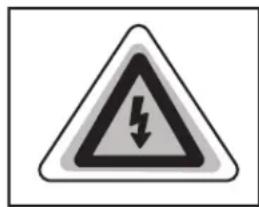
This symbol is located in various locations on the motorcycle to inform you that exposure to high voltage can cause shock, burns and even death.
The high voltage components on the motorcycle should be serviced by technicians with special training.
High voltage cable or wiring has an orange covering. Do not probe, tamper with, cut, or modify high voltage cable or wiring.
Plug in Your Z-Force Power Pack™
WARNING: Proper care of the motorcycle's power pack is essential! When not in use, the power pack should be left on the charger even if fully charged. Failure to do so could damage the power pack and therefore void your power pack warranty. See page 4-6 for other important information about the power pack.
Owner Information
Record important information pertaining to your motorcycle here. When contacting your dealer, you may need to provide this information.
Dealer Information Motorcycle Information
Name ____
VIN ____
Address Model
Power Pack Serial Number ____
Telephone No. ____
Motor Serial Number ____
E-mail ____
Key Code ____
Date of Purchase ____
Power Pack Serial Number
The Power Pack serial number is located on the upper right rear of the power pack.
Motor Serial Number
The motor serial number is stamped on the motor housing.
Key Code Number
The key code is a 5 digit number used to create duplicate keys. This number is located on a tag that accompanies the original keys.
Vehicle Identification Number (VIN)
VIN Location

See Location Of Important Labels on page 2-3.
VIN Break Down
The VIN is a 17-digit number stamped on the head tube of the frame. Do not alter or remove this number as it is the legal identifier for your motorcycle.

flowchart
graph TD
    A["538"] --> B["S"]
    B --> C["M3 9 CM3 12345"]
    C --> D["C"]
    D --> E["A"]
    E --> F["Production Number"]

    G["World Manufacturer Identifier"] --> H["538 = On Road"]
    I["Motorcycle Type"] --> J["Z1 = S/DS Platform"]
    K["Model Line"] --> L["M3 = 12 MY S\nD3 = 12 MY DS"]
    M["Net Brake Horsepower"] --> N["M3 = 9.1 kW (12.2 HP)"]

    O["Model Year"] --> P["C = 2012"]
    Q["Plant Location"] --> R["C = California"]
    S["Model"] --> T["A = 11-12 MY S\nB = 11-12 MY DS"]
General Information Zero S Technical Specifications
| MOTOR | |
| Type | High efficiency, double-stator axial flux permanent magnet, brushless motor with integrated forced air cooling |
| Controller | High efficiency, 420 amp, 3-phase brushless controller with re-generative deceleration |
| Estimated Top Speed (max) | 142 km/h (88 mph) |
| Estimated Top Speed (sustained) | 121 km/h (75 mph) |
| POWER SYSTEM | |
| Type | Z-ForceTM Patented Li-Ion Intelligent Power Pack |
| Maximum Capacity | ZF6 6.0 kWhZF9 9.0 kWh |
| Nominal Capacity | ZF6 5.3 kWhZF9 7.9 kWh |
| Charge Time (standard) | ZF6 6.0 hours (100% charged)/5.3 hours (95% charged)ZF9 9.0 hours (100% charged)/8.0 (95% charged) |
| POWER SYSTEM | |
| Quick 2X Charger Time (accessory) | ZF6 3.0 hours (100% charged)/2.7 hours (95% charged)ZF9 4.9 hours (100% charged)/4.0 hours (95% charged) |
| Quick 3X Charger Time (accessory) | ZF6 2.2 hours (100% charged)/1.8 hours (95% charged)ZF9 3.1 hours (100% charged)/2.7 hours (95% charged) |
| Quick 4X Charger Time (accessory) | ZF6 1.6 hours (100% charged)/1.3 hours (95% charged)ZF9 2.4 (100% charged)/2.0 hours (95% charged) |
| Input** Standard | 120 V AC or 240 V AC |
| Charger Type 1 kW Integrated | |
| Estimated Power Pack Life to 80% (city) | ZF6 330,000 km (205,000 miles)ZF9 495,000km (308,000 miles) |
| RANGE | |
| City EPA UDDS* Range | ZF6 122 km (76 miles)ZF9 183 km (114 miles) |
| Highway at 113 km/h (70 mph) | ZF6 69 km (43 miles)ZF9 101 km (63 miles) |
*Environmental Protection Agency (EPA) Urban Dynamometer Driving Schedule (UDDS)
**Zero chargers typically draw as much as 10 amps at 120 volts.
| DRIVETRAIN | |
| Transmission Clutchless one speed | |
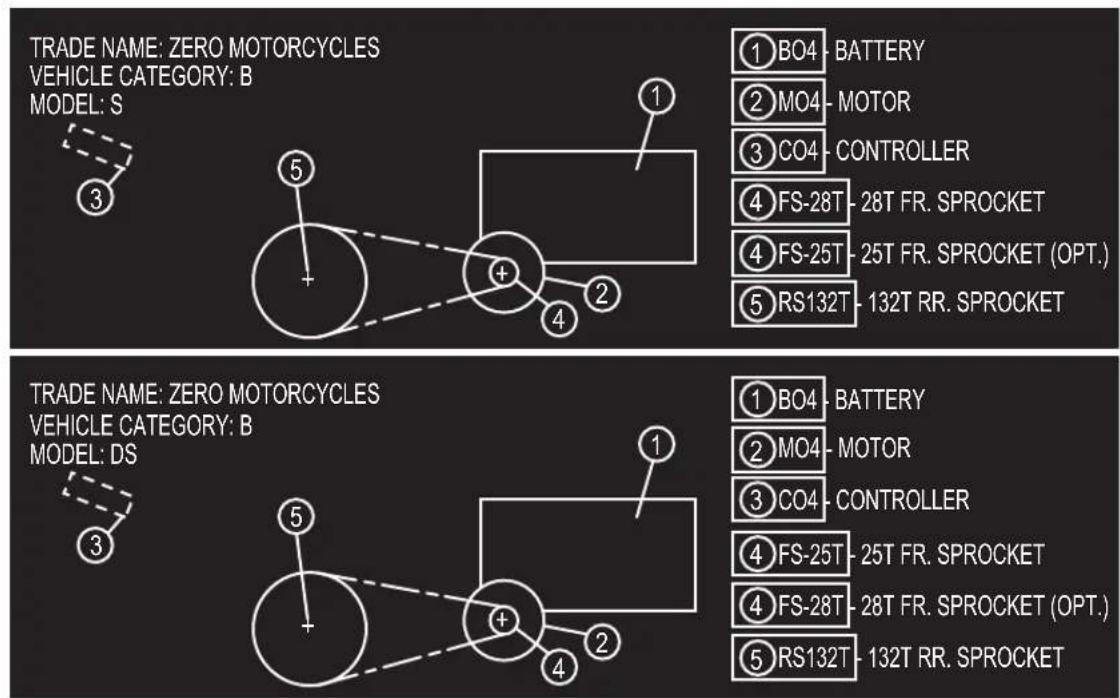
| Final Drive | 28T/132T Sprockets, 8 mm pitch, 200 tooth, 14 mm width, Poly Chain® GT® CarbonTM (belt) |
| CHASSIS/SUSPENSION/BRAKES | |
| Front Suspension Travel | 140 mm (5.51 in) |
| Rear Suspension Travel | 149 mm (5.85 in) |
| Front Brakes | 2 Piston Hydraulic, 310 x 4 mm Floating Rotor, Hand Actuated |
| Rear Brakes | 1 Piston Hydraulic, 220 x 4 mm Rotor, Foot Actuated |
| Brake Rotor Minimum Thickness | 3.85 mm (0.15 in) |
| Front Tire 110/70-17 in | |
| Rear Tire 130/70-17 in | |
| Front Wheel 17 x 3.0 in | |
| Rear Wheel 17 x 3.5 in | |
| Front Suspension | 38 mm inverted forks with adjustable compression and rebound damping |
| CHASSIS/SUSPENSION/BRAKES | |
| Rear Suspension | Direct-link shock with adjustable spring preload, compression and rebound damping |
| DIMENSIONS | |
| Wheel Base 144 cm | (56.6 in) |
| Seat Height (standard) | ZF6 83 cm (32.5 in)ZF9 84 cm (33 in) |
| Low Seat Height (option) | ZF6 80 cm (31.5 in)ZF9 81 cm (32 in) |
| Rake 23.1 degrees | |
| Trail 76 mm (3.0 in) | |
| WEIGHT | |
| Frame 10 kg (22 pounds) | |
| Curb Weight | ZF6 135 kg (297 pounds)ZF9 155 kg (341 pounds) |
| GVWR | ZF6 289 kg (637 pounds)ZF9 309 kg (681 pounds) |
| Carrying Capacity 154 kg (340 pounds) | |
| ECONOMY | |
| Typical Cost to Recharge | • ZF6 0.63• ZF90.95 |
| Equivalent Fuel Economy (city) | 487 MPGe- 0.48 Liters/100km(0.13 gallons/62 miles) |
| Equivalent Fuel Economy (highway) | 273 MPGe- 0.86 Liters/100km(0.23 gallons/62 miles) |
Zero DS Technical Specifications
| MOTOR | |
| Type | High efficiency, double-stator axial flux permanent magnet, brushless motor with integrated forced air cooling |
| Controller | High efficiency, 420 amp, 3-phase brushless controller with re-generative deceleration |
| Estimated Top Speed (max) | 129 km/h (80 mph) |
| Estimated Top Speed (sustained) | 113 km/h (70 mph) |
| POWER SYSTEM | |
| Type | High efficiency, double-stator axial flux permanent magnet, brushless motor with integrated forced air cooling |
| Maximum Capacity | • ZF6 6.0 kWh• ZF9 9.0 kWh |
| Nominal Capacity | • ZF6 5.3 kWh• ZF9 7.9 kWh |
| Charge Time (standard) | • ZF6 6.0 hours (100% charged)/5.3 hours (95% charged)• ZF9 9.0 hours (100% charged)/8.0 (95% charged) |
| Quick 2X Charger Time (accessory) | • ZF6 3.0 hours (100% charged)/2.7 hours (95% charged)• ZF9 4.9 hours (100% charged)/4.0 hours (95% charged) |
| Quick 3X Charger Time (accessory) | • ZF6 2.2 hours (100% charged)/1.8 hours (95% charged)• ZF9 3.1 hours (100% charged)/2.7 hours (95% charged) |
| Quick 4X Charger Time (accessory) | • ZF6 1.6 hours (100% charged)/1.3 hours (95% charged)• ZF9 2.4 (100% charged)/2.0 hours (95% charged) |
*Environmental Protection Agency (EPA) Urban Dynamometer Driving Schedule (UDDS)
| POWER SYSTEM | |
| Input** Standard 120 | V AC or 240 V AC |
| Charger Type 1 kW integrated | |
| Estimated Power Pack Life to 80% (city) | ZF6 326,000 km (203,000 miles)ZF9 487,000 km (302,000 miles) |
| RANGE | |
| City EPA UDDS* Range | ZF6 121 km (75 miles)ZF9 180 km (112 miles) |
| Highway at 113 km/h (70 mph) | ZF6 68 km (42 miles)ZF9 100 km (62 miles) |
| DRIVETRAIN | |
| Transmission Clutchless One Speed | |
| Drive System (standard) | 25T/132T Sprockets, 8 mm pitch, 220 tooth, 14 mm width, Poly Chain® (belt) |
| Drive System (optional) | 13T/71T Sprockets, 420 Chain |
| CHASSIS/SUSPENSION/BRAKES | |
| Front Suspension Travel | 240 mm (9.4 in) |
| Rear Suspension Travel | 195 mm (7.69 in) |
**Zero chargers typically draw as much as 10 amps at 120 volts.
| CHASSIS/SUSPENSION/BRAKES | |
| Front Brakes | 2 Piston Hydraulic, 310 x 4 mm Floating Rotor, Hand Actuated |
| Rear Brakes | 1 Piston Hydraulic, 240 x 4 mm Rotor, Foot Actuated |
| Front Tire 100/80-17 | in |
| Rear Tire 110/90-16 | in |
| Front Wheel 17 x 2.5 | in |
| Rear Wheel 16 x 3.0 | in |
| Front Suspension | 38 mm inverted fork with adjustable compression and rebound damping |
| Rear Suspension | Direct link shock with adjustable spring preload, compression and rebound damping |
| DIMENSIONS | |
| Wheel Base 145.5 cm | (57.3 in) |
| Seat Height (standard) | ZF6 89.7 cm (35.3 in)ZF9 88.3 cm (34.8 in) |
| Low Seat Height (optional) | ZF6 87.1 cm (34.3 in)ZF9 85.8 cm (33.8 in) |
| Rake 25.3 degrees | |
| Trail 89 mm 3.5 in | |
| WEIGHT | |
| Frame 10 kg (22 pounds) | |
| Curb Weight | • ZF6 135 kg (297 pounds)• ZF9 155 kg (341 pounds) |
| GVWR | • ZF6 289 kg (637 pounds)• ZF9 309 kg (688 pounds) |
| Carrying Capacity 154 kg (340 pounds) | |
| ECONOMY | |
| Typical Cost to Recharge | • ZF6 0.63• ZF90.95 |
| Equivalent Fuel Economy (city) | 480 MPGe- 0.49 liters/100km(0.13 gallons/62 miles) |
| Equivalent Fuel Economy (highway) | 267 MPGe- 0.88 liters/100km(0.23 gallons/62 miles) |
Vehicle Range
The range of an electric vehicle is defined as the distance the vehicle will travel on a single full charge of the power pack. Just like EPA mileage estimates on an automobile, “your mileage may vary.” Your range results are a direct reflection of your riding habits. The more conservative you ride the better range you can expect from your Zero S/DS motorcycle.
Some of the factors which affect range include speed, acceleration, number of starts and stops, as well as changes in elevation. The combination of these factors, as you travel from one point to another, defines your trip profile. In addition, tire pressure and payload are important considerations.
We suggest that you ride conservatively when you first get your Zero S/DS motorcycle, and get to know your motorcycle and your commute. Once you become familiar with the range versus performance of your motorcycle, then you can adjust your riding characteristics if you so desire. This applies mainly to riders with trip profiles which are at the edge of the performance envelope. Those individuals with relatively short commutes can expect to ride quite aggressively and reach their destination with energy to spare.
Average motorcycle range is calculated using an industry standardized formula. The range is separated into two separate specifications: "City (EPA UDDS)" Environmental Protection Agency (EPA) Universal Dynamometer Driving Schedule (UDDS) and "Highway." The City (EPA UDDS) range is a U.S. federal test procedure to give an estimate on how many miles an electric vehicle will go on a single charge. The highway range is to provide the rider an estimate of what you can expect to achieve when using the motorcycle for highway commuting. This range takes into account the distanced traveled on city roads getting to and from the highway as well as the distance spent in highway congestion. The average highway commute is made up of 50% steady highway speed riding and 50% city-like riding. See technical specification charts on page 1-6 through 1-10 for these ranges.
Optimizing Your Range By Adapting Your Riding Style
- Apply the throttle slowly and try to match the motorcycle's acceleration with your throttle position.
•Hard acceleration will decrease your range.
•The Zero S/DS has the ability to start, from a standstill, up a steep 13% grade when fully loaded. It is not recommended that you stop on a grade of more than 13% with a fully loaded motorcycle.
•Example: If 108 km/h (67 mph) can be reached at 100% throttle, 75% throttle will give you about 89-95 km/h (55-59 mph) (a 25% energy savings for an approximate 12% speed loss).
•Coasting whenever possible makes a significant difference. The regenerative braking system on deceleration takes some of the energy from the motor and turns it back into electrical energy. This energy is then stored back into the power pack.
- Plan ahead for decelerations and coast whenever possible. For example, do not rush to traffic signals.
Public Charging Stations
There are more public charging stations coming on-line every day and there may be some in your area. You can charge from a public charging station with the optional J1772 S/DS Zero motorcycle accessory. These stations are often available at a variety of locations including shopping centers, city parking lots, airports, hotels, government offices, and other businesses. We recommend that you search the internet for locations in your area. For example, search for “charging stations.”
Emissions Information
The Zero S/DS electric motorcycle is a true freeway capable zero emissions vehicle under California Air Resources Board (CARB), U.S. Federal (EPA), and European Union standards. It uses no gasoline or other liquid fuel. It has no tailpipe and therefore no tailpipe emissions. It also has no exhaust or evaporative emissions. Because the Zero S/DS runs solely on electricity, it is the only kind of vehicle which actually gets cleaner in terms of air pollution each year, as the electricity grid gets cleaner and more renewable. Zero Emissions Vehicles (ZEV's) offer greater efficiency, and can help solve the serious air pollution, global warming, and energy security problems facing the country and the world.
WARNING: Please use only Zero approved parts and accessories for your Zero motorcycle. Parts and accessories for your Zero motorcycle have been checked and tested for safety and suitability. Zero is unable to accept any liability whatsoever for parts and accessories which have not been approved.
Transporting
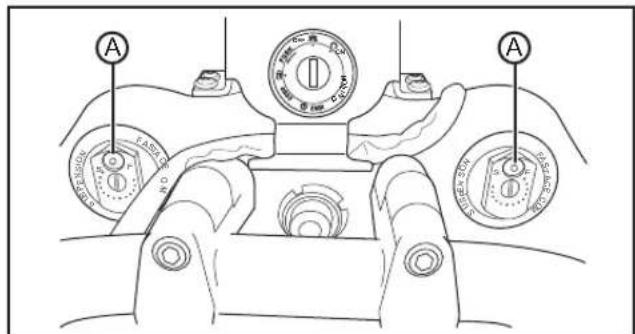
When the front fork is compressed, the built up pressure must be released to help prevent fork seal leaks. There is a 3 mm Allen "bleed" screw located just in front of the rebound adjuster on each fork leg. This "bleed" screw (A) is used to release the built up pressure. Loosen the screw slowly, but do not remove. Once all the air is out, tighten the bleed screw.
When the fork is released, with no weight on the front tire, the screw must be opened again to allow for stabilization. Ensure that the screw is tightened before riding.
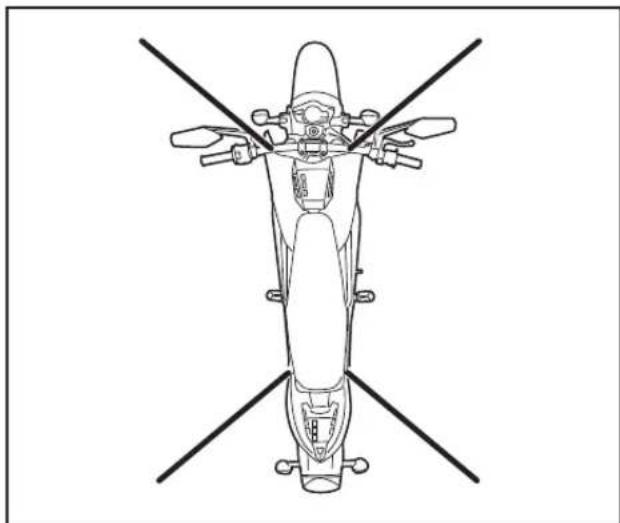
It is recommended that the motorcycle be tied-down using ratchet straps. Place the ratchet straps around a frame contact point. Soft straps must be used to prevent scratches or other damage.
Use two ratchet straps in the front and two in the rear. The tie down straps should be at a 45° angle from the motorcycle. Follow the manufacturer's instructions for the ratchet straps you are using.
natural_image
Top-down line drawing of a motorcycle with four legs and front-mounted sensors (no text or symbols)The electrical system must be disconnected when transporting or shipping.
Remove the 80 volt fuses (A) from the fuse center.
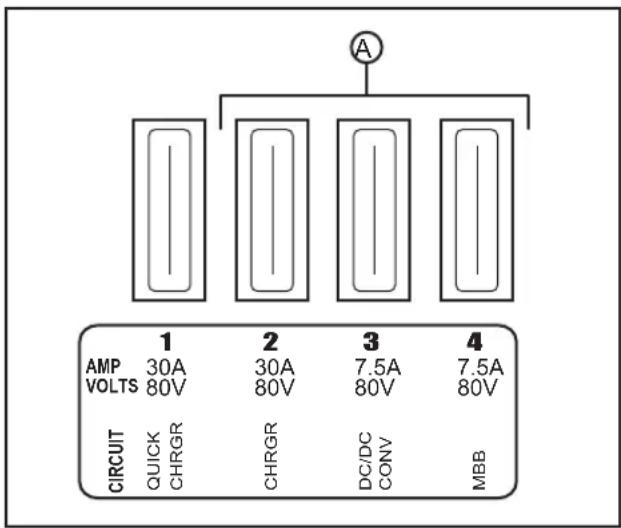
The 80 volt fuse center is located on the back upper right corner of the power pack. See page 5-29 for further information.
Safety Information
General Safety Precautions
- This is a performance motorcycle and should be treated with extreme caution.
- Proper safety gear, including a regionally approved helmet, riding boots, gloves, and protective clothing should be worn while riding to reduce the risk of potential injury. We highly recommend the use of full height riding boots since the vast majority of motorcycle injuries are leg and foot injuries. It is not recommended to ride without protective clothing; this applies to even short journeys, and to every season of the year.
- Read all additional warnings and product instructions in this owner's manual, and safety labels, before operating the electric motorcycle.
- Never carry a passenger unless your motorcycle is upfitted with the passenger optional accessory, which can be found on the Zero Motorcycles website.
- Never permit a guest to ride your electric motorcycle without proper instruction.
These are performance motorcycles and should be treated with extreme caution.
- Do not ride on frozen, oily, or pitted surfaces. Avoid potholes, surface cracks, and other obstacles.
- Never use alcohol or mind-altering drugs before operating an electric motorcycle.
- Persons unwilling or unable to take responsibility for their actions should not use this motorcycle. You assume all responsibility while operating your motorcycle. The seller will assume no liability for misuse or operator negligence.
- Prior to each use, the rider must check everything in the "every ride" column of the maintenance schedules on pages 5-24 through 5-26, and the charge level of the power pack as indicated on the instrument panel charge indicator.
-
Your safety depends in part on the good mechanical condition of the motorcycle. Be sure to follow the maintenance schedule and adjustment requirements contained in this manual. Be sure you understand the importance of checking all items thoroughly before riding.
-
Modifications of the motorcycle may render the vehicle unsafe and may cause severe personal injury. Zero Motorcycles cannot be held liable for non-approved modifications.
- Be very careful when loading or adding accessories to your motorcycle. Large, bulky, or heavy items may adversely affect the handling and performance of your motorcycle.
- Failure to follow power pack storage and charging instructions, as described in this Zero Motorcycles Owner's Manual, may void the warranty of your Zero motorcycle. These guidelines have been rigorously tested to ensure maximum power pack efficiency and service.
Important Operating Information
-
Always turn the key switch and the motor stop switch to the OFF position when not actively riding. It is very easy to forget that the motorcycle is powered up because it is silent. An accident can occur if the motorcycle is left powered up while getting on or off the motorcycle.
-
Turn the motor stop switch OFF when backing up or pushing the motorcycle while dismounted. It is possible to unintentionally twist the throttle, resulting in unexpected acceleration.
- Use the rear brake when you are stopped on an incline. Do not hold the motorcycle using partial throttle or damage to the motor may occur.
- The Zero S/DS power pack should be plugged in when storing the motorcycle for extended periods of time.
- Keep your Zero S/DS connected to the charger when your motorcycle is sitting in storage or if it will be sitting unused for more than 7 days.
WARNING: Charge the Zero power pack with the Zero charger.
The power pack must be charged within 24 hours if fully discharged, and charged within 60 days if stored fully charged. Zero recommends that you plug in your Zero motorcycle after 7 days even if charged. Please leave your Zero motorcycle plugged in whenever possible.
- The power pack does not require or tolerate deep discharging. To get the most power pack life, recharge the power pack immediately after each ride. Leaving a power pack in a discharged state will cause damage. See Charging The Power Pack on page 4-10.
Location Of Important Labels
The vehicle could contain the following information:
• Gross Vehicle Weight Rating (GVWR)
• Gross Axle Weight Rating (GAWR) Front and Rear
• Vehicle Identification Number (VIN)
•Rim Size
•Tire Pressure
• Date of Manufacture
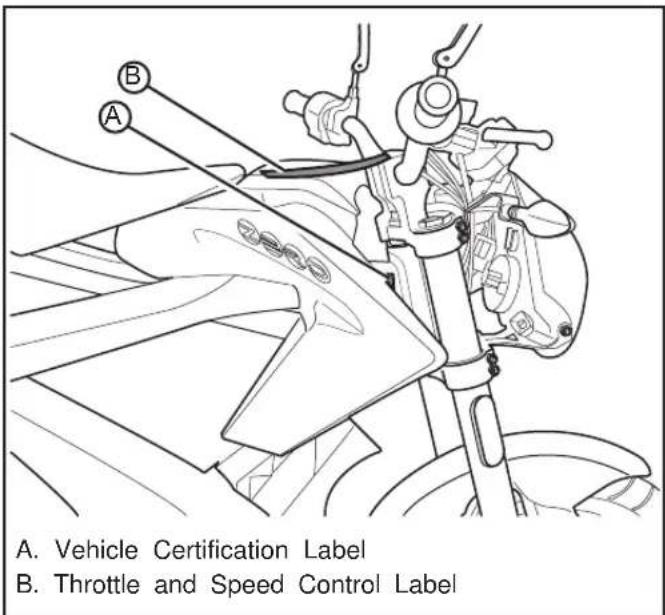

Throttle And Speed Control Label

IMPORTANT
THROTTLE AND SPEED CONTROL
The fully electric drivetrain of this motorcycle is different than any gas counterpart:
- When going into corners or coming to a stop you will be fully dependent on your brakes
- It is easy to find yourself speeding due to the absence of engine noise
- Passersby will not hear your approach - be extra cautious when making turns, entering intersections or when people are likely to cross your path
Be aware that your motorcycle is still ON during stops and while at an "idle". Accidentally twisting the throttle can cause serious harm. Please read the user manual for more information prior to operating the motorcycle.
IMPORTANT
Anti-Tamper Control Label (Europe Only)
NOTES
Controls And Components
Motorcycle Controls
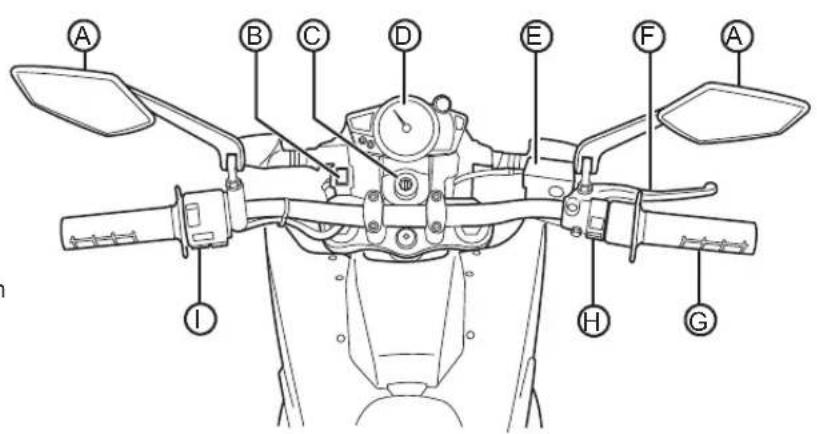
A. Mirrors
B. Performance Level Switch
C. Key Switch/Steering Lock
D. Instrument Panel
E. Front Brake Fluid
Reservoir
F. Front Brake Lever
G. Throttle Control
H. Motor Stop Switch
I. Left Handlebar Control
A. Mirrors
This motorcycle is equipped with convex mirrors. A convex mirror has a curved surface. Convex mirrors offer a greater field of view than a similar flat mirror. However, the greater field of view makes objects seem further away than they really are. Care must be used when judging the distance of objects seen in these mirrors.
B. Performance Level Switch
For description and operation see page 3-10.
C. Key Switch/Steering Lock
For description and operation see page 4-4.
D. Instrument Panel
For description and operation see pages 3-7 through 3-9.
E. Front Brake Fluid Reservoir
For description and operation see Brakes on page 5-7.
F. Front Brake Lever
For description and operation see pages 3-11 and 3-12.
G. Throttle Control
For description and operation see pages 3-11 and 3-12.
H. Motor Stop Switch
For description and operation see pages 3-11 and 3-13.
I. Left Handlebar Control
For description and operation see pages 3-11 through 3-13.
Left Side View
A. Headlight
B. Front Turn Signal
C. Brake/Tail Light
D. AC Charger Power Connection
E. Integrated Power Pack Charger
F. Kickstand
G. Kickstand Switch
H. Rear Turn Signal

A. Headlight
- For headlight operation, see Handlebar Controls on pages 3-11 and 3-12.
- For headlight bulb replacement, see Headlight Bulb Replacement on page 5-18.
- For headlight alignment, see Headlight Alignment on page 5-17.
B, H. Turn Signals
•For turn signal operation, see Handlebar Controls on pages 3-11 and 3-13.
- For turn signal light bulb replacement, see Turn Signal Light Bulb Replacement on page 5-20.
C. Brake/Tail Light
For brake/tail light bulb replacement, see Brake/Tail Light Bulb Replacement on page 5-20.
D. AC Charger Power Connection
For description and operation, see Charging The Power Pack on page 4-10.
E. Integrated Power Pack Charger
For description and operation, see Power Pack Charger on page 4-8.
F. Kickstand
The kickstand swings out from the side and supports the motorcycle when parked. The key switch should be in the OFF position when parked.
G. Kickstand Switch
This switch is a safety feature that prevents motor operation when the kickstand is down. If the kickstand were down when riding it could contact the ground causing you to lose control of the motorcycle and cause personal injury.
WARNING: Park only on a flat firm surface otherwise the motorcycle could fall over causing damage.
Right Side View
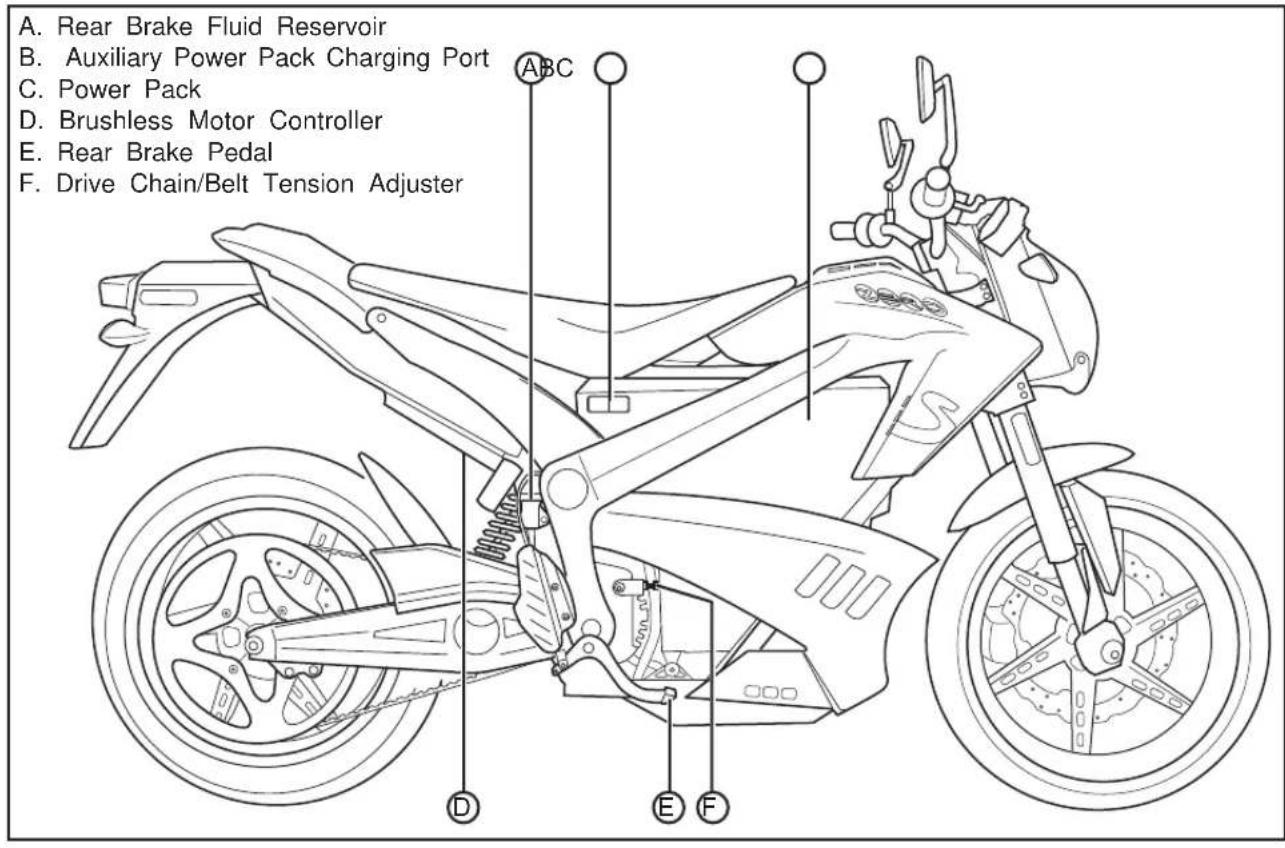
A. Rear Brake Fluid Reservoir
See Rear Brake on page 5-8.
B. Auxiliary Power Pack Charging Connection For description and operation see page 4-12.
C. Power Pack
For description and operation see page 4-6.
D. Brushless Motor Controller
Precisely "meters" the flow of electricity from the power pack to the motor according to the action of the throttle and surrounding conditions.
E. Rear Brake Pedal The rear brake pedal controls the rear brake when the pedal is pressed. When braking, the throttle should be in the closed position. The brake light will illuminate when the rear brake pedal is applied.
F. Drive Chain/Belt Tension Adjuster See Drive Chain Adjustment Procedure on page 5-16 or Drive Belt Adjustment Procedure on page 5-13.
Instrument Panel

A. Left Turn Signal Indicator
B. Temperature Indicator
C. High Beam Indicator
D. Speedometer
E. Main Power Indicator
F. Charge Indicator
G. Right Turn Signal Indicator
H. Odometer
I. Trip Odometer
J. Adjust Button
K. Select Button
L. System Warning Indicator
Indicators

natural_image
Simple black left-pointing arrow inside a square frame (no text or symbols)A. and G. Turn Signals An arrow on the instrument panel will flash green in the same direction as selected by the turn signal switch. This will remain on until the turn signal request has been canceled.

natural_image
Simple thermometer icon above water surface, no text or symbols presentB. Temperature Lamp This will flash in the event that you exceed the motorcycle's performance capabilities. The temperature warning lamp indicates the temperature of the motor and power pack. See
Temperature Indicator on page 6-12 for more information.

C. High Beam Indicator When the headlight high beam is on, this indicator will illuminate blue, and will remain on until the high beam is turned off.
D. Speedometer
The speedometer is an analog and digital display in either kilometers per hour (km/h) or miles per hour (mph).
E. Main Power Indicator
The main power indicator is ON any time the key is in the ON position. If the main power indicator is flashing, the system has detected a fault. For troubleshooting, see section 6.
F. Charge Indicator
This indicator displays the amount of energy remaining in the power pack, similar to the fuel gauge on a gasoline powered vehicle.
H. Odometer
The odometer displays the total distance the motorcycle has been ridden in kilometers or miles.
I. Trip Odometer
The trip odometer displays individual trip mileage, and is reset by pressing and holding the adjust button.
J. Adjust Button
By pressing the adjust button you can toggle between the trip odometer settings. Holding it down will clear the trip odometer resetting it back to zero.
K. Select Button
By pressing the select button you can change the display units that appear on the instrument panel between English or Metric.

L. System Warning Indicator If a fault has been detected, count the number of times the red LED flashes. See the table on page 6-2.
Performance Level Switch
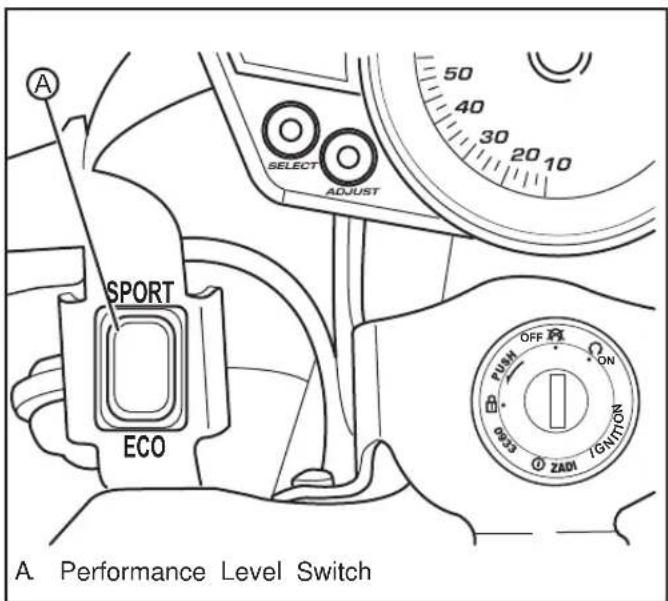
The performance level is a two position switch that toggles between Eco and Sport. To select either of the switch positions, the motorcycle must be stopped and the key switch in the OFF position.
The Eco position reduces the acceleration and top speed of the motorcycle. It is an ideal position to use for times when you want softer acceleration. This position is also good for newer riders and for extending range.
The Sport position causes the motorcycle to accelerate at a significantly faster rate. This position is recommended for advanced riders.
Those who take advantage of the Eco position are likely to see a slight increase in range and experience greater regenerative braking.
Handlebar Controls

A. High Beam Flash-to-Pass
B. Headlight High/Low Beam Switch
C. Front Brake Lever
D. Throttle Control

E. Motor Stop Switch
F. Turn Signal Switch
G. Horn Button
A. High Beam Flash-to-Pass
When the headlight is in the low beam position, push the flash-to-pass switch and the high beam will illuminate and will stay illuminated until the switch is released. When released, this switch will default back to the low beam position. The high beam indicator will also illuminate.

B. Headlight High/Low Beam Switch
When the switch is pushed, the headlight will change from low beam to high beam. It will stay in the selected position until it is switched back. When in high
beam position, the high beam indicator on the instrument panel will illuminate.
C. Front Brake Lever
The front brake lever controls the front brake when the lever is squeezed. When braking, the throttle should be in the closed position. The brake light will also illuminate.
D. Throttle Control
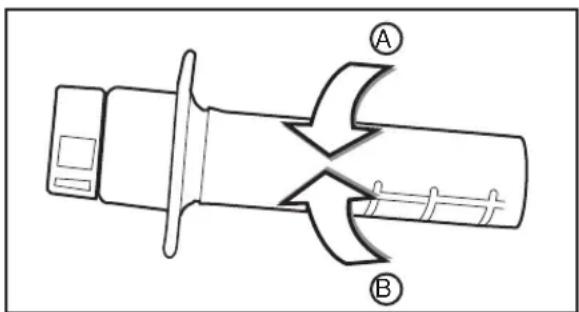
Twist the throttle in a counter-clockwise rotation (A) to energize the motor and start the motorcycle in a forward direction. Release the throttle and it will snap back to the closed position (B), de-energizing the motor, and regenerative braking will begin.
When the motorcycle is moving and the throttle control is in the fully closed position, the regenerative braking feature will activate. Regenerative braking takes some of the energy from the moving motorcycle and turns it back into electrical energy. This energy is then stored back into the power pack, contributing to increased energy efficiency. A slight drag is felt when the regenerative braking is activated. If you want to coast without the regenerative braking, hold the throttle just off of the fully closed position.

flowchart
graph TD
    A["Process Block A"] --> B["Process Block B"]
    B --> C["Feedback Loop"]
    C --> A
E. Motor Stop Switch When the switch (A) is pressed, it will stop power to the motor controller. The motor controller will remain in this state until the ON (B) button is pressed. The switch does not turn off all electrical circuits, just the operation of the motor.
G. Horn Button When the key is in the ON position, the horn will sound when the button is pressed. Electric vehicles run quietly; the horn can be used to warn pedestrians or other motorists of your presence.
natural_image
Simple black left-pointing arrow inside a square frame (no text or symbols)F. Turn Signal Switch When the turn signal switch is pushed in the left or right position, the corresponding front and rear turn signals will flash. When the turn signal switch is ON, the corresponding turn
signal indicator on the instrument panel will illuminate.
Always signal your turns and other maneuvers as required by law. Unlike an automobile, the turn signals must always be cancelled manually on the motorcycle. Push in on the switch and it will return to the center, or, OFF position.
NOTES
Starting And Operating
First Time Set-Up
If your motorcycle was direct-shipped you will need to perform the following:
- Remove the motorcycle from its shipping crate. See Unpacking Your Zero Motorcycle on page 4-2.
- You must charge the power pack before riding the motorcycle. See Charging The Power Pack on page 4-10.
- Identify and inspect wheels for spoke tension and/or damage (DS only).
-
Check the tire pressure and adjust to proper specifications. See Tire Inflation on page 5-10.
-
Inspect the hydraulic brake system. Follow the hydraulic line from the reservoirs to the calipers and verify that there are no leaks or damage to the brake lines. Verify that the brakes function properly.
- Make sure the motorcycle key switch is OFF, then twist the throttle to make sure it's rotation is smooth, and it returns correctly.
- Inspect bolts and make sure they are tight. See Bolt Torque Table on page 5-2. Double check the fork, wheel, and brake bolts.
- Insert the key in the key switch and turn the key to the ON position. The gauge will perform a self test sweep. The charge indicator should read fully charged.
Unpacking Your Zero Motorcycle
Although unpacking your Zero motorcycle can be done by a single person, it is recommended to have a second person to help lift and remove your motorcycle from the crate base.
Outer Box Cover
- Cut and remove the two outer box retention straps.
- Unscrew stabilizer bar bolts, one on each side of outer box.
- Open box top and remove inner cardboard end reinforcement sleeves.
- Unscrew stabilizer bar from handlebar end and remove.
- Unscrew lower crate cover retaining screws and washers.
- Lift or cut outer box away from motorcycle.
Inner Assembly
- Carefully remove plastic cover from motorcycle.
- Locate small parts box below motorcycle and put to the side. (This box contains important documentation, owner's manual, keys, etc.)
- Remove the tie down straps from crate base.
- Carefully lift rear portion of the motorcycle over the swingarm standoff and off crate base.
- Carefully lift front wheel out of crate base.
- Deploy kickstand, lean motorcycle and inspect in accordance with delivery inspection sheet.
Recycling
Your Zero Motorcycles shipping crate and packaging materials were designed to be completely recycled. Please cut down and recycle all cardboard, plastic, and metal materials in appropriate receptacles.
The tie down straps that accompanied your motorcycle can be reused as regular tie down straps for transporting your motorcycle.
General Operation
Pre-Ride Inspection
Before operating the Zero S/DS motorcycle, check the following to make sure the motorcycle is secure and intact:
•Power Pack
Make sure the instrument panel charge indicator is indicating a charged power pack. If the charge indicator reads below 6 bars (1/2), we suggest you recharge before use. Always keep the charger cord with the motorcycle.
- Drive Belt
Check the belt tension and condition. See Drive Belt on page 5-10.
- Drive Chain (Optional)
Check the chain tension and condition. Adjust and lubricate if necessary. The drive chain must be cleaned and lubricated at the intervals specified in the maintenance schedule; otherwise it will quickly wear out, especially when riding in dusty or wet areas. See Drive Chain on page 5-14.
- Brakes
Squeeze the brake lever and press the brake pedal individually while pushing the motorcycle to see if it rolls. You should be able to lock-up the wheels completely by applying the brakes.
- Throttle
With the key switch in the OFF position, apply the throttle and release to verify that the throttle is smooth and returns correctly.
- Tires
Check both tires for condition and tread depth. Check cold tire pressure frequently. Check for damage and alignment. Maintain correct tire pressure as specified on page 5-10. Replace the tires when the tread height is 2 mm (0.08 in) or less.
CAUTION: Under-inflation is the most common cause of tire failure and may result in severe tire cracking, tread separation, "blowout," or unexpected loss of motorcycle control causing personal injury and possible death.
- Electrical System
Check for correct function of the headlight, turn signals, and the brake/tail lights.
Key Switch/Steering Lock Positions

flowchart
graph TD
    A["Start"] --> B["PUSH OFF"]
    B --> C["ON"]
    C --> D["IGNITION"]
    D --> E["ZADI"]
    E --> F["0933"]
    F --> G["A"]
    G --> H["B"]
    H --> I["C"]
This is a three-position switch that is located on the fork in front of the handlebar. The switch positions are as follows:
A. Steering Lock
B. OFF
C. ON
The key should be removed from the motorcycle when parked to prevent theft. The key can be removed in either the OFF or steering lock position.
A. Steering Lock
Using the steering lock when parked will prevent unauthorized use and help prevent theft.
To Lock:
-
Turn the handlebar all the way to the left.
-
Push the key down from the OFF position and turn the key counter-clockwise while still pushing it in.
-
Remove the key.
To Unlock:
-
Install the key and turn clockwise.
-
Remove the key.

natural_image
Mechanical assembly diagram showing a rotating component with directional arrows indicating motion (no text or symbols)B. OFF
This position is used to turn the motorcycle OFF, disabling the electrical system.
C. ON
This position is used for operating the motorcycle. In this position the following will occur:
•Lights turn ON
•Instrument Panel display turns ON
Power Pack
The battery is located within the power pack and requires no special break in period.
The 2012 Zero S and DS leverage a completely new battery cell chemistry and configuration. Not only does the ZF9 power pack enable you to go beyond 161 km (100 miles), it is also designed to last the life of the motorcycle. The integrated onboard charger minimizes charge time and can work in parallel with Zero's quick charge accessories to cut charge times by as much as 75%. See Charging the Power Pack on page 4-10.
•Available in two configurations:
S:
-ZF6 122 km (76 miles)
-ZF9 183 km (114 miles)
DS:
-ZF6 121 km (75 miles)
-ZF9 180 km (112 miles)
•Cells last 3,000 full charge-discharge cycles before hitting 80% capacity, yielding as much as 495,000 km (308,000 miles) on the Zero S ZF9 original power pack.
- Up to 95% higher energy density power packs that yield significant range and performance advantages.
•The battery management system with enhanced 24/7 cell monitoring and a 92% reduction in power consumption.
- New, higher voltage power system that allows the motor to run cooler and with more RPMs.
The charging time is the same if connected to 120 V AC or 240 V AC. The charger output will be the same.
The normal recharging time of the power pack to a 100% charge is usually less than 6 hours for the ZF6 and 9 hours for ZF9 in ambient temperatures. Out of the normal temperature range charging and run-time times will vary. The power pack should not be used outside of the range of -7°C - 71°C (20°F - 160°F); the Battery Management System (BMS) will turn off the motor controller outside of this range.
The power pack should maintain up to 80% of its capacity, for approximately:
It is required that you leave the motorcycle on the charger if you expect it to sit in storage or unused for over 7 days. The power pack must be charged within 24 hours if fully discharged, and charged within 60 days if stored fully charged. Zero recommends you plug in your Zero motorcycle after 7 days, even if fully charged. Please leave your Zero motorcycle plugged in whenever possible.
S:
-ZF6 330,000 km (205,000 miles)
-ZF9 495,000 km (308,000 miles)
DS:
-ZF6 326,000 km (203,000 miles)
-ZF9 487,000 km (302,000 miles)
Add On Electrical Equipment
WARNING: Do not add anything electrical to your motorcycle unless approved by your dealer. Some electrical components can damage your motorcycle. Some add-on electrical equipment can keep other components from working as they should or can dramatically reduce the range and/or life expectancy of the power pack.
Battery Management System (BMS)
Every power pack contains a Battery Management System (BMS) which monitors the condition of the cells, and optimizes the charging process to provide the highest-performance, longest-range, and longest-life for the power pack.
The BMS safeguards the power pack by means of safety interlocks. These interlocks turn off or control certain operations that could damage the power pack. See Safety Interlocks on page 6-10 for more information.
The BMS also monitors the power pack for a host of predefined conditions, and then takes actions according to these conditions. Some of these conditions are listed below. Also see, Understanding BMS Flash Code Patterns on page 6-4.
•Dangerously Low Voltage
Action: If the voltage drops to the point that may damage the battery cells, the battery sends a signal to disable the motor controller and the motorcycle will not run until the voltage returns to an acceptable level.
•High or Low Temperature
Action: If the BMS senses that the power pack is too hot, above 71^ C ( 160^ F), or too cold, below -7^ C ( 20^ F), it sends a signal to disable the motor controller and the motorcycle will not run until the temperature returns to an acceptable level. The charger will also be disabled in this condition.
•High Voltage
Action: If the BMS detects a voltage that is too high, it shuts down the charger to prevent over-charging.
The BMS is sealed inside the power pack. As a rider, you don't need to think much about the BMS - it just silently does its job as you charge, ride, and store your motorcycle.
Power Pack Charger
Keep you power pack connected to the charger when your motorcycle is sitting in storage or if it will be sitting unused for more than 7 days. The power pack must be charged within 24 hours if fully discharged, and charged within 60 days if stored fully charged. Zero recommends you plug in your Zero motorcycle after 7 days, even if fully charged. Please leave your Zero motorcycle plugged in whenever possible.
Warning: Charge the Zero power pack with the Zero charger.
The charger is located under the power pack.
When charging the motorcycle's power pack, the charger can be left ON, even after the power pack is fully charged (see image on page 4-9). There are two possible cases that can occur:
- When left on the charger, the power pack will receive a full charge. Once fully charged, the charger will check the status of the power pack once every 72 hours to ensure that it maintains a full charge. When fully charged, a green light will illuminate on the charger. Should the charger not read that the power pack is full, it will continue to attempt to fully charge the power pack. In this event the green light may not illuminate; however, the power pack may be fully charged. To ensure that the power pack is charged, check the charge indicator on the instrument panel prior to riding.
- If the power pack terminates the charge before the charger reaches the state previously mentioned, then the charger will continue to cycle and will top off the power pack until the power pack is removed from the charger, or the charger reaches the complete state previously noted.
Charger LED Indicators A. Ammeter
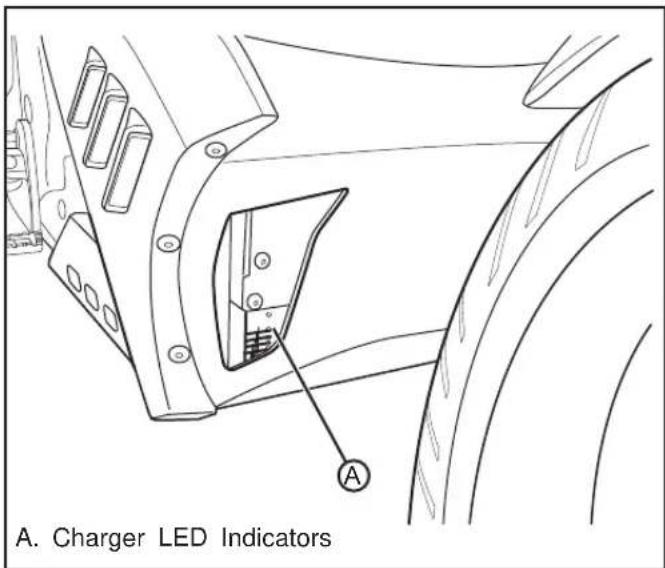
The charger LED indicators (A) are visible through right lower opening in the fairing.
The Ammeter LED is an amber indicator that
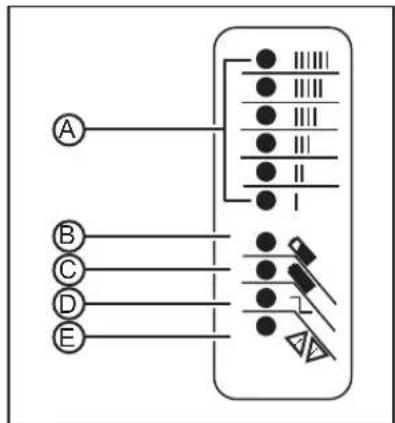
indicates the amount of current output and should gradually ramp down from "II/III" to "I".
B. 80% Charge The 80% Charge LED is an amber indicator. If it is on solid, the bulk charge phase is complete, 80% charged. Charger is
now in absorption phase. If the indicator is flashing, there are two issues that can cause this to occur:
•The charger and BMS are balancing.
•The BMS is cutting off the charge because one or more cells have reached maximum voltage.
C. 100% Charge
The 100% Charge LED is a green indicator. If it is on solid, the charging is complete and the charger will enter maintenance mode. If it is flashing, the absorption phase is complete and the charger is in finish phase.
D. AC ON
The AC ON LED is an amber indicator. If it is on solid, the AC power is good. If it is flashing, the AC voltage is low. Check for proper voltage, and if an extension cord is being used, verify that it is of the correct length. Maximum length is 7.6 m (25 ft.) 12-AWG.
E. Fault
The Fault LED is a red indicator which indicates there is a charger error. If it is flashing, reset the charger and see section 6, Troubleshooting.
Charging The Power Pack
WARNING: Charge the Zero power pack with the Zero charger.
It is possible for lithium ion cells to overheat and fail.
It is recommended to charge in a location that is away from combustible materials and in a well-ventilated area. If charging your Zero motorcycle outdoors, avoid charging in the rain.
The maximum power pack internal charging temperature is 52^ C ( 125^ F). If the power pack's internal temperature is over 52^ C ( 125^ F), it will not accept a charge until it is moved to a cooler location. Also, if the power pack has just been run hard, it may internally be above 52^ C ( 125^ F) even if the ambient temperature is lower.
If you experience a power pack that will not take a charge, you should ensure the internal temperature is below 52^ C ( 125^ F). If the power pack was recently run and it will not take a charge, the power pack should cool and begin taking a charge in around 30 minutes or less.
The maximum charging temperature cutoff is a power pack longevity feature. Charging at higher temperatures can shorten the life of the power pack.
Note: Frequent top off charging is good for the power pack's life span, so do not hesitate to charge frequently.
Standard Charging
- Ensure that the key switch is in the OFF position.
- Plug the supplied power cord (A) into the on-board charger connector. Always keep the power cord with the motorcycle.

natural_image
Technical line drawing of a mechanical assembly with no visible text or symbols- Always connect the charger to a GROUNDED outlet. When using an extension cord, avoid excessive voltage drops by using a grounded, 3-wire, 12-AWG cord no longer than 7.6 m (25 ft). The charger can be used on 120 V AC or 240 V AC current. The voltage does not change the amount of time that the motorcycle takes to charge.
Note: AVOID connecting the Zero charger and another device to a single 120 V AC 15A/20A circuit, as it may become overloaded. Zero chargers draw as much as 10 amps from the 120 V AC circuit when charging.
- Charging a fully discharged power pack to 100% takes about:
•ZF6 6 hours
•ZF9 9 hours
When the power pack is fully charged, disconnect the power cord from the charger.
Quick Charging
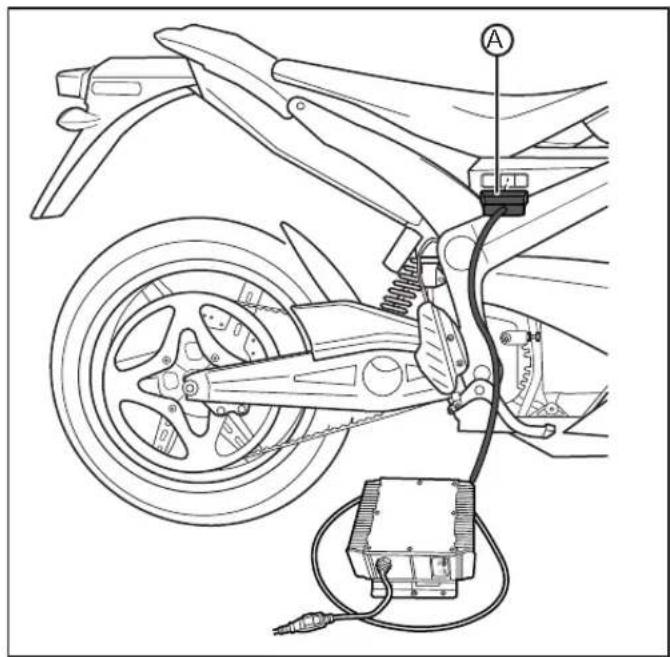
The “scalable” quick charging feature utilizes up to three auxiliary/standalone chargers (in addition to the existing integrated charger) for up to a 75% reduction in charge time. The amount for quick charging time will vary with the number of chargers used; see technical specifications on pages 1-6 through 1-10 for charging times. The auxiliary/standalone charging connector is located under a cover on the right upper rear corner of the power pack.
- Ensure that the key switch is in the OFF position.
- Locate the auxiliary charging connector and remove the protective cover.
- Connect the power pack charger to the power pack connector (A).
-
Always connect the charger to a GROUNDED outlet. When using an extension cord, avoid excessive voltage drops by using a grounded, 3-wire, 12-AWG cord no longer than 7.6 m (25 ft). The charger can be used on 120 V AC or 240 V AC current. The voltage does not change the amount of time that the motorcycle takes to charge.
-
Connect the integrated charger. See Charging the Power Pack Single Charger (integrated) on page 4-10.
- When the power pack is fully charged, disconnect the chargers and reinstall the protective cover.
Operating Your Motorcycle
Starting
- Turn the key switch to the ON position.
- Verify that the charge indicator reads fully charged.
- Press the motor stop switch to the ON position.
- With the kickstand up, twist the throttle toward you (counter-clockwise) to increase speed. When the throttle is twisted away from you (clockwise), the speed will decrease.
Braking
On the right handlebar is the hand operated brake lever. The brake lever controls the front brake when the lever is squeezed. On the right lower side, next to the foot peg, is the foot operated brake pedal. This pedal controls the rear brake. When braking, the throttle should be in the closed position.
CAUTION: If you apply the front or rear brake hard enough, it is possible to lock the wheels. This could cause you to lose control of the motorcycle. We suggest progressive use of the brakes to bring the Zero motorcycle to a complete stop without locking the wheels. Your Zero motorcycle is a light weight performance product and therefore practice is recommended to safely perfect emergency stops.
Stopping
- With the throttle in the closed position press the motor stop switch to the OFF position. This switch can also be used in an emergency to shut the motor off.
- Turn the key switch to the OFF position and remove the key. To prevent theft, the key should be removed anytime the motorcycle is left unattended.
- Be sure to charge the power pack after each ride. See Charging The Power Pack on page 4-10.
Suspension Adjustment
Front Fork Adjustment
A shock has two main actions: compression when the shock gets loaded, and rebound when the shock returns back to full length. Compression damping is the adjustment that determines how fast or slow the fork compresses. Rebound damping is the adjustment that determines how fast or slow the fork rebounds.
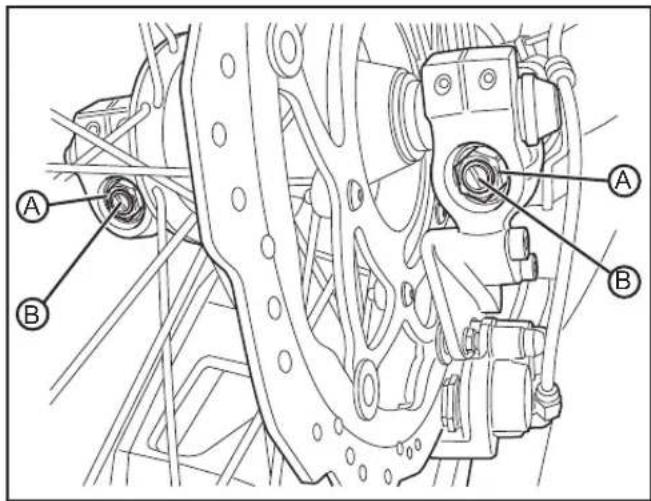
- Bleed Screw - The 3 mm Allen M5 screw (A) at the top of the fork leg is the "bleed" screw. The bleed screw serves two purposes:
- Transporting your motorcycle. See Transporting on page 1-13.
- Bleeding the fork: Bleed the fork regularly, let any excess air out after each ride.
- Rebound Damping - The rebound damping is adjusted by turning the slotted brass adjuster screw (B) on the top of both fork legs. Next to it will be the writing S-F, meaning Slow and Fast. The adjuster has 18 stages of adjustment. This determines how quickly the fork returns to its extended position after being compressed. Turning the rebound adjuster screw clockwise will slow the rebound speed down making it better for larger, rolling terrain or bumps. Turning the rebound adjuster screw counter-clockwise will increase the rebound speed making it better for smaller, rougher bumps. Adjust each fork leg evenly.

- Compression Damping - The compression damping is adjusted by turning a screw on the bottom of each fork leg. There is a rubber dust cover protecting the jam nut (A) securing the screw (B). The adjuster has 12 stages of adjustment. Turn the adjuster clockwise for slower compression. To speed up compression, turn the adjuster counter-clockwise. Start with a middle setting and fine tune the compression from there. Proper compression will allow the tire to track the ground over consecutive bumps. Compression that is set too slow will pack-up (feel harsh over consecutive bumps) while compression that is set too fast will cause the fork to bottom out harshly. If the fork is bottoming out, turn the adjuster one click at a time until the bottom-out stops. Adjust each fork leg evenly. Replace the rubber dust cover after the adjustment.
Note: Adjusters should never be forced completely "Fast" or "Slow"; always leave one click of adjustment in either direction.
Rear Shock Adjustment
Spring Adjustment:
Obtaining the correct rear spring preload is critical for proper handling. The spring preload must be set to match the weight of the rider. The spring is preloaded for an 82 kg (180 lb) rider. This puts the rear tire 1/3 of the way through its vertical travel. Heavier riders require stiffer spring rates. A good approximation of your rear spring requirements can be found by measuring the rear suspension's sag. This measurement will quickly determine if your rear spring is approximately correct for your weight. This adjustment is a recommended guideline; personal riding preference may vary from the specifications given.
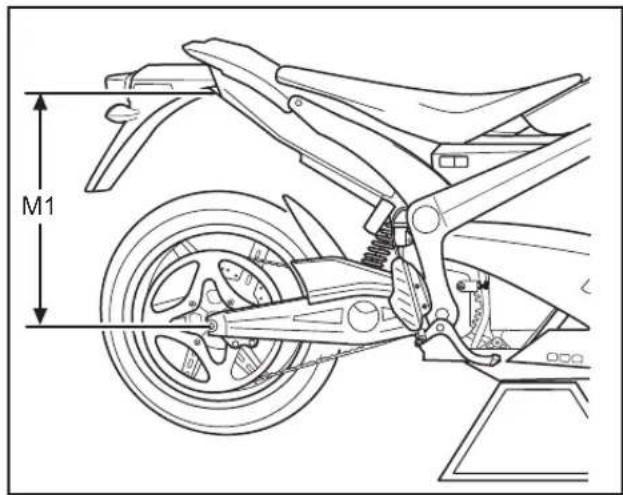
- Checking Sag
- Support your motorcycle on a stand with the rear wheel off the ground.
- Measure vertically from the rear axle to the rear fender. Mark this spot as it will be used for other measurements.
- Record this measurement, this will be measurement M1.
- Remove the motorcycle from the stand.
- Wearing your normal riding apparel, sit on the motorcycle.
- Have an assistant hold the motorcycle up, your feet should be on both pegs.
-
Bounce the suspension a couple of times.
-
Have a second assistant take a measurement using the same locations as in step 2.
- Record this measurement, this will be measurement M2.
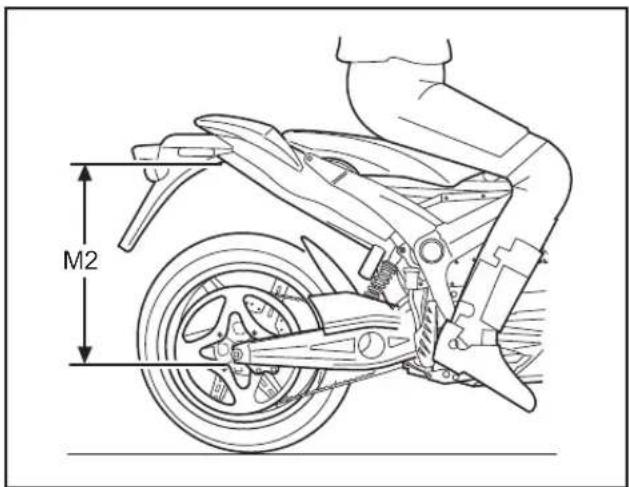
- Subtract the second measurement (M2) from the first measurement (M1).
Example:
| M1 600 mm | (23.6 in) | |
| M2 - 550 mm | (21.7 in) | |
| Sag = 50 mm | (1.97 in) |
The total sag is 50 mm (1.97 in). Refer to the chart below for the correct sag. If the sag is not correct, the spring pre-load should be adjusted. See Spring Pre-load Adjustment on page 4-19.
| MODEL SAG | |
| S 50 mm (1.97 in) | |
| DS 65 mm (2.56 in) |
•Spring Pre-load Adjustment
-
Clean any dirt or debris from the threads of the shock near the lock ring (A).
-
Using a lock ring wrench loosen the lock nut (A).
-
For measurements less than the specified value, decrease the pre-load on the spring by turning the spring nut (B) counter-clockwise on the shock. If more than the specified value, increase the pre-load on the spring by turning the spring nut (B) clockwise on the shock.
-
Recheck the sag. If the sag is correct, tighten the lock nut (A).
- Rebound Adjustment - The rebound adjuster knob (C) is at the bottom of the shock. It has 8 stages of adjustment. Printed on the knob is S-F, meaning Slow and Fast. The rebound adjuster knob controls how slow or fast the shock returns to its extended position after being compressed. Turning the knob clockwise, or S direction, is good for big impacts.
Turning the knob counter-clockwise, or F direction, is good for smaller and more frequent impacts.

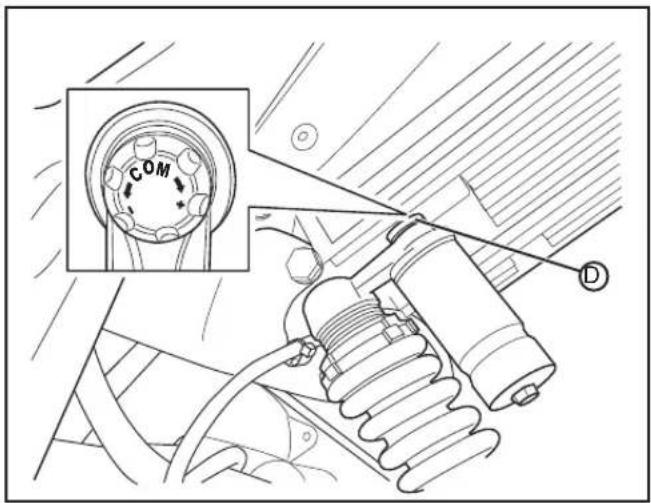
- Compression Adjustment - The compression adjustment knob (D) is at the top of the shock. It has 18 stages of adjustment. The knob has "+" (slower compression) and "-" (faster compression). Turn the adjuster clockwise for slower compression. To speed up compression, turn the adjuster counter-clockwise. Start with a middle setting and fine tune the compression from there. Proper compression will allow the tire to track the ground over consecutive bumps. Compression that is set too slow will pack-up (feel harsh over consecutive bumps) while compression that is set too fast will cause the shock to bottom out harshly. If the shock is bottoming out, turn the adjuster one click at a time until the bottom out stops.
Note: Adjusters should never be forced completely "Fast" or "Slow"; always leave one click of adjustment in either direction.
Maintaining Your Motorcycle
Owner's Responsibilities
- This owner's manual should be considered a permanent part of this motorcycle and should remain with it even if the motorcycle is subsequently sold.
- Perform routine care and maintenance of your electric motorcycle as detailed in this owner's manual.
-
Use only Zero approved parts and Zero Motorcycle Accessories.
-
The operator is responsible for learning and obeying all country, federal, state, and local laws governing the operations of an electric motorcycle.
- Always wear a regionally approved helmet, goggles, appropriate boots, and all other appropriate safety equipment when operating an electric motorcycle.
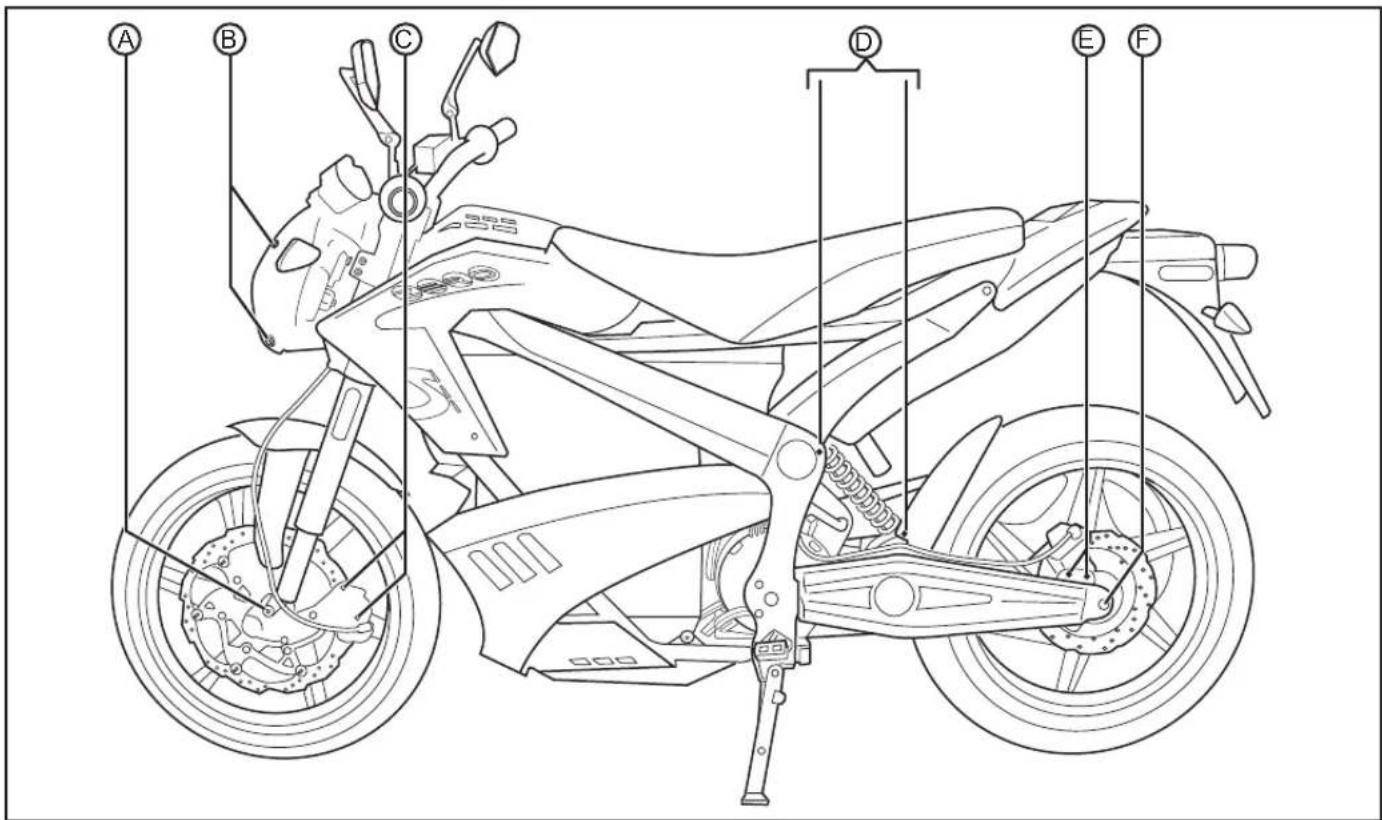
Bolt Torque Table
| LOCATION | TEM TORQUE NOTES | ||
| A Front | axle end bolts 26 N·m (19 lb ft) Use LOCTITE | ^ 242^** | |
| B Headlight | bolts 16 N·m (12 lb ft) Use LOCTITE | ^ 242^** | |
| C | Front caliper mount bolts | 20 N·m (15 lb ft) | Use LOCTITE ^ 242^** |
| D Shock | mount bolts 52 N·m (38 lb ft) - | ||
| E | Rear caliper mount bolts | 20 N·m (15 lb ft) | Use LOCTITE ^ 242^** |
| F | Rear axle end bolts | 26 N·m (19 lb ft) | Use LOCTITE ^ 242^** |
| G | Rear axle pinch bolts | 26 N·m (19 lb ft) | Use LOCTITE ^ 242^** |
| H | Controller heat sink to frame bolts (rear) | 26 N·m (19 lb ft) | - |
| I | Motor mount bolts (rear) | 24 N·m (18 lb ft) | - |
| J | Controller heat sink to frame (front) | 26 N·m (19 lb ft) | - |
| K | Main pivot bolt/nut (swingarm) | 102 N·m (75 lb ft) | - |
| L | Motor mount bolts (front) | 30 N·m (22 lb ft) | - |
* or equivalent
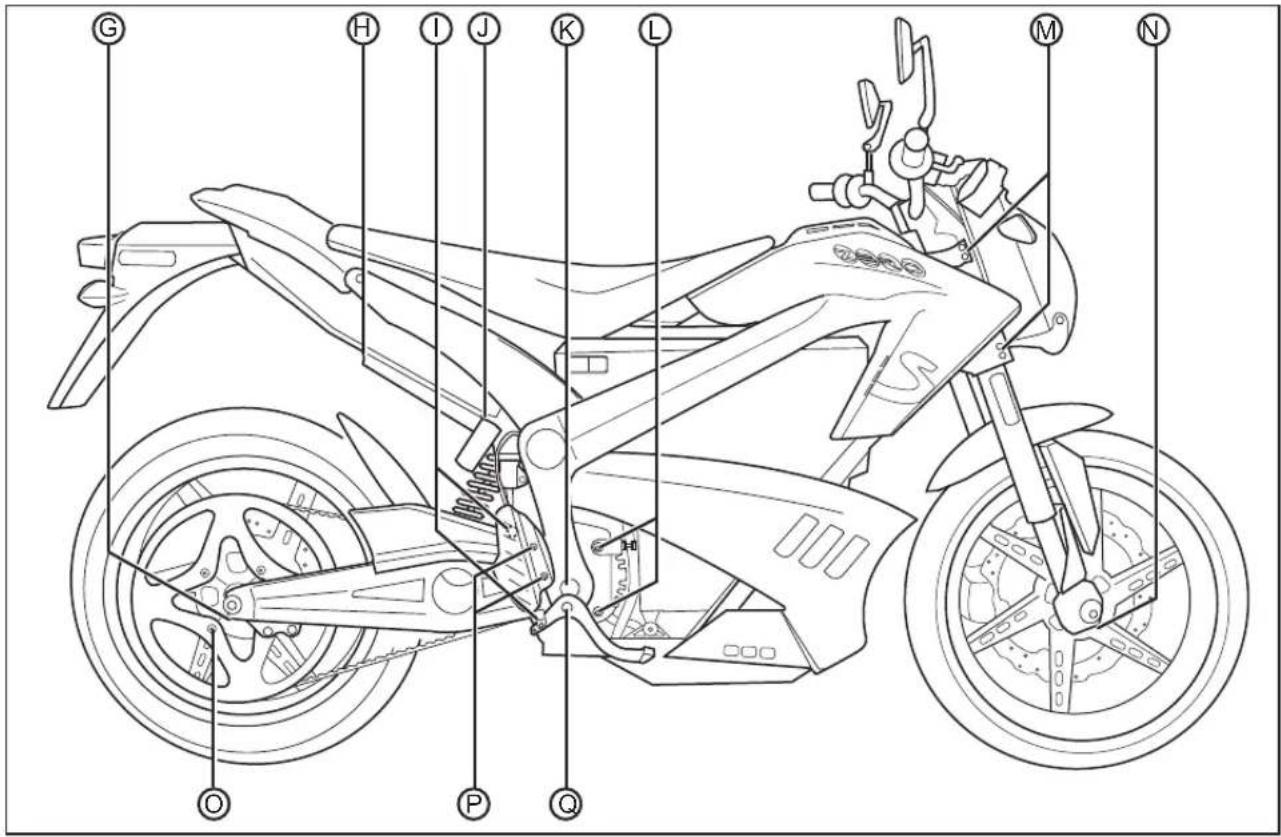
Bolt Torque Table, cont'd
| LOCATION | ITEM TORQUE NOTES | ||
| M | Triple tree pinch bolts | 16 N·m (12 lb ft) | Use LOCTITE® 242®* |
| N Front | axle pinch bolts 18 N·m (13 lb ft) Use LOCTITE | ® 244®* | |
| O | Rear sprocket to cast wheel, 4 bolts (S model) | 34 N·m (25 lb ft) | Use LOCTITE® 242®* |
| P | Rear brake master cylinder to frame bolts | 23 N·m (17 lb ft) | Use LOCTITE® 242®* |
| Q | Rear brake pedal pivot bolt | 46 N·m (34 lb ft) | Use LOCTITE® 242®* |
| R | Handlebar clamp mount bolts | 26 N·m (19 lb ft) | - |
* or equivalent
See Bolt Torque Table on page 5-2.
See Bolt Torque Table on page 5-2.
See Bolt Torque Table on page 5-2.

Power Pack
WARNING: You must leave your motorcycle on the charger if you expect it to sit in storage or unused for over 7 days.
The power pack must be charged within 24 hours if fully discharged, and charged within 60 days if stored fully charged.
Zero recommends you plug in your Zero motorcycle after 7 days, even if fully charged. Please leave your Zero motorcycle plugged in whenever possible.
- The power pack is a lithium ion power system. While it does require charging, it does not require maintenance.
- The power pack should be kept away from excessive heat. The lithium ion cells should not get above 71^ C ( 160^ F). Do not store in a hot trailer or leave the power pack in direct sunlight.
- Only an authorized service agent is qualified to have access to and troubleshoot the power pack.
- Dispose of the power pack according to your state and local laws. It is encouraged that the power pack be recycled rather than disposed of in landfills. Please contact Zero at support@zeromotorcycles.com or locate a recycling center in your area.
General Maintenance
Brakes
Brake Fluid Level Inspection
WARNING: Do not spill brake fluid on painted surfaces, the finish could be damaged. Spilling brake fluid on the ABS body plastics will cause them to crack. Clean off any brake fluid spills immediately.
Always place a shop towel under the master cylinder reservoir prior to removing cover/cap.
Low fluid levels may indicate worn brake pads or a leak in the hydraulic system. Inspect the brake pads for wear and/or the hydraulic system for leaks. Use only new DOT 4 brake fluid from a sealed container.
Front Brake
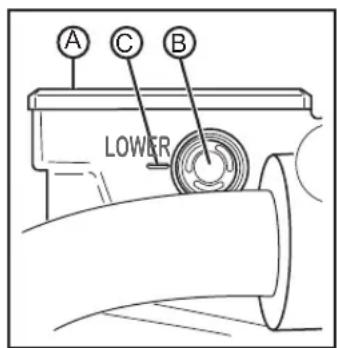
Inspect the level of the front brake fluid through the sight glass (B). If the fluid level is visibly below the low level indicator (C), brake fluid must be added. Clean any dirt or debris from the cover (A) before opening the reservoir.
- Remove the two Phillips screws, securing the cover onto the reservoir.
- Add new DOT 4 brake fluid.
- Inspect the cover seal, ensuring that it is free of any wear or damage and that it is positioned correctly.
- Install the cover and tighten the Phillips screws.
Rear Brake

Inspect the level of the rear brake fluid by inspecting the level through the reservoir housing. If the fluid level is visibly below the low minimum "MIN" indicator (B), brake fluid must be added. Clean any dirt or debris from the cap and reservoir opening
(A) before opening the reservoir. Unscrew the cap and add new DOT 4 brake fluid. Inspect the cap seal ensuring that it is free of any wear or damage then reinstall the cap.
Brake Pad Inspection
The brake pads must be inspected when specified in the maintenance schedule. See Maintenance Schedule on pages 5-24 through 5-26. Visually inspect the brakes by looking at the remaining brake pad material through the sides of the brake caliper. Replace the brake pads if either pad's thickness is 1.35 mm (0.05 in) or less. If the brake pads (A) are worn, replace both brake pads immediately.
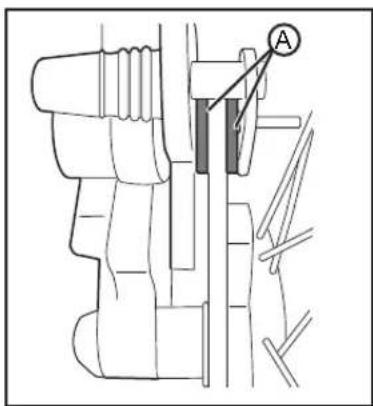
The brake rotor should also be checked for thickness. The minimum thickness is 3.85 mm (0.15 in).
Suspension
Front
For maintenance, see Maintenance Schedule on pages 5-24 through 5-26.
To adjust the fork, see Suspension Adjustment on page 4-15.
Rear
CAUTION: The shock absorber assembly contains highly pressurized gas.
- Do not attempt to tamper with or open the cylinder or shock.
- Do not subject the shock to high temperature or open flame.
Doing either of these can cause the cylinder or shock to explode causing personal injury or death.
For maintenance, see Maintenance Schedule on pages 5-24 through 5-26.
To adjust the shock, see Rear Shock Adjustment on page 4-17.
Wheels And Tires
Inspect both wheels for the following:
•Bent, loose, or missing spokes (DS only)
• Bent or cracked rims
- Impact marks on the rims
Inspect both tires for the following:
•Cuts, cracks, splits, or missing tread lugs in the tread or sidewall area
• Bumps or bulges within the tire body
- Uneven tire tread wear. Wear on one side of the tire tread or flat spots in the tire tread indicate a problem with the tire or motorcycle.
• Exposed tire thread or cords
If either of the wheels or tires are found to have any of the above conditions, replace the wheel and tire immediately.
Tire Inflation
CAUTION: Under-inflation is the most common cause of tire failure and may result in severe tire cracking, tread separation, "blowout," or unexpected loss of motorcycle control causing personal injury and possible death.
Tire pressure should be checked and adjusted before each ride. Tire pressure is checked using an accurate gauge when the tires are cold. This means that the tires have not been ridden on for 3 hours. Always replace the valve stem cap when finished.
| MODEL FRONT REAR | ||
| S 220 kpa | (32 psi) | 241 kpa(35 psi) |
| DS 220 kpa | (32 psi) | 241 kpa(35 psi) |
Drive Belt
The belt drive provides low maintenance and quiet operation with minimal stretch. Keep dirt, grease, oil, and debris off the belt and sprockets.
The drive belt tension should be checked and adjusted at the intervals specified in the Maintenance Schedule. See Maintenance Schedule on pages 5-24 through 5-26.
Clean the belt with mild soap and water when washing you motorcycle. Towel dry and inspect for the following:
•Cuts or unusual wear patterns.
•Damage to the center of the belt.
- Outside edge beveling. Some beveling is common but it indicates that sprockets are misaligned.
•Outside ribbed surface for signs of stone puncture.
• Inside (tooth portion) of belt for exposed tensile cords normally covered by nylon layer and polyethylene layer. This condition will result in belt failure and indicates worn sprocket teeth.
•Signs of puncture or cracking at the base of the belt teeth.
If any of the above conditions are found, the belt should be replaced.
Checking Drive Belt Tension
Proper belt tension is essential for optimum operation of the drive system.
Lack of belt tension can lead to so-called "ratcheting". The teeth of the belt will slide over the teeth of the rear sprocket. This causes not only an unpleasant sound; the ratcheting can also cause damage to the carbon tensile cords. If ratcheting has occurred you should replace the belt before the next time you ride.
Too much tension can increase the wear of your drive system and the system can drag.
The tension is checked by using a Tension Tester.
The Tension Tester has a plastic measurement arm, located in a slot. Along this slot there is a measuring scale. The point of intersection of the measurement arm and the measuring scale shows the tension of the belt. There is a button (clicking pad) on the upper side of the Tension Tester, where you can secure your finger with a rubber band holder. A spring is located underneath this clicking pad. If a certain pressure is applied to the spring, it makes a clicking sound.

natural_image
Illustration of a hand gripping a train with a crane, no text or symbols present-
Remove the key from the key switch.
-
Press the Tension Tester steadily to the middle of the upper side of the belt. The "lip" will lead the tester on to the belt.
-
Slowly increase the pressure on the tester, until you hear a clicking sound. Do not increase the pressure after the tester has clicked.
-
Remove the tester carefully from the belt. Avoid rough movements of the tester, as this would change the results of the measurement. The measurement should be in the range of 20-30 kg.
Drive Belt Adjustment Procedure
- Remove the key from the key switch.
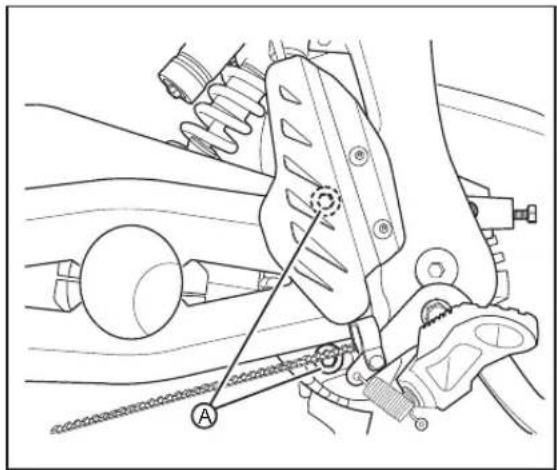
- Loosen both rear motor mount bolts (A) using a 5 mm Allen/Hex wrench.
natural_image
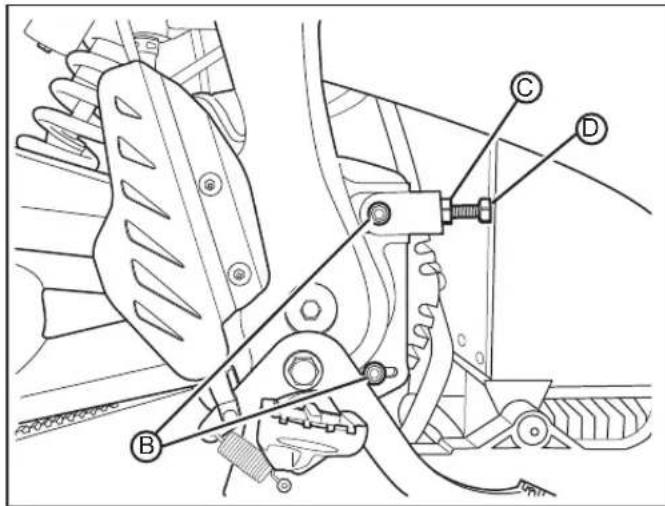
Mechanical assembly diagram showing a brake caliper and suspension components (no text or labels)- Loosen both front motor mount bolts (B) using a 6 mm Allen/Hex wrench. Loosen the 13 mm jam nut (C) on the belt tensioner.
Note: Belt tension will increase slightly when motor mounts bolts are fully torqued.
- Turn the adjuster bolt (D) a 1/4 turn at a time until the belt adjustment is within specification.
- Tighten all motor mount Allen bolts. See Bolt Torque Table on page 5-2.
- Tighten the 13 mm jam nut on the belt tensioner.
- Test ride the motorcycle.
- Recheck the belt for proper adjustment after the test ride and readjust if necessary.
Drive Chain (Optional)
Cleaning The Drive Chain
CAUTION:
- Wear safety glasses when cleaning the chain to prevent eye injuries.
- Never have the motor spinning the wheel. Turn the wheel only by hand. Failure to do so could result in serious personal injury.
- Never place your hand or any other body part between the chain and sprockets. Work with the chain only in the middle between the two sprockets. Failure to do so could result in serious personal injury.
- Do not allow any of the cleaner to get on the brake rotors or brake pads. If the brake rotors or brake pads are contaminated with cleaner, it will impair the motorcycle's ability to stop. This could result in serious personal injury.
Follow the manufacturer's instructions for the chain cleaner you are using; below are the general guidelines.
-
Remove the key from the key switch.
-
Set the motorcycle on a stand or lift so the rear wheel is free to spin. While turning the wheel by HAND, spray the inside of your entire chain with a good coating of chain cleaner and let it sit for a few minutes.
- Using a brush, fill the bristles with spray from the chain cleaner. Begin gently scrubbing the chain on the top of your swingarm using the brush.
- Do this for the entire length of the chain. Now do the same thing for the inside/bottom of the chain.
- Using the brush, clean both sides of the rear sprocket. Let this soak for 5 minutes.
- Using a water hose, rinse the entire chain. Then, using a clean rag, wipe any residual moisture from the chain.
Lubricating The Drive Chain
CAUTION:
- Wear safety glasses when lubricating the chain to prevent eye injuries.
-
Never have the motor spinning the wheel. Turn the wheel only by hand. Failure to do so could result in serious personal injury.
-
Never place your hand between the chain and sprockets. Work with the chain only in the middle between the two sprockets. Failure to do so could result in serious personal injury.
- Do not allow any of the lubricant to get on the brake rotors or brake pads. If the brake rotors or brake pads are contaminated with lubricant, it will impair the motorcycle's ability to stop. This could result in serious personal injury.
Follow the manufacturer's instructions for the chain lubricant you are using; below are the general guidelines. Do not allow any of the lubricant to get on the brake rotor.
- Turn the wheel backwards slowly and spray the inside of the chain on the inside of the links.
- Turn the wheel backwards slowly and spray the outside of the chain on the outside of the links.
- Let the motorcycle stand for 30 minutes to allow the lubricant to penetrate the link rollers.
Checking The Drive Chain
- Remove the key from the key switch.
- Using a ruler, grasp the chain halfway between the front and rear sprockets.
- The chain should move 16 mm (.63 in) in either direction, so 32 mm (1.25 in) of total free play.
- If the chain's free play is not within specifications it will need to be adjusted. See the Drive Chain Adjustment Procedure on page 5-16.

Drive Chain Adjustment Procedure
- Remove the key from the key switch.
- Loosen both rear motor mount bolts (A) using a 5 mm Allen/Hex wrench.
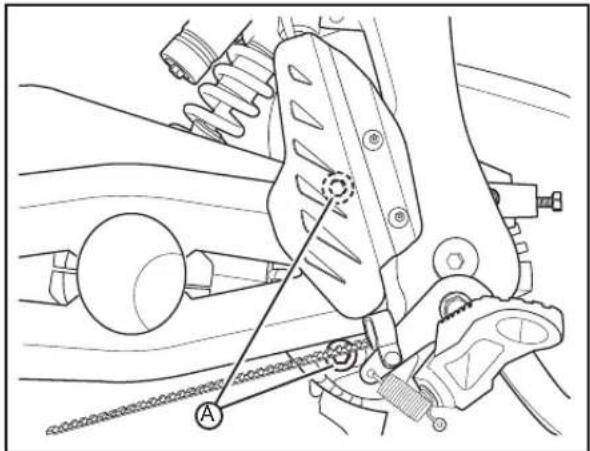
- Loosen both front motor mount bolts (B) using a 6 mm Allen/Hex wrench.
- Loosen the 13 mm jam nut (C) on the chain tensioner.
Note: Chain tension will increase slightly when motor mounts bolts are fully torqued.
- Turn the adjuster bolt (D) a 1/4 turn at a time until the chain adjustment is within specification.
- Tighten all motor mount hex bolts. See Bolt Torque Table on page 5-2.
- Tighten the 13 mm jam nut on the chain tensioner.
- Test ride the motorcycle.
- Recheck the chain for proper adjustment after the test ride and readjust if necessary.

Headlight Alignment
The headlight should be checked for correct alignment periodically. It must be aligned any time the suspension sag is adjusted because this will affect the headlight alignment. Before the headlight can be aligned, the suspension sag and tire pressure must be correctly adjusted. The headlight can be adjusted vertically. If the vertical adjustment is off, it will cause the beam to point too close to or too far ahead of the motorcycle. With the headlight on the low beam position, the motorcycle perpendicular to the ground, and the operator sitting on the motorcycle, verify the beam alignment. The motorcycle is shipped with the headlight at a 0.5-2.5% dip.
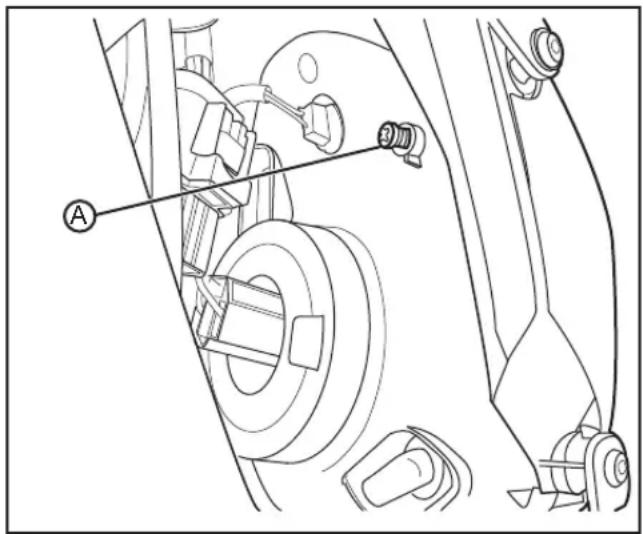
The adjustment screw (A) is located on the back upper right corner of the headlamp. To adjust the headlight, turn screw until the correct beam alignment is achieved.
natural_image
Technical line drawing of a vehicle suspension system with labeled component A (no text or symbols beyond label)Headlight Bulb Replacement
CAUTION: Halogen bulbs contain gas under pressure. Handling a bulb improperly could cause it to shatter into flying glass fragments. To help avoid personal injury:
•Turn the key switch OFF and allow the bulb to cool before changing the bulb.
- Leave the key switch OFF until the bulb change is complete.
•Always wear eye protection when changing a halogen bulb.
- Avoid touching the glass.

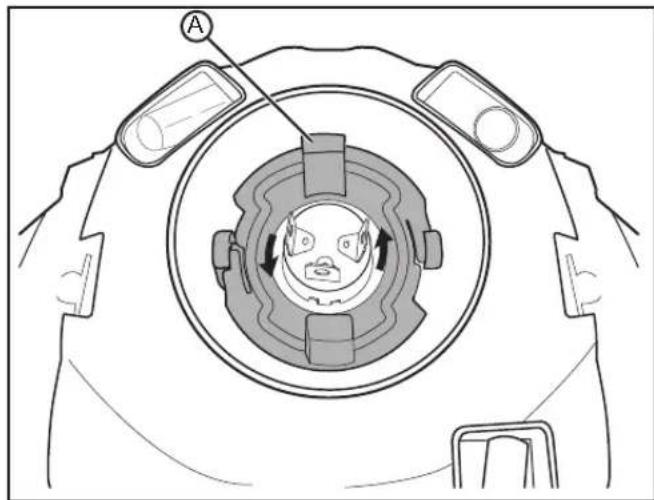
- Working from behind the headlight, disconnect the headlight bulb connector (A) and rubber cover (B).
natural_image
Technical diagram of a mechanical component with circular housing and labeled component A (no text or symbols beyond label)-
Remove the headlight bulb retainer (A) by turning it counter-clockwise.
-
Remove the headlight bulb by pulling it straight out.
WARNING: Do not touch the glass portion of the headlight bulb. Keep the headlight bulb free of contaminants. Oil from your fingers or contaminants will shorten the life of the bulb. Thoroughly clean any fingerprints or contaminants from the bulb using a clean cloth moistened with alcohol.
-
Install the headlight bulb into the lens.
-
Install the headlight bulb retainer and turn it clockwise until it locks into position.
-
Install the headlight bulb rubber cover.
-
Connect the headlight bulb connector.
Turn Signal Light Bulb Replacement
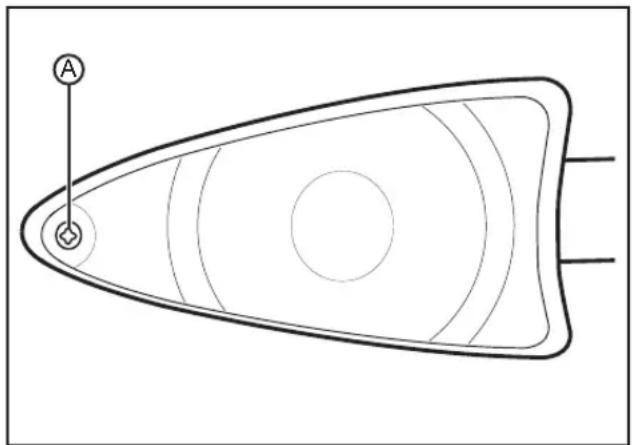
- Remove the turn signal lens screw (A) and remove the lens.
- Push in on the bulb, turn the bulb counterclockwise, and then pull the bulb out.
- Insert the new bulb into the socket, push in and turn clockwise until it stops.
- Install the lens and screw; tighten the screw. Do not over-tighten the screw.
natural_image
Simple line drawing of a symmetrical abstract shape with concentric circles and two labeled points (A and B), no text or symbols present.Brake/Tail Light Bulb Replacement
- Remove the brake/tail light lens screws (A) and remove the lens.

natural_image
Line drawing of a car's front grille with triangular headrest and circular vent, no text or symbols present-
Push in on the bulb and turn the bulb counterclockwise then pull the bulb out.
-
Insert the new bulb into the socket, push in and turn clockwise until it stops.
-
Install the brake/tail light lens and screws; tighten the screws. Do not over-tighten the screws.
Running Light Bulb Replacement
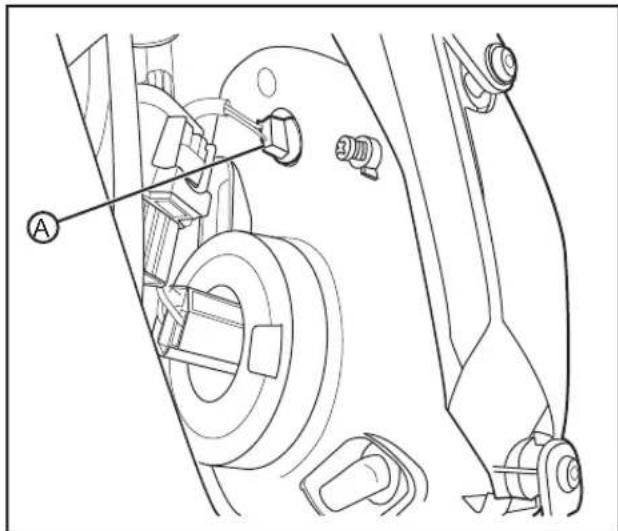
-
Working from behind the headlight, remove the bulb socket (A) from the headlight using a rocking motion.
-
Pull the old bulb straight out from the socket.
- Push the new bulb into the socket, and push the socket into the headlight.
Cleaning
To prolong the life of your motorcycle it should be washed periodically. Regular cleaning, using correct methods, is an important factor in maintaining the value of your motorcycle. It also ensures that safety-relevant parts remain in full working order.
CAUTION: After cleaning and before starting your journey, always test the brakes.
If tar, bugs, or other similar deposits have accumulated, wash them off as soon as possible. Do not use high pressure or steam cleaners; they can cause water intrusion of bearing, seals, and electrical components. Avoid spraying water of great force around the instrument panel, power pack, or controller. Avoid using strong acidic wheel cleaners, especially on spoked wheels. If such products are used on hard-to-remove dirt, do not leave the cleaner on the affected area any longer than instructed. Also thoroughly rinse the area off with water, immediately dry it, and then apply a corrosion protection spray.
WARNING: Improper cleaning can damage electrical components, cowlings, panels, and other plastic parts. Use only a soft, clean cloth or sponge with mild detergent and water to clean plastic. Do not use any harsh chemical products on plastic parts. Be sure to avoid using cloths or sponges which have been in contact with strong abrasive cleaning products, solvent or thinner, fuel (gasoline), rust removers or inhibitors, brake fluid, antifreeze or electrolyte.
After gently washing the motorcycle, be sure to allow all of the electrical components to dry prior to operation. If the motorcycle is ridden immediately after being washed, apply both brakes several times in order to remove any moisture from the brake pads. Do not use products such as tire dressings on tires as this will deteriorate traction.
Parking And Long Term Storage
- It is recommended to always leave the power pack plugged in. The Zero S/DS charger is designed to maintain a balanced and complete charge at all times without wasting any electricity.
- Over extended periods of time the power pack is checked every 72 hours to ensure that the cells are balanced and that the power pack is full.
-
To prolong the life of your power pack you should store your motorcycle in a cool area. Storing your motorcycle in a hot area will cause your power pack's life to be shortened.
-
If, for some reason, your motorcycle was not plugged in for several days, you should always charge it up before riding.
For more information on the power pack and the electrical system see Battery Management System (BMS) on page 4-7.
WARNING: Opening of the power pack is for trained Zero Motorcycles' technicians. Please be aware that incorrect handling of a Zero power pack can be dangerous. DO NOT OPEN!
Maintenance Schedule
The scheduled maintenance must be performed in accordance with this chart to keep the Zero S/DS motorcycle in top running condition. The initial maintenance is vitally important and must not be neglected. Where time and mileage are listed, follow the interval that occurs first.
| NO. | ITEM ROUTINE | EVERY | RIDE | INITIAL O | DOMETER MILEAGE READINGS | ||||
| 1,000 km(600 mi)or1 month | 7,000 km(4,000 mi)or6 months | 13,000 km(8,000 mi)or12 months | 19,000 km(12,000 mi)or18 months | 25,000 km(16,000 mi)or24 months | 31,000 km(20,000 mi)or30 months | ||||
| 1 | Front Brake | Check operation, and for fluid leakage.Replace brake pads if necessary. | √ | √ | √ | √ | |||
| 2 | R e a | Check operation, and for fluid leakage.Replace brake pads if necessary. | √ | √ | √ | √ | |||
| 3 | Brake Hoses | Check for cracks or damage.Replace if necessary. | √ | √ | √ | √ | √ | ||
| 4 | Whe e | Check runout, and for damage.Replace if necessary. | √ | √ | √ | √ | √ | ||
| 5 | Tire s | Check tread depth, and for damage.Replace if necessary.Check air pressure. See page 5-9.Correct if necessary. | √ | √ | √ | √ | √ | ||
| 6 | Wheel Bearings | Check bearings for smooth operation.Replace if necessary. | √ | √ | √ | √ | √ | ||
| 7 | D r i | Check chain slack/alignment and condition.Adjust andCubridate chain with chain lubricant thoroughly.Replace worn chain. | √ | Every 1,000 km (600 mi) and after washing the motorcycle or riding in th | |||||
| 8 | D r i | Check belt slack and condition.Replace a worn/damaged belt.Replace the belt every 20,000 km(12,500 mi). | √ | ||||||
| 9 | Steering Bearings | Check bearing assembly for looseness.Moderately repack with Teflon® greaseevery 25,000 km (16,000 mi) or 24months. | √ | √ | √ | Repack | √ | ||
| 10 | Chassis Fasteners | Check all chassis fittings and fasteners.Correct if necessary. | √ | √ | √ | √ | √ | ||
| NO. | ITEM ROUTINE EVERY | RIDE | INITIAL O | DOMETER MILEAGE READINGS | |||||
| 1,000 km(600 mi)or1 month | 7,000 km(4,000 mi)or6 months | 13,000 km(8,000 mi)or12 months | 19,000 km(12,000 mi)or18 months | 25,000 km(16,000 mi)or24 months | 31,000 km(20,000 mi)or30 months | ||||
| 11 | Front Brake Lever Pivot Shaft | ·Apply silicon grease lightly. | √ | √ | √ | ||||
| 12 | Front Fork | ·Check operation and for oil leakage.·Service/rebuild if necessary. | √ | √ | √ | √ | √ | √ | |
| 13 | Rear Shock Absorber Assembly | ·Check operation and for oil leakage. Replace if necessary. | √ | √ | √ | √ | √ | √ | |
| 14 | Throttle Grip · Check | operation and free play. | √ | √ | √ | √ | √ | √ | |
| 15 | Kickstand Pivots | ·Check operation.·Apply silicon grease lightly. | √ | √ | √ | ||||
| 16 | Kickstand Switch | ·Check operation and replace if necessary. | √ | √ | √ | √ | √ | √ | |
NOTE: From 37,000 km (24,000 mi) or 36 months, repeat the maintenance intervals starting from 13,000 km (8,000 mi) or 12 months.
Parts/Maintenance Items
The proper replacement parts, fluids, and lubricants to use are listed in the chart below.
| PART NUMBER | |
| Headlight Bulb H4 (55/60 watt) | |
| Turn Signal Light Bulb (amber) | RY10W (10 watt) |
| Brake/Tail Lights Bulb 1157 (5 watt) | |
| Front Running Light Bulb W3W (3 watt) | |
| Brake Fluid DOT 4 |
Zero Motorcycle Accessories
Zero accessories are designed to complement and function with other systems on your motorcycle. Your dealer can accessorize the motorcycle using genuine Zero accessories.
A full line of Parts, Accessories, and Apparel can be found on the Zero Motorcycles website.
Fuses
Whenever there is an excessive amount of current flowing through a circuit the fusible element will melt and create an open or incomplete circuit. Fuses are a one-time protection device and must be replaced each time the circuit is overloaded. Replace the fuse with one of equal current and voltage rating. Do NOT interchange 12 volt and 80 volt fuses. If the fuse melts repeatedly, have the electrical system inspected by your dealer.
Fuse Center Locations
12 Volt:
The 12 volt fuse center is located behind the front fork under the top trim panel.

The fuse center has a protective cover that must first be removed to gain access to the fuses. To remove the cover, squeeze the tabs (A) together and lift off the cover.
To access the 12 volt fuse center:
•Turn the forks to full lock.
- Remove the cover from inside the cavity.
-Replace the fuse.
•Reinstall the cover.
| FUSE # | AMP CIRCUITS | CONTROLLED |
| 1 10 | Headlight, Flash-to-Pass | |
| 2 10 | Accessory Port | |
| 3 10 | Turn Signals, Horn, Brake/Tail Light | |
| 4 5 | Instrument | Panel |
80 Volt:
The 80 volt fuse center (A) is located on the back upper right corner of the power pack.

natural_image
Technical line drawing of a car interior showing suspension system and steering wheel (no text or symbols)To access the 80 volt fuse center:
- Remove the cover to access the fuse.
-Replace the fuse. - Reinstall the cover.
| FUSE # | AMP CIRCUITS | CONTROLLED |
| 1 30 | Quick Charger | |
| 2 30 | Charger | |
| 3 7.5 | DC/DC Converter | |
| 4 | 7 | . 5 M Board/Controller |

Follow the maintenance schedules on pages 5-24 through 5-26. After a scheduled service or routine is performed, record the information on the chart below.
| DATE ITEM | SERVICE/ROUTINE DESCRIPTION |
Troubleshooting
All of the motorcycles are carefully inspected before they are delivered. Even after the motorcycles are inspected, some technical issues can occur. The following information offers a guide to help you to identify an issue, and if possible, repair it yourself. If you are unable to solve an issue with your Zero S/DS electric motorcycle, take it to an authorized dealer at your convenience. If there is no dealer in your area call Zero Motorcycles Customer Service.
Power Pack And Charger
If a fault occurs during charging, count the number of times the red light (A) flashes on the charger in between pauses. See the table on page 6-2 for the possible cause and solution to the issue.
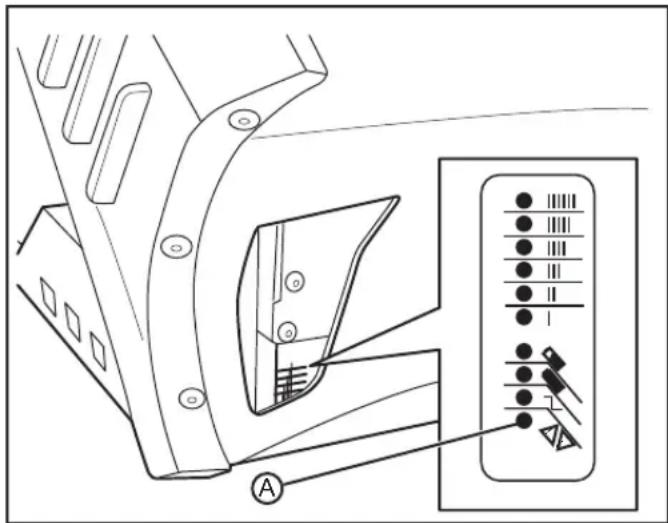
| SEHSALFDERFOREBMUN ESUAC NOITULOS | |||
| 1 | * | Power Pack High Voltage | Reset charger (interrupt AC power for 15 seconds). |
| 2 | ** | Power Pack Low Voltage | Reset charger (interrupt AC power for 15 seconds). |
| 3 | *** | Charge Timeout caused by power pack not reaching required voltage. Charger output was reduced due to high temperatures. | Check connections. Operate charger at a lower ambient temperature. |
| 4 | **** | Power pack could not be trickle charged up to minimum voltage. | Contact the dealer. |
| 5 | ***** | Over-Temperature: Charger shut down due to high internal temperature. | Ensure sufficient cooling air flow and reset charger (interrupt AC power for 15 seconds). |
| 6 | ***** | Charger Internal Fault | Reset charger (interrupt AC power for 15 seconds). Contact the dealer if fault persists. |
Battery Management System
The Battery Management System (BMS) is located inside the power pack and is fitted with a window (A) to provide visual notification about the status of the power pack. There are four LED lamps, one red and three green, that will flash. The window is located on the front side of the power pack. See Understanding BMS Light Patterns for the meanings of these patterns.

Understanding BMS Flash Code Patterns
Idle Mode
In this mode the key is OFF and the power pack is not being charged; the BMS is only monitoring the battery.
| 1 Red | 2 Green | 3 Green | 4 Green | ON OFF MEANING SOLUTION | |||
| √ | 50 ms 5 | sec Healthy BMS OK | |||||
| √ | 50 ms 6 | sec Pack | Low Charge power pack | ||||
| √ | 50 ms 1 | sec | Number of Cell Packs Not Set | Contact Zero or the Dealer | |||
| √ | 50 ms 1 | sec Self-Test Failed | Contact Zero or the Dealer | ||||
| √ | 50 ms 2 | 50 ms | Waiting for UART Input | Contact Zero or the Dealer | |||
Charge Mode
This mode is with the charging cord plugged into the AC power, and the key in the OFF position. During the charging process, first all lights will flash, then 1 through 4 will flash depending on the power pack's state of charge.
| 1 Red | 2 Green | 3 Green | 4 Green | ON OFF MEANING SOLUTION | |||
| √ | √ | √ | √ | 1 sec 5 | sec | Charge Complete | Unplug Charger |
| Charging | |||||||
| √ | 250 ms | 25% Continue Charging | |||||
| √ | √ | 250 ms | 50% Continue Charging | ||||
| √ | √ | √ | 250 ms | 75% Continue Charging | |||
| √ | √ | √ | √ | 250 ms | 100% Charging Complete | ||
Charge Mode cont'd
| 1 Red | 2 Green | 3 Green | 4 Green | ON OFF MEANING SOLUTION | |||
| Balancing | |||||||
| √ | 500 ms | Power Pack Unbalanced | Leave on Charger for 72 Hours | ||||
| √ | √ | 500 ms | |||||
| Temperature Disable | |||||||
| √ | √ | 100 ms | 500 ms Too Hot | Hot | Let the Power Pack Cool Down | ||
Run Mode
In this mode, the key is in the ON position.
| 1 Red | 2 Green | 3 Green | 4 Green | ON OFF MEANING SOLUTION | |||
| √ | 5 sec 1 | sec | 25% of Power Remaining | Charge Soon | |||
| √ | √ | 5 sec 1 | sec | 50% of Power Remaining | Charge Soon | ||
| √ | √ | √ | 5 sec 1 | sec | 75% of Power Remaining | Charge Soon | |
| √ | √ | √ | √ | 5 sec 1 | sec | 100% of Power Remaining | OK |
Power Pack Empty
If the power pack is completely empty, an error-beep will sound and the BMS will disable the throttle. You cannot ride the motorcycle until you recharge the power pack. If the Power Pack Empty error-beep still sounds after two hours of charging time, contact your dealer. Your power pack may need to be repaired or replaced.
Too Hot
The power pack contains internal temperature sensors. If the BMS measures excessive internal temperatures, it will flash an error code and disable the throttle. You cannot ride the motorcycle until the power pack cools down. Place the motorcycle in a cool, well-ventilated location and wait a few minutes before riding again. If the Too Hot error code still flashes after the power pack has had time to cool down, contact your dealer. Your power pack may need to be repaired or replaced.
Power Pack Unbalanced
The power pack contains many individual cells. The BMS continuously monitors the cells and tries to keep them all “in balance” (at the same level-of-charge). If any of the cells are grossly out-of-balance, the BMS will flash a Power Pack Unbalanced error code and disable the throttle. You cannot ride the motorcycle until the problem is resolved.
The solution to the problem is to plug in the charger and allow the power pack to charge for 72 hours. This will allow the BMS to re-balance the cells in the power pack. If the Power Pack Unbalanced error code still flashes after the power pack has spent more than 72 hours charging, contact your dealer. Your power pack may need to be repaired or replaced.
Low Power Pack Warning
When in the run mode, The BMS provides a Low Power Pack red warning flash code telling the operator that the remaining range is limited, and the power pack should be recharged soon. This is equivalent to a “low fuel” warning-light on a gasoline-powered vehicle.
The Low Power Pack warning will flash continuously until either (1) the motorcycle is turned OFF, or (2) the throttle control is disabled for any reason, which includes the power pack being completely empty. The Low Power Pack warning will flash and you can still ride the motorcycle, but the remaining range is limited. It means: "Stop at a destination and charge-up."
The solution is to recharge the power pack. If the Low Power Pack warning still flashes after the power pack has charged for two hours, contact a dealer. Your power pack may need to be repaired or replaced.
Other Error-Flash Patterns
If the BMS in your power pack produces an error code which is not described in Understanding BMS Flash Code Patterns, then the power pack has encountered a serious internal hardware problem and must be repaired or replaced by a dealer.
BMS Error Beep Pattern
It is possible to encounter the power ON self-test result error-beeps from a badly malfunctioning or damaged power pack. If so, the user should return the power pack to Zero for repair or replacement.
| PATTERN WHEN MEANING | |||
| 3 Long |  | Pwr-onM-cmd | FailPower ONSelf-test/Mfg.test |
Safety Interlocks
If the BMS detects a serious internal fault, it can take either or both of two actions to prevent damage to the power pack:
1 Throttle Disable The BMS will disable the throttle if the power pack is empty, or if the BMS detects certain serious internal problems. You cannot ride the motorcycle until the problem is resolved.
2 Charger Disable The BMS will prevent charging if it detects certain serious internal problems - even if the power pack is connected to a charger and plugged in to AC power. The power pack cannot be charged until the problem is resolved.
Throttle Disable Interlock
The BMS communicates with the main motorcycle control module. The BMS can send a signal to the main motorcycle controller requesting that the throttle control on the motorcycle be disabled. When the throttle control is disabled, the motor will not deliver power to the rear wheel, and the motorcycle cannot be ridden.
If the throttle is disabled while riding, the motorcycle will cease to provide power, and the operator must pull over to a safe location.
All conditions which would cause the BMS to disable the throttle are also signaled by a flash code pattern at self-test. If you suspect that the BMS has disabled the throttle control on your motorcycle, turn the key switch OFF and back ON again to enter self-test mode. The flash code pattern from the BMS will report any of the error conditions which would cause the BMS to disable the throttle.
Each of these conditions, the associated self-test flash code pattern, and the suggested remedies are discussed in Understanding BMS Flash Code Patterns on page 6-4.
•Power Pack Empty
• Too Hot
•Power Pack Unbalanced
Charger-Disable Interlock
When the charger is attached and plugged in to AC power, the BMS communicates with the charger. The BMS can send a signal to the charger requesting that charging terminates immediately. When the charger is disabled, the indicator lights on the charger will show that charging has stopped.
There are two conditions that will cause the BMS to disable charging. One of these conditions is also reported by a self-test result beep pattern, the other is not.
Too Hot
If the BMS detects high internal power pack temperatures, it will both disable the throttle and prevent charging. This condition is also reported by a flash code pattern after BMS self-test when the motorcycle is turned ON. See Understanding BMS Flash Code Patterns on page 6-4 for a description of the Too Hot error and the solutions.
Temperature Indicator
| PATTERN MEANING | |
| Slow Constant Flash | Brushless Motor Temperature Warning Stage 1Power Pack Temperature Warning Stage 1Motor Controller Temperature Warning Stage 1 |
| Indicator Always ON | Brushless Motor Temperature Warning Stage 2Power Pack Temperature Warning Stage 2Motor Controller Temperature Warning Stage 2 |
The Zero S/DS is equipped with temperature sensors that sense the temperature of the motor, power pack, and brushless motor controller. In the unlikely event that you exceed the motorcycle's performance capabilities, the temperature indicator will provide you with an instrument panel illumination warning indicator (A).

Stage 1
The motor, power pack, or brushless motor controller begins to reach an undesirable temperature:
• A slow flash is clearly seen on the warning indicator.
- You can continue to ride without performance interruptions.
- You should reduce speed - this will lower power output and the motor temperature to eliminate the flashing warning indicator.
Stage 2
If the motor, power pack, or brushless motor controller continues to heat up:
•The power to the motor begins to drop off, resulting in a noticeable reduction in available torque. This provides tactile feedback to the rider and also helps prevent the component from heating further. As the component cools again, full-power will be restored.
- At this point it is strongly recommended that you reduce your speed and consider finding a safe area to exit the road.
- You may still have time to back off the throttle to reduce heat. This will restore full power to the motor and eliminate the warning indicator.
Power Pack Full (High Power Pack-Voltage)
If the BMS detects that the power pack is already full, it will disable further charging to prevent damage to the power pack.
This is not an error-condition; it is the result of a successful charging cycle. There is no self-test flash code which reports this condition.
During an ordinary charging cycle, when the cells are balanced, the charger (not the BMS) will sense that the power pack is full and terminate the charging cycle with a “green light.” The BMS does have a redundant back-up mechanism to prevent overcharging of the power pack. If the charger fails to terminate a charging-cycle when the power pack is full, the BMS will terminate charging itself to prevent damage.
Instrument Panel
System Warning Indicator
If a fault has been detected, count the number of times the red LED (A) flashes. Refer to the tables on pages 6-15 and 6-16 for possible cause and solution to the issue.

| NUMBER OF RED FLASHES | CAUSE SOLUTION | ||
| 1 |  | Motor Stop Switch Disabled or Kickstand Switch Disabled | Motor stop switch is in the OFF position. Press the motor stop switch ON button or kickstand is down. Raise kickstand. |
| 2 | Self-Test Failed Contact Zero or your dealer. | ||
| 3 | Ch  Connected Unplug charger. Connected Unplug charger. | ||
| 4 | High Throttle Disable | Throttle is ON or throttle/connection is bad Verify throttle action and/or check connection. | |
| 5 | Pr  Charge Failed Charge Failed | Could not pre-charge motor controller. Contact your dealer. | |
| 6 | Lo  Ver Pack Disable Charge Power Pack Before Riding. Ver Pack Disable Charge Power Pack Before Riding. | ||
| 7 | Contactor Error Contact Zero or your dealer. | ||
| 8 | Out of Area Network (CAN) Error Contact Zero or your dealer. | ||
| 9 |  | Battery Management System (BMS) Throttle Disable | Contact Zero or your dealer. |
| 10 | T  Out of Range Out of Range | Bad throttle or connections. Verify throttle action and/or check connection. | |
| NUMBER OF RED FLASHES CAUSE SOLUTION | |||
| 11 | 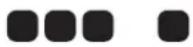 | Motor Temperature Sensor Out of Range | Bad motor temperature sensor or connections. Replace temperature sensor and/or check connections. |
| 12 M |  | contact Zero or your dealer. | |
| 13 B |  | Board may have overheated. Let the motorcycle cool down. | |
| 14 C |  | Problem with current sensor or connection. Contact your dealer. | |
| 15 |  | Board Temperature Sensor Out of Range | Problem sensing temperature of board. Contact your dealer. |
| 16 H |  | Turn the ignition OFF and ON. If problem persists contact Zero or your dealer. | |
| 17 T |  | Turn the ignition OFF and allow to cool off and then restart. If problem persists contact Zero or your dealer. | |
| 18 T |  | Turn the ignition OFF and ON. If problem persists contact Zero or your dealer. | |
| 19 K |  | Bad kickstand switch or connection. Replace kickstand switch and/or check connection. | |
| 20 M |  | our dealer. | |
General Troubleshooting
| SYMPTOM POTENTIAL CAUSE POTENTIAL SOLUTION | ||
| Motorcycle does not turn on | Power Pack not chargedKey not properly engagedMotor stop switch turned OFFFault code set | Charge Power Pack.Recheck key in ignition, turn OFF/ON again.Press the motor stop Switch ON button.See Charge Fault Code chart on page 6-2 or see Understanding BMS Flash Code Patterns on pages 6-4 to 6-7. |
| Charger not working | A/C power missingFault code set | Check A/C outlet for power, A/C source check fuse/voltage.See Charge Fault Code chart on page 6-2 or see Understanding BMS Flash Code Patterns on pages 6-4 to 6-7. |
| Handlebars wobbly (shimmy) | Incorrect tire pressure Inflate to correct tire pressure. See page 5-10. | |
| Deformed front tire | Replace/balance front tire with the same tire supplied from the factory. | |
| Bald tire (excess wear) | Replace/balance tire with the same tire supplied from the factory. | |
| Loose headset bearings | Inspect the headset for wear or damage replace any worn or damaged parts.Tighten the headset pre-load. | |
NOTES
Warranty/Customer Assistance
Customer Assistance
Zero Motorcycles Inc. can be contacted via the contact methods listed below. Please have the following available as they are essential to effectively and efficiently answer your questions or resolve your concerns.
- Owner's name and address
- Owner's telephone number
• Vehicle identification number (VIN) - Date of purchase
•Power Pack serial number
•Motor serial number
An owner information chart is provided on page 1-3 to record this information.
Zero Motorcycles
170 Technology Circle
Scotts Valley, California 95066
USA
Phone:
(888) 786-9376
Monday-Friday
8am to 5pm Pacific Time
E-mail:
support@zeromotorcycles.com
24 hours
For 24 hour updates and additional information about your motorcycle, visit the Owners Resources section of the Zero Motorcycles website:
www.zeromotorcycles.com/owner-resources/
Warranty Information
Zero Motorcycles Warranties
Zero Motorcycles Inc. expressly warrants all 2012 Zero manufactured S and DS models from defects in material and workmanship to the original owner, under normal operating conditions and according to proper use, for 2 years (unlimited miles) from the “In Service Date,” which is the date your Zero Motorcycle dealer performed a Pre-Delivery Inspection (P.D.I) on the Zero.
These warranties are transferrable subject to a \$50 processing fee and a new registration card to subsequent owners.
Standard Warranty
The standard warranty covers parts, standard shipping and labor for all major components, defined herein as including the motor, motor controller, power pack, frame, swingarm, fork, rear shock, brake assemblies, wheels, and electrical sub-assemblies.
This warranty covers Zero manufactured accessories installed at the time of purchase.
Standard Warranty Exclusions
This warranty does not apply to tire wear, chain or sprocket condition, brake pads or rotors, fork seals, grips, foot pegs, the seat, or any other parts subject to normal wear and tear. Wheels are excluded from this standard warranty on off-road bikes once they have been ridden.
This standard warranty excludes aftermarket accessory kits which may be subject to their own warranties.
This standard warranty excludes parts and components damaged by use or operation under abnormal circumstances or contrary to the requirements described in the owner's manual, or damaged by improper use or accidents.
Racing or competitive use voids this warranty.
Modifications or alterations to major components of the manufacturer's original product or its sub-components void all warranties. Zero Motorcycles Inc. assumes no liability for any misuse or improper operation of Zero motorcycles.
Under this limited warranty and liability agreement, Zero Motorcycles Inc. shall have no obligation and the purchaser shall have no remedy against Zero Motorcycles Inc. and its officers and/or agents for any damages, including but not limited to incidental, consequential, special, punitive damages arising from direct or indirect injury to person or property, or any other loss, whether or not occasioned by negligence or otherwise on the part of Zero Motorcycles Inc.
Disclaimers Applicable to Standard Warranty
The purchaser acknowledges that there is an inherent risk in the operation of Zero motorcycles and all other Zero Motorcycles Inc. products, and herewith assumes liability for any injury arising from all operation of any Zero Motorcycles Inc. product. The original registered owner or subsequent registered transferee as documented on the Zero motorcycle warranty registration form will indemnify and hold Zero Motorcycles Inc. harmless and take full responsibility for conveying all safety warnings, instructions and limited warranty if the unit is sold, loaned or otherwise transferred to other persons, and will indemnify Zero Motorcycles Inc. from any claims against it for original owner's failure to do so. Zero Motorcycles Inc. does not assume or authorize anyone to assume for them any other obligation. Some states, provinces, or countries do not allow limitations on how long an implied warranty lasts, so the above limitation may not apply to you.
Zero Motorcycles Inc. assumes no responsibility for incidental, consequential or other damages including but not limited to: expense of returning the Zero product to a certified service center, expense of delivering it back to the owner, mechanic's travel, time, communication charges, rental of a like product during the time the warranty service is being performed, travel, loss or damage to personal property, loss of revenue, loss of use of the product, loss of time, or inconvenience. Some states, provinces, or countries do not allow limitations so the above limitation may not apply to you.
Zero Motorcycles Inc. reserves the right to change or improve the design of any electric motorcycle product without assuming any obligation to modify any product previously manufactured.
These warranties give you specific legal rights, and you also have other rights, which vary from state to state, province to province, and country to country.
These warranties apply to all Zero products manufactured by Zero Motorcycles Inc.
Normal operating conditions require routine care and maintenance by the purchaser of the Zero Motorcycles Inc. electric motorcycle and power pack.
Proper Use
For the purposes of these warranties, ‘proper use’ means only the use of a motorcycle in the manner intended for a single rider with proper safety equipment as described in the Owner’s Manual on safe and dry surfaces in accordance with local regulations. “Proper use” also means charging the Power Pack after each use and storing it in a fully charged state, or recharging it every 15 days, or keeping it on the charger when in storage or out of regular use.
Purchaser's Responsibilities
Read and understand the Owner's Manual and all product warnings before operating your Zero Motorcycles Inc. electric motorcycle. Serious injury or death may result from improper operation or failure to observe warnings and safety instructions on any motorized motorcycle or vehicle.
Submit the warranty registration card for your Zero motorcycle within the required time period as printed on the registration card.
Perform routine care and maintenance of your Zero Motorcycles Inc. electric motorcycle and power pack as detailed in the Owner's Manual.
The rider is responsible for learning and obeying all federal, state, province, country, and local laws governing the operations of an electric motorcycle.
Always wear a helmet, goggles, appropriate boots, and all other appropriate safety equipment when operating a motorcycle.
Warranty Procedures
Warranty services may be obtained by contacting your local Zero Motorcycle dealer; please see the locator on www.zeromotorcycles.com for the nearest location. In the event that a dealer is not in your state, province, or country, you can contact Zero Motorcycles Inc. directly at (888) 786-9376 or via e-mail at support@zeromotorcycles.com.
Service may also be available from a local Zero Motorcycles Certified Service Center; please see the locator on www.zeromotorcycles.com for the nearest location.
In any written or telephonic communication, please state the specific nature of and any circumstances leading to the problem.
North America and Canada:
Zero Motorcycles Inc.
170 Technology Circle
Scotts Valley, CA 95066
USA
Europe:
Zero Motorcycles BV
Fluorietweg 12D
Alkmaar, 1812 RR
NL
(U.S. and International Patents and Trademarks Pending)
Transfer Of Ownership And Warranty
When it comes time to sell your Zero motorcycle, please visit the Zero Motorcycles website and access the Owner Resources section to fill out the on-line transfer of ownership and warranty form. This must be performed to allow Zero Motorcycles the ability to contact the new owner in the unlikely event of a safety related issue. Use the URL address listed or feel free to contact the Zero Motorcycles Customer Service department for assistance.
Phone:
(888) 786-9376
Monday-Friday
8am to 5pm Pacific Time
E-mail:
support@zeromotorcycles.com
For 24 hour updates and additional information about your motorcycle, visit the Owner Resources section of Zero Motorcycles' website at:
http://www.zeromotorcycles.com/owner-resources/
U.S. Manufacture:
Zero Motorcycles
170 Technology Circle
Scotts Valley, CA 95066.
All illustrations and specifications contained in this Owner's Manual are based on the latest product information available at the time of printing. Zero reserves the right to make changes at any time, without notice, in colors, materials, equipment, specifications and models.
Zero may, subject to legal requirements, determine the Model Year designations of its vehicles. The Model Year designation on any particular model may be longer or shorter than 12 months.
Some vehicles pictured may contain non-U.S. equipment. Some models may be shown with optional equipment.
While Zero Motorcycles makes all reasonable efforts to provide accurate information in this Owner's Manual, there is no guarantee or warranty of accuracy. Furthermore, we do not assume any liability for the accuracy of completeness of information presented.
This Owner's Manual shall not be used or relied upon as a substitute for information that is available from your Zero Motorcycles dealer. Further information can be obtained from your authorized Zero dealer or Zeromotorcycles.com.
©2012 Zero Motorcycles Inc. Not to be reproduced wholly or in part without written permission of Zero Motorcycles Inc. The Zero Motorcycles name, model names and logo are registered trademarks.
NOTES
INDEX
A
Accessories 5-27
Add On Electrical Equipment 4-7
An Important Message To You From
Zero Motorcycles 1-1
Anti-Tamper Control Label (Europe Only) 2-5
B
Battery Management System (BMS) 4-7, 6-3
Dangerously Low Voltage 4-7
High or Low Temperature 4-8
High Voltage 4-8
BMS Error Beep Pattern.... 6-9
BMS Flash Code Patterns 6-4
Charge Mode 6-5
Idle Mode 6-4
Run Mode 6-7
Bolt Torque Table 5-2
Brake Fluid Level Inspection 5-7
Brake Pad Inspection 5-8
Brakes 4-4, 5-7
Brake Fluid Level Inspection 5-7
Brake Pad Inspection 5-8
Front Brake 5-7
Rear Brake 5-8
Brake/Tail Light Bulb Replacement....5-20
Braking 4-14
C
Chain 5-14
Checking The Drive Chain 5-15
Cleaning The Drive Chain.... 5-14
Drive Chain Adjustment Procedure....5-16
Lubricating The Drive Chain 5-14
Charger Disable Interlock 6-10, 6-11
Charger LED Indicators 4-9
Charging The Power Pack 4-10
Checking Drive Belt Tension 5-11
INDEX-1
Checking The Drive Chain ....5-15
Cleaning 5-22
Cleaning The Drive Chain 5-14
Controls And Components 3-1
Customer Assistance 7-1
D
Dangerously Low Voltage 4-7
Disclaimers Applicable to Standard Warranty 7-3
Drive Belt 5-10
Checking Drive Belt Tension 5-11
Drive Belt Adjustment Procedure 5-13
Drive Chain 4-3, 5-14
Checking The Drive Chain 5-15
Cleaning The Drive Chain 5-14
Lubricating the Drive Chain....5-14
Drive Chain Adjustment Procedure 5-16
E
Electrical System 4-4
Emissions Information 1-12
F
First Time Set-Up 4-1
Front Brake 5-7
Front Fork Adjustment 4-15
Fuse Center Locations 5-28
Fuses 5-27
G
General Information.... 1-6
Zero DS Technical Specifications 1-8
Zero S Technical Specifications ....1-6
General Maintenance 5-7
Brakes 5-7
Brake/Tail Light Bulb Replacement 5-20
Cleaning 5-22
Drive Belt....5-10
Drive Chain 5-14
Headlight Alignment 5-17
Headlight Bulb Replacement 5-18
Maintenance Schedule.... 5-24
Parking And Long Term Storage 5-23
Running Light Bulb Replacement 5-21
Suspension....5-9
INDEX-2
Tire Inflation 5-10
Turn Signal Light Bulb Replacement .....5-20
Wheels And Tires 5-9
General Operation 4-3
Key Switch/Steering Lock Positions 4-4
Pre-Ride Inspection 4-3
Power Pack.... 4-6
General Safety Precautions 2-1
General Troubleshooting 6-17
H
Handlebar Controls 3-11
Headlight Alignment 5-17
Headlight Bulb Replacement 5-18
|
Important Operating Information 2-2
Indicators 3-8
Instrument Panel 3-7, 6-14
Introduction 1-1
K
Key Code Number.... 1-4
Key Switch Positions 4-4
L
Left Side View 3-3
Location Of Important Labels 2-3
Anti-Tamper Control Label (Europe Only) .....2-5
Throttle And Speed Control Label 2-4
Low Power Pack Warning 6-8
Lubricating The Drive Chain 5-14
M
Maintaining Your Motorcycle 5-1
Maintenance Schedule 5-24
Motorcycle Controls 3-1
Left Side View 3-3
Right Side View 3-5
Motor Serial Number 1-4
0
Operating Information 2-2
Operating Your Motorcycle....4-14
Braking 4-14
Starting 4-14
Stopping 4-14
Optimizing Your Range By Adapting Your
Riding Style 1-11
Owner Information 1-3
Owner's Responsibilities 5-1
P
Parking And Long Term Storage 5-23
Parts/Maintenance Items 5-27
Performance Level Switch 3-10
Plug in Your Z-Force Power Pack™ 1-2
Power Pack 4-3, 4-6, 5-6
Power Pack And Charger 6-1
Power Pack Charger 4-8
Power Pack Empty 6-8
Power Pack Full (High Power Pack-Voltage) .....6-13
Power Pack Serial Number 1-4
Pre-Ride Inspection 4-3
Brakes 4-4
Drive Belt....4-3
Drive Chain 4-3
Electrical System 4-4
Power Pack.... 4-3
Throttle 4-4
Tires 4-4
Proper Use....7-4
Public Charging Stations 1-12
Purchaser's Responsibilities 7-4
Q
Quick Charging 4-12
R
Rear Brake 5-8
Rear Shock Adjustment 4-17
Right Side View 3-5
Running Light Bulb Replacement....5-21
S
Safety Information 2-1
INDEX-4
Safety Interlocks 6-10
Standard Charging....4-11
Standard Warranty 7-2
Starting 4-14
Starting And Operating.... 4-1
Steering Lock Positions 4-4
Stopping 4-14
Suspension 5-9
Front 5-9
Rear....5-9
Suspension Adjustment 4-15
Front Fork Adjustment 4-15
Rear Shock Adjustment 4-17
System Warning Indicator 6-14
T
Technical Specifications 1-6
Zero DS Technical Specifications 1-8
Zero S Technical Specifications 1-6
Temperature Indicator 6-12
Power Pack Full (High Power Pack-Voltage)... 6-13
Tension Tester 5-12
Throttle And Speed Control Label 2-4
Throttle Disable Interlock 6-10
Tire Inflation 5-10
Tires.... 4-4
Torque Table 5-2
Transfer Of Ownership And Warranty 7-6
Transporting 1-13
Troubleshooting 6-1
Turn Signal Light Bulb Replacement 5-20
U
Unpacking Your Zero Motorcycle 4-2
Understanding BMS Flash Code Patterns 6-4
Charge Mode 6-5
Idle Mode 6-4
Low Power Pack Warning 6-8
Other Error-Beep Patterns 6-9
Power Pack Empty 6-8
Power Pack Unbalanced 6-8
Run Mode 6-7
Too Hot.... 6-8
Useful Information for Safe Riding 1-2
V
Vehicle Identification Number (VIN).... 1-4
VIN Break Down 1-5
VIN Location 1-4
Vehicle Range 1-10
W
Warranty....7-2
Disclaimers....7-3
Standard Warranty 7-2
Transfer Of Ownership And Warranty 7-6
Warranty/Customer Assistance 7-1
Warranty Information.... 7-2
Warranty Procedures 7-5
Wheels And Tires 5-9
- Safety Information 2-1
- Controls And Components....3-1
- Starting And Operating 4-1
- An Important Message To You From Zero Motorcycles
- Introduction
- Index
- Useful Information For Safe Riding
- Plug in Your Z-Force Power Pack™
- Owner Information
- Power Pack Serial Number
- Motor Serial Number
- Key Code Number
- Vehicle Identification Number (VIN)
- VIN Break Down
- Vehicle Range
- Optimizing Your Range By Adapting Your Riding Style
- Public Charging Stations
- Emissions Information
- Transporting
- Safety Information
- General Safety Precautions
- Important Operating Information
- Location Of Important Labels
- Throttle And Speed Control Label
- IMPORTANT
- THROTTLE AND SPEED CONTROL
- NOTES
- Controls And Components
- Motorcycle Controls
- Left Side View
- Right Side View
- Instrument Panel
- Indicators
- Charge Indicator
- Odometer
- Trip Odometer
- Adjust Button
- Select Button
- Performance Level Switch
- Handlebar Controls
- Starting And Operating
- First Time Set-Up
- Unpacking Your Zero Motorcycle
- Outer Box Cover
- Inner Assembly
- Recycling
- General Operation
- Pre-Ride Inspection
- •Power Pack
- - Drive Belt
- - Drive Chain (Optional)
- - Brakes
- - Throttle
- - Tires
- - Electrical System
- Power Pack
- Add On Electrical Equipment
- Battery Management System (BMS)
- •Dangerously Low Voltage
- •High or Low Temperature
- •High Voltage
- Power Pack Charger
- Charger LED Indicators A. Ammeter
- The Ammeter LED is an amber indicator that
- Charging The Power Pack
- Standard Charging
- Quick Charging
- Operating Your Motorcycle
- Starting
- Braking
- Stopping
- Suspension Adjustment
- Front Fork Adjustment
- Rear Shock Adjustment
- Maintaining Your Motorcycle
- Owner's Responsibilities
- General Maintenance
- Brakes
- Brake Fluid Level Inspection
- Front Brake
- Rear Brake
- Brake Pad Inspection
- Suspension
- Front
- Rear
- Wheels And Tires
- Tire Inflation
- Drive Belt
- Checking Drive Belt Tension
- Drive Belt Adjustment Procedure
- Drive Chain (Optional)
- Cleaning The Drive Chain
- CAUTION:
- Lubricating The Drive Chain
- Checking The Drive Chain
- Drive Chain Adjustment Procedure
- Headlight Alignment
- Headlight Bulb Replacement
- Turn Signal Light Bulb Replacement
- Brake/Tail Light Bulb Replacement
- Cleaning
- Parking And Long Term Storage
- Maintenance Schedule
- Parts/Maintenance Items
- Zero Motorcycle Accessories
- Fuses
- Fuse Center Locations
- Troubleshooting
- Power Pack And Charger
- Battery Management System
- Understanding BMS Flash Code Patterns
- Charge Mode
- Run Mode
- Power Pack Empty
- Too Hot
- Power Pack Unbalanced
- Low Power Pack Warning
- Other Error-Flash Patterns
- BMS Error Beep Pattern
- Safety Interlocks
- Throttle Disable Interlock
- Charger-Disable Interlock
- Stage 1
- Stage 2
- Power Pack Full (High Power Pack-Voltage)
- Warranty/Customer Assistance
- Customer Assistance
- Warranty Information
- Zero Motorcycles Warranties
- Standard Warranty
- Standard Warranty Exclusions
- Disclaimers Applicable to Standard Warranty
- Proper Use
- Purchaser's Responsibilities
- Warranty Procedures
- Transfer Of Ownership And Warranty
- A
- B
- C
- D
- E
- F
- G
- INDEX-2
- H
- |
- K
- L
- M
- 0
- P
- Q
- R
- S
- INDEX-4
- T
- U
- V
- W
Brand : Zero
Model : S (2012)
Category : Electric scooter