AAW-05CM1FHU - Washing machine Admiral - Free user manual and instructions
Find the device manual for free AAW-05CM1FHU Admiral in PDF.


| Product Type | Room Air Conditioner (Window Unit) |
| Brand | Admiral |
| Model | AAW-05CM1FHU |
| Cooling Capacity | 5,000 BTU |
| Electrical Requirements | 115 V, 60 Hz, 15 A; grounded 3-prong outlet |
| Cabinet Dimensions (W x H x D) | 17.7 x 12.4 x 15.7 inches |
| Minimum Window Opening (Width) | 21 inches |
| Maximum Window Opening (Width) | 35 inches |
| Control Type | Mechanical (Knobs) |
| Fan Speeds | Low Fan, High Fan, Low Cool, High Cool |
| Thermostat | Adjustable; automatically maintains room temperature |
| Fresh Air Ventilation | Yes (manual pull tab) |
| Power Supply Cord | UL certified with RESET and TEST buttons (leakage current detection) |
| Air Filter | Washable; located behind front grille; clean monthly |
| Installation | Single or double-hung window; requires L-brackets and sealing strip |
| Warranty | 5 years full warranty (parts and in-home service) |
| Safety Features | Grounded plug; power cord with auto shut-off; no adapter/extension cord allowed |
Frequently Asked Questions - AAW-05CM1FHU Admiral
User questions about AAW-05CM1FHU Admiral
0 question about this device. Answer the ones you know or ask your own.
Ask a new question about this device
Download the instructions for your Washing machine in PDF format for free! Find your manual AAW-05CM1FHU - Admiral and take your electronic device back in hand. On this page are published all the documents necessary for the use of your device. AAW-05CM1FHU by Admiral.
USER MANUAL AAW-05CM1FHU Admiral
Remote control
AAW-05CR1FHU
AAW-06CR1FHU
AAW-08CR1FHU
AAW-08DR1FHU
Mechanical control
AAW-05CM1FHU
AAW-06CM1FHU
AAW-08CM1FHU
AAW-08DM1FHU
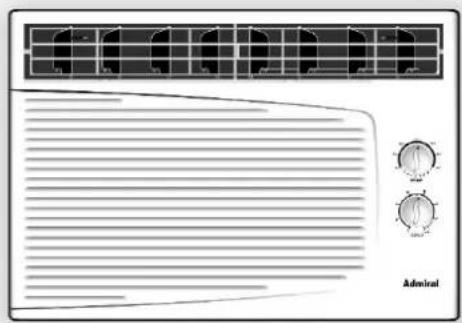
Thank you for purchasing an Admiral b room air conditioner. Please read this “Use and Care Manual” carefully before installing and using this appliance. Keep this manual for future reference.
Parts Identification 2-3
Air Conditioner Safety 4-5
Electrical Specifications 6
Tips Before Installation 7
Installation Instructions 8-10
Operating Instructions 11-14
Care and Maintenance 15
Troubleshooting Guide 16
Warranty 17
ÍNDICE
Page
Introducción 18
Thank you for choosing this room air conditioner to cool your home. This USE AND CARE MANUAL provides information necessary for the proper care and maintenance of your new room air conditioner. If properly maintained, your air conditioner will give you many years of trouble free operation. To avoid installation difficulties, read instructions completely before starting. This manual contains information for the installation and operation of your room air conditioner.
PART IDENTIFICATION
▶ Mechanical control model
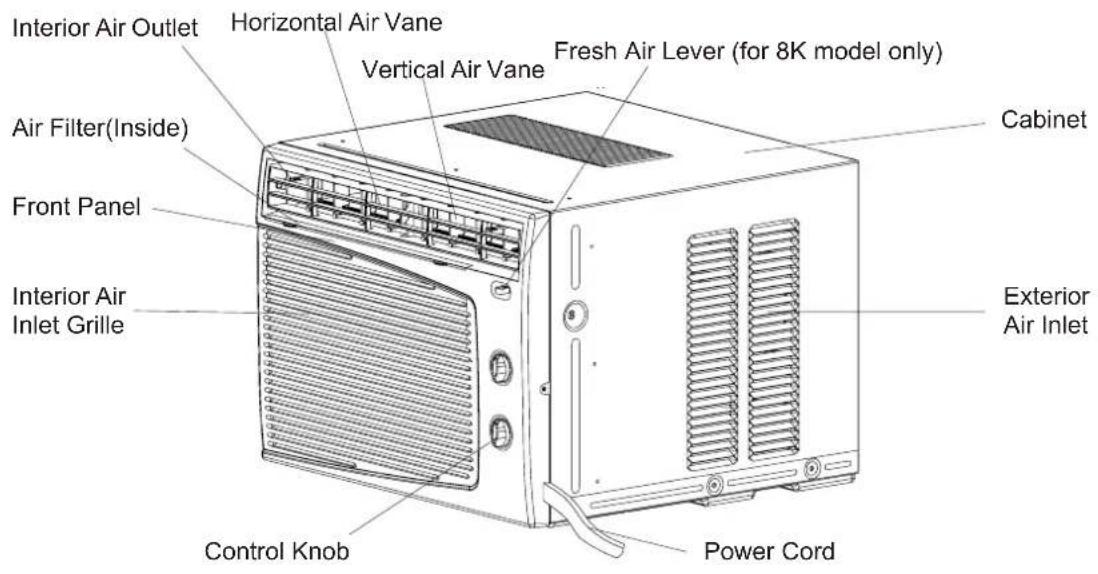
Note:
The figures in this manual are based on the external view of a standard model. Consequently, the shape may differ from that of the air conditioner you have selected.
INTRODUCTION
PART IDENTIFICATION
▶ Remote control model
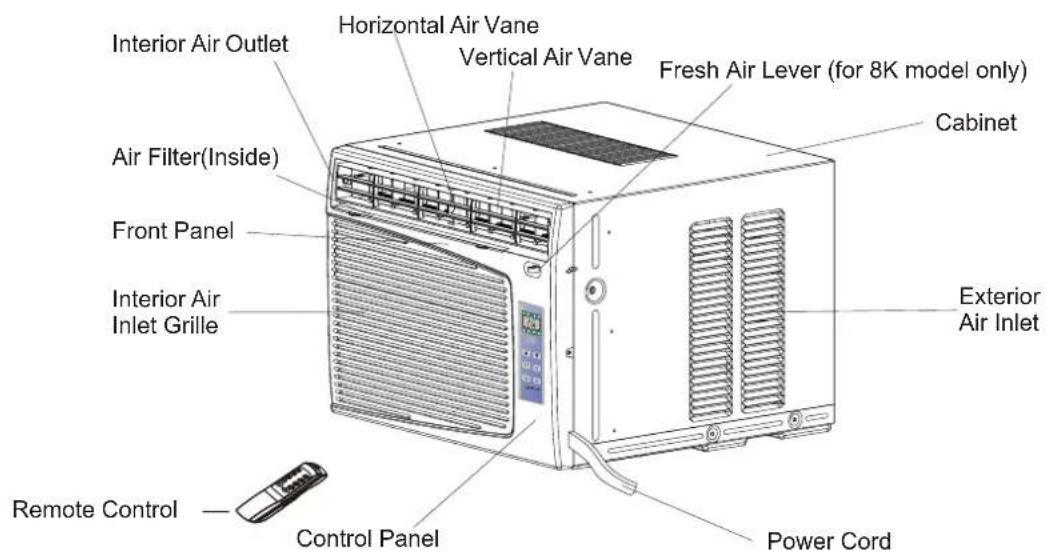
Control Panel
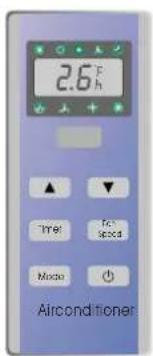
Remote Control
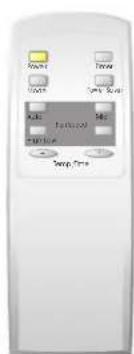
Note:
The figures in this manual are based on the external view of a standard model.
Consequently, the shape may differ from that of the air conditioner you have selected.
AIR CONDITIONER SAFETY
Your safety and the safety of others are very important.
We have provided many important safety messages in this manual and on your appliance. Always read and obey all safety messages.

This is the SAFETY ALERT SYMBOL.
This symbol alerts you to potential hazards that can kill or hurt you and others.
All safety messages will follow the safety alert symbol and either the word “DANGER” or “WARNING.” These words mean:

You can be killed or seriously injured if you don't immediately follow instructions.

You can be killed or seriously injured if you don't follow instructions.
All safety messages will tell you what the potential hazard is, tell you how to reduce the chance of injury, and tell you what can happen if the instructions are not followed.
IMPORTANT SAFETY INSTRUCTIONS
WARNING: To reduce the risk of fire, electrical shock, or injury when using your air conditioner, follow these basic precautions:
- Plug into a grounded 3-prong outlet. • Do not use an extension cord.
- Do not remove ground prong. • Unplug air conditioning before servicing.
- Do not use an adapter. Use two or more people to move and install air conditioner.
— S A V E THESE INSTRUCTIONS —
INSTALLATION REQUIREMENTS
- The portable air conditioner should be connected to a 115 V, 60 Hz, 15- or 20-amp fused 3-prong grounded outlet.
- The use of a time-delay fuse or time-delay circuit breaker is recommended.
- All wiring must comply with local and national electrical codes and be installed by a qualified electrician. If you have any questions, contact a qualified electrician.
Electrical Requirements
WARNING

ELECTRIC SHOCK HAZARD
- Plug into a grounded 3-prong outlet.
- Do not remove ground prong.
- Do not use an adapter.
- Do not use an extension cord.
- Failure to follow these instructions can result in death, fire, or electrical shock.
Power Supply Cord
NOTE: Your unit's device may differ from the one shown.
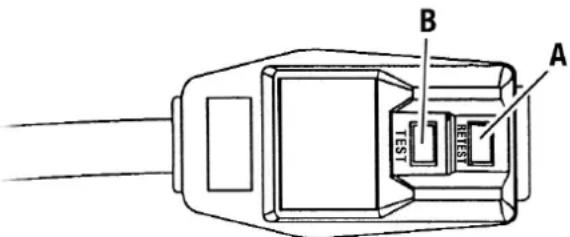
A Reset Button B Test Button
This room air conditioner is equipped with a power supply cord required by UL. This power supply cord contains state-of-the-art electronics that sense leakage current. If the cord is crushed, the electronics detect leakage current and power will be disconnected in a fraction of a second.
To test your power supply cord:
- Plug power supply cord into a grounded 3-prong outlet.
- Press RESET.
- Press TEST (listen for click; Reset button will trip and pop out).
- Press and release RESET (listen for click; Reset button will latch and remain in). The power supply cord is ready for operation.
NOTES:
- The Reset button must be pushed in for proper operation.
- The power supply cord must be replaced if it fails to trip when the test button is pressed or fails to rest.
- Do not use the power supply cord as as an off/on switch. The power supply cord is designed as a protective device.
- A damaged power supply cord must be replaced with a new power supply cord obtained from the product manufacturer and must not be repaired.
- The power supply cord contains no use serviceable parts. Opening the tamper-resistant case voids all warranty and performance claims.
INSTALLATION INSTRUCTIONS
Unpack the Air Conditioner
WARNING
EXCESSIVE WEIGHT HAZARD
Use two or more people to move and install air conditioner.
Failure to do so can result in back or other injury.
Remove packaging materials
- Remove and properly dispose of packaging materials. Remove tape and glue residue from surfaces before turning on the air conditioner. Rub a small amount of liquid dish soap over the adhesive with your fingers. Wipe with warm water and dry.
- Do not use sharp instruments, rubbing alcohol, flammable fluids, or abrasive cleaners to remove tape or glue. These products can damage the surface of your air conditioner.
- Handle air conditioner with care.
ELECTRICAL SPECIFICATIONS
- All wiring must comply with local and national electrical codes and must be installed by a licensed electrician. Once you have any questions regarding the following instructions, contact a licensed electrician.
- Check available power supply and resolve any wiring problems BEFORE installing and operating this unit.
- For your safety and protection, this unit is grounded through the power cord when plugged into a matching wall outlet. If you are not sure whether your wall outlet is properly grounded, please consult a licensed electrician.
- The wall outlet(3-pin) must match the plug (3-pin) on the power cord supplied with the unit. DO NOT use plug adapters or extension cords. See (Table 1) for receptacle and fuse information.

Electric Shock Hazard

If the air conditioner has a serial plate rating of 115 volts and up to and including 7.5 amps the unit maybe on a fuse or circuit breaker with other devices. However, the maximum amps of all devices on that fuse or circuit breaker can not exceed the amps of the fuse of circuit breaker.
If the air conditioner has a serial plate rating of 115 volts and greater than 7.5 amps it must have its own fuse or circuit breaker, and no other device or unit should be operated on the fuse or circuit breaker.
To avoid the possibility of personal injury, disconnect the power to the unit before installing or servicing.
- The rating plate on the unit contains electrical and other technical data. The rating plate is located on the right side of the unit.
| RECEPTACLE AND FUSE TYPES | |
| COOLING CAPACITY | 5K.6K 8K |
| RATED VOLTS | 125 |
| AMPS | 15 |
| WALL OUTLET |  |
| FUSE SIZE | 15 |
| Time Delay Fuse (or circuit breaker) | Plug type |
Note: 5K including AAW-05CR1FHU AAW-05CM1FHU
6K including AAW-06CR1FHU AAW-06CM1FHU
8K including AAW-08CR1FHU AAW-08DR1FHU
AAW-08CM1FHU AAW-08DM1FHU
Table 1
TIPS BEFORE INSTALLATION
Your Room Air Conditioner unit is designed to be highly efficient and save energy. Follow these recommendations for greater efficiency.
- Select thermostat setting that suits your comfort needs and leave the thermostat at that chosen setting.
- The air filter is very efficient in removing airborne particles. Keep the air filter clean. Typically, filter should be cleaned once a month. More frequent cleaning may be necessary depending on outdoor and indoor air quality.
- Use drapes, curtains, or shades to keep direct sunlight from heating your room, but DO NOT obstruct the air conditioner. Allow air to circulate around the unit without obstructions.
- Start your air conditioner before outdoor air becomes hot and uncomfortable. This avoids an initial period of discomfort while the unit is cooling off the room.
- When outdoor temperature is cool enough, use HIGH or LOW FAN only. This circulates indoor air, providing some cooling comfort, and utilizes less electricity than when operating on a cooling setting.
Your Room Air Conditioner was designed for easy installation in a single or double-hung window. NOTE: This unit is NOT designed for vertical (slider type) windows.
CAUTION
To avoid installation/operating difficulties, read the instructions thoroughly.
NOTE: Save the shipping carton and packing materials for future storage or transport of the unit. Please check the contents of the hardware kit against the corresponding model check list, prior to installation of the unit. See lists below.(Fig.1)
Installation Hardware
3/4"Screws (12)
2/5"Screws (8)
Top Channel(1) factory installed
L Bracket(2)
Side Bracket(2)

Seal(1)

Foam(1)
Tools Needed for Window Installation
Screw drivers: Both Philips and flat head
Power drill: 1/8 inch diameter drill bit
Pencil
Measuring tape
Scissors
Carpenters level
INSTALLATION INSTRUCTIONS
CAUTION
Because the compressor is located on the controls side of the unit (right side), this side will be heavier and more awkward to manipulate. Inadequate support on control side of the unit can result in personal injury and damage to your unit and property. Therefore, it is recommended to have someone assist you during the installation of this unit.
F. Your unit was designed to evaporate condensation under normal conditions. However, under extreme humidity conditions, excess condensation may cause the base pan to overflow to the outside.
The unit should be installed where condensation run-off cannot drip on pedestrians or neighboring properties.
1. Select the Best Location
A. Your room air conditioner was designed to fit easily into a single or double hung window. However, since window designs vary, it may be necessary to make some modifications for safe and proper installation.
B. Make sure the window and frame are structurally sound and free from dry, rotted wood.
C. For maximum efficiency, install the air conditioner on side of the house or building which favors more shade than sunlight. If the unit is in direct sunlight, it is advisable to provide an awning over the unit.
D. Provide sufficient clearance around the cabinet to allow for ample air circulation through the unit. See (Fig.2). The rear of the unit should be outdoors and not in a garage nor inside of a building. Keep unit as far away as possible from obstacles and obstructions and at least 30" above the floor or ground. Curtains and other objects within a room should be prevented from blocking the air flow.
E. Be certain the proper electrical outlet is within reach of the installation. Use only a single outlet circuit rated at 15 amps. All wiring should be in accordance with local and national electrical codes.
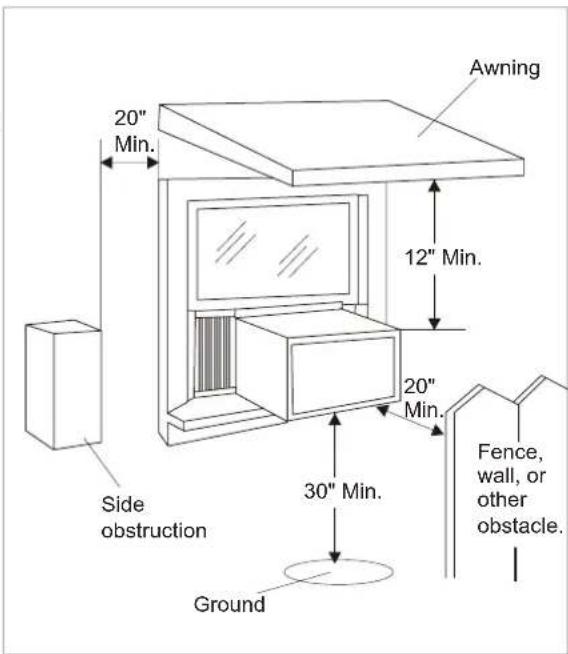
Fig.2
Window opening requirements (see table below)
| SizeSize | Model 5K-6K5K-6K | 8K 8K |
| Cabinet size(W*H*D) | 17.7" *12.4" *15.7" | 17875" *1234.7" *151.7".7" |
| Min. Window opening | 21" 21" | 22" 22" |
| Max. Window opening | 35" 35" | 36" 36" |
18.5" *13.7" *17.7"
INSTALLATION INSTRUCTIONS
▶ WINDOW INSTALLATION STEP
- If your air conditioner cabinet 18" wide, it will fit window openings 21" to 32" in wide. Minimum opening height is 14" from bottom of sash to sill (Fig. 1).
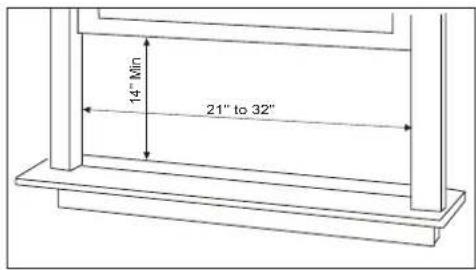
Fig. 1
- Insert the guide panels into the guides of the air conditioner. Fasten the curtains to the unit with screws (Fig. 2).
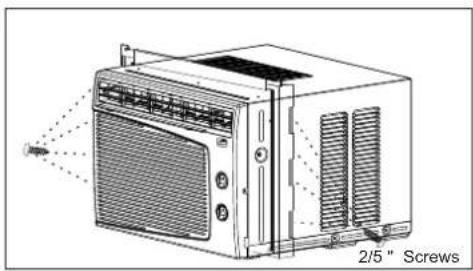
Fig. 2
- Cut the adhesive-backed seal strip the window width. Remove the backing from the seal strip and attach the seal strip to the underside of the bottom window. (Fig. 3)
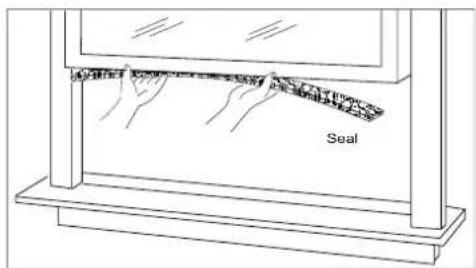
Fig. 3
- Measure the inside window sill width and find the center line as shown in Fig. 4.
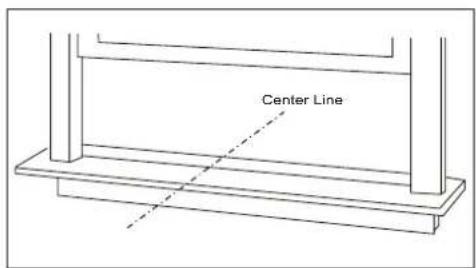
Fig. 4
INSTALLATION INSTRUCTIONS
-
Install the L brackets on the outer sill with the short side of the bracket against the back of the inner sill. Install one L bracket 7.5" to each side of center line. See Fig. 5.
-
Carefully lift the air conditioner and slide it into the open window. Make sure the bottom guide of the air conditioner drops into the notches of the L brackets. When the air conditioner drops into the L brackets, the air conditioner will be centered in window opening as show in Fig. 6.
While steadying the air conditioner, carefully bring the window sash down behind the top channel of the air conditioner, as shown in Fig. 7.
First, fix both sides onto the window sill with two 3/4" screws and one 2/5"screw (which is unscrewed from each side of the unit). Then fix top channel to widow sash with one 3/4"screw and fix side curtain frames with four 3/4"screws as shown in Fig.6.
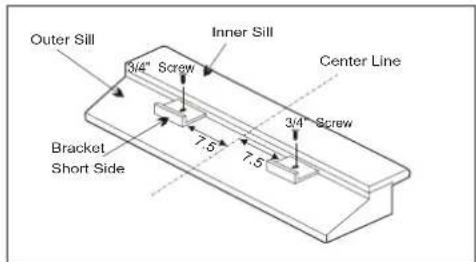
Fig. 5
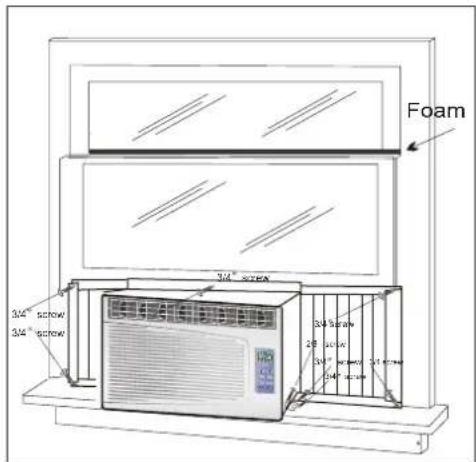
Fig. 6
- If storm window presents interference, fasten a 2" wide wood strip to the inner window sill across the full width of the sill. The wood strip should be thick enough to raise the height of the window sill so that the unit can be installed without interference from the storm window frame, as show in Fig. 8.
Top of wood strip should be approximately 3/4" higher than the storm window frame to help condensation to drain properly to the outside.
Install a second wood strip (approximately 6" long by 11/2"wide and same thickness as first strip) in the center of the outer sill flush against the back of the inner sill.
Screw the L brackets into this strip.
This will raise the L bracket as shown in Fig. 8.
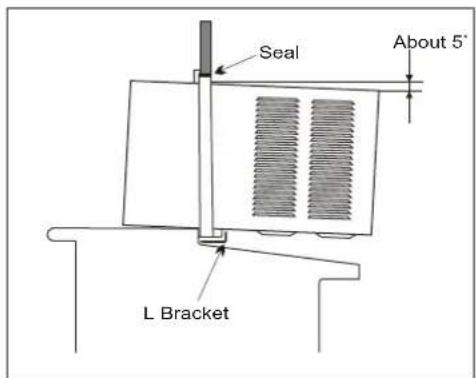
Fig.7
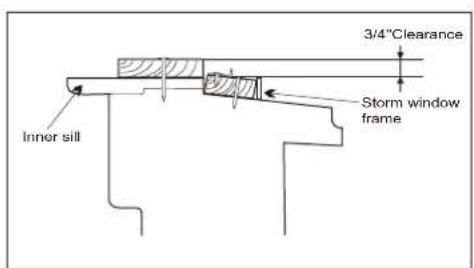
Fig.8
OPERATING INSTRUCTIONS
▶Mechanical control model
MODE
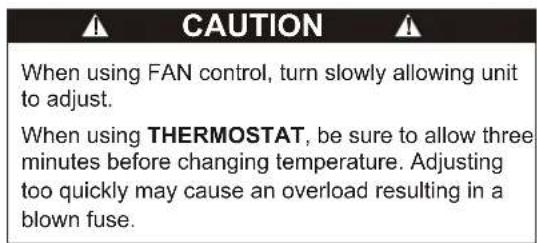
The mode knob controls fan speeds and cooling speeds. To set desired cooling temperature, simply rotate the mode knob dial to the appropriate setting. See Fig. 9.
THERMOSTAT
The thermostat automatically controls the cooling cycle (compressor) of the air conditioner to maintain room temperature. However, the fan motor will continue to operate after the compressor (cooling cycle) is completed. See Fig.9.
LOW FAN will circulate the air at a minimum speed without cooling.
HIGH FAN will circulate the air at a maximum speed without cooling.
LOW COOL provides cooling, automatically with minimum air circulation. Recommended for night-time use.
HIGH COOL provides cooling, automatically with quick cooling or for extremely hot days. Once room is cooled, reduce setting to LOW COOL.
OFF will completely shut-off the unit.
NOTE: After setting the mode, allow 3 minutes before switching to another mode.
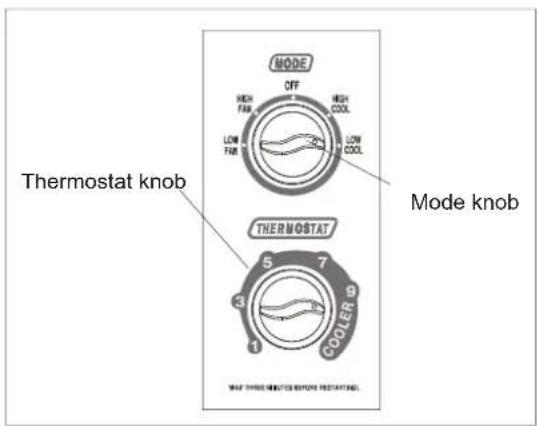
Fig.9
Fresh Air Ventilation is usually kept in the closed position. Use only when clearing smoke and/or odors from the room. Pull to open. (See Fig.10).

Fig.10
OPERATING INSTRUCTIONS
▶CONTROL PANEL
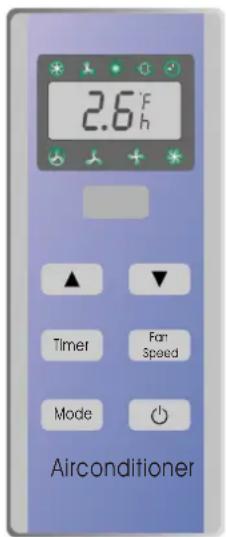
You can easily operate this air conditioner by pressing relevant button on the control panel as well as the remote control.
Button
The air conditioner will be started when it is energized or will be stopped when it is in operation, if you press this button. When the air conditioner is heating, allow 3 minutes after you press this button.
Mode button
Each time Mode button is pressed, the operation mode is changed in sequence:
5K,6K 8K cooling only COOLING FAN ONLY ENERGY SAVING COOLING
8K with heater COOLING FAN ONLY HEATING ENERGY SAVING COOLING
NOTE: After setting the mode, allow three (3) minutes before switching to another mode. In the FAN ONLY Mode, Room Temperature display range is from 0°C (32°F) to 38°C (99°F). Room Temperature below 32°F, the Temperature display L0. Room Temperature above 99°F, the Temperature display H1.
Control Panel
Fan Speed button
Used to select fan speed in sequence auto, low, medium and high (low and medium are in same fan speed).
Timer button
Used to set or cancel timer operation.
When the unit is in operation, you can set OFF TIMER. When the unit is off, you can set ON TIMER. Timer setting range is 0 to 24 hours.
If the OFF TIMER is set, the time LED displays the remaining time to turn off the unit for only 12 seconds, then LED shifts to display set temperature. If you press TIMER button within the 12 seconds, OFF TIMER will be cancelled.
If the ON TIMER is set, the timer LED displays the remaining time to turn on the unit. If you want to cancel ON TIMER, press TIMER button.
Indication symbols of LED on control panel :
Above LED lights on when the relevant mode is in use.
▲▼ Button
Used to set room temperature in COOLING mode or used to set time in TIMER mode.
If the two keys are pressed at the same time, the temperature LED display will alternate between ° C and ° F.
N NOTE: Temperature setting range is from 19°C (66°F) to 31°C (88°F).
OPERATING INSTRUCTIONS
▶REMOTE CONTROL
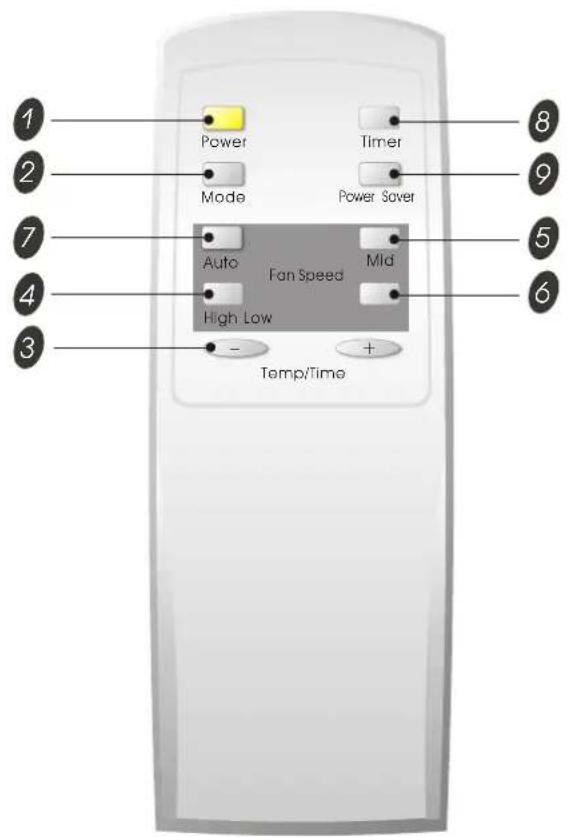
1 Power BUTTON
The appliance will be started when it is energized or will be stopped when it is in operation, if you press this button.
2 Mode BUTTON
Used to select the operation mode.
3 BUTTONS
Used to set room temperature in COOLING mode or used to set time in Timer mode.
4 High BUTTON
Used to select the mode.high fan speed
5 Mid BUTTON
Used to select the mid (same as low) fan speed mode.
6 Low BUTTON
Used to select the low mode.fan speed
7 Auto BUTTON
Used to select the auto mode. fan speed
8 Timer BUTTON
Used to set or cancel timer operation.
9 Power Saver BUTTON
Used to select the mode.Energy-saving

- When changing modes during operation, sometimes the unit does not always respond at once. Wait three (3) minutes.
- Wait three (3) minutes before restarting the appliance.
OPERATING INSTRUCTIONS
▶REMOTE CONTROL
• How to Insert the Batteries
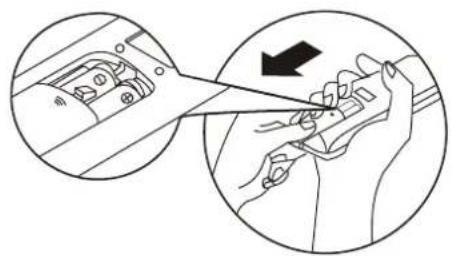
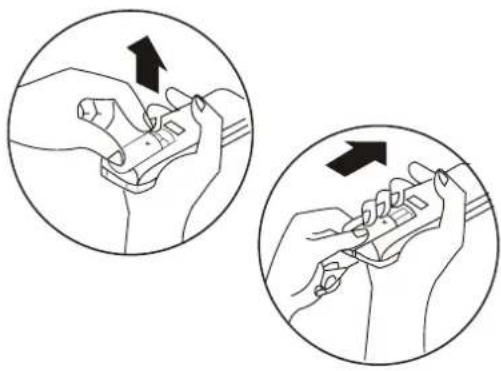
Remove the battery cover according to the arrow direction. Insert new batteries making sure that the (+) and (-) of battery are matched correctly.
Reattach the cover by sliding it back into position.
Note:
- Use 2 LR6 AA(1.5volt) batteries. Do not use rechargeable batteries. Replace batteries with new ones of the same type when the display becomes dim.
- If the replacement is done within 1 minute, the remote control will keep original presetting. (This function only for LCD remote control)
- How to Use
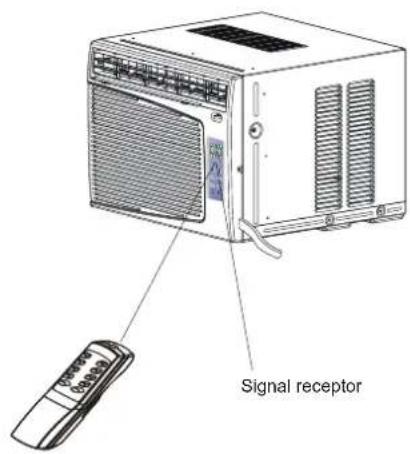
To operate the room air conditioner, aim the remote control to the signal receptor. The remote control will operate the air conditioner at a distance of up to 23 feet when pointing at signal receptor of indoor unit.
CARE AND MAINTENANCE
When servicing the air conditioner, be sure to turn the mode switch to the "OFF" position and disconnect the power cord from the electrical outlet.
- DO NOT use gasoline, benzine, thinner or other chemicals on the air conditioner as these substances may cause damage to the paint finish and deformation of plastic parts.
- Never attempt to pour water directly in front of the unit as this will cause deterioration of the electrical insulation.
Cleaning the Air Filter
If the air filter becomes clogged with dust, air-flow is obstructed and reduces efficiency. The air filter should be cleaned once a month. More frequent cleaning may be necessary depending on outdoor and indoor air quality.
Air Filter Removal
The air filter on the above models is located behind the air intake front grill.
To remove the air filter, grasp the filter handle(tab) located on the up (center) side of the air inlet grille and slide the air filter to the up.
To reinstall the air filter, reverse the above procedure.
CAUTION
DO NOT forget to install the air filter. If the air conditioner is left to operate without the air filter, dust is not removed from the room and may cause your air conditioner to fail.
When the air filter inlet grill and cabinet are dirty, wipe with lukewarm water (below 104° F). Use of mild detergent is recommended.
Cleaning of Air Filter
- Remove dust clogged in the filter by tapping it or vacuum clean it.
- Wash the filter well with lukewarm water below 40°C (104°F) while rubbing lightly. To get better results, wash it with soapy water or a neutral cleaning agent.
- Rinse the filter well using clean water then dry completely.
End-of-Season Care
- Operate the fan alone for half a day to dry out the inside of the unit.
- Turn off power and remove plug from wall socket.
- Clean filter.
- Store in a dry location.
TROUBLESHOOTING GUIDE
Frequently, a problem is minor and a service call may not be necessary, use this troubleshooting guide for a possible solution.
| PROBLEM POSSIBLE CAUSE SUGGESTED SOLUTION | ||
| Air conditioner will not operate | No power to the unit. | Check connection of power cord to power source.Check fuse or circuit breaker.Set MODE knob to position other than "OFF". |
| Inefficient or no cooling | Dirty air filter.Inappropriate capacity for application.Blocked air flow.Power interruption, settings change too quickly, or compressor overload tripped. | Clean or replace air filter.Check with dealer to determine proper unit capacity for application.Remove obstruction from grill or outdoor louvers.Let fan run to restart compressor (in approximately 10 minutes). |
| Noisy unit | Loose parts.Inadequate support. | Tighten loose parts.Provide additional support to unit. |
| Odors | Formation of mold, mildew, or algae on wet surfaces. | Remove drain plug and drain base pan.Replace drain plug.Clean unit thoroughly. |
| Water dripping outside | Condensation run-off is normal during hot and humid weather | Add flexible tubing to redirect water flow. |
| Water dripping inside | Unit is not properly angled to allow water to drain outside. | Unit must be installed on an angle for proper condensation run-off. Check the unit and make adjustments. |
| Ice or frost build-up Low | outside temperature.Unit air filter is dirty. | When outdoor temperature is approximately 65°F or below, frost may form when unit is in cooling mode. Switch unit to FAN (only) operation until frost melts.Remove and clean filter. |
NOTE:
If circuit breaker is tripped repeatedly, or fuse is blown more than once, contact a licensed technician.
WARRANTY
5 YEAR FULL WARRANTY
This product is warranted for 5 years from the date of original purchase. Any part which fails in materials or workmanship will be replaced within the warranty period. This warranty covers in home service. A copy of your proof of purchase, with date of purchase and product name included, is required to arrange this service repair.
For the name and location of an authorized service provider nearest you, please CALL 1-877-465-3566. Please reference product name, brand name, and model number when you call.
This warranty does not apply if the damage occurs because of accident, improper handling or operation, shipping damage, abuse, misuse, unauthorized repairs made or attempted, or the use of the product for commercial use, or any other use for which it was not intended.
ALL WARRANTIES, EXPRESSED OR IMPLIED, LAST FOR 5 YEARS FROM THE DATE OF ORIGINAL PURCHASE. THIS WARRANTY DOES NOT COVER LIABILITY FOR INCIDENTAL OR CONSEQUENTIAL DAMAGES FOR ANY CAUSE WHATSOEVER.
This warranty is extended to the original owner and any succeeding owner for products purchased for home use within the USA. Some states do not allow the exclusion or limitation of incidental or consequential damages. This warranty gives you specific rights, and you may also have other rights which may vary from state to state. To know what your legal rights are, consult your local or state consumer affairs office or your state's Attorney General.
Introducción
Fig. 1
Fig. 4
• C cómo use
© 2005 Admiral; Kelon Air Conditioner Co., and Kelon USA, Inc. All rights reserved.
Printed in China
- REMOTE CONTROL
- MECHANICAL CONTROL
- ÍNDICE
- PART IDENTIFICATION
- MECHANICAL CONTROL MODEL
- INTRODUCTION
- REMOTE CONTROL MODEL
- AIR CONDITIONER SAFETY
- YOUR SAFETY AND THE SAFETY OF OTHERS ARE VERY IMPORTANT
- IMPORTANT SAFETY INSTRUCTIONS
- S A V E THESE INSTRUCTIONS
- INSTALLATION REQUIREMENTS
- ELECTRICAL REQUIREMENTS
- WARNING
- ELECTRIC SHOCK HAZARD
- POWER SUPPLY CORD
- TO TEST YOUR POWER SUPPLY CORD
- NOTES
- INSTALLATION INSTRUCTIONS
- UNPACK THE AIR CONDITIONER
- EXCESSIVE WEIGHT HAZARD
- REMOVE PACKAGING MATERIALS
- ELECTRICAL SPECIFICATIONS
- TIPS BEFORE INSTALLATION
- CAUTION
- SELECT THE BEST LOCATION
- WINDOW INSTALLATION STEP
- OPERATING INSTRUCTIONS
- MODE
- THERMOSTAT
- CONTROL PANEL
- BUTTON
- MODE BUTTON
- FAN SPEED BUTTON
- TIMER BUTTON
- INDICATION SYMBOLS OF LED ON CONTROL PANEL
- ▲▼ BUTTON
- 1 POWER BUTTON
- 2 MODE BUTTON
- 3 BUTTONS
- 4 HIGH BUTTON
- 5 MID BUTTON
- 6 LOW BUTTON
- 7 AUTO BUTTON
- 8 TIMER BUTTON
- 9 POWER SAVER BUTTON
- HOW TO INSERT THE BATTERIES
- NOTE
- HOW TO USE
- CARE AND MAINTENANCE
- CLEANING THE AIR FILTER
- AIR FILTER REMOVAL
- CLEANING OF AIR FILTER
- END-OF-SEASON CARE
- TROUBLESHOOTING GUIDE
- WARRANTY
- 5 YEAR FULL WARRANTY
- INTRODUCCIÓN
- C CÓMO USE
Brand : Admiral
Model : AAW-05CM1FHU
Category : Washing machine