MT-1348 - Vacuum Cleaner Marta - Free user manual and instructions
Find the device manual for free MT-1348 Marta in PDF.


User questions about MT-1348 Marta
0 question about this device. Answer the ones you know or ask your own.
Ask a new question about this device
Download the instructions for your Vacuum Cleaner in PDF format for free! Find your manual MT-1348 - Marta and take your electronic device back in hand. On this page are published all the documents necessary for the use of your device. MT-1348 by Marta.
USER MANUAL MT-1348 Marta
natural_image
Line drawing of a vacuum cleaner with handle and control panel (no text or symbols)ОПИСАНИЕ
text_image
Labeled diagram of a vacuum cleaner with numbered parts for identificationМЕРЫ БЕЗОПАСНОСТИ
natural_image
Line drawing of a car with a hand operating the hood and a side-view view of a device (no text or symbols)natural_image
Illustration of a hand holding a small object with a magnified inset showing a circular component (no text or symbols)Cosmos Far View International Limited
Room 701 16 apt, lane 165, Rainbow North Street, Ningbo, China
- Combined "Floor / carpet" brush
- Telescopic tube
- Hose handle
- Hose handle connector
- Hose
- Vacuum cleaner connector
- Hole for hose fixation / suction hole
- On/Off button
- Cord auto rewind button
- Dust container fixation button
- Power switch
- Carrying handle/ Dust container handle
- Wheel
- Dust container
- Dust container opening button
- Cord
- Outgoing airflow filter
- Crevice nozzle
- Sofa brush

text_image
Labeled diagram of a vacuum cleaner with numbered parts for identificationCAUTION
Read this manual carefully before using the appliance and save it for future reference.
• Before the first use, check the device specifications and the power supply in your network.
• Use only for domestic purposes according to the instruction manual. It is not intended for industrial use.
- For indoor use only.
- Do not use with damaged cord, plug or other injuries.
- Keep the power cord away from sharp edges and hot surfaces.
- Do not pull the cord. Always take the socket. Don' reel the cord around the device housing.
• Using accessories or replacement parts that are not recommended or sold by the manufacturer may cause damage to the item.
• Always unplug the item and let it cool down before cleaning and removing parts. Keep unplugged when not in use.
• Before you begin cleaning, remove from the floor smoldering and sharp objects that may damage the dust container.
• Never attempt to dissemble and repair the item by yourself. If you encounter problems, please contact the nearest customer service center.
• To avoid electric shock and fire, do not immerse in water or other liquids. If this occurs, immediately unplug it and contact service center for inspection.
- This appliance is not intended for use by persons (including children) with reduced physical, sensory or mental capabilities, or lack of experience and knowledge, unless they have been given supervision or instruction concerning use of the appliance by a person responsible for their safety.
• To avoid overloading the power supply, do not connect the product together with other high-powered appliances to the same power line.
- When you wrap the cord, hold the plug carefully.
- Make sure that ventilation holes are not blocked.
- Event of a blocked suction inlet of the vacuum cleaner hose or telescopic tube, immediately turn off the vacuum cleaner. Do not expose any loose objects to get into the device. Before switching on again is necessary to eliminate the clog.
- Be extremely careful when working with vacuum cleaner on stairs.
- Do not use vacuum cleaner on wet surfaces. Do not use the device to clear any liquids.
• Carpets treated with liquid cleaner, should be dried before using vacuum cleaner.
ASSEMBLAGE
• To attach the hose to a vacuum cleaner, insert the connector into the hole for attaching the hose and push down until it clicks.
• To disconnect the hose, press the connector button and pull the handle.
- Insert the hose handle into the tube. To hose handle and tube, turn parts and pull them in different directions.
- Connect one of the nozzles:
• Combined Floor / carpet brush
- Sofa brush
- Crevice nozzle
- Pull the cord and connect it to the network. Device is equipped with cord rewind system. For cord rewind push button, always hold the cord and plug to avoid any injuries.
USING THE DEVICE
• Before using the device, pull the cord to the required length and insert the plug into network. Yellow mark on the cord matches its optimal length, red mark matches the limit length.
• To turn vacuum cleaner on push On/Off button; to turn of push On/Off button once again.
NOTE: in rare instances while vacuum cleaner is working hissing noise can appear. It will disappear over some time and is not an indication of malfunction.
• on the housing is installed power regulator that allows you to vary the suction power:
- MIN - This mode is suitable for cleaning delicate fabrics, such as curtains, tulle.
- MIN-MAX - average suction power for cleaning upholstered furniture, carpets, mattresses.
- MAX - maximum suction power. Suitable for cleaning hardwood flooring: wood, tile, etc.

- Never use vacuum cleaner for cleaning of cement, glue and plaster. These substances can clog and damage the filter.
• Additional suction power regulator is on the handle of the vacuum cleaner.
• To prevent motor overheating cleaner do not use vacuum cleaner continuously for more than 30 minutes and always take a break for at least 15 minutes. - After cleaning: switch off the appliance by pressing On / Off button on vacuum cleaner housing. Disconnect the mains plug. By clicking rewind button, wait until the cord is fully rewound onto the drum inside the unit.
- In case of overheating unplug the appliance, wait for 30 minutes, remove all possible obstacles in ingoing airflow holes, then switch on again. The device is ready. If the problem persists, contact the service center.
CLEANING AND MAINTENANCE
- Before cleaning unplug the appliance and let it cool.
- Wipe the outer surface of the housing with a soft cloth with mild detergent that does not contain abrasives.
- Do not immerse the appliance or power cord in water or any liquid.
- Avoid getting water, dirt or any other liquid inside of the appliance.
CLEANING THE DUST BAG:
- As the dust container is transparent, it's easy to monitor the extent of its fullness. Necessarily empty it when the content of the dust bag fills up the visible part.
WARNING: always unplug the vacuum cleaner from the mains before cleaning the dust bag.
• After emptying the dust bag it is also recommended to clean the filter.
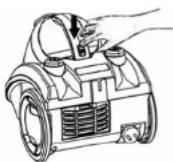
- Remove the dust container and empty it by clicking on the button.
• After emptying the dust bag is also recommended, if necessary, clean the filter.

CLEANING THE MICRO-FILTER:
- Cleaning the MICRO-filter should be done as it is dirtying.
• Use the vacuum cleaner only with the filter fitted. Operation without filters may reduce the suction power and damage the motor.
• Always unplug the vacuum cleaner from the mains before cleaning MICRO-filter. - Don't clean filters in laundry washer.
- Don't use hair-drier to dry filters.
- To remove dust container and filter press lock button, pull the handle and remove it, then empty by clicking the button on housing.
- Remove MICRO -filter from the dust bag.
- Clean MICRO -filter in warm water using soft brush.
NOTE: don't wash MICRO-filter using soap or any detergent.

text_image
Lock button• After cleaning let filter dry up, then place it into the vacuum cleaner and push button on housing.

natural_image
Illustration showing a hand holding a small object next to a circular component with three smaller parts nearby (no text or symbols)- When the MICRO filter is foul and this weakens the suction power, it is recommended to replace the filter.
WARNING: Vacuum cleaner is valved. When dust bag is full, MICRO-filter or incoming airflow hole are foul, protective admission valve turns on, preventing motor of overheating.
• Cleaning / replacement of outgoing airflow filter
- Unplug the device.
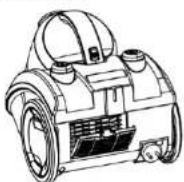
- Remove outgoing airflow filter grating and extract the filter.
- Clean MICRO filter in warm water and let it dry up.
- Place MICRO -filter into the vacuum cleaner.
- Place outgoing airflow filter grating correctly.


SPECIFICATION
| Power supply | 220-240 V, 50 Hz |
| Power | 2400 W |
| Suction power | 300 W |
| Net weight / Gross weight | 4.8 kg / 5.6 kg |
| Package size (L x W x H) | 420 x 310 x 325 mm |
Production date is available in the serial number located on the identification sticker on the gift box and/or on sticker on the device. The serial number consists of 13 characters, the 4th and 5th characters indicate the month, the 6th and 7th indicate the year of device production.
Producer may change the complete set, appearance, country of manufacture, warranty and technical characteristics of the model without notice. Please check when purchasing device.
Producer:
Cosmos Far View International Limited
Room 701 16 apt, lane 165, Rainbow North Street, Ningbo, China