BM2-TI - Access Point Ubiquiti Networks - Free user manual and instructions
Find the device manual for free BM2-TI Ubiquiti Networks in PDF.


User questions about BM2-TI Ubiquiti Networks
0 question about this device. Answer the ones you know or ask your own.
Ask a new question about this device
Download the instructions for your Access Point in PDF format for free! Find your manual BM2-TI - Ubiquiti Networks and take your electronic device back in hand. On this page are published all the documents necessary for the use of your device. BM2-TI by Ubiquiti Networks.
USER MANUAL BM2-TI Ubiquiti Networks
natural_image
Exterior view of a gray cylindrical mechanical device labeled 'M2HP' with no visible text or symbols beyond the branding.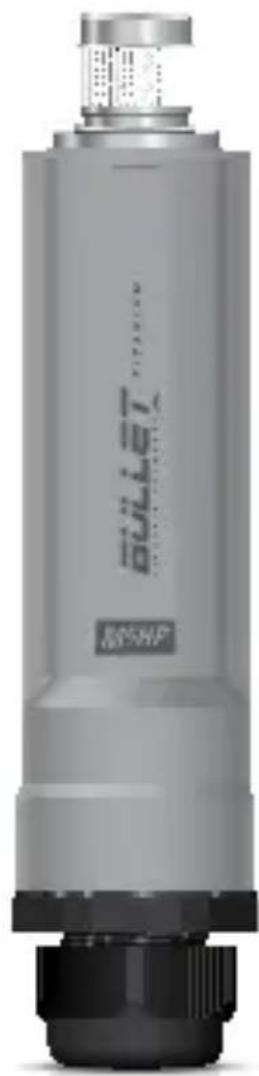
natural_image
Exterior view of a gray cylindrical mechanical device labeled 'M5-NP' with no visible text or symbols beyond the branding.BULLET™
TITANIUM
Zero-Variable Outdoor Radio
Models: BM2-Ti, BM5-Ti
airMAX
QUICK START GUIDE
Introduction
Thank you for purchasing the Ubiquiti Networks™ airMAX™ Bullet™ Titanium. This Quick Start Guide is designed to guide you through the installation of the radio. This Quick Start Guide also includes the warranty terms and is for use with the BulletM2 Titanium, model BM2-Ti, and the BulletM5 Titanium, model BM5-Ti.
Package Contents

natural_image
Two industrial pressure relief devices, one cylindrical and one connected by a pipe fitting (no visible text or symbols)Bullet Titanium N-Type Right Angle Adapter
natural_image
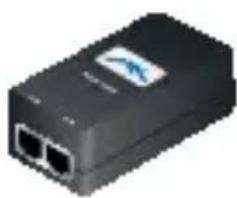
Black electronic device with two ports and a logo (no visible text or symbols)PoE Adapter (24V, 1A)
natural_image
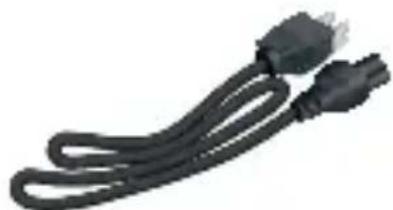
Coiled black cable with two connectors (no text or symbols visible)Power Cord Quick Start Guide

natural_image
Two cylindrical mechanical components with no visible text or symbolsProducts may be different from pictures and are subject to change without notice.
TERMS OF USE: Ubiquiti radio devices must be professionally installed. Shielded Ethernet cable and earth grounding must be used as conditions of product warranty. TOUGHCable is designed for outdoor installations. It is the customer's responsibility to follow local country regulations, including operation within legal frequency channels, output power, and Dynamic Frequency Selection (DFS) requirements.
Hardware Overview

text_image
N-Type Connector Bullet Titanium Radio M5HP Ethernet Port Rubber Washer Cable Gland Body Compression Seal Compression NutHardware Installation
- Unscrew the Cable Gland Body and detach it from the Bullet Titanium Radio.

natural_image
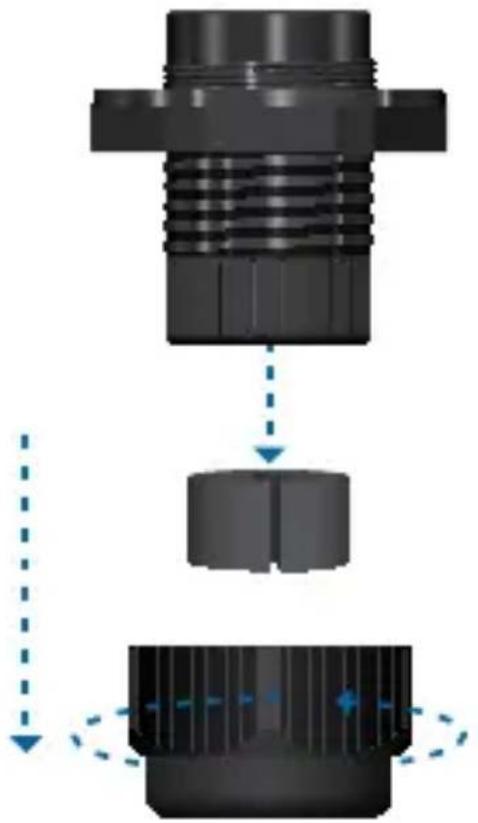
Mechanical assembly diagram showing a gear and shaft assembly with motion arrows (no text or symbols)- Unscrew the Compression Nut and remove the Compression Seal from the Cable Gland Body.
natural_image
Mechanical assembly diagram showing a threaded component being processed into a cylindrical housing, with motion arrows indicating movement (no text or symbols present)- Slide the Compression Nut over the Ethernet cable with the threaded end facing the RJ-45 connector. Slip the Compression Seal around the cable.

natural_image
Mechanical assembly diagram showing a shaft and housing with directional arrows indicating motion (no text or symbols)- Feed the Ethernet cable through the Cable Gland Body and seat the Compression Seal into the Cable Gland Body.

natural_image
Mechanical assembly diagram showing a shaft, gear, and housing with no visible text or symbols- Connect the Ethernet cable to the port located on the bottom of the Bullet Titanium Radio.

natural_image
Close-up of a white USB port connector with an internal network socket and cable (no text or symbols visible)- Securely screw the Cable Gland Body into the Bullet Titanium Radio so that the Rubber Washer seals the bottom of the radio.
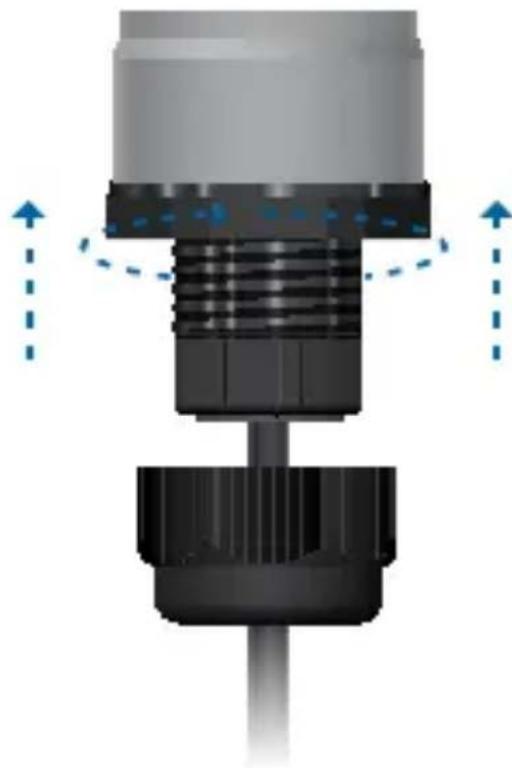
natural_image
Mechanical component diagram showing a threaded shaft and base with directional arrows indicating motion (no text or symbols)- Tightly screw on the Compression Nut. Ensure the Compression Seal is securely compressed and tightly sealed around the cable.
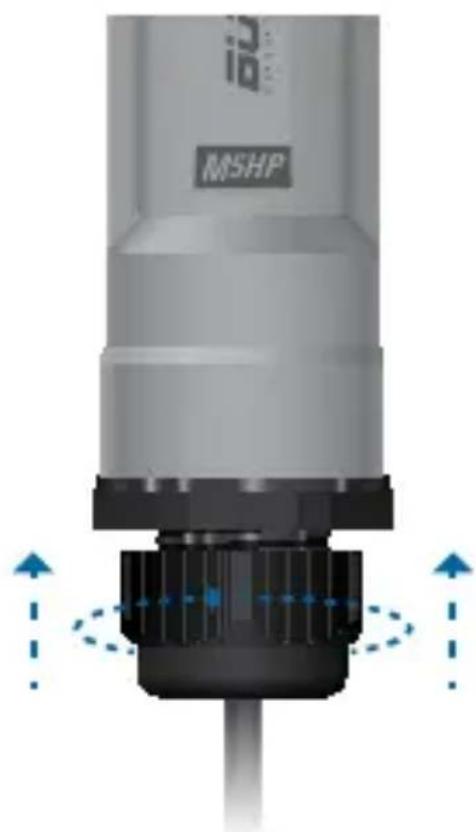
natural_image
Close-up of a mechanical component labeled 'MSHP' with directional arrows indicating movement or force (no readable text beyond label)- Connect the Bullet Titanium to the N-Type connector of the antenna.

natural_image
Close-up of a gray cylindrical device labeled 'M5HP' with internal components and directional arrows indicating movement (no readable text beyond label)
Note: The Bullet Titanium should be mounted vertically to reduce stress on the N-Type Connector.
The N-Type Right Angle Adapter may be used as needed.
Connecting Power over Ethernet
- Connect the other end of the Ethernet cable from the Bullet Titanium to the Ethernet port labeled POE on the PoE Adapter.

natural_image
Close-up of a black USB router with a cable inserted, showing port connections and a warning symbol (no text or labels)- Connect an Ethernet cable from your LAN to the Ethernet port labeled LAN on the PoE Adapter.

natural_image
Close-up of a black USB router with attached cable and connector (no visible text or symbols)- Connect the power cord to the power port on the PoE Adapter. Connect the other end of the power cord to a power outlet.
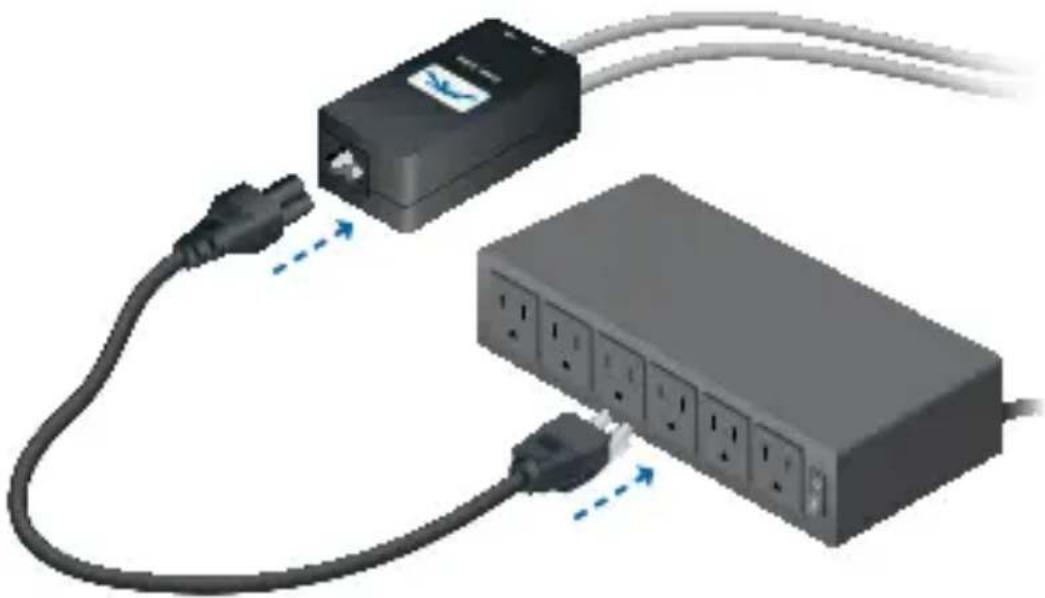
natural_image
Diagram of a network device with connected ports and cables, showing connections without any text or symbols.Accessing the airOS Utility
- Make sure that your host machine is connected to the LAN that is connected to the Bullet Titanium.
- Configure the Ethernet adapter on your host system with a static IP address on the 192.168.1.x subnet.
- Launch your web browser. Type https://192.168.1.20 in the address field and press enter (PC) or return (Mac).

text_image
https://192.168.1.20- The login screen will appear. Enter ubnt in the Username and Password fields. Select your Country and Language. You must agree to the Terms of Use to use the product. Click Login.

Note: U.S. product versions are locked to the U.S. Country Code to ensure compliance with FCC regulations.

text_image
OS™ Device Name: Accession: none Country: Group States: 1 Language: English: 0 CEREM OF USE The Ubiquit class device must be professionally insured. Property installed should be used as conditions of practical warranty. It is the INFO'S HISTORY TO SHOW QUR COUNTY REGULATIONS INCLUDING OPERATION WITH E&P Frequency Shipment, output power, and Finland. Frequently installed ZOPS requirements. This increase in response for keeping the own working according to these rules. For it this information, please visit www.ebscn.com. I sign to these names of use.The airOS Configuration Interface will appear, allowing you to customize your settings as needed.
For additional details on the airOS Configuration Interface, refer to the User Guide available at documentation.ubnt.com/airmax
Installer Compliance Responsibility
Devices must be professionally installed and it is the professional installer's responsibility to make sure the device is operated within local country regulatory requirements.
text_image
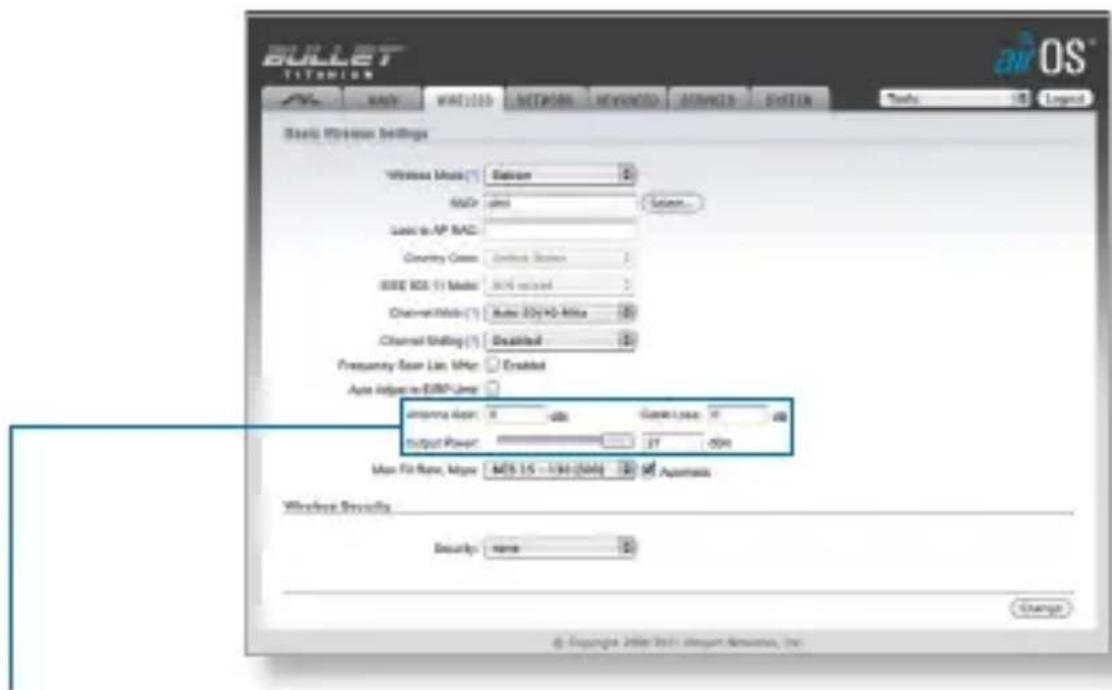
BULLET TSYNION BACK WART100 NETWORK ADVICE ADVICE SYSTEM Tools Legend Basic Wireless Settings Wireless Music (E) Saturn 8 MACr Junction Sapiere... Audio to AP MAC Country Cross Connect Status 8 IEEE I/O (1) Model 80% rated 8 Channel Mode (1) Auto 32y+40 MHz Channel Moding (1) Disabled Frequency Span Line, MHz Enabled Auto Input to EBIT Line Improving User: 8 600 Gates Type: 8 Output Power: 37 00% Max Fit Rate, Mbps: 905.15 - 1/36/2000 Automatics Wireless Security Security: name Change © Copyright © 2011 Microsoft Access, Inc. BIOS®Since Ubiquiti Networks equipment can be paired with a variety of antennas and cables, the Antenna Gain, Cable Loss, and Output Power fields are provided to the professional installer to assist in meeting regulatory requirements.
Specifications
| Bullet Titanium | |
| Processor Atheros MIPS 24KC, 400 MHz | |
| Memory 32 MB SDRAM, 8 MB Flash | |
| Networking Interface (1) 10/100 Ethernet Port | |
| Dimensions 190 x 46 mm | |
| Weight 196 g | |
| Enclosure Powder Coated Aluminum | |
| Antenna Connector N-Type Connector | |
| Operating FrequencyBM2-Ti2402 - 2462 MHzBM5-TiWorldwide: 5170 - 5875 MHzUSA: 5725 - 5850 MHz | |
| Max. Power ConsumptionBM2-Ti7 WBM5-Ti6 W | |
| Output PowerBM2-Ti28 dBmBM5-Ti25 dBm | |
| Power Supply 24V, 1A PoE Adapter (Included) | |
| Power Method Passive PoE (Pairs 4, 5+; 7,8 Return) | |
| Certifications CE, FCC, IC | |
| Operating Temperature -40 to 80°C | |
| Operating Humidity 5 to 95% Condensing | |
| Shock and Vibration ETSI300-019-1.4 | |
Safety Notices
- Read, follow, and keep these instructions.
- Heed all warnings.
- Only use attachments/accessories specified by the manufacturer.

WARNING: Do not use this product in location that can be submerged by water.

WARNING: Avoid using this product during an electrical storm. There may be a remote risk of electric shock from lightning.
Electrical Safety Information
- Compliance is required with respect to voltage, frequency, and current requirements indicated on the manufacturer's label. Connection to a different power source than those specified may result in improper operation, damage to the equipment or pose a fire hazard if the limitations are not followed.
- There are no operator serviceable parts inside this equipment. Service should be provided only by a qualified service technician.
- This equipment is provided with a detachable power cord which has an integral safety ground wire intended for connection to a grounded safety outlet.
a. Do not substitute the power cord with one that is not the provided approved type. Never use an adapter plug to connect to a 2-wire outlet as this will defeat the continuity of the grounding wire.
b. The equipment requires the use of the ground wire as a part of the safety certification, modification or misuse can provide a shock hazard that can result in serious injury or death.
c. Contact a qualified electrician or the manufacturer if there are questions about the installation prior to connecting the equipment.
d. Protective earthing is provided by Listed AC adapter. Building installation shall provide appropriate short-circuit backup protection.
e. Protective bonding must be installed in accordance with local national wiring rules and regulations.
Limited Warranty
UBIQUITI NETWORKS, Inc ("UBIQUITI NETWORKS") warrants that the product(s) furnished hereunder (the "Product(s)") shall be free from defects in material and workmanship for a period of one (1) year from the date of shipment by UBIQUITI NETWORKS under normal use and operation. UBIQUITI NETWORKS' sole and exclusive obligation and liability under the foregoing warranty shall be for UBIQUITI NETWORKS, at its discretion, to repair or replace any Product that fails to conform to the above warranty during the above warranty period. The expense of removal and reinstallation of any Product is not included in this warranty. The warranty period of any repaired or replaced Product shall not extend beyond its original term.
Warranty Conditions
The above warranty does not apply if the Product:
(I) has been modified and/or altered, or an addition made thereto, except by Ubiquiti Networks, or Ubiquiti Networks' authorized representatives, or as approved by Ubiquiti Networks in writing;
(Ⅲ) has been painted, rebranded or physically modified in any way;
(III) has been damaged due to errors or defects in cabling;
(IV) has been subjected to misuse, abuse, negligence, abnormal physical, electromagnetic or electrical stress, including lightning strikes, or accident;
(V) has been damaged or impaired as a result of using third party firmware;
(VI) has no original Ubiquiti MAC label, or is missing any other original Ubiquiti label(s); or
(VII) has not been received by Ubiquiti within 30 days of issuance of the RMA.
In addition, the above warranty shall apply only if: the product has been properly installed and used at all times in accordance, and in all material respects, with the applicable Product documentation; all Ethernet cabling runs use CAT5 (or above), and for outdoor installations, shielded Ethernet cabling is used, and for indoor installations, indoor cabling requirements are followed.
Returns
No Products will be accepted for replacement or repair without obtaining a Return Materials Authorization (RMA) number from UBIQUITI NETWORKS during the warranty period, and the Products being received at UBIQUITI NETWORKS' facility freight prepaid in accordance with the RMA process of UBIQUITI NETWORKS. Products returned without an RMA number will not be processed and will be returned freight collect or subject to disposal. Information on the RMA process and obtaining an RMA number can be found at: www.ubnt.com/support/warranty.
Disclaimer
EXCEPT FOR ANY EXPRESS WARRANTIES PROVIDED HEREIN, UBIQUITI NETWORKS, ITS AFFILIATES, AND ITS AND THEIR THIRD PARTY DATA, SERVICE, SOFTWARE AND HARDWARE PROVIDERS HEREBY DISCLAIM AND MAKE NO OTHER REPRESENTATION OR WARRANTY OF ANY KIND, EXPRESS, IMPLIED OR STATUTORY, INCLUDING, BUT NOT LIMITED TO, REPRESENTATIONS, GUARANTEES, OR WARRANTIES OF MERCHANTABILITY, ACCURACY, QUALITY OF SERVICE OR RESULTS, AVAILABILITY, SATISFACTORY QUALITY, LACK OF VIRUSES, QUIET ENJOYMENT, FITNESS FOR A PARTICULAR PURPOSE AND NON-INFRINGEMENT AND ANY WARRANTIES ARISING FROM ANY COURSE OF DEALING, USAGE OR TRADE PRACTICE IN CONNECTION WITH SUCH PRODUCTS AND SERVICES. BUYER ACKNOWLEDGES THAT NEITHER UBIQUITI NETWORKS NOR ITS THIRD PARTY PROVIDERS CONTROL BUYER'S EQUIPMENT OR THE TRANSFER OF DATA OVER COMMUNICATIONS FACILITIES, INCLUDING THE INTERNET, AND THAT THE PRODUCTS AND SERVICES MAY BE SUBJECT TO LIMITATIONS, INTERRUPTIONS, DELAYS, CANCELLATIONS AND OTHER PROBLEMS INHERENT IN THE USE OF COMMUNICATIONS FACILITIES. UBIQUITI NETWORKS, ITS AFFILIATES AND ITS AND THEIR THIRD PARTY PROVIDERS ARE NOT RESPONSIBLE FOR ANY INTERRUPTIONS, DELAYS, CANCELLATIONS, DELIVERY FAILURES, DATA LOSS, CONTENT CORRUPTION, PACKET LOSS, OR OTHER DAMAGE RESULTING FROM ANY OF THE FOREGOING. In addition, UBIQUITI NETWORKS does not warrant that the operation of the Products will be error-free or that operation will be uninterrupted. In no event shall UBIQUITI NETWORKS be responsible for damages or claims of any nature or description relating to system performance, including coverage, buyer's selection of products (including the Products) for buyer's application and/or failure of products (including the Products) to meet government or regulatory requirements.
Limitation of Liability
EXCEPT TO THE EXTENT PROHIBITED BY LOCAL LAW, IN NO EVENT WILL UBIQUITI OR ITS SUBSIDIARIES, AFFILIATES OR SUPPLIERS BE LIABLE FOR DIRECT, SPECIAL, INCIDENTAL, CONSEQUENTIAL OR OTHER DAMAGES (INCLUDING LOST PROFIT, LOST DATA, OR DOWNTIME COSTS), ARISING OUT OF THE USE, INABILITY TO USE, OR THE RESULTS OF USE OF THE PRODUCT, WHETHER BASED IN WARRANTY, CONTRACT, TORT OR OTHER LEGAL THEORY, AND WHETHER OR NOT ADVISED OF THE POSSIBILITY OF SUCH DAMAGES.
Note
Some countries, states and provinces do not allow exclusions of implied warranties or conditions, so the above exclusion may not apply to you. You may have other rights that vary from country to country, state to state, or province to province. Some countries, states and provinces do not allow the exclusion or limitation of liability for incidental or consequential damages, so the above limitation may not apply to you. EXCEPT TO THE EXTENT ALLOWED BY LOCAL LAW, THESE WARRANTY TERMS DO NOT EXCLUDE, RESTRICT OR MODIFY, AND ARE IN ADDITION TO, THE MANDATORY STATUTORY RIGHTS APPLICABLE TO THE LICENSE OF ANY SOFTWARE (EMBEDDED IN THE PRODUCT) TO YOU. The United Nations Convention on Contracts for the International Sale of Goods shall not apply to any transactions regarding the sale of the Products.
Compliance
FCC
Changes or modifications not expressly approved by the party responsible for compliance could void the user's authority to operate the equipment.
This device complies with Part 15 of the FCC Rules. Operation is subject to the following two conditions:
- This device may not cause harmful interference, and
- This device must accept any interference received, including interference that may cause undesired operation.
NOTE: This equipment has been tested and found to comply with the limits for a Class A digital device, pursuant to part 15 of the FCC Rules. These limits are designed to provide reasonable protection against harmful interference when the equipment is operated in a commercial environment. This equipment generates, uses, and can radiate radio frequency energy and, if not installed and used in accordance with the instruction manual, may cause harmful interference to radio communications. Operations of this equipment in a residential area is likely to cause harmful interference in which case the user will be required to correct the interference at his own expense.
For MPE and antenna usage details, please visit our website at
www.ubnt.com/products
Industry Canada
This Class A digital apparatus complies with Canadian ICES-003.
To reduce potential radio interference to other users, the antenna type and its gain should be so chosen that the equivalent isotropically radiated power (e.i.r.p.) is not more than that permitted for successful communication.
This device complies with Industry Canada licence-exempt RSS standard(s). Operation is subject to the following two conditions:
- This device may not cause interference, and
- This device must accept any interference, including interference that may cause undesired operation of the device.
Users should also be advised that high-power radars are allocated as primary users (i.e. priority users) of the bands 5250-5350 MHz and 5650-5850 MHz and that these radars could cause interference and/or damage to LE-LAN devices.
This radio transmitter (IC: 6545A-M5B) has been approved by Industry Canada to operate with the antenna types listed below with the maximum permissible gain and required antenna impedance for each antenna type indicated. Antenna types not included in this list, having a gain greater than the maximum gain indicated for that type, are strictly prohibited for use with this device.
- 7 dBi omni (50 ohm) • 30 dBi grid (50 ohm)
• 20 dBi sector (50 ohm) • 30 dBi dish (50 ohm)
• 24 dBi panel (50 ohm)
The antennas used for this transmitter must be installed to provide a separation distance of at least 2.52 m from all persons and must not be located or operating in conjunction with any other antenna or transmitter.
CE marking on this product represents the product is in compliance with all directives that are applicable to it.
Alert Sign (!) Follows CE Marking
Alert sign must be indicated if a restriction on use applied to the product and it must follow the CE marking.

RoHS/WEEE Compliance Statement

English
European Directive 2002/96/EC requires that the equipment bearing this symbol on the product and/or its packaging must not be disposed of with unsorted municipal waste. The symbol indicates that this product should be disposed of separately from regular household waste streams. It is your responsibility to dispose of this and other electric and electronic equipment via designated collection facilities appointed by the government or local authorities. Correct disposal and recycling will help prevent potential negative consequences to the environment and human health. For more detailed information about the disposal of your old equipment, please contact your local authorities, waste disposal service, or the shop where you purchased the product.
Deutsch
Declaration of Conformity
| Česky [Czech] | UBIQUITI NETWORKS tímto prohla uje, e tento UBIQUITI NETWORKS device, je ve shod se základními po adavky a dal ími p íslu n mi ustanoveními sm rnice 1999/5/ES. |
| Dansk [Danish] | Undertegnede UBIQUITI NETWORKS erklærer herved, at følgende udstyr UBIQUITI NETWORKS device, overholder de væsentlige krav og øvrige relevante krav i direktiv 1999/5/EF. |
| Nederlands [Dutch] | Hierbij verklaart UBIQUITI NETWORKS dat het toestel UBIQUITI NETWORKS device, in overeenstemming is met de essentiële eisen en de andere relevante bepalingen van richtlijn 1999/5/EG.Bij deze verklaart UBIQUITI NETWORKS dat deze UBIQUITI NETWORKS device, voldoet aan de essentiële eisen en aan de overige relevante bepalingen van Richtlijn 1999/5/EC. |
| English | Hereby, UBIQUITI NETWORKS, declares that this UBIQUITI NETWORKS device, is in compliance with the essential requirements and other relevant provisions of Directive 1999/5/EC. |
| Eesti [Estonian] | Käesolevaga kinnitab UBIQUITI NETWORKS seadme UBIQUITI NETWORKS device, vastavust direktiivi 1999/5/EÜ põhinõuetele ja nimetatud direktiivist tulenevatele teistele asjakohastele sätetele. |
| Suomi [Finnish] | UBIQUITI NETWORKS vakuuttaa täten että UBIQUITI NETWORKS device, tyyppinen laite on direktiivin 1999/5/EY oleellisten vaatimusten ja sitä koskevien direktiivin muiden ehtojen mukainen. |
| Français [French] | Par la présente UBIQUITI NETWORKS déclare que l'appareil UBIQUITI NETWORKS, device est conforme aux exigences essentielles et aux autres dispositions pertinentes de la directive 1999/5/CE. |
| Deutsch [German] | Hiermit erklärt UBIQUITI NETWORKS, dass sich diese UBIQUITI NETWORKS device, in Übereinstimmung mit den grundlegenden Anforderungen und den anderen relevanten Vorschriften der Richtlinie 1999/5/EG befindet". (BMWi) |
| Ελληνική [Greek] | ME THN ΠΑΡΟΥΣΑ UBIQUITI NETWORKS ΔΗΛΩΝΕΙ ΟΤΙ UBIQUITI NETWORKS device, ΣΥΜΜΟΡΦΩΝΕΤΑΙ ΠΡΟΣ ΤΙΣ ΟΥΣΙΩΔΕΙΣ ΑΠΑΙΤΗΣΕΙΣ ΚΑΙ ΤΙΣ ΛΟΙΠΕΣ ΣΧΕΤΙΚΕΣ ΔΙΑΤΑΞΕΙΣ ΤΗΣ ΟΔΗΓΙΑΣ 1995/5/EK. |
| Magyar [Hungarian] | Alulírott, UBIQUITI NETWORKS nyilatkozom, hogy a UBIQUITI NETWORKS device, megfelel a vonatkozó alapvető követelményeknek és az 1999/5/EC irányelv egyéb előírásainak. |
| Íslenska [Icelandic] | Hér me I sir UBIQUITI NETWORKS yfir ví a UBIQUITI NETWORKS device, er í samræmi vi grunnkröfur og a rar kröfur, sem ger ar eru í tilskipun 1999/5/EC. |
| Italiano[Italian] | Con la presente UBIQUITI NETWORKS dichiara che questo UBIQUITI NETWORKS device, è conforme ai requisiti essenziali ed alle altre disposizioni pertinenti stabilite dalla direttiva 1999/5/CE. |
| Latviski[Latvian] | Ar o UBIQUITI NETWORKS deklar , ka UBIQUITI NETWORKS device, atbilst Direkt vas 1999/5/EK b tiskaj m pras b m un citiem ar to saist tajiem noteikumiem. |
| Lietuviškai[Lithuanian] | UBIQUITI NETWORKS deklaruoja, kad šis UBIQUITI NETWORKS jrenginys atitinka esminius reikalavimus ir kitas 1999/5/EB Direktyvos nuostatas. |
| Malti[Maltese] | Hawnhekk, UBIQUITI NETWORKS, jiddikjara li dan UBIQUITI NETWORKS device, jikkonforma mal- ti ijiet essenzjali u ma provvedimenti o rajn relevanti li hemm fid-Dirrettiva 1999/5/EC. |
| Norsk[Norwegian] | UBIQUITI NETWORKS erklærer herved at utstyret UBIQUITI NETWORKS device, er i samsvar med de grunnleggende krav og øvrige relevante krav i direktiv 1999/5/EF. |
| Slovensky[Slovak] | UBIQUITI NETWORKS t mto vyhlasuje, e UBIQUITI NETWORKS device, sp a základné po iadavky a v etky príslu né ustanovenia Smernice 1999/5/ES. |
| Svenska[Swedish] | Härmed intygar UBIQUITI NETWORKS att denna UBIQUITI NETWORKS device, står I överensstämmelse med de väsentliga egenskapskrav och övriga relevanta bestämmelser som framgår av direktiv 1999/5/EG. |
| Español[Spanish] | Por medio de la presente UBIQUITI NETWORKS declara que el UBIQUITI NETWORKS device, cumple con los requisitos esenciales y cualesquiera otras disposiciones aplicables o exigibles de la Directiva 1999/5/CE. |
| Polski[Polish] | Niniejszym, firma UBIQUITI NETWORKS o wiadcza, e produkt serii UBIQUITI NETWORKS device, spełnia zasadnicze wymagania i inne istotne postanowienia Dyrektywy 1999/5/EC. |
| Português[Portuguese] | UBIQUITI NETWORKS declara que este UBIQUITI NETWORKS device, está conforme com os requisitos essenciais e outras disposições da Directiva 1999/5/CE. |
| Română[Romanian] | Prin prezenta, UBIQUITI NETWORKS declară că acest dispozitiv UBIQUITI NETWORKS este în conformitate cu cerințele esențiale și alte prevederi relevante ale Directivei 1999/5/CE. |
Online Resources
Support support.ubnt.com
Community community.ubnt.com
Downloads downloads.ubnt.com

text_image
UBIQUITI NETWORKSwww.ubnt.com
© 2011-2013 Ubiquiti Networks, Inc. All rights reserved.