R520 - Radio ENERGY SISTEM - Free user manual and instructions
Find the device manual for free R520 ENERGY SISTEM in PDF.


| Product Type | Portable Radio |
| Brand | Energy Sistem |
| Model | R520 |
| Dimensions (Approx.) | 150 x 80 x 30 mm |
| Weight (Approx.) | 300 g (with batteries) |
| Power Supply | 2 x AA batteries (not included) or USB DC 5V |
| Battery Life (Approx.) | Up to 20 hours with alkaline batteries |
| Tuning Bands | FM (87.5-108 MHz) / AM (520-1710 kHz) |
| Speaker | Built-in 3W mono speaker |
| Headphone Jack | 3.5 mm stereo jack |
| Antenna | Telescopic FM rod antenna |
| Controls | Volume, tuning knob, on/off, band switch |
| Display | Analog dial with pointer |
| Additional Features | Carry strap, standby timer (sleep mode) |
| Material | ABS plastic casing |
| Cleaning | Wipe with soft dry cloth; avoid liquids |
| Safety | Keep away from water and heat sources |
| Spare Parts / Repair | Batteries and antenna available as spares; device not user-serviceable |
Frequently Asked Questions - R520 ENERGY SISTEM
User questions about R520 ENERGY SISTEM
0 question about this device. Answer the ones you know or ask your own.
Ask a new question about this device
Download the instructions for your Radio in PDF format for free! Find your manual R520 - ENERGY SISTEM and take your electronic device back in hand. On this page are published all the documents necessary for the use of your device. R520 by ENERGY SISTEM.
USER MANUAL R520 ENERGY SISTEM
natural_image
Line drawing of a SOYNTEC® computer mouse with control buttons and scroll wheel (no text or symbols on body)User manual

Input R520 Series
Enjoy the advanced features of this technological product that we have developed with maximum guarantees for you.
Wireless mouse
1. INTRODUCTION
Soyntec® give you thanks for buying Soyntec® Mouse Inputput™ R520. We wish you enjoy using it.
Cordless long range technology mouse. High precision with 1.600 dpi that provide superior smooth movement. Integrates a small sized nano-receiver which can be either stored in the mouse or integrate inside your laptop.
We recommend to read this user manual in order to enjoy the product in a safe way and with the best features.
2. CARE AND MAINTENANCE
- Do not expose your Input™ R520 to shakes, dust, direct sun light, moisture or extreme temperatures.
- Do not use abrasive or corrosive cleaners.
- Keep the device clean and without dust with a soft and dry cloth.
Do not disassemble the device. Any repair work must be performed by qualified Energy Sistem Soyntec's personnel. - Keep distance to water or moisture which could be harmful to the device.
- Avoid to look directly to the sensor light in the bottom of the mouse.
3. MAIN FEATURES
▶ Commutable optical sensor: 800 \~ 1600 dpi.
▶ 2.4 GHz wireless technology.
▶ Micro sized USB nano-receiver.
▶ You can store the nano-receiver inside the mouse built-in slot.
- 5 functional buttons and scroll wheel.
▶ 32 channels to avoid interferences.
▶ Plug & Play: No need for drivers.
▶ Only needs one AA battery to operate.
▶ Mouse size: 97 x 70 x 35 mm.
▶ Nano-receiver size: 18 x 14 x 6 mm.
Net weight: 70 grs.
4. PRODUCT CONTENT
▶ Input™ R520 mouse.
USB nano-receiver.
1 AA battery.
▶ User manual.
▶ Mini catalogue.
5. INSTALLATION
- Insert the battery in the Mouse.
- Connect the nano-receiver with a free USB hub of your computer.

text_image
AA Fig. 1 Fig. 2Fig. 1 Fig. 2
- Wait until the automatic installation complete.
- Click the right or left mouse button in order to activate it.
- You can start to use it.
6. USE INFORMATION
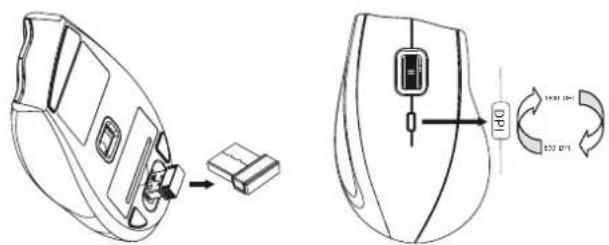
- You can store the nano-receiver inside the mouse built-in slot as showed in the Figure 6.
- Click the DPI switch to select between 800 DPI and 1600 DPI.
text_image
Technical diagram showing a device with a USB cable and its internal components, including a 100% speed limit indicator.Fig. 6 Fig. 7
- Use the forward and backward lateral buttons for folders or internet navigation. They are very useful for games as well.
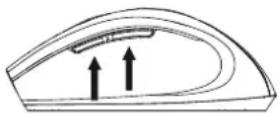
Fig. 8
- Energy save function: mouse will be inactive after sometime without use. Click the right or left mouse button to activate it.
7. SUGGESTIONS AND ADVERTISING
If there is any metal object close to the nano-receiver, please remove it, as it may obstruct the wireless transmission.
If there are any other wireless device close to the nanoreceiver please remove the receiver and reconnect it to get a different communication ID.
Do not leave nano-receiver next to Bluetooth dongle.
- Do not use mouse on very shiny surface or transparent surface.
Any question? Check the product's F.A.Q. section at www.soyntec.com
Technical support email address: support@soyntec.co.uk
8. SPECIAL GUARANTEE
Soyntec® guarantees that your product have no any material, design or manufacture defect and provides 36 month guarantee.
Guarantee procedure. Direct to your vendor and present the purchase invoice or ticket. For more information visit:
www.soyntec.com
Specifications are subject to change without notice.
© 2010 by Soyntec. All right reserved.
Trademarks. All company brand and product names are trademarks or registered trademarks of their respective companies.
CE
AGREEMENT DECLARATION
Supplier Name: Energy Sistem Soyntec S. A.
Address: Pol. Ind. Finestrat C/ Calpe 1, 03509 Finestrat
Alicante - SPAIN
Tel: 902 388 388 Fax: 902 119 034 NIF: A53107488
We declare, under our own exclusive responsibility, the product agreement:
Soyntec® Mouse Input™ R520
Manufacturing country: China
Which concern this agreement, with the norm(s) or other(s) formative(s) document(s).
In accord with the disposition of the Directive 93/68/CEE, from the European Parliament and the Counsel from 22th July 1993, transponed to the spaish legislation through the Real Decree 1950/1995, from 1th December 1995.