
AT-COMP300SL - AV Transmitter Atlona - Free user manual and instructions
Find the device manual for free AT-COMP300SL Atlona in PDF.


| Product Type | AV Transmitter (Component Video/Audio) |
| Brand | Atlona |
| Model | AT-COMP300SL |
| Dimensions | 4.5 x 2.5 x 1.2 in (114 x 64 x 30 mm) |
| Weight | 0.5 lb (227 g) |
| Power Supply | 5V DC, 1A |
| Input Connectors | 3x RCA (Component Video), 2x RCA (Audio L/R) |
| Output Connector | RJ45 (Cat5/6) |
| Maximum Transmission Distance | 300 m (1000 ft) |
| Supported Video Resolutions | Up to 1080p |
| Audio Support | Stereo analog audio |
| LED Indicators | Power, Link, Signal |
| Housing Material | Metal |
| Operating Temperature | 0°C to 50°C (32°F to 122°F) |
| Storage Temperature | -20°C to 60°C (-4°F to 140°F) |
| Mounting | Desktop or wall-mountable (brackets included) |
| Compliance | CE, FCC |
| Included Accessories | Power adapter, mounting brackets, user manual |
| Maintenance | Keep dry; clean with a soft, dry cloth |
| Safety | Use only the included power supply; avoid moisture |
| Spare Parts / Repairability | No user-serviceable parts; contact Atlona support for replacements |
| Compatible Receiver | Atlona AT-COMP300SR (sold separately) |
Frequently Asked Questions - AT-COMP300SL Atlona
User questions about AT-COMP300SL Atlona
0 question about this device. Answer the ones you know or ask your own.
Ask a new question about this device
Download the instructions for your AV Transmitter in PDF format for free! Find your manual AT-COMP300SL - Atlona and take your electronic device back in hand. On this page are published all the documents necessary for the use of your device. AT-COMP300SL by Atlona.
USER MANUAL AT-COMP300SL Atlona
Component Video & Analog /Digital Audio CAT5 Extender
With Chainable Output
AT-COMP300SL & AT-COMP300RL


AT-COMP300SL AT-COMP300RL

User Manual
TABLE OF CONTENTS
| 1. | Introduction | 2 | |
| 2. | Specifications | 3 | |
| 3. | Installation | 4 | |
| 4. | Installation Tips | 6 | |
| 5. | Safety Information | 7 | |
| 6. | Warranty | 8 | |
| 7. | Atlona Product Registration 9 |
INTRODUCTION
This Extension system is designed for Component Video + Stereo Audio, Digital Audio signal over cost effective CAT5 cable instead of Component Video and Audio cable. AT-COMP300RL receiver has a built in chainable output to cascade the other receiver for working range over 1000ft (300 meters). It is the optimum video performance under long cable run and perfect for multiple monitor display.
This AV Extender is smart, fast and cost-effective, eliminating costly and bulky Component Video and Audio cable and is the most efficient way to move multimedia content from player to display. Used in pairs, the Component Video & Audio Extender is used in shopping malls, public address systems, airports, train & bus station, boardrooms, trade shows and computer based training application.
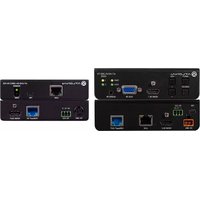
AT-COMP300SL (SENDER UNIT): 1 IN 2 OUT
COMPONENT VIDEO WTH STEREO AUDIO CAT5 EXTENDER WITH CHAINABLE FUNCTION
- Extends Component Video and analog / digital audio over one UTP CAT5 cable.
• Supports analog stereo audio and digital audio. - Digital transmission on analog stereo audio for eliminating sound distortion. (Dolby Digital, AC3, DTS passed through)
• Supports hi resolution up to 1080p. - Long range transmission up to 300 meters (Max.)
- Dual output: 1 Component Video loop output for local, plus 1 x CAT5 RJ45 output for remote side.
• Built in equalization, gain adjustment, chainable CAT5 output at remote unit. - Remote unit can be daisy chained to another AT-COMP300RL receiver to extend working range over 300 meters.
- Application for airports, train & bus stations, window display, trades shows and an exhibitions.
AT-COMP300RL ( RECEIVER UNIT )
COMPONENT VIDEO WITH STEREO AUDIO CAT5 EXTENDER - CHAINABLE FUNCTION
- Works with AT-COMP300SL as receiver for extra remote component Video display equipment.
- It can be daisy chained for another AT-COMP300RL to an extended working range over 300 meters and multiple displays.
• Built in equalization, gain adjustment.
• Supports up to 1080p. - Built in LPCM 44.1K / 48K 16Bit stereo audio decode function, digital & analog audio can be output simultaneously.
• Supports Dolby Digital (AC3) & DTS digital output.
SPECIFICATIONS
AT-COMP300SL
| Resolution Up to 1080p | |
| Video Bandwidth Local 750MHz-3dB / Remote 350MHz-3dB | |
| Video Input / Output | Y/Pb/Pr RCA x 1 (Y 1V p-p 75Ω - Pb 0.7V p-p 75Ω - Pr 0.7V p-p 75Ω) |
| Audio Input / Output | Analog audio L-R stereo audio RCA x 1( 3Vp-p Max.10KΩ) |
| Audio Bandwidth 20-20KHz -3dB | |
| Analog Audio input Analog Sampling Frequency 44.1Khz or 48Khz | |
| Audio Connector stereo audio RCA x 1 + optical coax | |
| Link Connector 1 x RJ45 | |
| Max Distance Up to 300M (1000 feet) | |
| Power Supply 5V DC 2000mA Regulated (External) | |
| Power Consumption 400mA (Max) | |
| Dimensions (mm) 125 x 95 x 30 | |
| Weight (g) 280 | |
AT-COMP300RL
| Resolution Up to 1080p | |
| Video Bandwidth 150Mhz-3dB | |
| Video Output | Y/Pb/Pr RCA x 1 (Y 1V p-p 75Ω - Pb 0.7V p-p 75Ω - Pr 0.7V p-p 75Ω) |
| Audio Output | Analog audio output: L-R stereo audio RCA x 1( 3Vp-p Max.10KΩ)Digital Audio output: Optical x1, RCA coax x 1 |
| Link Connector 1 x RJ45 | |
| Loop output Connector 1 x RJ45 | |
| Max Distance Up to 300M (1000 feet) | |
| Power Supply 5V DC 2000mA Regulated (External) | |
| Power Consumption 600mA (Max) | |
| Dimensions (mm) 125 x 95 x 30 | |
| Weight (g) 280 |
INSTALLATION

flowchart
graph TD
    A["AT-COMP300SL"] -->|300M (Max)| B["AT-COMP300RL"]
    B -->|color 300 (Max)| C["AT-COMP300RL"]
    C --> D["Computer monitor"]
    A --> E["Computer monitor"]
    B --> F["Computer monitor"]
    C --> G["Computer monitor"]
    style A fill:#f9f,stroke:#333
    style B fill:#ccf,stroke:#333
    style C fill:#cfc,stroke:#333
    style D fill:#fcc,stroke:#333
    style E fill:#ffc,stroke:#333
    style F fill:#fcc,stroke:#333
    style G fill:#fcc,stroke:#333
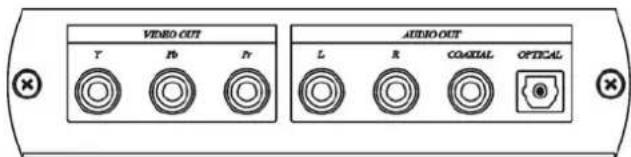
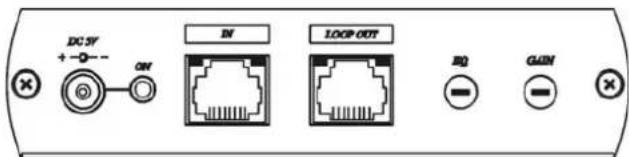
PANEL VIEW:
AT-COMP300SL

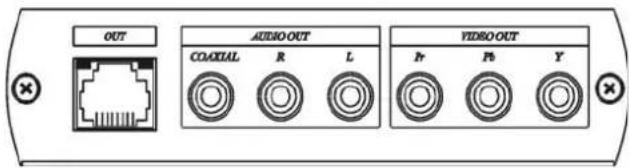
AT-COMP300RL
Cable:
Video Link cable using hi quality CAT5E UTP/STP or CAT6 UTP cable. Please note:STP cable can not only enhance noise rejection, but also lessen transmission range and picture sharpness quality.
RJ45 Define:
Link Cable (TIA/EIA-568-B)
| No. Color Signal | |
| 1. Orange-white Video Pr+ | |
| 2. Orange Video Pr- | |
| 3. Green-white Video Y+ | |
| 4. Blue Audio - | |
| 5. Blue-white Audio + | |
| 6. Green Video Y- | |
| 7. Brown-white Video Pb+ | |
| 8. Brown Video Pb- |
AT-COMP300SL Switch Setting::
DIP Switcher Setting:
1 Audio Source Select Stereo audio input (Analog) Digital Audio input (Coaxial)
2 Analog Sampling Frequency 48Khz 44Khz
AT-COMP300SL LED indication:
Blue power on/off
Link Cable Connector:
Green: Digital audio signal setup
Yellow: Analog Sampling Frequency, ON = 48Khz, OFF = 44Khz
AT-COMP300RL Adjustment:
EQ equalization (sharpness)
Gain signal boost (brightness)
* Recommend to adjust the EQ trimmer to the right end, then slightly turn to left side for the best picture quality. Improper adjustment can cause picture to become unstable, even resulting in no picture display.
AT-COMP300RL LED Indication:
Blue Power on/off
Link Cable Connector:
Green: Digital audio signal setup
Caution:
The cabling must remain away from any equipment with electromagnetic wave, i.e.: microwave, radio equipment, high voltage lines.
INSTALLATION TIPS
- Due to the inside of CAT5 cable containing pairs of wires twisted at different rates, AND the different quality on the cable itself and installation different signal arrival time at each pair may occur. If there are big different at arrival time, that will cause skew status. This is seen on the monitor as separation, or lack of convergence in colors. Normally it happens on long CAT 5 cable runs.
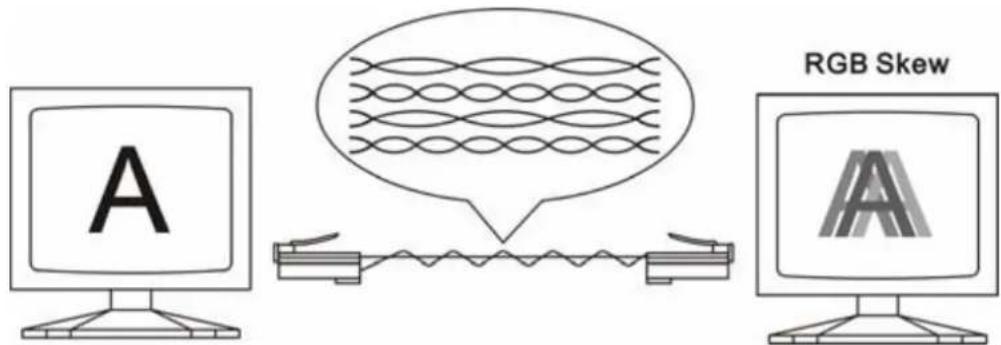
- Recommend to use following cabling design to reduce skew status, to add special made “skew immunized adaptor”, 2 pieces included at the package.

CAUTION: to avoid display equipment damaged, be sure to make correct cable connection and power for both AT-COMP300SL before connecting AT-COMP300RL.
SAFETY INFORMATION
Safeguards
To reduce the risk of electric shock, do not expose this product to rain or moisture void the warranty and safety features. Do not modify the wall plug. Doing so will
If the wall plug does not fit into your local power socket, hire an electrician to replace your obsolete socket. be easily accessible in the case it requires this equipment should be installed near the socket outlet and the device should disconnection.
Precautions
FCC regulations state that any unauthorized changes or modifications to this equipment, not expressly approved by the manufacturer, could void the user's authority to operate this equipment.
Operate this product using only the included external power supply. Use of other power supplies could impair performance, damage the product, or cause fires.
In the event of an electrostatic discharge this device may automatically turn off. If this occurs, unplug the device and plug it back in.
Protect and route power cords so they will not be stepped on or pinched by anything placed on or against them. Be especially careful of plug-ins or cord exit points from this product.
Avoid excessive humidity, sudden temperature changes or temperature extremes.
Keep this product away from wet locations such as bathtubs, sinks, laundries, wet basements, fish tanks, and swimming pools.
Use only accessories recommended by Atlona to avoid fire, shock, or other hazards.
Unplug the product before cleaning. Use a damp cloth for cleaning and not cleaning fluid or aerosols.
Such products could enter the unit and cause damage, fire, or electric shock. Some substances may also mar the finish of the product.
Never open, remove unit panels, or make any adjustments not described in this manual. Attempting to do so could expose you to dangerous electrical shock or other hazards. It may also cause damage to your ATCOMP300SL, AT-COMP300RL. Opening the product will void the warranty.
Do not attempt to service the unit. Disconnect the product and contact your authorized Atlona reseller or contact Atlona directly.
WARRANTY
Limited Warranty
Atlona Technologies warrants that (a) its products (AT-COMP300SL or AT-COMP300RL) will perform substantially in accordance with the accompanying written materials for a period of 3 years from the date of receipt and (b) that the product will be free from defects in materials and workmanship under normal use and service for a period of 3 years. In the event applicable law imposes any implied warranties, the implied warranty period is limited to 3 years from the date of receipt. Some jurisdictions do not allow such limitations on duration of an implied warranty, so the above limitation may not apply to customers that fall within those areas.
Customer Remedies
Atlona Technologies' and its suppliers' entire liability and Customer's exclusive remedy shall be, at Atlona Technologies' decision, either return of the price paid for the product, repair, or replacement of the product that does not meet this Limited Warranty and which is returned to Atlona Technologies with a copy of the Customer's receipt. This Limited Warranty is void if failure of the product has resulted from accident, abuse, misapplication, or natural occurrence. In example but not limited to: power surges (electrical storms, local power outage), dropping the product (or items on the product), contact with fluids, and physical misconduct (i.e. kicking or punching). Any replacement product will be warranted for the remainder of the original warranty period.
No other warranties
To the maximum extent permitted by applicable law, Atlona Technologies and its suppliers disclaim all other warranties, either expressed or implied, including, but not limited to, implied warranties of merchantability and fitness for a particular purpose, with regard to the product and any related written materials. This Limited Warranty gives customer specific legal rights. Customers may have other rights depending on the jurisdiction.
No liability for damages
To the maximum extent permitted by applicable law, in no event shall Atlona Technologies or its suppliers be liable for any damages arising out of the use of or inability to use this product, even if Atlona Technologies has been advised of the possibility of such damages. Such damages include but are not limited to: special, incidental, consequential, or indirect damages for personal injury, loss of business profits, business interruption, loss of business information, or any other pecuniary loss.
Atlona Technologies' and its suppliers' entire liability under any provision of this agreement shall be limited to the amount actually paid by you for the product. Some Jurisdictions do not allow the exclusion or limitation of liability for consequential or incidental damage. The above limitations may not apply to you in such jurisdictional cases.
ATLONA PRODUCT REGISTRATION
Thank you for purchasing this Atlona product. - We hope you enjoy it and will take an extra few moments to register your new purchase.
Registration creates an ownership record if your product is lost or stolen and helps ensure you'll receive notification of performance issues and firmware updates.
At Atlona, we respect and protect your privacy, assuring you that your registration information is completely secure. Atlona product registration is completely voluntary and failure to register will not diminish your limited warranty rights.
To register go to: http://www.atlona.com/registration



- Component Video & Analog /Digital Audio CAT5 Extender
- With Chainable Output
- AT-COMP300SL & AT-COMP300RL
- INTRODUCTION
- AT-COMP300SL (SENDER UNIT): 1 IN 2 OUT
- COMPONENT VIDEO WTH STEREO AUDIO CAT5 EXTENDER WITH CHAINABLE FUNCTION
- AT-COMP300RL ( RECEIVER UNIT )
- COMPONENT VIDEO WITH STEREO AUDIO CAT5 EXTENDER - CHAINABLE FUNCTION
- SPECIFICATIONS
- PANEL VIEW:
- Cable:
- RJ45 Define:
- AT-COMP300SL Switch Setting::
- DIP Switcher Setting:
- AT-COMP300SL LED indication:
- AT-COMP300RL Adjustment:
- AT-COMP300RL LED Indication:
- Caution:
- INSTALLATION TIPS
- SAFETY INFORMATION
- Safeguards
- Precautions
- WARRANTY
- Limited Warranty
- Customer Remedies
- No other warranties
- No liability for damages
- ATLONA PRODUCT REGISTRATION
Brand : Atlona
Model : AT-COMP300SL
Category : AV Transmitter