SAS-MON120 - Traceur KONIG - Free user manual and instructions
Find the device manual for free SAS-MON120 KONIG in PDF.


| Product Type | GPS Tracker |
| Model | SAS-MON120 |
| Brand | Konig |
| Dimensions | 50 x 30 x 15 mm |
| Weight | 50 g |
| Power Supply | Rechargeable lithium battery, USB charging |
| Battery Life | Up to 72 hours in continuous mode |
| Main Functions | Real-time GPS tracking, geofencing, SOS button, history playback |
| Connectivity | 2G/3G/4G LTE, Wi-Fi, Bluetooth |
| Compatibility | iOS and Android app |
| Maintenance | Clean with a soft, dry cloth |
| Safety | Do not expose to water or extreme temperatures |
| Spare Parts | Replacement battery, USB cable, mounting bracket |
| Repairability | Battery is user-replaceable; other repairs by authorized service |
| General Information | Compact design, suitable for vehicles, pets, and personal tracking |
Frequently Asked Questions - SAS-MON120 KONIG
User questions about SAS-MON120 KONIG
0 question about this device. Answer the ones you know or ask your own.
Ask a new question about this device
Download the instructions for your Traceur in PDF format for free! Find your manual SAS-MON120 - KONIG and take your electronic device back in hand. On this page are published all the documents necessary for the use of your device. SAS-MON120 by KONIG.
USER MANUAL SAS-MON120 KONIG
natural_image
Computer monitor displaying a parking lot with two cars on a green road, surrounded by trees and sky (no visible text or symbols)ENGLISH
1. Introduction:
LCD/TFTmonitorforobservationandsecurity.ImprovedLCDpanelfor24-hourCCTV systems. High stability pictures and clear colours. Advanced circuits for a better capabilitytodealwiththevideosignalandreduceinterferenceonthemonitor.Equipped withaVGAconnection.
Description-front:

text_image
AUTO - + MENU POWERMENU
Enter MENU
Selectoptions

Decrease value

Increase value
rewoPotuA
Auto adjust (Escape MENU)
Green, monitor ON
SelectsettingsinMENURed,monitorStandby
2.UseoftheMENU:
PresstheMENUbuttonontoentertheMENU
Use “+” and “-” and press “MENU” to confirm the selection of the various menus and submenus.
Use “+” and “-” to adjust.
Use"AUTO"toexit.
2.1Colour:
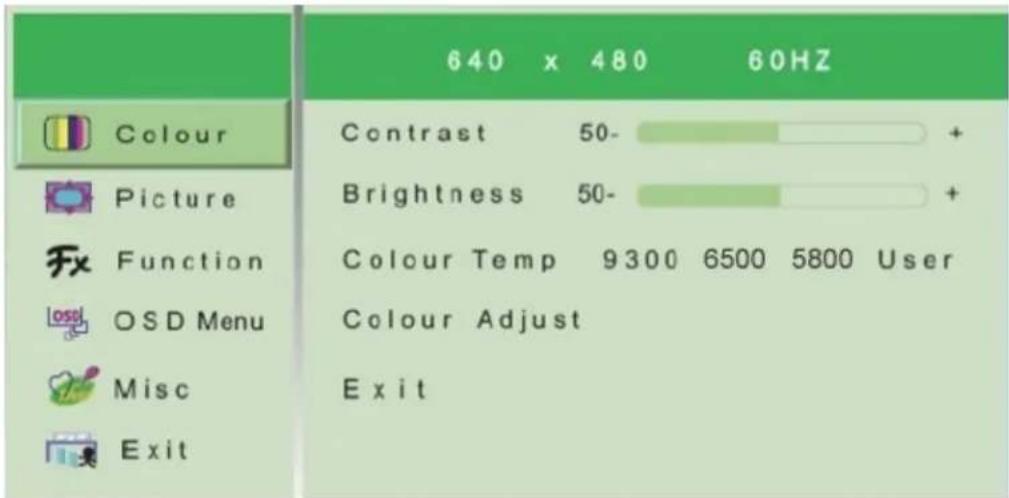
Select“COLOUR”andpress“MENU”toconfirm. The following screen will appear showing the display settings.
text_image
640 x 480 60HZ Colour Picture Function OSD Menu Misc Exit Contrast 50- Brightness 50- Colour Temp 9300 6500 5800 User Colour Adjust ExitContrast:
Thissettingisusedtochangethecontrastbetweentheblackandwhiteareasoftheimage. Clearresolutionofthewhite,blackandgreyscalescanbeobtainedbycorrectlysetting thecontrast.Press “+” or “−”toincreaseordecreasetheparametersettings.
Brightness:
Thissettingisusedtochangethebrightnessoftheimageaccordingtoanyambientlight. Press “+” or “−” to increase or decrease the parameter settings.
Colourtemperature:
Thissettingisusedtoadjustthecolourtemperature.Press “+” or “—”toselectthe desiredvalue.
Colouradjust:
Thissettingisusedtoenterthesub-menuofcolouradjustments.
2.2 Imagesetting:
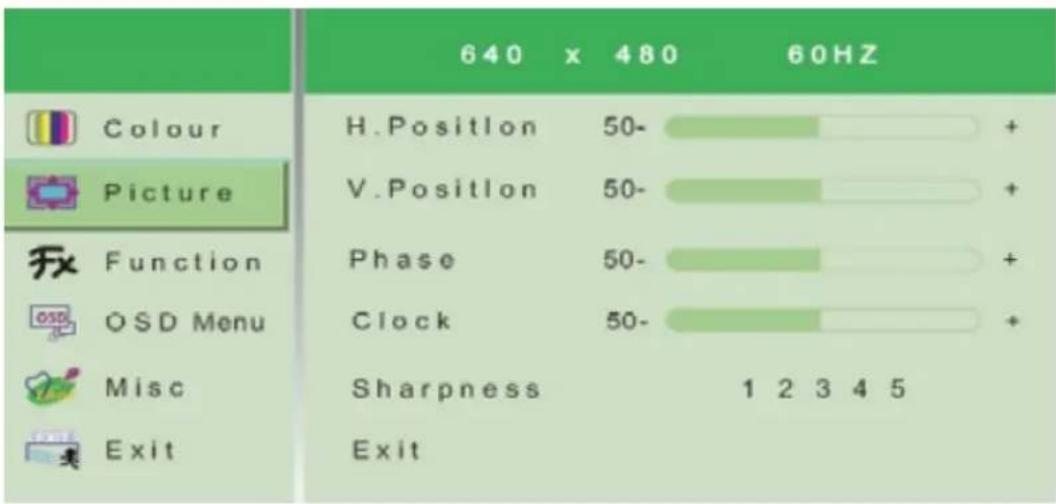
Select“PICTURE”andpress“MENU”toconfirm. The following screen will appear showing the display settings.
text_image
640 x 480 60HZ Colour Picture H.Position 50- V.Position 50- Phase 50- Clock 50- Sharpness 1 2 3 4 5 ExitH.Position:
Thissettingisusedtomovetheimageleftandright. “+”movesthescreenimageright.
“—”movesthescreenimageleft.
V.Position:
This setting is used to move the picture image up and down. “—” moves the screen imagedownward. “+”movesthescreenimageupward.
Phase:
This setting is used to minimize distortions and video instability. Press “+” or “−” to increase or decrease the parameters settings.
Clock:
This setting is used to minimize strips on the video. Press “+” or “−” to increase or decrease the parameters settings.
Sharpness:
Thissettingisusedtooptimizethesharpnessoftheimage.Selectavaluebetween1to5.
2.3Function:
Select“FUNCTION”andpress“MENU”toconfirm. The following screen containing settings related to imaged dimensions and position of the image on the screen will appear.
| 640 x 480 | 60HZ | ||
| Colour | Auto Adjust | YES | NO |
| Picture | Auto Colour | YES | NO |
| Function | Exit | ||
| OSD Menu | |||
| Misc | |||
| Exit | |||
Autoadjust:
This setting is used to automatically adjust the video setup. Press “+” or “−” to select the parameters settings.
Autocolour:
This setting is used to automatically adjust the colours of the image. Press “+” or “−” to select the parameters settings.
2.4OSDMenu:
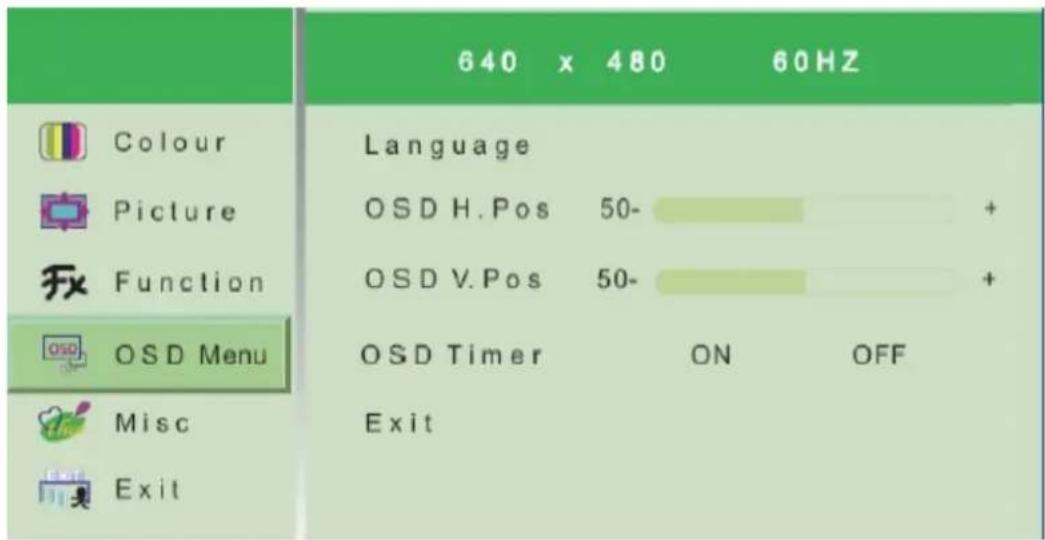
Select"OSDMENU" and press "MENU" to confirm. The following screen will appear containing the OSD settings.
text_image
640 x 480 60HZ Colour Language Picture OSD H. Pos 50- + Function OSD V. Pos 50- + OSD Menu OSD Timer ON OFF Misc ExitLanguage:
This setting is used to select the language of the controls. Press “+” or “-” to select
betweentheavailableoptions.
OSDH.Pos:
ThissettingisusedtochangethehorizontalpositionoftheOSDpanel.Press “+” to movetheimagetotheright.Press “—”tomovetheimagetotheleft.
OSDV.Pos:
This setting is used to change the vertical position of the OSD panel. Press “+” to movetheimageupward. Press “—”tomovetheimagedownward.
OSDTimer:
ThissettingisusedtosethetimeforwhichtheOSDpanelappearsonthedisplay(3to 27 sec). Press “+” or “−” to increase or decrease the parameter settings.
2.5MISC
Select"MISC"andpress"MENU"toconfirm.Thefollowingscreenwillappear:
| 1280 x 1024 | 60HZ | ||
| Colour | Reset | YES | NO |
| Picture | AspectRatio | Wide | 4:3 |
| Function | Exit | ||
| OSD Menu | |||
| Misc | |||
| Exit | |||
Reset:
Resetstofactorysettings.
Specifications:
•Panelsize:17"TFTLCD (LEDbacklight)
- Responsetime:5ms
•Resolution:1280x1024Hz
•Brightness:250cd/m2
•Contrastratio:1000:1
•Screenlifespan:50.000hours(intensiveuse)
•Viewingangle:170°
• System: PAL/NTSC
- Inputs: VGA
•Power:DC12V,5A
•Dimensions:38.5x37.5x13.5cm(includingstand)
Installationprecautions:
- Topreventoverheatingofthemonitor,putitinapositionwhichallowstheflowofair throughtheslotsinthecasing.
- Ensureatleast5cmoffreespacewheninstallinginsidearack.Forthesamereason,do notinstallnearsourcesofheat,suchasradiatorsorhotairducts.Keepawayfromdirect sunlight.Donotinstallinareassubjecttoexcessivedust,mechanicalvibrationsor shocks.
- Slotsandopeningsinthecabinetareprovidedforventilation. These openings must not be blocked or covered.
- Donotplacethemonitoronanunstablesurface,suchasatotteringorslantedtable.The monitorcouldfallcausinginjuryormechanicalfailures.
- Donotplaceheavyorheatgeneratingobjectsontopofthemonitor, thiscoulddamage thecasingand/orincreaseinternaltemperaturecausingfaults.
- Donotcoverthemonitorwithaclothwhileitisrunningtopreventdeformingthe externalcasingandoverheatingtheinternalpartsresultinginriskoffire,electrocution andmechanicalfailure.
- Keepmagnetsandmagnetizedobjectsawayfromthemonitortopreventfaults.
- Waitforawhilebeforeoperatingadeviceaftertransportingitfromacoldplacetoa warmplaceandviceversa. Waitonaverageforthrechours: thiswillallowthedeviceto adapttothenewambienttemperature,humidity,etc.
Safetyprecautions:

text_image
CAUTION RISK OF ELECTRIC SHOCK DO NOT OPENToreduceriskofelectricshock, thisproduct should ONLY beopene d by anauthorize d technician when service is required. Disconnect the product from mains and otherequipment if a problem should occur. Donot exposethe product to water or moisture.
Maintenance:
Cleanonlywithadrycloth.Donotusecleaningsolventsorabrasives.
Warranty:
Noguaranteeorliabilitycanbeacceptedforanychangesandmodificationsofthe productordamagecausedduetoincorrectuseofthisproduct.
General:
Designsandspecificationsaresubjecttochangewithoutnotice.
Allogosbrandsandproductnamesaretrademarksorregisteredtrademarksoftheir respectiveholdersandareherebyrecognizedassuch.
Keepthismanualandpackagingforfuturereference.
UseonlytheprovidedAC/DCadapter.
Attention:

Thisproductismarkedwiththiss ymbol.Itmeansthatuse d electricaland electronicproductsshouldnot bemixedwith generalhousehol d waste. Thereisaseparatecollectionss ystemfor theseproducts.
This product has been manufactured and supplied in compliance with all relevant regulations and directives, valid for all member states of the European Union. It also complies with all applicable specifications and regulations in the country of sales.
Formal documentation is available upon request. This includes, but is not limited to: Declaration of Conformity (and product identity), Material Safety Data Sheet and product test report.
Please contact our customer service desk for support:
via website: http://www.nedis.com/en-us/contact/contact-form.htm
via e-mail: service@nedis.com
via telephone: +31 (0)73-5993965 (during office hours)
NEDIS B.V., De Tweeling 28, 5215 MC 's-Hertogenbosch, THE NETHERLANDS