
TEL2407 - Smartphone Manta - Free user manual and instructions
Find the device manual for free TEL2407 Manta in PDF.


| Product Type | Smartphone |
| Brand | Manta |
| Model | TEL2407 |
| Display Size | 6.1 inches |
| Display Resolution | 720 x 1560 pixels |
| Processor | Quad-core 2.0 GHz |
| RAM | 2 GB |
| Internal Storage | 32 GB |
| Expandable Storage | microSD up to 128 GB |
| Rear Camera | 13 MP + 2 MP dual |
| Front Camera | 5 MP |
| Battery Capacity | 4000 mAh |
| Operating System | Android 11 (Go edition) |
| Connectivity | 4G LTE, Wi-Fi 802.11 b/g/n, Bluetooth 5.0 |
| Sensors | Accelerometer, proximity, ambient light |
| Dimensions | 160 x 75 x 8.5 mm |
| Weight | 180 g |
| Charging Port | micro USB |
| Headphone Jack | 3.5 mm |
| Maintenance | Clean with soft dry cloth; avoid liquid contact |
| Safety | Do not expose to water or extreme temperatures; use only original charger |
| Spare Parts | Battery, screen, charging port available for replacement |
| Repairability | Moderate; components are accessible with basic tools |
| Warranty | 1 year manufacturer warranty |
Frequently Asked Questions - TEL2407 Manta
User questions about TEL2407 Manta
0 question about this device. Answer the ones you know or ask your own.
Ask a new question about this device
Download the instructions for your Smartphone in PDF format for free! Find your manual TEL2407 - Manta and take your electronic device back in hand. On this page are published all the documents necessary for the use of your device. TEL2407 by Manta.
USER MANUAL TEL2407 Manta
natural_image
Abstract black-and-white circular logo with interlocking curved shapes (no text or symbols)MANTA
M obil e Pho n
Model: TEL2407
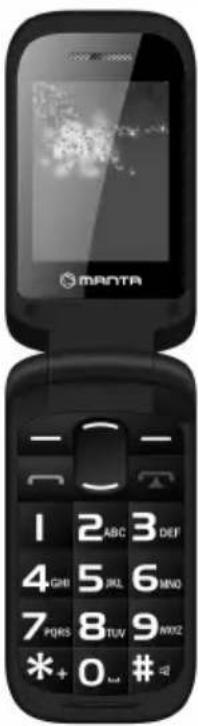
The functions in this menu depend on the type of SIM card and the services provided by the network operator. Therefore, before using the functions in this menu, check their availability.
Type your message
Before using this function, you must set the network operator's service center. SIM card capacity dep Enter a message to enter the edit menu messages. After writing a message, press the "Option" to enter the recipient's number or select from your address book, and then send the message.
Inbox
Stores the received SMS.
Outbox
Saves unsuccessfully sent SMS and MMS.
Template
At the time of writing a message, you can use the templates.
1.1. Phonebook
This feature helps in finding business cards of people from your contact list, save, edit and delete names and phone numbers from the phone and SIM card. In order to facilitate the management of these records in your phone contacts grouping functions that connects similar elements in the group. The capacity of the SIM card is different, and the maximum memory capacity of this phone are 100 numbers.
1.2. Call
karty1 Call History (2)
Displays a record of recent calls.
Missed Connections
Displays the previous record of missed calls. Proceed as in the case of function calls selected.
Dialled calls
Displays a record of the last dialed.
Received calls
Displays a record of recent calls received. Proceed as in the case of function calls dialed.
Delete the contents of the register
With this function, you can delete the records of dialed, received, missed and rejected.
Call Time
Displays the following information for the card SIM1 / SIM2: Last Call, Received Calls, Calls selected, all calls.
GPRS counter
Displays the following information about the uploaded data cards SIM1 / SIM2: Last sent, Last received, Total sent Total received. Press the left soft key to select "Reset".
1.3. Multimedia
Camera
The device is equipped with a camera. You can take a picture at any time and save them in the device memory or on a memory card (if inserted). Press OK to take a picture.
Viewer: Enter the photo viewer.
Video Recorder
With this function, you can record video.
Viewer:
The content of the album and captured images can be viewed using the Viewer function.
Video Player
The phone allows you to play the video recorded by the user.
Audio Player
The phone supports MP3 files stored in the phone memory and memory card. Press the navigation key to enter the playlist. Press the left button to select and play or pause music, press the up / down navigation to adjust the volume
FM Radio
The entrance to the radio menu. Press the left navigation key to the stereo to the menu. Press 5 to stop / start playback FM radio station. 2 and 8 buttons to adjust the volume.
Sound Recorder (Dictaphone)
Use this function if you want to record or play your own sound recording. The sound is saved in .wav format.
1.4. Settings
You can customize the settings such as time and date, language, etc connection settings.
Dual-SIM settings
Allows you to enable / disable the SIM card
Phone options
Time and Date: Y o u
and how they are displayed.
Language: You can select the language of your phone.
Display
Wallpaper: The phone supports: Wallpapers static and slideshow.
Security
Enable / disable the PIN and PIN change.
Change PIN2: Change PIN2.
Automatically lock the keypad: Set the time after which the keypad will be locked automatically.
1.5. User Profiles
Allows you to select a sound profile. The default profiles are available: General, Meeting, Outdoor, Indoor, Bluetooth
Tools
Bluetooth
Allows you to connect devices such as bluetooth headset, handsfree, etc.
Calculator
The calculator allows you to perform simple mathematical operations.
Calendar
With this function, you can easily check the year, date and time of the solar year. Using the directional keys to navigate up / down / left / right, you can go to another date.
Alarm
You can select to edit the alarm, time, and repeat the ring tone.
SOSbutton
Allows you to configure the SOS button. After selecting this option, you can enable / disable the SOS. Selecting numbers SOS, SOS numbers can be entered for the selected users, such as family or friends. After activation of the SOS function to select the SOS number quickly, hold long SOS button on the housing or hold long keys 1,2 or 3. Selecting SOS SMS allows you to enter text messages that will be automatically sent to the recipient from a list of numbers SOS.
NOTE!
Product design and Technical parameters may be change without notice. This mainly concerns parameters technical, software and user manual present. User's Manual is a general orientation on service product.
Manufacturer and distributor do not assume any responsibility as compensation for any inaccuracies errors in the descriptions appearing in this user manual.

natural_image
Abstract black-and-white circular logo design with interlocking curved shapes (no text or symbols)MANTA
INFOLINIA SERWISOWA
from Monday to Friday. 9.00-17.00
The manufacturer reserves the right to make changes to product cito twisitifies
Home: www.manta.com.pl
Home support: www.manta.info.pl


Made in P.R.C.
FOR MANTA EUROPE


- MANTA
- Model: TEL2407
- Type your message
- Inbox
- Outbox
- Template
- Phonebook
- Call
- karty1 Call History (2)
- Missed Connections
- Dialled calls
- Received calls
- Delete the contents of the register
- Call Time
- GPRS counter
- Multimedia
- Camera
- Video Recorder
- Viewer:
- Video Player
- Audio Player
- FM Radio
- Sound Recorder (Dictaphone)
- Settings
- Dual-SIM settings
- Phone options
- Display
- Security
- User Profiles
- Tools
- Bluetooth
- Calculator
- Calendar
- Alarm
- SOSbutton
- NOTE!
- INFOLINIA SERWISOWA
Brand : Manta
Model : TEL2407
Category : Smartphone