MLEG - Synthesizer Majella - Free user manual and instructions
Find the device manual for free MLEG Majella in PDF.


User questions about MLEG Majella
0 question about this device. Answer the ones you know or ask your own.
Ask a new question about this device
Download the instructions for your Synthesizer in PDF format for free! Find your manual MLEG - Majella and take your electronic device back in hand. On this page are published all the documents necessary for the use of your device. MLEG by Majella.
USER MANUAL MLEG Majella
The MLEG is a loop-able envelope generator. The envelope generator can be set to loop, to continuously generate an Attack/Decay signal (LFO). If not looped the MLEG behaves as a normal ADSR envelope. The MLEG has an attenuverter / polarizer on the output, for amount/polarization control!
CONTENT
In the box of the assembled version of the MLEG contains the following
• Assembled and Tested Module
• 16 pin to 16 pin ribbon cable
- Mounting hardware: 4x M3 screws and M3 washers / rack crash protectors
If anything of the above is missing. Please contact your dealer or support@majella-audio.com
SPECIFICATIONS
• Dimensions: 128.5 x 30 x 35mm (6HP)
- Doepfer A-100 Eurorack compatible (16 pin power connector)
• Power consumption: +/-12V (27mA)
POWER CONNECTION
This module is designed to be connected to your Eurorack system, using a 16-pin ribbon cable. The -12V (red stripe) should be directed as shown in the picture below.
WARNING!
This module is designed for Eurorack systems. The supply should be +-12V and connected signals should not be out of the +-12V range! Do not reverse polarity when connecting the power, this will damage your module permanently!
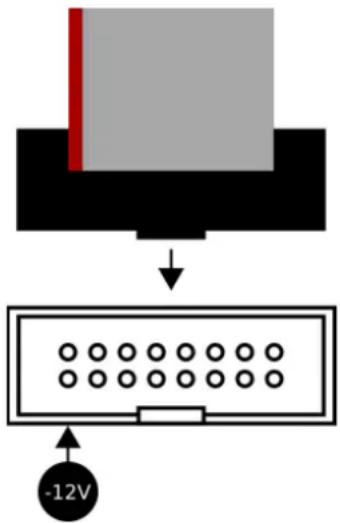
text_image
-12VOVERVIEW (See figure 1)
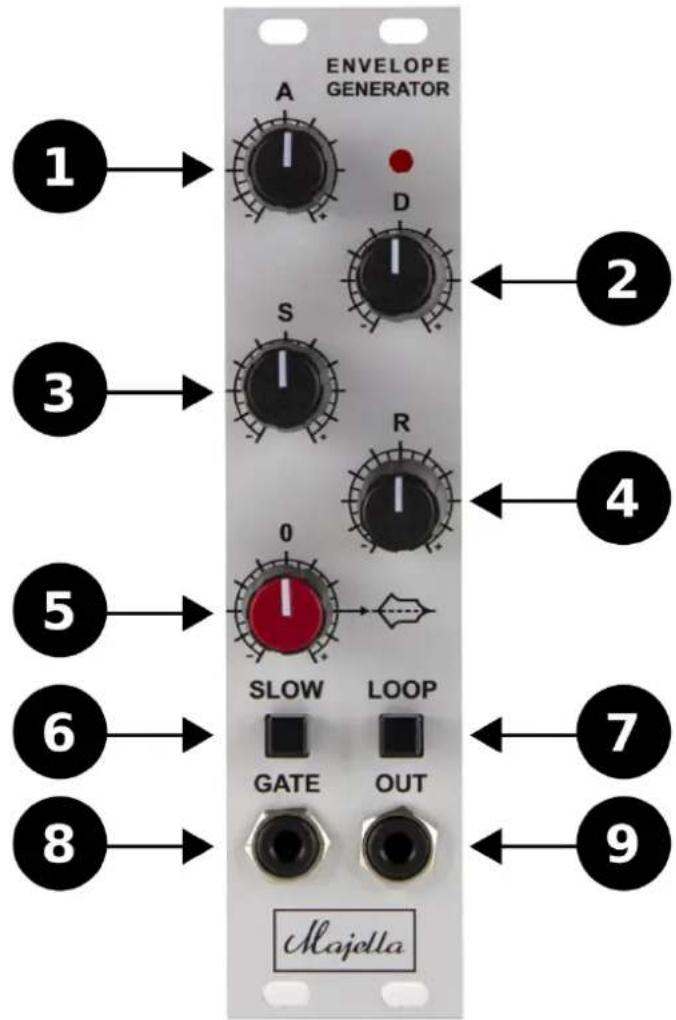
CONTROLS
1. ATTACK
Controls the length of the Attack slope.
2. DECAY
Controls the length of the Decay slope.
3. SUSTAIN
Controls the Sustain level.
4. RELEASE
Controls the length of the Release slope.
5. ATTENUVERTER / POLARIZER
Controls the output level and polarization. See page 4 for more info about the attenuverter.
6. FAST / SLOW button
When pressed, the slew time (rise/fall) of the Attack, Decay and Sustain will be significantly longer.
7. LOOP
When pressed, the Attack and Decay stages will loop. The speed / rate / frequency it determined by Attack and Decay. See page 5 for more info about the loop functionality.
CONNECTIONS
8. GATE
Gate input: At 0V (LOW) the envelope has 0V (LOW) output. At 5V (HIGH) or higher the envelope will be triggered. See page 5 for info about the behavior when LOOP is pressed.
9. OUTPUT
Envelope output (+-8V).
text_image
ENVELOPE GENERATOR A D S R 0 SLOW LOOP GATE OUT 1 2 3 4 5 6 7 8 9 MajettaFigure 1: Overview
Attenuverter / Polarizer
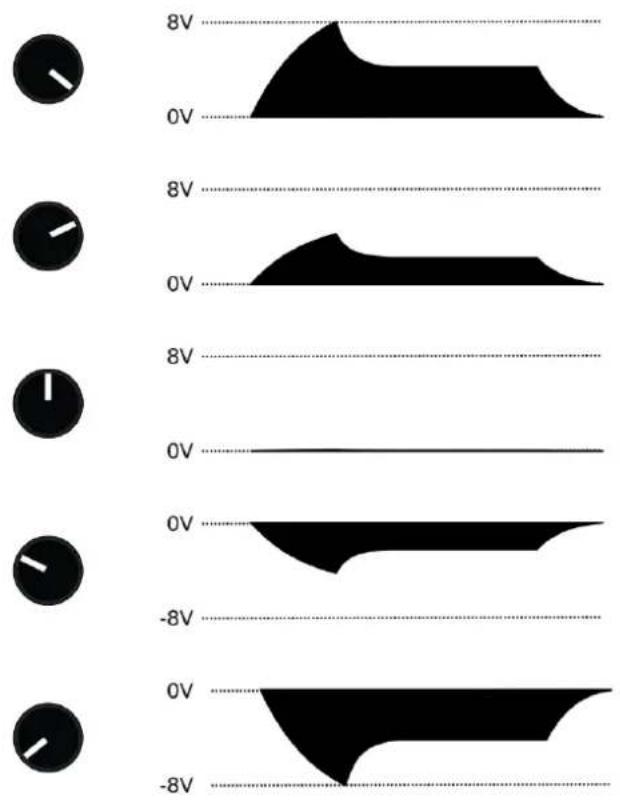
The attenuverter knob controls the envelope amount, from -8 up to +8V output, as displayed in figure 2.
This feature is very applicable for example when used with filters or other effects.
text_image
8V 0V 8V 0V 8V 0V 0V -8V 0V -8VFigure 2: Attenuverter / Polarizer output
LOOP MODE
Loop ON without patch cable connected to gate input (LFO mode)
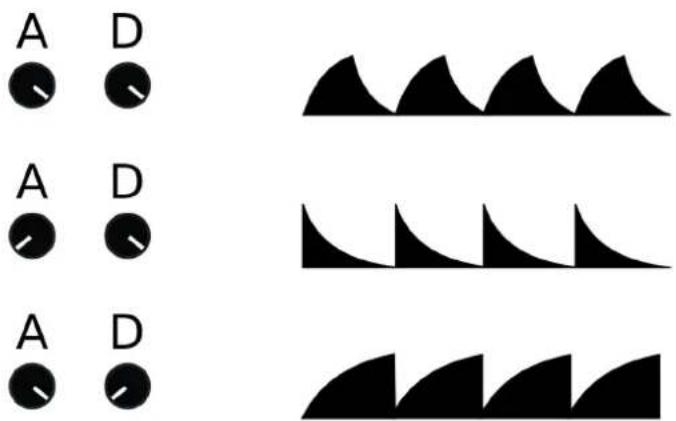
When the LOOP button is pressed and there is no patch cable connected to the GATE input, the (AD) envelope will loop continuously. The envelope generator will behave like a LFO in this case. The rate and shape of the LFO can be controlled with the ATTACK and DECAY knobs, as displayed in figure 3.
text_image
A D A D A DFigure 3: Loop without patchcable to gate (LFO Mode)
Loop ON with patch cable connected to gate input (triggered Loop)
When there is a jack cable connected to the GATE input and the LOOP button is pressed, the envelope will loop for as long as the GATE signal is ON, as displayed in figure 4.

other
| Signal | Value | |--------|-------| | OUTPUT | 8V | | OUTPUT | 0V | | ON | | | OFF | |Figure 4: Loop with gate (triggered loop)
MLEG User Manual version 1.0 20-01-2020
©2020

text_image
Majellahttps://majella-audio.com support@majella-audio.com
Designed and made in Holland
Important notice:
- WARNING. his product is not a toy and contains small parts
- WARNING: This product is not suitable for children within the age of 0.16 years!
• WARNING: This product is not for human/animal consumption.
• WARNING: This product is meant for professional usage only.
• WARNING: This product can be damaged by sharp objects! - WARNING: his product can be damaged by fluids, do not spill any fluids (e.g. water) over this product!
- WARNING: This product can be damaged when being dropped, used carelessly or used otherwise than described in this manual. This product should be connected and used as described in this document.
• WARNING: This product is not meant to be modified - WARNING: This product is meant to be used as a musical instrument and nothing else!
Majella Audio products should be carefully used as musical instruments and as described in this user manual, by professionals. Majella Audio can not be held responsible for any damage to human beings, animals and personal or business belongings/property/things.