S-4904P - Extendeur AV SWIT - Free user manual and instructions
Find the device manual for free S-4904P SWIT in PDF.


| Product Type | AV Extender |
| Brand | SWIT |
| Model | S-4904P |
| Dimensions (L x W x H) | 120 x 70 x 25 mm |
| Weight | 0.3 kg |
| Power Input | DC 12V / 1A |
| Power Consumption | < 5W |
| Input Interface | 1 x HDMI (Type A) |
| Output Interface | 1 x HDMI (Type A) |
| Max Resolution | 4K@30Hz (4:4:4) |
| Transmission Distance | Up to 50 m (Cat6 at 1080p) |
| Supported Cable | Cat5e / Cat6 / Cat7 |
| Audio Support | PCM, Dolby, DTS (pass-through) |
| HDCP Compliance | HDCP 1.4 / 2.2 |
| Operating Temperature | 0°C to 40°C |
| Storage Temperature | -20°C to 60°C |
| Enclosure Material | Metal |
| LED Indicators | Power, Link, Signal |
| Mounting Options | Desktop, wall-mount (optional) |
| Accessories Included | Power adapter, user manual |
| Certifications | CE, FCC, RoHS |
Frequently Asked Questions - S-4904P SWIT
User questions about S-4904P SWIT
0 question about this device. Answer the ones you know or ask your own.
Ask a new question about this device
Download the instructions for your Extendeur AV in PDF format for free! Find your manual S-4904P - SWIT and take your electronic device back in hand. On this page are published all the documents necessary for the use of your device. S-4904P by SWIT.
USER MANUAL S-4904P SWIT
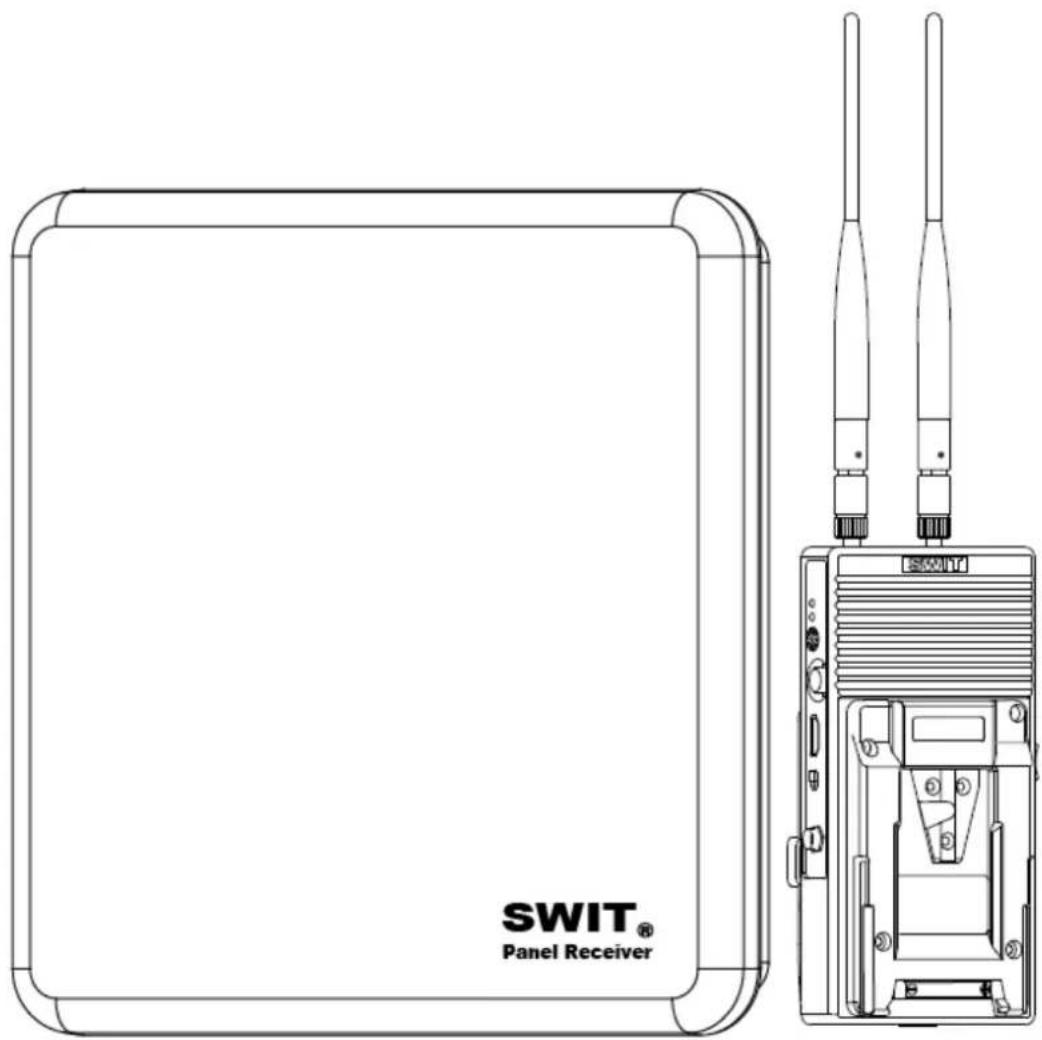
Wireless HD Transmission System(with Panel Receiver)
natural_image
Line drawing of a device with a rectangular base and two vertical-mounted antennas (no text or symbols)User Manual
Ver:A
Please read this User Manual throughout before using
PrefacePreface
- All internal technologies of this product are protected, including device, software and trademark. Reproduction in whole or in part without written permission is prohibited.
- All brands and trademarks of SWIT Electronics Co., Ltd. are protected and other relative trademarks in this user manual are the property of their respective owners.
- Due to constant effort of product development, SWIT reserves the right to make changes and improvements to the product described in this manual without prior notice.
- The warranty period of this product is 2 years, and does not cover the following:
(1) Physical damage to the products;
(2) Any damage or breakdown caused by use, maintenance, or storage not according to the user manual's instructions;
(3) The attenuation of signal quality resulting from being used in any special environments;
(4) Any damage caused by not powering the product by package supplied power adaptor.
(5) Any damage or breakdown not caused by the product's design, workmanship, or manufacturing quality, etc.
- For any suggestions and requirements on this product, please contact us through phone, fax, Email, etc.
SWIT Electronics Co., Ltd.
Address: 10 Hengtong Road, Nanjing Economic and Technological Development Zone, Nanjing 210038, P.R.China
Phone: +86-25-85805753
Fax: +86-25-85805296
Email: contact@swit.cc
Website: http://www.swit.cc
For Your Safety
Before start, please follow the safety precautions below
Do not try the followings:
- Unauthorized repairs or parts replacement or other operations.
- Inappropriate placement including but not limited to lighting, fire, exposure to rain, water or gas.
- Switch to the power not in the voltage allowable range.

Warning
- Do not get any liquid inside the product.
- Do not block the ventilation openings or get substances inside, in order to avoid short circuit, fire or electric shock.
- Do not soak the product into water to avoid electric shock or fire.
● Make sure the protection work on the rainy day. - Do not reverse the receiver to get the best transmission effect.

Danger
- Switch the power off before connecting other devices.
- Power socket: Make sure the power socket under the voltage range of the product to avoid short circuit, electric shock and fire.
● Power cable: Make sure the power cable is not pressed or tightened by any items or weights. - Power Load: Do not exceed the load on the wall outlet, extension cable or other porous receptacle to avoid fire or electric shock.
● Lighting: Disconnect the power cable if it is lighting or not using in a Iperiod of time.
Working environment
- Please don't lay the product on any unstable place to avoid fallen damage
- Please don't use the product in a place overheating, undercooling or with lots of moisture, or near by strong magnetic devices.
- Please don't lay the product on metal shelf, in order to ensure the effective wireless transmission.
Contents
Preface 1
Safety Precautions....2
Contents 3
Packing list 3
Product Introduction 4
Features 4
Product Instruction 5
Transmitter S-4904T 5
Receiver S-4990....6
Frenquency 7
Build Connection 8
Optional battery plate 8
Accessory 9
Trouble shooting....10
Specification....10
Packing list
The wireless system offers three kinds of package for option, each includes:
Super Luxury package Luxury package Standard package
1、S-4904P 1
、S-4904P 1
1、S-4990
2、S-7200 2
、S-7200 2
、S-7200
3、Antenna*3 3
、Antenna*3 3
8、Flat screwdriver 8
、Flat screwdriver
9、Monopod installation module
9、Warranty card
10、Carrying case
11、Warranty card
Note: The system is equipped with two antennas, the other one is for spare.
Product introduction
This broadcast industry wireless system includes S-4904T transmitter and S-4990 receiver, adopts WHDI (OFDM) technology, supports uncompressed 3G/HD/SD-SDI and HDMI wirelessly transmitted in 1000 meters scale, and with less than 1ms latency, which is widely used in on-site shooting and director monitoring.
Features
◆ Uncompressed 3G/HD/SD-SDI and HDMI transmission
Support up to 1080p 50/60 uncompressed SDI & HDMI wireless transmission
◆ 1000 meters transmission distance
In open outdoor area, the effective transmission distance is approx 1000 meters.
◆ Less than 1ms latency
There's no discernible video delay and you can use it as real time on-location monitoring.
◆ License free operation frequency
The wireless frequency is 5.1-5.9GHz, license free operated.
◆ Frequency channel selection
Adopt buttons to select frequency channel and digital tube to display, easier to operate.
◆ Multicast support
Support one transmitter to multi receivers. User can set frequency to pair the transmitter and receivers.
◆ Battery plate optional
User can choose Gold mount or V-mount battery plates for S-4904T transmitter.
All-Metal Shell
Both the transmitter and receiver adopt metal shell which is durable and solid.
◆ Simple connection
The wireless system is plug-and-play designed, without any software connection and configuration.
Remark:
- The transmission distance may be different, and depend on surroundings, radio wave conditions, buildings, etc., the 1000 meters transmission distance may be not guaranteed.
- The wireless transmission might be interrupt if there're many other devices of 5GHz wireless bandwidth operated in the in the same location.
- Signal reception may be affected by the position, height and angle of devices. If reception video is not stable, please physically adjust placement for the optimized signal.
- Open the antennas at various angles and set receiver higher will enhance the transmission efficiency.
- The product offers the AES 128-bit encryption to protect the wireless transmission. Anyway, please be aware of the intentional capture from third person.
Product instruction
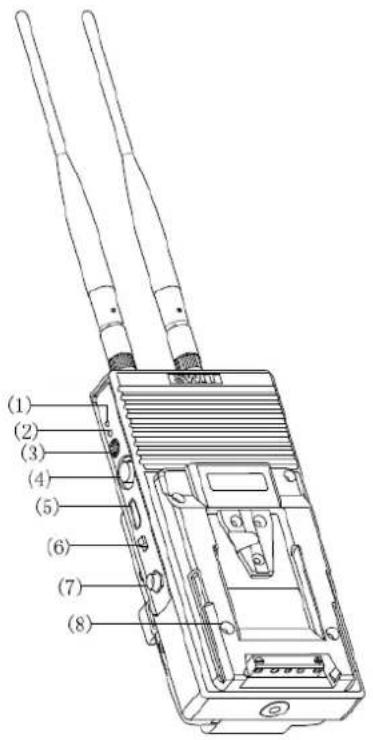
Transmitter S-4904T
Rear view
(1)、(2) LED status indicators:
Including Video Signal and Power indicators
(3) Wireless frequency dial switch
Set frequency range from 0\~9, in total 10 channels
(4) SDI in : 3G/HD/SD-SDI input (BNC connector)
(5) HDMI in : HDMI input (HDMI-A type connector)
(6) On/Off: Switch the power on/off
(7) DC in : Support DC 6.5-17V voltage input, 5.5mm/2.1mm. Outside: negative, Inside: positive
(8) Power installer: To be installed on Gold mount or V-mount cameras
(9) Antenna
(10) Battery Plate: Gold mount or V-mount battery plate optional. See details in "Optional Battery Plate"
(11) Installation thread :
1/4"-20 thread. Use the package supplied articulating arm trestle to install the device to the camera.
The description of LED status indicator
| Device Indicators Status Description | |||
| S-4904T transmitter | Power | Constant On Power connected and switched on | |
| Off Power disconnected or switched off | |||
| Video | Constant On | Network is connected, and there is recognizable video signal input | |
| Off | Network connection failed and there is no recognizable video signal input | ||
Receiver S-4990
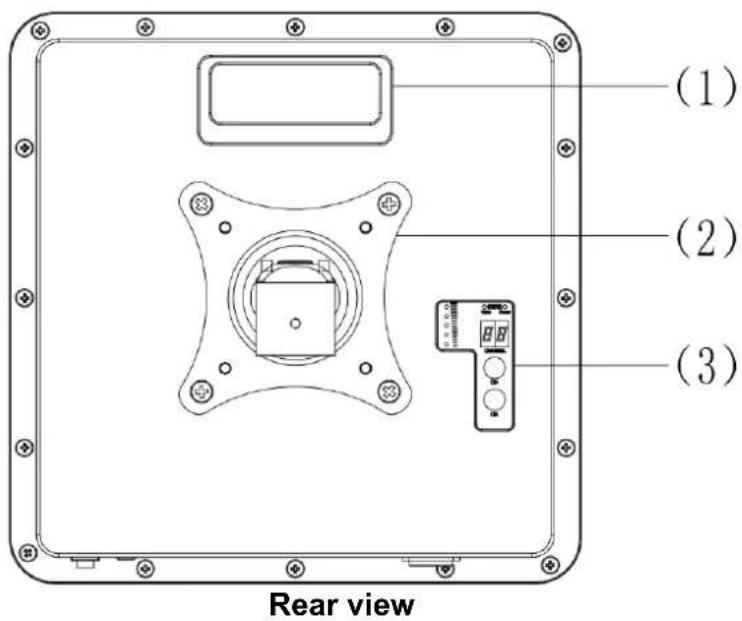
(1) Handle
(2) VESA bracket
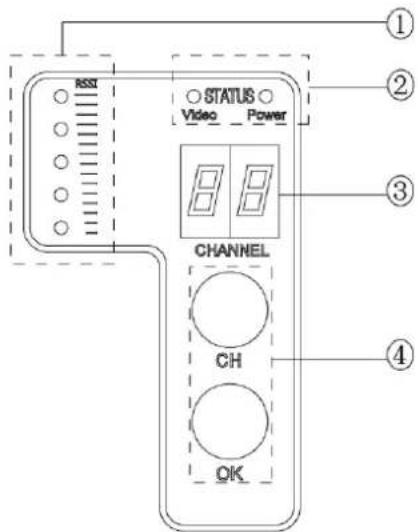
(3) Control area:
① RSSI: Receiving signal LED indicator
② STATUS: Video signal and power status indicator
③ CHANNEL: Digital display frequency channel
④ Button: CH button: Selecting "0-9" 10 channels; OK button: Confirming selected channel
The description of LED status indicator
| Device Indicators Status Description | |||
| S-4990 receiver | Power | Constant On Power connected and switched on | |
| Off Power disconnected or switched off | |||
| Video | Constant On | Network connected, and there is recognizable video signal output | |
| Off | Network connection failed and there is no recognizable video signal output | ||
| RSSI | 0~1 LEDs light | The wireless network connection is weak, and the video noise is visible | |
| 2~3 LEDs light | The wireless network connection is general, and the video quality is good | ||
| 4~5 LEDs light | The wireless network connection is strong, and the video quality is very good | ||
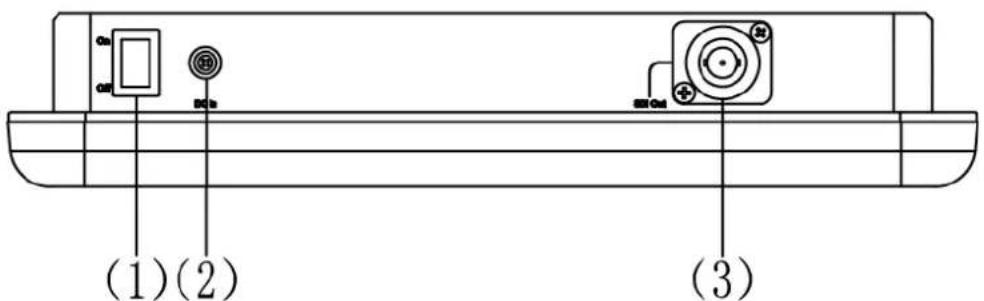
Bottom view
(1) On/Off: Switch the power On/Off
(2) DC in: Support DC 7-36V voltage input, 4-pin lockable LEMO connector
(3) SDI Out : SDI output (BNC connector)
Frequency Dial Switch
1. Using ONE set of devices under the same environment
Dial the frequency switch of both transmitter and receiver to the same channel (transmitter dial number same to receiver digital display number), the default channel number is "0":

S-4904T

S-4990
2. Using TWO sets of devices under the same environment
It is suggested that set the dial switch of the first set to channel "0" and the second set to channel "5"

S-4904T #1

S-4990 #1

S-4904T #2

S-4990 #2
3. Using THREE sets of devices under the same environment
It is suggested that set the dial switch of the first set to channel "0", the second set to channel "4" and the third set to channel "7":

S-4904T #1

S-4990 #1

S-4904T #2


S-4990 #2

S-4904T #3
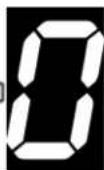
S-4990 # 3
Note: 1. Please don't use more than 3 sets of devices under the same environment to avoid interference.
2. To use multicast, just set several receivers at the same frequency channel as the one transmitter.
The description of frequency channel
| Frequency channel | “0” | “1” | “2” | “3” | “4” | “5” | “6” | “7” | “8” | “9” |
| Real frequency (MHz) | 5550 5 | 590 5630 | 5670 | 5150 519 | 055230 | 5270 5310 | 5510 |
Note: If the on using frequency channel has been interfered, please select other frequency channels according to the above table to avoid interference.
Build connection
(1) Connect the SDI or HDMI video source with the "SDI IN" / "HDMI IN" port of S-4904T transmitter.
(2) Connect the "SDI OUT" / "HDMI OUT" port of S-4990 receiver with monitor or other receiving devices.
(3) Dial the S-4904T and S-4900 to the same frequency channel.
(4) Power S-4904T and S-4990, they will automatically search the network, the S-4990 output video signal OSD displayed as Fig1.
(5) The network will be built after 10-20 seconds, the "RSSI" of receiver indicates the wireless network connection status.
(6) When S-4990 detect the recognizable video signal, "Video" indicator will light and OSD will disappear
Link Connecting...
Fig1
Remark: S-4904T support SDI input and HDMI input, and it will automatically detect the connected signal input. If both SDI and HDMI are connected, S-4914T will give priority to transmit SDI signal.
Optional battery plate
S-4904T battery plate choice
S-4904T provides V-mount or Gold mount two-sided plates for installing between camera and battery, so that the battery can power the camera and S-4904T simultaneously.
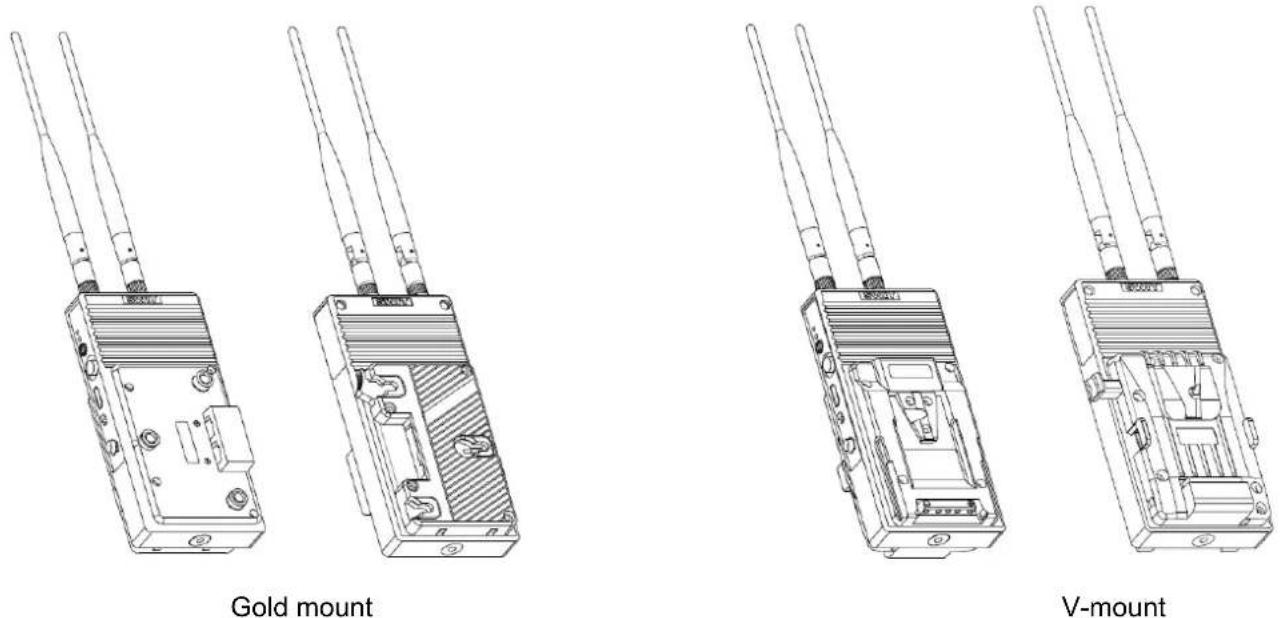
Note: The battery plates are fixed on S-4904T at factory, please specify the suitable plate type before purchase.
Accessory
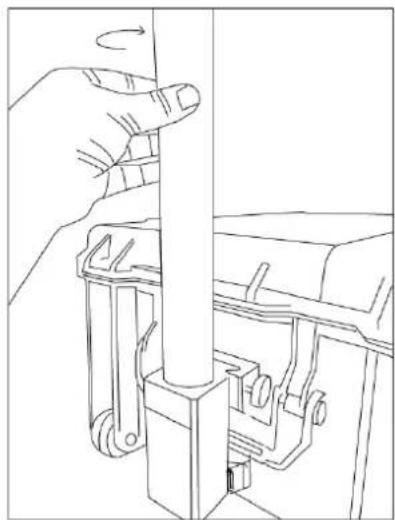
1、Supporting carbon fiber monopod

Installation instruction
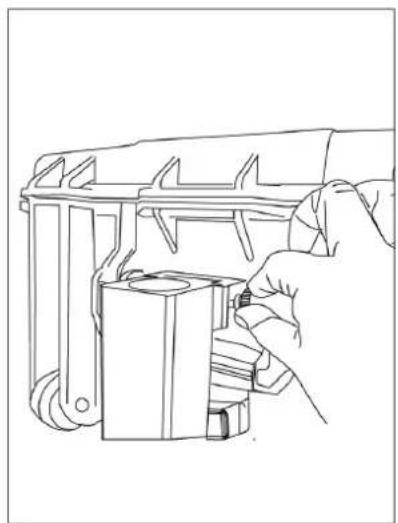
1、Snap the monopod installing module on the carrying case mounting block, and screw tightly, see Fig 1.
2、Insert the monopod into the installing module, and clockwise screw tightly, see Fig 2..
natural_image
Line drawing of a hand using a tool to adjust or install a mechanical component (no text or symbols present)Fig 1
natural_image
Line drawing of a hand adjusting a vertical mechanical component with a rotating arrow (no text or symbols)Fig 2
Note: The above accessory only included in luxury package.
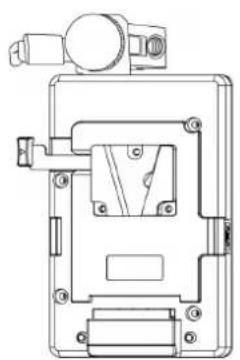
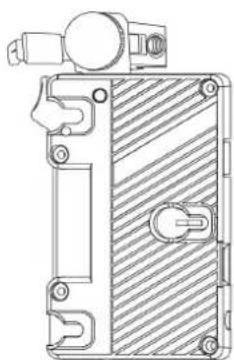
2、Battery plate with Clamp installation
natural_image
Technical line drawing of a mechanical device with mounting bracket and internal components (no text or symbols)S-7200S
natural_image
Technical line drawing of a mechanical component with hatched fill and mounting bracket (no text or symbols)S-7200A
Trouble shooting
If the receiver failed to output video correctly, the possible causes are as below, please find the solution from following chart:
| The receiving video | Possible causes Solution | |
| No display | No power | Check power connection and switch on the transmitter and receiver |
| The antennas are not installed properly and screwed tightly | Install the antennas properly and screw tightly of both transmitter and receiver | |
| Bad connection of video cable | Check video cable connection of both transmitter and receiver | |
| Video format is not supported | Check the format of video source. (See the supported video formats at Specifications.) | |
| Video quality is poor | Bad connection of video cable | Check video cable connection and if possible, change to better quality cables |
| The wireless transmission is disturbed by environment, such as other electronic devices in the same location. | Wait for one minute or reboot both the transmitter and receiver | |
| The transmission distance is out of effective range or being interfered by obstacles. | Try the wireless transmission at a closer distance or clean out the obstacles |
Specification
| Model Transmitter | (S-4904T) Receiver (S-4990) R | ||
| Input 3G/HD/SD-SDI ×1、HDMI×1 / | |||
| Output / | 3G/HD/SD-SDI ×1 | ||
| SDI Format | SMPTE-425M | 1080p (60 / 59.94 / 50) | |
| SMPTE-RP211 | 1080psf (30 / 29.97 / 25 / 24 / 23.98) | ||
| SMPTE-274M | 1080p (30 / 29.97 / 25 / 24 / 23.98) | ||
| 1080i (60 / 59.94 / 50) | |||
| SMPTE-296M | 720p (60 / 59.94 / 50) | ||
| SMPTE-125M | 480i (59.94) | ||
| ITU-R BT.656 | 576i (50) | ||
| HDMI Format | 480i / 576i / 1080i (60 / 59.94 / 50) / 720p (60 / 59.94 / 50) / 1080p (60 / 59.94 / 50 / 30 / 29.97 / 25 / 24 / 23.98) | / | |
| Wireless frequency | 5.1~5.9GHz | ||
| Radio module | OFDM 16QAM | ||
| Max transmission distance | Approx 1000m (Line of sight) | ||
| Latency | ≤1 millisecond | ||
| Power consumption | ≤6.5W | ≤7W | |
| Radio power | Max 63mW | / | |
| Input voltage | DC/Battery: 6.5-17V | DC/Battery: 7-36V | |
| Working environment | Temperature: 0°C~+40°C | ||
| Dimension | 93*188*66 (mm) (exclude antenna) | 305*305*58.5 (mm) (exclude VESA bracket) | |
| Net weight | 572g (include antenna) | 2.38Kg (include VESA bracket) | |