821-029 - Kitchen scale Menuett - Free user manual and instructions
Find the device manual for free 821-029 Menuett in PDF.


| Product Type | Kitchen Scale |
| Brand | Menuett |
| Model | 821-029 |
| Material | Plastic with wooden cutting board |
| Display | LCD digital display |
| Max Weight Capacity | 5000 g (5 kg) |
| Min Weight Capacity | 1 g |
| Weight Units | g, lb:oz (convertible) |
| Volume Units | ml, fl'oz (convertible) |
| Modes | Weight, Water volume, Milk volume |
| Functions | Zero, Tare, Auto shut-off after 2 minutes |
| Sensor | High precision strain gauge sensor |
| Indicators | Low battery, Overload |
| Power Supply | 2 x 1.5V AAA batteries (not included) |
| Dimensions | Approx. 200 x 150 x 25 mm |
| Weight of Scale | Approx. 0.4 kg |
| Cleaning | Wipe with damp cloth; do not immerse in water |
| Safety | Use on hard, flat surface; avoid carpet |
| Warranty | Refer to manufacturer |
Frequently Asked Questions - 821-029 Menuett
User questions about 821-029 Menuett
0 question about this device. Answer the ones you know or ask your own.
Ask a new question about this device
Download the instructions for your Kitchen scale in PDF format for free! Find your manual 821-029 - Menuett and take your electronic device back in hand. On this page are published all the documents necessary for the use of your device. 821-029 by Menuett.
USER MANUAL 821-029 Menuett
natural_image
Digital kitchen scale with wooden wood cutting board and digital display (no visible text or symbols)EN - Operating instructions in original
Date of production: 2014-03-25
© Jula AB
SVENSKA....4
SÄKERHETSANVISNINGAR....4
BESKRIVNING 4
FUNKTIONER....4
SÄTTA I ELLER BYTA BATTERI. 4
LCD-SKÄRM 4
KNAPPFUNKTIONER 4
SKIFTA LÄgE OCh ENhET....5
HANDHAVANDE 5
ANVÄNDA VÅgEN 5
FUNKTIONERNA NOLL OCh TARA 6
AUTOMATISK AVSTÄNgNINg 7
MANUELL AVSTÄNgNINg 8
VANNINGSSYMBOLER 8
UNDERHÅLL 8
NORSK 10
SIKKERHETSANVISNINGER ....10
BESKRIVELSE....10
FUNKSJONER 10
SETTE I ELLER SKIFTE BATTERI 10
LCD-SKJERM 10
KNAPPFUNKSJONER....10
SKIFTE INNSTILLINg Og ENhET 11
HÄNDTERING 11
BRUK AV VEKTEN....11
FUNKSJONENE null Og TARA 12
AUTOMATISK AVSLÅINg 13
MANUELL AVSTENgNINg 14
VARSELSSYMBOLER....14
VEDLIKEHOLD 14
POLSKI 16
ZASADY BEZPIECZEŃSTWA 16
OPIS 16
FUNKCJE 16
WKŁADANIE LUB WYMIANA BATERII 16
Wyświetlacz LCD 16
FUNKCJE PRZYCISKÓW 16
ZMIEŃ TRYB I JEDNOSTKĘ 17
OBSŁUGA 17
UŻYTKOWANIE WAgI....17
FUNKCJE ZERO | TARA 18
AUTOMATYCZNE WYŁĄCZANIE 19
REÇZNE WYŁĄCZANIE 20
SAFETY INFORMATION 22
DESCRIPTION 22
FEATURES 22
TO INSTALL OR REPLACE BATTERY 22
LCD 22
BUTTON FUNCTIONS....22
MODE AND UNIT CONVERSION 23
OPERATION....23
TO START WEIghINg....23
ZERO AND TARE FUNCTIONS 24
AUTO SHUT OFF 25
MANUAL SHUT OFF....26
WARNING INDICATORS 26
MAINTENANCE 26
SÄKERHETSANVISNINGAR
natural_image
Simple line drawing of a trash bin with diagonal lines crossing it, no text or symbols present.Värna om miljön!
- innstilling for vannvolum
KNAPPFUNKSJONER
MODE
MANUELL AVSTENGNING
natural_image
Pure electrical circuit lines without any symbolsDBAJ O ŚRODOWISKO!
Read the operating instructions carefully before use.
Please retain for future reference.
DESCRIPTION
FEATURES
- Indicate volume of water and milk
- Two weight unit systems g^ lb:oz convertible
- Two volume unit systems ml, fl'oz convertible
- Low battery power/Overload indication
- With high precision strain gauge sensor
- With zero, tare function
- Auto off
TO INSTALL OR REPLACE BATTERY
- 2 x 1.5 V (AA/AAA) batteries (excluded). Remove isolation sheet before use;
- Open the battery case cover at the bottom of scale:
- Remove the old batteries. Use a sharp object if necessary.
- Install new batteries by putting one side of the battery down first and pressing down the other side. (Please observe the polarity)

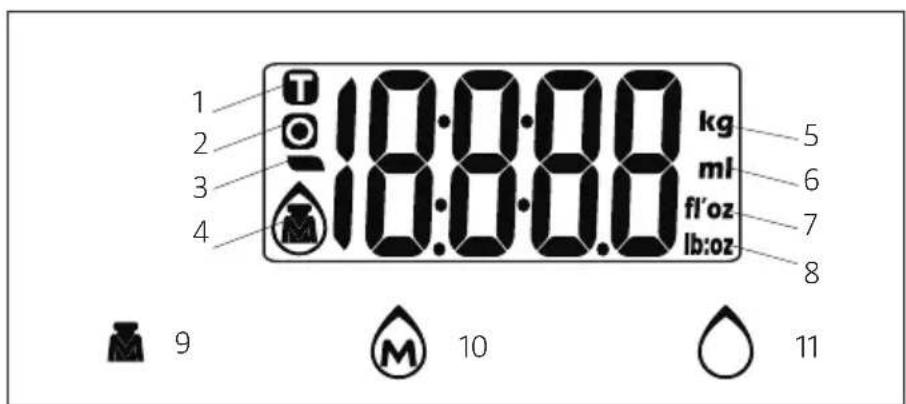
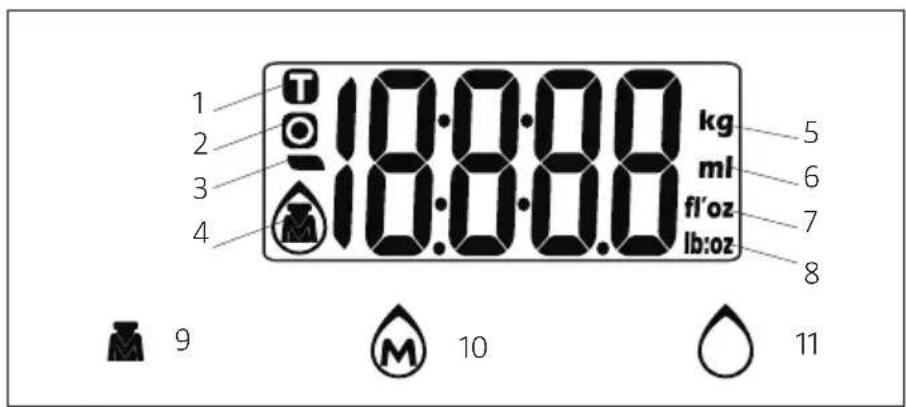
LCD
- Tare
- Zero
- Negative value
- Mode
- Weight unit (kg)
- Volume unit (ml)
- Volume unit (fl'oz)
- Weight unit (lb:oz)
- Weight mode
- Milk volume mode
- Water volume mode
BUTTON FUNCTIONS
MODE
Mode and unit conversion

Turn on/Turn off/Zero/Tare
MODE AND UNIT CONVERSION
After turning on the scale, press the MODE button to select mode and unit. See illustration below.

flowchart
graph TD
    A["MODE"] --> B["0 g"]
    B --> C["MODE"]
    C --> D["0.0 mm"]
    D --> E["MODE"]
    E --> F["0.0 fl'oz"]
    F --> G["MODE"]
    G --> H["0 ml"]
    H --> I["MODE"]
    I --> J["0.0 fl'oz"]
Remark: The unit system of scale depends on sales destination or the requirement of distributor.
OPERATION
TO START WEIGHING
Weight mode
- Place the scale on a solid and flat surface.
- Place bowl (if used) on the scale.
- Press ①ZERO to turn on the scale.
- Wait until LCD shows "O". Press MODE button to convert to weighing mode.
- Place object to be weighed on scale (or bowl) to start weighing. LCD will display the weight reading.
- If the object to be weighed is water or milk, press MODE button to choose volume mode and view the volume of the object to be weighed.

flowchart
graph TD
    A[" "] --> B["↓ ZERO"]
    B --> C["0 ml"]
    C --> D["↓ MODE"]
    D --> E["0 g"]
    E --> F["Place object to be weighed"]
    F --> G["86 g"]
    G --> H["↓ MODE"]
    H --> I["86 ml"]
Volume indication mode
- Place the scale on a solid and flat surface.
- Press to turn on the scale.
- Wait until the LCD shows '0', then press the MODE button to choose 'Water' or 'Milk' mode.
- Put a liquid container on the scale platform. The LCD shows the weight of the container.
- Press to zero or tare the weight.
- Pour liquid (water or milk) into the container. The LCD shows the volume of the liquid.
- Press MODE button to choose 'Weight' mode and view the weight of liquid.

flowchart
graph TD
    A[" "] --> B["0 g"]
    B --> C["MODE"]
    C --> D["0 ml"]
    D --> E["Put the liquid container on the scale platform"]
    E --> F["123 ml"]
    F --> G["0 ml"]
    G --> H["Pour liquid"]
    H --> I["412 ml"]
    I --> J["MODE"]
    J --> K["424 g"]
ZERO AND TARE FUNCTIONS
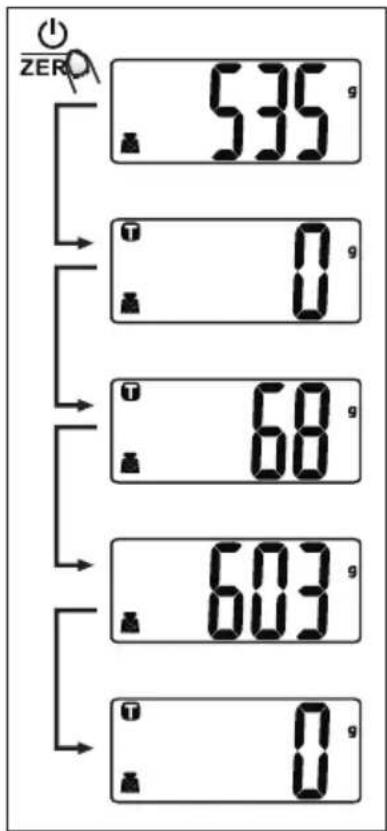
To weigh different loads consecutively without removing loads from the scale. Put first Load on the scale, get weight reading. Press the ZERO button to zero or tare the scales. Make sure that 'O' appears on the LCD before placing the next item you want to weigh on the scales. You can repeat this operation if necessary.
Condition 1: 'Zero' function
When the total sum of all loads on the scale is ≤ 4% of the scale's max. weight capacity (4% = 80 g when the weight capacity is 2000 g or 200 g when the weight capacity is 5000 g.) the LCD will show ZERO or 0 g each time ZERO is pressed. Wait a moment if ---- appears on the display. 0 g and an o icon at the same time on the left hand side of the LCD means that the ZERO function is activated. Max.weight capacity remains unchanged.
Condition 2: 'Tare' function
When the total sum of all loads on the scale is >4% of the scale's max. weight capacity ( 4% = 80g when the weight capacity is 2000g or 200g when the weight capacity is 5000g .) the LCD will show ---- or 0g each time the ZERO button is pressed. Wait a moment if ---- appears on the display. 0g and a (T) icon at the same time on the upper left corner of the LCD means that the Tare function is activated. Max. weight capacity is reduced by the total weight of all loads.
Under this condition:
By pressing ①ZERO , you can see the total weight of all loads on the scale. If you want to weigh more loads, just press ①ZERO to reset the LCD reading to '0' again.

AUTO SHUT OFF
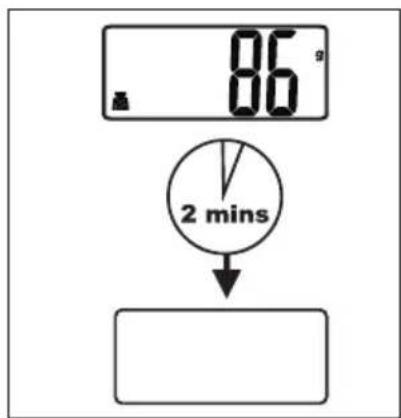
Auto shut-off occurs if display shows '0' or shows the same weight reading for 2 minutes.
MANUAL SHUT OFF
To maximise battery life, always press again to turn off the scale after use.
Note: When display shows '0', press ①ZERO to turn off the scale. When display shows weight reading, press ②ZERO for 3 seconds to turn off the scale.

WARNING INDICATORS
- Replace battery.
- Scale overload. Remove the object to avoid damage to the scale. The max. weight capacity is specified on the scale.

MAINTENANCE
- Clean the scale with a damp rag. Do not immerse the scale in water or use chemical/abrasive cleaning agents.
- All plastic parts should be cleaned immediately after contact with fats, spices, vinegar or strongly flavoured/coloured foods. Avoid contact with acidic citrus juices.
• Always use the scale on a hard, flat surface. Do not use on carpet.
Jula reserves the right to make changes. In the event of problems, please contact our service department. www.jula.com

natural_image
Symbol of a trash bin crossed with no text or labels, representing waste sorting or disposal (no text present)Care for the environment!
Must not be discarded with household waste!
This product contains electrical or electronic components that should be recycled.
Leave the product for recycling at the designated station e.g. the clocal authority's recycling station.
- SVENSKA....4
- SÄKERHETSANVISNINGAR....4
- BESKRIVNING 4
- FUNKTIONER....4
- SÄTTA I ELLER BYTA BATTERI. 4
- LCD-SKÄRM 4
- KNAPPFUNKTIONER 4
- SKIFTA LÄgE OCh ENhET....5
- HANDHAVANDE 5
- ANVÄNDA VÅgEN 5
- FUNKTIONERNA NOLL OCh TARA 6
- AUTOMATISK AVSTÄNgNINg 7
- MANUELL AVSTÄNgNINg 8
- VANNINGSSYMBOLER 8
- UNDERHÅLL 8
- NORSK 10
- SIKKERHETSANVISNINGER ....10
- BESKRIVELSE....10
- FUNKSJONER 10
- SETTE I ELLER SKIFTE BATTERI 10
- LCD-SKJERM 10
- KNAPPFUNKSJONER....10
- SKIFTE INNSTILLINg Og ENhET 11
- HÄNDTERING 11
- BRUK AV VEKTEN....11
- FUNKSJONENE null Og TARA 12
- AUTOMATISK AVSLÅINg 13
- MANUELL AVSTENgNINg 14
- VARSELSSYMBOLER....14
- VEDLIKEHOLD 14
- POLSKI 16
- ZASADY BEZPIECZEŃSTWA 16
- OPIS 16
- FUNKCJE 16
- WKŁADANIE LUB WYMIANA BATERII 16
- SÄKERHETSANVISNINGAR
- Värna om miljön!
- KNAPPFUNKSJONER
- MANUELL AVSTENGNING
- DBAJ O ŚRODOWISKO!
- Read the operating instructions carefully before use.
- DESCRIPTION
- FEATURES
- TO INSTALL OR REPLACE BATTERY
- LCD
- BUTTON FUNCTIONS
- MODE AND UNIT CONVERSION
- OPERATION
- TO START WEIGHING
- Weight mode
- Volume indication mode
- ZERO AND TARE FUNCTIONS
- Condition 1: 'Zero' function
- Condition 2: 'Tare' function
- Under this condition:
- AUTO SHUT OFF
- MANUAL SHUT OFF
- WARNING INDICATORS
- MAINTENANCE
- Care for the environment!
Brand : Menuett
Model : 821-029
Category : Kitchen scale