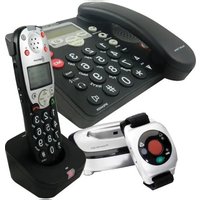
PowerTel 785 - Telephone Amplicom - Free user manual and instructions
Find the device manual for free PowerTel 785 Amplicom in PDF.


Pick your language and provide your email: we'll send you a specifically translated version.
| Product Type | Corded Telephone |
| Brand | Amplicom |
| Model | PowerTel 785 |
| Dimensions (approx.) | 220 × 190 × 60 mm |
| Weight (approx.) | 500 g |
| Power Supply | AC adapter (included) or phone line powered |
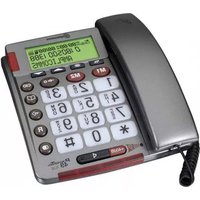
| Display | Large LCD with date, time, and caller ID |
| Keypad | Extra-large buttons with tactile feedback |
| Amplification | Up to 30 dB adjustable volume |
| Ringer Volume | Adjustable, up to 90 dB |
| Visual Ring Indicator | Flashing LED light on the phone |
| Hearing Aid Compatibility | Yes (M/T rating) |
| Handset | Ergonomic with extra-large earpiece |
| Memory | 40-name phonebook, 10 speed dial keys |
| Caller ID | Supports both name and number (if subscribed) |
| Redial | Last 10 numbers redial |
| Mute Function | Yes |
| Wall Mountable | Yes |
| Color | White or Black (variant) |
| Cleaning Instructions | Wipe with a soft, dry cloth. Do not use liquids. |
| Safety Warnings | Keep away from water and extreme temperatures. |
| Repairability | No user-serviceable parts. Contact qualified service. |
| Included Accessories | Handset, base, line cord, handset cord, AC adapter, user manual |
Frequently Asked Questions - PowerTel 785 Amplicom
How do I adjust the volume on the PowerTel 785?
Use the volume control buttons on the side of the base to adjust the ringer volume. For handset volume, press the VOLUME UP or VOLUME DOWN button during a call.
Can I use the PowerTel 785 with a hearing aid?
Yes, the PowerTel 785 is hearing aid compatible with M/T rating. It also features an amplified handset for clearer sound.
How do I set up caller ID?
Connect the phone to your phone line. Caller ID is automatically enabled if your provider offers the service. The LCD will display the caller's name and number.
How do I store a number in the phonebook?
Press PHONEBOOK, then ADD. Enter the name and number using the keypad, then press SAVE. You can store up to 40 contacts.
What is the maximum amplification level?
The handset can amplify sound up to 30 dB. The ringer can reach up to 90 dB.
How do I use the speed dial keys?
Press and hold a speed dial key (1-0) until the phone beeps, then follow prompts to assign a number. To dial, simply press and hold the key.
Can I mount the PowerTel 785 on a wall?
Yes, the phone has a wall-mountable design. Use the included wall bracket or standard telephone wall plate.
What should I do if the phone does not ring?
Check that the ringer volume is not set to off. Ensure the phone is properly connected to the phone line. If issue persists, try a different phone jack.
How do I clean the phone?
Disconnect the phone from power. Wipe the surfaces with a soft, dry cloth. Do not use water, cleaning fluids, or abrasive materials.
Does the phone require batteries?
No, the PowerTel 785 is powered by the phone line and the included AC adapter. No batteries are needed for normal operation.
User questions about PowerTel 785 Amplicom
0 question about this device. Answer the ones you know or ask your own.
Ask a new question about this device
No questions yet. Be the first to ask one.
Download the instructions for your Telephone in PDF format for free! Find your manual PowerTel 785 - Amplicom and take your electronic device back in hand. On this page are published all the documents necessary for the use of your device. PowerTel 785 by Amplicom.
USER MANUAL PowerTel 785 Amplicom
Manual assistant
Powered by Anthropic
Waiting for your message
Product information
Brand : Amplicom
Model : PowerTel 785
Category : Telephone