
PFD1350W - Food Dehydrator Profilo - Free user manual and instructions
Find the device manual for free PFD1350W Profilo in PDF.


| Product Type | Food Dehydrator |
| Brand | Profilo |
| Model | PFD1350W |
| Number of Trays | 5 |
| Tray Material | BPA-free Plastic |
| Temperature Range | 35°C - 70°C |
| Timer | 0 - 24 hours |
| Power Consumption | 600 W |
| Voltage | 220 - 240 V |
| Frequency | 50/60 Hz |
| Dimensions (W x D x H) | 33 x 33 x 32 cm |
| Weight | 4.5 kg |
| Safety Features | Overheat Protection, Auto Shut-off |
| Cleaning | Removable Trays, Dishwasher Safe |
| Warranty | 2 Years |
Frequently Asked Questions - PFD1350W Profilo
User questions about PFD1350W Profilo
0 question about this device. Answer the ones you know or ask your own.
Ask a new question about this device
Download the instructions for your Food Dehydrator in PDF format for free! Find your manual PFD1350W - Profilo and take your electronic device back in hand. On this page are published all the documents necessary for the use of your device. PFD1350W by Profilo.
USER MANUAL PFD1350W Profilo
food dryer food dryer
PROFiLO
natural_image
Exterior view of a modern glass dish with coiled structures and a digital display showing 0.729 (no text or symbols on the device itself)PFD1350W KuruMaX
GIDA KURUTUCUSU KURUMAX
PROFiLO
Fruit and vegetable dryer with electronic control
- perfectly dries your favourite fruit.
vegetables and mushrooms

natural_image
Modern kitchen stand with multi-tiered food arrangement and fresh fruits on the side (no visible text or symbols)PROFILO
dignaher Kelleri
www.preflo.com.tr
A
B


Congratulations on your choice of our appliance, and welcome among the users of PROFiLO products.
In order to achieve best possible results we recommend using exclusively original PROFiLO accessories. They have been specially designed for this product.
Please read these instructions carefully. Pay your special attention to important safety instructions. Keep this User's Guide for future reference.
Safety operation instructions
Before using the device, read the whole content of the manual.

DANGER! / WARNING!
Health hazard
- Do not use the appliance if the power cord is damaged or the heat and ventilation unit is visibly damaged.
- If the supply cord is damaged, it must be replaced by the manufacturer, its service agent or similarly qualified persons in order to avoid a hazard.
- All repairs must be performed by qualified personnel. Incorrect repairs may cause serious hazard to the user. In case of any defects, contact an authorised service centre.
● Always unplug the appliance before cleaning, assembly and disassembly.
- Be careful not to wet the plug of the supplying cord.
- The temperature of accessible surfaces may be high when the appliance is operating. Do not touch the surface marked with the symbol.
This appliance can be used by children aged from 8 years and above and persons with reduced physical, sensory or mental capabilities or lack of experience and knowledge if they have been given
supervision or instruction concerning use of the appliance in a safe way and understand the hazards involved. Children shall not play with the appliance. Cleaning and user maintenance shall not be made by children unless they are older than 8 and supervised.
- Keep the appliance and its cord out of reach of children less than 8 years.

CAUTION!
Not observance can result in damage to possessions
Plug the appliance only to a grounded AC electrical outlet with voltage corresponding to the voltage specified on the nameplate.
The appliance is not intended for use with any external time switches or a separate remote control system.
Do not unplug the appliance by pulling on power cord.
Do not wash the appliance under running water or immerse the heat and ventilation unit in water while cleaning.
Do not place drying trays containing products dripping with water on the heat-and ventilation unit.
If water gets inside the heat-and-ventilation unit and comes into contact with any electrical components, make sure to dry the appliance thoroughly before plugging it into electrical outlet.
Do not clean the body of the heat and ventilation unit with any aggressive detergents, such as emulsion, milk, paste, etc. as they can remove the graphic symbols such as: scales, labels, caution signs, etc.

SUGGESTION
Information on the product and suggestions for its use
This appliance is intended for household use only.
Unwind a sufficient length of the cord from the storage compartment of the heat and ventilation unit before attempting to use the appliance.
Clean all parts of your appliance thoroughly before first use.
Unplug the appliance after use.
Technical data and description
The technical data are given on the nameplate.
PROFiLO fruit and vegetable dryers satisfy the requirements of relevant standards.
This appliance complies with the following directives:
- Electrical equipment designed for use within specific voltage limits (LVD) – 2006/95/EC.
- Electro-Magnetic Compatibility (EMC) - 2004/108/EC.
This device complies with Commission Regulation (EC) no. 1275/2008 on eco-design requirements.
Nominal capacity: 11 l.
Power: 520 W.
Noise level ( L_WA ): 66 dB/A.
This product is a Class II electrical appliance and does not require grounding ☐
The appliance is suitable for contact with food.
The product is marked with CE symbol on the nameplate.
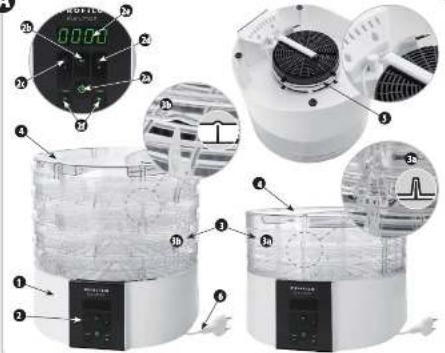
Construction of the appliance

1 Heat-and-ventilation unit
2 Control panel
a On/Off switch
b Power level switch ◀
c Indicator light – power level I (250 W)
d Indicator light – power level II (500 W)
e Display
f Time adjustment button and +
3 Drying trays (4 pcs.)
The drying trays may be adjusted between two positions:
a Folded position – only for storing the appliance (saving space)
b Extended position – for using the appliance (a large gap is visible between the trays)
4 Lid
5 Cord storage compartment
6 Power cord
Use and operation

Before using the appliance for the first time, disassemble it and wash all parts that come into contact with the processed food products (see „Cleaning and Maintenance”). Reassemble once dry.
① Place the appliance on hard, dry and level surface near a wall socket.
② Distribute the food on drying trays and place the trays in the extended position 3b on the heat and ventilation unit 1. Apply the lid 4. To extend the trays, rotate them 90 degrees relative to each other so that a large gap is visible between them.
1 Distribute food products loosely on trays, making sure not to block the airflow through the trays. Choose the number of trays according to the amount of food you intend to dry.
1 Dehydration is achieved by the circulation of hot air through the trays. The drying time depends on the content of water in products and their fragmentation. For example, when drying apples, it is recommended to use slices not thicker than 5 mm.
③ Insert the plug into a wall outlet. Switch on the appliance by pressing the On/Off button ⏻. The appliance will start operating on power I setting. The indicator light ⓒ will come on.
Never use the appliance with trays in the folded position!
For 1 even drying result, it is recommended to change the position of sieves from time to time during operation. Note that drying products with high water content, such as plums, grapes or wet mushrooms takes much more time.
④ To change the power level, press the power adjust button ◀. The indicator light 2d will come on.
The appliance has two power settings (250 W and 500 W). Press the Button to switch between power level I and II.
Changing the heating power does not affect the timer setting.
⑤ Set the time using the


If the timer is not set, the appliance will run for 24:00 hours and will turn off automatically after that time.
After pressing or, the appliance will start a countdown timer accurate to 1 minute. The time can be adjusted between 30 min and 24 hours (with 30 minute increments). Press and hold — or + to accelerate the adjustment.
⑥ Press ⏻ to switch off the appliance. If the countdown function is used, the appliance will turn off automatically after the selected period of time.
If you use the ⏻ button to switch off the appliance or countdown timer is used (automatic switch-off) the appliance will enter standby mode. Flashing 5t6 message will be displayed.
To completely switch off the appliance, pull the plug from the wall socket.
The appliance comes with an auto-cool feature. After pressing the button, the heater will switch off and the auto-cool function will come on. The fan will run for another 5 minutes to cool the heating unit and the inside of the appliance to extend the useful life of the appliance. The 00:00 symbol will blink on the display when the auto cool feature is on.
Overheat protection
The dryer is equipped with a thermal protection system:
Circuit breaker – in case of excessive temperature increase, the heating element will disengage automatically and the fan will remain on. The heating element comes on again once cooled down to normal service temperature.
Troubleshooting
The fan or the heating element does not work:
Return the appliance to a service centre.
Cleaning and maintenance
Wash the drying trays and the lid in warm soapy water. They are also suitable for dishwasher at max. 60°C.
Clean the heating and ventilation unit 1 with a damp cloth and wipe dry.
Plastic parts of the appliance may change colour during long-term use. It is normal and should not be considered a defect.
Dry all parts thoroughly after cleaning.
Ecology – Environment protection
Each user can protect the natural environment. It is neither difficult nor expensive.
In order to do it: put the cardboard packing into recycling paper container; put the polyethylene (PE) bags into container for plastic.
When worn out, dispose the appliance to particular disposal centre, because of the dangerous elements of this appliance, which can be hazardous for natural environment.

Do not dispose into the domestic waste disposal!!!
The manufacturer/importer does not accept any liability for any damages resulting from unintended use or improper handling.
The manufacturer/importer reserves his rights to modify the product any time in order to adjust it to law regulations, norms, directives, or due to construction, trade, aesthetic or other reasons, without notifying in advance.
- PROFiLO
- PFD1350W KuruMaX
- Safety operation instructions
- DANGER! / WARNING!
- Health hazard
- CAUTION!
- Not observance can result in damage to possessions
- SUGGESTION
- Information on the product and suggestions for its use
- Technical data and description
- Construction of the appliance
- Use and operation
- Overheat protection
- Troubleshooting
- Cleaning and maintenance
- Ecology – Environment protection
Brand : Profilo
Model : PFD1350W
Category : Food Dehydrator