SAX35 - Uncategorized MARMITEK - Free user manual and instructions
Find the device manual for free SAX35 MARMITEK in PDF.


| Product Type | Wireless Remote Control |
| Dimensions | 120 x 80 x 25 mm |
| Weight | 150 g |
| Power Supply | 3V (2x AAA batteries) |
| Frequency | 433 MHz |
| Range | Up to 30 meters indoors |
| Functions | On/Off, Dimming, Scene control |
| Compatibility | Marmitek receivers and modules |
| Cleaning | Wipe with soft dry cloth |
| Safety | Keep away from water and moisture |
| Spare Parts | Not available separately |
| Repairability | Non-repairable; replace if defective |
| Operating Temperature | 0°C to 40°C |
Frequently Asked Questions - SAX35 MARMITEK
User questions about SAX35 MARMITEK
0 question about this device. Answer the ones you know or ask your own.
Ask a new question about this device
Download the instructions for your Uncategorized in PDF format for free! Find your manual SAX35 - MARMITEK and take your electronic device back in hand. On this page are published all the documents necessary for the use of your device. SAX35 by MARMITEK.
USER MANUAL SAX35 MARMITEK
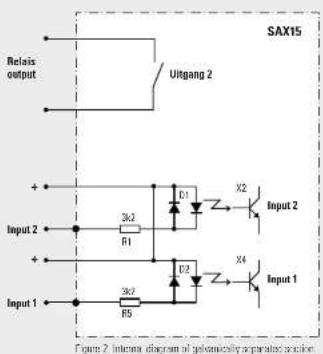
- Two galvanically separated potential-free inputs for transposing contact outputs on external devices into Marmitek X-10 power line commands.
- One galvanically separated potential-free relay contact output for transposing Marmitek X-10 power line signals for opening and/or closing of a relay contact.
Connection
- Mains connection via fixed mains cable.
- Calvanically separated relay contact with 2 screw terminals: normally open contact
- Calvanically separated inputs with 4 screw terminals with common "1" connection.
Application
On one side, the module can be connected directly to the main and on the other side, via the built-in gevanic separation, to peripheral equipment to send 2 Marmitek X-10 addresses and receive 1 Marmitek X-10 address. The module must be connected to other equipment such as a personal alarm system, burglar alarm system or other equipment to make this equipment suitable for use with the Marmitek X-10.
16
Copyrights
Marmitek is a trademark of Patilitude B.V., SAX35 ^™ is a trademark of Marmitek B.V. All rights reserved. Copyright and all other proprietary
software, audio, video, text and photographic tests with Mamitek B.V. Any use of the Content, but without limitation, distribution, reproduction, modification, display or transmission without the prior written consent of Mamitek is strictly prohibited. All copyright and other proprietary notices


5.02-7.11(1)
Operation
The SAX36 can transpose two gevanically separated contact inputs to Marmitek X-10 addresses, plus on or off commands. The addresses are defined by the programmed sand address of the module. The inputs are activated by an external DC or AC voltage of 5 V to 25 V.
The SAX35 can also transpose a received Mermtek X-10 address plus command to open or close the relay contact. This output is suitable for 5 A AC or DC
Which Marmtek X-10 address is transposed is definite during the programming of the SAX35. To do so the module needs to be provided with a receive address. The relay contact is also galvanically separated from the input wires.
Connection terminals
| Description Explanation | |
| Input 1 | Programmed send address +on + with DC supply\ |
| Input 2 | Programmed send address +1 +on + with DC supply\ |
| Relay contact | Programmed receive address |
17

Marmitek X-10
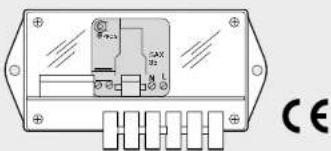
Potential-free actuator/interface type SAX35
For connecting external devices to Marmitek X-10
Programming
Always switch on the power before programming. Avoid the contact with life parts!
Programming the SAX35
To define which Marmitok X-10 accesses correspond to the inputs and relay contact, the SAX15 included in the SAX35 needs to be programmed.
The address of input 1 and the relay contact output can be selected independently.
The second input is automatically allocated the next higher address. Remember that the input and output addresses should not overlap and ensure that the base input address is always at least two higher than the base output address. If the base address is set to 16, the second connected address will be 1.
Programming mode
Activating programming mode
The SAX35 needs to be set into programming mode as follows: - Press the program button for at least three seconds,
see Figure 1, so that the red LED lights up when the button is released.
18

Note
If no setting command is received within 80 seconds the module will automatically exit programming mode.
Cancelling programming mode
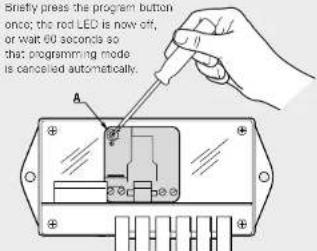
Figure 1. To activate and cancel programming mode, insert a screwdriver through the opening (A) in the case of the box
19
Programming (continued)
Programming the options
The table below shows the standard settings and options. The SAX35 is set to "Standard".
Proceed as follows to access the options:
- Put the module into programming mode.
- Send the desired command in "Setup Command" twice.
via a program and measurement interface (PMIX35) or
Mermitek X-10 Control Box.
• The program LED confirms the 'Setup Command' by flashing a
specific number of times.
• Cancel programming mode.
Must always be programmed
| Standard | Optional | Setup | Number |
Command flashing
| Send address A1 A1 ... P16 Desired address 1 |
| Receive address A3 A1 ... P16 Desired address 2 |
Note: If the receive address is programmed lower than the send address, one free address should be loft between the two addresses. The programmed send address and programmed receive address must therefore always differ by at least 2 addresses. Example: if the send address is C7, the receive address cannot be programmed as C6, C7 or C8.
20
Optional settings for the output:
| Standard | Optional | Setup | Number |
| Command flashing | |||
| No All Lights On All Lights On All Lights On 6 | |||
| No All Lights Off All Lights Off All Lights Off | 10 | ||
| No All Units Off | All Units Off | All Units Off | 8 |

Note
- When in programming mode, always enter the address first
and then the other settings. - When a new address is programmed the optional commands are (os, reset)
21
Programming (continued)
Example where the send address is programmed on D3 and the receive address on D6
| Event | Result |
| Input 1 is connected to supply | SAX35 sends D3 Don |
| Input 1 is disconnected | SAX35 sends D3 Doff |
| Input 2 is connected to supply | SAX35 sends D4 Don |
| Input 2 is disconnected | SAX35 sends D4 Doff |
| SAX35 receives D6 Don | Relay contact closes |
| SAX35 receives D6 Doff | Relay contact opens |
22
23
Connection example
Figure 3 shows an application in which an input on the SAX35 is activated by a bell transformer switch. In this way, pressure on the doorbell button is converted into a Marmitek X 10.
command. When doorbell switch S1 is closed, the SAX35 sends the programmed send address plus an ON command. When S1 is opened, the SAX35 sends the programmed send address plus an OFF command.
Lamp L1 is switched by the relay output. When the SAX35 receives the programmed receive address plus an ON command, L1 will switch on. When the SAX35 receives the programmed receive address plus an OFF command, L1 will switch off.
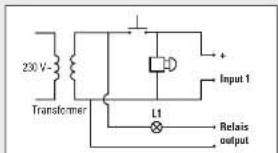
Figure 3 Concession application example
24
Technical data
| Nominal supply voltage 230 V, 50Hz |
| Current consumption <1 W |
| Input voltage isolation 3 kV |
| Clearance and creepagedistance prim/sec. >5 mm |
Galvanically separated connections
| Secondary connection terminals |
| Input 1 Binary (high: V1; low: < +1 V) |
| Input 2 Binary (high: V1; low: < +1 V) |
| Common (V1) + 5 V ... + 25 V, AC or DC |
| Input current < 7.5 mA |
| Relay contact output potential-free and galvanically |
separated relay contact, mono
Relay contact current < 5 A resistive
| Voltage | |
| Relay contact/inputs < 30 V | |
| Standards EN 60950 | |
| Signal strength sending > 5 Vpp in 5 Ohm | |
| Signal sensitivity | 15 mVpp min, > 50 mVpp at 120 kHz |
| Certification CE | |
25
Undisturbed functioning of Marmitek X-10 automation
Electrical equipment and systems can be sensitive to signals from other equipment, which causes electro magnetic disturbance. In the European Union, countries agreed upon laws for the immunity (sensitivity) of signals of other equipment as well as equipment emission (disturbance). When equipment or applications in a certain surrounding comply with the void standards, they will not disturb each other's operations (they are called "Electro Magnetic Competitive").
For residential surroundings, where the home automation system Marmitek X-10 is being applied, the European standard for immunity is standardized in EN 610004-51. Equipment that complies with this standard is resistant to electric magnetic emission of other equipment, which complies with the European standard EN 610008-3 for residential surroundings. Experience has shown that in domestic surroundings, equipment is being used which has an EMC-emission level that is above the levels stated in EN 610008-3. This equipment can disturb the correct functioning of the Marmitek X-10 modules. The immunity of the Marmitek X-10 built in modules is therefore reevaluated and equivalent to EN 610008-3 (the more severe European standard for immunity in industrial surroundings).
Nevertheless, the application area for Marmitek X-10 will remain restricted to residential areas.
26
Marmitek is therefore not responsible for the disfunctioning of the Marmitek X-10 system as a consequence of equipment in the building with emission levels that exceed the maximum allowed levels set as standard for residential, commercial and semi-industrial surroundings stated in EN 61000-6-3.
| Application area Valid European Standard Marmeltek X-10 | |||
| Immunity of equipment | Emission of equipment | home automation* Immunity and emission standards | |
| Residential Commercial Semi-industrial | 61000-6-1 | 61000-6-3 | Compatible/ meets the requirements |
* Condition is that the total Marmitek X-10 -system is installed in accordance with valid instructions supplied by a certified and trained Marmitek X-10 dealer.
27
Copyrights
Marmitek is a trademark of Pattuole B.V., SAX35 ^™ is a trademark of Marmitek B.V. All rights reserved. Copyright and all other proprietary rights in the content (including but not limited to model numbers,
software, audio, video, text and photographs rests with Marmitek B.V. Any use of the Content, but without limitation, distribution, reproduction, modification, display or transmission without the prior written consent of Marmitek is strictly prohibited. All copyright and other proprietary notices shall be retained on all productions.



2007年1月20日