ACER TRAVELMATE 5720 - Laptop

TRAVELMATE 5720 - Laptop ACER - Free user manual and instructions

Find the device manual for free TRAVELMATE 5720 ACER in PDF.

📄 102 pages English EN Download 💬 AI Question 11 questions ⚙️ Specs
Notice ACER TRAVELMATE 5720 - page 97
View the manual : Français FR English EN
Pick your language and provide your email: we'll send you a specifically translated version.
Product Type Notebook laptop
Brand and model Acer TravelMate 5720
Processor Intel Core 2 Duo (T7300/T7500/T7700/T7100/T7200/T7400/T7600/T5500/T5600/T5300/T5200/T2250/T2350/T2450) or Intel Celeron (530/540/550/M 440), FSB up to 800 MHz
RAM 1/2 GB DDR2 533/667 MHz, expandable up to 2/4 GB (2 SO-DIMM slots, dual-channel support)
Storage SATA hard disk 80/120/160 GB with Acer DASP protection; Super Multi DVD double-layer optical drive or DVD/CD-RW combo; 5-in-1 card reader (SD, MMC, MS, MS PRO, xD)
Display 15.4-inch TFT WXGA (1280 x 800 pixels), LED backlight
Graphics Intel GMA X3000/X3100 (integrated) or ATI Mobility Radeon HD 2300/X2500/HD 2600/HD 2400 XT with dedicated memory up to 512 MB
Dimensions 360 x 267 x 30.3/43 mm (W x D x H)
Weight Approximately 3.02 kg (with 8-cell battery) or 2.88 kg (with 6-cell battery)
Power 65 W or 90 W AC adapter (3-pin, grounded); Li-ion 71 Wh (8-cell) or 44 Wh (6-cell) battery; 80% fast charge in 1 hour (with 90 W adapter)
Wireless connectivity Intel WiFi 4965AGN or 3945ABG (802.11 a/b/g/n); Bluetooth 2.0+EDR
Ports 4 USB 2.0 ports, 1 x IEEE 1394, 1 x DVI-D (depending on model), 1 x VGA, 1 x S-Video, 1 x RJ-45 Gigabit Ethernet, 1 x RJ-11 modem, audio input/output, microphone, infrared, ExpressCard/54 slot, 1 x PCMCIA Type II
Operating system Windows Vista Business/Home Premium/Home Basic or Windows XP Professional SP2
Security Acer Bio‑Protection fingerprint reader (optional), Kensington lock slot, BIOS and hard disk passwords
Audio Acer 3DSonic stereo speakers, built-in microphone, Intel HD audio support
Webcam Integrated Acer Crystal Eye
Maintenance and cleaning Turn off the computer, remove the battery, unplug the adapter. Use a soft, slightly damp cloth. Do not use liquid or aerosol.
Safety instructions Do not expose to water, excessive heat, or shocks. Use only the supplied adapter. Follow RF exposure distances (20 cm for WiFi).
Operating temperature 5°C to 35°C
Operating humidity 20% to 80% (non-condensing)
Warranty One-year International Travelers Warranty (ITW)

Frequently Asked Questions - TRAVELMATE 5720 ACER

How to turn on the TravelMate 5720?
Press and release the power button located below the LCD screen, next to the easy-launch buttons. If the computer does not turn on, check that the battery is charged or that the AC adapter is plugged in.
What to do if the screen remains black?
Check that the computer is not in Sleep mode (sleep indicator on): briefly press the power button. Adjust brightness with Fn + Right/Up arrow. If the display is switched to an external monitor, use Fn + F5 to switch back to the built-in screen.
How to connect a projector or external monitor?
Plug the projector into the VGA or DVI-D port. Press Fn + F5 to switch between the internal screen, external screen, or both. You can also use Acer ePresentation Management from the Empowering Technology bar.
The sound does not work, what to do?
Check that the volume is not muted: click the speaker icon in the taskbar. Make sure the speakers are not disabled via Fn + F8. Increase the volume with Fn + Up arrow.
How to use the touchpad?
Move your finger on the touchpad to move the cursor. A single tap is equivalent to a left click, a double tap to a double-click. Use the left and right buttons like a mouse. To enable/disable the touchpad, use Fn + F7.
How to charge the battery and optimize its life?
Insert the battery, plug in the AC adapter. The battery LED turns orange while charging, then green when full. Use Acer ePower Management to choose a power saving profile. You can also reduce the screen brightness with Fn + Left arrow.
What to do in case of an error message at startup?
Note the message. For example, 'Disk boot failure': insert a system floppy (or a bootable device) and restart. 'CMOS battery bad' or 'Hard disk 0 error': contact an authorized service center. You can also enter the BIOS with F2 at startup to reset settings.
How to burn a recovery DVD or CD?
Use Acer eRecovery Management. Launch it via Alt + F10 or from the Empowering Technology bar. Choose 'Burn Disc', select the backup type (factory, user, system) and follow the instructions. Make sure you have a CD/DVD burner.
How to protect the computer against theft?
Use a Kensington lock by wrapping the cable around a fixed object and inserting the lock into the slot on the left side. You can also set passwords (BIOS, hard disk) via the security utility.
Where to find the serial number and model?
The serial number and model are printed on a label attached to the bottom of the computer chassis. Note them in the user manual (dedicated pages) for any correspondence with technical support.

User questions about TRAVELMATE 5720 ACER

1 question about this device. Answer the ones you know or ask your own.

Ask a new question about this device

The email remains private: it is only used to notify you if someone responds to your question.

What is the year of service for the ACER TRAVELMATE 5720 laptop?
Frequently Asked Questions - 29/11/2025
Response Notice-Facile

The ACER TRAVELMATE 5720 model was released around the year 2007. However, the exact year of service for your computer may vary depending on the purchase and usage date.

To determine the year of service for your device, you can proceed as follows:

  • Check the purchase invoice: it indicates the date when the computer was purchased, which generally corresponds to the year of service.
  • Consult the service label: often located under the battery or on the back of the computer, this label may mention the manufacturing date.
  • Examine the system information: in the operating system, some information about the installation date or first use may be accessible.

These methods will allow you to estimate the year of service for your ACER TRAVELMATE 5720.

Respond (be the first)

Download the instructions for your Laptop in PDF format for free! Find your manual TRAVELMATE 5720 - ACER and take your electronic device back in hand. On this page are published all the documents necessary for the use of your device. TRAVELMATE 5720 by ACER.

USER MANUAL TRAVELMATE 5720 ACER

TravelMate de la gamme 5720/5710/5320/5310

Acer Empowering Technology 1

Mot de passer de Empowering Technology 1
Acer eNet Management 2
Acer ePower Management 4
Acer ePresentation Management 6
Acer eDataSecurity Management 7
Acer eLock Management 8
Acer eRecovery Management 10
Acer eSettings Management 12
Windows Mobility Center 13

Acer eRecovery Management 68

LCD panel ergonomic specifications 79

Federal Communications Comission Declaration of Conformity 80

Index 83

Acer Empowering Technology

Acer ePresentation Management

Acer eRecovery Management

Acer eRecovery Management

This Class B digital apparatus complies with Canadian ICES-003.

"Brevets U.S. Nos. 4,631,603, 4,819,098, 4,907,093, 5,315,448 et 6,516,132."

Council Decision 98/482/EC (CTR21) for pan-European single terminal connection to the Public Switched Telephone Network (PSTN).

RoHS Directive 2002/95/EC on the Restriction of the Use of certain Hazardous Substances in Electrical and Electronic Equipment

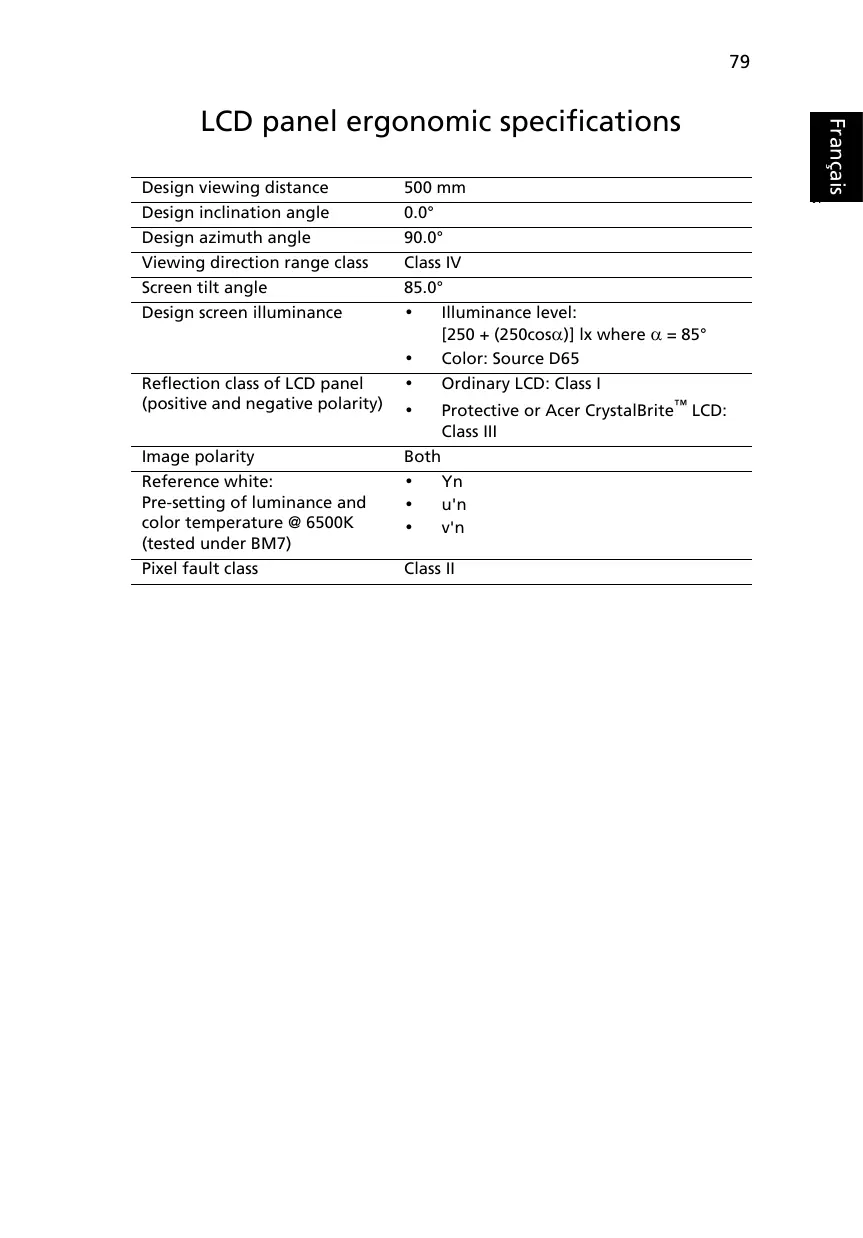
LCD panel ergonomic specifications

Design viewing distance500 mm
Design inclination angle0.0°
Design azimuth angle90.0°
Viewing direction range classClass IV
Screen tilt angle85.0°
Design screen illuminance• Illuminance level: [250 + (250cosα)] lx where α = 85° • Color: Source D65
Reflection class of LCD panel (positive and negative polarity)• Ordinary LCD: Class I • Protective or Acer CrystalBrite™ LCD: Class III
Image polarityBoth
Reference white:• Yn
Pre-setting of luminance and color temperature @ 6500K (tested under BM7)• u'n • v'n
Pixel fault classClass II

Federal Communications Comission Declaration of Conformity

This device complies with Part 15 of the FCC Rules. Operation is subject to the following two conditions: (1) This device may not cause harmful interference, and (2) This device must accept any interference received, including interference that may cause undesired operation.

The following local manufacturer/importer is responsible for this declaration:

Product name:Notebook PC
Model number:MS2205
Machine type:TravelMate 5720/5710/5320/5310
SKU number:TravelMate 5720/5710/5320/5310-xxxx (“x” = 0 - 9, a - z, or A - Z)
Name of responsible party:Acer America Corporation
Address of responsible party:333 West San Carlos St. San Jose, CA 95110 USA
Contact person:Acer Representative
Tel:1-254-298-4000
Fax:1-254-298-4147

C E O

Declaration of Conformity

We,

Acer Computer (Shanghai) Limited

3F, No. 168 Xizang medium road, Huangpu District, Shanghai, China

Contact Person: Mr. Easy Lai

Tel: 886-2-8691-3089 Fax: 886-2-8691-3000

Hereby declare that:

Product: Personal Computer

Trade Name: Acer

Model Number: MS2205

Machine Type:TravelMate 5720/5710/5320/5310

SKU Number: TravelMate 5720/5710/5320/5310-xxxx ("x" = 0~9, a ~ z, or A ~ Z)

Is compliant with the essential requirements and other relevant provisions of the following EC directives, and that all the necessary steps have been taken and are in force to assure that production units of the same product will continue comply with the requirements.

EMC Directive 89/336/EEC as attested by conformity with the following harmonized standards:

EN55022:1998 + A1:2000 + A2:2003, AS/NZS CISPR22:2002, Class B
EN55024:1998 + A1:2001 + A2:2003
EN61000-3-2:2000, Class D
EN61000-3-3:1995 + A1:2001
EN55013:2001 + A1:2003 (applied to models with TV function)
EN55020:2002 + A1:2003 (applied to models with TV function)

Low Voltage Directive 73/23/EEC as attested by conformity with the following harmonized standard:

EN60950-1:2001
EN60065:2002 (applied to models with TV function)

Council Decision 98/482/EC (CTR21) for pan-European single terminal connection to the Public Switched Telephone Network (PSTN).

RoHS Directive 2002/95/EC on the Restriction of the Use of certain Hazardous Substances in Electrical and Electronic Equipment

Index

A

computer features 40
Connexions
Réseau 61

M Mémoire installation

Messageserreur 70

Manual assistant
Powered by Anthropic
Waiting for your message
Product information

Brand : ACER

Model : TRAVELMATE 5720

Category : Laptop