
CP100 - Alarm Clock OREGON SCIENTIFIC - Free user manual and instructions
Find the device manual for free CP100 OREGON SCIENTIFIC in PDF.


| Product Type | Smart alarm clock with Bluetooth and speaker |
| Brand | Oregon Scientific |
| Model | CP100 |
| Display | LCD with backlight |
| Power supply | USB charging port (5V) |
| Dimensions (approx.) | Approximately 10 x 10 x 5 cm |
| Weight (approx.) | Approximately 200 g |
| Connectivity | Bluetooth 4.0 or higher |
| Bluetooth range | Up to 10 meters (without obstacles) |
| Main functions | Alarm with snooze, music streaming, hands-free, 6 sleep/wake sounds, automatic time synchronization |
| Alarm setting | Via the dedicated app |
| Snooze | Press SNOOZE; repeats after 8 minutes |
| Alarm on/off | Press and hold the alarm button for 3 seconds |
| Volume control | + and - buttons |
| Sleep function | Sleep button (Sleep Sound) to activate/deactivate sleep sounds |
| Power off | Press and hold the power button for 5 seconds |
| Key lock | Lock/unlock switch |
| Reset | Reset button on the back |
| Required app | Oregon Scientific Smart Living (iOS/Android) |
| Care and cleaning | Wipe with a soft, dry cloth; do not use abrasive products |
| Safety | Do not immerse in water; avoid shocks and extreme temperatures; do not open the device |
| Spare parts | No user-serviceable parts; contact customer service |
| General information | Manufactured by IDT Technology Limited; complies with Directive 2014/53/EU |
Frequently Asked Questions - CP100 OREGON SCIENTIFIC
User questions about CP100 OREGON SCIENTIFIC
0 question about this device. Answer the ones you know or ask your own.
Ask a new question about this device
Download the instructions for your Alarm Clock in PDF format for free! Find your manual CP100 - OREGON SCIENTIFIC and take your electronic device back in hand. On this page are published all the documents necessary for the use of your device. CP100 by OREGON SCIENTIFIC.
USER MANUAL CP100 OREGON SCIENTIFIC
With Bluetooth Music
Model: CP100
Quick Start Guide
This Quick Start Guide provides the instructions for the basic set up in addition to the user manual. For the complete operation instructions, please visit http://global.oregonscientific.com/customerSupport.php.
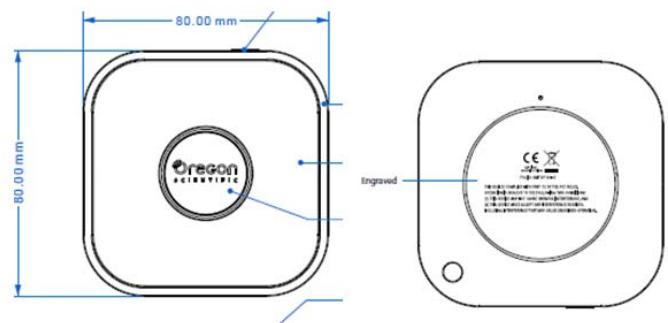
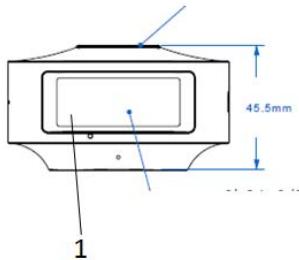
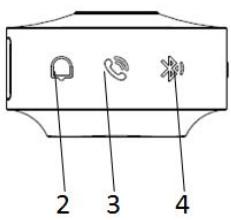
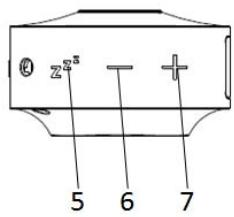
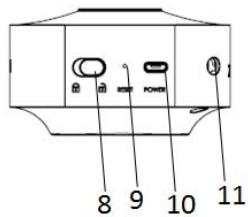
- LCD display with backlight
- SNOOZE/Alarm OFF on that day
- Answer/End the Phone call
- Bluetooth ON/OFF
- Sleep Sound ON/OFF
- Decrease Volume
- Increase Volume
- Key Lock/Unlock switch
- Reset
- Charging port
- Lanyard hole
NOTE
Slide the key lock/unlock switch to unlock the smart clock and press RESET before
first time using
Download THE APP
Download the app on your smart device. This app is available on both Apple App Store and
Google Play Store. Search "Oregon Scientific Smart Living" to find the app.
Tap the app icon to open, then select CP100 smart travel clock on the app. Follow the instructions step- by- step to complete the pairing setup.
GETTING STARTED
- Turn on Bluetooth on your smart device.
- Press on the clock to enter the pairing mode. The bluetooth icon will flash and display steady when successfully paired.
NOTE Bluetooth wireless technology operates within 10 meters (33 ft) range and varies if there are physical obstacles, such as a thick wall in between your smart device and CP100.
ALARM FUNCTION
Set up the clock alarm by using the dedicated app. You can set the alarm sound in beep or 3 wake-up sound. When the alarm is set or standby, the alarm icon will show on the display.
Snoopze function
- To use the snooze function, press on the clock when the alarm sounds. The alarm will stop and start again after 8 minutes.
Activating/deactivating the alarm
- Press and hold for 3 seconds to deactivate the alarm. The alarm will reactivate the following day unless it is changed.
MUSIC STREAMING
When the device is connected wirelessly via Bluetooth, the clock can support music streaming on your smart device.
-Press + and to control sound volume.
-Press to stop/play music.
- Pres and hold for 3 seconds to next song.
SPEAKER PHONE CALL
When the device is connected wirelessly via Bluetooth, the clock can support speaker phone function.
When answering an incoming call,
- Press to accept the call and press again to end the call.
- Press and hold for 3 seconds to reject incoming call.
NOTE
- When using Bluetooth music streaming and speaker phone function, ensure Bluetooth
connection is turned on. Press

on the clock to turn on the Bluetooth,

icon appears on the clock display.
- Turn off Bluetooth function when you don't use Bluetooth music streaming/ speaker
phone function in order to save power consumption. Press

again to turn off the
Bluetooth, the

icon will disappear from the clock display.
There are 6 built-in sounds are featured with brainwave sleep /wake-up function.
Sleep sounds: Hawaii, Unwind and Tranquility.
Wake-up sounds: Aurora, Dawn Rain and Revitalize.
-
Press ^^ to turn on/off the brainwave sleep/wake-up sound.
-
Press and to control sound level.
Select sleep/wakeup songs
-
Press and hold ^^ for 3 seconds to enter song selecting mode when the sleep/wake-up activates.
-
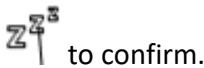
Use and to select sleep/wake-up song and press ^^3 to confirm.
CLOCK TIME
This unit will automatically synchronize the clock with the mobile device when the unit is connected to the smart device via Bluetooth.
Setting Time manually
The clock time can also set manually.
- Press and hold mode.

together for 3 seconds to enter the clock setting
- Press once or press and hold format, hour, minute.

to adjust the setting for 12/24 hour
- Pr
TURN ON & OFF THE WHOLE UNIT
Turn off the unit to save power consumption.
To turn off the unit:
-Press and hold

for 5 seconds to turn off the whole unit.
To turn on the unit:
-Press and hold

for 5 seconds to turn on the whole unit.
NOTE
-All functions of the unit are disabled when it is turned off.
PRECAUTIONS
- Do not subject the device to excessive force, shock, dust, temperature or humidity.
- Do not immerse the device in water. If you spill liquid over it, dry it immediately with a soft, lint-free cloth.
- Do not clean the device with abrasive or corrosive materials.
- Do not tamper with the device's internal components. Doing so invalidates the warranty.
Images shown in this manual may differ from the actual display. - When disposing of this product, ensure it is collected separately for special treatment.
- The contents of this manual may not be reproduced without the permission of the manufacturer.
NOTE The technical specifications for this product and the contents of the user manual are subject to change without notice.
NOTE Features and accessories will not be available in all countries. For more information, please contact your local retailer. To download an electronic version of the user manual, please visit http://global.oregonscientific.com/customerSupport.php.
ABOUT OREGON SCIENTIFIC
Visit our website www.oregonscientific.com to learn more about Oregon Scientific products.
For any inquiry, please contact our Customer Services at
info@oregonscientific.com.
Oregon Scientific Global Distribution Limited reserves the right to interpret and construe any contents, terms and provisions in this user manual and to amend it, at its sole discretion, at any time without prior notice. To the extent that there is any inconsistency between the English version and any other language versions, the English version shall prevail.
FCC STATEMENT
This device complies with Part 15 of the FCC Rules. Operation is subject to the following two conditions:
(1) This device may not cause harmful interference, and (2) This device must accept any interference received, including interference that may cause undesired operation.
WARNING Changes or modifications not expressly approved by the party responsible for compliance could void the user's authority to operate the equipment.
NOTE This equipment has been tested and found to comply with the limits for a Class B digital device, pursuant to Part 15 of the FCC Rules. These limits are designed to provide reasonable protection against harmful interference in a residential installation.
This equipment generates, uses and can radiate radio frequency energy and, if not installed and used in accordance with the instructions, may cause harmful interference to radio communications. However, there is no guarantee that interference will not occur in a particular installation. If this equipment does cause harmful interference to radio or television reception, which can be determined by turning the equipment off and on, the user is encouraged to try to correct the interference by one or more of the following measures:
Reorient or relocate the receiving antenna.
- Increase the separation between the equipment and receiver.
- Connect the equipment into an outlet on a circuit different from that to which the receiver is connected.
- Consult the dealer or an experienced radio / TV technician for help.
DECLARATION OF CONFORMITY
The following information is not to be used as contact for support or sales. Please call our customer service number (listed on our website at www.oregonscientific.com), or on the warranty card for this product) for all inquiries instead.
We
Name: Oregon Scientific, Inc.
Address: SW Manhasset Dr.
DEVICE B-2 Tualatin,
Or 97062 USA
Telephone No.: 1-800-853-8883
declare that the product
Product No. CP 100
Product Name: Smart Clock with Bluetooth Music
Manufacturer: IDT Technology Limited
Address: Block C, 9/F, Kaiser Estate,
Phase 1, 41 Man Yue St.,
Hung Hom, Kowloon,
Hong Kong
EU-DECLARATION OF CONFORMITY
Hereby, IDT Technology Limited, declares that Smart Clock with Bluetooth Music (model: CP100) is in compliance with the essential requirements and other relevant provisions of Directive 2014/53/EU. A copy of the signed and dated Declaration of Conformity is available on request via our Oregon Scientific Customer Service.
CE


COUNTRIES RTTE APPROVED COMPLIED
All EU countries, Switzerland
and Norway
CH
N
DISPOSAL INFORMATION FOR USERS
Pursuant to and in accordance with Article 14 of the Directive 2012/19/EU of the
European Parliament on waste electrical and electronic equipment (WEEE), and pursuant to and in accordance with Article 20 of the Directive 2006/66/EC of the European Parliament on batteries and accumulators and waste batteries.
The barred symbol of the rubbish bin shown on the equipment indicates that, at the end of its useful life, the product must be collected separately from other waste.
Please note that the batteries/rechargeable batteries must be removed from the equipment before it is given as waste. To remove the batteries/accumulators refer to the specifications in the user manual. Therefore, any products that have reached the end of their useful life must be given to waste disposal centers specializing in separate collection of waste electrical
and electronic equipment, or given back to the dealer when purchasing a new WEEE, pursuant to and in accordance with Article 14 as implemented in the country.
The adequate separate collection for the subsequent start-up of the equipment sent to be recycled, treated and disposal of in an environmentally compatible way contributes to preventing possible negative effects on the environment and health and optimizes the recycling and reuse of components making up the apparatus.
Abusive disposal of the product by the user involves application of the administrative sanctions according to the laws in force.
- Quick Start Guide
- NOTE
- Download THE APP
- GETTING STARTED
- ALARM FUNCTION
- Snoopze function
- Activating/deactivating the alarm
- MUSIC STREAMING
- SPEAKER PHONE CALL
- Select sleep/wakeup songs
- CLOCK TIME
- Setting Time manually
- TURN ON & OFF THE WHOLE UNIT
- PRECAUTIONS
- ABOUT OREGON SCIENTIFIC
- FCC STATEMENT
- DECLARATION OF CONFORMITY
- EU-DECLARATION OF CONFORMITY
- DISPOSAL INFORMATION FOR USERS
Brand : OREGON SCIENTIFIC
Model : CP100
Category : Alarm Clock