LA19 - Scale Valore - Free user manual and instructions
Find the device manual for free LA19 Valore in PDF.


| Product Type | Digital Bathroom Scale |
| Model | LA19 |
| Brand | Valore |
| Dimensions | 28 x 28 x 2.5 cm (approx.) |
| Weight | 1.2 kg |
| Maximum Capacity | 150 kg / 330 lb |
| Division | 0.1 kg / 0.2 lb |
| Power Supply | 2 x AAA batteries (included) |
| Display Type | LCD with backlight |
| Material | Tempered glass platform |
| Auto-Off | Yes, after 10 seconds of inactivity |
| Tare Function | Yes (weighing container) |
| Unit Switch | kg / lb / st |
| Overload Indicator | Yes, displays 'Err' |
| Low Battery Indicator | Yes |
| Usage | Indoor domestic use only |
| Cleaning | Wipe with a damp cloth; do not immerse |
| Safety | Place on flat, hard surface; avoid impact |
| Included Accessories | User manual, batteries |
Frequently Asked Questions - LA19 Valore
User questions about LA19 Valore
0 question about this device. Answer the ones you know or ask your own.
Ask a new question about this device
Download the instructions for your Scale in PDF format for free! Find your manual LA19 - Valore and take your electronic device back in hand. On this page are published all the documents necessary for the use of your device. LA19 by Valore.
USER MANUAL LA19 Valore
Thank you for purchasing the Valore Luggage Belt With Digital Scale & TSA Lock (LA19).
- Avoid overweight charges
- Up to 1800mm adjustable strap
• 3-digit TSA approved combination lock
Important: Please read the user manual thoroughly before using the product.
Specifications:
- Weighing unit: lb/kg
- Capacity: 30kg
- Dimensions (L x W): 1800 x 50mm
- Material: Polymer
- Weight: 195g
Package Contents:
- Luggage belt with digital scale & TSA lock
- Metal hook
Understanding the product

Start using the luggage belt with digital scale & TSA lock
1. Reset passcode
The initial lock code is 0-0-0. Plug in the buckle, hold and press the code reset button. Change the code wheel to set your personal code. Release code rest button to complete.


natural_image
Illustration of a medical or health monitoring device with digital display and control buttons (no text or symbols visible)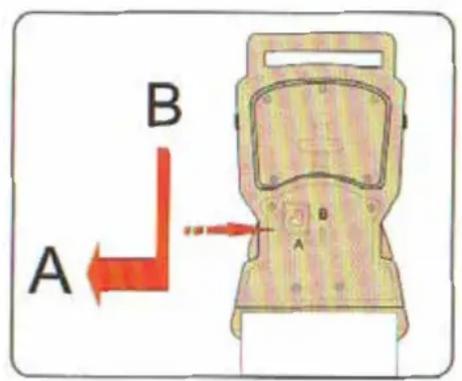

natural_image
Diagram of a robotic arm with directional arrows indicating movement or force (no text or symbols)2. On/Off
Slide power button to On/Off digital scale.
3. Changing unit
Press unit button ti switch between kg/lb.
4. Weighing luggage
Attach the strap to your luggage and lift luggage with the webbing until “Hold” is displayed on the right. The weight of luggage will be shown in the display.

natural_image
Illustration of a hand pressing down on a surface with an upward arrow, no text or symbols presentNote: The weight reading will not be displayed if object is less than 1Kg.
Err will be displayed if your luggage is over 40.0Kg.
5. Tare function
a. Weigh the container by itself first.
b. Once the screen displays the container weight with "Hold" on the right. continue to lift the container and press unit button to reset the scale to 0.0kg.
Tare is in the lowest right corner.
c. Put the luggage to be weighed in the container. The luggage weight ill be displayed on screen,
d. Press unit button, the scale will display 0.0Kg. Put the luggage and container down, the gross weight will be displayed on the screen.
e. Press the unit button to reset the display to 0.0Kg.
Brand : Valore
Model : LA19
Category : Scale