VF-002 - Scale Valore - Free user manual and instructions
Find the device manual for free VF-002 Valore in PDF.


| Product Type | Body Composition Monitor with Scale |
| Brand | Valore |
| Model | VF-002 |
| Weight Capacity | 5 - 180 kg |
| Graduation | 100 g |
| Weight Unit Options | kg, lb, st |
| Body Fat Measurement | Yes (bioelectrical impedance analysis) |
| Body Water Measurement | Yes |
| Bone Mass Measurement | Yes |
| Muscle Mass Measurement | Yes |
| BMI Calculation | Yes |
| Calorie Estimation | Yes |
| Display | LCD, 88 x 40 mm |
| User Profiles | Up to 10 (P0 - P9) |
| User Settings | Height (100-240 cm), Age (10-80), Gender, Sport Mode |
| Power Source | 1 x AAA battery (included) |
| Material | ABS + Tempered Glass |
| Dimensions (L x W x H) | 310 x 310 x 24 mm |
| Weight | 2100 g |
| Auto Recognition | Yes, remembers last user weight |
| Safety Cautions | Not for pregnant women or pacemaker users; keep dry; avoid impacts |
| Cleaning Instructions | Wipe with dry cloth; do not submerge in water |
| Warranty Support | Email v.info@valore.sg |
Frequently Asked Questions - VF-002 Valore
User questions about VF-002 Valore
0 question about this device. Answer the ones you know or ask your own.
Ask a new question about this device
Download the instructions for your Scale in PDF format for free! Find your manual VF-002 - Valore and take your electronic device back in hand. On this page are published all the documents necessary for the use of your device. VF-002 by Valore.
USER MANUAL VF-002 Valore
Thank you for purchasing the Valore Body Composition Monitor
Get an insight to the overall health of your body as part of a regular monitoring and maintenance plan. Check your body fat percentage, skeletal muscle level, BMI and analyse other physical components that are integral to a healthy lifestyle.
Important: Please read the user manual thoroughly before using your Human Body Composition Monitor
Note: Pregnant women should not use this monitor, and if you have a pacemaker or other internal electronic medical device.
Specifications:
• Full body composition scan:
- BMI parameter
- Body weight
• Body fat analysis
• Body water analysis
• Body bone analysis
• Body muscle analysis
- Calories analysis
• LDC display screen size: 88 x 40mm
- Capacity: 5 - 180 kg
- Graduation: d = 100 g
- Battery type: AAA battery
- Material: ABS + Tempered Glass
- Dimensions (L x W x H): 310 x 310 x 24mm
- Weight: 2100g
Package Contents:
• Body Composition Monitor with Scale
- AAA battery
UNDERSTANDING THE PRODUCT
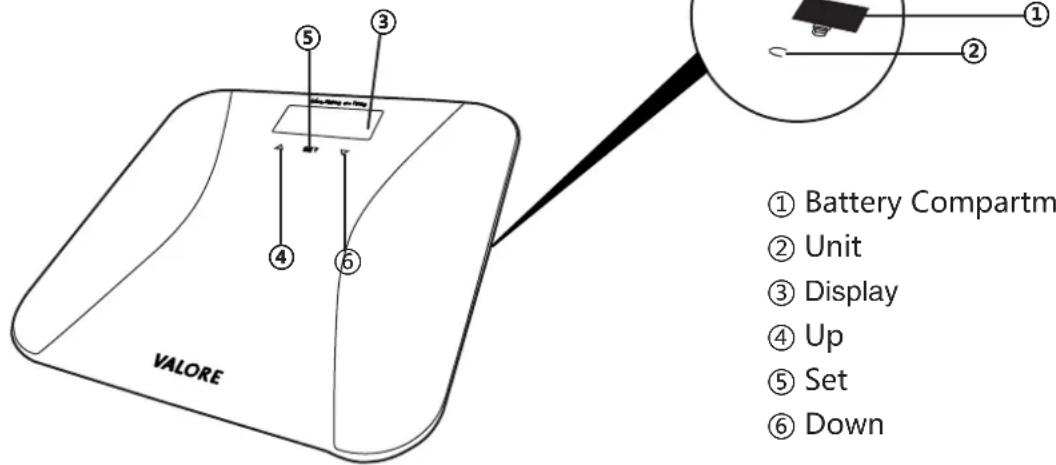
① Battery Compartment
② Unit
③ Display
④ Up
⑤ Set
⑥ Down
START USING THE BODY COMPOSITION MONITOR
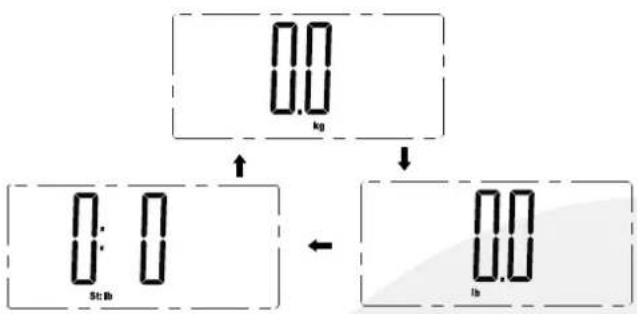
1) Unit Conversion
Press the 'Unit' button located at the back of the body composition monitor to select measuring unit(kg/lb/st). The default unit is Kg.
Note: kg=kilograms, lb=pounds, st=stone
flowchart
graph TD
    A["0.0 kg"] --> B["0.0 lb"]
    B --> C["0.0 lb"]
2) Personal Data
You must enter user parameters in order to measure your body fat percentage and other physical data.
| Memory Position(P) | P0 - P9 |
| Body Size | 100~240cm/3ft 3inch ~ 7ft 10 inch |
| Age | 10 - 80 years old |
| Gender | Male( ), Female( ) |
| Sport Mode | Sportsman( ), Sportswoman( )For people who do exercise regularly |
Press 'Set' to enter setting mode.
Press 'Up' or 'Down' to change the user number, press 'Set' to confirm.

kg
Press 'Up' or 'Down' to change the user number, press 'Set' to confirm.

Press 'Up' or 'Down' to choose Female/Male, normal/sports mode, press 'Set' to confirm.

Press 'Up' or 'Down' to change height, press 'Set' to confirm.

Press 'Up' or 'Down' to change height, press 'Set' to confirm.

3) Weighing and measuring fat
After setting is done, body composition monitor will indicate "0.0"

Stand bare feet on the scale, make sure there is good contact between feet and metal electrodes. Wait for the weight to be displayed stably.

Then 4 'O' will disappear one by one from the left.

After the measurement, the scale circularly displays the BMI, body fat, water, calorie, bone, muscle and weight twice.

Lastly, it will display user's information which allow user to confirm. After which, the display will turn off automatically.

4) Automatic identification range
If you correctly measured the body fat the last time, it will automatically memorize the user's weight. The next measurement, the user can directly stand on the scale to weigh. You will not have to re-enter personal data.

Then 4 'O' will disappear one by one from the left.

LCD will display the BMI, body fat, water, calorie, bone, muscle and weight.

If the scale identify the weight is similar to 2 users or more, you can use 'UP' or 'DOWN' to choose your profile.


5) Evaluation of the results
The following body fat percentages are guided values.
| Body fat analysis (Unit %) | ||||||||
| Age | Female | Male | ||||||
| Underfat | Healthy | Overfat | Obese Healthy | Overfat | Obese Underfat | |||
| 10-39 <21 | >39 >25 | 21-33 | 33-39 | <8 | 8-20 | 20-25 | ||
| 40-59 | <23 | 23-34 | 34-40 | >40 | <11 | 11-22 | 22-28 | >28 |
| 60-80 | <24 | 24-36 | 36-42 | >42 | <13 | 13-25 | 25-30 | >30 |
| Body water analysis (Unit %) | ||||||
| Age | Female Male | |||||
| Underfat Health | Healthy Overfat U | Underfat Healthy | Overfat | |||
| 10-15 | <57 | 57-67 | >67 | <58 | 58-72 | >72 |
| 16-30 | <47 | 47-57 | >57 | <53 | 53-67 | >67 |
| 31-60 | <42 | 42-52 | >52 | <47 | 47-61 | >61 |
| 61-80 | <37 | 37-47 | >47 | <42 | 42-56 | >56 |
BMI is normal within this range.
| BMI parameter (reference to WHO) | ||||
| under weight | normal | over weight | obese | |
| BMI | <18.5 18.5~25 | 25~30 | >30 | |
Body mass is normal within this range.
| Body muscle analysis (Unit %) | ||
| Gender | Female | Male |
| Normal | >34% | >40% |
Body bone is normal within this range.
| Body bone analysis (Unit Kg) | ||||||
| Gender | Female | Male | ||||
| Weight | <45Kg | 45-60Kg | >60Kg | <60Kg | 60-75Kg | >75Kg |
| Bone mass | 1.8Kg | 2.2Kg | 2.5Kg | 2.5Kg | 2.9Kg 3.2Kg | |
According to the human body basic metabolism, the body needs certain amount of calorie to sustain life demand every day. Value on chart is suggested number of calories to be consumed per day.
| Calories analysis (Unit: KJ) | |||||
| Age | <17 >5018 | ~29 30~50 | |||
| Male | <50Kg 1350 | 1200 | 1115 | 1075 | |
| 50~65Kg | 1485 | 1320 | 1227 | 1183 | |
| 65~80Kg | 1890 | 1680 | 1561 | 1505 | |
| 80~95Kg | 2295 | 2040 | 1896 | 1828 | |
| >95Kg | 2700 | 2400 | 2230 | 2150 | |
| Female | <50Kg | 1265 | 1180 | 1085 | 1035 |
| 50~65Kg | 1392 | 1298 | 1194 | 1139 | |
| 65~80Kg | 1771 | 1652 | 1519 | 1449 | |
| 80~95Kg | 2151 | 2006 | 1845 | 1760 | |
| >95Kg | 2530 | 2360 | 2170 | 2070 | |
TECHNICAL SUPPORT & WARRANTY
- For Technical Support, email us at v.info@valore.sg.
- For Warranty Registration, visit www.valore.sg.
Cautions:
Read all the instructions and warnings carefully prior to using this product.
- Do not store the body composition monitor in a high temperature environment.
- Do not place the body composition monitor near a fire or other excessively hot environments.
- Do not expose this body composition monitor to moisture or submerge it in liquid. Keep body composition monitor dry at all times.
- Do not disassemble this body composition monitor or attempt to repair or modify it in any manner.
- Be cautious of excessive drops, bumps, abrasions or other impacts to this body composition monitor. If there is any damage to the body composition monitor such as dents, punctures, tears, deformities or corrosion, stop using the body composition monitor and contact us immediately via email at v.info@valore.sg, or return this product to the store where you have purchased it from.
- If the product produces an abnormal smell, high temperature (low temperature during normal use), discolours or changes shape abnormally, stop using the product and contact us immediately via email at v.info@valore.sg.
DISCLAIMER & TRADEMARKS
All information, trademarks, logos, graphics, and images (“Materials”) provided on this user manual are copyrighted or trademarked and are the property of Valore Lifestyle Pte Ltd. Any unauthorized use of any material contained on the instruction manual may violate copyright laws, trademark laws, laws of privacy and communications statutes.
The trademarks, service marks and logos used and displayed in the Materials are registered and unregistered trademarks and service marks of Valore and others. All other registered and unregistered company names, product names and marks mentioned herein the (“Materials”) are the property of their respective owners and may be trademarks or registered trademarks.
Brand : Valore
Model : VF-002
Category : Scale