
AP-150M B - Air purifier Vivax - Free user manual and instructions
Find the device manual for free AP-150M B Vivax in PDF.


| Product Type | Air Purifier |
| Model | AP-150M B (also AP-150M W, AP-150M G) |
| Dimensions | 190 x 310 x 190 mm |
| Power Supply | 220-240 V ~ 50/60 Hz |
| Power Consumption | 30 W |
| CADR (Smoke) | 135 – 150 m³/h |
| Noise Level (High/Low) | < 55 dB(A) / < 33 dB(A) |
| Off Mode Power Consumption | 0.4 W |
| Filter Type | HEPA13 filter with integrated carbon layer |
| Replacement Filter Model | SFAP-150 |
| Fan Speeds | Low, Medium, High |
| Timer Settings | 2h, 4h, 6h |
| Control Panel | On/Standby, Fan Speed, Timer buttons with LED indicators |
| Filter Replacement Indicator | Yes |
| Cleaning Method | Vacuum or wipe with dry cloth; do not wash filter |
| Safety Features | Automatic shut-off after power outage recovery; child safety warnings |
| Intended Use | Indoor, domestic only |
| Accessories Included | HEPA filter (pre-installed), user manual |
Frequently Asked Questions - AP-150M B Vivax
User questions about AP-150M B Vivax
0 question about this device. Answer the ones you know or ask your own.
Ask a new question about this device
Download the instructions for your Air purifier in PDF format for free! Find your manual AP-150M B - Vivax and take your electronic device back in hand. On this page are published all the documents necessary for the use of your device. AP-150M B by Vivax.
USER MANUAL AP-150M B Vivax
Works best with life.
AP-150M W
AP-150M G
AP-150M B
HR
Upute za uporabu
natural_image
Abstract geometric pattern with concentric curved lines forming a stylized 'V' shape (no text or symbols)MK
Works best with life.
AP-150M W
AP-150M G
AP-150M B
HR
HR
Upute za uporabu
natural_image
Abstract geometric pattern with concentric curved lines forming a stylized 'V' shape (no text or symbols)Pročišćivač zraka
AERIS Mini Series
AP-150M W
AP-150M G
AP-150M B

natural_image
White cylindrical smart air conditioner with mesh grille and a wooden handle (no visible text or symbols)Važno je da prije uporabe uređaja u potpunosti pročitate ove upute te ih sačuvate na sigurnom mjestu za buduću potrebu.
SIGURNOST I UPOZORENJA
natural_image
Diagram of a cylindrical device with internal components and directional arrows indicating rotation (no text or symbols)- Izvadite HEPA filter.
natural_image
Illustration of a hand holding a cylindrical device with a handle, next to a bag with scissors and a lid (no text or symbols)- Postavite HEPA filter.
natural_image
Illustration of hands operating a cylindrical device with a handle and arrow indicating rotation (no text or symbols)natural_image
Illustration of a power plug inserted into an electrical outlet (no text or symbols)Uporaba

natural_image
Simple line drawing of a cylindrical object with scissors above it, no text or symbols present2. Ugradite HEPA filter.
HEPA filter postavite u prostor s donje strane kućišta uređaja.
natural_image
Illustration of hands operating a cylindrical device with a handle, showing motion arrows (no text or symbols)3. Priprema
natural_image
Illustration of two containers with a hand cleaning the top portion (no text or symbols)Čišćenje HEPA13 filtera
natural_image
Illustration of a hand inserting a cable into a cylindrical device, showing electrical connection (no text or symbols)Works best with life.
AP-150M W
AP-150M G
AP-150M B
SRB
SR
Korisničko uputstvo
Informacije potrošačima / Servisna mesta
BIH
Korisničko uputstvo
Garantni list / Servisna mjesta
CG
Korisničko uputstvo
natural_image
Abstract geometric pattern with concentric curved lines forming a stylized 'V' shape (no text or symbols)Prečišćivač vazduha
AERIS Mini Series
AP-150M W
AP-150M G
AP-150M B

natural_image
White smart air conditioner with mesh grille and circular vent, featuring a brown handle clip (no visible text or symbols)Važno je da pre upotrebe uređaja u potpunosti pročitate ova uputstva i da ih sačuvate na sigurnom mestu za buduće potrebe.
BEZBEDNOST I UPOZORENjA
VAŽNO: Molimo vas da sačuvate ovo uputstvo za buduće potrebe.
natural_image
Diagram of a cylindrical mechanical component with internal slots and directional arrows indicating rotation (no text or symbols)2.Uklonite HEPA filter.

natural_image
Illustration of hands holding a cylindrical device with a handle, showing mechanical components and motion direction (no text or symbols)natural_image
Simple line drawing of a rectangular object with a square cutout and scissors above it (no text or symbols)4.Instalirajte HEPA filter.
Okrenite kućište filtera u smeru kazaljke na satu da biste ga pričvrstili za kućište. Okrenite kućište filtera u smeru suprotnom od kazaljke na satu da biste ga uklonili.

natural_image
Illustration of hands holding a cylindrical device with a knob, showing motion arrows (no text or symbols)natural_image
Illustration of a plug inserted into an electrical outlet socket with a black arrow indicating direction (no text or symbols)Upotreba
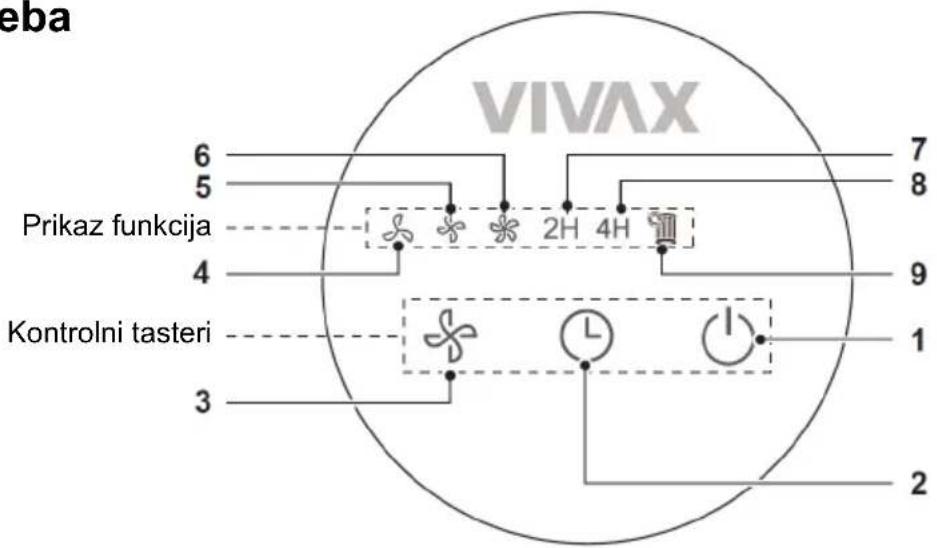
| 1 |  | Dugme za uključenje / stanje pripravnosti | Pritisnite ovo dugme da biste uključili/isključili uređaj. |
| 2 |  | Dugme tajmera | U uključenom stanju, pritisnite dugme „Tajmer“ da biste podesili vreme nakon kojeg će se prečistač vazduha isključiti. Vreme isključivanja možete podesiti redosledom: 2 sata -> 4 sata -> 6 sati -> Otkaži -> 2h.U uključenom stanju, pritisnite i držite dugme da biste resetovali vreme rada filtera. |
| 3 |  | Dugme za brzinu ventilatora | Pritisnite dugme da biste promenili brzinu ventilatora: niska, srednja i visoka brzina. |
| 4 |  | Mala brzina ventilatora | Indikator svetli kada je ventilator podešen na malu brzinu. |
| 5 |  | Srednja brzina ventilatora | Indikator svetli kada kada je ventilator podešen na srednju brzinu. |
| 6 |  | Velika brzina ventilatora | Indikator svetli kada kada je ventilator podešen na veliku brzinu. |
| 7 |  | Tajmer od 2 sata | U uključenom stanju, svetli kada je zakazano vreme isključivanja podešeno na 2 sata. |
| 8 |  | Tajmer od 4 sata | U uključenom stanju, svetli kada je zakazano vreme isključivanja podešeno na 4 sata.Indikatori „2H“ i „4H“ svetle zajedno kada je planirano vreme isključivanja 6 sati. |
| 9 |  | Upozorenje o zameni filtera | Kada se upali ikona filtera, filter je potrebno zameniti.Model zamenskog filtera je SFAP-150.Nakon što je filter zamenjen i instaliran, pritisnite i držite dugme „ “ dok je uređaj uključen da biste resetovali vreme rada filtera. |
Testiranje rada
NAPOMENA
natural_image
Simple line drawing of a bag with scissors and a lid, no text or symbols present2. Instalirajte HEPA filter.
HEPA filterPostavite ga u prostor na dnu kućišta uređaja.
Okrenite kućište filtera u smeru kazaljke na satu da biste pričvrstili filter za kućište uređaja.

natural_image
Illustration of hands holding a cylindrical device with a handle, showing motion arrows (no text or symbols)3. Priprema
natural_image
Illustration of two containers with a hand cleaning the interior (no text or symbols)Čišćenje HEPA13 filtera
natural_image
Illustration of a hand inserting a plug into a cylindrical device, with an open electrical outlet nearby (no text or symbols)- Usisajte prašinu ili je obrišite suvom krpom ili usisivačem. Napomena: Ne perete filter. Nikada ne izlažite filter vlazi ili vodi.

- Nakon čišćenja, vratite filter u uređaj i ponovo ga povežite.priključite uređaj na izvor napajanja.
Zamena HEPA13 filtera
Kada se indikator zamene filtera upali, to znači da je potrebno zameniti HEPA filter. Ako se filter ne zameni na vreme, podsetnik će se pojavljivati svaki put kada se uređaj uključi.

Model zamenskog filtera: SFAP-150.
Rezervni filter možete kupiti u prodavnici u kojoj ste kupili uređaj ili preko ovlašćene servisne mreže.
Resetovanje upozorenja o zameni filtera:
Pritisnite i držite dugme Tajmer 3 sekunde da biste resetovali upozorenje za HEPA filter.

Pritisnite i držite 3 sekunde
Works best with life.
AP-150M W
AP-150M G
AP-150M B
MK
MK
natural_image
Abstract geometric pattern with concentric curved lines forming a stylized 'V' shape (no text or symbols)natural_image
White cylindrical smart air conditioner with mesh grille and a wooden handle (no visible text or symbols)natural_image
Diagram of a cylindrical device with internal components and directional arrows indicating rotation (no text or symbols)natural_image
Illustration of hands holding a cylindrical device with a handle, showing a curved arrow indicating rotation (no text or symbols present)natural_image
Simple line drawing of a bag with scissors and a square cutout (no text or symbols)natural_image
Illustration of hands holding a cylindrical device with a handle, showing motion arrows (no text or symbols)natural_image
Illustration of a wall socket connected to a power plug, with an arrow indicating direction (no text or symbols)Употреба

natural_image
Simple line drawing of a bag with scissors and a square cutout (no text or symbols)natural_image
Illustration of hands holding a cylindrical device with a handle, showing mechanical components and rotation arrows (no text or symbols)- Подготовка
natural_image
Illustration of a hand pressing down on a cylindrical device with a textured base (no text or symbols visible)Модел: AP-150M W AERIS Mini, AP-150M G AERIS Mini, AP-150M B AERIS Mini
member of M SAN Grupa
KOMPANI

Model: AP-150M W AERIS Mini, AP-150M G AERIS Mini, AP-150M B AERIS Mini
member of M SAN Grupa
KOMPANI
Nënshkruar
Margareta Gnjatovic Spirov Manager
Works best with life.
AP-150M W
AP-150M G
AP-150M B
AL
AL
natural_image
Abstract geometric pattern with concentric curved lines forming a stylized 'V' shape (no text or symbols)Pastrues ajri
Mini-Seria AERIS
AP-150M W
AP-150M G
AP-150M B

natural_image
White smart air purifier with perforated grille and circular vent, featuring a brown handle clip (no visible text or symbols)natural_image
Diagram of a cylindrical device with internal components and directional arrows indicating rotation (no text or symbols)- Hiqni filtrin HEPA.

natural_image
Illustration of hands operating a cylindrical device with a handle, showing mechanical components and motion direction (no text or symbols)natural_image
Simple line drawing of a bag with scissors and a square cutout (no text or symbols)natural_image
Illustration of hands holding a cylindrical device with a handle, showing motion arrows (no text or symbols)natural_image
Illustration of a wall socket with a plug inserted, showing an arrow indicating direction (no text or symbols present)natural_image
Simple line drawing of a cylindrical container with scissors above it (no text or symbols)- Instaloni filtrin HEPA.
natural_image
Illustration of hands holding a cylindrical device with a knob, showing motion arrows (no text or symbols)- Përgatitja
natural_image
Two-step illustration showing a hand cleaning a cup with a cloth, next to a second container (no text or symbols)Pastrimi i filtrit HEPA13
natural_image
Illustration of a hand holding a cylindrical device with a wall socket, connected to a wall-mounted power outlet (no text or symbols present)Works best with life.
AP-150M W
AP-150M G
AP-150M B
SLO
SLO
Navodila za uporabo
Garancijski list / Servisna mesta

natural_image
Abstract geometric pattern with concentric curved lines forming a stylized 'V' shape (no text or symbols)Čistilec zraka
Mini serija AERIS
AP-150M W
AP-150M G
AP-150M B

natural_image
White cylindrical smart air conditioner with mesh grille and a wooden handle (no visible text or symbols)natural_image
Diagram of a cylindrical device with internal components and directional arrows indicating rotation (no text or symbols)-
Odstranite HEPA filter.
-
Odstranite zaščitno folijo s filtra.
-
Namestite HEPA filter.
Ohišje filtra obrnite v smeri urinega kazalca, da ga pritrdite na ohišje. Ohišje filtra obrnite v nasprotni smeri urinega kazalca, da ga odstranite.
natural_image
Illustration of a hand holding a cylindrical device with a lid, being cut by scissors (no text or symbols present)
natural_image
Illustration of hands operating a cylindrical device with a knob, showing rotational motion (no text or symbols)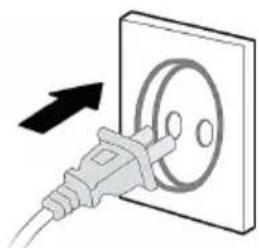
natural_image
Illustration of a power plug inserted into an electrical outlet (no text or symbols)Uporaba

natural_image
Simple line drawing of a cylindrical object with scissors above it, no text or symbols present2. Namestite HEPA filter.
HEPA filterPostavite ga v prostor na dnu ohišja naprave.
Ohišje filtra obrnite v smeri urinega kazalca, da ga pritrdite na ohišje naprave.
natural_image
Illustration of hands operating a cylindrical device with a handle, showing motion arrows (no text or symbols)3. Priprava
natural_image
Illustration of two containers with a hand cleaning the liquid (no text or symbols)natural_image
Illustration of a person using a cable to switch a wall-mounted device, with an electrical outlet nearby (no text or symbols)- Prah posesajte ali obrišite s suho krpo ali sesalnikom.
Opomba: Filtra ne perite. Filtra nikoli ne izpostavljajte vlagi ali vodi.
- Po čiščenju filter vstavite nazaj v napravo in ga ponovno priklopite.priključite napravo na vir napajanja.
Zamenjava filtra HEPA13
Ko zasveti indikator za zamenjavo filtra, to pomeni, da je treba zamenjati HEPA filter. Če filtra ne zamenjate pravočasno, se bo opomnik prikazal vsakič, ko bo naprava vklopljena.

Model nadomestnega filtra:SFAP-150.
Works best with life.
AP-150M W
AP-150M G
AP-150M B
EN
EN
Instruction manual

natural_image
Abstract geometric pattern with concentric curved lines forming a stylized 'V' shape (no text or symbols)Air Purifier
AERIS Mini Series
AP-150M W
AP-150M G
AP-150M B

natural_image
White cylindrical smart air conditioner with perforated grille and a brown handle (no visible text or symbols)It is important that you read these instructions before using your product and we strongly recommend that you keep them in a safe place for future reference.
SAFETY AND WARNINGS
IMPORTANT: Please retain your instruction booklet for future use.
We believe that safe performance is the first priority in any consumer product. We ask that any electrical appliance that you use be operated in a sensible fashion with due care and attention placed on the following important operating instructions.
Important Safeguards for your Air Purifier.
When using any electrically powered appliance, basic safety precautions should always be followed.
Warning: To reduce the risk of fire, electrical shock or injury to person or property:
- Ensure all packing materials and labels or stickers are removed from the appliance before first use.
● Always operate the product from a power source of the same voltage, frequency and rating as indicated on the product identification plate. - This appliance is not to be used by persons (including children) with reduced physical, sensory or mental capabilities, or lack of experience and knowledge, unless they have been given supervision or instruction
● Children being supervised not to play with the appliance. - This appliance can be used by children aged from 8 years and above under supervision. This appliance can be used by persons with reduced physical, sensory or mental capabilities or lack of experience and knowledge if they have been given supervision or instruction concerning use of the appliance in a safe way and understand the hazards involved.
● Children shall not play with the appliance -
Cleaning and user maintenance shall not be mad by children without supervision.
-
Close supervision is necessary when the product is used by or near children or incapacitated individuals. Do not allow children to use it as a toy.
- Do not operate the product with a damaged cord or plug, or after the product malfunctions, or has been dropped or appears damaged in any way. Return the complete product to the place of purchase for inspection or service.
- Unplug from the mains when not in use and before cleaning.
- Do not use any other accessories or attachments with this appliance.
- Do not use the unit if it is not properly and completely assembled.
● Always place the unit on a flat level surface. Never leave the product unattended while in use. - Do not leave the cord hanging over the edge of a table or worktop.
● Avoid contact between the cord and hot surfaces.
● For indoor use only. For domestic use only. - Do not use the appliance for any other than its intended use.
- This appliance should be used only as described within the instructions for use that accompany it. Please retain these instructions for future reference.
- If the supply cord is damaged, it must be replaced by the manufacturer, its service agent or similarly qualified persons in order to avoid a hazard
● Always ensure that your hands are dry before removing the plug from the main outlet. Never pull the plug out of the mains outlet by its cord. - Keep the air intake cover free of dust or fluff.
- Do not insert the fingers or objects into the air inlets or air outlets to prevent the product from physical damages or malfunction.
-
Do not block the air inlets/outlets of the appliance with any item.
-
This appliance cannot replace natural ventilation and other appliances like the vacuum cleaner, kitchen ventilator, etc.
- When the appliance is working, it must be placed on a dry, flat and stable floor, with at least 30cm space reserved around it.
- The mist produced by the ultrasonic humidifier may affect the PM2.5 detection of this appliance (if sensor exist on your device), and both should maintain a certain distance.
- Please use the original filter provided by the factory (Model: SFAP-150). In case of other filters, the best results cannot be achieved.
- Do not place other items on top of the appliance, and forbid sitting or standing on this appliance.
- Do not spray flammable substances near the appliance;
- Do not spray water directly on the appliance or use chemical cleaners like alcohol or hydrochloric acid, etc.;
- Do not place water containers, medicines, or flammable materials on the appliance.
- Do not put it in a place with direct sunlight.
- To prevent electromagnetic disturbance, the appliance must keep a certain distance from the TV, radio, microwave oven and others.
Caution:
- The appliance is not intended to be operated by means of an external timer or separate remote-control system.
- Make sure your hands are dry when plugging in and unplugging appliance.
- Ensure all the parts are correctly mounted before switching on the appliance.
- Do not immerse the appliance in water or any other liquid.
- Always remove the plug after use.
Important Safeguards for all Electrical appliances
- Carefully read all instructions before operating the appliance and save for future reference.
- Remove and safely discard all packing materials and promotional labels before using the appliance for the first time.
- Fully unwind the power cable before use. Do not pull the power cable to move the appliance.
- Do not let the power cord hang over the edge of a bench or table, touch hot surface or become knotted. Do not run cord under carpeting. Do not cover cord with throw rugs, runners, or similar coverings. Do not route cord under furniture or appliances. Arrange cord away from traffic area and where it will not be tripped over.
- To protect against electric shock, do not immerse the power cord, plug or appliance in water or any other liquid, unless it is recommended in the cleaning instructions.
- It is recommended to inspect the appliance regularly. Do not use the appliance if the supply cord, plug, connector or appliance becomes damaged in any way.
- The appliance is for household use only. Do not use this appliance for any other than its intended use.
Do not use in moving vehicles or boats. Do not use outdoor. Misuse may cause injury. - Always switch off at the power outlet and unplug at the power outlet when the appliance is not use.
- Before cleaning, always turn the appliance to the OFF position. Switch off at the power outlet and remove the power cord, if detachable, from the appliance and allow all parts to cool.
- Do not place this appliance on or near a heart source, such as a hot plate or oven.
Part names
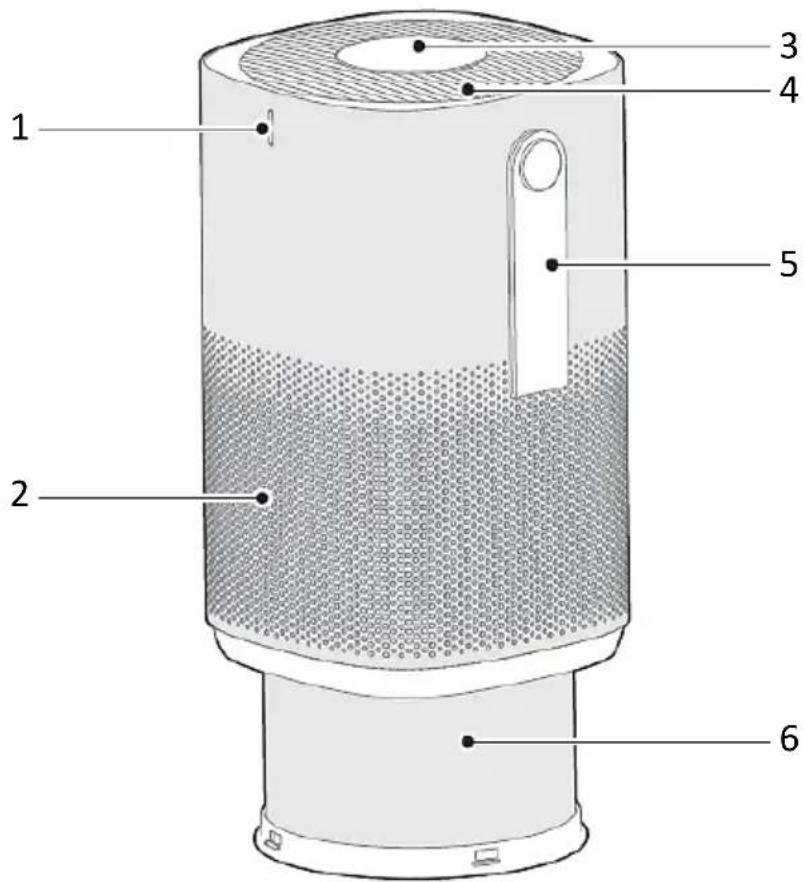
- Decorative stripe
- Air Inlet Grille
- Control Panel
- Air Outlet Grille
-
Carryng Belt
-
HEPA13 filter with integrated carbon layer (inside the cabinet)
(Replacement filter model: SFAP-135)
Box Contents
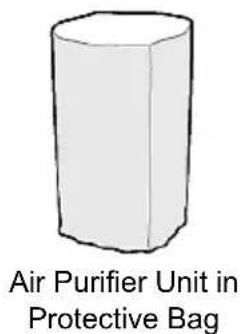
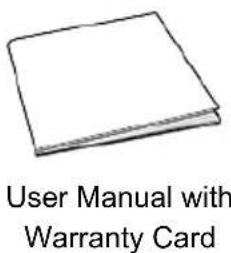
NOTE
All the pictures in this manual are for explanation purpose only. Any discrepancy between the real object and the illustration in the drawing shall be subject to the real subject.
Assembly and installation
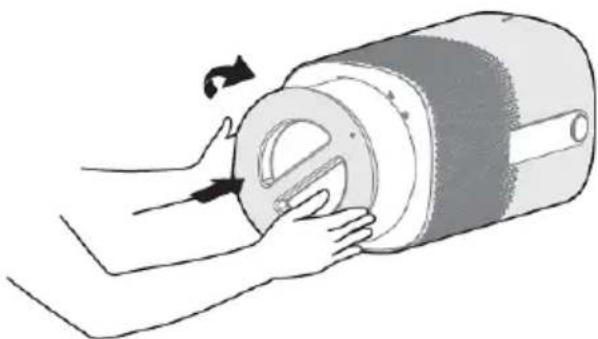
- Remove the HEPA filter integrated with the base.(Rotate the base clockwise to tighten, and rotate counterclockwise to remove).

natural_image
Diagram of a cylindrical device with internal components and directional arrows indicating rotation (no text or symbols)- Take out the HEPA filter.

natural_image
Illustration of hands holding a cylindrical device with a handle, showing a curved arrow indicating rotation (no text or symbols present)- Remove the protective film of the filter assembly.

natural_image
Simple line drawing of a bag with scissors and a square cutout (no text or symbols)- Install the HEPA filter. Rotate the base clockwise to tighten, and rotate counterclockwise to remove).

natural_image
Illustration showing a hand holding a cylindrical device and a plug inserted into an electrical socket (no text or symbols)- Plug power supply.
Operation Instructions

| 1 |  | On/Standby button | Press this key to turn the AirPurifier On/Off. |
| 2 |  | Timer button | In the Power-On state, press the button to set the schedule power off time in the following sequence: 2h->4h->6h->Cancel-->2h.In the Power-On state, Press and Hold the button to reset the working time of the Filter. |
| 3 |  | Fan Speed button | Press this button to cycle through low, medium, and high fan speeds. |
| 4 |  | Low Fan Speed | The indicator turns on when the fan is set to low speed. |
| 5 |  | Mid Fan Speed | The indicator turns on when the fan is set to mid speed. |
| 6 | [H2ZS] | High Fan Speed | The indicator turns on when the fan is set to high speed. |
| 7 |  | 2h Timer | In the Power-On state, the indicator light turns On when the schedule Power Off time is set to 2 hours. |
| 8 |  | 4h Timer | In the Power-On state, the indicator light turns On when the schedule Power Off time is set to 4 hours."2H" and "4H" indicators light up together when the scheduled Power Off time is 6 hours. |
| 9 |  | Filter Change Warning | When this Filter icon lit, the filter needs to be replaced.Replacement filter model: SFAP-150After the filter is replaced and installed, press and hold the “L” button in the power-on state to reset the working time of the filter. |
Test Run
NOTE
- When power is continuously supplied, the appliance will enter working mode directly instead of standby mode after each power-on.
-
If the appliance is reconnected to power after an unexpected power outage (e.g., during use or if the power cord is unplugged), it will automatically restore to the previous working state.
-
Remove the protective film of the filter assembly.

natural_image
Simple line drawing of a cylindrical object with scissors attached (no text or symbols)- Install the HEPA filter.
Rotate the base clockwise to tighten, and rotate counterclockwise to remove.

natural_image
Illustration of hands holding a cylindrical device with a handle, showing motion arrows (no text or symbols)- Preparation
When powered on for the first time, the display panel flashes for 1 second, then turns off. The appliance enters standby mode.


Flash for 1 second
- On / Standby
Press On / Standby button

- Work
When powered on for the first time, the Air purifier automatically enters medium fan speed mode.

Press the Fan Speed button to set the desired fan operating speed,
Cleaning and Maintenance
NOTE: Always turn off the unit and disconnect the power supply before performing any maintenance.
Cabinet:
Wipe cabinet with a damp cloth and a small amount of non-abrasive cleaning agent.
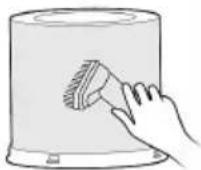
Air outlet Grille
Remove dust using a vacuum cleaner or by wiping with a dry cloth.

natural_image
Illustration of two containers with a hand cleaning the interior (no text or symbols)Cleaning of the HEPA13 filter
It is recommended to clean the HEPA filter at least once every two weeks. The cleaning frequency may vary depending on the usage environment and operating time.
In heavily polluted environments, more frequent cleaning is advised.
- Unplug the appliance, and take out the HEPA-filter.

natural_image
Illustration of a hand inserting a cable into a cylindrical device, with an electrical outlet nearby (no text or symbols)- Vacuum the dust or wipe it with a dry cloth or vacuum cleaner.
Note: Do not wash the filter. Never expose the filter to moisture or water.

- After cleaning, place the filter back into the device and plug it back into the power source
HEPA13 filter replacement
When the filter replacement indicator lights up, it means the HEPA filter should be replaced. If the filter is not replaced in time, the reminder will appear every time the device is powered on.

Replacement filter model: SFAP-150.
You can purchase a replacement filter from the store where you bought the device or through an authorized service network.
Reset Warning Light:
Press and hold the Timer button for 3 seconds to reset the HEPA filter warning light.

Press and hold for 3 seconds
Storage Instructions
The AirPurifier should be stored in a cool and dry place.
Do not allow to be in reach of children.
Troubleshooting
During normal operation, certain errors or malfunctions may occur.
The table below provides a list of common issues, their possible causes, and recommended corrective actions.
Please refer to this table before contacting the service center. In many cases, the problem can be resolved by the user, avoiding unnecessary service requests and associated costs.
| Problem Cause | Solution | |
| The unit does not work properly after installed | The power cable is not plugged in or has poor contact | Make sure the plug is properly inserted into the socket. |
| The power button on the control panel is not turned on. | Turn on the switch on the control panel. |
Technical specification
| Model | Voltage | Power | CADR | Dimensions |
| AP-150M W/G/B | 220V-240V~ 50/60Hz | 30W | 135 Min – 150 Max m^3 /h | 190x310x190mm |
| Noise Level High / Low speed | <55 dB(A) / <33 dB(A) | |||
| Off mode Power consumption: 0,4 W | Standby Power consumption: N/A | |||
Disposal of electrical and electronic equipment

To protect our environment and to recycle the raw materials used as completely as possible, the consumer is asked to return unserviceable equipment to the public collection system for electrical and electronic. The symbol of the crossed indicates that this product must be returned to the collection point for electronic waste to feed it by recycling the best possible raw material recycling.
By ensuring this product you will prevent possible negative effects on the environment and human health, which could otherwise be caused due to improper disposal of that product. The recycling of materials from this product, you will help to preserve a healthy environment and natural resources.
For detailed information about the collection of EE products contact M SAN Grupa or the dealer where you purchased the product.
This device is manufactured in accordance with the applicable European standards and in accordance with all applicable Directives and Regulations.
EU declaration of conformity can be downloaded from the following link:
www.msan.hr/dokumentacijaartikala

JAMSTVENI LIST HR
VIVAX
MODEL UREĐAJA
SERIJSKI BROJ
DATUM PRODAJE
BROJ RAČUNA PRODAVATELJA
POTPIS I PEČAT PRODAVATELJA
POŠTOVANI!
Zahvaljujemo na kupnji Vivax uređaja i nadamo se da ćete biti zadovoljni odabirom. Ako u jamstvenom roku bude potreban popravak proizvoda, molimo savjetujte se sa ovlaštenim prodavačem koji Vam je proizvod prodao ili nas kontaktirajte na dolje navedene brojeve i adrese. MOLIMO VAS DA PRIJE UPORABE PROIZVODA PAŽLJIVO PROČITATE UPUTE PRILOŽENE UZ PROIZVOD!
POTPIS I PEČAT PRODAVATELJA
POŠTOVANI!
The Ground Truth image displays a single, solid horizontal line. According to Rule 2 (UNDERSCORE & LINE RULES), this is a stylistic or background line, not a placeholder underscore. Therefore, the OCR result must ignore it and output nothing or only meaningful text. The provided OCR content is "____", which consists of four underscores. This is an incorrect interpretation of the line as a placeholder, violating the rule that stylistic lines must be ignored. The OCR has hallucinated underscores where none should exist based on the GT's visual context. Hence, the OCR result is inconsistent with the Ground Truth.
Works best with life.
SN.:
VIVAX
- Works best with life.
- HR
- MK
- Pročišćivač zraka
- AERIS Mini Series
- SIGURNOST I UPOZORENJA
- Ugradite HEPA filter.
- Priprema
- Čišćenje HEPA13 filtera
- Prečišćivač vazduha
- BEZBEDNOST I UPOZORENjA
- VAŽNO: Molimo vas da sačuvate ovo uputstvo za buduće potrebe.
- Testiranje rada
- NAPOMENA
- Instalirajte HEPA filter.
- Zamena HEPA13 filtera
- Resetovanje upozorenja o zameni filtera:
- Употреба
- Pastrues ajri
- Mini-Seria AERIS
- Pastrimi i filtrit HEPA13
- Čistilec zraka
- Mini serija AERIS
- Namestite HEPA filter.
- Priprava
- Zamenjava filtra HEPA13
- Air Purifier
- SAFETY AND WARNINGS
- IMPORTANT: Please retain your instruction booklet for future use.
- Important Safeguards for your Air Purifier.
- Warning: To reduce the risk of fire, electrical shock or injury to person or property:
- Caution:
- Important Safeguards for all Electrical appliances
- Part names
- Box Contents
- NOTE
- Assembly and installation
- Test Run
- Cleaning and Maintenance
- Cabinet:
- Air outlet Grille
- Cleaning of the HEPA13 filter
- HEPA13 filter replacement
- Replacement filter model: SFAP-150.
- Reset Warning Light:
- Storage Instructions
- Troubleshooting
- Disposal of electrical and electronic equipment
- JAMSTVENI LIST HR
- VIVAX
- MODEL UREĐAJA
- SERIJSKI BROJ
- DATUM PRODAJE
- BROJ RAČUNA PRODAVATELJA
- POTPIS I PEČAT PRODAVATELJA
- POŠTOVANI!
Brand : Vivax
Model : AP-150M B
Category : Air purifier