
OT180FWW - Washing machine GORENJE - Free user manual and instructions
Find the device manual for free OT180FWW GORENJE in PDF.


| Product Type | Freestanding Washing Machine |
| Brand | Gorenje |
| Model | OT180FWW |
| Capacity | 8 kg |
| Spin Speed | 1400 rpm |
| Energy Class | A+++ |
| Noise Level (Wash) | 56 dB(A) |
| Noise Level (Spin) | 76 dB(A) |
| Dimensions (H x W x D) | 85 x 60 x 55 cm |
| Weight | 68 kg |
| Power Supply | 220-240 V, 50 Hz |
| Water Connection | Cold water only |
| Programs | Cotton, Synthetics, Delicates, Wool, Quick 15', Eco, Rinse & Spin |
| Display | LED with time remaining indicator |
| Delay Start | Up to 24 hours |
| Child Lock | Yes |
| Drum Material | Stainless steel |
| Annual Energy Consumption | 175 kWh |
| Annual Water Consumption | 9200 L |
| Spare Parts Availability | 7 years after end of production |
Frequently Asked Questions - OT180FWW GORENJE
User questions about OT180FWW GORENJE
0 question about this device. Answer the ones you know or ask your own.
Ask a new question about this device
Download the instructions for your Washing machine in PDF format for free! Find your manual OT180FWW - GORENJE and take your electronic device back in hand. On this page are published all the documents necessary for the use of your device. OT180FWW by GORENJE.
USER MANUAL OT180FWW GORENJE
Instructions for Use GB
- Med utripanjem izberite želeni program. Za izbor programa pritisnite ↑ ali ↓, nato SET za potrditev.
![graph LR A["01"] --> B["02"] B --> C["SET"]](/content/2026/05/1100339/images/d1b35b76427adb582c60733fd9c566c1c1a44d107be6500a7e603eee81f8c6a6.jpg)
- Vstavite 2 x CR 2032 baterije.
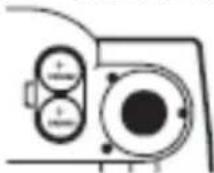
- Zaprite pokrovček.

Opomba:
- Za vrijeme treptanja izaberite željeni program. Za izbor programa pritisnite ↑ ili ↓ i zatim SET za potvrđivanje.
![graph LR A["01"] --> B["02"] B --> C["SET"]](/content/2026/05/1100339/images/47e48747ba56abe219ed54e2d58f242580dedad2235e7a3b9a693c4eb2c25e94.jpg)
- Namjestite jedinicu težine.

- Namjestite spol.
![graph LR A["Input"] --> B{Transformation} B --> C["Output"] style A fill:#fff,stroke:#000 style B fill:#fff,stroke:#000 style C fill:#fff,stroke:#000](/content/2026/05/1100339/images/83b3964fe0774c76310af10f937e688ae0151782f89e1455dbf417a6bf92304b.jpg)
- Atletski način.
![graph LR A["输入"] --> B{转换} B --> C["输出"] C --> D["SET"]](/content/2026/05/1100339/images/dcdec179df6b6ed5dac57dba618201371e077d04b4776f9836bebf7b8c513190.jpg)
- Namjestite starost.
![graph LR A["30"] --> B["↔"] B --> C["-31"] C --> D["SET"]](/content/2026/05/1100339/images/391b129fb40d82b9735fbd4e9b14956b884fdabe53b086fdf9108cace90d1315.jpg)
- Namjestite visinu.

- Umetnite 2 x CR 2032 baterije.

- Zatvorite poklopac.

Pozor:
- Ako vagu ne rabite dulje vrijeme, izvadite baterije iz jedinice.
- Prazne baterije odlažite u za to namijenjeni prostor. Pazite na prirodu. NE BACAJTE IH U SMEĆE!
- Ako su baterije procurile, odmah ih zamijenite jer mogu trajno oštetiti vagu.
DETALJNI OPIS
Težina: maks. 180 kg....Stupnjevanje: 0,1 kg
Starost: 10-99 Stupnjevanje: 1
- U toku treperenja odaberite željeni program.Za biranje programa pritisnite ↑ ili ↓, zatim SET za potvrđivanje.
![graph LR A["01"] --> B["02"] B --> C["SET"]](/content/2026/05/1100339/images/ee5a2dfa378bd0f2c2ebb160300a718dcb05f37aa4a76aaac7bde0dc0ff96ad0.jpg)
- Unesite jedinicu težine.

Na ekranu će se pojaviti vaša težina.
MERENJE SA MERENJEM TELESNE MASNOĆE I VODE
- Zatvorite poklopac.
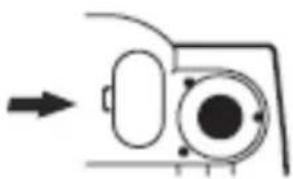
- Ubacite 2 x CR 2032 baterije.

Napomena:
- Ako vagu ne upotrebljavate duže vremena izvadite baterije iz nje.
2 Prazne baterije odložite u za to namenjen prostor. Čuvajte prirodu. NE BACAJTE IH U SMEĆE! - Ako su baterije procurile, treba ih odmah zameniti jer mogu trajno oštetiti vagu.
DETALJAN OPIS
Težina: Max 180 kg ......Stepenovanje: 0.1 kg
Starost: 10-99 Stepenovanje: 1
Visina: 100-220 cm Stepenovanje: 1 cm
% telesne masnoće ......Područje merenja 5-53%
% vode u telu....Područje merenja 36-85%
- Ставете 2 x CR 2032 батерии.

Забeleшка:
Why is it important to know the fat percentage in your body?
Obesity(having an abnormal proportion of body fat) is a known risk for people's health, which is closely associated with serious diseases like high blood pressure, heart disease, diabetes, osteoarthritis and some forms of cancer. There are other, less common symptom like sleep apnea and sleepiness during the day, which can be caused by obesity. Measuring the body fat percentage, or your Body Composition, is an effective way to determine the level of your fitness.
Body water is an indicator of healthiness. If weight remains the same, the value of TBW(total body water)% increases, which indicates the muscle in one's body increases(which is good for health); if value of TBW (%) decreases, which indicates the muscle in one's body decreases and fat increases, or indicates maladjustment of body water or some possible diseases with lacking body water.
How the scale works
The fat monitor uses one of the most reliable methods of analyzing body composition, BIA, short for bioelectrical impedance analysis. BIA measures the resistance, which is in proportional to fat in body, to the flow of a small, harmless low-level electrical current. The source electrodes introduce the current at one end and the detecting electrodes receive the current at the other end. Data, like height, age, gender, from the BIA device is then input into a software program for analysis. Weight and body fat are calculated automatically.
The Scale's accuracy is dependent up several client-based variable, we recommend that you get into a routine of taking measurements, always at around the same time of day and under the same conditions.
Important Notice:
- This scale requires bare feet for proper conductivity while measuring body fat.
- Do not place the scale on a carpeted or uneven surface.
- Do not use the body fat monitor function of these products if you are using the following equipment-cardiac pacemaker, electrocardiograph and/or other medical devices implanted in the body or used for support.
- Excessive drinking, eating, exercising, medical conditions, taking medication, the female menstrual cycle etc., have an effect on the measurement results.
REFERENCE TABLE
Body fat percentage
Female
Male
| Age | Under fat | Healthy | Overfat | Obese | Under fat | Healthy | Overfat | Obese | |
| 10-17 | ≤20 | 20-31 | 31-37 | ≥37 | ≤8 | 8-19 | 19-25 | ≥25 | |
| 18-39 | ≤21 | 21-32 | 32-38 | ≥38 | ≤9 | 9-20 | 20-26 | ≥26 | |
| 40-59 | ≤23 | 23-34 | 34-40 | ≥40 | ≤11 | 11-22 | 22-28 | ≥28 | |
| 60-79 | ≤25 | 25-36 | 36-42 | ≥42 | ≤13 | 13-24 | 24-30 | ≥30 | |
| Athlete | 12-25 | Athlete | 3-15 |
Body water percentage
| Female | Male | |
| Adult | 38-75 | 36-75 |
Athlete Mode:
Athletic body has greater muscle mass and tend to be more dehydrated than standard adult body, and will result in high body fat reading if measured with standard adult mode.
Note:
The scope above were gained by sampling, the data is only for reference, if you have any question about your health, please consult your doctor.
SET PERSONAL DATA
The scale can store 12 persons' data (including age, height, gender & unit).
- Press the ON/OFF button to turn the scale on. "8888" will display. Press SET.
![graph LR A["ON/OFF"] --> B["8888"] B --> C["SET"]](/content/2026/05/1100339/images/b513e1895866a297a8b13f872209da91e64180ba8aca0b076b5a0c6629f2ee1f.jpg)
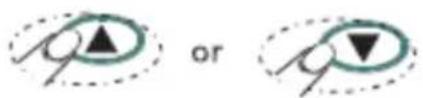
2 While the digit is flashing please select the desired program. Press the ↑ / ↓ button to select pre-programmed number. Press the SET button to confirm.
![graph LR A["01"] --> B["02"] B --> C["SET"]](/content/2026/05/1100339/images/71004de72fc55956f6a9efd9a18430d01f04a2d34fc09af0ead0386828fd2241.jpg)
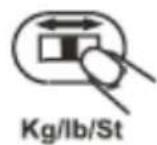
- Set unit mode (kg/ lb).
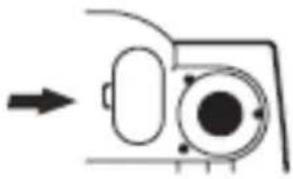
Backside of the scale

Select the weight unit (kg/lb/St)
- Set your gender
![graph LR A["Input"] --> B{Transformation} B --> C["Output"] style A fill:#fff,stroke:#000 style B fill:#fff,stroke:#000 style C fill:#fff,stroke:#000 note1["▲"] --> B note2["▼"] --> B](/content/2026/05/1100339/images/e076b3fd0ce59d14e66ecaafe23a81977be93d3859f5713506a38cf8a005451f.jpg)
- Athlete mode
![graph LR A["输入"] --> B{双向箭头} B --> C["中间箭头"] C --> D["输出 SET"]](/content/2026/05/1100339/images/d96c5abb0738c8f928f995ff81fbe346fb405e7614988c5d9292e779ed43faed.jpg)
- Set your height
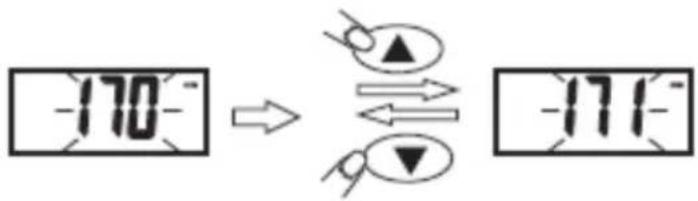
- Set your age
![graph LR A["-30"] --> B["↔"] B --> C["-31"] C --> D["SET"]](/content/2026/05/1100339/images/b9410ca70190fd8363260e7a46e6cc611cf7e006c96c09425a2e3de568917f2a.jpg)
Height can be measured in cm or in inch. When we set weight to kg, the scale automatically measures in cm. If the weight is set to lb or st, the weight is measured in inch.
-
After the pre-program number flashes 3 times, all the personal data are stored, then the scale is in measuring mode.
-
Set other pre-program numbers, repeat step 1-7.
- The default setting is: man, 175, 30, kg, cm. (Default setting might be different as a result of OQC test).
- The scale will display 0.0 in about 5 seconds while setting personal data if you don't press any button.
WEIGHING ONLY
Press the ON/OFF button to turn the scale on.
![graph TD A["ON/OFF"] --> B["8888"] B --> C["Grid Icon 1"] B --> D["Grid Icon 2"] B --> E["Grid Icon 3"] B --> F["Grid Icon 4"] B --> G["Grid Icon 5"] B --> H["Grid Icon 6"] B --> I["Grid Icon 7"] B --> J["Grid Icon 8"] B --> K["Grid Icon 9"] B --> L["Grid Icon 10"] B --> M["Grid Icon 11"] B --> N["G…](/content/2026/05/1100339/images/d01964fcb51801cdd7e919a1f841e01102f0c3d1ec6807147d4e93e24e1305d0.jpg)
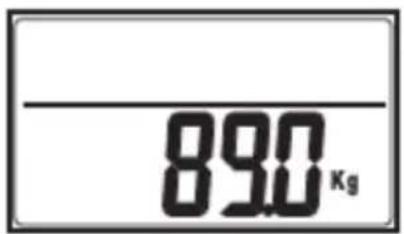
When "0.0 kg" is displayed step on the scale.
![graph TD A["0.0"] --> B["Device Icon"] B --> C["700"]](/content/2026/05/1100339/images/6cd32cd77c331542f6b4c4ee43d09a401a5ec1433e3f552771f00b0db2dc4eea.jpg)
Your weight will be displayed on the screen.
WEIGHING AND MEASURING BODY FAT AND WATER PERCENTAGE
Press the ON/OFF button to turn the scale on.
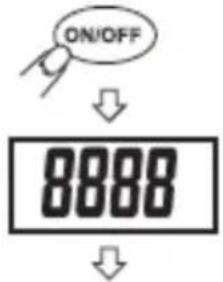
Select the program.
Select the preset number or the scale will automatically set to weighting mode.
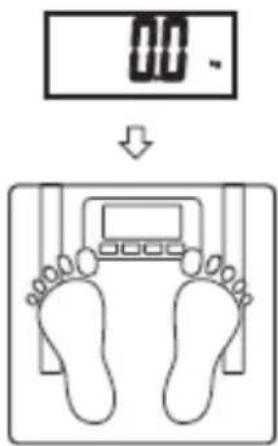
Step on the scale. The scale will switch off automatically if you do not step on it in 10 sec after 0.0 kg appears on the screen.
![graph TD A["Top Block"] --> B["Left Block"] B --> C["Right Block"] C --> D["Bottom Block"]](/content/2026/05/1100339/images/cfb4d1ed6a13424a7c481e0ad5e3146e751a86ad29e579fa6bd11ae68636f2a4.jpg)
The scale is measuring your body fat and water level.

Shows your weight.
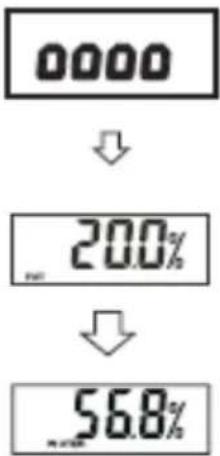
The screen shows your body fat and body water percentage. After that it will automatically shut off.
BATTERY
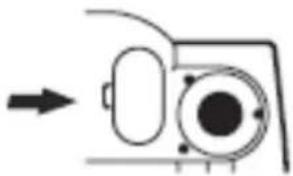
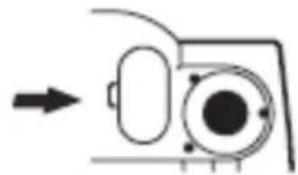
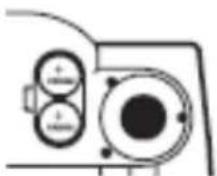
- Open battery cover on the back side of the scale.

- Insert 2x CR 2032 batteries.
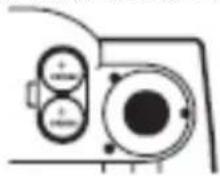
- Close the cover.
Note:
- Please take the batteries out if the scale is not in use for a long time.
- The battery should, be disposed of when it is no longer capable of functioning, according to the local regulations in your municipality; in most cases you can deliver the battery to your local recycling centre.
- If the batteries are leaking, please change them immediately, otherwise it may cause damage to the scale.
SPECIFICATION
Weight range Max180kg......Graduation 0.1kg
Age range 10-99 ...... Graduation 1
Height range 100-220cm ......Graduation 1cm
Body fat percentage range.... 5-53%
Water percentage range 36-85%
CAUTION
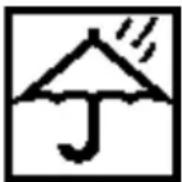
Keep the scale off water

Don't step on the edge of the scale

Keep the scale with care

Don't step on the Scale with wet feet

Don't put it on uneven floor while weighing

Body fat & water percentage has to be measured barefoot
IMPORTANT
Pregnant and cardiac pacemaker users are prohibited to use the scale.
Environment
Do not throw away the appliance with the normal household waste at the end of its life, but hand it in at an official collection point for recycling. By doing this, you help to preserve the environment.
This appliance is marked according to the European directive 2002/96/EC on Waste Electrical and Electronic Equipment (WEEE). This guideline is the frame of a European-wide validity of return and recycling on Waste Electrical and Electronic Equipment.
GORENJE WISHES YOU A LOT OF PLEASUREWHILE USING YOUR APPLIANCE
INFORMACJE OGÓLNE
Uwaga:
- Zadajte váš vek.
![graph LR A["-30"] --> B["↔"] B --> C["-31"] C --> D["SET"]](/content/2026/05/1100339/images/a53e04374e989a9f03881d2c33fcc2f0a5696c4289912760418ccfdc448f16ef.jpg)
- Zadajte vašu výšku.

- Zatvorte batériový priestor.
- Vložte 2x CR 2032 batérie.
Poznámka:
- Установка возраста.
![graph LR A["30"] --> B["→"] B --> C["31"] C --> D["SET"] style A fill:#f9f,stroke:#333 style D fill:#ccf,stroke:#333](/content/2026/05/1100339/images/75383487799a6e18e81e87126086ee4caf33e6693ab2d4b6423de32b98de407a.jpg)
- Установка роста.

- Закройте крышку.
- OPOMBA
- POZOR
- DETALJNI OPIS
- MERENJE SA MERENJEM TELESNE MASNOĆE I VODE
- NAPOMENA
- DETALJAN OPIS
- ЗАБELEШКА
- HOW THE SCALE WORKS
- IMPORTANT NOTICE
- REFERENCE TABLE
- ATHLETE MODE
- NOTE
- SET PERSONAL DATA
- WEIGHING ONLY
- WEIGHING AND MEASURING BODY FAT AND WATER PERCENTAGE
- BATTERY
- SPECIFICATION
- CAUTION
- IMPORTANT
- ENVIRONMENT
- GORENJE WISHES YOU A LOT OF PLEASUREWHILE USING YOUR APPLIANCE
- INFORMACJE OGÓLNE
- UWAGA
- POZNÁMKA
Brand : GORENJE
Model : OT180FWW
Category : Washing machine