
Xenium E6810 - Mobile Phone PHILIPS - Free user manual and instructions
Find the device manual for free Xenium E6810 PHILIPS in PDF.


Pick your language and provide your email: we'll send you a specifically translated version.
| Product Type | Mobile Phone (Feature Phone) |
| Model | Philips Xenium E6810 |
| Dimensions | 117 x 51 x 14.5 mm |
| Weight | 95 g with battery |
| Display | 2.8-inch TFT, 240x320 pixels |
| Battery | Li-Ion 3100 mAh, removable |
| Standby Time | Up to 50 days |
| Talk Time | Up to 20 hours |
| SIM Slots | Dual SIM (Standard SIM) |
| Camera | Rear VGA, no front camera |
| Memory | microSD slot up to 32 GB, internal ~64 MB |
| Radio | FM Radio with recording |
| Flashlight | Yes, dedicated button |
| Connectivity | Bluetooth 2.1, micro USB 2.0, 3.5 mm jack |
| Network | GSM 900/1800 MHz |
| Sensors | None (basic phone) |
| Audio | Mono speaker, ringtone MP3 |
| Included Accessories | Battery, charger, user manual |
| Maintenance | Clean with dry cloth, avoid liquids |
| Safety | Use approved parts, avoid water exposure |
| Spare Parts & Repairability | Battery and back cover easily replaceable; screen service by qualified technician |
| General Information | Designed for long battery life and basic communication needs |
Frequently Asked Questions - Xenium E6810 PHILIPS
How do I insert the SIM card and microSD card?
Remove the back cover and battery. You will see two SIM slots (SIM1 and SIM2) and one microSD slot. Insert SIMs with gold contacts facing down, and push the microSD card until it clicks.
How long does the battery last?
The Philips Xenium E6810 has a 3100 mAh battery providing up to 20 hours talk time and up to 50 days standby.
Can I charge the phone via USB?
Yes, use the included micro USB cable and plug it into a standard USB charger (5V/1A) or computer USB port.
How to turn on the flashlight?
Press and hold the Flashlight button located on the top edge of the phone for 2 seconds. Press again to turn off.
Does this phone support 4G or 3G?
No, the E6810 is a GSM dual-band phone (900/1800 MHz) and does not support 3G or 4G networks.
How to set an MP3 as ringtone?
Copy the MP3 file to the memory card or phone memory. Go to Settings > Audio Profiles > Customize > Ringtone and select your file.
Can I use WhatsApp or other apps?
No, this is a basic feature phone without an app store. It supports only built-in functions like calls, SMS, FM radio, and basic multimedia.
Why is my phone not charging?
Ensure the charger is plugged into a working outlet and the micro USB cable is fully inserted. If the battery is completely drained, allow 10-15 minutes before the indicator shows charging.
How to unlock the keypad?
Press the Left soft key (usually labeled 'Unlock') then press the OK button within 2 seconds to unlock the keypad.
Where can I find the user manual?
A printed manual is included in the box. You can also download a PDF version from our website via the download button on this page.
User questions about Xenium E6810 PHILIPS
0 question about this device. Answer the ones you know or ask your own.
Ask a new question about this device
No questions yet. Be the first to ask one.
Download the instructions for your Mobile Phone in PDF format for free! Find your manual Xenium E6810 - PHILIPS and take your electronic device back in hand. On this page are published all the documents necessary for the use of your device. Xenium E6810 by PHILIPS.
USER MANUAL Xenium E6810 PHILIPS
- 找到手机右侧卡托孔

找到手机下方Type-c插口
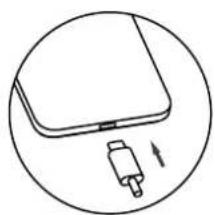
按箭头方向进行插拨
注意
充电时,您仍可以使用手机。
502.C071.21000


