FVA50NE - Oven REX - Free user manual and instructions
Find the device manual for free FVA50NE REX in PDF.


Pick your language and provide your email: we'll send you a specifically translated version.
| Product Type | Built-in Electric Oven |
| Brand | Rex |
| Model | FVA50NE |
| Energy Source | Electric |
| Voltage | 220-240 V ~ 50 Hz |
| Total Power Consumption | 2400 W |
| Energy Efficiency Class | A |
| Oven Capacity | 70 L |
| Temperature Range | 50°C - 250°C |
| Number of Functions | 8 (Conventional, Grill, Fan, Defrost, etc.) |
| Dimensions (H x W x D) | 595 x 595 x 560 mm |
| Weight | 30 kg |
| Control Type | Rotary knobs + Timer |
| Display | LED clock and timer |
| Interior Light | Yes |
| Child Lock | Yes |
| Auto Shut-off | Yes |
| Cool Touch Door | Yes |
| Cleaning Method | Clean with damp cloth and mild detergent |
| Removable Door Glass | Yes |
| Spare Parts Availability | Contact Rex service center |
| Included Accessories | 1 oven rack, 1 baking tray |
| User Manual | PDF available for download |
Frequently Asked Questions - FVA50NE REX
How do I set the timer on my Rex FVA50NE oven?
Turn the timer knob clockwise to the desired cooking time (up to 120 minutes). The oven will switch off automatically when the time elapses.
What does the 'defrost' function do?
The defrost function uses the fan to circulate room temperature air, speeding up defrosting of frozen foods without cooking them.
Why is my oven not heating up?
Check that the oven is properly connected to the power supply and that the timer is set. If the problem persists, the heating element may be faulty. Contact Rex support.
How do I clean the oven door glass?
For easy cleaning, the inner door glass can be removed. Refer to the manual. Clean with a soft cloth and mild glass cleaner. Avoid abrasive pads.
Can I use aluminum foil in the oven?
Avoid covering the oven floor or heating elements with foil as it can damage the enamel. Use foil only on the rack or tray, and keep away from the element.
What is the maximum weight for the oven rack?
The oven rack supports up to 25 kg evenly distributed. Do not overload.
How do I activate the child lock?
Press and hold the 'Child Lock' button for 3 seconds until the lock icon appears. To deactivate, repeat the process.
Why is there smoke coming from the oven?
Food residue on the bottom or heating elements can produce smoke. Remove any spills. If first use, some smoke from protective oil is normal. Preheat empty oven for 30 min.
How do I replace the oven light bulb?
Disconnect power. Remove the glass cover (twist counterclockwise). Replace with a 25W, 300°C resistant bulb (E14). Do not touch bulb with bare hands.
What do the symbols on the control panel mean?
Symbols indicate cooking modes: top/bottom heat, fan forced, grill, defrost, etc. Refer to the user manual for a full description.
User questions about FVA50NE REX
0 question about this device. Answer the ones you know or ask your own.
Ask a new question about this device
No questions yet. Be the first to ask one.
Download the instructions for your Oven in PDF format for free! Find your manual FVA50NE - REX and take your electronic device back in hand. On this page are published all the documents necessary for the use of your device. FVA50NE by REX.
USER MANUAL FVA50NE REX
Fig. 3
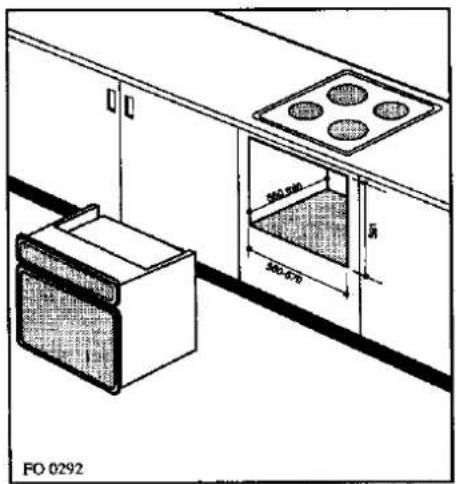
Fig. 4
ASSIEMAGGIO
natural_image
Simple line drawing of a mechanical or electrical component with a screw and rod, no text or symbols present.Fig. 6
natural_image
Line drawing of a hand holding a tool against a diagonal line, no text or symbols presentFig. 10
ASSIEME SONDA VAPORE (Fig. 11)
natural_image
Line drawing of a hand cleaning a clean surface inside a rectangular appliance with a circular vent (no text or symbols)Fig. 16
ACQUE CONSIGLIATE PER COTTURE A VAPORE
natural_image
Illustration of a large dome-shaped structure with surrounding clouds and plants, enclosed in a decorative frame (no text or symbols)VAPORE IN TEGLIA
natural_image
Illustration of a fish being cooked in a rectangular dish using a tool (no text or symbols)VAPORE DIFFUSO
natural_image
Diagram of a container with a hose and a circular object inside, enclosed in a rectangular frame (no text or symbols)VAPORE DIRETTO
natural_image
Line drawing of a two-tier baking tray with multiple baked goods inside (no text or symbols)Fig. 17
natural_image
Diagram of a device interior showing a circular component with internal circuit-like structure and directional arrows (no text or symbols)Fig. 21
SCARICO ACQUA DEL GENERATORE VAPORE
natural_image
Diagram of a rope knot being lifted by a clamp, showing rope routing and angle measurement (no text or symbols)Fig. 24
natural_image
Hand holding a cable with arrows indicating direction of movement (no text or symbols)Fig. 25
natural_image
Technical diagram of a mechanical device with internal components and directional arrows (no text or symbols)Fig. 26
PULIZIA DEL GENERATORE E SONDA VAPORE
PULIZIA GENERATORE VAPORE
natural_image
Technical line drawing of a mechanical component with three views: straight, curved, and flanged (no text or symbols)Fig. 30
natural_image
Line drawing of a vintage computer monitor with front panel and base (no text or symbols)
Table of contents
Click a title to access it
Manual assistant
Powered by Anthropic
Waiting for your message
Product information
Brand : REX
Model : FVA50NE
Category : Oven