
IVY-405-11W - Lighting Cotech - Free user manual and instructions
Find the device manual for free IVY-405-11W Cotech in PDF.


| Product Type | LED Desk Lamp |
| Model | IVY-405-11W |
| Brand | Cotech |
| Power Consumption | 11W |
| Input Voltage | 220-240V ~ 50/60Hz |
| Light Source | Integrated LED (non-replaceable) |
| Color Temperature | 3000K - 6000K (adjustable) |
| Brightness Levels | 5 levels (10% - 100%) |
| Luminous Flux | 800 lm (max) |
| Dimensions (H x W x D) | 42 cm x 15 cm x 25 cm |
| Weight | 0.8 kg |
| Material | Aluminum and ABS plastic |
| Control Method | Touch sensor on base |
| Adjustable Arm | Yes, with spring mechanism |
| USB Charging Port | Yes (5V/2A) |
| Eye-Care Technology | Flicker-free, anti-glare |
| Energy Class | F (EU 2019/2015) |
| Lifetime (LED) | 50,000 hours |
| Cleaning Instruction | Wipe with dry cloth, avoid liquids |
| Safety Feature | Overheat protection |
| Warranty | 2 years |
Frequently Asked Questions - IVY-405-11W Cotech
User questions about IVY-405-11W Cotech
0 question about this device. Answer the ones you know or ask your own.
Ask a new question about this device
Download the instructions for your Lighting in PDF format for free! Find your manual IVY-405-11W - Cotech and take your electronic device back in hand. On this page are published all the documents necessary for the use of your device. IVY-405-11W by Cotech.
USER MANUAL IVY-405-11W Cotech
Read the entire instruction manual carefully and make sure that you fully understand it before you use the equipment. Keep the manual for future reference.
Viktig information:
natural_image
Line drawing of a rectangular electronic device with two circular outlets and a power outlet (no text or symbols)11 W PL-Compact Fluorescent Counter/Wall Light
ART.NO 36-4745 MODEL IVY-405-11W
Please read the entire instruction manual before using the product and save it for future reference. We reserve the right for any errors in text or images and any necessary changes made to technical data. If you have any questions regarding technical problems please contact our customer services.
Safety
- This product is intended for indoor use only.
- Only connect the product to a power supply of 230 V, 50 Hz.
- Take care to avoid any electrical cables or water pipes hidden in the wall or ceiling if you need to drill holes to mount the light fitting.
- Keep the work area clean and tidy. Cluttered surfaces and benches invite accidents.
- Keep any onlookers, especially children, at a safe distance from the ongoing installation work.
- Never attempt to tamper with or modify the product in any way.
- Any repairs to the product must only be carried out by a competent electrician and only using genuine spare parts.
Installation
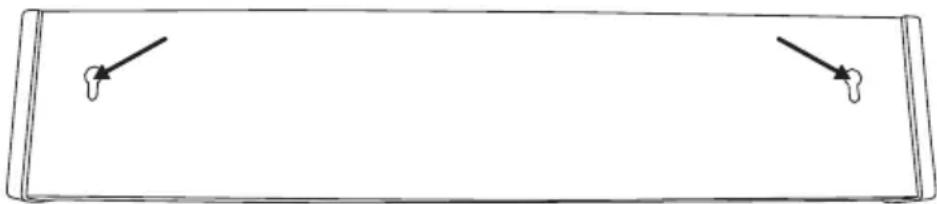
- The light fitting has mounting holes on the back.

natural_image
Pure diagram of a rectangular container with internal components and directional arrows, no text or symbols present.- The small mounting holes located on the back of the light fitting can also be used if necessary. Note: The provided screws are larger than the smaller mounting holes. The small holes only accommodate screws up to 4 mm in diameter. These smaller screws must be purchased separately.
- There are also mounting holes on the bottom.
natural_image
Simple line drawing of a rectangular frame with two small protrusions and an arrow pointing to the top-left corner (no text or symbols)- Mark out the position of the mounting holes using the most suitable holes as a guide. The included screws and wall plugs can be used for mounting.
Wiring
Note: If you are at all unsure how to wire the light fitting, contact a competent electrician.
- Turn off the power before beginning the installation.
- Bear in mind that the circuit must be protected by a fuse.
-
Connect the wires to the correct terminals (L, N or ⏻). The earth must always be connected.
-
If the light fitting is to be mounted with the back up against the supporting surface, cut away the plastic in one of the prepared holes in the end of the fitting and pass the cable through it.

natural_image
Pure technical line drawing of a mechanical component with no text or symbols- The light fitting has two earthed electrical sockets. These sockets are "live" even when the counter light is switched off. Note: The two electrical sockets must not be loaded over 16 A.
Care and maintenance
Replacing the fluorescent tube
Only use a fluorescent tube of the same type and rating as the original.
- Turn off the power before changing the tube.
-
Wait until the tube has cooled down before handling it.
-
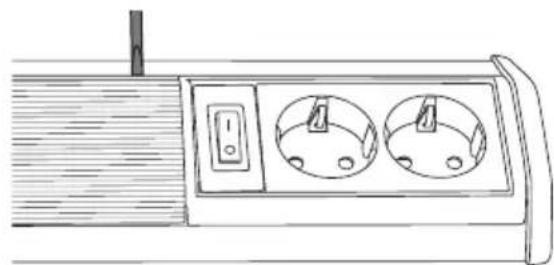
Carefully pry out the diffuser with a screwdriver.
natural_image
Line drawing of a wall-mounted electrical socket with two circular outlets and a switch (no text or symbols)- Lift the diffuser up a little and slide it out of the end of the light fitting.

natural_image
Line drawing of a hand holding a device with a right-handled arrow indicating direction (no text or symbols)- Carefully release the fluorescent tube from the clip and then unplug it from the pin socket.

natural_image
Line drawing of a hand holding a cylindrical device with internal components and directional arrows indicating movement (no text or symbols)- Insert a new fluorescent tube and then refit the diffuser. Never use the light fitting without the diffuser in place.
Cleaning
- Turn off the power and wait until the fitting has cooled.
- Clean the product using a lightly moistened cloth. Only use mild detergents, never solvents or corrosive chemicals.
Disposal
Disposal of this product should be in accordance with local regulations. If you are unsure how to proceed, contact your local authority.
Specifications
Power supply 230 V, 50 Hz
Fluorescent tube Compact Fluorescent double tube 2-pin, G23, 11 W
Size 405 × 85 × 65 mm
Protection class IP20
natural_image
Pure diagram of a rectangular device with internal components and directional arrows, no text or symbols present.natural_image
Simple line drawing of a rectangular frame with two small circular indentations and two arrows pointing to the center (no text or symbols)natural_image
Pure technical line drawing of a mechanical component with no text or symbolsnatural_image
Line drawing of a dual-polluted electrical outlet with a switch and power outlet (no text or symbols)natural_image
Line drawing of a hand holding a device with a right-handled arrow indicating direction (no text or symbols)natural_image
Line drawing of a hand holding a cylindrical device with internal components and directional arrows indicating movement (no text or symbols)natural_image
Pure technical diagram of a rectangular component with internal features and arrows indicating direction (no text or symbols)natural_image
Simple line drawing of a rectangular frame with two corner handles and an arrow pointing to the center (no text or symbols)natural_image
Pure technical line drawing of a mechanical component with no text or symbolsnatural_image
Line drawing of a utility box with two outlets and a switch (no text or symbols)natural_image
Line drawing of a hand holding a device with a right-hand arrow indicating direction (no text or symbols)natural_image
Line drawing of a hand holding a cylindrical device with internal components and directional arrows indicating movement (no text or symbols)natural_image
Pure diagram of a rectangular object with internal symbols and arrows, no text or labels presentnatural_image
Simple line drawing of a rectangular frame with two small protrusions and an arrow pointing to the top-left corner (no text or symbols)natural_image
Line drawing of a door handle with three circular indentations and an arrow pointing to the end (no text or symbols)natural_image
Line drawing of a dual-polluted electrical outlet with a switch and power outlet (no text or symbols)natural_image
Line drawing of a hand holding a device with a right-handled arrow indicating direction (no text or symbols)natural_image
Line drawing of a hand holding a cylindrical device with internal components and directional arrows indicating movement (no text or symbols)For consumer contact, please visit www.clasohlson.co.uk and click on customer service.
INTERNET www.clasohlson.co.uk
Brand : Cotech
Model : IVY-405-11W
Category : Lighting