
STV-036 - Wall mount Steren - Free user manual and instructions
Find the device manual for free STV-036 Steren in PDF.


| Product Type | Wall Mount |
| Brand | Steren |
| Model | STV-036 |
| Compatible Screen Sizes | 26" to 55" |
| VESA Compatibility | 100x100mm to 400x400mm |
| Maximum Weight Capacity | 45 kg (99 lbs) |
| Tilt Range | -5° to +15° |
| Swivel Range | ±60° |
| Level Rotation | ±3° |
| Wall Distance | 2.5 to 18.5 inches (63 to 470 mm) |
| Material | Cold-rolled steel, powder coated |
| Color | Black |
| Installation Type | Fixed to wall studs, includes mounting hardware |
| Included Components | Mount bracket, wall plate, screws, washers, bubble level |
| Security Features | Anti-theft locking brackets, safety screws |
| Cable Management | Built-in cable covers and clips |
| Cleaning Instructions | Wipe with a dry cloth; avoid abrasive cleaners |
| Maintenance | Periodically check screws for tightness |
| Repair and Spare Parts | Contact Steren customer service; spare screws available |
| Certifications | TUV, UL listed (when installed to specification) |
| Warranty | 1 year limited warranty |
Frequently Asked Questions - STV-036 Steren
User questions about STV-036 Steren
0 question about this device. Answer the ones you know or ask your own.
Ask a new question about this device
Download the instructions for your Wall mount in PDF format for free! Find your manual STV-036 - Steren and take your electronic device back in hand. On this page are published all the documents necessary for the use of your device. STV-036 by Steren.
USER MANUAL STV-036 Steren
STEREN PRODUCTO EMPACADO S.A. DE C.V.
Biólogo Maximino Martínez No. 3408 Int. 2, 3 y 4, San Salvador Xochimanca, Del. Azcapotzalco, México, D.F. 02870, RFC: SPE941215H43
ELECTRÓNICA STEREN DEL CENTRO, S.A. DE C.V.
Rep. del Salvador 20 A y B, Centro, 06000, Del. Cuauhtémoc, México. D.F. RFC: ESC9610259N4
ELECTRÓNICA STEREN DE GUADALAJARA, S.A.
López Cotilla No. 51, Centro, 44100, Guadalajara, Jal. RFC: ESG810511HT6
ELECTRÓNICA STEREN DE MONTERREY, S.A.
Colón 130 Pte., Centro, 64000, Monterrey, N.L. RFC: ESM830202MF8
ELECTRÓNICA STEREN DE TIJUANA, S.A. de C.V.
Calle 2a, Juárez 7636, Centro, 22000, Tijuana, B.C.N. RFC: EST980909NU5

STEREN
STV-036
25 to 45" LCD/LED TV stand

Instruction manual
0814b
V0.0
25 to 45" LCD/LED TV stand
STV-036
Thank You on purchasing your new Steren product.
This manual includes all the feature operations and troubleshooting necessary to install and operate your new Steren's 25 to 45" LCD/LED TV stand.
Please review this manual thoroughly to ensure proper installation and operation of this product. For support, shopping, and everything new at Steren, visit our website:
www.steren.com

The instructions of this manual are for reference about the product. There may be differences due to updates.
Please check our website (www.steren.com) to obtain the latest version of the instruction manual.
IMPORTANT
-Only use the supplied pieces and fasten them tightly.
-Do not forget to use all pieces. Install all pieces as shown on this manual.
-Do not try to modify any piece.
-Take care about the weight of the bracket while mounting in a wall.
-If you mount the bracket in a concrete wall, make sure to use the supplied anchors.
-If you mount the bracket in a wooden wall, it is possible that you need an additional support, in order to bear the weight of the TV.
-At least two people are needed for installing the bracket.
-Choose a flat wall, in order to fix the TV securely.
-Place a cover protection over the working surface, while you manipulate the monitor and the wall bracket.
-Make sure the wall bracket is securely fixed to the wall, after the installation.
-Leave at least 15 cm around the unit, and remove all kind of objects.
HIGHLIGHTS
The LCD/LED TV stand is hardy and perfect to use with TVs between 25 and 45" and supports up to 99 lb.
You can adjust the original position up to 15° angle.
The package includes all required fittings for installation.
Manufactured in low carbon steel fi nished in black colour.
Maximum load: 99 lb
VESA
Angle of adjustment: 30° (15 up/ 15° down)
For LED and LCD
CONTENT
| A | Support plate (1) | 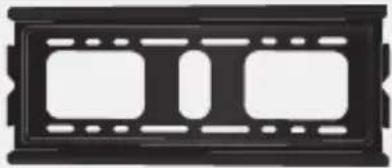 |
| B | Fastening bar (2) | 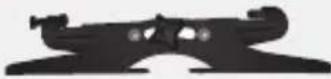 |
| C | Plug (4) |  |
| D | Screw (4) | 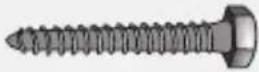 |
| E | M5X14 bolt (4) |  |
| F | M6X14 bolt (4) |  |
| G | M8X14 bolt (4) |  |
| H | M6 washer (4) |  |
| I | M8 washer (4) |  |
BRACKET INSTALLATION
-
Locate the place where you want to install the screen.
-
Place the backplate on the wall and mark the places where you have to drill.
-
Once you made the holes, insert anchors (C) in each one.

-
Place the backplate on the wall, insert the screws (D) in the anchors and tighten firmly.
-
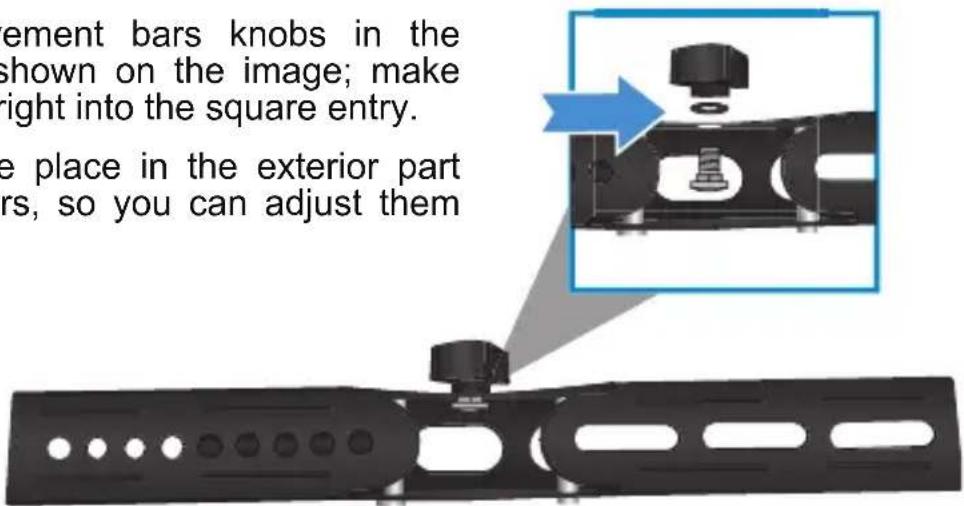
Place the movement bars knobs in the fastening bars as shown on the image; make sure the screw fi ts right into the square entry.
The knobs must be place in the exterior part of the fastening bars, so you can adjust them without any trouble.
- Place and secure the bars on screen's back (check your screen's manual for more information). Use screws E, F, or G and the washer H and I.

The screws are standard size, we recommend refer to the instruction manual of your screen for more information about the necessary screws for the mounting. The next diagram is an example of placement.
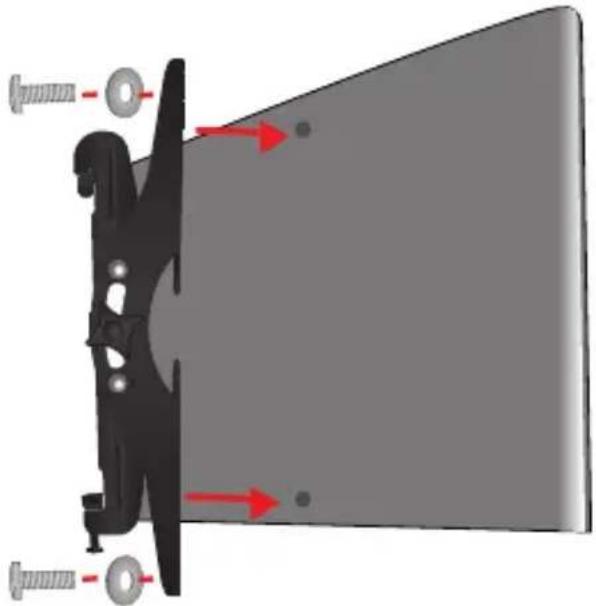
- When the screen is securely mounted in the fastening bars, hook it up to the bottom plate. Note the hook must be placed in the upper side of the plate.

- Tighten the screws so that the bracket is properly fixed.
ANGLE ADJUSTMENT AFTER INSTALLATION
- Once the screen is installed and firmly attached, locate the knob on the movement bars.
- Loosen them slightly so that the screen moves.
- Adjust the screen at the desired angle.
- Tight the knob.

Product: 25 to 45" LCD/LED TV stand
Part number: STV-036
Brand: Steren
WARRANTY
This Steren product is warranted under normal usage against defects in workmanship and materials to the original purchaser for one year from the date of purchase.
CONDITIONS
- This warranty card with all the required information, invoice, product box or package, and product, must be presented when warranty service is required.
- If the product is in the warranty time, the company will repair it free of charge.
- The repairing time will not exceed 30 natural days, from the day the claim was received.
- Steren sell parts, components, consumables and accessories to customer, as well as warranty service, at any of the addresses mentioned later.
THIS WARRANTY IS VOID IN THE NEXT CASES:
If the product has been damaged by an accident, acts of God, mishandling, leaky batteries, failure to follow enclosed instructions, improper repair by unauthorized personnel, improper safe keeping, among others.
a) The consumer can also claim the warranty service in the purchase establishment. b) If you lose the warranty card, we can reissue it, if you show the invoice or purchase ticket.
RETAILER INFORMATION
Name of the retailer
Address
Product ____
Brand
Part number ____
Serial number
Date of delivery ____

In case your product fails or have questions, please contact your nearest dealer. If you are in Mexico, please call to our Call Center.
01 800 500 9000

STEREN
Help us to improve this instruction manual, call us:

01800 500 9000
Customer Service Center
www.steren.com
- STEREN PRODUCTO EMPACADO S.A. DE C.V
- ELECTRÓNICA STEREN DEL CENTRO, S.A. DE C.V
- ELECTRÓNICA STEREN DE GUADALAJARA, S.A
- ELECTRÓNICA STEREN DE MONTERREY, S.A
- ELECTRÓNICA STEREN DE TIJUANA, S.A. DE C.V
- STEREN
- 25 TO 45" LCD/LED TV STAND
- STV-036
- IMPORTANT
- HIGHLIGHTS
- CONTENT
- BRACKET INSTALLATION
- ANGLE ADJUSTMENT AFTER INSTALLATION
- WARRANTY
- CONDITIONS
- THIS WARRANTY IS VOID IN THE NEXT CASES
- RETAILER INFORMATION
Brand : Steren
Model : STV-036
Category : Wall mount