
CU-RE9NKX - Air conditioner PANASONIC - Free user manual and instructions
Find the device manual for free CU-RE9NKX PANASONIC in PDF.


| Product Type | Split System Air Conditioner |
| Model | CU-RE9NKX (Outdoor Unit) |
| Indoor Unit Model | CS-RE9NKX (typically) |
| Cooling Capacity | 9000 BTU/h |
| Heating Capacity | 10,800 BTU/h |
| Power Supply | 220-240 V, 50 Hz, 1 Phase |
| Rated Cooling Power Input | 0.73 kW |
| Rated Heating Power Input | 0.82 kW |
| Energy Efficiency Ratio (EER) | 3.32 (for cooling) |
| Refrigerant Type | R410A |
| Indoor Unit Dimensions (WxHxD) | 837 x 280 x 205 mm |
| Indoor Unit Weight | 10.5 kg |
| Outdoor Unit Dimensions (WxHxD) | 742 x 548 x 245 mm |
| Outdoor Unit Weight | 25 kg |
| Inverter Technology | Yes (DC Inverter) |
| Timer Function | On/Off timer (up to 24 hours) |
| Sleep Mode | Yes, gradual temperature adjustment |
| Air Filter | Washable reusable filter |
| Filter Cleaning Interval | Every 2 weeks (recommended) |
| Safety Features | Overcurrent protection, voltage surge protection |
| Spare Parts Availability | Official Panasonic service centers |
| Reparability | Designed for modular repair; parts available |
| Noise Level (Indoor Unit) | 19-40 dB(A) (low-high) |
| Noise Level (Outdoor Unit) | 50 dB(A) approx. |
| Warranty | Standard Panasonic warranty (check local terms) |
Frequently Asked Questions - CU-RE9NKX PANASONIC
User questions about CU-RE9NKX PANASONIC
0 question about this device. Answer the ones you know or ask your own.
Ask a new question about this device
Download the instructions for your Air conditioner in PDF format for free! Find your manual CU-RE9NKX - PANASONIC and take your electronic device back in hand. On this page are published all the documents necessary for the use of your device. CU-RE9NKX by PANASONIC.
USER MANUAL CU-RE9NKX PANASONIC
Panasonic®
Operating Instructions Air Conditioner
Indoor Unit Outdoor Unit
CS-RE9NKX
CU-RE9NKX
CS-RE12NKX
CU-RE12NKX
CS-RE15NKX
CU-RE15NKX


ENGLISH
Before operating the unit, read these operating instructions thoroughly and keep them for future reference.
ESPAÑOL
© Panasonic Appliances Air-Conditioning (Guangzhou) Co., Ltd. 2012. Unauthorized copying and distribution is a violation of law.
F568412
ENGLISH Thank you for purchasing Panasonic Air Conditioner
TABLE OF CONTENTS
SAFETY PRECAUTIONS 8\~9
REMOTE CONTROL 10\~11
INDOOR UNIT 12
TROUBLESHOOTING 13
INFORMATION ....50\~55
PRODUCT SPECIFICATION 56
QUICK GUIDE....BACK COVER
NOTE: The illustrations in this manual are for explanation purposes only and may differ from the actual unit. They are subjected to change without notice for future improvement.
Use this air conditioner under the following temperature range
| Temperature (°C) | Indoor Outdoor | ||||
| *DBT *WBT *DBT *WBT | |||||
| COOLING | Maximum 32 23 43 26 | ||||
| Minimum 16 11 16 11 | |||||
| HEATING | Maximum 30 - 24 18 | ||||
| Minimum 16 - -5 -6 | |||||
* DBT: Dry bulb temperature
* WBT: Wet bulb temperature
NOTICE: • This model is not suitable for 24 hours non-stopping operation in heating mode below -5°C. When the outdoor temperature is below -5°C and you use this model out of above conditions, the outdoor unit might be frozen up and stop operation for protection control.
To prevent personal injury, injury to others, or property damage, please comply the following. Incorrect operation due to failure to follow instructions may cause harm or damage, the seriousness of which is classified as below:

WARNING
This sign warns of death or serious injury.

CAUTION
This sign warns of injury or damage to property.
The instructions to be followed are classified by the following symbols:

This symbol denotes an action that is PROHIBITED.


These symbols denote an action that is COMPULSORY.
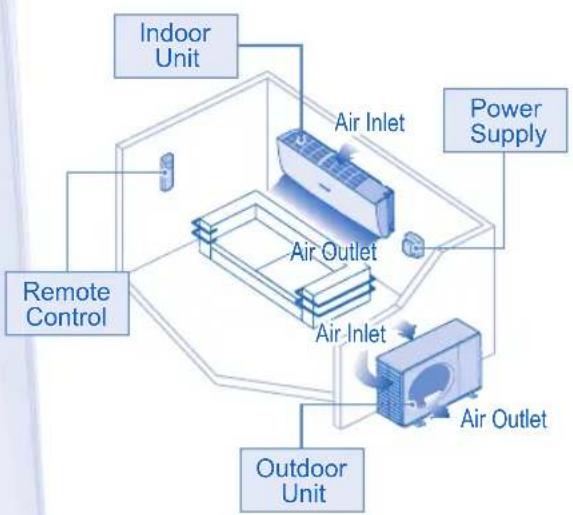
flowchart
graph TD
    A["Indoor Unit"] --> B["Air Outlet"]
    C["Remote Control"] --> B
    D["Air Inlet"] --> B
    E["Air Outlet"] --> B
    F["Power Supply"] --> B
    G["Air Outlet"] --> B
    H["Outdoor Unit"] --> B
    I["Air Inlet"] --> B

WARNING
INDOOR UNIT AND OUTDOOR UNIT

This appliance is not intended for use by persons (including children) with reduced physical, sensory or mental capabilities, or lack of experience and knowledge, unless they have been given supervision or instruction concerning use of the appliance by a person responsible for their safety. Children should be supervised to ensure that they do not play with the appliance.
Please consult authorized dealer or specialist to clean the internal parts, repair, install, remove and reinstall the unit. Improper installation and handling will cause leakage, electric shock or fire.
Confirm to authorized dealer or specialist on usage of specified refrigerant type. Using of refrigerant other than the specified type may cause product damage, burst and injury etc.

Do not install the unit in a potentially explosive or flammable atmosphere. Failure to do so could result in fire.
Do not insert your fingers or other objects into the air conditioner indoor or outdoor unit, rotating parts may cause injury.

Do not touch the outdoor unit during lightning, it may cause electric shock.
Do not expose yourself directly to cold air for a long period to avoid excess cooling.
Do not sit or step on the unit, you may fall down accidentally.

REMOTE CONTROL

Do not allow infants and small children to play with the remote control to prevent them from accidentally swallowing the batteries.
POWER SUPPLY

Do not use modified cord, joint cord, extension cord or unspecified cord to prevent overheat and fire.


To prevent overheating, fire or electric shock:
- Do not share the same power outlet with other equipment.
- Do not operate with wet hands.
- Do not over bend the power supply cord.
- Do not operate or stop the unit by inserting or pulling out the power plug.

WARNING
POWER SUPPLY

If the supply cord is damage, it must be replaced by the manufacturer, its service agent or similarly qualified persons in order to avoid a hazard.
It is strongly recommended to be installed with Earth Leakage Circuit Breaker (ELCB) or Residual Current Device (RCD) to prevent electric shock or fire.
To prevent overheating, fire or electric shock:
- Insert the power plug properly.
- Dust on the power plug should be periodically wiped with a dry cloth.
Stop using the product if any abnormality/failure occurs and disconnect the power plug or turn off the power switch and breaker. (Risk of smoke/fire/electric shock)
Examples of abnormality/failure
• The ELCB trips frequently.
- Burning smell is observed.
- Abnormal noise or vibration of the unit is observed.
• Water leaks from the indoor unit.
• Power cord or plug becomes abnormally hot.
• Fan speed cannot be controlled.
- The unit stops running immediately even if it is switched on for operation.
- The fan does not stop even if the operation is stopped.
Contact your local dealer immediately for maintenance/repair.
Replacement or installation of power plugs shall be performed by authorized/qualified personnel only. The wires in this mains lead are coloured in accordance with the following code:

Wiring colour may vary depending on a country wiring code's standard.

This equipment must be earthed to prevent electric shock or fire.

Prevent electric shock by switching off the power supply and unplug when:
- Before cleaning or servicing.
- Extended non-use
- Abnormally strong lightning activity.


CAUTION
INDOOR UNIT AND OUTDOOR UNIT

Do not wash the indoor unit with water, benzene, thinner or scouring powder to avoid damage or corrosion at the unit.
Do not use for preservation of precise equipment, food, animals, plants, artwork or other objects. This may cause quality deterioration, etc.
Do not use any combustible equipment in front of the airflow outlet to avoid fire propagate.
Do not expose plants or pet directly to airflow to avoid injury, etc.
Do not touch the sharp aluminium fin, sharp parts may cause injury.

Do not switch ON the indoor unit when waxing the floor. After waxing, aerate the room properly before operating the unit.
Do not install the unit in oily and smoky areas to prevent damage to the unit.
Do not dismantle the unit for cleaning purpose to avoid injury.
Do not step onto unstable bench when cleaning the unit to avoid injury.
Do not place vase or water container on the unit. Water may enter the unit and degrade the insulation. This may cause an electric shock.
Do not open window or door for long time during COOL mode operation.

Ensure drainage pipe is connected properly and keep drainage outlet clear of gutters, containers or does not immersed in water to prevent water leakage.
After long period of use or use with any combustible equipment, aerate the room regularly.
After long period of use, make sure the installation rack is not deteriorate to prevent the unit from falling down.
REMOTE CONTROL

Do not use rechargeable (Ni-Cd) batteries. It may damage the remote control.

To prevent malfunction or damage of the remote control:
- Remove the batteries if the unit is not going to be used for a long period of time.
- New batteries of the same type must be inserted following the polarity stated.
POWER SUPPLY

Do not pull the cord to disconnect the plug to prevent electric shock.
REMOTE CONTROL

Press the remote control's button

TO TURN ON OR OFF THE UNIT

- Please be aware of the OFF indication on the remote control display to prevent the unit from starting/stopping improperly.

TO SET TEMPERATURE
- Selection range: 16°C \~ 30°C.
- Operating the unit within the recommended temperature could induce energy saving.
HEAT mode : 20°C \~ 24°C.
COOL mode : 26°C \~ 28°C.
DRY mode: 1°C \~ 2°C lower than room temperature.

- During operation mode selection the power indicator blinks.
- Unit selects the operation mode according to the indoor intake temperature and remote control temperature.
HEAT mode - To enjoy warm air
- In heat mode, it may take a while for the unit to warm up. The POWER indicator blinks during preheating.
COOL mode - To enjoy cool air
- Use curtains to screen off sunlight and outdoor heat to reduce power consumption during cool mode.
DRY mode - To dehumidify the environment
- Unit operates at low fan speed to give a gentle cooling operation.

TO SELECT FAN SPEED (5 OPTIONS)
FAN SPEED

- For AUTO, the indoor fan speed is automatically adjusted according to the operation mode.

TO ADJUST AIRFLOW DIRECTION (5 OPTIONS)
AIR SWING

- In COOL mode, if AUTO is set, the louver swing up/down automatically.
- In HEAT mode, if AUTO is set, the horizontal louver fix at predetermined position.

TO ACHIEVE TEMPERATURE QUICKLY
- This setting enables the desired set temperature to be reached quickly.

TO ENJOY QUIET ENVIRONMENT
- This setting provides a quiet environment by reducing the airflow noise.
- POWERFUL AND QUIET operations can not be activated at the same time.

PRESS TO RESTORE THE REMOTE CONTROL'S DEFAULT SETTING

NOT USED IN NORMAL OPERATIONS

TO SET THE TIMER (12-HOUR TIMER SETTING)
- When you want the air conditioner to turn ON or OFF automatically.
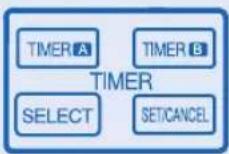
DELAY OFF-TIMER
For example, to stop the air conditioner 5 hours later.
1 To select the Delay OFF-TIMER, press the SELECT button once.
2 Press the TIMER button to select the delay hour.
- The OFF-TIMER can only be set while the air-conditioner is in operation.
DELAY ON-TIMER
For example, to start the air conditioner 2 hours later.
1 To select the Delay ON-TIMER, press the SELECT button once.
2 Press the TIMER button to select the delay hour.
- The ON-TIMER can only be set while the air-conditioner is not in operation.
DELAY OFF AND ON TIMER
For example, to stop the air conditioner 3 hours later and start 4 hours later.
1 To select the Delay OFF and ON Timer, press the SELECT button twice repeatedly.
2 Press the TIMER button to select the delay hour for OFF Timer.
3 Press the TIMER button to select the delay hour for ON Timer.
- This mode of timer can only be set while the air-conditioner is in operation.
DELAY ON AND OFF TIMER
For example, to start the air conditioner 7 hours later and stop 10 hours later.
1 To select the Delay ON and OFF Timer, press the SELECT button twice repeatedly.
2 Press the TIMER button to select the delay hour for ON Timer.
3 Press the TIMER button to select the delay hour for OFF Timer.
- This mode of timer can only be set while the air-conditioner is not in operation.
TO CONFIRM THE TIMER SETTING
Press the SET/CANCEL button once to activate the timer operation which will start when the set time is reached.
TO CANCEL THE TIMER SETTING
Press the SETCANCEL button again to cancel the timer operation.
- The timer indicator of the indoor unit will light up during the timer operation.
- When ON Timer is set, the unit may start earlier before the actual set time in order to achieve the desired temperature on time.
- If you press operation OFF-OND button during the timer setting operation, timer setting will be cancelled.
- If timer is cancelled manually or due to power failure, you can restore the timer again by repeating steps above (once power is resumed).
INDOOR UNIT

CAUTION
- Switch off the power supply before cleaning.
- Do not touch the aluminium fin, sharp parts may cause injury.
CLEANING INSTRUCTIONS HINT
- Do not use benzene, thinner or scouring powder.
• Use only soap (pH7) or neutral household detergent. - Do not use water hotter than 40°C.
• To ensure optimal performance of the unit, cleaning maintenance have to be carried out at regular intervals.
NOTE
- If chemical cloth is used to wipe the unit, instruction for the cloth should be followed.

1 INDOOR UNIT
- Wipe the unit gently with a soft, dry cloth.
2 FRONT PANEL
Remove Front Panel
- Raise and pull to remove the front panel.
- Wash gently and dry.
Close Front Panel

- Press down both ends of the front panel to close it securely.
3 RECEIVER
4 ALUMINIUM FIN
5 HORIZONTAL AIRFLOW DIRECTION LOUVER
- Manually adjustable.

WARNING

Be careful not to insert your fingers into the unit to avoid injuring by cross-flow fan.
6 VERTICAL AIRFLOW DIRECTION LOUVER
- Do not adjust by hand.
7 AUTO OFF/ON BUTTON
- Use when remote control is misplaced or malfunction.
| Action Mode | |
| Press once. Auto | |
| Press and hold until 1 beep is heard, then release. | Cooling |
| Press and hold until you hear double beep sound, then release. | Heating |
| Press the button to turn off. | |
8 AIR FILTERS
- Clean the filters regularly.
- Wash/rinse the filters gently with water to avoid damage to the filter surface.
- Dry the filters thoroughly under the shade, away from fire or direct sunlight.
- Replace any damage filter.
9 ANTI-BACTERIAL FILTER
Vacuum
• Vacuum the filter whenever necessary.
- Replace the filter every 10 years or replace any damaged filter.
TROUBLESHOOTING
The following symptoms do not indicate malfunction.
SYMPTOM CAUSE
| Mist emerges from indoor unit. ▶ • Condensation effect due to cooling process. | |
| Water flowing sound during operation. ▶ • Refrigerant flow inside the unit. | |
| The room has a peculiar odour. ▶ • This may due to damp smell emitted by the wall, carpet, furniture or clothing. | |
| Indoor fan stops occasionally during automatic fan speed setting. | ▶ • This helps to remove the surrounding odours. |
| Operation is delayed a few minutes after restart. | ▶ • The delay is a protection to the unit's compressor. |
| Outdoor unit emits water/steam. ▶ • Condensation or evaporation occurs on pipes. | |
| The unit operates automatically when power is resumed after a power failure. | ▶ • It is the Auto Restart function of the unit. Operation will be restarted automatically under the previous operation mode and air flow direction when power is resumed as the operation is not stopped by remote control. |
| Indoor fan stops occasionally during heating operation. | ▶ • To avoid unintended cooling effect. |
| Power indicator blinks before the unit is switched on. | ▶ • This is a preliminary step in preparation for the operation when the ON timer has been set. |
| Cracking sound during operation. ▶ • Changes of temperature cause the expansion/contraction of the unit. | |
Check the following before calling for servicing.
SYMPTOM CHECK
| Heating/Cooling operation is not working efficiently. ▶ Set the temperature correctly. | |
| Close all doors and windows.Clean or replace the filters.Clear any obstruction at the air inlet and air outlet vents. | |
| Noisy during operation. | Check if the unit has been installed at an incline.Close the front panel properly. |
| Remote control does not work.(Display is dim or transmission signal is weak.) | Insert the batteries correctly.Replace weak batteries. |
| The unit does not work. | Check if the circuit breaker is tripped.Check if timers have been set. |
| The unit does not receive the signal from the remote control. | Make sure the receiver not obstructed.Certain fluorescent lights may interfere with signal transmitter. Please consult authorized dealer. |
The unit stops and the timer indicator blinks.
Use remote control to retrieve error code.
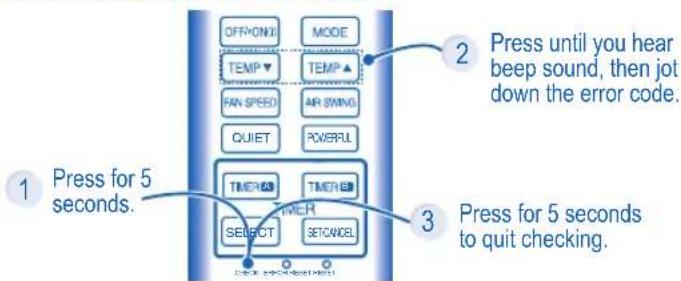
flowchart
graph TD
    A["OFF/ON"] --> B["MODE"]
    C["TEMP"] --> D["TEMP ▲"]
    E["FAN SPEED"] --> F["AIR SWING"]
    G["QUIET"] --> H["POWFUL"]
    I["TIMER"] --> J["TIMER B"]
    K["TIMER"] --> L["SELECT"]
    M["SET/CANCEL"] --> N["SET/CANCEL"]
    O["Press until you hear beep sound, then jot down the error code."] --> P["2"]
    Q["Press for 5 seconds."] --> R["3"]
4 Turn the unit off and reveal the error code to authorized dealer.
1 UNIDAD INTERIOR
UNITÀ INTERNA E UNITÀ ESTERNA

UNITÀ INTERNA E UNITÀ ESTERNA
1 UNITÀ INTERNA
1 UNIDADE INTERIOR
Retire o painel frontal
1 ВЪТРЕШНА ЧАСТ
1 UNUTARNJA JEDINICA
• Jedinicu pažljivo obrišite mekom, suhom krpom.
2 PREDNJA PLOČA
Uklonite prednju ploču
1 İÇ ÜNİTE
Information for Users on Collection and Disposal of Old Equipment and Used Batteries

These symbols on the products, packaging, and/or accompanying documents mean that used electrical and electronic products and batteries should not be mixed with general household waste.
For proper treatment, recovery and recycling of old products and used batteries, please take them to applicable collection points, in accordance with your national legislation and the Directives 2002/96/EC and 2006/66/EC.
By disposing of these products and batteries correctly, you will help to save valuable resources and prevent any potential negative effects on human health and the environment which could otherwise arise from inappropriate waste handling. For more information about collection and recycling of old products and batteries, please contact your local municipality, your waste disposal service or the point of sale where you purchased the items.
Penalties may be applicable for incorrect disposal of this waste, in accordance with national legislation.

For business users in the European Union
If you wish to discard electrical and electronic equipment, please contact your dealer or supplier for further information. [Information on Disposal in other Countries outside the European Union]
These symbols are only valid in the European Union. If you wish to discard these items, please contact your local authorities or dealer and ask for the correct method of disposal.
Note for the battery symbol (bottom two symbol examples):
This symbol might be used in combination with a chemical symbol. In this case it complies with the requirement set by the Directive for the chemical involved.
- Checking of remote control batteries.
- No obstruction at air inlet and air outlet vents.
- Use Auto OFF/ON button to select Cooling/Heating operation, after 15 minutes of operation, it is normal to have the following temperature difference between air inlet and air outlet vents: Cooling: ≥ 8°C Heating: ≥ 14°C
FOR EXTENDED NON-USE
- Activate Heat mode for 2\~3 hours to remove moisture left in the internal parts thoroughly to prevent mould growth.
- Turn off the power supply.
- Remove the remote control batteries.
NON SERVICEABLE CRITERIAS
TURN OFF POWER SUPPLY then please consult authorized dealer under the following conditions:
• Abnormal noise during operation.
• Water/foreign particles have entered the remote control.
• Water leaks from Indoor unit.
• Circuit breaker switches off frequently.
• Power cord becomes unnaturally warm.
- Switches or buttons are not functioning properly.
- The timer indicator blinks and the unit can not be operated.

1. Standard piping length: 5 m.
2. Air filters are attached.
| Translations | Deutsch | Français | Greek | Italian | Nederland | Portuguese | Russian | Spanish | Bulgarian | Turkish | Arabic | Swedish | Norwegian | Ukrainian |
| Product Specification | Produktspecification | Conductrations du produit | Préchéantique préférations | preconzione del producto | productenmarken | Especialisations de produits | Technische equipartament | Éspecialisation des produits | Équilibria générales | Übris-Eurolle | moussants fonction | Produktas spécifiziertes | Produktas spécifiziertes | Techni характеристики |
| Model Indoor UnitOutdoor Unit | ModellInnungs-Altusangerist | ModèleUnité minoursUnité extérieure | MontelloÉquiterach opsonchÉjuparion oukoun | ModelloImplante interneImplante esterne | ModelBinserinrichtingButterinrichting | ModeloElemento interiorElementa exterior | Modèleéurierung che l'expressionéurierung | ModeloEquipe interiorEquipe exterior | ModellВътрески устройствВышне устройство | ModellÜrteDiş Ürte | طرازالعربية المئيelleأحترية | ModellInnemhusenhetUtomhusenhet | ModellInnendersenetUtandersenhet | ModельВнутрішній блокЗовнішній блок |
| Power / Current | Stromversorgung | Alimentation | Пароху прбутатос | Corrente | Stroom | Potência | Награжнение питания | Corriente | Електрическо захранване | Güç / Akim | /الفرةالконيرالكهربان | Effekt/ström | Effekt/ström | Потужність / струм |
| Refrigerant | Kühmittel | Réfrigerant | руктиюμεο | Refrigerante | Koelmiddel | Refrigerante | Охлаждаций агент | Refrigerante | Охлаждане | Sogutucu | المادة الم parties | Köldmedium | Kjølemiddel | Холодрагент |
| Cooling Capacity | Kühlleistung | Capacitérefrigérante | İkavótηταφύξης | Refrigerazione | Cooling Capacity | Capacidade do refrascamento | Мощность охлаждения | PotenciaIngorifica | Охлаждацикапацитет | SogutmaKapasitesi | سعة التيريد | Kylkapacitet | Kjelekapasitet | Потужність на охпорядження |
| Heating Capacity | Heizleitung | Capacitàchauffage | İkavótηταθέρμανοης | Riscaldamento | VerwarmingCapacity | Capacidadado aquecimento | Мощность нагрева | Potenda calefacción | Загриващкапацитет | IstimaKapasitesi | سعة التدفئة | Upximmingskapasit | Varmekapasitet | Потужність на обігрівачня |
| Noise LevelConditions1m DistanceMax. coolingSound power level | LärmpiegelBedingungen1m AbstandMax. KüllungSchästeungsogel | Niveau de bruitCondimentsDistanza 1 mRathedassment max.Niveau de puissance senes | Entinoão θοριβουΣυνδηκαςAnobroton 1 μητρουΜιγ. ΨυξηΣισίΒυν ισιχοςθοριβου | Livello di rumoreConditionlDistanza di 1 mRathedamento max.Livello rumore | LawaaipellerVoorwaarden1m a'etandMax. KoelingGaludiniveau | Nivel do barulhoCondiçõesDistância de 1mAtrafelemento máx.Nivel de alimentação soneta | Уровень шумаИСФЯТУИЗДИЯТМ - 17MPX, кадилятМУ вянь мощностизайка | Nivel sonoroCondiciones1 m de distanciaRefrigeración máx.Nivel de potencia de sonida | Ниво на шумаУновки1m разстояниеМаксимальнаяНиво на звука | Ses seviyesiKayullar1m UzastukMaks. seglutmaSes seviyasi | مسنто الحضUAمالعربيةاممنزى القيры للبنبستويتى خارة ELSEN | BulemváVilkar1 m avständMax. kyfningLjudefektinivă | StoryniváVilkár1 m avstandMaks. kjalingLydefektinivă | Рівень шумуУвивідстань 1 мМакс. охпорядженняРівень потужностізвуку |
| Air Circulation | Luftzirkulation | Ventilation | Киклорогласalpha | Circolazione ana | Luchtorculatie | Circulação do ar | Циркулащке воздуха | Circulacion de are | Вълдушка циркулация | Hava Devri | دوران الهواє | Luftflöde | Luftstrømning | Циркулацияпоятря |
| Product weight | Produktgewicht | Poids du produit | Вáрос touпроюштос | Peso prodotto | Produktgewicht | Peso do producto | Вес продукта | Peso del producto | Тепло на продукта | Ürün agirligi | وزن النتح | Produktens vikt | Produktets vekt | Маса виробу |
| Dimensions | Abmessungen | Dimensions | Двостодн | Misure | Afmetingen | Dimensões | Размеры | Medidas | Размери | Ebatlar | Альبعاد | Māt | Māl | Габарити |
MEMO
MEMO
QUICK GUIDE/GUÍA RÁPIDA/GUIDA RAPIDA/GUIA RÁPIDO/ БЪРЗ СПРАВОЧНИК/BRZE UPUTE/HIZLI REHBER
Remote Control Preparation • Preparación Del Mando A Distancia • Telecomando: Operazioni Preliminari • Preparação Do Controlo Remoto • Подготовня He Дистанционното Управление • Priprema daljinskog upravljača • Uzaktan Kumanda Hazirlanmasi

Remove the battery cover • Retire la tapa de las pilas • Rimuovere il coperchio batteria • Remova a tampa da bateria • Свалете капака за батериите • Uklonite pokrov baterija • Pil kapağını çıkartın.
2 Insert AAA or R03 batteries (can be used \~ 1 year) •
Inserte pilas AAA o R03 (puede ser usado \~ 1 año) •
Inserire batterie AAA o R03 (può essere utilizzato per circa 1 anno) •
Introduza pilhas AAA ou R03 (pode ser utilizado \~ 1 ano) •
Поставете AAA или R03 батерии (могат да се използват приблизително една година) •
Umetnite AAA ili R03 baterije (mogu se koristiti \~ 1 godinu) •
AAA veya R03 pil kullanın (\~ 1 yıl kullanılabilir)
3 Close the cover • Cierre la tapa • Chiudere il coperchio • Feche a tampa • Затворете капака • Zatvorite pokrov • Kapağı kapatın.
1 MODE
AUTOHEAT DRYCOOL
Select the desired mode. Seleccione el modo deseado, Selezionare la modalità desiderata. Seleccione o modo de funcionamento pretendido. Избор на желания режим на работа. Odaberite željeni način. Istenilen modu seçin.
2 OFF/ON
Start/stop the operation. Inicie/detenga el funcionamiento. Avviare/arrestare l'apparecchio. Ligue/Desligue a unidade. Включване/спиране. Pokrenite/zaustavite rad. Çalışmayı başlatın/durdurun.
3 TEMP
Select the desired temperature. Seleccione la temperature deseada. Selezionare la temperatura desiderata. Programe a temperatura desejada. Настройка на желаната температура. Odaberite željenu temperaturu. İstenilen sıcaklığı seçin.

Pursuant to at the directive 2004/108/EC, article 9(2) Panasonic Testing Centre Panasonic Service Europe, a division of Panasonic Marketing Europe GmbH Winsbergring 15, 22525 Hamburg, F.R. Germany
EEE COMPLIES WITH DIRECTIVE OF TURKEY EEE YÖNETMELİĞİNE UYGUNDUR BU ÜRÜNÜN KULLANIM ÖMRÜ 10 YILDIR
Panasonic Corporation
Website: http://panasonic.net/
Printed in China
F568412 F1112-00
- Panasonic®
- Operating Instructions Air Conditioner
- ENGLISH
- ESPAÑOL
- TABLE OF CONTENTS
- WARNING
- CAUTION
- REMOTE CONTROL
- Press the remote control's button
- TO TURN ON OR OFF THE UNIT
- TO SET TEMPERATURE
- HEAT mode - To enjoy warm air
- COOL mode - To enjoy cool air
- DRY mode - To dehumidify the environment
- TO SELECT FAN SPEED (5 OPTIONS)
- FAN SPEED
- TO ADJUST AIRFLOW DIRECTION (5 OPTIONS)
- AIR SWING
- TO ACHIEVE TEMPERATURE QUICKLY
- TO ENJOY QUIET ENVIRONMENT
- PRESS TO RESTORE THE REMOTE CONTROL'S DEFAULT SETTING
- NOT USED IN NORMAL OPERATIONS
- TO SET THE TIMER (12-HOUR TIMER SETTING)
- DELAY OFF-TIMER
- DELAY ON-TIMER
- DELAY OFF AND ON TIMER
- DELAY ON AND OFF TIMER
- TO CONFIRM THE TIMER SETTING
- TO CANCEL THE TIMER SETTING
- INDOOR UNIT
- CLEANING INSTRUCTIONS HINT
- NOTE
- INDOOR UNIT
- FRONT PANEL
- Remove Front Panel
- Close Front Panel
- RECEIVER
- ALUMINIUM FIN
- HORIZONTAL AIRFLOW DIRECTION LOUVER
- VERTICAL AIRFLOW DIRECTION LOUVER
- AUTO OFF/ON BUTTON
- AIR FILTERS
- ANTI-BACTERIAL FILTER
- Vacuum
- TROUBLESHOOTING
- The following symptoms do not indicate malfunction.
- Check the following before calling for servicing.
- The unit stops and the timer indicator blinks.
- UNIDAD INTERIOR
- UNITÀ INTERNA
- UNIDADE INTERIOR
- Retire o painel frontal
- ВЪТРЕШНА ЧАСТ
- UNUTARNJA JEDINICA
- PREDNJA PLOČA
- Uklonite prednju ploču
- İÇ ÜNİTE
- Information for Users on Collection and Disposal of Old Equipment and Used Batteries
- For business users in the European Union
- Note for the battery symbol (bottom two symbol examples):
- FOR EXTENDED NON-USE
- NON SERVICEABLE CRITERIAS
- MEMO
- QUICK GUIDE/GUÍA RÁPIDA/GUIDA RAPIDA/GUIA RÁPIDO/ БЪРЗ СПРАВОЧНИК/BRZE UPUTE/HIZLI REHBER
- MODE
- AUTOHEAT DRYCOOL
- OFF/ON
- TEMP
- Panasonic Corporation
Brand : PANASONIC
Model : CU-RE9NKX
Category : Air conditioner