
PHONE ADAPTER - Phone adapter SIEMENS - Free user manual and instructions
Find the device manual for free PHONE ADAPTER SIEMENS in PDF.


| Product type | Bluetooth telephone adapter |
| Brand | SIEMENS |
| Model | PHONE ADAPTER |
| Dimensions (L x W x H) | 100 x 70 x 30 mm |
| Weight | 100 g |
| Power supply | 5 V DC via mini-USB, mains adapter included |
| Power consumption | 2.5 W |
| Bluetooth version | Classic Bluetooth |
| Bluetooth range | 10 m |
| Main functions | Bluetooth pairing, call transfer, LED status indicator, ringer on/off, reset |
| LED indicators | 5 states: idle (1x/3s), pairing (1x/1s), connected (2x/1s), incoming call (5x/1s), call in progress (solid) |
| Interfaces | Line socket (RJ11), phone socket (RJ11), mini-USB (power) |
| Included accessories | Connection cable, mains adapter, country plugs |
| Compatibility | Landline phones, Bluetooth hearing aids (Tek) |
| Care and cleaning | Clean with a soft dry cloth, do not use liquid or abrasive products |
| Safety | Use only the supplied mains adapter, do not expose to moisture, do not open the device |
| Spare parts and repairability | Mains adapter and mini-USB cable available as spare parts. Repair by a professional only. |
| General information | Manual available online, free download at notice-facile.com |
Frequently Asked Questions - PHONE ADAPTER SIEMENS
User questions about PHONE ADAPTER SIEMENS
0 question about this device. Answer the ones you know or ask your own.
Ask a new question about this device
Download the instructions for your Phone adapter in PDF format for free! Find your manual PHONE ADAPTER - SIEMENS and take your electronic device back in hand. On this page are published all the documents necessary for the use of your device. PHONE ADAPTER by SIEMENS.
USER MANUAL PHONE ADAPTER SIEMENS
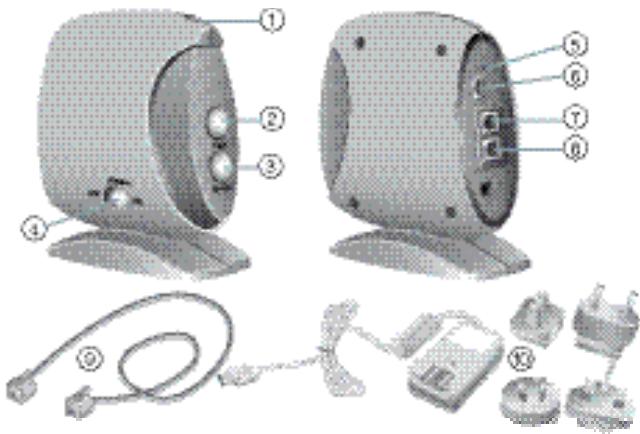
Included in delivery
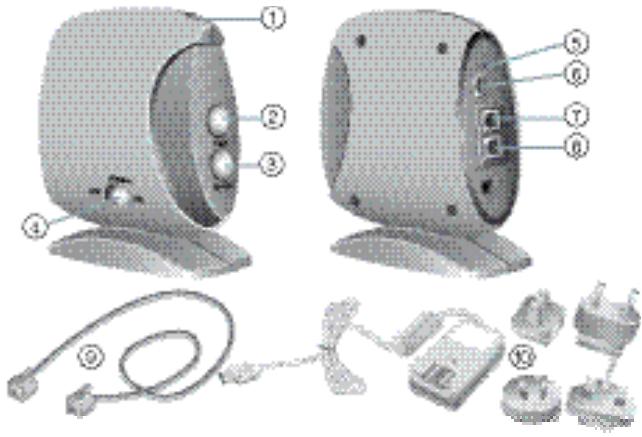
① LED indicator
② Pair button
③ Enter button
④ Ringer on/off switch
⑤ Reset button
⑥ Mini USB DC jack
⑦ Line jack
⑧ Telephone jack
⑨ Connector cable
Power plug with country specific adapters
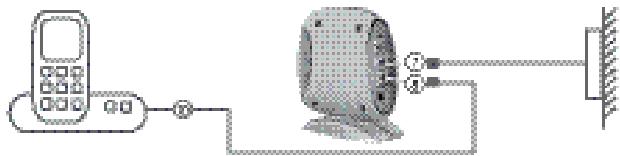
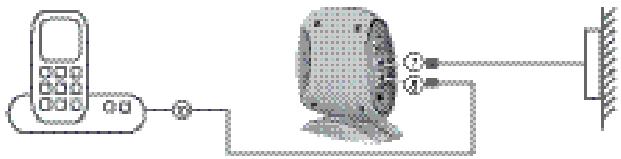
Setting up the phone adapter with your telephone
Connect the telephone's wall jack with the phone adapter's Line jack ⑦.
Connect the phone adapter's Telephone jack ⑧ with the telephone. Use the delivered Connector cable ⑨ .
Connect the phone adapter with the Power plug ⑩ to a power supply.
Pairing the phone adapter with your Tek
Press and hold on your Tek for about 7 seconds.
Press and hold the Pair button ② on the phone adapter for 2 seconds.
The LED indicator ① flashes once per second.
The phone adapter connects automatically to your Tek.
The pairing process can take up to 2 minutes.
The LED indicator on the phone adapter flashes twice per second when devices are successfully connected.
Tek and your hearing instruments now work as any other bluetooth phone.
For placing a call dial the requested number on your phone.
Press the Enter button ③ on the phone adapter to transfer the call to your Tek and hang up the phone.
Use and to accept, terminate and reject calls.
Refer to Tek user guide for more information.
| LED | Phone adapter status |
| 1x in 3 s | idle mode (power on) |
| 1x in 1 s | pairing mode |
| 2x in 1 s | connected mode |
| 5x in 1 s | incoming call |
| on | active call |
Loll Tekj42 20 Loll J41
Lolal Tekj4z
jai jgi7 oao
140 ② (j)
.
. ① LED
山 yoljI Tek j4y jilai Jsuu wiyi 100
Jua 11 Jau lo jaydulac (gaiuui
ailll 1 jyj yai l 14 ygall LED
Uuuu uuiu uua uua uua uua
Cai 5S 12
jəbluetooth
Cglglgblaljll,
Ujwl Ujwcl wyl 40 ③ Enter jll lc bwl
. wii 1 iolig ciwi TLkj4g
jg jjjj
. 111
Uc Ueauu uol keTj4pdoaunu
.1ogball j0joll
.901 ytn nbp Tek by wannwny
| LED 3-x1 | (,) |
| ' 1-2 x1 | ' |
| ' 1-2 x2 | ' |
| ' 1-2 x5 | ' |
| ' | ' |
n nn
nnnn ①
Wn
retnE ③
yynnnnn ④
1019X ⑤
Mini USB-5 DC yP v ⑥
同理, PQ = PF ②
nshuy ⑧
nnnn nn nnn ypu 10
n nn
y ynn nn nn nn npnn
xnn y np ypu np bn np np np n
.⑦
wnnnn. ⑧ nnnn nn np
9
.nnn npn nnyn yny by nnnn nn nn
Technical information
Phone Adapter
FCC ID: QWOBTA-3XX
IC:267AB-BTA336

N14203
This Class B digital apparatus complies with Canadian ICES-003.
Changes or modifications not expressly approved by the party responsible for compliance could void the users authority to operate the equipment.
FCC compliance
This device complies with Part 15 of the FCC Rules and with RSS-310 of Industry Canada.
Operation is subject to the following conditions:
this device may not cause harmful interference, and
this device must accept any interference received, including interference that may cause undesired operation.
This equipment has been tested and found to comply with the limits for a Class B digital device, pursuant to Part 15 of the FCC Rules. These limits are designed to provide reasonable protection against harmful interference in a residential installation. This equipment generates, uses and can radiate radio frequency energy and, if not installed and used in accordance with the instructions, may cause
harmful interference to radio communications. However, there is no guarantee that interference will not occur in a particular installation. If this equipment does cause harmful interference to radio or television reception, which can be determined by turning the equipment off and on, the user is encouraged to try to correct the interference by one or more of the following measures:
Reorient or relocate the receiving antenna.
- Increase the separation between the equipment and receiver.
- Connect the equipment to an outlet on a circuit different from that to which the receiver is connected.
- Consult the dealer or an experienced radio/TV technician for help.
Disposal information
Within the European Union, the marked equipment is covered by "Directive 2002/96/EC of the European Parliament and of the Council of 27 January 2003 on waste electrical and electronic equipment."
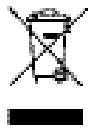
Amended by "Directive 2003/108/EC" (WEEE).

Recycle hearing instruments, batteries and accessories according to national regulations.
With the CE marking Rayson confirms compliance with the European Directive 2004/108/EC concerning electromagnetic compatibility and the European Directive 99/5/EC (R&TTE) concerning radio and telecommunications terminal equipment.
03.2010 · SB
Document No. A91SAT-01198-99T1-7600
Order/Item No. 106 002 61
Manufacturer:
Rayson Technology Co., Ltd
NO.1.Tongfu 1st Road
The 2nd Industrial Zone Loucun
Gongming, Guangming New District
Shenzhen, China
ZIP Code: 518107
Brand : SIEMENS
Model : PHONE ADAPTER
Category : Phone adapter