IS-AP7801 - Air purifier Scarlett - Free user manual and instructions
Find the device manual for free IS-AP7801 Scarlett in PDF.


| Product Type | Air Purifier |
| Brand | Scarlett |
| Model | IS-AP7801 |
| Dimensions (W x D x H) | 36 x 20 x 53 cm |
| Weight | 5.2 kg |
| Power Supply | AC 220-240V, 50Hz |
| Power Consumption | 55 W |
| Fan Speeds | 3 speeds (Low, Medium, High) |
| Coverage Area | Up to 40 m² |
| Filter Type | HEPA H13 + Activated Carbon |
| CADR (Clean Air Delivery Rate) | 200 m³/h |
| Noise Level | 25 - 50 dB(A) |
| Timer | 1, 2, 4, 8 hours |
| Auto Mode | Yes (with air quality sensor) |
| Air Quality Sensor | PM2.5 sensor |
| Filter Replacement Indicator | Yes |
| Child Lock | Yes |
| Night Mode | Yes (low noise, dimmed lights) |
| Remote Control | Yes (included) |
| Warranty | 2 years |
| Maintenance | Clean pre-filter every 2 weeks; replace HEPA filter every 6-12 months |
| Safety Features | Overheat protection, auto shut-off when front cover opened |
Frequently Asked Questions - IS-AP7801 Scarlett
User questions about IS-AP7801 Scarlett
0 question about this device. Answer the ones you know or ask your own.
Ask a new question about this device
Download the instructions for your Air purifier in PDF format for free! Find your manual IS-AP7801 - Scarlett and take your electronic device back in hand. On this page are published all the documents necessary for the use of your device. IS-AP7801 by Scarlett.
USER MANUAL IS-AP7801 Scarlett
natural_image
A faint curved blue line against a dark blue gradient background, resembling a stylized airplane or cloud trail (no text or symbols visible).SCARLETT™
INDIGO
INNOVATIONPERFECTPROGRESSIVETECHNOLOGYSELECTION
MODERNFASHIONSTYLE
natural_image
White industrial air purifier device with control panel and ventilation slots (no visible text or symbols)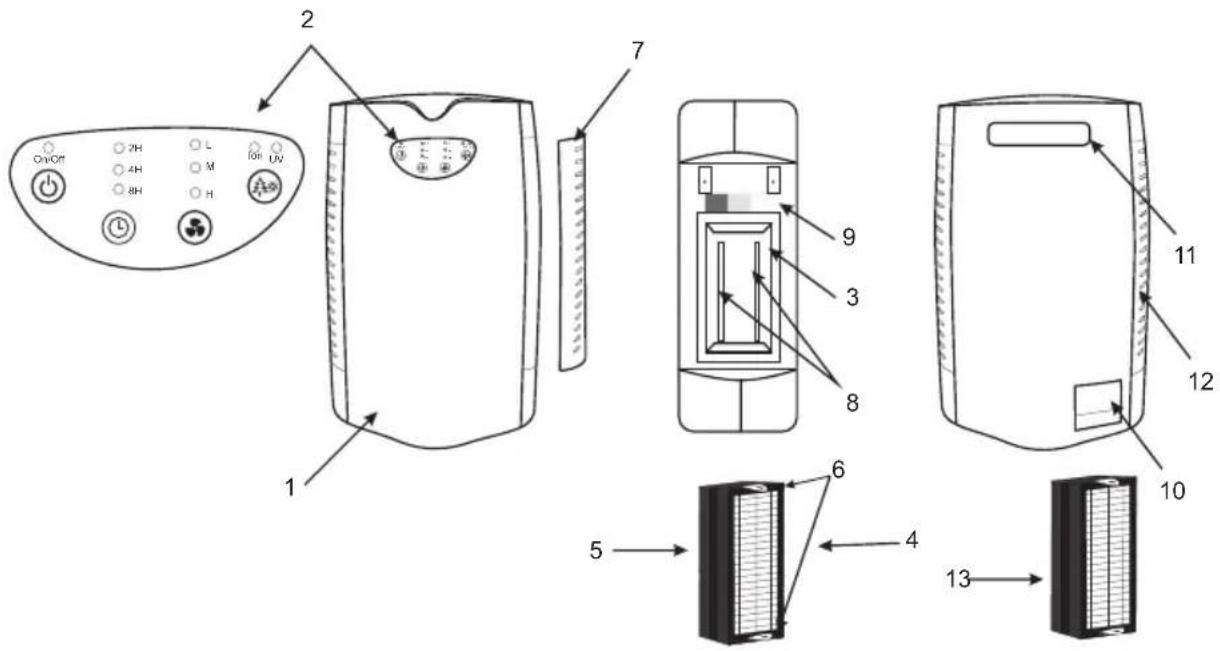
GB
1.Case
-
Control Panel
-
Filter compartment
-
Filters HEDA
-
Filters HEPA
5 Filters carbon
- loop
7.Lid
-
UV lamps
-
Filter Clogging Indicator
-
Card compartment
-
Cord compartment 11. Carving Handle
-
Carrying Handle
-
Air openings
-
Additional filter
RUS
1.Корпус
- Панель управления
3 Отсек для фильтра
- Оток для фи.
4.ФИЛЬТР НЕРА
5.Фильтр угольный
6.Петли
Pls add month and year of production e.g. 08.2010 at this place
- Please read this instruction manual carefully before use and keep in a safe place for future reference.
- Before the first connecting of the appliance check that voltage indicated on the rating label corresponds to the mains voltage in your home.
- For home use only. Do not use for industrial purposes. Do not use the appliance for any other purposes than described in this instruction manual.
- Do not use outdoors.
- Always unplug the appliance from the power supply before cleaning and when not in use.
- To prevent risk of electric shock and fire, do not immerse the appliance in water or in any other liquids. If it was happened DO NOT TOUCH the appliance, unplug it immediately and check in service center.
- This appliance is not intended for use by persons (including children) with reduced physical, sensory or mental capabilities, or lack of experience and knowledge, unless they have been given supervision or instruction concerning use of the appliances by a person responsible for their safety.
- Children should be supervised to ensure that they do not play with the appliance.
- Do not use other attachments than those supplied.
- If the power cord is damaged it should be replaced by the manufacturer or authorized servicing center or qualified professional for safety reasons.
- Do not attempt to repair, adjust or replace parts in the appliance. Check and repair the malfunctioning appliance in the nearest service center only.
- Keep the cord away from sharp edges and hot surfaces.
- Do not pull, twist, or wrap the power cord around appliance.
- Do not use the device in a small confined space.
-
Do not insert foreign objects into the grill.
-
Don't connect the appliance to the mains if the cover of filter compartment is not closed.
- If the unit was got from the environment with temperature < 0 °C, keep it under the room conditions at least 2 hours.
- The manufacturer reserves the right to introduce minor changes into the product design without prior notice, unless such changes influence significantly the product safety, performance, and functions.
BENEFITS OF AIR CLEANER
- The air cleaner with UV lamp and built-in ionizer helps to maintain indoor air parameters optimum for human health. The built-in HEPA filter, Class H13 cleans air from various contaminants, such us dust, dust mites and other microscopic parasites, mold spores, pollen, bacteria, etc. The carbon filter effectively removes odors of tobacco smoke, nicotine, carbon monoxide and sulfur dioxide, and various chemical air contaminants. Additionally, air is disinfected with ultraviolet light emitted by the bulb located inside the appliance. UV radiation is a well-studied, safe, and well-proven technology, which is widely used in hospitals for more than 50 years, and eliminates infectious microorganisms. UV radiation is able to eliminate airborne bacteria and microbes, including all influenza viruses, when they pass through the inlet opening, because it destroys their DNA structure by the light waves having specific wavelength. At that, the light emitted by this bulb is safe for people located in the room when the device operates, since the ultraviolet radiation remains enclosed in the device, and only the air flow passing through the device is processed. The air can be cleaned and purified without UV radiation, too. The built-in ionizer saturates air with ions and creates the effect of "Forest Air", which contributes to the prevention of chronic diseases, and positively influences on patients with asthma, allergy, blind headache, hypertension, diseases of digestive
system, respiratory system, and cardiovascular system. Recommended operation time is 6 to 8 hours per day. The user friendly control panel with LED indicators of operating modes is located on the top wall of the unit. The filter replacement indicator is located in the inner compartment of the device. The convenient built-in carrying handle is located on top of the rear panel. The device has a sleek design and will fit well in a modern interior of living and working areas. High quality and reliability is provided by three stages of air purification and by operation of the ionizer:
- The built-in HEPA filter, Class H13 (according to EN 1822-1:2009 International Classification) is able to absorb particles as small as 0.03 microns, and has an efficiency of 99.97%.
- The carbon filter eliminates or significantly reduces odors of various origin, and maintains freshness and purity of air.
- The UV filter eliminates microbes, and cleans air from bacteria and viruses. The lamp life is equal to 20,000 hours or 5 years, in case if the average daily operation time of the appliance does not exceed 8 hours.
- The ionizer (negative ion generator) creates ionic breeze with a flux density of negative ions equal to 2,000,000 units per cm ^3 , and creates the effect of forest air or sea air. These negative ions are used to collect even more smallest particles of dust or pollen and facilitates even better air purification. They also eliminate effects of electromagnetic radiation. IMPORTANT: The ionizer is not recommended for use in areas with relative humidity above 80%.
FILTERS
- Regular replacement of filters is required for efficient operation of the device.
- The device is equipped with filter pollution indicator. The filter should be replaced, when all the three squares of the indicator turn black. (show it on a picture)
INSTALLATION OF FILTERS
- Switch the device off and disconnect it from the mains.
- Open the filter compartment.
- Remove the filter by pulling the loops.
- Unpack the new filter.
- Insert the new filter into the filter slot. The HEPA filter should be located outside.
- Close the filter compartment.
OPERATION
- Before use, check the case of the device and accessories for transport damages.
- An extra set of filters is included into the delivery package.
- Place the appliance on dry and level surface.
- Connect the device to the mains.
On/Off Button
- Press the "On/Off" button to switch the air cleaner on or off.
Time Setting Button

- Press this button to select time of the device operation: 2, 4 or 8 hours. The respective indicator will light, when the time is chosen. Upon expiry of the selected time, the device automatically turns off and the light indicator goes out.
Speed Selection Button

- Press this button to select low (L), medium (M) or high (H) air speed.
Ionizer/UV Bulb Button

- Ionization is activated automatically after switching the unit. ION LED is on.
- Press this button to switch on the ionizing unit and the UV lamp. ION and UV LEDs are on.
- Press this button again to switch off the ionizing unit. UV LED is on.
- Press this button again to switch off the ionizing unit and the UV lamp.
CLEANING AND MAINTENANCE
- Always unplug the appliance from mains outlet before cleaning. - Wipe the outside surface of the air cleaner with soft damp cloth.
STORAGE
- Before storage make sure that the appliance is disconnected from power source.
- Perform all actions described in „CLEANING AND MAINTENANCE” section.
- Wipe and dry the appliance, place it in the original package and store in a dry place.
TROUBLESHOOTING
| Poor air flow. Check the filter for contamination.Check if the air openings are clogged. |
| The device cannot be switched on. |
| Noisy operation. Check if any foreign objects touch the device case.The filter is worn and should be replaced.Check the filter for proper installation. |
МЕРЫ БЕЗОПАСНОСТИ
LT VALYMO IRENGINYS 30
H LÉGTISZTÉTÓ 33
KZ ТАЗАРТКЫШ АРТЫКШЫЛЫКТАРЫ 36
SL ČISTIČKA VZDUCHU 39
Brand : Scarlett
Model : IS-AP7801
Category : Air purifier