
TPC-10100 - Graphic tablet Vivax - Free user manual and instructions
Find the device manual for free TPC-10100 Vivax in PDF.


| Product Type | Android Tablet |
| Model | Vivax TPC-10100 |
| Display | 10.1" LED backlight, 1280x800 resolution |
| Processor | Quad-core 1.3 GHz |
| RAM | 1 GB DDR |
| Internal Storage | 16 GB NAND Flash |
| Operating System | Android 4.4 |
| Wi-Fi | 802.11 b/g/n |
| Bluetooth | Bluetooth 4.0 |
| GPS | Supported |
| Front Camera | 2 Megapixel |
| Rear Camera | 5 Megapixel |
| Battery | Li-polymer 3.7 V, 7000 mAh |
| Power Adapter | Input: 100-240 VAC, Output: DC 5V, 2A |
| USB Port | Micro USB 2.0 (supports OTG) |
| HDMI Port | Mini HDMI 1.4 |
| Audio Jack | 3.5 mm earphone jack |
| Micro SD Card | Up to 32 GB |
| Dimensions | 254 mm x 172.65 mm x 9.8 mm |
| Sensors | G-sensor, built-in microphone |
| Accessories Included | Power adapter, USB data cable, user manual |
Frequently Asked Questions - TPC-10100 Vivax
User questions about TPC-10100 Vivax
0 question about this device. Answer the ones you know or ask your own.
Ask a new question about this device
Download the instructions for your Graphic tablet in PDF format for free! Find your manual TPC-10100 - Vivax and take your electronic device back in hand. On this page are published all the documents necessary for the use of your device. TPC-10100 by Vivax.
USER MANUAL TPC-10100 Vivax
User manual / Service points
EN
User manual
TPC-10100
HR BIH CG
Upute za uporabu
Tablet
-Connect the equipment into an outlet on a circuit dierent from that to which the receiver is connected. Spojite opremu na učnicu na drugom strujnom krugu od onoga na kojem je spojen prijemnik.
-Consult the dealer or an experienced radio/TV technician for help. Obrate se prodavaču ili iskusnom radio/TV serviseru.
Any Changes or modicaons not expressly approved by the party responsible for compliance could void the user's authority to operate the equipment.
Note: Uređaj je tesran i u skladu je s ograničenjima za digitalni uređaj Klase B, u skladu sa 15. delom pravila FCC-a. Ograničenja su postavljena kako bi se omogućila prikladna zašta od štetnih smetnji za instalacije u stambenim objekma. Ova oprema stvara, koris i može upotrebljava emitovanu energiju radijske frekvencije i ako se ne instalira i ne koris u skladu s uputstvima, može da izazove štetne smetnje u radijskoj komunikaciji. Međum, ne postoji garancija da se u određenim instalacijama neće pojavi smetnje. Ako oprema zaista uzrokuje štetne smetnje radijskom ili televizijskom prijemu, što se može ustanovi uključivanjem i isključivanjem opreme, korisnik treba da pokuša da ukloni smetnje na jedan ili više od navedenih načina:
- Promenite smer ili poziciju antene za prijem.
- Povećajte udaljenost između opreme i prijemnika.
Please read this manual carefully for proper usage before using. It is recommended to keep this manual properly for future check.
Accessories List
- PAD(1)
- User Manual (1)
• Power Adapter (1) - USB Data Cable (1)
Note: specific accessory in accordance with actual.
Technical Specicaons
| Program/ Specicaons | TPC-10100 |
| CPU frequency DDR-RAM | Quad-core 1.3GHz 1GB |
| NAND FLASH | 16GB |
| Operang system | Android 4.4 |
| Wi-Fi | Supports 802.11 b/g/n |
| Bluetooth | Bluetooth 4.0 |
| GPS | Supports |
| G-sensor | Built-in |
| Microphone | Built-in |
| USB port | Micro USB 2.0(Supports OTG) |
| Mini HDMI Port | HDMI1.4 |
| Environment light detecon | / |
| Audio port | 3.5mm earphone jack |
| Camera Standard baery | Front Camera, 2 Mega Pixel Rear Camera, 5 Mega Pixel Li-polymer Baery, 3.7V, 7000mAh |
| Power adapter | Input: 100-240VAC, 50-60 Hz Output: DC 5V- 2A |
| Micro SD card | 32G max. |
| Main screen | 10.1" LED backlight Screen, Resoluon: 1280x800 |
| Product size | 254mm x 172.65mm x 9.8mm |
Disclaimer: These speciaons are for reference only and shall not constute any commitment in any way. Concerning the product improvement, we shall reserve the right to change the product speciaons without further noce.
Machine structure map
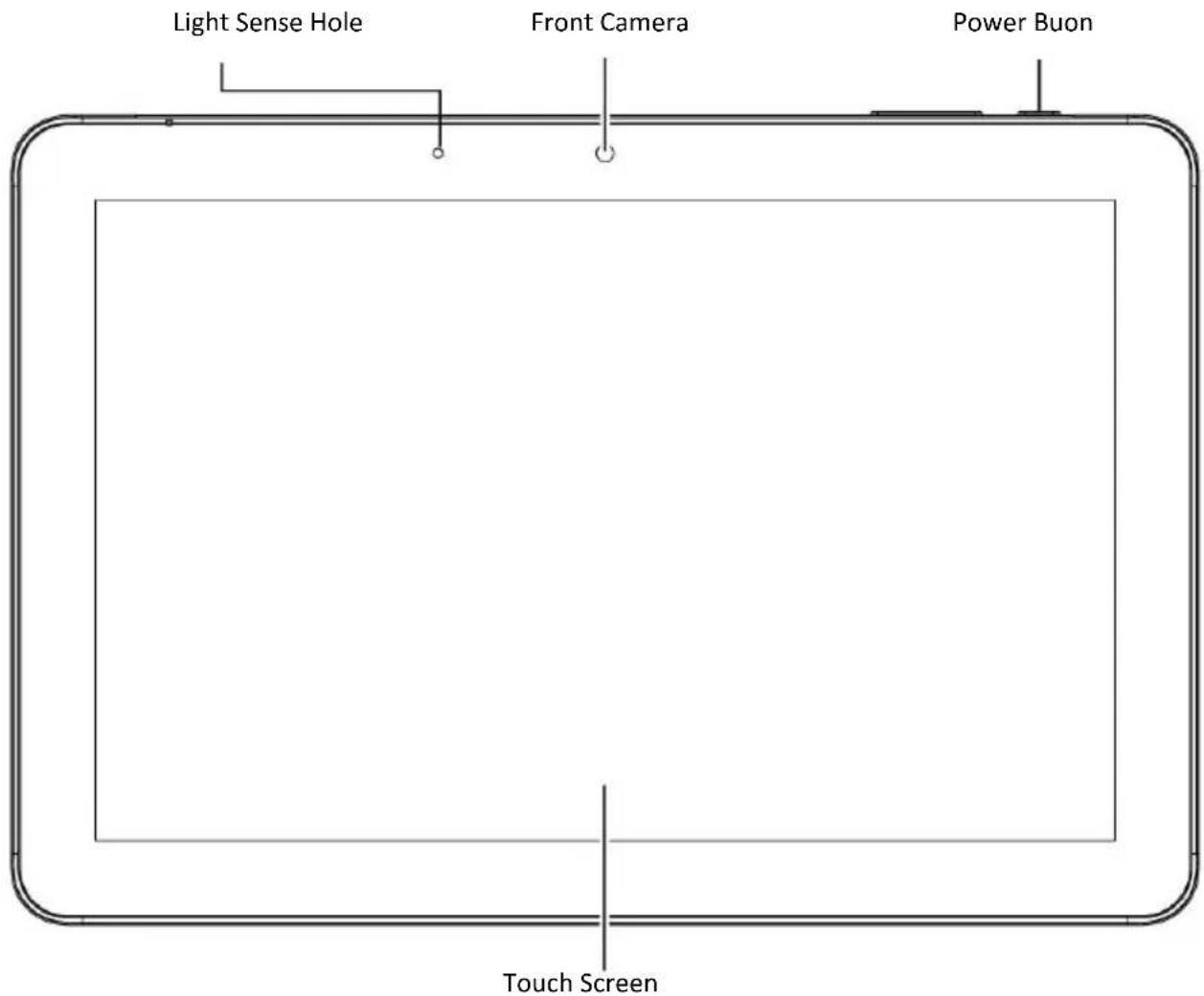

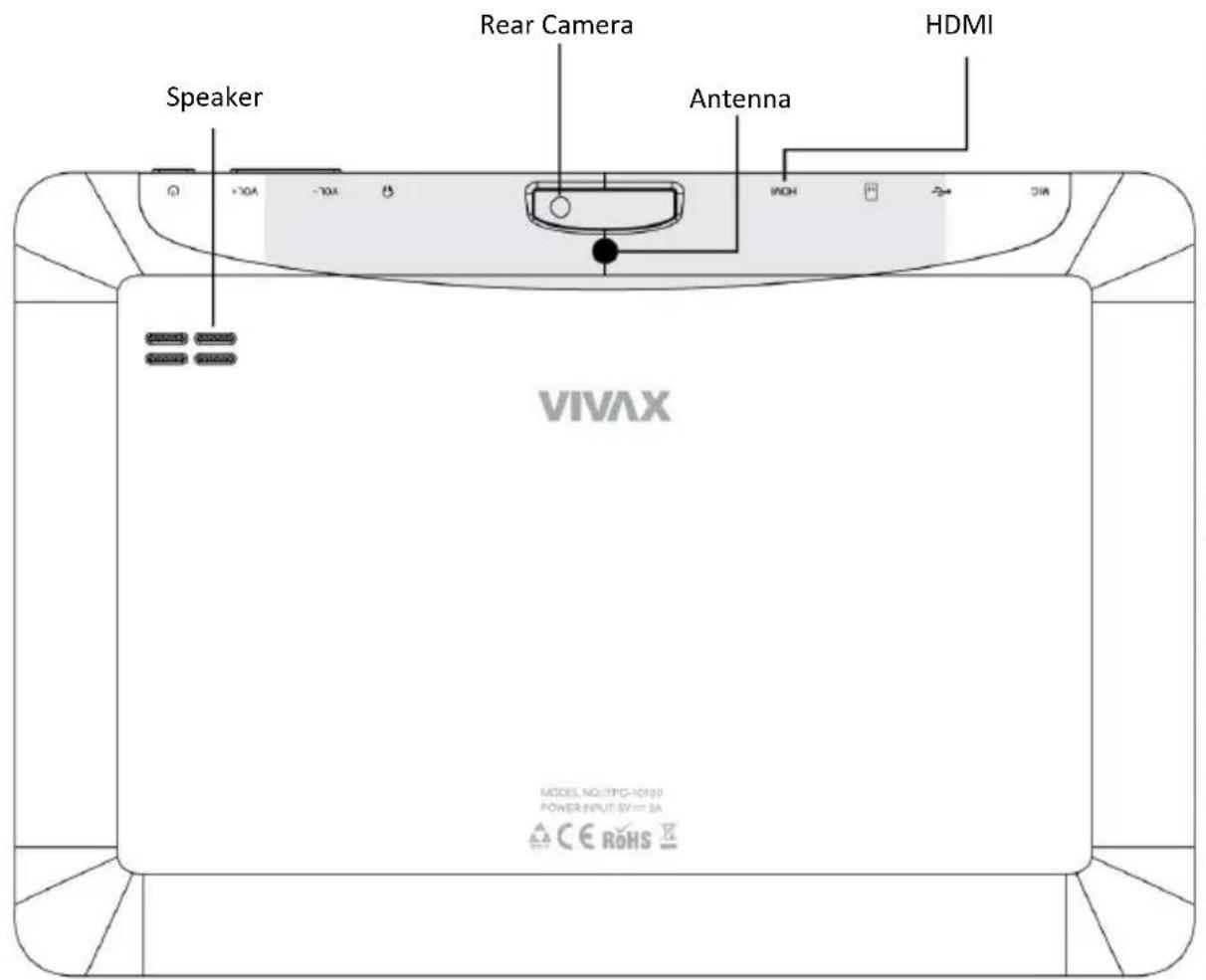
Warm Tips:
- Do not cover antenna area with hands or other objects, otherwise it may inuence signal.
- The machine schemac structure may be slightly dierent with real object, please prevail with the real object.
Turn on/off the machine
Press and hold the power button for a few seconds to turn on /off the machine.

Screenshot
Press the power buon and VOL-key simultaneously to capture a screenshot, which will be saved In USB storage > Pictures > Screenshots.
Baery Charging
Charging machine baery when using it for the rst me or baery is not used for a long me. Use the power adapter matched with the machine, plug the adapter power socket in 100-240VAC socket, then plug adapter output port to machine power input port. When the charging is normal, the Icon [] In the status bar Indicates charging baery; when the charging Is nished, the status bar will prompt electric quantity 100%. Disconnect the machine and charger, take o the charger from the machine rst, and then unplug it from the electrical outlet. Tips:
- Use manufacture approved charger or the charger matched with machine model; unauthorized power adapter or data cable may cause charger exploding or damage the machine.
- The device uses Micro USB interface for power input, and supports charging through USB interface of PC.
Important Safety Aenons
Thank you for purchasing our high performance & mul-funcon tablet PC. It will bring you a beer visual & aural experience. To ensure safety, extend the service life of the product, and give full play to the best performance of the product, please read all the instrucons and nameplates carefully, follow the safety aenons, and keep the user manual for future use.
Medical Device
Electromagnec waves produced by the device in working condion may interfere with the normal operaon of implantable medical devices or personal medical devices such as pacemakers, embedding cochlea, hearing-aids, etc. If you are using the above menoned medical devices, please consult the manufacturer for the condions or limitaons of using the product.
Hearing Protecon
- Please do not wear earphone without plugging It to video source rst. Turn down volume of the device before pung the earplugs into ears.
- To avoid damaging hearing, it is suggested that you use the lowest volume when listening to music or making a voice call using the earphones.
- Please do not use earplugs for a prolonged period of me.
Trac Safety
- Please do not use the device when crossing the road, riding a bicycle, motorbike, or any similar means of transportaon, or when driving a motor vehicle. Doing so may cause you to become distracted and may result in accidents.
- Wireless devices may interfere with the light system of a plane. Therefore, please comply with relevant rules of airline companies. Turn o the device In places where wireless devices are prohibited.
Operaon Environment
- Only used in safe area with altitude under 5000m.
- Please do not use the device in places that have a water source such as bathtubs, pools, washing machines. The device should not be used in moist basements and other similar environments, etc. If the device has been splashed, turn it o immediately. Do not use It unl It has been dried properly.
- To avoid Internal circuit fault of the device, please do not charge or use the device in places which are dusty, moist or dirty or near magnec elds.
- Please do not store or transport the device In the same container with ammable liquids, ammable gases or explosives.
- Please turn o the device in places where the use of wireless devices is expressly prohibited.
- Working environment temperature for the device is -5 - 35 . Please do not use the device when the temperature is above or below this range, otherwise, fault may occur.
Child Health
The device and its accessories may include several small parts. Please keep them out of reach of children to prevent accidental damage to the device or its accessories, and to prevent accidental swallowing by children which may result in apnea or other danger.
Environment Protecon
Please comply with the local laws of disposing of the device, baery and or its accessories, and support recycling. Do not dispose the device, its baery and or its accessories as ordinary household garbage.
Accessory Requirement
Only use the charger and accessories authorized by the device manufacturer and compatible with the model number of the device. The use of any other type of chargers and or accessories may violate the guarantee clause and related provisions of the state in which the device is being used and may result in safety accidents. If authorized baeries, chargers and or accessories are needed, please contact the dealers of this device.
Safety Use of Baery and Charger
- When charging has been completed, or when the device is not being charged, please disconnect the charger from the device and from the power socket.
-
Do not place the device near heang devices such as microwave ovens, ovens, radiators, etc. Overheated baery may cause explosion.
-
Do not remove or ret baeries as this may cause baery leakage, overheang, re or explosion.
- If the baery leaks, do not allow the leaking liquid contact with your skin or eyes. If such contact does occur, wash the aected area thoroughly with clean water and seek medical aenon.
- If the power cord of the charger has been damaged, do not connue to use it, so as to avoid electric shock or re.
Maintenance
- Please keep the device and Its accessories dry. Do not use external heang devices such as microwave ovens to dry them.
- Do not allow the device and its accessories to become impacted Intensively by falling or any other means, nor to become shocked, as this may cause damage to the device or its accessories, re or explosion of the baeries.
- Do not place the device and its accessories in areas with very high or very low temperature, as this may cause device or baery accident, explosion, re, or other damages, baery funcon will be limited when temperature is under O'C.
- Do not place sharp metal objects such as large headed pins near to the device as they may become magnecally aached to the speaker and may result in damage when the device is being used.
- Do not use strong chemicals, cleaner or detergent to clean the device or Its accessories. Before cleaning or maintenance, please turn o the device and disconnect the charger from the device.
- Do not disassemble the device and its accessories by yourself; the damage caused In this case will not be covered by maintenance.
- If the device falls or is exposed to any external force which causes screen damaged or broken, do not touch or try to remove the broken part. Stop using the device. Seek immediate assistance for maintenance.
Screen Protecon
- Do not place any objects on the device, to avoid laceraon.
- Do not use a sharp object to touch the screen. Proper Use
Use the machine properly; please do not be over indulge in the cyber world and games. Long me spends on Internet and game is harmful to physical and mental health.
Troubleshoong
■ Your device can not be turned on.
The baery power is used up. Please fully charge your device.
■ Your device can not access to the Internet via Wi-Fi.
- Check whether your device can receive any Wi-Fi signal.
- Check whether the wireless router supports DHCP. If not, please conjure a static IP address.
- Check whether the wireless router has been connected to the Internet.
■ Your device responds to operaons slowly.
- Check whether too many applicaons are running in the backstage.
-
Check whether any incompatible-version applicaon has been installed.
-
Use the anvirus soware to scan and kill the
malicious programs (if any).
■ Your device gets warm in use.
It is normal that your device gets warm in a long-me use or in charging.
■ Your device crashes and its keys do not work. Press and hold the power switch for 6 seconds, and the system will turn o and restart automacally.
■ The total memory is smaller than the theoretical memory.
A certain space has been used to store the system les and Install user applicaons, so It appears that the total memory Is smaller than the theoretical memory.
■ Some video les can not be played.
Your device supports most of the common audio and video le formats, except a few special formats. We suggest that you download a third-party player from the applicaon market to play those exceponal les.
■ SIM card is not recognized.
- Check if the installed SIM card is compatible.
- Restart the device.
- Take out the SIM card, and Install in steps properly.
■ The device can not receive any network signal, or the received signal is too weak.
-
Signal interference may exist nearby; please move to an open area before use.
-
Please contact your network operator and conrm that your locaon has signal.
■ Can not make or answer calls, send or receive messages when the device is under normal operang conditions.
- Check if the SIM card is properly installed and recognized.
- Check if the SIM card arrears down.
- Check if ight mode is turned on.
- Restart the device.
■ Network is busy.
The network trac may be too high during peak hours, and thus can not make calls. Please avoid using this device In such period, or wait a moment and try again.
Important Statements
All contents and services obtained through your device shall belong to a third party under the protecon of copyright, patent, trademark or other Intellectual properes, and shall be used for your personal non-commercial purposes only. You are not allowed to use any content or service in any way without the authorizaon of the content or service provider.
In no case shall we be held liable for any direct, indirect or accidental loss or damage caused by your accessing any content, service, Informaon or third-party soware through your device.
Third-party services are subject to change, deleon or may stop without prior noce. We shall not imply or assure that all services and contents will be kept available at all me.
We shall not be responsible for providing any related customer service for any third-party service or content. Please refer your quesons and service requests directly to the relevant content or service provider.
Please remember to backup the data when using your device. We shall not be held liable for any personal data loss or damage caused by soware or hardware misoperaon, product repair, baery replacement or any other unexpected situations, or for any other indirect loss arising thereof. Any misunderstandings in relation to this Manual shall be beyond our control. Consequently, we shall not bear any liability for any accidental loss caused by the use of this Manual or for any third-party claim caused by the use of your device.
Trademark
"Android" is the trademark of Google Inc.
"Micro SD" Is the trademark of SD Card Associaon.
Other company names, product names or services may be also the registered trademarks of other companies, and shall be subject to the applicable laws, regulaons and internaonal convenons, whether indicated and marked on the product and in this Manual or not.
CE Statement
Noces for the use of pad
Your pad is a product of superior design and crasmanship and should be treated with care. The following suggestions can help you comply with the terms of repair kits, to extend the life of your pad.
1) Place the mobile pad and its parts and components out of reach of small children.
2) Keep the pad dry. Rain, humidity and all types of liquids which contain minerals will corrode electronic circuits.
3) Don't touch the pad with wet hands when charging, it will cause electric shock or damage the pad.
4) Avoid placing the device in high temperature environment. High temperatures will shorten the life of electronic devices, damage baeries, and warp or melt certain plascs. Avoid placing the device in significantly low temperature environments. When the temperature rises, the pad will produce water vapor that may damage electronic circuit.
5) Avoid placing the pad in dusty or dirty places, otherwise parts may be damaged.
6) To avoid damage to the pad, do not place it near a lit cigaree, an open ame or any other heat source.
7) Do not open the device, non-professional approach will cause damage to the pad.
8) Do not shake the pad or throw it from high places, handling the pad roughly can damage internal circuit boards.
9) Do not paint the pad, as paint will block headphones, microphones or other removable parts, and cause the part or the device to stop working.
10) Use clean, so, dry cloth to clean the camera and light sensor lenses. Do not use of harmful chemicals, cleaning agents or cleaning uids to clean the pad.
11) If mobile pad, baery, charger, or mobile pad accessories are defective, send to the nearest qualified service center for inspecon.
12) If necessary, Service Centre sta will assist you and will arrange for pad repairs.
13) To prevent possible hearing damage, do not listen at high volume levels for long periods
Cauon:
Use the Mobile pad in an environment with temperature between -5V and 35V, For the following equipment: Mobile pad is in compliance with the essenal requirements and other relevant provisions of Direcve 1999/5/EC.
The earphones should be used carefully. Excessive sound pressure from earphones and headphones can cause hearing loss.
The product shall only be connected to a USB interface of version USB 2.0 or higher. The conncon to a power USB is prohibited.
Adapter shall be installed near the equipment and shall be easily accessible.
The device complies with RF speciaons when the device used at 0 mm form your body.
Risk of explosion if baery is replaced by an incorrect type.
Dispose of used baeries according to the instrucons. The plug considered a disconnect device of adapter.
FCC Warning
1. Labelling requirements:
This device complies with part 15 of the FCC Rules. Operaon is subject to the following two conditions: (1) This device may not cause harmful interference, and (2) this device must accept any interference received, including interference that may cause undesired operaon.
2. Informaon to user:
Any Changes or modicaons not expressly approved by the party responsible for compliance could void the user's authority to operate the equipment.
Note: This equipment has been tested and found to comply with the limits for a Class B digital device, pursuant to part 15 of the FCC Rules. These limits are designed to provide reasonable protecon against harmful
interference in a residential installaon. This equipment generates uses and can radiate radio frequency energy and, if not installed and used in accordance with the instrucons, may cause harmful interference to radio communicaons. However, there is no guarantee that interference will not occur in a parcular installaon. If this equipment does cause harmful interference to radio or television recepon, which can be determined by turning the equipment o and on, the user is encouraged to try to correct the interference by one or more of the following measures:
-Reorient or relocate the receiving antenna.
-Increase the separaon between the equipment and receiver.
-Connect the equipment into an outlet on a circuit dierent from that to which the receiver is connected.
-Consult the dealer or an experienced radio/TV technician for help.
3. RF warning for pad:
This equipment complies with FCC radiaon exposure limits set forth for an uncontrolled environment. This equipment should be installed and operated with minimum distance 20cm between the radiator & your body.
4. Specific Absorpon Rate (SAR) informaon for MTK8127 program.
This pad meets the government's requirements for exposure to radio waves. The guidelines are based on standards that were developed by Independent scienc organizaons through periodic and thorough evaluation of scienc studies. The standards include a substantial safety margin designed to assure the safety of all persons regardless of age or health.
FCC RF Exposure Informaon and Statement The SAR limit of USA (FCC) is 1.6 W/kg averaged over one gram of issue. Device types: 101P53C (FCC ID: ROU00010) has also been tested against this SAR limit. SAR informaon on this and other pad can be viewed on-line at http://www.fcc.gov/oet/ea/fccid/. Please use the device FCC ID number for search. This device was tested for typical body-worn operations with the back of the handset kept 5mm from the body. To maintain compliance with FCC RF exposure requirements, use accessories that maintain a 1.5cm separation distance between the user's body. The use of belt clips, holsters and similar accessories should not contain metallic components in its assembly. The use of accessories that do not satisfy these requirements may not
POŠTOVANI!
Zahvaljujemo na kupnji Vivax uređaja i nadamo se da čete biti zadovoljni odabirom. Ako u jamstvenom periodu bude potreban popravak proizvoda, molim savjetujte se sa ovlaštenim prodavačem koji Vam je proizvod prodo ili nas kontaktirajte na dolje navedene brojeva i adrese. MOLIMO VAS DA PRIJE UPOTREBE PROIZVODA PAŽLJIVO PROČITATE TEHNIČKU DOKUMENTACIJU I UPUTE KOJISU PRILOŽENI UZ PROIZVODI
JAMSTVENI LIST
VIVAX
HR
MODEL UREĐAJA
SERIJSKI BROJ
DATUM PRODAJE
BROJ RAČUNA PRODAVATELJA
POTPIS I PEČAT PRODAVATELJA
- Ovim jamstvom jamči
proizvođač proizvoda, preko M SAN GRUPA d.d, kao uvoznika i davatelja jamstva u Republici Hrvatskoj besplatan popravak istog u skladu s važećim propisima i u skladu s uvjetima opisanim u ovom jamstvenom listu. Ovim jamstvom jamčimo da će predmet ovog jamstva raditi bez greške uzrokovane eventualnom lošom izradom i lošim materijalom izrade. Svi eventualno nastali kvarovi biti će besplatno oklionjeni u ovlaštenom servisu u jamstvenom roku.
- UVJETI JAMSTVA Jamstveni rok počinje teći od dana kupnje proizvoda i traje 12 mjeseci.
- U slučaju kvara na proizvođu koji je predmet ovog jamstva, obavezujemo se da čemo isti popraviti u razumnom roku - 45 dana Ako se proizvod ne može popraviti ili se ne popravi u razumnom roku - 45 dana, biti će zamijenjen novim. Jamstvo na uređaj se produžuje za ono vrijeme koliko traje popravak uređaja.
- Jamstvo se priznaje samo uz račun o kupnji, te uz ovaj jamstveni list koji mora biti ispravno popunjen odnosno mora sadržavati datum prodaje, pečat i potpis prodavatelja.
- JAMSTVO NE OBUHVAĆA
- brigade 1B, (Mejaši)
HR-21000 Split
Tel. (021) 684 000,
Fax. (021) 684 001
Radno vrijeme: 9:00 do 17:00 sati, pon-pet
POŠTOVANI!
Zahvaljujemo na kupnji Vivax uređaja i nadamo se da čete biti zadovoljni odabirom. Ako u garantnom roku bude potreban popravak proizvoda, molim savjetuje se sa ovlaštenim prodavačem koji Vam je proizvod pradao ili nas kontaktirajte na dolje navedene brojeve i adrese. MOLIMO VAS DA PRIJE UPOTREBE PROIZVODA PAŽLJIVO PROCITATE TEHNIČKU DOKUMENTACIJU I UPUTE KOJI SU PRILOŽENI UZ PROIZVODI
GARANTNI LIST
VIVAX
BIH
MODEL UREĐAJA
SERIJSKI BROJ
DATUM PRODAJE
BROJ RAČUNA PRODAVATELJA
POTPIS I PEČAT PRODAVATELJA
- Ovom garancijom garantira
proizvođač proizvoda, preko KIM TEC d.o.o., kao uvoznika i davatelja garancije u Republici Bosni i Hercegovini besplatan popravak istog u skladu s važećim propisima i u skladu s uvjetima opisanim u ovom garantnom listu. Ovom garancijom garantiramo da će predmet ove garancije raditi bez greške uzrokovane eventualnom lošom izradom i lošim materijalom izrade. Svi eventualno nastali kvarovi biti će besplatno otklonjeni u ovlaštenom servisu u garantnom roku.
-
UVJETI GARANCIJE Garantni rok počinje teći od dana kupnje proizvođa i i traje 12 mjeseci.
-
U slučaju kvara na proizvodu koji je predmet ove garancije, obavezujemo se da ćemo isti popraviti u najkraćem mogućem roku, a najkasnije u roku od 45 dana. Ako se proizvod ne može popraviti ili se ne popravi u roku od 45 dana, biti će zamijenjen novim. Ako popravak proizvoda traje duže od 10 dana, garancija će se produžiti za vrijeme trajanja popravka.
-
Garancija se priznaje samo uz račun o kupnji, te uz ovaj garantni list koji mora biti ispravno popurjen odnosno mora sadržavati datum prodaje, pečat i potpis prodavatelja.
-
Davalac garancije osigurava servis i rezervne dijelove 7 godina od datuma kupnje.
-
GARANCIJA NE OBUHVAĆA
BROJ RAČUNA PRODAVAOCA
POTPIS I PEČAT PRODAVAOCA
- Ovom garancijom
Kosova Electronic Service Center
Kosova Electronic Service Center
-VIVAX Air Conditions; White Goods and Small Home Appliances
TÊ NDERUAR!
- EN
- Accessories List
- Warm Tips:
- Turn on/off the machine
- Screenshot
- Baery Charging
- Important Safety Aenons
- Medical Device
- Hearing Protecon
- Trac Safety
- Operaon Environment
- Child Health
- Environment Protecon
- Accessory Requirement
- Safety Use of Baery and Charger
- Maintenance
- Screen Protecon
- Troubleshoong
- ■ Your device can not be turned on.
- Important Statements
- Trademark
- CE Statement
- Noces for the use of pad
- Cauon:
- FCC Warning
- Labelling requirements:
- Informaon to user:
- RF warning for pad:
- Specific Absorpon Rate (SAR) informaon for MTK8127 program.
- POŠTOVANI!
- JAMSTVENI LIST
- VIVAX
- HR
- MODEL UREĐAJA
- POTPIS I PEČAT PRODAVATELJA
- GARANTNI LIST
- BIH
- SERIJSKI BROJ
- DATUM PRODAJE
- BROJ RAČUNA PRODAVATELJA
- BROJ RAČUNA PRODAVAOCA
- POTPIS I PEČAT PRODAVAOCA
- Kosova Electronic Service Center
- TÊ NDERUAR!
Brand : Vivax
Model : TPC-10100
Category : Graphic tablet