
EZ-Fit Lite MB290SP-B - Computer Case Icy Dock - Free user manual and instructions
Find the device manual for free EZ-Fit Lite MB290SP-B Icy Dock in PDF.


| Product Type | Mini-ITX Computer Case |
| Brand | Icy Dock |
| Model | EZ-Fit Lite MB290SP-B |
| Motherboard Support | Mini-ITX |
| Power Supply Support | SFX (max 100mm depth) |
| Drive Bays | 2 x 2.5" Internal |
| Expansion Slots | 1 x Low Profile (half-height) |
| Front I/O | 1 x USB 3.0, 1 x USB 2.0, Audio In/Out |
| Cooling Support | 1 x 80mm fan (rear, optional) |
| Max CPU Cooler Height | 37 mm |
| Max GPU Length | 190 mm (low profile only) |
| Dimensions (W x D x H) | 10.2 x 8.5 x 4.1 in (259 x 216 x 104 mm) |
| Weight | 2.6 lbs (1.2 kg) |
| Material | Steel / Plastic |
| Color | Black |
| Mounting | Horizontal or vertical with optional stand |
| Included Accessories | Screws, manual, dust filter |
| Warranty | 1 year |
Frequently Asked Questions - EZ-Fit Lite MB290SP-B Icy Dock
User questions about EZ-Fit Lite MB290SP-B Icy Dock
0 question about this device. Answer the ones you know or ask your own.
Ask a new question about this device
Download the instructions for your Computer Case in PDF format for free! Find your manual EZ-Fit Lite MB290SP-B - Icy Dock and take your electronic device back in hand. On this page are published all the documents necessary for the use of your device. EZ-Fit Lite MB290SP-B by Icy Dock.
USER MANUAL EZ-Fit Lite MB290SP-B Icy Dock
DUAL 2.5" to 3.5" Hard Drive & SSD Bracket
\ Click! /

User Manual
Bedienungsanleitung
Insert the SSD/HDD until a "Click" sound is audible to indicate the drive is secured.
1
Installation Guide • Installationsanleitung • Guide d'Installation • Guía de instalación • 製品の組み込み手順について • 操作歩驟 • 操作歩驟
1-1

1-2

Insert the SSD/HDD until a click sound is audible to indicate the drive is secured.

Eject the SSD/HDD by pressing the ejection button shown above in a pinch like motion.
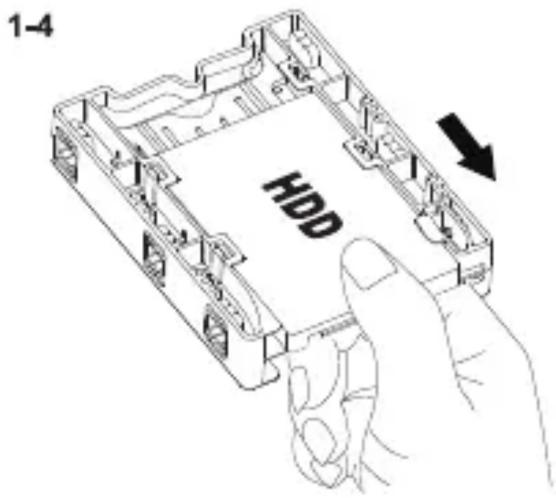
1-5

ICY DOCK will not be liable for any software, hardware, or data stored within or interfacing with ICY DOCK products which results in damage or malfunction. ICY DOCK will only be responsible for repairs and services of ICY DOCK products.

Brand : Icy Dock
Model : EZ-Fit Lite MB290SP-B
Category : Computer Case