
MB882SP-1S-2B - Memory reader Icy Dock - Free user manual and instructions
Find the device manual for free MB882SP-1S-2B Icy Dock in PDF.


| Product Type | External Hard Drive Enclosure / Memory Card Reader |
| Interface | USB 3.0 (5 Gbps) and eSATA (3 Gbps) |
| Supported Drives | 2.5" SATA HDD/SSD |
| Drive Height | Up to 9.5 mm |
| Material | Aluminum and ABS plastic |
| Dimensions (W x H x D) | 131 x 78 x 15 mm (5.15 x 3.07 x 0.59 inches) |
| Weight | 120 g (4.23 oz) |
| Power Supply | Bus-powered via USB |
| Operating Systems | Windows, macOS, Linux |
| Cooling | Passive cooling via aluminum housing |
| LED Indicators | Power and activity |
| Installation | Tool-free, slide-in design |
| Hot Swap | Supported |
| Backward Compatibility | USB 2.0 and eSATA 1.5 Gbps |
| Maintenance | Clean with a dry cloth; no liquid or abrasive cleaners |
| Repairability | Not user-serviceable; contact support for issues |
| Safety | Use with certified power source; avoid exposure to moisture |
| Included Accessories | USB 3.0 cable, eSATA cable, quick start guide |
Frequently Asked Questions - MB882SP-1S-2B Icy Dock
User questions about MB882SP-1S-2B Icy Dock
0 question about this device. Answer the ones you know or ask your own.
Ask a new question about this device
Download the instructions for your Memory reader in PDF format for free! Find your manual MB882SP-1S-2B - Icy Dock and take your electronic device back in hand. On this page are published all the documents necessary for the use of your device. MB882SP-1S-2B by Icy Dock.
USER MANUAL MB882SP-1S-2B Icy Dock
natural_image
Isometric line drawing of a rectangular electronic device with ventilation slots and ports (no text or symbols)

natural_image
Four identical screwdrivers arranged in a 2x2 grid (no text or symbols)2
natural_image
Illustration of hands installing a CD-ROM drive into a rack, showing internal components and mounting arrows (no text or symbols)or

natural_image
Illustration of hands installing or adjusting a device into a rack (no text or symbols visible)2-2
natural_image
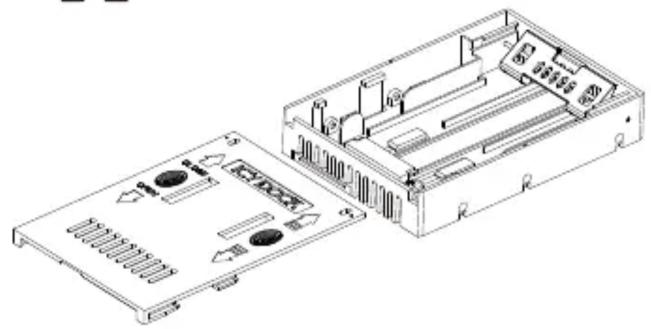
Technical line drawing of an electronic device chassis showing internal components and housing (no text or symbols)
2-4

natural_image
Technical line drawing of an internal electronic device casing with ventilation slots and a magnified inset showing internal components (no text or symbols)2-5
natural_image
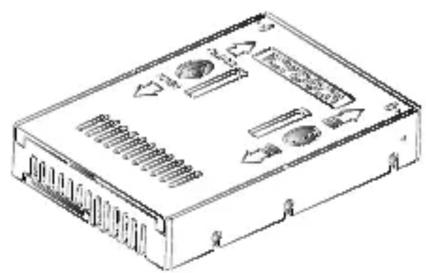
Technical line drawing of a rectangular electronic device with ventilation slots and ports (no text or symbols)2-6
2-7

2-8

ICY DOCK will not be liable for any software, hardware, and any data stored within or interfacing with our product, which results in damages or dysfunctions. ICY DOCK will only be responsible for repairs and services of its own products. For any further inquiries related to ICY DOCK products, please visit http://www.icydock.com.

Brand : Icy Dock
Model : MB882SP-1S-2B
Category : Memory reader