
PS-50 - Docking Station Sven - Free user manual and instructions
Find the device manual for free PS-50 Sven in PDF.


| Product Type | Docking Station / Stand |
| Brand | Sven |
| Model | PS-50 |
| Compatible Devices | Laptops, tablets, smartphones with USB-C or HDMI |
| Dimensions (L x W x H) | 250 x 150 x 30 mm |
| Weight | 0.5 kg |
| Material | ABS plastic and aluminum |
| Color | Black |
| Input Interface | USB-C (Power Delivery 3.0) |
| Output Ports | 2x USB-A 3.0, 1x HDMI 2.0, 1x USB-C PD, 1x 3.5mm audio |
| Power Supply | External adapter (20V/3.25A) |
| Max Charging Power | 65W (laptop charging) |
| Data Transfer Rate | USB 3.0: up to 5 Gbps |
| Video Output | HDMI 2.0 up to 4K@60Hz |
| Cable Length | 1 meter |
| LED Indicators | Power and data activity |
| Cooling | Passive ventilation grills |
| Package Contents | Docking station, power adapter, user manual |
| Safety Features | Overcurrent, overvoltage, short circuit protection |
| Operating Temperature | 0°C to 40°C |
Frequently Asked Questions - PS-50 Sven
User questions about PS-50 Sven
0 question about this device. Answer the ones you know or ask your own.
Ask a new question about this device
Download the instructions for your Docking Station in PDF format for free! Find your manual PS-50 - Sven and take your electronic device back in hand. On this page are published all the documents necessary for the use of your device. PS-50 by Sven.
USER MANUAL PS-50 Sven
natural_image
Black SVEN audio recorder device with mesh grille and digital display (no visible text or symbols on main body)PS-50
www.sven.fi
natural_image
Top-down schematic of a device casing with internal components and labeled part (13), no text or symbols present.natural_image
Black SVEN audio recorder device with mesh grille and digital display (no visible text or symbols on main body)PS-50
www.sven.fi
natural_image
Top-down schematic of a car interior showing front panel, rear panel, and internal compartments (no text or symbols)natural_image
Black SVEN audio recorder device with mesh grille and digital display (no visible text or symbols on main body)Operation Manual
PS-50
Congratulations on your purchase of the Sven speaker system!
COPYRIGHT
© 2014. SVEN PTE. LTD. Version 1.0 (V 1.0).
This Manual and information contained in it are copyrighted. All rights reserved.
TRADEMARKS
All trademarks are the property of their legal holders.
NOTICE OF RESPONSIBILITY RESTRICTION
Despite the exerted efforts to make this Manual more exact, some discrepancies may occur. The information in this Manual is given on «as is» terms. The author and the publisher do not bear any liability to a person or an organization for loss or damage which has arisen from the information contained in this Manual.
CONTENTS
RUS 1
UKR 7
ENG 14
-
BUYER RECOMMENDATIONS .... 15
-
PACKAGE CONTENTS.... 16
-
SAFETY PRECAUTIONS 16
-
TECHNICAL DESCRIPTION ...... 16
-
PREPARATION AND OPERATION 18
-
OPERATION MODES ...... 19
-
TROUBLESHOOTING.... 20
-
TECHNICAL SPECIFICATIONS ...... 20
1. BUYER RECOMMENDATIONS
- Unpack the device carefully. Make sure there are no accessories left in the box. Check up the device for damage; if the product was damaged during transportation, address the firm which carried out the delivery; if the product functions incorrectly, address the dealer at once.
- Check up the package contents and availability of the warranty card. Make sure the warranty card has a shop stamp, a legible signature or the seller's stamp and purchase date, and the goods number corresponds to that in the warranty card. Remember: in case of warranty card loss or discrepancy of numbers you forfeit the right for warranty repairs.
- Do not switch on the speaker system immediately after you bring it into a room from environment with negative temperature! After unpacking, the speaker system should be kept in conditions of room temperature for at least 4 hours.
- Before installing and using the speaker system, read this Manual carefully and keep it for future reference.
2. PACKAGE CONTENTS
- Speaker system – 1 pc
- Mini-jack to mini-jack sygnal cable – 1 pc
- USB to mini USB cable – 1 pc
- Strap (string) for transportation – 1 pc
- Li-Ion battery (3.7 V, 800 mA·h) – 1 pc
• Operation Manual – 1 pc - Warranty card – 1 pc
3. SAFETY PRECAUTIONS
- Do not open the multimedia speaker system (MSS) and do not perform repairs by yourself. Service and repairs should be performed only by qualified specialists in an authorized service center. The list of authorized service centers is available on www.sven.fi.
- Do not put foreign objects inside the holes of the MSS.
- Protect the MSS from high humidity, water and dust.
- Protect the MSS from heating: do not place it closer than 1 m from a heat source. Do not expose it to direct sunlight.
- Do not place open flame sources closely to MSS.
- Do not use any chemical agents for cleaning. Clean it with dry soft cloth only.
4. TECHNICAL DESCRIPTION
PS-50 Multimedia Speaker System (MSS) is designed to play music and sound games, movies, etc. The MSS has a built-in high-quality wideband loudspeaker, FM tuner, MP3 player, a slot to connect SD micro, AUX stereo input, USB port to connect a USB flash to connect the MSS to PC, notebook, MP3 or CD player or other sound sources.
Special features
• High-quality wideband loudspeaker
• LED display (light-emitting-diode display)
• Built-in FM tuner
• Built-in MP3 player
- USB port to connect a USB flash
- Slot to connect SD micro
• Additional AUX stereo input
- Headphone jack
- Possibility to charge the battery from a USB port of PC, notebook or peripheral charger (+5V DC) with standard mini USB cable
• Li-Ion battery (3.7 V, 800 mA·h)
Operation Manual
PS-50
MSS design
① Battery charge indicator
② LED-display
③ M: signal source shift button (short pressing);
automatic scan and storage of radio stations in radio mode (long pressing, more than 2 sec)
④ ▶/ playback/pause in player and radio modes (short pressing);
ON/OFF for all modes (long pressing)
⑤ vol+/▶▶: next track in player mode (short pressing);
next station* in radio mode (short pressing); volume increase (long pressing)
⑥ |◀◀/vol-: previous track in player mode (short pressing);
previous station* in radio mode (short pressing);
volume decrease (long pressing)
⑦ High-quality wideband loudspeaker
⑧ AUX: additional AUX stereo input
⑨: headphone jack
⑩ Micro SD: slot to connect micro SD card** with musical files in MP3 format
⑪ DC IN: USB mini jack to connect the MSS to a charger or USB port of a notebook/PC
⑫ USB: jack for USB flash** with musical files in MP3 format
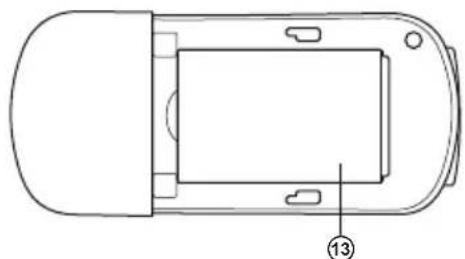
⑬ Li-Ion battery(3.7 V, 800 mA·h)
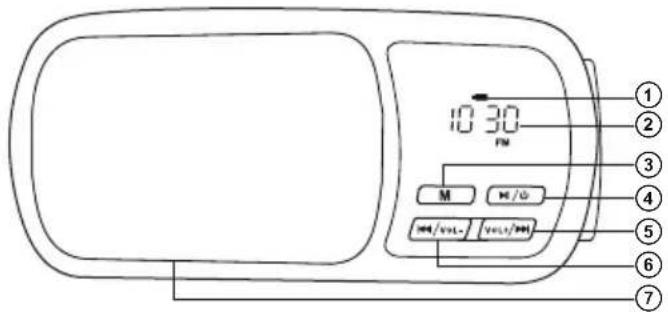
Fig. 1. Front panel

Fig. 2. Top panel

Fig. 3. Lower panel

Fig. 4. Side panel
natural_image
Top-down schematic of a car interior showing front, rear, and side views with no text or symbolsFig. 5. Rear panel
5. PREPARATION AND OPERATION
Speaker placement
- Place the device in an easy-to-use place for a user.
- Place the MSS far away from monitors and TV sets, as insignificant image distortion in these supersensitive devices is possible.
MSS connecting
PS-50 Portable Multimedia Speaker System can be connected to virtually any audio devices: PC, notebook, MP3/MP4 players, etc. (see connection diagram in Fig. 6).
- Before making any connections, make sure the MSS is unplugged.
- Connect signal cable with 3.5 mm mini-jack (included) to AUX jack ⑧, and then to a sound source audio output (PC, notebook, CD/MP3/MP4 players, iPhone, iPod, etc.), as shown in the connection diagram (see Fig. 6).
- Connect the power cable connector (included) to DC IN jack ⑪, and then to a USB port of a PC or 5V DC power unit.
- Connect a USB flash carrier with musical files to USB jack ⑫. Connect a Micro SD card with musical files to Micro SD slot ⑩.

flowchart
graph TD
    A["PC"] -->|Mini-jack to mini-jack signal cable| B["Micro SD"]
    C["iPhone"] --> B
    D["iPod"] --> B
    E["MP4 player MP3 player"] --> B
    F["CD player"] --> B
    G["Socket"] --> H["USB jack"]
    I["Headphones"] --> J["USB flash"]
    K["USB flash"] --> L["Mini USB to USB power cable"]
Fig. 6. Connection diagram
Operation Manual
PS-50
- Then switch on the device by long pressing of the button ④.
- Switch on an audio signal source.
- Control the master volume level by long pressing of buttons ⑤ or ⑥.
- Connect headphones to the jack ⑨ (see Fig. 2).
Battery charging
- Connect the device using USB cable (included) to DC IN port ⑪, and then to a USB port of PC or to 5V DC power unit with output USB jack.
- If the battery is discharged, the indicator ① blinks, but if it is charged – the indicator is red.
Notes:
- After using the MSS, mind to unplug the USB cable from a USB port of PC, notebook or 5V DC power unit.
- To improve sound quality, use the Line-Out output of the sound card.
6. OPERATION MODES
Player Mode
- The system will go to the player mode automatically, if one of carriers (USB flash or micro SD card)* is inserted into an appropriate jack ⑫ or ⑩. Press the button M ③ on the front panel to select a desired source, when the MSS is turned on. LED display ② will show a selected source "USB/CARD" and after that the playback time from the beginning. The playback will start automatically. Press buttons ⑥ or ⑤ short on the front panel to select a track. LED will briefly show the sequence number of a track and after that the playback time from the beginning.
Radio Mode
- Use the button M ③ on the front panel to enter the radio mode when the MSS is on. The display ② will show “FM” symbol and the frequency of a station received.
- Press and hold down the button M ③ not less than for 2 seconds for the automatic scan and to store the found stations. The display ② will show a frequency during scanning and will show its sequence number for short time during storing.
AUX Mode
- Use the button M ③ on the front panel to enter the AUX mode, when the MSS is turned on. The display ② will show “AUX/LINE”.
ON/OFF Mode
- Press and hold down the button ④ on the front panel to turn on/off the MSS.
- TROUBLESHOOTING
| Problem | Cause | Solution |
| The MSS does not turn on. | Battery is discharged. | Connect the MSS to a charger, USB port of a notebook or PC to charge the battery. |
| No sound or there is too quiet sound of speakers. | The volume level is set at minimum value. | Press the button «vol+» on the front panel. |
| Improperly connected audio source. | Connect/select audio sources correctly. | |
| Distortion of sound. | Large amplitude of the input signal. | Turn down the source volume and the MSS volume. |
If none of the above methods can solve the problem, please seek professional advice at your nearest service center. Never attempt to repair the product yourself.
- TECHNICAL SPECIFICATIONS
| Parameter, measurement unit | Value |
| Output power (RMS), W | 3 |
| Frequency range, Hz | 90 – 20,000 |
| Received frequency range in FM mode, MHz | 87.5 – 108 |
| Speaker diameter, mm | ∅ 40 |
| Voltage supply | 3.7 B / 800 mA · h |
| Dimensions (W × H × D), mm | 113 × 53 × 29 |
| Weight, kg | 0.116 |
Notes:
- Technical specifications given in this table are supplemental information and cannot give occasion to claims.
- Technical specifications are subject to change without notice due to the improvement of SVEN production.
natural_image
Black digital ear restor with a digital display showing 10:30, no visible text or symbols on the device itself.Модель: PS-50
Manufacturer: SVEN PTE. LTD., 176 Joo Chiat Road, N° 02-02, Singapore, 427447. Produced under the control of Oy Sven Scandinavia Ltd. 15, Kotolahdentie, Kotka, Finland, 48310. Made in China.
® Registered Trademark of Oy SVEN Scandinavia Ltd. Finland.
PS-50
- Operation Manual
- PS-50
- Congratulations on your purchase of the Sven speaker system!
- COPYRIGHT
- TRADEMARKS
- NOTICE OF RESPONSIBILITY RESTRICTION
- CONTENTS
- BUYER RECOMMENDATIONS
- PACKAGE CONTENTS
- SAFETY PRECAUTIONS
- TECHNICAL DESCRIPTION
- Special features
- MSS design
- PREPARATION AND OPERATION
- Speaker placement
- MSS connecting
- Battery charging
- Notes:
- OPERATION MODES
- Player Mode
- Radio Mode
- AUX Mode
- ON/OFF Mode
- Модель: PS-50
Brand : Sven
Model : PS-50
Category : Docking Station