
ideaCam S1 - Video Conferencing System BENQ - Free user manual and instructions
Find the device manual for free ideaCam S1 BENQ in PDF.


| Product Type | Video Conferencing System (Webcam) |
| Brand | BenQ |
| Model | ideaCam S1 |
| Dimensions | Approximately 110 x 60 x 40 mm |
| Weight | ~150 g |
| Power Supply | USB 2.0 (5V, 500mA) |
| Resolution | 4K UHD (3840 x 2160) at 30fps |
| Field of View | 90 degrees |
| Autofocus | Yes, with face tracking |
| Built-in Microphone | Dual stereo microphone |
| Privacy Shutter | Yes, physical switch |
| Mounting | Clip-on monitor or tripod (1/4 inch) |
| Compatibility | Windows, macOS, Chrome OS, Android |
| Cable Length | 1.5 meters |
| Maintenance & Cleaning | Wipe lens and body with a soft, dry cloth. Avoid solvents. |
| Safety Precautions | Do not expose to liquids or extreme temperatures. Use only supplied USB cable. |
| Spare Parts & Repairability | USB cable replaceable; no user-serviceable parts inside. Contact BenQ support for repairs. |
| Warranty | 1 year limited warranty |
| Package Contents | ideaCam S1, USB cable, quick start guide, warranty card |
| General Information | Ideal for video conferencing, streaming, and online teaching. |
Frequently Asked Questions - ideaCam S1 BENQ
User questions about ideaCam S1 BENQ
0 question about this device. Answer the ones you know or ask your own.
Ask a new question about this device
Download the instructions for your Video Conferencing System in PDF format for free! Find your manual ideaCam S1 - BENQ and take your electronic device back in hand. On this page are published all the documents necessary for the use of your device. ideaCam S1 by BENQ.
USER MANUAL ideaCam S1 BENQ
Copyright and disclaimer
Disclaimer
BenQ Corporation makes no representations or warranties, either expressed or implied, with respect to the contents of this document. BenQ Corporation reserves the right to revise this publication and to make changes from time to time in the contents thereof without obligation to notify any person of such revision or changes.
Copyright
Copyright 2023 BenQ Corporation. All rights reserved. No part of this publication may be reproduced, transmitted, transcribed, stored in a retrieval system or translated into any language or computer language, in any form or by any means, electronic, mechanical, magnetic, optical, chemical, manual or otherwise, without the prior written permission of BenQ Corporation.
Typographics
| Icon / Symbol | Item Meaning | |
 | Warning | Information mainly to prevent the damage to components, data, or personal injury caused by misuse and improper operation or behavior. |
 | Tip Useful information for completing a task. | |
 | Note Supplementary information. | |
In this document, the steps needed to reach a menu are shown in condensed form, for example: System > Information.
Product Support
This document aims to provide the most updated and accurate information to customers, and thus all contents may be modified from time to time without prior notice. Please visit the website for the latest version of this document and other product information. Available files vary by model.
- Make sure your computer is connected to the Internet.
- Visit the local website from Support.BenQ.com. The website layout and content may vary by region/country.
Search for your model's user manual and related document.
Servicing
- If misuse or other accident occurs, contact qualified service personnel for servicing.
- Contact your place of purchase or visit the local website from Support.BenQ.com for more support.
Table of contents
Copyright and disclaimer ....i
Product Support......ii
Package contents....1
Overview 2
ideaCam exterior view 2
Remote controller exterior view ....3
Setting up your ideaCam 4
Attaching to a monitor....4
Attaching to a tripod....5
Setting up the remote controller....6
Installing/Replacing batteries....6
Connecting the USB receiver 6
Operations 7
Hand-hold mode 7
Using the magnifying lens....8
Updating firmware 8
Using BenQ EnSpire 9
Accessing different platforms....9
Initial setup for web version....9
Using EnSpire during meetings 10
Maintenance....11
Cleaning the lens....11
Product information....12
Specifications 12
Dimensions....14
Troubleshooting 15
Hardware issues: ideaCam....15
Hardware issues: remote controller....16
Hardware issues: magnifying lens....16
Software issues: EnSpire....17
Package contents
Open the sales package and check the contents. If any item is missing or damaged, please contact your dealer immediately.

Webcam Webcam mount
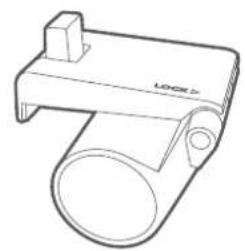

Webcam cover

User documents
(quick start guide, software guide, regulatory statements, warranty cards)
Other accessories

Magnifying lens
(only in S1 Plus & S1 Pro)

Remote controller

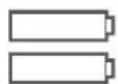
(only in S1 Pro)

- Before discarding the package, check that you haven't left any accessories inside the box.
- Use original accessories to ensure compatibility.
- The warranty card is only supplied in some specific regions. Please consult your dealer for detailed information.
Overview
ideaCam exterior view
See Setting up your ideaCam on page 4.


- Freeze button
Press to freeze or unfreeze the screen image. (Use with EnSpire) - Ring light button
Press to turn the ring light on or off. - Ring light
- Status light
Lights up when the camera is on. - Slot for webcam mount
- USB Type-A connector
Connects to a USB 2.0 port. - Attachment point for webcam
- Mount lock
- Screw hole for tripod
Remote controller exterior view
See Setting up the remote controller on page 6.
Always use the remote controller with EnSpire. You can control your ideaCam with the remote controller instead of making changes on EnSpire through mouse-clicking.

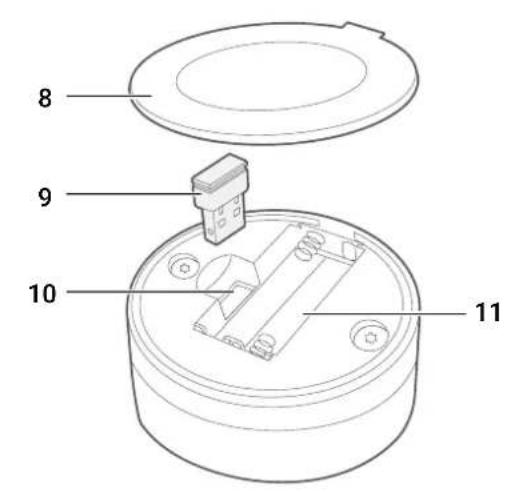
-
Status light
-
Lights up white when buttons are tapped.
-
Lights up red when battery charge is low. Replace the batteries immediately.
-
Capture button
- AF/MF switch button
- Mute/Unmute button
- Focus button
- Freeze button
- Zoom ring
Rotate the ring to zoom in and out.
- Battery cover
- USB receiver
- USB receiver slot
- Battery holder
Setting up your ideaCam
Attaching to a monitor
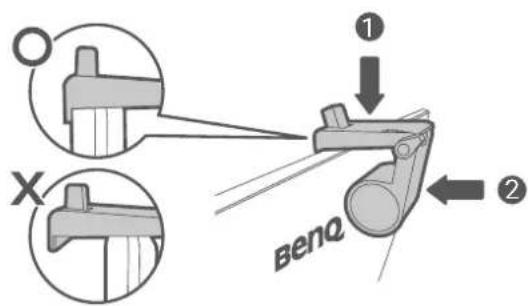
-
Rest the webcam mount on the monitor's bezel and align the mount's front edge with the monitor.
-
Ensure that the mount is braced against the monitor's back.

- Rotate the lock clockwise to secure the webcam mount.

Do not over rotate the lock. Stop when the mount is firmly attached.
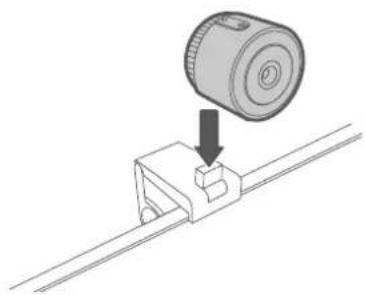
- Align and attach the webcam to the attachment point of the webcam mount.
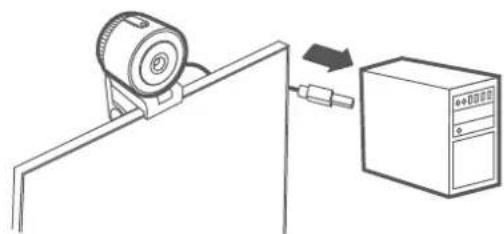
- Connect your webcam to a USB Type-A port on your computer and wait for the driver to install.

If your computer does not recognize the webcam, please unplug the USB and plug it back in again.

- Tilt the webcam within the 90-degree range to either focus on portrait or present items on your desk.

Use EnSpire for advanced camera settings.
Attaching to a tripod

Tripod is not included with the product.
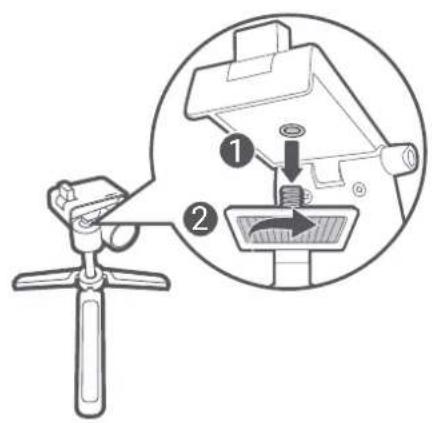
- Screw a standard tripod into the screw hole on the webcam mount.

- Align and attach the webcam to the attachment point of the webcam mount.

- Connect your webcam to a USB Type-A port on your computer and wait for the driver to install.

If your computer does not recognize the webcam, please unplug the USB and plug it back in again.
Setting up the remote controller
Installing/Replacing batteries
- Open the battery cover.
- Insert the supplied batteries, ensuring that the positive and negative ends are facing in the correct direction.
- Close the battery cover.


- Do not mix old and new batteries.
- Do not place the batteries under direct sunlight, at a high temperature or near fire. Neither store the batteries in high humidity nor submerge them in water.
- Do not disassemble, hit, or make modifications to the batteries or they may short circuit and pose a hazard.
- Do not attempt to recharge discarded non-chargeable batteries or expose them to fire.
- Remove the batteries if they are depleted or if the product will not be used for an extended period; otherwise chemicals inside the batteries may leak and damage the product.
- To reduce adverse impact on the environment and prevent health hazards, please properly discard the batteries according to your local recycling regulations.
Connecting the USB receiver
To begin using the remote controller, you must first insert the remote controller receiver to a USB Type-A port on your computer.


Use EnSpire for advanced camera and image settings.
Operations
Hand-hold mode
You can take the webcam off the webcam mount to give a more-detailed demonstration of an object.
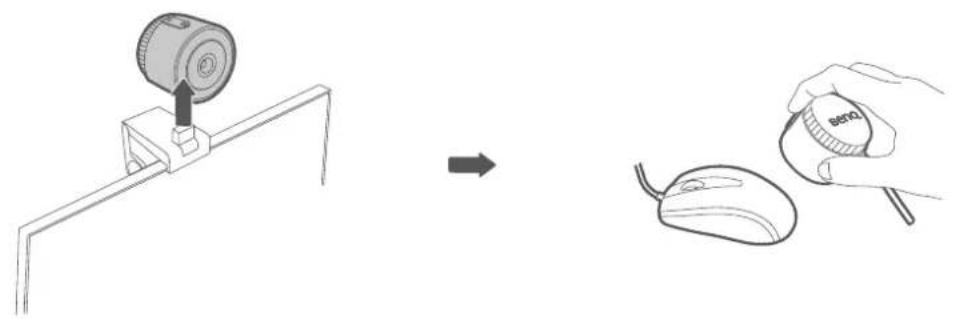
- Tap the ring light button ( ) to add additional lighting to the object.
- Tap the freeze button (◎) to freeze your screen image while using EnSpire.
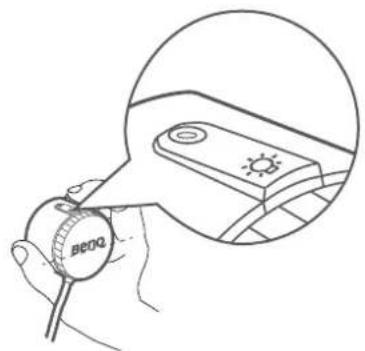

To keep your screen image upright, ensure that the BenQ logo is horizontal with the object you'd like to capture and align your index finger with the buttons on top.

Using the magnifying lens
- Attach the magnetic magnifying lens to the webcam.

- Hold the webcam close to the object and don't leave any gap between the lens and the object to avoid blurred images.

Updating firmware

• Supported OS: Windows
- For Mac or other OS, visit the local website from Support.BenQ.com for assistance.
- Download the firmware from the ideaCam official site page.
- Connect your ideaCam to your computer.
- Launch the update tool and follow the on-screen instructions to complete the update process.
Using BenQ EnSpire
BenQ Enspire is a software that provides powerful toolkits for remote collaboration, annotation, and measurement. BenQ Enspire supports multi-platforms and allows users to share ideas easily with ideaCam.
Accessing different platforms
Software version Supported version Description
| Web | ChromeEdge | Open EnSpire (https://enspire.benq.com/).See Initial setup for web version on page 9 for details. |
| Windows Windows 10 or above | Go to ideaCam official site page to download the latest version of BenQ EnSpire. | |
| Mac macOS 13.1 or above | ||
Initial setup for web version

Internet connection is required for using the web-based software.

The screenshots in this document are for reference only and may differ from actual design.
- Open EnSpire (https://enspire.benq.com/) on your browser. (Recommend browsers: Chrome or Edge)
- Log in with your google account or create a new account to continue.
- After logging in, a permission window will pop up. Enable camera and microphone access for EnSpire to complete the setup.

- In EnSpire, go to Settings > Source settings to change your camera or microphone sources.
Using EnSpire during meetings
- Ensure that your ideaCam and EnSpire is all setup before entering meetings.
- Click on the share-screen icon in the video conferencing software.

- Select the EnSpire software tab and confirm your selection to share your screen via EnSpire.
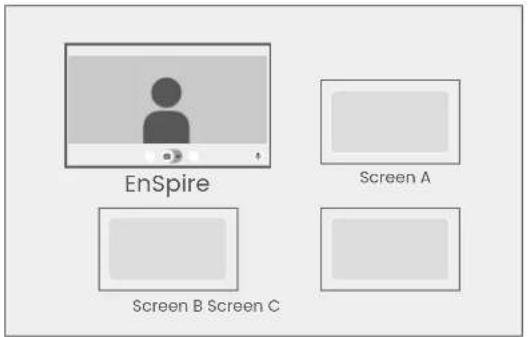
Share screen
Maintenance
Cleaning the lens
Clean the lens whenever you notice dirt or dust on the surface.
- Use a canister of compressed air to remove dust.
- If there is dirt or smears, use lens-cleaning paper or moisten a soft cloth with lens cleaner and gently wipe the lens surface.
- Never use any type of abrasive pad, alkaline/acid cleaner, scouring powder, or volatile solvent, such as alcohol, benzene, thinner or insecticide. Using such materials or maintaining prolonged contact with rubber or vinyl materials may result in damage to the product's surface.

Never touch the lens with your finger or rub the lens with abrasive materials. Even paper towels can damage the lens coating. Only ever use a proper photographic lens brush, cloth, and cleaning solution. Do not attempt to clean the lens while the product is switched on or is still hot from previous use.
Product information
Specifications
| ideaCam S1 series | |
| Sensor | Sony 8MP CMOS |
| Effective Pixels | 3264 x 2448, 4:3 |
| Video Resolution | USB Output:4:3 Aspect Ratio3264x2448/2592x1944/2048x1536/1600x12001024x768/800x600/640x480 @ 30fps16:9 Aspect Ratio3264x1836/1920x1080/1280x720 @ 30fps |
| Maximum Still Image Resolution | 3264x2448 |
| FOV | 72.9° |
| Focal Length | 10 cm ~∞ |
| Auto Focus | Yes |
| Auto Exposure | Yes |
| Auto White Balance | Yes |
| Aperture | 2.2 |
| Microphone | Digital-microphone |
| Noise Reduction | Yes |
| Video Compression | MJPEG |
| Ring Light | 6 LEDs |
| USB | USB 2.0 , UVC |
| USB Cable Length | 1.6 M |
| Input Voltage | 5 V |
| Input Current | 450 mA (MAX) |
| Power Consumption | 2 W (MAX) |
| Ring Light Button | 1 |
| Freeze Button | 1 |
| Operating Temperature | 0°C ~40°C |
| Operating Humidity | 0% ~ 60% |
| Store Temperature | -10°C ~ 50°C |
| Store Humidity | 0% ~ 90% |
| Dimensions (mm) | 107 x 83.5 x 57 (mm) |
| Weight | 307g |
| Operating System | Mac/Windows/Chromebook |
| Monitor Compatibility (thickness) | 10 mm ~ 75 mm |
| 15x Magnifying Lens | |
| Dimensions (mm) | ∅32.4 x 25.15 (mm) |
| Weight | 10.5 g |
| Remote Controller | |
| Remote Controller Dimensions (mm) | 73 x 73 x 39 (mm) |
| Remote Controller Weight | 157 g |
| USB Receiver | 1 |
| USB Receiver Dimensions (mm) | 15 x 21 x 6.5 (mm) |
| USB Receiver Weight | 1.9 g |
| Connection Type | 2.4 GHz wireless connection |
| Battery | AAA x 2 |
| Battery Lifespan | 6 months (Battery lifespan may vary based on user's usage.) |
| Wireless Range | 2 M (Wireless range may vary based on user, computing conditions and environment.) |

Specifications and functions are subject to change without notice
Dimensions
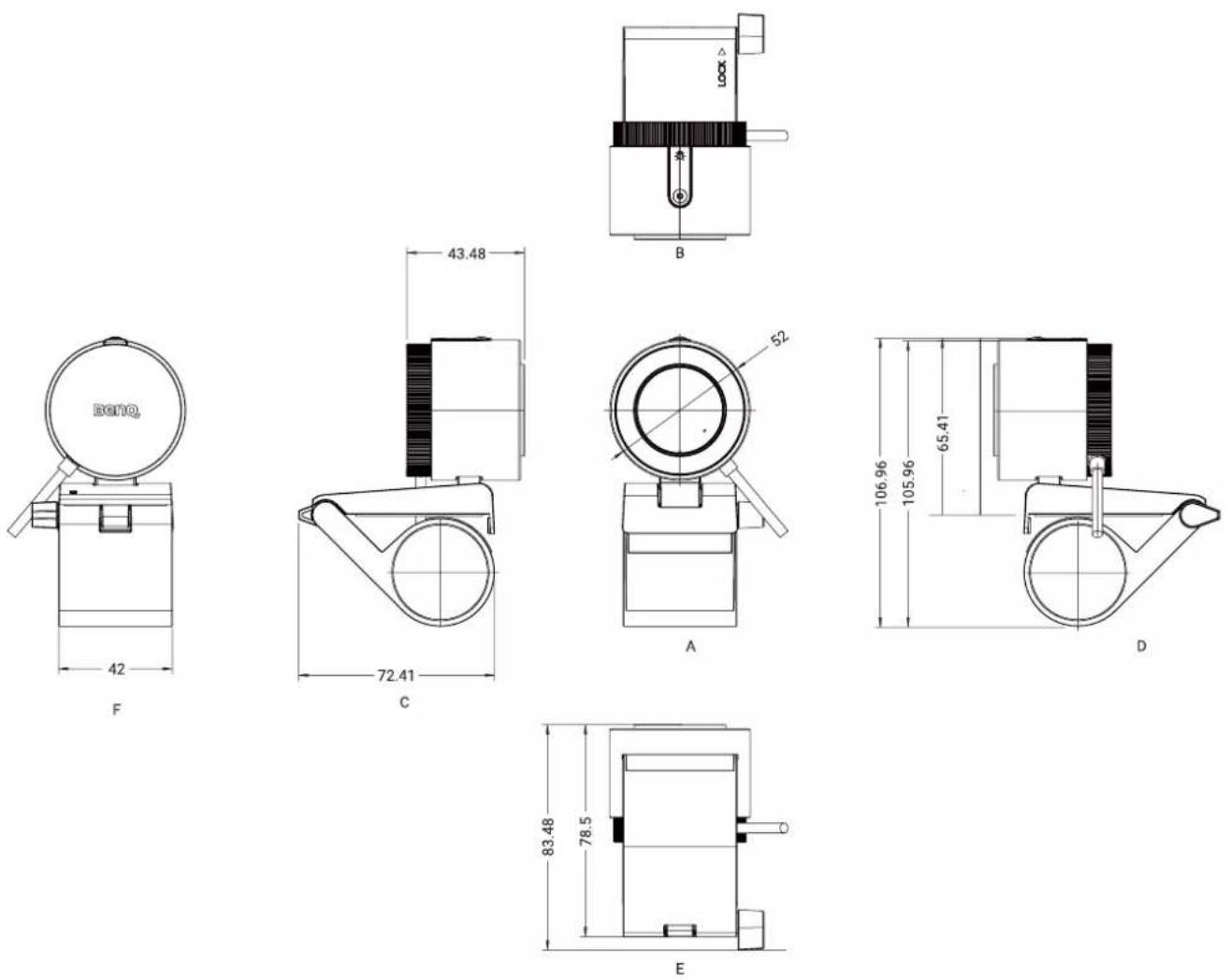
Unit: mm
Troubleshooting
If your problems remain after checking this manual, please contact your place of purchase or visit the local website from Support.BenQ.com for more support and local customer service.
Hardware issues: ideaCam
| Problem Solution | |
| My ideaCam can't be set on the monitor firmly. | Check whether your webcam mount is setup properly. Rotate the lock at the right-side of the mount clockwise to secure the mount.Note that the thickness of the monitor frame must be within the range of 1 cm-7.5 cm. |
| ideaCam is not detected on my computer | Try methods below:Connect the webcam to a different USB port on your device.Ensure the webcam is not connected to a USB hub or docking station.Try connecting your ideaCam to another computer. If your webcam is still not detected by the second computer, please connectSupport.BenQ.comfor further support. |
| Can I use a USB hub with ideaCam? | Though ideaCam is compatible with both USB2.0 and USB3.0 hub, we don't recommend using a USB hub because it is very likely to affect the overall performance of your ideaCam. |
| Is it normal if my ideaCam gets warm? | It is normal that your webcam gets warm since shooting and recording requires a lot of the camera's internal resources. |
| Screen images are blurry./Screen images are blurry when using the magnifying lens. | The provided 15x magnifying lens is fixed lens. Please cover the surface of the object with the magnifying lens to get a clear image.Try methods below if the image is still blurry:Clean your camera lens with a lens cloth.Adjust focal length and focus onEnSpire.Make sure you have adequate lighting around you. |
Hardware issues: remote controller
| Problem Solution | |
| My remote controller is not responding | Try methods below:• Ensure you've opened EnSpire on your browser. The remote controller is made to use together with the web based software EnSpire.• Ensure you've inserted the USB receiver. See Connecting the USB receiver on page 6 for more information.• Check your remote controller's status light:- No light: the battery charge may have run out.Contact BenQ Support if replacing the batteries does not help.- Red light: Battery charge is low. Please replace your battery as soon as possible.- If the controller is flashing white light when buttons are tapped, and the usb receiver is inserted properly, please contactSupport.BenQ.comfor further support. |
| What is the lifespan of the battery used in the remote controller? | About 6 months. (Lifespan may vary depends on users' usage.) |
Hardware issues: magnifying lens
| Problem Solution | |
| Screen images are blurry./Screen images are blurry when using the magnifying lens. | The provided 15x magnifying lens is fixed lens. Please cover the surface of the object with the magnifying lens to get a clear image.Try methods below if the image is still blurry:Clean your camera lens with a lens cloth.Adjust focal length and focus onEnSpire.Make sure you have adequate lighting around you. |
Software issues: EnSpire
| Problem Solution | |
| My ideaCam does not work on EnSpire | Try methods below:Make sure your computer has connected to the Internet.Reconnect your ideaCam to the USB port and refresh your EnSpire page.Ensure your camera access for your computer is on. Go to privacy settings on your device to turn on your camera access and try connecting the camera again.Ensure Enspire is allowed to access your camera and microphone on your browser. Go to your browser's setting page to switch your permission settings.Ensure no application in the background is blocking EnSpire from using the webcam. You can try to temporarily turn off the camera source in other applications, refresh the EnSpire page, and try connecting the camera again.Update your browser to make sure that all features work properly. |
| Is EnSpire available on Mac? | Features of EnSpire is limited on macOS. We recommend using browsers such as Chrome or Edge for EnSpire. |
- COPYRIGHT AND DISCLAIMER
- DISCLAIMER
- COPYRIGHT
- PRODUCT SUPPORT
- SERVICING
- TABLE OF CONTENTS
- PACKAGE CONTENTS
- OTHER ACCESSORIES
- OVERVIEW
- IDEACAM EXTERIOR VIEW
- REMOTE CONTROLLER EXTERIOR VIEW
- SETTING UP YOUR IDEACAM
- ATTACHING TO A MONITOR
- ATTACHING TO A TRIPOD
- SETTING UP THE REMOTE CONTROLLER
- INSTALLING/REPLACING BATTERIES
- CONNECTING THE USB RECEIVER
- OPERATIONS
- HAND-HOLD MODE
- USING THE MAGNIFYING LENS
- UPDATING FIRMWARE
- USING BENQ ENSPIRE
- ACCESSING DIFFERENT PLATFORMS
- INITIAL SETUP FOR WEB VERSION
- USING ENSPIRE DURING MEETINGS
- MAINTENANCE
- CLEANING THE LENS
- PRODUCT INFORMATION
- SPECIFICATIONS
- DIMENSIONS
- TROUBLESHOOTING
Brand : BENQ
Model : ideaCam S1
Category : Video Conferencing System