
PWE350 - Calculator SHARP - Free user manual and instructions
Find the device manual for free PWE350 SHARP in PDF.


| Product Type | Electronic Dictionary with Calculator and Converter functions |
| Model | SHARP PW-E350 |
| Dimensions (closed) | 125 mm (W) × 79.4 mm (D) × 16.8 mm (H) |
| Weight (including battery) | Approx. 148 g (0.33 lb) |
| Power Supply | 1.5 V DC, one alkaline battery LR03 (size AAA) |
| Battery Life | Approx. 200 hours (continuous display at 25°C) |
| Display | 159 × 80 dot matrix LCD |
| Operating Temperature | 0°C – 40°C (32°F – 104°F) |
| Main Functions | New Oxford American Dictionary, Oxford American Thesaurus, Spellcheck, Calculator (12-digit), Currency and Metric Converter, Super Jump, History, Quick View |
| Dictionary Content | Over 250,000 definitions (NOAD), 15,000 main entries with 350,000 synonyms (Thesaurus) |
| Calculator Functions | Addition, subtraction, multiplication, division, percentage, memory, constant calculations |
| Converter Functions | Currency (1 rate) and Metric (length, weight, temperature, volume, surface area) |
| Auto Power Off | Adjustable (default 5 minutes) |
| Key Sound | On/off adjustable |
| LCD Contrast | Adjustable |
| Maintenance | Clean with a soft, dry cloth; do not use solvents |
| Safety | Do not drop, apply excessive force, or expose to extreme temperatures/humidity; not waterproof |
| Battery Replacement | Use AAA alkaline battery; follow switch procedure to preserve history |
| Reset | Press RESET switch with ballpoint pen; clears history and settings |
| Accessories Included | Alkaline battery LR03 (AAA) × 1, operation manual |
| Warranty | 1 year parts and labor (US) |
Frequently Asked Questions - PWE350 SHARP
User questions about PWE350 SHARP
0 question about this device. Answer the ones you know or ask your own.
Ask a new question about this device
Download the instructions for your Calculator in PDF format for free! Find your manual PWE350 - SHARP and take your electronic device back in hand. On this page are published all the documents necessary for the use of your device. PWE350 by SHARP.
USER MANUAL PWE350 SHARP
The New Oxford American Dictionary Oxford American Thesaurus of Current English


ELECTRONIC DICTIONARY OPERATION MANUAL
- Getting Started....2 • Using the New Oxford American Dictionary .... 14 • Using the Oxford American Thesaurus of Current English .... 18 • Using the Super jump function ..... 20 • Using the History function 22 • Using the Calculator function ...... 23 • Using the Converter function 24
- Appendices 26
- Introductions to the Dictionaries .... 29 • Product Support 44
Introduction
Thank you for purchasing the SHARP Electronic Dictionary, model PW-E350.
The PW-E350 contains data based on the following dictionaries (see page 4):
• The New Oxford American Dictionary • Oxford American Thesaurus of Current English
After reading this manual, store it in a convenient location for future reference.
NOTICE
- SHARP will not be liable nor responsible for any incidental or consequential economic or property damage caused by misuse and/or malfunction of this product and its peripherals, unless such liability is acknowledged by law.
- The specification of this product and its accessories, as well as information provided in this manual, is subject to change without prior notice.
CAUTION
- Do not carry the PW-E350 in the back pocket of slacks or trousers.
- Do not apply excessive physical pressure on the LCD panel because the glass material may break.
- Do not drop the PW-E350 or apply excessive force to it. Bending the unit unduly can damage it.
- Do not subject the PW-E350 to extreme temperatures. Do not expose the unit to an extremely humid or dusty environment.
- Do not apply extreme force when pressing the keys.
- Sharp or hard objects can scratch and damage the unit. Make sure it is adequately protected when carried with other objects.
- Since the unit is not waterproof, do not use it or store it where fluids can splash onto it. Raindrops, water spray, juice, coffee, steam, perspiration, etc. will also cause malfunction.
- Clean only with a soft, dry cloth. Do not use solvents.
- Use only a SHARP approved service facility.
NOTES
- Oxford is a registered trademark of Oxford University Press in the UK and in certain other countries.
- All company and/or product names are trademarks and/or registered trademarks of their respective holders.
FOR YOUR RECORDS...
For your assistance in reporting this product in case of loss or theft, please record the model number and serial number (located on the bottom of the unit) below.
Please retain this information.
Model Number
Serial Number
Date of Purchase
Place of Purchase
CONTENTS
Getting Started
Using the PW-E350 for the first time 2
Layout 5
Basic Operation 7
Set-up Menu 11
Inputting Characters 12
Using the New Oxford American Dictionary
Looking up a word (Filter search) 14
Phrase search....15
Crossword solver 15
Anagram solver....16
Spellcheck function....16
Further information....17
Using the Oxford American Thesaurus of Current English
Looking up a word (Filter search) 18
Phrase search....19
Further information....19
Using the Super jump function
How to use the Super jump function 20
Using the History function
How to use the History function 22
Using the Calculator function
Prior to initiating calculations 23
Calculation examples 23
Using the Converter function
Currency converter 24
Metric converter 25
Appendices
Replacing the battery 26
Reset procedure if trouble occurs 27
Specifications 27
Troubleshooting 28
Introductions to the Dictionaries
The New Oxford American Dictionary....29
Oxford American Thesaurus of Current English 41
Product Support 44
Getting Started
Using the PW-E350 for the first time
Be sure to perform the following operations before using the PW-E350 for the first time.
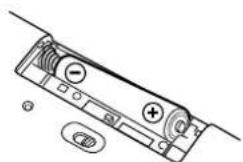
- Set the battery replacement switch on the bottom of the unit to the 'REPLACE BATTERY' position.
- Remove the battery cover.
- Insert the battery. Make sure the battery polarity is correct.
- Replace the battery cover.
- Set the battery replacement switch to the 'NORMAL OPERATION' position.


- Open the unit and press ON/OFF to turn the power on.
The LCD contrast screen will appear.
- Should a different screen appear, follow the reset procedure on page 27.
- If the power cannot be turned on:
- Make sure the battery replacement switch is placed at the 'NORMAL OPERATION' position, then press ON/OFF again.
- If the power still cannot be switched on, try following steps 1 through 6 in the above procedure again.
- Adjust the LCD contrast by using ▶, and press ENTER.
The key sound on/off screen will appear.
- Select Y or N to turn the key sound on/off.
The main menu screen will appear.
• The LCD contrast and the key sound settings can be adjusted later in the Set-up menu.
![LCD contrast adjustment [◀]Lighter [▶]Darker (Press [ENTER] to finish) •Press [◀] or [▶] to adjust the LCD contrast](/content/2026/05/1084526/images/0da29d26c96310eeac540e7ff040f654078096eabe06b8ad5524a4e3318e2f0e.jpg)
![Do you want key sound ON? [Y]Yes [N]No](/content/2026/05/1084526/images/c7c393fde87bf34149e3fc5259f94eb131db42c43238c69628a8e8eba43357bb.jpg)

Turning the power on/off
The power can be switched on by pressing the keys listed below. To turn off the power, press ON/OFF.
| Key | Display status upon start-up |
| ON/OFF | Restores the display as it was before the unit was switched off (Resume function). |
| MENU | The main menu screen appears. |
| DICT THES SPELL CALC CONV | The input screen of each dictionary and/or function appears (Direct-on function) |
Auto power off function
To save the battery, the PW-E350 will automatically turn its power off if no key operations are detected for a set period of time. The initial activation interval setting is 5 minutes, but it can be adjusted by following the directions on page 12.
To attach a commercially available strap
A carrying strap can be attached, as shown in the picture below (strap not included).
Caution:
- Do not swing the unit by the strap, or use excessive force to pull the strap. Doing so will cause a malfunction or hardware damage to the unit.
Back of the unit
Key notation used in this manual
- All keys are framed (A, for instance); exceptions are found in the Calculator section, where the numeral entries are shown with real numbers.
- Keys are often assigned with more than one function. The appropriate key/function will be shown according to the input status.
Q will be shown as either Q, '1' or '1' depending on the input status.
G will be shown as either G or ' + depending on the input status.
The functions indicated with green typeface are second functions. Press and release 2nd, then press an appropriate key.
2nd LIST directs to press and release 2nd, then press LIST (ESC). 2nd PREV directs to press and release 2nd, then press PREV (A).
Data contained in the PW-E350
The dictionary data contained in this unit are based on the following dictionaries: - New Oxford American Dictionary © Oxford University Press 2001 • The Oxford American Thesaurus of Current English © Oxford University Press 1999 * All rights reserved. No part of this publication may be reproduced, stored in a retrieval system, or transmitted, in any form or by any means, without the prior permission in writing of Oxford University Press, or as expressly permitted by law, or under terms agreed with the appropriate reprographics rights organization. Enquiries concerning reproduction outside the scope of the above should be sent to the Rights Department, Oxford University Press. * The data includes some words that are, or are asserted to be, proprietary names or trademarks. Their inclusion does not imply that they have acquired for legal purposes a nonproprietary or general significance, nor is any other judgment implied concerning their legal status. In cases where the editor has some evidence that a word is used as a proprietary name or trademark, this is indicated by the designation 'trademark', but no judgment concerning the legal status of such words is made or implied thereby. - The data content of each Dictionary is mostly retained faithful to the original. However, some sections of the dictionary contents have had to be altered due to the limitations of the LCD display and for other reasons; these modifications have been implemented under the provisions of the publisher(s). In some rare cases, misspellings and/or mistypings may be found; these are 'errors' that have been retained unmodified from the source Dictionaries.
Note:
- For information on the contents of the dictionaries, see Introductions on pages 29–42.
- This product does not contain most of the appendix data (including the preface, etc.) found in the book version.
- The product does not contain illustrations and photographs found in the book version.
Layout
Key assignments Display symbols
DICT: Opens the input screen for the New Oxford American Dictionary. THES: Opens the input screen for the Oxford American Thesaurus of Current English. SPELL: Opens the input screen for the spell checker. CALC: Opens the calculator function screen. CONV: Opens the converter function screen. HISTORY: Opens the history list of each dictionary. QUICK VIEW: Brings up a 'digest' view of descriptions. SUPER JUMP: Initiates a definition search of a term in a detailed view of each dictionary. NOTE: Selects a Note icon in the detailed view. 2nd: 2nd function key. Activates the second function (printed in green on the above or left side of keys) assigned to the next key pressed.
BATT: This symbol will be displayed when the battery level is low. Promptly replace the old battery with a new one.
Indicates that the key sound (beep) is set to ON.
2nd: Indicates that 2nd has been pressed.
These arrows suggest that more contents can be browsed by scrolling up/down the window.
▲ ▼: Press to scroll up/down per text row. ∧ ∨: Press to scroll up/down per visible window.
Note:
- In this manual, symbols are not shown in the display examples.
- Certain symbols may appear on the display only when the LCD contrast is set to dark. Please ignore these symbols as they are not used by this product.
Operation guidance message
A brief guidance message may appear at the bottom of the screen to help you utilize functions more effectively.
Basic Operation
Inputting words for a dictionary search
In this section, the basic search operation is described. For details, refer to the manual chapter for each dictionary.
Find definitions of 'convenience' in the New Oxford American Dictionary.
- Press (DICT) to display the input screen for the New Oxford American Dictionary, then input 'conven'. The entries starting with 'conven' are listed.

- Enter 'i' to narrow down the list further. If the desired word is found, then you do not need to type any more letters.

- While the '→' indication is visible on the left of 'convenience', press ENTER.
- Press ESC to return to the previous view. - Press 2nd LIST to list the headwords in the New Oxford American Dictionary.
Note:
- Refer to the section 'Inputting Characters' on page 12.
- To learn different searching methods from those above, refer to the manual chapter for each dictionary.
Selecting a dictionary / function in the main menu
Press [MENU].
The main menu appears.
- Select an item by its index number using the number keys (1 through 3). The initial screen of the selected item appears.
- The desired item can also be selected by using the ▲▼ keys, followed by pressing the ENTER key.

List view: selecting an item; scrolling
Press (DICT) to display the initial screen of the New Oxford American Dictionary, then press (ENTER). The list view of the New Oxford American Dictionary appears.

Selecting an item or a word
Use the corresponding number key to the index number on the left of each item, or use the ▲ or ▼ key to place the cursor on the desired item, followed by pressing the ENTER key.
Scrolling the view
'↑' and/or '↓' may appear on the left side of the screen, indicating that more information can be browsed by scrolling up/down the view.
1) Press ▼ once to scroll down one text row. To scroll back one text row, press ▲ once. 2) Press ☑ to scroll down a page. Press ☑ to scroll the page up.
- Press and hold these keys to continuously scroll the lines/pages.
Filter search view: selecting an item; scrolling
Press DICT, then type A, and B.
'ab' is entered, and words starting from 'ab' are listed.
![□ Oxford American Dictionary [ab_ ] →AB¹ AB² Ab¹ Ab²](/content/2026/05/1084526/images/30873bd0b421cbf53f247b5da7c0e73148907826be132a7cdcb38592a5dbecea.jpg)
Selecting each entry
Use ▼ ▲ to place the cursor (indicated as 'on the left of the listed items) at the desired entry, then press ENTER. The detailed view of the entry appears.
Scrolling the view
Refer to the section 'Scrolling the view' in the previous section, 'List view: selecting an item; scrolling'.
Detailed view: scrolling
Press DICT, then type A, and ENTER. The detailed view with definitions appears.
A¹ |ā| (also a) ▶n. (pl. As or A's) 1 the first letter of the alphabet. ■denoting the first in a set of items, categories, sizes,
Browsing contents above/below the screen
'and/or ' may appear on the left side of the screen, indicating that more information can be browsed by scrolling up/down the view. Use ▼ ▲ or ▼ ▲.
etc. ■denoting the first of two or more hypothetical people or things: ◇suppose A had killed B. ■the highest class of
Scrolling up/down to the previous/next entry header
Press 2nd NEXT to show the next entry header. To show the previous entry header, press 2nd PREV.
Other useful keys
ESC: Returns to the previous view
CLR: Shows the input screen of each Dictionary or the initial display of a function
2nd LIST Shows the list view starting from the previously displayed header
Shifting the displayed character size (ZOOM)
Press the ZOOM key to shift the character size to be displayed.
12 dot-based (vertical pixel resolution) or 9 dot-based characters can be selected. For instance, press ZOOM to display the 12 dot characters to 9 dot characters. Press ZOOM again to toggle back the displayed characters to 12 dot-base.


- The character size setting will be retained until the next time ZOOM is pressed.
- The ZOOM key is functional in the following views:
- The list view, detailed view, filter search view or Quick view of each Dictionary • The Super jump window • The contents of the Note
- The character size setting is saved for each dictionary in both the list view (including filter search view and Quick view) and the detail view.
Recalling the terms previously searched (HISTORY)
The history of up to 30 items in each dictionary is automatically stored, and can be recalled easily by selecting the word in the history list. (For more information, see page 22.)
Listing a summary of detailed view items (QUICK VIEW)
The Quick view function suppresses some examples and additional information, and lists the main sections and senses from each detailed view entry. Use this function to browse quickly through the summary of an entry.
- In the detailed view shown on page 9, press QUICK VIEW.
The Quick view screen appears.

- While the relevant sense or section is on the screen, select the desired item by the index number. The detailed view of the selected sense/section appears.
- Press QUICK VIEW in the Quick view to display the detailed view.
Searching a word on the screen (SUPER JUMP)
A word in the detailed view can be selected for searching. (For more information, see page 20.)
Browsing Notes (NOTE)
A Note icon (N) appears in the detailed view. This indicates that a note can be selected to view extra information (additional information, usage note, etc.) of the entry.
Press NOTE to select the icon. If more than one icon is visible, then the topmost icon will be selected, and use the ▼▲▶◀ keys to select the desired icon if necessary, then press ENTER to view the contents.
To exit, press ESC twice. The first push of the ESC key closes the contents view, then the second deselects the icon.
Browse the Note contents of 'earth' in the New Oxford American Dictionary.
- Open the detailed view of 'earth'.
• The symbol ‘*’ in front of ‘earth’ means that the word has a Note.
- Use the √ key or ▼ key to scroll down the view so that a Note icon will be visible.
- Press (NOTE). The Note icon will be selected (reversed).
- Press ENTER. The contents of the Note is displayed.
*earth |arth|
▶n.
1 (also Earth) the planet on which we live; the world: ◦the diversity of life on earth.
humankind, as distinct from heaven or hell: - God's will be done on earth as it is in heaven.
the substance of the land
The earth is the third planet from the sun in the solar system, orbiting between Venus and Mars at an average distance of 90 million miles (149.6 million km).
Note:
Using the NOTE key will display the following:
• The New Oxford American Dictionary - Usage notes • Additional (boxed) information • Oxford American Thesaurus of Current English • Additional information
Set-up Menu
Press Ⓑ MENU to display the main menu, then press ③. The set-up menu appears.
![Setup menu: 1. Key sound [ON]→OFF, 2. Auto power off [5 min], 3. LCD contrast, 4. Deleting history, 5. Auto demo](/content/2026/05/1084526/images/8204d48db6dea91f67cedfd2518c6f9128f1c566e024da88e58e49d67540184f.jpg)
Select a desired item to change the setting.
Note:
- To delete the history list, see page 22.
Setting the key sound on/off
The key sound (a short audible beep when a key is pressed) can be set to on or off.
- Press Ⓑ MENU, 3, then 1, to toggle the key sound on or off.
A splash message appears to indicate the change of setting, then the main menu will be displayed.
Setting the Auto power off activation time
This product automatically turns its power off to save the battery. The auto power off time is set to five minutes by default.
- Press MENU, 3, then 2.
The Auto power off setting screen appears.
![Auto power off: Select the time to turn off automatically. Options: 3 minutes, 5 minutes, 10 minutes, 20 minutes. Select the time and press [ENTER].](/content/2026/05/1084526/images/37b2e7de709ac931dc759249cae8f1b9fe389db79f6ecf24079b48ef8aad72f5.jpg)
- Use the ▲, ▼, ◀ and ▶ keys to place the check mark on the desired duration, then press ENTER.
The time will be set, then the main menu will be displayed.
Adjusting the LCD contrast
Select this menu item to adjust the LCD contrast.
- Press MENU, 3, then 3.
- To adjust the LCD contrast, use the ◀ (Lighter) key or ▶ (Darker) key, then press ENTER to return to the main menu.
Starting Auto Demo mode
Activate the Auto demo for a guided tour through the key features of the product.
- Press MENU, 3, then 5, to start the Auto demo mode.
- Press ESC or ENTER to end the Auto demo mode and return to the main menu.
Inputting Characters
Methods of inputting characters are described in this section.
Character entry
A simple example of inputting characters is shown below.
Enter a word 'clear' for search.
- Press DICT to open the input screen of the New Oxford American Dictionary.
- Type 'clear'.
On the keyboard, press C, L, E, A, then R.
![Oxford American Dictionary: [clear_] → clear, clearable, clearance, clearance sale](/content/2026/05/1084526/images/ab020cd7af48c75f22ca7bcdba8147baf5b2147a87d31647cfc288d84453c780.jpg)
Note:
- To enter accented characters, enter their unaccented equivalent. For characters such as 'ü' and 'ä', enter 'u' and 'a'.
- While entering characters, exclude characters such as spaces, hyphens, apostrophes, slashes, and periods.
| Word Entry for search | |
| fast food fastfood | |
| weak-kneed weakkneed | |
| let's lets | |
| either/or eitheror | |
| a.m. am |
- Convert uppercase letters to lowercase.
| Word Entry for search | |
| AC ac | |
| UK uk |
- Spell out the numbers when applicable.
| Word Entry for search | |
| 4WD fourwd | |
| A5 afive |
- Enter 'and' instead of '&'. • To enter '£', place 'I' instead.
Modifying entry
Deleting unnecessary characters
Modify an entry 'external' to input 'enter'.
- Press [DICT] to open the input screen of the New Oxford American Dictionary.
- Type 'external'.
![Oxford American Dictionary: [external_] → external, external auditory meatus, external ear, externalism](/content/2026/05/1084526/images/273174a421927294ef99605e6976ef92309bf66f5a48af9172506f8fcca0e16f.jpg)
- While the cursor is at the end of the string, press ← three times to delete 'nal'.
- Next, press ◀ three times to move the cursor under the letter 't'.
- Press ← once to delete a character on the left of cursor. 'x' will be deleted.
![Oxford American Dictionary: [exter] → exterior, exterior angle, exteriority, exteriorize](/content/2026/05/1084526/images/e987564eb2b8233e4adb5df7fa3f210352184ca773682cc5142deb69b0ac0fca.jpg)
Adding characters
- In the above example, press N to insert a letter 'n' on the left of the cursor. The search will be narrowed with the word 'enter'.
Note:
- Press CLR to delete all characters entered.
![Oxford American Dictionary: [enter] → enter, enteral, enterally, enteric](/content/2026/05/1084526/images/ea0729a5f3ca89f9743a21b529821d77b60e3a73aa033324b7af4931b508f63b.jpg)
Using the New Oxford American Dictionary
In this Dictionary, definitions of a word can be found by entering its spelling.
Features such as Phrase search, Crossword solver, and Anagram solver are also available.
Looking up a word (Filter search)
A definition of a word can be looked up by inputting its spelling.
Find the definition of 'advance'.
- Press DICT to open the New Oxford American Dictionary.
The input screen appears.
- Input the spelling of 'advance'.
![Oxford American Dictionary: [blank] Phrase search, Crossword solver, Anagram solver. Enter word you want to search.](/content/2026/05/1084526/images/49d8e12987e3f0c0512c248a333ec6f37a582365876d22a183ec2aa447b10ae9.jpg)
As you type, candidates for matching narrow. If the desired word is found, then letters.
there is no need to type any more
- While '→' appears on the left of 'advance', press ENTER. The detailed view of the word appears.
- To browse contents on the next/previous page, press ▼ ▲ or ▼ △. You may also find the Quick view function useful.
- If a word selected is a close derivative of a headword, it may not have its own definitions. In these cases, it is helpful to scroll up within the detailed view to find the definitions of the headword itself.
- To search for a word in the detailed view, use the Super jump function.
- Press ESC to return to the previous screen.
- Press 2nd LIST to list the headwords in the New Oxford American Dictionary.
To search a different word, simply input a new spelling for the word, or press CLR or DICT to go to the dictionary's input screen.
If there is no match found
As you input the spelling of the desired word, the dictionary will narrow down the matching candidates. If the match is narrowed down to none (i.e., no word starting with the spelling is found in the Dictionary), the message 'similar words' appears. In this case, press ENTER to list the dictionary entries alphabetically after the entry.
![Oxford American Dictionary: [advanse_] → similar words](/content/2026/05/1084526/images/16f42143deff6c64f17d206a327a0eb3e6ce44a3ad4224e58a861d574c3da72b.jpg)
Note about entering characters
While entering characters, exclude characters such as spaces, hyphens, apostrophes, slashes, and periods. See page 12 for details.
Note:
- The wildcard character '?' must not be entered in the input field of the Dictionary. The wildcard character '?' can be used in the Crossword solver (see page 15).
- Up to 24 characters can be entered in the input field of the Dictionary. When searching words containing 25 characters or more, narrow down the search to select the words from the list manually.
Browsing Notes
When the NOTs appear in the detailed view, a note can be selected and browsed. For details, refer to pages 10–11.
Note:
A headword with a Note is marked with an asterisk (*). In many cases, the NOTE only appears at the bottom of an entry, but contains important information about usage of the headword as a whole. If unsure about usage, scroll down to the bottom of the entry to access any relevant notes.
Phrase search
To search for idioms or phrasal verbs, enter no more than three words in the input field. The phrases containing ALL the entered words can be searched for.
Search for a phrase containing 'take' and 'care'.
- Press □DICT to open the New Oxford American Dictionary.
Press ▼ once to place the cursor at the 'Phrase search', then press ENTER.
The input screen of the Phrase search appears.
- Input 'take', press ▼, followed by 'care'.
To input more than one word, input each word in the separate input field. Use the ▼▲ keys to move the cursor. Each input field can accommodate up to 24 characters.
![Phrase search (DICT): [take] [care_] [ ] Enter up to 3 search words and press [ENTER].](/content/2026/05/1084526/images/606dfe0f65dc20bf40b30c09e14212cdc195eca41f6fafdf8a6c41e95db624a8.jpg)
- Press ENTER.
A list of phrases containing the words appears.
If no matching phrase is found, then a message 'Not Found!' will momentarily be displayed.
- Select the desired index of the phrase using the number key(s). The definition of the selected phrase is displayed.
- Press ESC to return to the previous view.
- Press 2nd LIST to list the index of phrases containing the words.
- To search for a new phrase, simply begin inputting new words, or press CLR to go back to the input screen to start a new search.
Crossword solver
Use a wildcard character '?' to search for words with ambiguous spellings. Place the appropriate number of '?' characters in the places of characters yet to be determined.
Find a matching word for a query 'ma???n'.
- Press DICT to open the New Oxford American Dictionary.
Press the ▼ key twice to place the cursor at the 'Crossword solver', then press ENTER.
The Crossword solver's input screen appears.
- Type 'ma???n' into the input field. Press the ☐ key three times to enter '???'.
- Press ENTER to start the search.
A list of the wildcard matches appear. Up to 100 words may be displayed in the list.
![Crossword solver (DICT): [ma???n_] Enter word (use ? for unknowns) and press [ENTER].](/content/2026/05/1084526/images/35badf5540b3610854ef4e3030526d1387eb90aa7e2dbd06e85a3a60f7cf7414.jpg)
- In the list, select a desired word using the number keys.
The detailed view with definitions of the selected word appears.
- Press ESC to return to the previous view.
- Press 2nd LIST to list the headwords in the New Oxford American Dictionary.
- To initiate another search, simply type in the new spelling or press CLR to return to the input screen of the Crossword solver.
Anagram solver
A word or series of letters can be entered to find any matching anagrams found in the New Oxford American Dictionary.
Find anagrams for 'dear'.
- Press (DICT) to open the New Oxford American Dictionary. Press the ▼ three times to place the cursor at the 'Anagram solver', then press (ENTER). The input screen of the Anagram solver appears.
- Place 'dear' in the input field, then press ENTER to initiate the search. Up to 100 words may be displayed in the list.

- In the list of matches, use the number keys to select a word.
The detailed view with definitions of the selected word appears.
- Press ESC to return to the previous view.
- Press 2nd LIST to list the headwords in the New Oxford American Dictionary.
- To initiate another search, simply type in the new spelling or press CLR to return to the input screen of the Anagram solver.
Spellcheck function
The spellcheck function can be helpful when the exact spelling of a query word is not known.
You are not sure whether 'liason' or 'liaison' is correct.
- Press SPELL to open the input screen of the spellcheck function.
![Spellcheck (DICT): [blank] Enter the word to check and press [ENTER]. Spellcheck (DICT): [liason_] Enter the word to check and press [ENTER].](/content/2026/05/1084526/images/326c21f6393a1d4e2e13b5a7569778b8ba6fdac751484533fce1454db0baacd8.jpg)
- Enter 'liason'.
- Press ENTER to initiate the spellcheck function.
Words with similar spellings will be listed.
- While 'Searching... Press [ENTER] to break' is visible, press ENTER to stop the search. Note that if the search is interrupted, the list of possible results may not include all the closest matches.
- If the word is typed with the correct spelling, it will appear at the top of the displayed list.
- If two or more words with an identical spelling are found in the list, then the relevant headword will also be displayed, after an arrow symbol.
- In the list, select a desired word using the number keys. The detailed view with descriptions of the word is displayed.
- If a word selected is not in its original form, and cannot be found as a headword, then the detailed view of the word's original form will be displayed. It may be necessary to scroll down within the detailed view to find the desired word form.
- Press ESC to go back to the previous view.
- Press 2nd LIST to list the headwords in the New Oxford American Dictionary.
Note:
- Up to 100 words may be displayed in the list.
If the list of words does not appear as expected:
- Searching words with particular spellings may take more time to complete than others.
- If no word is given, a message 'Not Found!' will momentarily be displayed, followed by the input screen of the spellcheck function. In this case you may wish to start the search again with a new spelling for the word.
Further information
For further information on using this dictionary, refer to the Introduction on pages 29-40.
Using the Oxford American Thesaurus of Current English
Input a word in this Thesaurus to find its synonyms, as well as antonyms and other related terms in the detailed view.
Looking up a word (Filter search)
Find a set of related words by inputting the spelling of a given word.
Find a set of relative words for 'make'.
- Press THES to open the Oxford American Thesaurus of Current English.
The spelling input screen of the Thesaurus appears.
- Input 'make'.
As you type, options are narrowed. If the desired word is found, then you do not need to type any more letters.
- Part of speech should be found on the right side of each headword.
- While →'appears on the left of 'make', press ENTER. The detailed view of the word 'make' appears.
- To browse contents on the next/previous page, press ▼ ▲ or ▼ △. You may also find the Quick view function useful.
![Oxford American Thesaurus: [blank] Phrase search. Enter word you want to search.](/content/2026/05/1084526/images/4b77cb68700da7956897dd6735e27d67d812c55d32016627ef01016ffc86d094.jpg)
![Oxford American Thesaurus: [make_] → make verb, make noun, make-believe noun, make-believe adjective](/content/2026/05/1084526/images/cbc7c465e1a0a04f4982fa656fc21365c2de4c6b295f8452d9706a5067caea09.jpg)

- To search a word in the detailed view, use the Super jump function.
- Press ESC to return to the previous screen.
- Press 2nd LIST to list the headwords in the Oxford American Thesaurus of Current English.
- To search a different word, simply begin inputting a new word, or press CLR or THES to go to the input screen of the Oxford American Thesaurus of Current English.
If there is no match found
The same message appears as for the New Oxford American Dictionary. See page 14 for details.
Note about entering characters
While entering characters, exclude characters such as spaces, hyphens, apostrophes, slashes, and periods. See page 12 for details.
Note:
- Up to 24 characters can be entered in the input field. When searching words containing 25 characters or more, narrow down the search to select the words from the list manually.
Browsing Notes
When the icons appear in the detailed view, a note can be selected and browsed. For details, refer to pages 10-11.
Note:
- A headword with a Note is marked with an asterisk (*)
- In many cases, the note not only appears at the bottom of an entry, but contains important information about usage of the headword as a whole. If unsure about usage, scroll down to the bottom of the entry to access any relevant notes.
Phrase search
To search for idioms or phrasal verbs, enter no more than three words in the input field. The phrases containing ALL the entered words can be searched for.
Search for a phrase containing 'make' and 'up', and find its synonyms.
- Press THES to open the Oxford American Thesaurus of Current English. Press ▼ once to place the cursor at the 'Phrase search', then press ENTER. The input screen of the Phrase search appears.
- Input 'make', press ▼, followed by 'up'.
To input more than one word, input each word in the separate input field. Use the ▼▲ keys to move the cursor. Each input field can accommodate up to 24 characters.
![Phrase search (THES): [make] [up_] [ ] Enter up to 3 search words and press [ENTER].](/content/2026/05/1084526/images/f892c1f73c32e4d7491feb6ccd186fd4941c356b15b87fc5951a8bee675b7c7c.jpg)
- Press ENTER.
A list of phrases containing the words appears.
If no matching phrase is found, then a message 'Not Found!' will momentarily be displayed.
- Select the desired index of the phrase using the number key(s). The detailed view of the selected phrase is displayed.
- Press ESC to return to the previous view.
- Press 2nd LIST to list the index of phrases containing the words.
- To search for a new phrase, simply begin inputting new words, or press CLR to go back to the input screen to start a new search.
Further information
For further information on using this thesaurus, refer to the Introduction on pages 41-42.
Using the Super jump function
Use the Super jump function to select any word in the detailed view of each dictionary, then initiate a search based on the selected word.
How to use the Super jump function
Initiate a Super jump search via the New Oxford American Dictionary.
- In the New Oxford American Dictionary, show the detailed view of the word 'function'.
- Press (SUPER JUMP). The cursor appears to select the first word in the view.
- Use the ▼▲▶◀ keys to move the cursor (and its selection of word) to a desired word.
- The pressing of SUPER JUMP moves the cursor to the next.
- While the desired word is selected, press ENTER.
The Super jump window appears to display selectable items.
- A list of matching words is displayed. If the selected word is in a variant or inflected form, the original spelling may be displayed instead.
- A variant or a word of inflected form may not be initiated for a Super Jump search.

![n. 1 an activity or purpose □ Super jump [purpose] 1 DICT: purpose 2 THES: purpose noun 3 THES: purpose verb](/content/2026/05/1084526/images/b3ba1ec847db07c4b39a6dcee553589ffe9745f64dd9c44d08273e1950b085f8.jpg)
- If only one match is found, the description of the word will be displayed in the Super jump window instead.
- Press DICT or THES instead of pressing ENTER, to specify the Dictionary to jump to.
- Use the number keys to select a desired word in the list (Press 1 in this example).
The definition of the selected word is displayed in the Super jump window.
- Press ESC to go back to the previous view.
- When '↑' and/or '↓' appears on the left side of the window, ▼ ▲ or ▽ △ can be used to scroll the window.
- Press ENTER to jump to the definition of the selected word.
The detailed view of the selected word appears.
- Press ESC to display the previous view.
![purpose ['perpas] ▶ n. the reason for which something is done or created or for which something exists: ◇ the purpose of the meeting](/content/2026/05/1084526/images/fe57958da2005e902ff5ddb2327c56ca503c9d3a055873bfc423f4b6a142d074.jpg)
Note:
- A Super jump search from any of the dictionaries will return matching entries in the following dictionaries: • The New Oxford American Dictionary • Oxford American Thesaurus of Current English
Specifying a Dictionary to jump to
In step 4 above, press ☑ Dict or ☑ THES instead of pressing ☑ ENTER, to specify the Dictionary to jump to.
Note icon in the Super jump window
When the Note icon appears in the Super jump window, press (NOTE) and (ENTER) to view the contents.
About the detailed view after the Jump
- The behavior and function of the detailed view is the same as the detailed view after an ordinary search.
- Press CLR at the detail view to go back to the Dictionary's input screen.
- A chain of multiple Super jump actions can be backtracked up to 10 times by pressing the ESC key.
Using the History function
Use the History function to recall a headword or phrase previously searched in the Dictionaries.
How to use the History function
Recall the search history in the New Oxford American Dictionary.
- Press DICT to open the New Oxford American Dictionary.
- Press HISTORY. The history view appears, with the most recent search placed at the top of the list.
When '↑' and/or '↓' appears on the left side of the window, ▼ ▲ or ▼ △ can be used to scroll the window.

- Use the number keys to select a desired word in the list.
The detailed view of the selected word appears.
Note:
• Each dictionary has its own history list. Additionally, the New Oxford American Dictionary and the Oxford American Thesaurus of Current English each have their own phrase search history lists. - To view the history list, press HISTORY at the initial screen of each Dictionary, and the initial screen of each phrase search. - Truncated words in the list are indicated with trailing '...' at the end. • Each history list can contain up to 30 items. The older item will be deleted as item count exceeds 30.
Deleting a history item
- Display the history list on the screen.
- Use the ▼ or ▲ key to place the cursor on the word to be deleted. The reverse color indicates the selected item.
- Press ←. A confirmation dialog for deletion appears.
- Press Ⓖ. The selected word or phrase is deleted.
Deleting the history list of a Dictionary
- Press ⒽMENU, then ⓢ to open the Set-up menu.
- Press ④ to select 'Deleting history'.
- Use the number keys to select the history list you wish to delete. A confirmation dialog for deletion appears.
- To delete all history lists, select 'ALL'.
- Selecting 'only DICT' or 'only THES' will also delete the history list of each phrase search.
- Press Y. The selected history is deleted and the main menu appears.
Using the Calculator function
The built-in calculator in the Electronic Dictionary can perform twelve-digit arithmetic calculations with memory function. To access the Calculator function, press CALC.
Prior to initiating calculations
- Before performing any calculation, press R·CM R·CM CLR to clear the memory and the display.
- To start a calculation with a negative number, place a subtraction sign by pressing \boxed{-} at the beginning of the calculation.
- If you wish to correct a wrong entry, press C·CE and re-enter the figure.
- In the calculation examples found in this section, indications and icons that may appear on the screen ('=', 'M+', 'M-', '+', '-', 'x', and '÷') are abbreviated or are not shown. These icons appear to show you the interim result of calculations. For example, the '=' icon appears on the screen when (=) or (%) is pressed, while icons such as 'M+' and '+' appear after each corresponding key has been pressed.
- An 'M' is shown when a value other than 0 is put in the memory. To clear the content of the memory, press R·CM twice. Note that pressing M+ or M- also functions as =.
- Press ENTER to enter '='. To input '.' (decimal point), press?
- An error message 'E' is displayed if:
- the integer section of a calculation result exceeds 12 digits • the memory exceeds 12 digits
- an attempt is made to divide a number by zero. Press C-CE to clear the error condition.
Calculation examples
| Example | Operation | Display |
| (-24) ÷ 4 - 2 = | C-CE — 24 ÷ 4 — 2 = | -8. |
| 34 +57= | 34 + 57 = The second figure (57) | 91. |
| 45 +57= | 45 = becomes the constant. | 102. |
| (Subtraction and division are performed in the same way as above.) | ||
| 68 × 25 = | 68 × 25 = The first figure (68) | 1,700. |
| 68 × 40 = | 40 = becomes the constant. | 2,720. |
| What is 10% of 200? | 200 × 10 % | 20. |
| What percentage is 9 of 36? | 9 ÷ 36 % | 25. |
| 200 + (200 × 10%) = | 200 + 10 % | 220. |
| 500 – (500 × 20%) = | 500 — 20 % | 400. |
| (43) 2 = | 4 × = = × = | 4,096. |
| 1/8 = | 8 ÷ = | 0.125 |
| 25 × 5 = | R-CM R-CM 25 × 5 M+ | M 125. |
| -) 84 ÷ 3 = | 84 ÷ 3 M- | M 28. |
| +) 68 + 17 = | 68 + 17 M+ | M 85. |
| (Total) = | R-CM | M 182. |
| R-CM R-CM 12 + 14 M+ | M 26. | |
| 135 × (12 + 14) = | 135 × R-CM = | 3,510. |
| (12 + 14) ÷ 5 = | R-CM ÷ 5 = | M 5.2 |
| R-CM R-CM CLR | 0. | |
| 123456789098 × 145 = | 123456789098 × 145 = | 17.9012344192 |
| C-CE | 17.9012344192 | |
| (17.9012344192 × 10 12 = 17901234419200) | ||
Using the Converter function
The Converter function consists of two converters: the Currency converter, and the Metric converter.
Currency converter
Setting a currency rate
One conversion rate can be set.
Set the following rate: US$1 = €0.7
- Press CONV 1 to access the Currency converter.
- Press ⚠. The input fields for the currency name and rate appear.
![Currency Converter USD ⇔ EUR (RATE 0.) 0. • Convert with [◀] or [▶] • Change the unit & rate with [∧] Currency Converter UNIT & RATE setting ◀ 1 [◀SD ] → [EUR ] ( RATE[ 0. ] ) • Enter the both units to convert • Press [▼] to set the RATE](/content/2026/05/1084526/images/f882dd50450cd896d05544a0d5fb740a8c0be214b860729c67565453217e3626.jpg)
- Use the ▲▼ keys to place the cursor at the desired input field, then input the currency name and its rate. In this example, press▼ and input '0.7'.
- The currency name field of currency converter is temporarily pre-defined, as seen in the above example.
- When inputting the desired currency name, press CLR to clear the input field and use no more than four letters. Use the ▶ keys to set the cursor on the left/right of the currently selected input field.
- In the left input field, enter the base currency name. In the input field on the right, place the currency name of which you wish to set the conversion rate.
- Up to 10 digits (excluding the decimal point) can be entered in the currency rate input field.
- Press ENTER. The currency name and its rate are set.
Converting currencies
The conversion calculation can be performed using the previously set conversion rate.
Convert € 175 to US\when setting the rate: US\1 = €0.7
- Press CONV 1 to display the currency converter.
- Input '175'. You may input a simple formula, such as '35× 5 =', instead.
- Press ◀ to execute the conversion from € to US. The converted value of US250 is displayed.
- Pressing ▶ executes a US$-to-€ conversion. In this case, the converted value of €122.5 will be displayed.
- The ◀ and ▶ arrows on the screen indicate the direction of conversion.
- To initiate conversion of a different value, just enter the value to be converted, or press (C·CE) to clear the value in the input field prior to entering the new conversion.
- Press ESC to return to the Converter menu.
Metric converter
Conversions between different units of measurement (length, mass, etc.) can be performed.
Convert 40 feet to meters.
- Press CONV 2 to access the Metric converter.
- Use ▲ ▼ to select 'Converter [length2]'.
![Converter [length2] feet ⇔ m (0.3048) 0. • Choose the unit with [▼], and convert with [◀] or [▶]](/content/2026/05/1084526/images/30f39f9e13505bb7d76c08639d3b0e9ecadaf747798af76efb5a1c6eb8d16041.jpg)
- Input '40'. You may input a simple formula, such as '25 + 15 =', instead.
- Press ▶ The value in feet is converted to the metric value.
- Press ▶ to convert from the metric value to feet. In this case, the given value '40' will be taken as the metric value to be converted to feet.
- The ◀ and ▶ arrows on the screen indicate the direction of conversion.
- To initiate conversion of a different value, just enter the value to be converted, or press (C·CE) to clear the value in the input field prior to entering the new conversion.
- Use the ▼ or ▲ key to select one of the other Metric converters.
- Press ESC to return to the Converter menu.
Units capable of being converted
The following conversion formulae can be utilised.
length1: inch ⇔ cm
length2: feet ⇔ m
length3: yard ⇔ m
length4: mile ⇔ km
weight1: ounce ⇔ g
weight2: pound ⇔ kg
temperature: °F ⇔ °C
volume1: pint ⇔ liter
volume2: gallon(US) ⇔ liter
volume3: gallon(UK) ⇔ liter
surface area1: mile² ⇔ km²
surface area2: acre ⇔ hectare
Appendices
Replacing the battery
Battery used
- Use only the specified alkaline battery.
| Type | Size / Model | Quantity |
| Alkaline battery | Size “AAA” / LR03 | 1 |
Precautions
- Fluid from a leaking battery accidentally entering an eye could result in serious injury. Should this occur, wash with clean water and immediately consult a doctor.
- Should fluid from a leaking battery come in contact with your skin or clothes, immediately wash with clean water.
- If the product is not to be used for some time, to avoid damage to the unit from a leaking battery, remove it and store in a safe place.
- Do not leave an exhausted battery inside the product. It may leak and damage the product.
- Keep batteries out of the reach of children.
- Incorrect handling of batteries may introduce risk of explosion.
- Do not throw batteries into a fire as they may explode.
- Make sure the new battery is the correct type before fitting.
- When installing, orient the battery correctly as indicated in the unit.
- The battery packaged with this product may be partially exhausted during the shipment and/or storage period, and may need to be replaced sooner than expected.
When to replace the battery
Replace the battery immediately in the following cases:
- When BATT is displayed.
- When the message 'Replace the battery' appears upon turning the power on.
Note:
- If you do not follow the procedure describing the battery replacement, the History list, as well as the Calculator's memory, may be cleared or altered. Also, Currency converter and the Set-up menu configurations may be reset.
Replacement procedure
- Switch off the power by pressing ON/OFF.
- Set the battery replacement switch located on the bottom of the unit to the 'REPLACE BATTERY' position.
- Remove the battery cover.
- Remove the used battery and insert the one new battery. Make sure the battery polarity is correctly oriented.
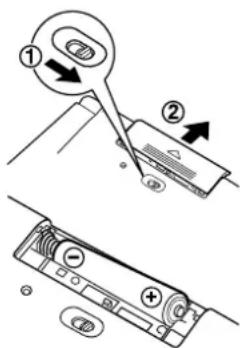
- Replace the battery cover.
- Set the battery replacement switch to the 'NORMAL OPERATION' position.
- Open the unit and press ON/OFF to turn the power on.
The LCD contrast screen appears.
- If the power cannot be switched on, try following steps 2 through 7 in the above procedure again. Should this fail, then follow the reset procedure on the following page.
- Follow the instructions on the screen to adjust the LCD contrast, as well as to set the key sound on/off configuration (see steps 7 through 8 of the procedure on page 2.)
Reset procedure if trouble occurs
Exposure to a strong physical shock or powerful electrical fields may render the keys inoperable, to the point that the power cannot be switched on. If such case is suspected, try following the procedure below.
Reset procedures
- Press the RESET switch located on the bottom of the unit with the tip of a ball-point pen or similar object. Do not use an object with a breakable or sharp tip.
The message 'Do you want to initialize?' appears.

- Press Y to initialize the unit.
- A message 'Initialized!' is momentarily displayed, followed by the LCD contrast adjustment screen.
- If N is selected, then the unit will not be initialized.
- Follow the instructions on the screen to adjust the LCD contrast, as well as to set the key sound on/off configuration (see steps 7 through 8 of the procedure on page 2.)
Note:
- The reset procedure will clear the History list, and Calculator's memory, as well as to reset the Currency converter and the Set-up menu configurations. To avoid these, you may press N at step 2 of the above.
- Occasionally when corruption of data etc. occurs, the reset procedure may automatically be initiated upon pressing of the RESET switch or the ON/OFF key. When this occurs, the message 'Initialized!' will be displayed, followed by the LCD contrast screen. Follow the instructions on the LCD contrast, as well as to set the key sound on/off configuration.
Specifications
Model: PW-E350
Product name: Electronic Dictionary
Display: 159 × 80 dot matrix LCD
Number of entries: • The New Oxford American Dictionary: More than 250,000 definitions and more than 9,000 biographical and geographical entries
- Oxford American Thesaurus of Current English: 15,000 main entries keyed to more than 350,000 synonyms
Calculator function: 12-digit calculation of addition, subtraction, multiplication, division, percentage, memory calculation, etc.
Converter function: 12-digit conversion of currency and measurement
Power consumption: 0.11 W
Operating temperature: 0°C - 40°C (32°F - 104°F)
Power supply: 1.5 V ... — (DC): Alkaline battery LR03 (size "AAA") × 1
Battery life: Approx. 200 hours If data is continuously displayed at 25° C ( 77° F) Note: May vary according to various usage conditions
Weight (including battery): Approx. 148 g (0.33 lb)
Dimensions (when closed): 125 mm (W) × 79.4 mm (D) × 16.8 mm (H) 4-29/32" (W) × 3-1/8" (D) × 21/32" (H)
Accessories: Alkaline battery LR03 (size "AAA") × 1, operation manual
Troubleshooting
Solutions to possible symptoms may be found here.
The unit cannot be switched on.
- Check if the battery is drained. See page 26.
- Check the battery replacement switch; it should be set at the 'NORMAL OPERATION' position. See page 2.
- Check the polarity of the battery. See page 2.
- Verify the LCD contrast setting; the power may be switched on, but the message on the screen may not be visible. See page 12.
- If the above settings appear normal, then press the RESET switch. See page 27.
The screen is dark or light.
- Adjust the LCD contrast. See page 12.
The key sound cannot be heard.
• The key sound may be set to OFF. See page 11.
The unit does not respond to a key press.
- Press the RESET switch. See page 27.
The unit shuts off automatically.
- The Auto power off function is in action. The activation interval of the Auto power off function can be adjusted. See page 12.
The desired word cannot be found.
- A variant form of the word may have been entered. Enter the original form.
- Use the Spellcheck function to verify spellings.
Introductions to the Dictionaries
The New Oxford American Dictionary
Introduction
The New Oxford American Dictionary has been compiled according to principles that are quite different from those of traditional American dictionaries. New types of evidence are now available in sufficient quantity to allow lexicographers to construct a picture of the language that is more accurate than has been possible before. The approach to structuring and organizing within individual dictionary entries has been rethought, as has the approach to the selection and presentation of information in every aspect of the dictionary: definitions, choice of examples, grammar, word histories, and every other category. New approaches have been adopted in response to a reappraisal of the workings of language in general and its relationship to the presentation of information in a dictionary in particular. The aim of this introduction is to give the user background information for using this dictionary and to explain some of the thinking behind these new approaches.
Structure: Core Sense and Subsense
The first part of speech is the primary one for that word: thus, for bag and balloon the senses of the noun are given before those for the verb, while for babble and bake the senses of the verb are given before those of the noun.
nose
CORE SENSE
the part projecting above the mouth on the face of a person or animal, containing the nostrils and used for breathing and smelling.
SUBSENSE
the sense of smell, esp. a dog's ability to track something by its scent: ◦ a dog with a keen nose.
SUBSENSE
figurative an instinctive talent for detecting something: ◇ he has a nose for a good script.
SUBSENSE
the aroma of a particular substance, esp. wine.
Within each part of speech, the first definition given is the core sense. The general principle on which the senses in the New Oxford American Dictionary are organized is that each word has at least one core meaning, to which a number of subsenses may be attached. If there is more than one core sense (see below), this is introduced by a bold sense number. Core meanings represent typical, central uses of the word in question in modern standard English, as established by research on and analysis of American and World English through corpora (language databanks) and citation databases. The core meaning is the one that represents the most literal sense that the word has in ordinary modern American usage. This is not necessarily the same as the oldest meaning, because word meanings change over time. Nor is it necessarily the most frequent meaning, because figurative senses are sometimes the most frequent. It is the meaning accepted by native speakers as the one that is most established as literal and central.
The core sense also acts as a gateway to other, related subsenses. These subsenses are grouped under the core sense, each one being introduced by a solid square symbol.
There is a logical relationship between each subsense and the core sense under which it appears. The organization of senses according to this logical relationship is designed to help the user, not only in being able to navigate the entry more easily and find relevant senses more readily, but also in building up an understanding of how senses in the language relate to one another and how the language is constructed on this model. The main types of relationship of core sense to subsense are as follows:
(a) figurative extension of the core sense, e.g.,
HEADWORD: backbone
CORE SENSE: the series of vertebrae extending from the skull to the pelvis; the spine.
SUBSENSE: figurative the chief support of a system or organization; the mainstay:
EXAMPLE: these firms are the backbone of our industrial sector.
HEADWORD: bankrupt
CORE SENSE: (of a person or organization) declared in law unable to pay outstanding debts:
EXAMPLE: the company was declared bankrupt.
SUBSENSE: figurative completely lacking in a particular quality or value:
EXAMPLE: their cause is morally bankrupt.
(b) specialized case of the core sense, e.g.,
HEADWORD: zone
CORE SENSE: [usu. with adj.] an area or stretch of land having a particular characteristic, purpose, or use, or subject to particular restrictions:
EXAMPLE: a pedestrian zone.
SUBSENSE: Geography a well-defined region extending around the earth between definite limits, esp. between two parallels of latitude:
EXAMPLE: a zone of easterly winds.
SUBSENSE: Sports in basketball, football, and hockey, a specific area of the court, field, or rink, esp. one to be defended by a particular player, or the mode of defensive play using this system.
HEADWORD: demand
CORE SENSE: an insistent and peremptory request, made as if by right:
EXAMPLE: a series of demands for far-reaching reforms.
SUBSENSE: Economics the desire of purchasers, consumers, clients, employers, etc., for a particular commodity, service, or other Item:
EXAMPLE: a recent slump in demand.
(c) other extension or shift in meaning, retaining one or more elements of the core sense, e.g.,
HEADWORD: bamboo
CORE SENSE: a giant woody grass that grows chiefly in the tropics, where it is widely cultivated.
SUBSENSE: the hollow jointed stem of this plant, used as a cane or to make furniture and implements:
EXAMPLE: [as adj.] a bamboo serving tray.
HEADWORD: management
CORE SENSE: the process of dealing with or controlling things or people:
EXAMPLE: the management of elk herds.
SUBSENSE: Medicine & Psychiatry the treatment or control of diseases, injuries, or disorders, or the care of patients who suffer from them:
EXAMPLE: the use of combination chemotherapy in the management of breast cancer.
HEADWORD: mandarin
CORE SENSE: an official in any of the nine top grades of the former imperial Chinese civil service.
SUBSENSE: a powerful official or senior bureaucrat, esp. one perceived as reactionary and secretive:
EXAMPLE: a civil service mandarin
Many entries have just one core sense. However some entries are more complex and have different strands of meaning, each constituting a core sense. In this case, each core sense is introduced by a bold sense number, and each potentially has its own block of subsenses relating to it.
Specialist Vocabulary
One of the most important uses of a dictionary is to provide explanations of terms in specialized fields that are unfamiliar to a general user. Yet in many traditional dictionaries, the definitions have been written by specialists as if for other specialists, and as a result the definitions are often opaque and difficult for the general user to understand.
One of the primary aims of the New Oxford American Dictionary has been to break down the barriers to understanding specialist vocabulary. The challenge has been, on the one hand, to give information that is comprehensible, relevant, and readable, suitable for the general user, while on the other hand maintaining the high level of technical information and accuracy suitable for the more specialist user.
This has been achieved in some cases, notably entries for plants and animals and chemical substances, by separating technical information (e.g., Latin names, chemical formulae) from the rest of the definition (shown immediately after a bullet). For examples, see American crocodile and benzopyrene.
In other cases, it is achieved by giving additional explanatory information within the definition itself, typically in a separate sentence. For examples, see curling and alchemy.
As elsewhere, the purpose is to give information that is relevant and interesting, aiming not just to define the word but also to describe and explain its context in the real world. Additional information of this type, where it is substantial, is given in the form of a separate note (NOTE). For example, see earth and Eocene.
An especially important feature of the New Oxford American Dictionary is the coverage of American animals and plants. In-depth research and a thorough review have been carried out for animals and plants in the Americas and throughout the world and, as a result, a large number of entries have been included that have never before been included in general American dictionaries. The style and presentation of these entries follow the general principles for specialist vocabulary in the New Oxford American Dictionary: the entries not only give the technical information, but also describe, in everyday English, the appearance and other characteristics (of behavior, medicinal or culinary use, mythological significance, reason for the name, etc.) and the typical habitat and distribution. For examples, see mesosaur, blacktail deer and chia.
Encyclopedic Material
Some dictionaries do not include entries for the names of people and places and other proper names, or include them only in separate sections. The argument for this is based on a distinction between “words” and “facts,” by which dictionaries are about “words” while encyclopedias and other reference works are about “facts.” The distinction is an interesting theoretical one, but in practice there is a considerable overlap: names such as Shakespeare and Mississippi are as much part of the language as words such as drama or river, and they belong in a large dictionary.
The New Oxford American Dictionary includes all those terms forming part of the enduring common knowledge of English speakers, regardless of whether they are classified as "words" or "names." The information given is the kind of information that people are likely to need from a dictionary, however that information may traditionally be classified. Both the style of definitions in the New Oxford American Dictionary and the inclusion of additional material in separate blocks reflect this approach.
The New Oxford American Dictionary includes more than 5,000 place-name entries, 4,000 biographical entries, and just under 3,000 other proper names. The biographical entries are designed to provide not just the basic facts (such as birth and death dates, full name, and nationality), but also a brief context giving information about, for example, a person's life and why he or she is important.
For a few particularly important encyclopedic entries—for example, countries—a fuller treatment is given and additional information appears in a separate note (NOTE).
Grammar
In recent years, grammar has begun to enjoy greater prominence than in the past few decades. It is once again being taught explicitly in schools throughout the United States. In addition, there is a recognition that different meanings of a word are closely associated with different lexical and syntactic patterns. The New Oxford American Dictionary records and exemplifies the most important of these patterns at the relevant senses of each word, thus giving guidance on language use as well as word meaning.
For example, with the word bomb, it is possible to distinguish the main senses of the verb simply on the basis of the grammar: whether the verb is transitive (takes a direct object) or intransitive (no direct object):
CORE SENSE: attack *(a place or vehicle)* with a bomb or bombs:
EXAMPLE: London* was bombed, night after night.
GRAMMAR: [trans.]
(The asterisks shown here match the direct object in the example with the parenthetical item in the definition)
CORE SENSE: informal (of a movie, play, or other event) fail miserably:
EXAMPLE: a big-budget movie that bombed at the box office.
GRAMMAR: [intrans.]
This has particular relevance for a dictionary such as the New Oxford American Dictionary, where the aim is to present information in such a way that it helps to explain the structure of the language itself, not just the meanings of individual senses. For this reason, special attention has been paid to the grammar of each word, and grammatical structures are given explicitly.
Where possible, the syntactic behavior of a word is presented directly: for example, if a verb is normally found in a particular sense followed by a certain preposition, this is indicated before the definition, in bold. For example, see build (build on).
In other cases, collocations that are typical of the term in use, though not obligatory, are shown highlighted within the example sentence. For examples, see ball game (a whole new ball game) and bet (your best bet).
Great efforts have been made to use a minimum of specialist terminology. Nevertheless, a small number of terms are essential in explaining the grammar of a word. The less familiar terms are explained below. All terms are, of course, defined and explained under their own entries in the dictionary.
Terms relating to nouns
[as adj.]: used to mark a noun that can be placed before another noun in order to modify its meaning, e.g., boom and bedside.
[treated as sing.]: used to mark a noun that is plural in form but is used with a singular verb, e.g., mumps in mumps is one of the major childhood diseases or genetics in genetics has played a major role in this work.
[treated as sing. or pl.]: used to mark a noun that can be used with either a singular or a plural verb without any change in meaning or in the form of the headword (often called collective nouns, because they typically denote groups of people considered collectively), e.g., the staff are committed to this policy or the staff is trying to gag its critics.
[in sing.]: used to mark a noun that is used as a count noun but is never or rarely found in the plural, e.g., ear in an ear for rhythm.
Terms relating to verbs
[trans.]: used to mark a verb that is transitive, i.e., takes a direct object (the type of direct object often being shown in parentheses in the definition), e.g., escort.
[intrans.]: used to mark a verb that is intransitive, i.e., takes no direct object, e.g., quibble.
[with adverbial]: used to mark a verb that takes an obligatory adverbial, typically a prepositional phrase, without which the sentence in which the verb occurs would sound unnatural or weird, e.g., amble.
Terms relating to adjectives
[attrib.]: used to mark an adjective that is normally used attributively, i.e., comes before the noun that it modifies, e.g., certain in a certain man (not the man is certain, which has a very different meaning). Note that attributive use is standard for many adjectives, especially in specialist fields: the [attrib.] label is used only to
mark those cases in which predicative use would be less usual.
[predic.]: used to mark an adjective that is normally used predicatively, i.e., comes after the verb, e.g., ajar in the door was ajar (not the ajar door).
[postpositive]: used to mark an adjective that is used postpositively, i.e., typically comes immediately after the noun that it modifies (such uses are unusual in English and generally arise because the adjective has been adopted from a language where postpositive use is standard), e.g., galore in there were prizes galore.
Terms relating to adverbs
[sentence adverb]: used to mark an adverb that stands outside a sentence or clause, providing commentary on it as a whole or showing the speaker's or writer's attitude to what is being said, rather than the manner in which something was done. Sentence adverbs most frequently express the speaker's or writer's point of view, although they may also be used to set a context by stating a field of reference, e.g., certainly.
[as submodifier]: used to mark an adverb that is used to modify an adjective or another adverb, e.g., comparatively.
Evidence and Illustrative Examples
The information presented in the dictionary about individual words is based on close analysis of how words behave in real, natural language. Behind every dictionary entry are examples of the word in use—often hundreds and thousands of them—that have been analyzed to give information about typical usage, about distribution (whether typically American or typically British, for example), about register (whether informal or derogatory, for example), about currency (whether archaic or dated, for example), and about subject field (whether used only in medicine or finance, for example).
Databank and Citation Evidence
Extensive use has been made of Oxford's text databank resources, which include a carefully balanced selection of 100 million words of written and spoken English text (equivalent to one person's reading over ten years) in machine-readable form, available for computational analysis, and about 64 million words of citations from Oxford's own North American Reading Program, an ongoing research project in which readers select citations from a huge variety of specialist and nonspecialist sources in all varieties of English. These resources mean that Oxford lexicographers are in a position to see how words normally behave. By using concordancing techniques, each word can be viewed almost instantaneously in the immediate contexts in which it is used. Since the Oxford Reading Program is ongoing, and growing at a rate of 4.5 million words a year, Oxford lexicographers have the most up-to-date language resource of an American dictionary, with the majority of the citations coming from sources of the past two decades.
The Oxford databank shows at a glance that some combinations of words (called "collocations") occur together much more often than others. For example, concordance entries might show that "end in," "end the," and "end up" all occur quite often. But are any of these combinations important enough to be given special treatment in the dictionary?
Recent research has focused on identifying combinations that are not merely frequent but also statistically significant. In the Oxford databank, the two words "end the" occur frequently together but they do not form a statistically significant unit, since the word "the" is the most common in the language. The combinations end up and end in, on the other hand, are shown to be more significant and tell the lexicographer something about the way the verb end behaves in normal use. Of course, a dictionary for general use cannot go into detailed statistical analysis of word combinations, but it can present examples that are typical of normal usage. In the New Oxford American Dictionary particularly significant or important patterns are highlighted, in bold, e.g., end in, end up under end.
For further details, see the previous section on Grammar.
Specialist Reading
A general dictionary databank does not, by definition, contain large quantities of specialized terminology. For this reason, additional research and collection of citations in a number of neglected fields (for example, antique collecting, food and cooking, boats and sailing, photography, video and audio, martial arts, and alternative medicine) was done to ensure the thorough coverage of these fields. Additionally, specialists in nearly 100 different areas reviewed entries for accuracy.
Examples
The New Oxford American Dictionary contains many more examples of words in use than any other comparable dictionary. Generally, they are there to show typical uses of the word or sense. All examples are authentic, in that they represent actual usage. In the past, dictionaries typically have used made-up examples, partly because not enough authentic text was available and partly through an assumption that made-up examples were somehow better in that they could be tailored to the precise needs of the dictionary entry. Such a view finds little favor today, and it is now generally recognized that the "naturalness" provided by authentic examples is of the utmost importance in giving an accurate picture of language in use.
Word Histories
The etymologies in standard dictionaries explain the language from which a word was brought into English, the period at which it is first recorded in English, and the development of modern word forms. While the New Oxford American Dictionary does this, it also goes further. It explains sense development as well as morphological (or form) development. Information is presented clearly and with a minimum of technical terminology, and the perspective taken is that of the general user who would like to know about word origins but who is not a philological specialist. In this context, the history of how and why a particular meaning developed from an apparently quite different older meaning is likely to be at least as interesting as, for example, what the original form was in Latin or Greek.
For example, the word history for the word oaf shows how the present meaning developed from the meaning 'elf,' while the entry for compass shows how the sense 'magnetic compass' may have been influenced by Italian.
Additional special features of the New Oxford American Dictionary include "internal etymologies" and "folk etymologies." Internal etymologies are given within entries to explain the origin of particular senses, phrases, or idioms. For example, how did the figurative use of red herring come about? Why do we call something a flash in the pan? See the internal etymologies under red herring and flash.
The New Oxford American Dictionary presents the information in a straightforward, user-friendly fashion immediately following the relevant definition.
In a similar vein, folk etymologies—those explanations that are unfounded but
nevertheless well known to many people—have traditionally simply been ignored in dictionaries. The New Oxford American Dictionary gives an account of widely held but often erroneous folk etymologies for the benefit of the general user, explaining competing theories and assessing their relative merits where applicable. See the folk etymologies at posh and cherub.
Researching word histories is similar in some respects to archaeology: the evidence is often partial or not there at all, and etymologists must make informed decisions using the evidence available, however inadequate it may be. From time to time, new evidence becomes available, and the known history of a word may need to be reconsidered. In this, the New Oxford American Dictionary has been able to draw on the extensive expertise and ongoing research of the Oxford English Dictionary.
Usage Notes (NOTE)
Interest in questions of good usage is widespread among English speakers everywhere, and many issues are hotly debated. In the New Oxford American Dictionary, traditional issues have been reappraised, and guidance is given on various points, old and new. The aim is to help people to use the language more accurately, more clearly, and more elegantly, and to give information and offer reassurance in the face of some of the more baffling assertions about “correctness” that are sometimes made.
This reappraisal has involved looking carefully at evidence of actual usage (in the Oxford databank, the British National Corpus, the citations collected by the Oxford North American Reading Program, and other sources) in order to find out where mistakes are actually being made, and where confusion and ambiguity actually arise. The issues on which journalists and others tend to comment have been reassessed and a judgment made about whether their comments are justified.
From the 15th century onward, traditionalists have been objecting to particular senses of certain English words and phrases, for example, “due to” and “hopefully.” Certain grammatical structures, too, have been singled out for adverse comment, notably the split infinitive and the use of a preposition at the end of a clause. Some of these objections are founded on very dubious arguments, for example, the notion that English grammatical structures should precisely parallel those of Latin or that
meaning change of any kind is inherently suspect. For examples of notes on such issues, see preposition, due and hopefully.
The usage notes in the New Oxford American Dictionary take the view that English is English, not Latin, and that English is, like all living languages, subject to change. Good usage is usage that gets the speaker's or writer's message across, not usage that conforms to some arbitrary rules that fly in the face of historical fact or current evidence. The editors of the New Oxford American Dictionary are well aware that the prescriptions of pundits in the past have had remarkably little practical effect on the way the language is actually used. A good dictionary reports the language as it is, not as the editors (or anyone else) would wish it to be, and the usage notes must give guidance that accords with observed facts about present-day usage.
This is not to imply that the issues are straightforward or that there are simple solutions, however. Much of the debate about use of language is highly political, and controversy is, occasionally, inevitable. Changing social attitudes have stigmatized long-established uses, such as the word "man" to denote the human race in general, for example, and have highlighted the absence of a gender-neutral singular pronoun meaning both "he" and "she" (for which purpose "they" is now often used). Similarly, words such as "race" and "native" are now associated with particular problems of sensitivity in use. The usage notes in the New Oxford American Dictionary offer information and practical advice on such issues. For examples, see man and native.
Standard English
Unless otherwise stated, the words and senses recorded in this dictionary are all part of standard English; that is, they are in normal use in both speech and writing everywhere in the world, at many different levels of formality, ranging from official documents to casual conversation. Some words, however, are appropriate only in particular contexts, and these are labeled accordingly. The technical term for a particular level of use in language is register.
The New Oxford American Dictionary uses the following register labels:
formal: normally used only in writing, in contexts such as official documents.
informal: normally used only in contexts such as conversations or letters between friends.
dated: no longer used by the majority of English speakers, but still encountered occasionally, especially among the older generation. archaic: very old-fashioned language, not in ordinary use at all today, but sometimes used to give a deliberately old-fashioned effect, or found in works of the past that are still widely read. historical: still used today, but only to refer to some practice or artifact that is no longer part of the modern world. literary: found only or mainly in literature written in an "elevated" style. poetic: found only or mainly in poetry. technical: normally used only in technical and specialist language, though not necessarily restricted to any specific subject field. rare: not in normal use. humorous: used with the intention of sounding funny or playful. dialect: not used in standard American English, but still widely used in certain local regions of the United States. offensive: language that is likely to cause offense, particularly racial offense, whether the speaker intends it or not. derogatory: language intended to convey a low opinion or cause personal offense. vulgar slang: informal language that may cause offense, often because it refers to the bodily functions of sexual activity or excretion, which are still widely regarded as taboo.
World English
English is spoken as a first language by more than 300 million people throughout the world, and used as a second language by many millions more. It is the language of international communication in business, diplomacy, sports, science, technology, and countless other fields.
The main regional standards are American, British, Canadian, Australian and New Zealand, South African, Indian, and West Indian. Within each of these regional varieties, a number of highly differentiated local dialects may be found. For example, within American English, Southern and Appalachian English have a long history and a number of distinctive features, which have in turn influenced other varieties.
The scope of a dictionary such as the New Oxford American Dictionary, given the breadth of material it aims to cover, must be limited for the most part to the vocabulary of the standard language of the United States rather than world English variation. Nevertheless, the New Oxford American Dictionary includes thousands of regionalisms encountered in standard contexts in the different English-speaking areas of the world. For examples, see bunyip, kaross, parkade, serviette, snog, tuque and tyke.
The underlying approach has been to get away from the traditional, parochial notion that “correct” English belongs to a chosen few in any one geographical area or social class. A network of consultants in all parts of the English-speaking world has assisted in this by giving information and answering queries—by e-mail, on a regular, often daily basis—on all aspects of the language in a particular region. Often, the aim has been to find out whether a particular word, sense, or expression, well known and standard in American English, is used anywhere else. The picture that emerges is one of complex interactions among an overlapping set of regional standards.
The vast majority of words and senses in the New Oxford American Dictionary are common to all the major regional standard varieties of English, but where important local differences exist, the New Oxford American Dictionary records them. There are over 6,000 geographical labels on words and senses in this dictionary, but this contrasts with more than ten times that number that are not labeled at all.
The complexity of the overall picture has necessarily been simplified, principally for reasons of space and clarity of presentation. For example, a label such as “chiefly Brit.” implies, but does not state, that a term is not standard in American English, though it may nevertheless be found in some local varieties in the United States. The label “Brit.” on the other hand, implies that the use is found typically in standard British English but is not found in standard American English, though it may be found elsewhere.
Spelling
It is often said that English spelling is both irregular and illogical, and it is certainly true that it is only indirectly related to contemporary pronunciation. English spelling reflects not modern pronunciation but the pronunciation of the 16th and 17th centuries, in particular through the influence of the works of Shakespeare and the Authorized Version of the Bible. However, in the two centuries between Chaucer and Shakespeare, English pronunciation had undergone huge changes, but spelling had failed to follow.
In the 18th century, standard spelling became almost completely fixed. The dictionaries written in this period, particularly Samuel Johnson's Dictionary of the English Language (1755), helped establish this standard, which, with only minor change and variation, is the standard accepted in British English today. Just over fifty years after the American colonies became independent, in 1828, Noah Webster published a dictionary with many of the spellings that we recognize today as being distinctly American rather than British. The complex history of the English language, together with the absence of any ruling body imposing “spelling reform,” has ensured that many idiosyncrasies and anomalies in standard spelling have not only arisen but have also been preserved.
The New Oxford American Dictionary gives advice and information on spelling, particularly those cases that are irregular or that otherwise cause difficulty for native speakers. The main categories are summarized below.
Variant spellings
The main form of each word given in the New Oxford American Dictionary is always the standard American spelling. If there is a standard variant, e.g., a standard British spelling variant, this is indicated at the top of the entry and is cross-referred if its alphabetical position is more than five entries distant from the main entry. For examples, compare esophagus/oesophagus and phyllo/filo.
Other variants, such as archaic, old-fashioned, or informal spellings, are cross-referred to the main entry, but are not themselves listed at the parent entry. For example, compare cyder/cider.
Hyphenation
Although standard spelling in English is fixed, the use of hyphenation is not. In standard American English, a few general rules are followed, and these are outlined below.
Hyphenation of noun compounds: There is no hard-and-fast rule to determine whether, for example, airstream, air stream, or air-stream is correct. All forms are found in use: all are recorded in the Oxford databank and other standard texts. However, there is a broad tendency to avoid hyphenation for noun compounds in modern English (except when used to show grammatical function: see below). Thus there is, for example, a preference for airstream rather than air-stream, and for air raid rather than air-raid. Although this is a tendency in both American and British English, there is an additional preference in American English for the form to be one word and in British English for the form to be two words, e.g., airfare tends to be the most common form in American English, while air fare tends to be the most common form in British English. To save space and avoid confusion, only one of the three potential forms of each noun compound (the standard American one) is generally used as the headword form in the New Oxford American Dictionary. This does not, however, imply that other forms are incorrect or not used.
Grammatical function: Hyphens are also used to perform certain grammatical functions. When a noun compound made up of two separate words (e.g., credit card) is placed before another noun and used to modify it, the general rule is that the noun compound becomes hyphenated, e.g., I have overused my credit card and am now in credit-card debt. This sort of regular alternation is seen in example sentences in the New Oxford American Dictionary but is not otherwise explicitly mentioned in the dictionary entries.
A similar alternation is found in compound adjectives such as well intentioned. When used predicatively (i.e., after the verb), such adjectives are unhyphenated, but when used attributively (i.e., before the noun), they are hyphenated: his remarks were well intentioned; a well-intentioned remark
A general rule governing verb compounds means that, where a noun compound is two words (e.g., beta test), any verb derived from it is normally hyphenated (to beta-test: the system was beta-tested). Similarly, verbal nouns and adjectives are more often hyphenated than ordinary noun or adjective compounds (e.g., epoch-making).
Inflection
Compared with other languages, English has comparatively few inflections, and those that exist are remarkably regular. We add an -s to most nouns to make a plural; we add -ed to most verbs to make a past tense or a past participle, and -ing to make a present participle.
Occasionally, a difficulty arises: for example, a single consonant after a short stressed vowel is doubled before adding -ed or -ing (hum, hums, humming, hummed). In addition, words borrowed from other languages generally bring their foreign inflections with them, causing problems for English speakers who are not proficient in those languages.
In all such cases, guidance is given in the New Oxford American Dictionary. The main areas covered are outlined below.
Verbs
The following forms are regarded as regular and are therefore not shown in the dictionary:
- third person singular present forms adding -s to the stem (or -es to stems ending in -s, -x, -z, -sh, or soft -ch), e.g., find → finds; crush → crushes
- past tenses and past participles dropping a final silent e and adding -ed to the stem, e.g., change → changed; dance → danced
- present participles dropping a final silent e and adding -ing to the stem, e.g., change → changing; dance → dancing. Other forms are given in the dictionary, notably for:
- verbs that inflect by doubling a consonant, e.g., bat → batted, batting
- verbs ending in y that inflect by changing -y to -i, e.g., try → tries, tried
- verbs in which past tense and past participle do not follow the regular ed pattern, e.g., feel → past and past participle felt; awake → past awoke; past participle awoken
- present participles that add -ing but retain a final -e (in order to make clear that the pronunciation of g remains soft), e.g., singe → singeing
Nouns
Plurals formed by adding -s (or -es when they end in -s, -x, -z, -sh, or soft -ch) are regarded as regular and are not shown, e.g., dog → dogs; lunch → lunches. Other plural forms are given in the dictionary, notably for:
- nouns ending in -i or -o, e.g., agouti → agoutis; albino → albinos
- nouns ending in -a, -um, or -us that are or appear to be Latinate forms, e.g., alumna → alumnae; spectrum → spectra; alveolus → alveoli
- nouns ending in -y, e.g., fly → flies; party → parties
- nouns with more than one plural form, e.g., crux → cruxes or cruces; money → moneys or monies
- nouns with plurals showing a change in the stem, e.g., foot → feet; louse → lice
- nouns with plurals unchanged from the singular form, e.g., sheep → sheep; bonsai → bonsai
Adjectives
The following forms for comparative and superlative are regarded as regular and are not shown in the dictionary:
- words of one syllable adding -er and -est, e.g., great → greater, greatest
- words of one syllable ending in silent -e, which drop the -e and add -er and -est, e.g., brave → braver, bravest
- words that form the comparative and superlative by adding "more" and "most"; e.g., beautiful → more beautiful, most beautiful
Other forms are given in the dictionary, notably for:
- adjectives that form the comparative and superlative by doubling a final consonant, e.g., hot → hotter, hottest
- two-syllable adjectives that form the comparative and superlative with -er and -est (typically adjectives ending in -y and their negative forms), e.g., happy → happier, happiest; unhappy → unhappier, unhappiest
Syllabification
In the New Oxford American Dictionary, syllable breaks are shown for main entries and derivatives. Although all possible breaks are shown, there are some conventions that govern how writers break words at the ends of lines. Guidelines include:
- Avoid a break that will leave one letter and a hyphen at the end of the line or one letter (or one letter and a punctuation mark such as a period) at the beginning of a line.
- Avoid breaking a word that is already hyphenated except at that hyphen (e.g., self-affirmation; leather-bound).
- Never break proper names.
- Avoid breaking abbreviations.
Key to the Pronunciations
This dictionary uses a simple respelling system to show how entries are pronounced, using the symbols listed below. Generally, only the first of two or more identical headwords will have a pronunciation respelling. Where a derivative simply adds a common suffix such as -less, -ness, or -ly to the headword, the derivative may not have a pronunciation respelling unless some other element of the pronunciation also changes.
æ as in hat |hæt|, fashion |'fæSHən|, carry |'kærē|
ā as in day |dā|, rate |rāt|, maid |mād|, prey |prā|
ä as in lot |lät|, father |'fäTHər|, barnyard |bärn,yärd|
b as in big |big|
CH as in church |CHərCH|, picture |'pikCHər|
d as in dog |dôg|, bed |bed|
e as in men |men|, bet |bet|, ferry |'ferē|
ē as in feet |fēt|, receive |ri'sēv|
er as in air |er|, care |ker|
ə as in about |ə'bowt|, soda |'sōdə|, mother |'məTHər|, person |'pərsən|
f as in free |frē|, graph |græf|, tough |təf|
g as in get |get|, exist |ig'zist|, egg |eg|
h as in her |hər|, behave |bi'hāv|
i as in fit |fit|, guild |gild|, women |'wimin|
ī as in time |tīm|, guide |gīd|, hire |hīr|, sky |skī|
ir as in ear |ir|, beer |bir|, pierce |pirs|
j as in judge |jəj|, carriage |'kærij|
k as in kettle |'ketl|, cut |kət|, quick |kwik|
l as in lap |læp|, cellar |'selər|, cradle |'krādl|
m as in main |mān|, dam |dæm|
n as in need [nēd], honor ['ānor], maiden ['mādn]
NG as in sing |siNGL, anger |'æNGgər|
ō as in go lgol, promote lprə'mōtl
ô as in law |lô|, thought |THôt|, lore |lôr|
oi as in boy |boil, noisy l'noizēl|
so as in wood |wood|, football | 'foot,bôl |, sure |SHôor|
as in food [food], music ['myo'ozik]
ow as in mouse lmowsl, coward lkow(-ə)rdl
p as in put |pɔot|, cap |kæp|
r as in run |rən|, fur |fər|, spirit |'spirit|
s as in sit |sitl, lesson |'leson|, face |fās|
SH as in shut |SHət|, social |'sōSHəl|, action |'ækSHənl|
t as in top |täpl, seat |sētl
t as in butter |'bætər|, forty |'fɔrtēl|, bottle |'bætl|
TH as in thin |THin|, truth |troo TH|
TH as in then |THen|, father |'fäTHər|
v as in never |'nevər|, very |'verē|
w as in wait |wāt|, quit |kwit|
(h)w as in when |(h)wen|, which |(h)wich|
y as in yet |yet|, accuse |ə'kyooz|
z as in zipper |'zipər|, musician |myoō'zishən|
ZH as in measure |'mezhər|, vision |'vizhən|
Foreign Sounds
KH as in Bach |bäkh|
A fricative consonant pronounced with the tongue in the same position as for |k|, as in German Buch and ich, or Scottish loch.
N as in en route [aN'roʊt], Rodin [rō'dæN]
The |N| does not represent a consonant; it indicates that the preceding vowel is nasalized, as in French bon (bon voyage) and en (en route).
œ as in hors d'oeuvre |ôr'dœvrə|, Goethe |'gætə|
A vowel made by rounding the lips as with |ô| while saying |e| or |â|, as in French boeuf and feu, or German Hölle and Höhle.
Y as in Lully |1Y'lə|, Utrecht |'Y,trekht|
A vowel made by rounding the lips as with |ool or loō| while saying |il or lēl, as in French rue or German fühlen.
Stress Marks
Stress (or 'accent') is represented by marks placed before the affected syllable. The primary stress mark is a short, raised vertical line I'I which signifies that the heaviest emphasis should be placed on the following syllable. The secondary stress mark is a short, lowered vertical line I,I which signifies a somewhat weaker emphasis than on the syllable with primary stress.
Variant Pronunciations
There are several ways in which variant pronunciations are indicated in the respellings.
Some respellings show a pronunciation symbol within parentheses to indicate a possible variation in pronunciation; for example, in sandwich [sæn(d)wiCH] sometimes the |d| is pronounced, while at other times it is not.
Variant pronunciations may be respelled in full, separated by semicolons. The more common pronunciation is listed first, if this can be determined, but many variants are so common and widespread as to be of equal status.
Variant pronunciations may be indicated by respelling only the part of the word that changes. A hyphen will replace the part of the pronunciation that has remained the same. These 'cutback' respellings will occur primarily in three areas:
a) where the headword has a variant pronunciation:
quasiparticle |,kwāzī'pārtəkəl|; |,kwāzē-|
b) in derivative forms:
dangle |'dæNGgøl|
dangler |-glərl
dangly |-glē|
Note: Cutbacks in derivatives always refer back to the headword respelling, not the preceding derivative.
c) at irregular plurals:
Note: A hyphen sometimes serves to separate syllables where the respelling might otherwise look confusing, as at reinforce |ˌrɛ-inˈfɔrs|.
Oxford American Thesaurus of Current English
Guide to The Oxford American Thesaurus of Current English
HEADWORDS
The text of The Oxford American Thesaurus of Current English is organized under headwords, which are displayed in bold type. The headwords are listed in strict alphabetical order.
Many English words have two or more acceptable spellings; in this dictionary, the one used is the one regarded as being the most common. Occasionally, two spellings share nearly equal usage; in such cases, the headwords include both forms. For example:
cagey, cagy adjective guarded, secretive, noncommittal, cautious, chary, wary, careful, shrewd, wily ....
PARTS OF SPEECH
A headword is always followed by its part of speech. When a word has two or more different parts of speech, it is listed more than once with separate entries for each. For example:
obscure adjective 1 ◇ obscure references: unclear, indeterminate, opaque ....
obscure verb 1 ◇ obscure the main issue: confuse, blur, muddle ....
Not all parts of speech of a word are necessarily included as headwords. For example, many words that function as adjectives can also function as adverbs. In such cases, the adverbial senses are included only when they have useful sets of synonyms.
HOMOGRAPHS
Certain words have the same spelling but different meanings and different etymologies (origins). Such words, known as homographs, are treated as separate headwords, even when they have the same part of speech. For the purposes of cross-referencing, homograph numbers are included in order to distinguish identical headwords with the same part of speech. For example:
bank 1 noun 1 ♦ a grassy bank: slope, rise, incline ....
bank 2 verb ◇bank an aircraft: tilt, slope, slant ....
bank 3 noun 1 ◇ borrow from the bank: financial institution; commercial bank ....
If two or more headwords are identical in spelling but have different parts of speech, homograph numbers are not used. This does not necessarily imply that these entries share the same etymology.
ENTRIES
Each entry contains a list of words that are synonyms of the headword: i.e., the words can be used in place of the headword in most (although not all) contexts. When a word has more than one meaning, the different senses of the word are numbered. In many instances, example phrases (followed by symbol) indicate the particular sense and illustrate the use of the word. In some cases, two or more examples are given; these are separated by a vertical bar (l). For example:
contribute verb 1 ◇ contribute money/time to the charity I happy to contribute: give, donate, hand out ....
Note that a slash (/) is used to separate alternative words in order to save space. The slash applies only to the two words it separates; thus “contribute time/money” can be read as “contribute time” and “contribute money”.
SUBENTRIES
Verb phrases are included as subentries (in bold type) under a main entry. For example:
chance verb 1 ◇ it chanced that they arrived last: happen, occur, take place, come about, .... 2 ◇ have to chance it: risk, hazard, gamble, .... chance on/ upon ◇ chance upon an old friend I chanced on the answer: come across, meet, stumble on, come upon, encounter; inf. bump into, run into.
GROUPS WITHIN SENSES
In general, the synonyms in an entry are separated by commas. However, there are cases in which the words fall naturally into two or more distinct groups, which are separated by semicolons. There are various reasons for subdividing a sense in this way:
Grammatical Differences
Within a given sense, some synonyms may function differently from others. For example:
acclaim noun .... praise, commendation, approval, approbation, homage, tribute, extolment, laudation; cheers, congratulations, plaudits, bouquets.
In the acclaim entry, the semicolon separates the singular nouns from the plural nouns. There are other grammatical reasons for subdividing synonym groups; for instance, a headword may function as both a transitive verb (taking a direct object) and an intransitive verb (without an object), whereas some of the synonyms may be only intransitive or only transitive.
Relationship of Meanings
Within a given sense, there sometimes are synonyms whose meanings share a relationship that sets them apart from the other synonyms in that sense. For example:
age verb mature, ripen, grow up, come of age; grow old, decline, wither, fade, become obsolete.
bag noun receptacle; handbag, pocketbook, purse, shoulder bag; case, suitcase, grip, flight bag, ....
In the entry for age, a semicolon is used to separate the "maturing" senses of age from the "growing old" senses. In the bag entry, semicolons separate the general synonym "receptacle" from the specific synonyms, which themselves are separated into categories of bags.
Restricted Usage
Some synonyms are separated into labeled groups of restricted usage. Such
groups are always set off by semicolons. For example:
acquit verb .... vindicate, liberate, free, deliver; fml. exculpate.
work noun .... effort, exertion, labor, toil, sweat, drudgery, trouble, industry; lit. travail; inf. grind, elbow grease.
The usage labels used in this thesaurus are abbreviated as follows:
derog. derogatory
fml. formal
inf. informal
lit. literal
Med. Medicine
TM trademark
CROSS-REFERENCES
A cross-reference to a main entry is indicated by capitals and is preceded by "See".
Where necessary, the part of speech and sense number are also given. For example:
abasement noun humiliation, belittlement, lowering, .... See ABASE.
alternate adjective 1 ◇ alternate weeks: every other, every second .... See ALTERNATIVE adjective 1.
A cross-reference to a subentry follows the same format but also includes the main entry (given in parentheses). For example:
discount verb .... 4 ◇ discount the products: mark down, reduce, put on sale.
Antonym(s): NOTE; INCREASE; mark up (see MARK).
ANTONYMS
Many entries contain a list of antonyms (opposites). For example:
dally verb ....
Antonym(s): HURRY; HASTEN.
Note that antonyms in capitals are cross-references.
MEMO
This device complies with Part 15 of the FCC Rules. Operation is subject to the following two conditions: (1) This device may not cause harmful interference, and (2) this device must accept any interference received, including interference that may cause undesired operation.
WARNING – FCC Regulations state that any unauthorized changes or modifications to this equipment not expressly approved by the manufacturer could void the user's authority to operate this equipment.
Note: This equipment has been tested and found to comply with the limits for a Class B digital device, pursuant to Part 15 of the FCC Rules. These limits are designed to provide reasonable protection against harmful interference in a residential installation. This equipment generates, uses, and can radiate radio frequency energy and, if not installed and used in accordance with the instructions, may cause harmful interference to radio communications. However, there is no guarantee that interference will not occur in a particular installation. If this equipment does cause harmful interference to radio or television reception, which can be determined by turning the equipment off and on, the user is encouraged to try to correct the interference by one or more of the following measures:
– Reorient or relocate the receiving antenna. – Increase the separation between the equipment and receiver. - Connect the equipment into an outlet on a circuit different from that to which the receiver is connected. - Consult the dealer or an experienced radio/TV technician for help.
Product Support
Please register on our website so we can keep you up-to-date as new products and services become available.
Product Registration and Support
http://www.sharpusa.com/PWE350
If you have read the electronic dictionary operation manual, but you still require product support, you can:
Call a SHARP Customer Assistance Center
630-378-3590
(7am to 7pm CST M-F)
Visit our Web Site
http://www.sharpusa.com
Send an E-mail
pdasupport@sharpsec.com
Write to our Customer Assistance Center
SHARP Electronics Corp.
Customer Assistance Center
Att: WIZARD HELP
1300 Naperville Drive
Romeoville, IL 60446
LIMITED WARRANTY
SHARP ELECTRONICS CORPORATION warrants to the first consumer purchaser that this Sharp brand product (the "Product"), when shipped in its original container, will be free from defective workmanship and materials, and agrees that it will, at its option, either repair the defect or replace the defective Product or part thereof with a new or remanufactured equivalent at no charge to the purchaser for parts or labor for the period(s) set forth below.
This warranty does not apply to any appearance items of the Product nor to the additional excluded item(s) set forth below nor to any Product the exterior of which has been damaged or defaced, which has been subjected to improper voltage or other misuse, abnormal service or handling, or which has been altered or modified in design or construction.
In order to enforce the rights under this limited warranty, the purchaser should follow the steps set forth below and provide proof of purchase to the servicer.
The limited warranty described herein is in addition to whatever implied warranties may be granted to purchasers by law. ALL IMPLIED WARRANTIES INCLUDING THE WARRANTIES OF MERCHANTABILITY AND FITNESS FOR USE ARE LIMITED TO THE PERIOD(S) FROM THE DATE OF PURCHASE SET FORTH BELOW.
Some states do not allow limitations on how long an implied warranty lasts, so the above limitation may not apply to you.
Neither the sales personnel of the seller nor any other person is authorized to make any warranties other than those described herein, or to extend the duration of any warranties beyond the time period described herein on behalf of Sharp.
The warranties described herein shall be the sole and exclusive warranties granted by Sharp and shall be the sole and exclusive remedy available to the purchaser. Correction of defects, in the manner and for the period of time described herein, shall constitute complete fulfillment of all liabilities and responsibilities of Sharp to the purchaser with respect to the Product, and shall constitute full satisfaction of all claims, whether based on contract, negligence, strict liability or otherwise. In no event shall Sharp be liable, or in any way responsible, for any damages or defects in the Product which were caused by repairs or attempted repairs performed by anyone other than an authorized servicer. Nor shall Sharp be liable or in any way
responsible for any incidental or consequential economic or property damage. Some states do not allow the exclusion of incidental or consequential damages, so the above exclusion may not apply to you.
THIS WARRANTY GIVES YOU SPECIFIC LEGAL RIGHTS. YOU MAY ALSO HAVE OTHER RIGHTS WHICH VARY FROM STATE TO STATE.
Your Product: Electronic Dictionary
Warranty Period for this Product:
One (1) year parts and labor from date of purchase.
Additional Items Excluded from Warranty Coverage:
Any consumable items such as paper, maintenance cartridge, ink cartridges supplied with the Product or to any equipment or any hardware, software, firmware, fluorescent lamp, power cords, covers, rubber parts, or peripherals other than the Product.
Where to Obtain Service:
at a Sharp Authorized Servicer located in the United States. To find out the location of the nearest Sharp Authorized Servicer, call Sharp toll free at 1-800-BE-SHARP.
What to do to Obtain Ship Service: Authorized Servic
prepaid) or carry in your Product to a Sharp r. Be sure to have proof of purchase available. If you ship or mail the Product, be sure it is packaged carefully.
SHARP
SHARP ELECTRONICS CORPORATION
Sharp Plaza, Mahwah, New Jersey 07430-1163
PRINTED IN CHINA
04GGK (TINSE0783EHZZ)
- ELECTRONIC DICTIONARY OPERATION MANUAL
- INTRODUCTION
- NOTICE
- CAUTION
- NOTES
- FOR YOUR RECORDS
- CONTENTS
- GETTING STARTED
- USING THE NEW OXFORD AMERICAN DICTIONARY
- USING THE OXFORD AMERICAN THESAURUS OF CURRENT ENGLISH
- USING THE SUPER JUMP FUNCTION
- USING THE HISTORY FUNCTION
- USING THE CALCULATOR FUNCTION
- USING THE CONVERTER FUNCTION
- APPENDICES
- INTRODUCTIONS TO THE DICTIONARIES
- USING THE PW-E350 FOR THE FIRST TIME
- TURNING THE POWER ON/OFF
- AUTO POWER OFF FUNCTION
- TO ATTACH A COMMERCIALLY AVAILABLE STRAP
- KEY NOTATION USED IN THIS MANUAL
- DATA CONTAINED IN THE PW-E
- NOTE
- KEY ASSIGNMENTS DISPLAY SYMBOLS
- OPERATION GUIDANCE MESSAGE
- BASIC OPERATION
- INPUTTING WORDS FOR A DICTIONARY SEARCH
- SELECTING A DICTIONARY / FUNCTION IN THE MAIN MENU
- LIST VIEW: SELECTING AN ITEM; SCROLLING
- SELECTING AN ITEM OR A WORD
- SCROLLING THE VIEW
- FILTER SEARCH VIEW: SELECTING AN ITEM; SCROLLING
- SELECTING EACH ENTRY
- DETAILED VIEW: SCROLLING
- BROWSING CONTENTS ABOVE/BELOW THE SCREEN
- SCROLLING UP/DOWN TO THE PREVIOUS/NEXT ENTRY HEADER
- OTHER USEFUL KEYS
- SHIFTING THE DISPLAYED CHARACTER SIZE (ZOOM)
- RECALLING THE TERMS PREVIOUSLY SEARCHED (HISTORY)
- LISTING A SUMMARY OF DETAILED VIEW ITEMS (QUICK VIEW)
- SEARCHING A WORD ON THE SCREEN (SUPER JUMP)
- BROWSING NOTES (NOTE)
- N
- SET-UP MENU
- SETTING THE KEY SOUND ON/OFF
- SETTING THE AUTO POWER OFF ACTIVATION TIME
- ADJUSTING THE LCD CONTRAST
- STARTING AUTO DEMO MODE
- INPUTTING CHARACTERS
- CHARACTER ENTRY
- MODIFYING ENTRY
- DELETING UNNECESSARY CHARACTERS
- ADDING CHARACTERS
- LOOKING UP A WORD (FILTER SEARCH)
- IF THERE IS NO MATCH FOUND
- NOTE ABOUT ENTERING CHARACTERS
- BROWSING NOTES
- PHRASE SEARCH
- CROSSWORD SOLVER
- ANAGRAM SOLVER
- SPELLCHECK FUNCTION
- IF THE LIST OF WORDS DOES NOT APPEAR AS EXPECTED
- FURTHER INFORMATION
- HOW TO USE THE SUPER JUMP FUNCTION
- SPECIFYING A DICTIONARY TO JUMP TO
- NOTE ICON IN THE SUPER JUMP WINDOW
- ABOUT THE DETAILED VIEW AFTER THE JUMP
- HOW TO USE THE HISTORY FUNCTION
- DELETING A HISTORY ITEM
- DELETING THE HISTORY LIST OF A DICTIONARY
- PRIOR TO INITIATING CALCULATIONS
- CURRENCY CONVERTER
- SETTING A CURRENCY RATE
- CONVERTING CURRENCIES
- METRIC CONVERTER
- UNITS CAPABLE OF BEING CONVERTED
- REPLACING THE BATTERY
- BATTERY USED
- PRECAUTIONS
- WHEN TO REPLACE THE BATTERY
- REPLACEMENT PROCEDURE
- RESET PROCEDURE IF TROUBLE OCCURS
- RESET PROCEDURES
- SPECIFICATIONS
- TROUBLESHOOTING
- THE UNIT CANNOT BE SWITCHED ON
- THE SCREEN IS DARK OR LIGHT
- THE KEY SOUND CANNOT BE HEARD
- THE UNIT DOES NOT RESPOND TO A KEY PRESS
- THE UNIT SHUTS OFF AUTOMATICALLY
- THE DESIRED WORD CANNOT BE FOUND
- THE NEW OXFORD AMERICAN DICTIONARY
- STRUCTURE: CORE SENSE AND SUBSENSE
- NOSE
- CORE SENSE
- SUBSENSE
- HEADWORD: BACKBONE
- HEADWORD: BANKRUPT
- HEADWORD: ZONE
- HEADWORD: DEMAND
- HEADWORD: BAMBOO
- HEADWORD: MANAGEMENT
- HEADWORD: MANDARIN
- SPECIALIST VOCABULARY
- ENCYCLOPEDIC MATERIAL
- GRAMMAR
- TERMS RELATING TO NOUNS
- TERMS RELATING TO VERBS
- TERMS RELATING TO ADJECTIVES
- TERMS RELATING TO ADVERBS
- EVIDENCE AND ILLUSTRATIVE EXAMPLES
- DATABANK AND CITATION EVIDENCE
- SPECIALIST READING
- EXAMPLES
- WORD HISTORIES
- USAGE NOTES (NOTE)
- STANDARD ENGLISH
- WORLD ENGLISH
- SPELLING
- VARIANT SPELLINGS
- HYPHENATION
- INFLECTION
- VERBS
- NOUNS
- ADJECTIVES
- SYLLABIFICATION
- KEY TO THE PRONUNCIATIONS
- FOREIGN SOUNDS
- STRESS MARKS
- VARIANT PRONUNCIATIONS
- OXFORD AMERICAN THESAURUS OF CURRENT ENGLISH
- GUIDE TO THE OXFORD AMERICAN THESAURUS OF CURRENT ENGLISH
- HEADWORDS
- PARTS OF SPEECH
- HOMOGRAPHS
- ENTRIES
- SUBENTRIES
- GROUPS WITHIN SENSES
- GRAMMATICAL DIFFERENCES
- RELATIONSHIP OF MEANINGS
- RESTRICTED USAGE
- CROSS-REFERENCES
- ANTONYMS
- PRODUCT SUPPORT
- LIMITED WARRANTY
- THIS WARRANTY GIVES YOU SPECIFIC LEGAL RIGHTS. YOU MAY ALSO HAVE OTHER RIGHTS WHICH VARY FROM STATE TO STATE
- SHARP
- SHARP ELECTRONICS CORPORATION
Brand : SHARP
Model : PWE350
Category : Calculator