
BG-EXH-8KC6 - Audio/video converter BZBGear - Free user manual and instructions
Find the device manual for free BG-EXH-8KC6 BZBGear in PDF.


| Product Type | Audio/Video Converter |
| Model | BG-EXH-8KC6 |
| Brand | BZBGear |
| Dimensions (approx.) | 10.0 x 7.0 x 2.0 cm |
| Weight (approx.) | 150 g |
| Power Supply | USB powered (5V, 1A) |
| Input Interface | HDMI (Type A) |
| Output Interface | Composite AV (RCA) |
| Supported Resolutions | Up to 1920x1080p (Full HD) |
| Video Format Support | NTSC, PAL |
| Audio Support | Stereo audio via RCA (L/R) |
| Main Functions | Converts HDMI signal to composite AV for older TVs or capture devices |
| Maintenance & Cleaning | Wipe with a soft dry cloth; avoid liquids |
| Safety Warnings | Do not expose to water or moisture; keep away from heat sources |
| Spare Parts & Repairability | Not user-serviceable; no spare parts available |
| General Information | Plug-and-play; no driver required; compatible with Windows, Mac, Linux |
Frequently Asked Questions - BG-EXH-8KC6 BZBGear
User questions about BG-EXH-8KC6 BZBGear
0 question about this device. Answer the ones you know or ask your own.
Ask a new question about this device
Download the instructions for your Audio/video converter in PDF format for free! Find your manual BG-EXH-8KC6 - BZBGear and take your electronic device back in hand. On this page are published all the documents necessary for the use of your device. BG-EXH-8KC6 by BZBGear.
USER MANUAL BG-EXH-8KC6 BZBGear
Operation Controls and Functions 9
IR Pin Definition 15
Connection Diagrams 16
Tech Support 19
Warranty 19
Mission Statement 20
Copyright 20
Statement
Please read these instructions carefully before connecting, operating, or configuring this product. Please save this manual for future reference.
SafetyPrecaution
- To prevent damaging this product, avoid heavy pressure, strong vibration, or immersion during transportation, storage, and installation.
- The housing of this product is made of organic materials. Do not expose to any liquid, gas, or solids which may corrode the shell.
- Do not expose the product to rain or moisture.
- To prevent the risk of electric shock, do not open the case. Installation and maintenance should only be carried out by qualified technicians.
- Do not use the product beyond the specified temperature, humidity, or power supply specifications.
- This product does not contain parts that can be maintained or repaired by users. Damage caused by dismantling the product without authorization from BZBGEAR is not covered under the warranty policy.
- Installation and use of this product must strictly comply with local electrical safety standards.
Introduction
The BG-EXH-8KC6 is an 8K HDMI & USB over HDBaseT Extender than can increase the range of uncompressed HD/UHD video and audio signals, eARC/ARC, RS-232, bi-directional IR, 1GbE Ethernet and USB2.0 signals up to 295ft (90m) via a single CAT6A/7 cable.
Video resolutions up to 8K@30 4:4:4 10bit, 4K@120Hz 4:4:4 10bit, 4K60Hz 4:4:4 are supported. It also features eARC/ARC from receivers HDMI output pass-through to the transmitter's HDMI input or audio de-embedding to the transmitter's HDMI output port.
It further supports USB 2.0 signal transmission (Host / Device is configurable per device) and bi-directional POC functionality. The BG-EXH-8KC6 is the perfect 8K signal solution for home or commercial applications which require long distance signal transmission.
Features
- HDMI 2.1, HDCP 2.3, and HDBaseT 3.0 compliant
- Up to 40 Gbps Fixed Rate Link (FRL) and 18Gbps Transition-Minimized Differential Signaling (TMDS) video bandwidth
- Video resolution is up to 8K@30 4:4:4 10bit, 4K@120Hz 4:4:4 10bit
- Support for all industry standard video resolutions including VGA-WUXGA and 480i - 8K30
- Variable Refresh Rate (VRR), Fast as Possible V-active (FVA), Auto Low Latency Mode (ALLM) support
- HDR, HDR10, HDR10+, Dolby Vision and HLG pass-through
- HDMI audio formats: Dolby Atmos, Dolby TrueHD, Dolby Digital Plus and DTS-HD Master Audio
● Signal transmission distance up to 295ft (90m) via a single CAT 6A/7 cable
● Support for eARC/ARC (from RX to TX) sound systems - Advanced EDID management through EDID DIP switches
- CONFIG DIP switches allow for RS-232 serial port feature control
- USB 2.0 transmission (with speeds up to 350Mbps). The transmitter or receiver can be configured as either Host or Device.
- Bi-directional support for Ethernet (1Gb), analog audio, IR, RS-232 signal pass-through and 24V POC.
- HDMI re-clocking on the HDBaseT Receiver to help resolve HDMI HDCP compatibility and handshaking issues with displays.
PackingList
• 1x BG-EXH-8KC6 Transmitter
• 2x 3-pin 3.81mm phoenix connectors
• 1x BG-EXH-8KC6 Receiver
- 4x Mounting ears
• 1x 24V / 2.7A Locking Power Supply
- 8x KM3*4 Machine Screws
• 1x IR Blaster Cable (1.5m)
- 8x Rubber feet
• 1x IR Receiver Cable (1.5m)
- 1x User Manual
Specifications
| TechnicalSpecifications | |
| HDMI Compliance | HDMI 2.1 |
| HDCP Compliance | HDCP 2.3 |
| Video Bandwidth | Up to 40Gbps FRL and 18Gbps TMDS |
| Video Resolution | Up to 8K@30 4:4:4 10bit, 4K@120Hz 4:4:4 10bit |
| USB Bandwidth | Up to 350Mbps |
| HDR | HDR, HDR10, HDR10+, Dolby Vision, HLG |
| Color Space | RGB 4:4:4, YCbCr 4:4:4 / 4:2:2, YCbCr 4:2:0 |
| Color Depth | 8/10/12-bit |
| Audio Formats | HDMI:PCM 2.0, LPCM 5.1, LPCM 7.1,(32K/44.1K/48K/88.2K/96K/176.4K/192K) (16/20/24);Dolby Digital, Dolby Digital plus, Dolby TrueHD, DolbyAtmos; DTS Surround, 96/24, ES, DTS Express, DTS-HDHRA, DTS HD Master, DTS:XAnalog:PCM 2.0 48K |
| IR Level | 5Vp-p/12Vp-p |
| IR Bandwidth | 20K - 60KHz |
| TransmissionDistance | MAX: CAT6 = 197ft (60m) / CAT6A/7 = 295ft (90m) |
| ESD Protection | Human body model - ±8kV (Air-gap discharge) &±4kV (Contact discharge) |
| Connections | |
| Transmitter | Input: 1 x HDMI IN [Type A, 19-pin female]1 x AUDIO IN [3.5mm Stereo Mini-jack]Output: 1 x HDMI OUT [Type A, 19-pin female]1 x HDBT OUT [RJ45, 8-pin female]1 x AUDIO OUT [3.5mm Stereo Mini-jack]Control: 1 x IR IN [3.5mm Stereo Mini-jack]1 x IR OUT [3.5mm Stereo Mini-jack]1 x RS-232 [3 pin-3.81mm Phoenix jack] 1 x USBHOST [USB Type B] |
| 3 x USB DEVICE [USB Type A]1 x ETHERNET [RJ45] | |
| Receiver | Input: 1 x HDMI IN [Type A, 19-pin female] 1 x HDBT IN [RJ45, 8-pin female]1 x AUDIO IN [3.5mm Stereo Mini-jack]Output: 1 x HDMI OUT [Type A, 19-pin female]1 x AUDIO OUT [3.5mm Stereo Mini-jack]Control: 1 x IR IN [3.5mm Stereo Mini-jack]1 x IR OUT [3.5mm Stereo Mini-jack]1 x RS-232 [3 pin-3.81mm Phoenix jack] 1 x USB HOST [USB Type B]3 x USB DEVICE [USB Type A]1 x ETHERNET [RJ45] |
| Mechanical | |
| Housing | Front Panel - Aluminium / Enclosure - Metal Composite |
| Color | Black |
| Dimensions (L x W x | 200mm x 100mm x 30mm |
| Weight | 1.25lbs (20oz) |
| Power Supply | Input: AC 100 - 240V 50/60HzOutput: DC 24V/2.7A (US/EU standard, CE/FCC/UL certified) |
| Power Consumption | Total power consumption: 20.4w (POC)TX/RX Full Load: 9.36w/9.84w; TX/RX No Load: 2.46w/3.36w |
| Operating Temperature | 32° - 104°F / 0° - 40°C |
| Storage Temperature | -4° - 140°F / -20° - 60°C |
| Relative Humidity | 20 - 90% RH (no condensation) |
| Resolution | 8K30 | 4K60 | 4K24 | 1080P60 |
| Cable Length | 9.8ft / 3m | 16ft / 5m | 32ft / 10m | 66ft / 20m |
NOTE: The use of “Premium High Speed” HDMI 2.1 cables is highly recommended.
OperationControlsandFunctions
Transmitter
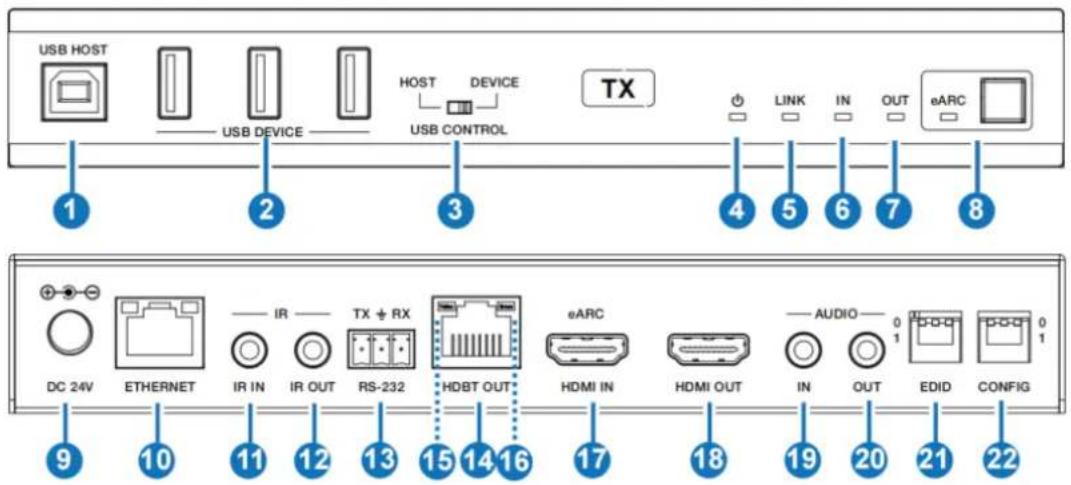
| No | Name | Description |
| 1 | USB Host | Connect to a PC |
| 2 | USB Device | 3 USB extension ports; connect a flash drive, mouse, or keyboard |
| 3 | Host/Device USB Control Switch | Switch to left (HOST), the USB HOST mode is enabled; Switch to right (DEVICE), the USB DEVICE mode is enabled.Note:IfthetransmitterissettoUSBHOSTmode,thereceivermustbesettoUSBDEVICEmode. |
| 4 | Power LED | Lighton:The transmitter is powered on.Lightoff:The transmitter is powered off. |
| 5 | Link LED | Lighton: Transmitter and receiver are in good connection status.Lightflashing:Transmitter and receiver are in pod connection status or connected to the same de Lightoff:Transmitter and receiver are not connected. |
| 6 | In LED | Video signal input indicator.Lighton:There is HDMI signal input.Lightoff:There is no HDMI input or the system powered off. |
| 7 | Out LED | Video signal output indicator.Lighton:There is HDMI signal output.Lightoff:There is no HDMI output or the system powered off. |
| 8 | eARC LED & Butto | Press the eARC button to enable/disable the eARC/ARC function, and the eARC LED will indi the status as following:Light on:The eARC/ARC mode is enabled, and device is working normally.Light flashing:The eARC/ARC mode is enabled but the device is working abnormally.Light off:The eARC/ARC mode is disabled. |
| 9 | DC 24V | DC 24V/2.7A power supply input port.Note The extenders support POC functionality wh means that either the transmitter or receiver is powered on by the 24V/2.7A power adapter, the other one does not need a power supply. |
| 10 | Ethernet Indicators | Ethernet port with adaptive broadband rate. For example, if the transmitter is connected to a PC with a 100Mbps, and the receiver is connected t Gigabit router, the device can automatically switch the 100Mbps of the transmitter to Gigabit rate.(Note:If the connected device only supports 100Mbps, the extender cannot switch to Gigabit.) Ethernet Indicators:Light in green:the Ethernet rate is 1000 MbpsLight in yellow:the Ethernet rate is 100 Mbps. |
| 11 | IR In | IR signal input port, connect to IR Receiver cab |
| 12 | IR Out | IR signal output port, connect to IR Blaster cable |
| 13 | RS-232 | The RS-232 serial port features different functions by setting the CONFIG DIP switch:RS-232 signal pass-throughControl & FW upgradeVS3000 FW upgradeDebug |
| 14 | HDBT Out | HDBaseT Network port, connect to the HDBT IN port of the receiver with a CAT 6A/7 cable. It is used for various signals pass-through. |
| 15 | Data Signal Indicator (Yellow) | Light on:HDMI signal with HDCP.Light flashing:HDMI signal without HDCP.Light off:No HDMI signal. |
| 16 | Link Signal Indicator (Green) | Light on:Transmitter and receiver are in good connection status.Light flashing:Transmitter and receiver are in connection status or connected to the same devLight off: Transmitter and receiver are not connected. |
| 17 | eARC/HDMI In | This port features two functions:1. HDMI signal input port, connect to HDMI source device2. eARC/ARC audio port, connect to eARC/AR amplifier/sound system. |
| 18 | HDMI Out | HDMI video signal output port. It can loop out the local video signal or output the video signal returned from the receiver. |
| 19 | Audio In | Analog audio input port. The audio from this port be output through the AUDIO OUT port of the receiver. |
| 20 | Audio Out | Analog audio output port. It can output the audio from the AUDIO IN port of the receiver. |
| 21 | EDID DIP Switch | The DIP switch is used for EDID settings.(Set to 000 by default.)[DIP]=000: Copy RX HDMI OUT port sink EDID (Note: If there is no TV connected to the receiver will copy the EDID of the local loopout video.)[DIP]=001: HDMI 1080p@60Hz, Audio 2ch PCM[DIP]=010: HDMI 4K@60Hz 4:4:4, Audio 2ch PCM[DIP]=011: HDMI 4K@60Hz 4:4:4, Audio 5.1ch PCM/DTS/DOLBY [DIP]=100: HDMI 4K@60Hz 4:4:4, Audio 7.1ch PCM/DTS/DOLBY/HD[DIP]=101: HDMI 8K@30Hz 4:4:4+4K@120Hz 4:4:4, Audio 2ch PCM[DIP]=110: HDMI 8K@30Hz 4:4:4+4K@120Hz 4:4 Audio 5.1ch PCM/DTS/DOLBY[DIP]=111: HDMI 8K@30Hz 4:4:4+4K@120Hz 4:4 Audio 7.1ch PCM/DTS/DOLBY/HD |
| 22 | CONFIG DIP Switch | The DIP switch is used to set IR level and serial port access.DIP SW1=0: The IR level is set to 12V.DIP SW1=1: The IR level is set to 5V.DIP SW2/SW3=00: The RS-232 port is used for RS-232 signal pass-through.DIP SW2/SW3=01: The RS-232 port is used for Control & FW upgrade.DIP SW2/SW3=10: The RS-232 port is used for VS3000 FW upgrade.DIP SW2/SW3=11: The RS-232 port is used for debugging. |
Receiver

| No | Name | Description |
| 1 | USB Host | Connect to a PC |
| 2 | USB Device | 3 USB extension ports; connect a flash drive, motor or keyboard |
| 3 | Host/Device USB Control Switch | Switch to left (HOST), the USB HOST mode is enabled; Switch to right (DEVICE), the USB DEVIC mode is enabled.Note:IfthetransmitterissettoUSBHOSTmode,the receivermustbesettoUSBDEVICEmode. |
| 4 | Power LED | Lighton:The transmitter is powered on.Lightoff:The transmitter is powered off. |
| 5 | Link LED | Lighton:Transmitter and receiver are in good connection status.Lightflashing:Transmitter and receiver are in poor connection status or connected to the same deviceLightoff:Transmitter and receiver are not connected. |
| 6 | In LED | Video signal input indicator.Lighton:There is HDMI signal input.Lightoff:There is no HDMI input or the system is powered off. |
| 7 | Out LED | Video signal output indicator.Lighton:There is HDMI signal output.Lightoff:There is no HDMI output or the system is powered off. |
| 8 | eARC LED & Butto | Press the eARC button to enable/disable the eARC/function, and the eARC LED will indicate the status following:Light on:The eARC/ARC mode is enabled, and the device is working normally.Light flashing:The eARC/ARC mode is enabled, by the device is working abnormally.Light off:The eARC/ARC mode is disabled. |
| 9 | DC 24V | DC 24V/2.7A power supply input port.Note The extenders support POC functionality which means that either the transmitter or receiver is power on by the 24V/2.7A power adapter, the other one do not need a power supply. |
| 10 | Ethernet Indicators | Ethernet port with adaptive broadband rate. For example, if the transmitter is connected to a PC with 100Mbps, and the receiver is connected to a Gigab router, the device can automatically switch the 100Mbps of the transmitter to Gigabit rate. (Note: In the connected device only supports 100Mbps, the extender cannot switch to Gigabit.)Ethernet Indicators:Light in green: the Ethernet rate is 1000 Mbps.Light in yellow: the Ethernet rate is 100 Mbps. |
| 11 | IR In | IR signal input port, connect to IR Receiver cable. |
| 12 | IR Out | IR signal output port, connect to IR Blaster cable. |
| 13 | RS-232 | The RS-232 serial port features different functions by setting the CONFIG DIP switch:RS-232 signal pass-throughControl & FW upgradeVS3000 FW upgradeDebug |
| 14 | HDBT In | HDBaseT Network port, connect to the HDBT OUT of the transmitter with a CAT 6A/7 cable. It is used various signals pass-through. |
| 15 | Data Signal Indicator (Yellow) | Light on:HDMI signal with HDCP.Light flashing:HDMI signal without HDCP.Light off: No HDMI signal. |
| 16 | Link Signal Indicator (Green) | Light on:Transmitter and receiver are in good connection status.Light flashing:Transmitter and receiver are in poor connection status or connected to the same device.Light off:Transmitter and receiver are not connected |
| 17 | HDMI In | HDMI Signal input port, connect to HDMI source de IT can transmit video with resolutions of 1080p@24I reverse to the HDMI OUT port of the transmitter,Note:This port is reserved and closed by default. Be using this port, users will need to turn it on throughRS232 commands and ensure that the eARC function disabled. |
| 18 | eARC/HDMI Out | This port features two functions:1. HDMI signal output port, connect to HDMI display device2. eARC/ARC audio port, connect to TV with eARC/ARC function. |
| 19 | Audio In | Analog audio input port. The audio from this port can output through the AUDIO OUT port of the transmit |
| 20 | Audio Out | Analog audio output port. It can output the audio from the AUDIO IN port of the transmitter. |
| 21 | CONFIG DIP Switch | The DIP switch is used to set IR level and serial p access.DIP SW1=0: The IR level is set to 12V.DIP SW1=1: The IR level is set to 5V.DIP SW2/SW3=00: The RS-232 port is used for RS signal pass-through.DIP SW2/SW3=01: The RS-232 port is used for Co & FW upgrade.DIP SW2/SW3=10: The RS-232 port is used for VS FW upgrade.DIP SW2/SW3=11: The RS-232 port is used for debugging. |
IRPinDefinition

Note: When the angle between the IR receiver and the remote control is ±45° , the transmission distance is 0-5 meters; when the angle between the IR receiver and the remote control is ±90° , the transmission distance is 0-8 meters.
ConnectionDiagrams
USBModes
The BG-EXH-8KC6 supports USB 2.0 transmission and the Host / Device is configurable.
Mode1:USB from TX to RX
- Switch the HOST/DEVICE USB control switch to the left and then power off and reboot the transmitter (TX) to set it to USB Host mode.
- Next, switch the HOST/DEVICE USB control switch to the right on the receiver (RX) and then power off and reboot the unit to set it to USB Device mode.

Mode2:USB Reverse from RX to TX
- Switch the HOST/DEVICE USB control switch to the right and then power off and the transmitter (TX) to set it to USB Device mode.
- Next, switch the HOST/DEVICE USB control switch to the left on the receiver (RX) then power off and reboot the unit to set it to USB Host mode.
![graph LR A["NoteBook"] -->|No Function| B["Local Monitor"] B -->|USB Devices| C["TX"] C -->|UTP Cable| D["RX"] D -->|USB Host| E["Computer Host"] D -->|USB Host| F["Remote Monitor"] F --> G["Keyboard & Mouse"] B -->|USB Host| H["Keyboard & Mouse"] C -->|USB Host| I["Keyboard & Mouse"] style A fill:#…](/content/2026/05/1084100/images/4cb04b334b158d682fa62ac27b9f66f309a4979182a1067328bfe3242ab08c2e.jpg)
eARC/ARCAplications
The Audio Return Channel (ARC) in HDMI 2.1 enables a display, via a single HDMI cable or audio cable, to send audio data “upstream” to an A/V receiver. The BG-EXH-8KC6 will send the upstream audio from the receiver (RX) unit to the transmitter (TX) where it can be connected to a compatible device via HDMI ARC.
![graph TD A["Desktop Computer"] -->|USB Cable| B["Transmitter"] A -->|USB Cable| C["Receiver"] A -->|USB Cable| D["Switch"] A -->|USB Cable| E["Radio"] A -->|USB Cable| F["Mouse"] A -->|USB Cable| G["Keyboard"] A -->|USB Cable| H["USB Camera"] A -->|USB Cable| I["Switch"] A -->|USB Cable| J["Switch"]…](/content/2026/05/1084100/images/379cacbe5c3658db8b6b771dfbefe9f6301a7595961cfda62b8d651ac2be1422.jpg)
Note: Press the eARC buttons on the front panel of the transmitter and receiver to enable the eARC/ARC functions before trying to operate the system.
StandardConnection
![graph TD A["Desktop Computer"] -->|USB Cable| B["Transmitter"] A -->|Switch| C["HDMI Cable"] A -->|Audio Cable| D["Receiver"] B -->|USB Cable| E["Receiver"] B -->|USB Cable| F["User Camera"] B -->|USB Cable| G["Mouse"] B -->|USB Cable| H["Keyboard"] C --> I["HDBaseT Cable"] C --> J["TV"] C --> K["Au…](/content/2026/05/1084100/images/84b8b2e50900865e1eca112ab94e30a5abf76df27b069bbb3695ff25615fb3b8.jpg)
TechSupport
Have technical questions? We may have answered them already!
Please visit BZBGEAR's support page (bzbgear.com/support) for helpful information and tips regarding our products. Here you will find our Knowledge Base (bzbgear.com/knowledge-base) with detailed tutorials, quick start guides, and step-by-step troubleshooting instructions. Or explore our YouTube channel, BZB TV (youtube.com/c/BZBTVchannel), for help setting up, configuring, and other helpful how-to videos about our gear.
Need more in-depth support? Connect with one of our technical specialists directly:
Phone
1.888.499.9906
support@bzbgear.com
LiveChat
bzbgear.com
Warranty
BZBGEAR Pro AV products and cameras come with a three-year warranty. An extended two-year warranty is available for our cameras upon registration for a total of five years.
For complete warranty information, please visit_bzbgear.com/warranty.
For questions, please call 1.888.499.9906 or email support@bzbgear.com.
MissionStatement
BZBGEAR is a breakthrough manufacturer of high-quality, innovative audiovisual equipment ranging from AVoIP, professional broadcasting, conferencing, home theater, to live streaming solutions. We pride ourselves on unparalleled customer support and services. Our team offers system design consultation, and highly reviewed technical support for all the products in our catalog. BZBGEAR delivers quality products designed with users in mind.
Copyright
All the contents in this manual and its copyright are owned by BZBGEAR. No one is allowed to imitate, copy, or translate this manual without BZBGEAR's permission. This manual contains no guarantee, standpoint expression or other implies in any form. Product specification and information in this manual is for reference only and subject to change without notice.
Allrightsreserved. No reproducing is allowed without acknowledgement.


- STATEMENT
- SAFETYPRECAUTION
- INTRODUCTION
- FEATURES
- PACKINGLIST
- SPECIFICATIONS
- OPERATIONCONTROLSANDFUNCTIONS
- TRANSMITTER
- RECEIVER
- IRPINDEFINITION
- CONNECTIONDIAGRAMS
- USBMODES
- MODE1:USB FROM TX TO RX
- MODE2:USB REVERSE FROM RX TO TX
- EARC/ARCAPLICATIONS
- STANDARDCONNECTION
- TECHSUPPORT
- WARRANTY
- MISSIONSTATEMENT
- COPYRIGHT
Brand : BZBGear
Model : BG-EXH-8KC6
Category : Audio/video converter