
BG-Air4Kast - Audio/video converter BZBGear - Free user manual and instructions
Find the device manual for free BG-Air4Kast BZBGear in PDF.


| Product Type | Audio/Video Converter |
| Brand | BZBGear |
| Model | BG-Air4Kast |
| Input Interfaces | HDMI, USB |
| Output Interfaces | HDMI, AV (RCA) |
| Supported Resolutions | Up to 4K@30Hz |
| Audio Support | PCM, Dolby Digital, DTS |
| Power Supply | 5V DC via USB (cable included) |
| Power Consumption | 2.5W |
| Dimensions (L x W x H) | 120 x 70 x 20 mm |
| Weight | 150 g |
| Material | ABS Plastic |
| Color | Black |
| Operating Temperature | 0°C to 45°C |
| Compatibility | Windows, macOS, Linux, Android, iOS |
| Package Contents | Converter, USB cable, Remote control, User manual |
| Certifications | CE, FCC, RoHS |
| Functions | Video conversion, audio extraction, signal scaling |
| Maintenance | Clean with a soft dry cloth; avoid liquids |
| Safety | Use in dry environment; do not disassemble |
| Spare Parts | Not available; device is non-repairable |
| Manual | Available in PDF (12 pages) |
Frequently Asked Questions - BG-Air4Kast BZBGear
User questions about BG-Air4Kast BZBGear
0 question about this device. Answer the ones you know or ask your own.
Ask a new question about this device
Download the instructions for your Audio/video converter in PDF format for free! Find your manual BG-Air4Kast - BZBGear and take your electronic device back in hand. On this page are published all the documents necessary for the use of your device. BG-Air4Kast by BZBGear.
USER MANUAL BG-Air4Kast BZBGear
TABLEOFCONTENTS
Statement 4
Safety Precaution 4
Introduction 5
Features 5
Package Contents 5
Specifications 6
Panel Descriptions 7
Connection Diagram 9
Connection Instructions 9
SSID Pairing Instructions 10
Troubleshooting 10
Tech Support 11
Warranty 11
Mission Statement 12
Copyright 12
Statement
Please read these instructions carefully before connecting, operating, or configuring this product. Please save this manual for future reference.
SafetyPrecaution
- To prevent damaging this product, avoid heavy pressure, strong vibration, or immersion during transportation, storage, and installation.
- The housing of this product is made of organic materials. Do not expose to any liquid, gas, or solids which may corrode the shell.
- Do not expose the product to rain or moisture.
- To prevent the risk of electric shock, do not open the case. Installation and maintenance should only be carried out by qualified technicians.
- Do not use the product beyond the specified temperature, humidity, or power supply specifications.
- This product does not contain parts that can be maintained or repaired by users. Damage caused by dismantling the product without authorization from BZBGEAR is not covered under the warranty policy.
- Installation and use of this product must strictly comply with local electrical safety standards.
Introduction
The BG-Air4Kast is an advanced 4K@60Hz HDMI wireless extender solution consisting of a transmitter and a receiver. It leverages ipcolor STREAM technology for high-definition and low-latency video transmission. Operating on the 5G wireless frequency band, it delivers stability, anti-interference capabilities, and increased performance. The BG-Air4Kast supports wireless transmission up to 164ft (50m), offering a solution for wirelessly transmitting video in applications such as video conferences, home entertainment, and multimedia education.
Note: Transmission distances may vary as interference from solid structures and other wireless signals may affect performance.
Features
- Ipcolor STREAM technology allows for high definition and low-latency transmission.
- Up to 3840x2160@60Hz resolution, backward compatible.
- 4K Wireless transmission up to 164ft (50m) / 1080p60 230ft (70m) line of sight.
- HDMI loop out on transmitter for local monitoring.
- SSID pairing and channel switching to avoid interference in case multiple sets of BG-Air4Kast are in the same area.
- IR passback (Receiver to Transmitter) to control source devices.
- 5G wireless for strong anti-interference.
- Firmware upgradeable via Micro USB port.
PackageContents
- 1 x BG-Air4Kast TX
- 1 x BG-Air4Kast RX
- 4 x Antenna
-
1 x IR Blaster Extension cable
-
1 x User Manual
- 4 x Mounting Ears
- 2 x 5V2A Power Adapters
- 1 x IR Receiver Extension Cable
- 12 x Screws
Specifications
| TechnicalSpecifications | |
| Power Supply | DC 5V/2A (TX ≤ 6W, RX ≤ 4W) |
| HDMI Version | HDMI 2.0 |
| HDCP Version | HDCP 1.4 / HDCP 2.2 |
| Maximum Transfer Rate | 18Gbps |
| Supported Resolutions | 3840x2160@24/30/50/60Hz, 1080P@50/60Hz, 720P@50/60Hz, 1920x1200, 2560x1440, 2560x1600 |
| Audio Format | PCM |
| WiFi Frequency Bands | 5.18~5.24 GHz |
| Transmission Distances | 4K60 ~ 164ft (50m) / 1080p60 230ft (70m) line of sight |
| Latency | 130~180ms |
| Connection Type | One-to-one |
| SSID Pairing | Supported |
| ESD Protection | 1a Contact discharge level 31b Air discharge level 3Standard: IEC61000-4-2 |
| Infrared Frequency | 20~60kHz |
| Receiving Range | ≤ 5m |
| Working Temperature | -20~60°C |
| Storage Temperature | -30~70°C |
| Humidity | 0~90% RH (no condensation) |
| Dimensions (L x W x H) | 115mm x 125mm x 20.6mm |
| Color | Black |
| Material | Iron |
| Weight | TX: 1Lb / RX: 1Lb |
PanelDescriptions
Transmitter(TX)
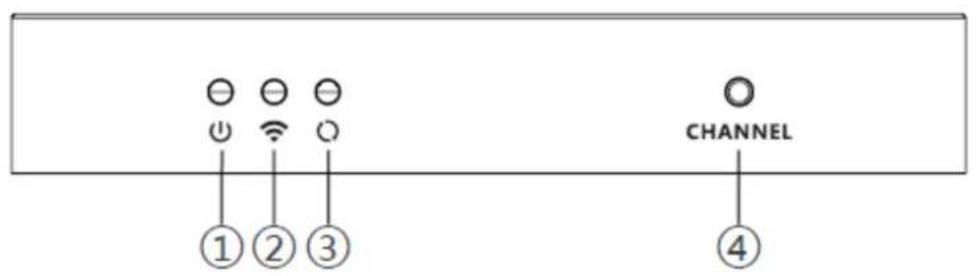
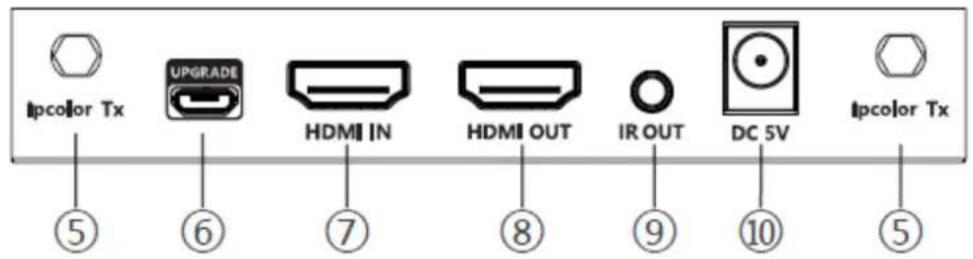
| 1. | Power Indicator | The LED will illuminate blue when the device is powered on. |
| 2. | WiFi Indicator | Slow Flash: Waiting for connectionSolid: Connection establishedRapid Flash: SSID Pairing Mode |
| 3. | Signal Indicator | Off: No HDMI signal detectedSolid: HDMI signal is transmittingRapid Flash: Restore Factory Settings in progress |
| 4. | Channel Switch Button | Press to switch broadcasting channelsPress and hold for 5s for SSID Pairing modePress and hold for 10s to restore factory settings |
| 5. | Antenna Connectors | Connect the included antennas |
| 6. | Micro USB Port | Used for firmware upgrades |
| 7. | HDMI Input | Connect to a source device using an HDMI cable |
| 8. | HDMI Output | Connect to a display using an HDMI cable |
| 9. | IR Out | Connect the included IR Blaster extension cable |
| 10. | Power Input | Connect the included 5V/2A power supply |
Receiver(RX)


| 1. | Power Indicator | The LED will illuminate blue when the device is powered on. |
| 2. | WiFi Indicator | Slow Flash: Waiting for connectionSolid: Connection establishedRapid Flash: SSID Pairing Mode |
| 3. | Signal Indicator | Off: No HDMI signal detectedSolid: HDMI signal is transmittingRapid Flash: Restore Factory Settings in progress |
| 4. | Channel Switch Button | Press to switch broadcasting channelsPress and hold for 5s for SSID Pairing modePress and hold for 10s to restore factory settings |
| 5. | Antenna Connectors | Connect the included antennas |
| 6. | Micro USB Port | Used for firmware upgrades |
| 7. | HDMI Out | Connect to a display using an HDMI cable |
| 8. | IR In | Connect the included IR Receiver extension cable |
| 9. | Power Input | Connect the included 5V/2A power supply |
ConnectionDiagram
![graph TD A["4K Display"] -->|IR Receiver| B["BG-Air4Kast"] B -->|Power| C["Blu-Ray Player"] C --> D["4K Display"] D -->|IR Blaster| E["BG-Air4Kast"] E --> F["4K Display"] style A fill:#f9f,stroke:#333 style B fill:#ccf,stroke:#333 style C fill:#cfc,stroke:#333 style D fill:#fcc,stroke:#333 style E f…](/content/2026/05/1065106/images/5bdf388cb4190c9f091595b3617290e288b1083049e421e183ea5782f48c609c.jpg)
ConnectionInstructions
-
Connect the source device to the HDMI IN port of the transmitter with an HDMI cable, and connect the HDMI OUT port of the receiver to the display device with another HDMI cable.
-
If using the IR passback function, connect the IR blaster extension cable into the IR OUT port of the transmitter, and connect the IR receiver extension cable into the IR IN port of the receiver.
a: The emitter of the IR blaster extension cable should be as close as possible to the IR receiving window of the source device.
b: Point the remote control at the receiving head of the IR receiver extension cable to operate.
-
Plug the included power supplies into the devices to turn them on.
-
If multiple sets of BG-Air4Kast are being used at the same time and in the same area, in order to prevent interference switch each set of transmitters and receivers to a different channel after they have been manually paired using the SSID function.
SSIDPairingInstructions
- Enter SSID pairing mode by holding the transmitter and receiver's channel switch buttons for five seconds. Both WiFi connection indicators will rapidly flash yellow.
- When the SSID pairing is successful, the WiFi indicators on the transmitter and receiver will change from quick flashing to a slow flashing or steady on.
| ChannelNumber | Frequency |
| Channel 1 | 5.180 GHz |
| Channel 2 | 5.200 GHz |
| Channel 3 | 5.220 GHz |
| Channel 4 | 5.240 GHz |
Troubleshooting
- Why are the receiver and transmitter not connected and showing "Search ipcolor Tx" on the display?
a. Move the Transmitter and Receiver closer.
b. Power cycle the transmitter and receiver.
c. Re-pair the transmitter and receiver.
- Why is the WiFi indicator solid but the display is showing "Please check the TX input signal"?
a. Ensure the TX has an HDMI input and that the resolution is within the specified range
b. Try conning the signal source directly to the display device or change the signal source and HDMI cables and then try again.
- Why is the display stuttering or the image is unstable?
a. Place the transmitter and receiver closer and minimize the number of obstructions between the transmitter and receiver.
b. Switch to a different channel to avoid interference from other wireless signals and devices.
c. Power cycle the transmitter and receiver.
TechSupport
Have technical questions? We may have answered them already!
Please visit BZBGEAR's support page (bzbgear.com/support) for helpful information and tips regarding our products. Here you will find our Knowledge Base (bzbgear.com/knowledge-base) with detailed tutorials, quick start guides, and step-by-step troubleshooting instructions. Or explore our YouTube channel, BZB TV (youtube.com/c/BZBTVchannel), for help setting up, configuring, and other helpful how-to videos about our gear.
Need more in-depth support? Connect with one of our technical specialists directly:
Phone
1.888.499.9906
support@bzbgear.com
LiveChat
bzbgear.com
Warranty
BZBGEAR Pro AV products and cameras come with a three-year warranty. An extended two-year warranty is available for our cameras upon registration for a total of five years.
For complete warranty information, please visit bzbgear.com/warranty.
For questions, please call 1.888.499.9906 or email support@bzbgear.com.
MissionStatement
BZBGEAR is a breakthrough manufacturer of high-quality, innovative audiovisual equipment ranging from AVoIP, professional broadcasting, conferencing, home theater, to live streaming solutions. We pride ourselves on unparalleled customer support and services. Our team offers system design consultation, and highly reviewed technical support for all the products in our catalog. BZBGEAR delivers quality products designed with users in mind.
Copyright
All the contents in this manual and its copyright are owned by BZBGEAR. No one is allowed to imitate, copy, or translate this manual without BZBGEAR's permission. This manual contains no guarantee, standpoint expression or other implies in any form. Product specification and information in this manual is for reference only and subject to change without notice.
Allrightsreserved. No reproducing is allowed without acknowledgement.


Brand : BZBGear
Model : BG-Air4Kast
Category : Audio/video converter