
MC-1GSFP - Power inverter AIRLIVE - Free user manual and instructions
Find the device manual for free MC-1GSFP AIRLIVE in PDF.


| Product Type | 1-Port Gigabit SFP Media Converter |
| Model | MC-1GSFP |
| Brand | AirLive |
| Dimensions (W x D x H) | 94 x 70 x 25 mm |
| Weight | 400 g |
| Power Supply | External power adapter, DC 5V 2A |
| Power Consumption | 3.5W (max) |
| Ports | 1 x 1000Base-SX/LX SFP slot, 1 x 10/100/1000Base-T RJ45 |
| Fiber Standard | IEEE 802.3z 1000Base-SX/LX |
| Copper Standard | IEEE 802.3ab 1000Base-T |
| Data Rate | Gigabit (1000 Mbps) on both ports |
| Operating Temperature | 0°C to 50°C (32°F to 122°F) |
| Storage Temperature | -10°C to 70°C (14°F to 158°F) |
| Humidity | 5% to 90% (non-condensing) |
| LED Indicators | Power, Link/Act (Fiber), Link/Act (Copper) |
| Housing Material | Metal |
| Mounting | Desktop or wall-mountable |
| Compliance | CE, FCC, RoHS |
| Maintenance | Keep clean from dust; avoid moisture. Use a dry cloth for cleaning. |
| Safety | Use only provided power adapter. Do not open the case. Disconnect power before cleaning. |
| Spare Parts / Repairability | No user-serviceable parts inside. Contact support for replacement. |
Frequently Asked Questions - MC-1GSFP AIRLIVE
User questions about MC-1GSFP AIRLIVE
0 question about this device. Answer the ones you know or ask your own.
Ask a new question about this device
Download the instructions for your Power inverter in PDF format for free! Find your manual MC-1GSFP - AIRLIVE and take your electronic device back in hand. On this page are published all the documents necessary for the use of your device. MC-1GSFP by AIRLIVE.
USER MANUAL MC-1GSFP AIRLIVE
No part of this publication may be reproduced in any form or by any means, whether electronic, mechanical, photocopying, or recording without the written consent of AirLive Technology Corp.
AirLive Technology Corp has made the best effort to ensure the accuracy of the information in this user's guide. However, we are not liable for the inaccuracies or errors in this guide. Please use with caution. All information is subject to change without notice
All Trademarks are properties of their respective holders.
Disposal
| This marking indicates that this product should not be disposed with other household wastes throughout the EU. To prevent possible harm to the environment or human health from uncontrolled waste disposal, recycle it responsibly to promote the sustainable reuse of material resources. To return your used device, please use the return and collection systems or contact the retailer where the product was purchased. They can take this product for environmentally safe recycling. |
CE
Table of Contents
1. Overview.... 2
1.1 Connecting MC-1GSFP and MC-10GSFP+ 3
1
Overview

MC-1GSFP

MC-10GSFP+
Media Converter (MC-1GSFP, MC-10GSFP+)
The AirLive MC-1G SFP Gigabit media converter allows users to extend communication distance with Gigabit performance via fiber optic, Single or Multi mode SFP transceivers auto-negotiation. It provides media conversion between 100/1000Base-T and Gigabit Fiber via various SFP transceivers for example like the AirLive SPF-LX-1.25G-20KM module. Connect different offices together over a longer distance using fiber.
The MC-10GSFP+ Multi Giga Media Converter provides 10Gbps Ethernet media conversion between SFP+ to UTP. It brings you the best and simple solution for the Ethernet conversion between copper wire and fiber, with the speed of 10G. It allows users to extend communication distance. Connect different offices together over a longer distance using a high-speed fiber connection.
Compact size converter
The Compact Size MC-1GSFP/MC-10GSFP+ have a standalone design with plug-and-play for easy installation and space saving.
1.1 Connecting MC-1GSFP and MC-10GSFP+
When using the Media Converter please make sure your SFP Modules are compatible with the Media Converter.
Installation Step
- Connect 5V/2A power adapter into the MC-1GSFP
- Connect 5V/2A power adapter into the MC-10GSFP+.
- Insert a compatible SFP Transceiver Module into the SFP Slot.
- Insert an Ethernet cable with an RJ-45 connector to the 10/100/1000Base-T Ethernet port for the MC-1GSFP
- Insert an Ethernet cable with an RJ-45 connector to the 10GBase-T Ethernet port for the MC-10GSFP+.
MC-1GSFP

TX LED: RJ-45 Port Info
Link/Act: Data Transfer
FX LED: SFP Port Info
SFP Slot
10/100/1000Base-T RJ-45
MC-10GSFP+
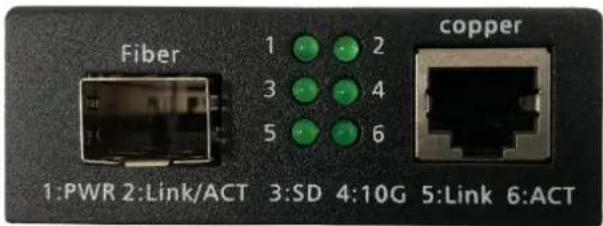
SFP+ Slot
10GBase-T RJ-45
- Power LED
- Link/Act: Data Transfer FX
- LED ON: Fiber signal detected
- LED ON: Transfer rate 10Gbps
- LED ON: RJ-45 Connection ok
- Link/Act: Data Transfer TX
Example Setup MC-1GSFP.

flowchart
graph LR
    A["RJ-45 network"] -->|1G Fiber 20KM*| B["MICPU-CHINA"]
    B --> C["1G Fiber 20KM* In Combination with SFP-LX-1.25G-20KM"]
    C --> D["MICPU-CHINA"]
    D --> E["RJ-45 network"]
Example Setup MC-10GSFP+.

flowchart
graph LR
    A["RJ-45 network 10GBaseT"] --> B["10G Fiber 300m*"]
    B --> C["SFP-SR-10G-300M * In Combination with SFP-SR-10G-300M"]
    C --> D["RJ-45 Network 10GBaseT"]
For more detailed specifications please see the datasheet. The datasheets can be found online on www.airlive.com
** Specifications are subject to change and improvement without notice.
Brand : AIRLIVE
Model : MC-1GSFP
Category : Power inverter