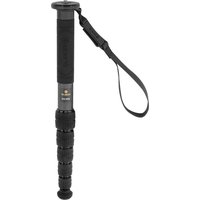
Vantage Series 3 RCM-633 - Tripod Robus - Free user manual and instructions
Find the device manual for free Vantage Series 3 RCM-633 Robus in PDF.


| Product Type | Tripod |
| Brand | Robus |
| Model | Vantage Series 3 RCM-633 |
| Material | Aluminum alloy |
| Maximum Height | 160 cm |
| Minimum Height | 40 cm |
| Folded Length | 55 cm |
| Weight | 1.8 kg |
| Load Capacity | 6 kg |
| Leg Sections | 3 |
| Leg Lock Type | Twist lock |
| Head Type | Not included |
| Leveling Base | No |
| Spikes/Feet | Retractable spikes |
| Maintenance | Clean with damp cloth; lubricate locks occasionally |
| Safety | Do not exceed load capacity; ensure leg locks are tight |
| Spare Parts | Replacement feet, locking knobs |
| General Information | Professional tripod for photography and video |
Frequently Asked Questions - Vantage Series 3 RCM-633 Robus
User questions about Vantage Series 3 RCM-633 Robus
0 question about this device. Answer the ones you know or ask your own.
Ask a new question about this device
Download the instructions for your Tripod in PDF format for free! Find your manual Vantage Series 3 RCM-633 - Robus and take your electronic device back in hand. On this page are published all the documents necessary for the use of your device. Vantage Series 3 RCM-633 by Robus.
USER MANUAL Vantage Series 3 RCM-633 Robus
4 & 6 SECTION / CARBON FIBER MONOPODS
VANTAGE SERIES 3

ROBUS
Securing a Camera/Lens or Head
Determine which side of the mounting screw you will need to use for your camera, lens or head and follow the instructions from Reversing the Mounting Screw.
- Attach your camera, lens, or head to the mounting screw, and make sure it's securely seated and flush with the baseplate.
- Use the included 2.5 mm hex key to tighten the set screw from the bottom of the baseplate and secure your camera, lens, or head.

Extending the Monopod
Turn each twist-lock clockwise and extend each leg section to the desired length. Turn the twist-locks counterclockwise to tighten.

Swapping the Feet
The monopod comes with a rubber and a spike foot. To swap the feet, unscrew the rubber foot, and screw in the spike.
Use one of the included hex keys to tighten or loosen the spike foot.

Wrist Strap and Belt Clip
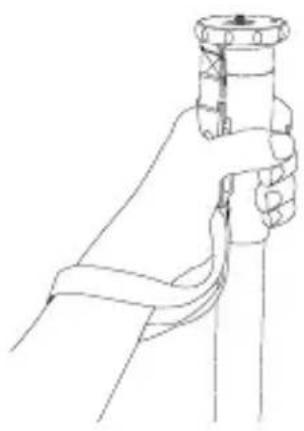
Use the wrist strap to further stabilize and secure the monopod in your hand.
The integrated belt clip attaches the monopod to your waist for hands-free transport.

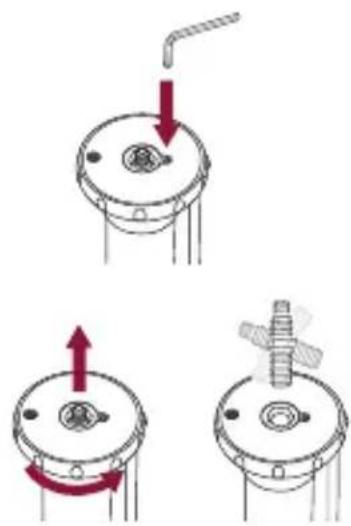
Reversing the Mounting Screw
The monopod offers a reversible 3/8-16 and 1/4-20 mounting screw.
- Loosen the set screw with the included 2 mm hex key.
- Unscrew the baseplate until you can remove the mounting screw and switch it to the other side.
- Screw the baseplate back onto the monopod until it's secure, and tighten the set screw from the top.
Specifications
RCM-633 RCM-439
Maximum Load 33 lb. (15 kg) 39 lb. (17.7 kg)
Maximum Height 65 in. (165 cm)
65 in. (165 cm)
Folded Length 17.2 in. (43.7 cm) 21.1 in. (53.6 cm)
Leg Sections 64
Weight 1.1 lb. (0.5 kg) 1.1 lb. (0.5 kg)
Included hex keys: 2 and 2.5 mm
Ten-Year Limited Warranty
This Robus product is warranted to the original purchaser to be free from defects in materials and workmanship under normal consumer use for a period of ten (10) years from the original purchase date or thirty (30) days after replacement, whichever occurs later. The warranty provider's responsibility with respect to this limited warranty shall be limited solely to repair or replacement at the provider's discretion, of any product that fails during normal use of this product in its intended manner and in its intended environment. Inoperability of the product or part(s) shall be determined by the warranty provider. If the product has been discontinued, the warranty provider reserves the right to replace it with a model of equivalent quality and function.
This warranty does not cover damage or defect caused by misuse, neglect, accident, alteration, abuse, improper installation or maintenance. EXCEPT AS PROVIDED HEREIN, THE WARRANTY PROVIDER MAKES NEITHER ANY EXPRESS WARRANTIES NOR ANY IMPLIED WARRANTIES, INCLUDING BUT NOT LIMITED TO ANY IMPLIED WARRANTY OF MERCHANTABILITY OR FITNESS FOR A PARTICULAR PURPOSE. This warranty provides you with specific legal rights, and you may also have additional rights that vary from state to state.
To obtain warranty coverage, contact the Robus Customer Service Department to obtain a return merchandise authorization ("RMA") number, and return the defective product to Robus along with the RMA number and proof of purchase. Shipment of the defective product is at the purchaser's own risk and expense.
For more information or to arrange service, visit www.robussupports.com or call Customer Service at 212-594-2353.

ROBUS™ A Gradus Group Brand
Product warranty provided by the Gradus Group. www.gradusgroup.com
Robus is a registered trademark of the Gradus Group. © 2019 Gradus Group LLC. All Rights Reserved. Images are for illustrative purposes only.
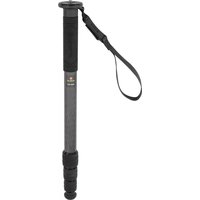

Brand : Robus
Model : Vantage Series 3 RCM-633
Category : Tripod