
RX-35 - Audio/video converter WyreStorm - Free user manual and instructions
Find the device manual for free RX-35 WyreStorm in PDF.


| Product Type | Audio/Video Converter |
| Brand | WyreStorm |
| Model | RX-35 |
| Input Interface | HDMI (Type A) |
| Output Interface | Composite Video + Stereo Audio (RCA) |
| Supported Video Resolutions | 480i, 576i, 720p, 1080i, 1080p |
| Audio Support | PCM 2.0, LPCM |
| Power Supply | 5V DC via USB cable (included) or power adapter (optional) |
| Power Consumption | 2.5W (typical) |
| Dimensions (W x D x H) | 80mm x 50mm x 19mm |
| Weight | 150g |
| Housing Material | ABS plastic |
| Operating Temperature | 0°C to 45°C |
| Storage Temperature | -10°C to 60°C |
| LED Indicator | Power status LED (blue) |
| Installation | Plug and play, no driver required |
| Compatibility | HDMI sources (DVD, game console, set-top box) to legacy displays (CRT, projector) |
| Maintenance | Wipe with a soft dry cloth; avoid liquids |
| Safety | Use in dry indoor environment; do not expose to rain or moisture |
| Spare Parts / Repairability | No user-serviceable parts; contact support for repairs |
Frequently Asked Questions - RX-35 WyreStorm
User questions about RX-35 WyreStorm
0 question about this device. Answer the ones you know or ask your own.
Ask a new question about this device
Download the instructions for your Audio/video converter in PDF format for free! Find your manual RX-35 - WyreStorm and take your electronic device back in hand. On this page are published all the documents necessary for the use of your device. RX-35 by WyreStorm.
USER MANUAL RX-35 WyreStorm
WyreStorm recommends reading through this document in its entirety to become familiar with the product's features before beginning the installation process.

CHDBT HDMI HDCP 2.2 PoH

IMPORTANT! Installation Requirements
- Visit the product page to download the latest firmware, document versions, additional documentation, and configuration tools.
- Read through the Wiring and Connections section for important wiring guidelines before creating or choosing premade cables.
- While this product supports CEC, WyreStorm cannot guarantee compatibility with all forms of CEC communication.
In the Box
1x RX-35-POH Receiver
1x 12V 2A Power Adaptor (US, UK, EU, AU)
1x IR Emitter
1x IR Receiver
2x Mounting Brackets
1x 3 Pin Phoenix Male Connector
1x Quickstart Guide (this document)
Basic Wiring Diagram
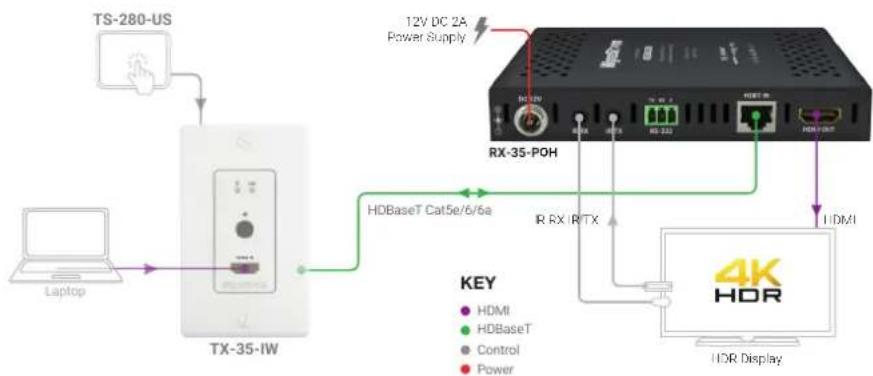
flowchart
graph TD
    A["TS-280-US"] --> B["TX-35-IW"]
    B --> C["HDBaseT Cat5e/6/6a"]
    C --> D["RX-35-POH"]
    D --> E["12V DC 2A Power Supply"]
    D --> F["HD Base T"]
    D --> G["HD Base T"]
    D --> H["HD Base T"]
    D --> I["HD Base T"]
    D --> J["HD Base T"]
    D --> K["HD Base T"]
    D --> L["HD Base T"]
    D --> M["HD Base T"]
    D --> N["HD Base T"]
    D --> O["HD Base T"]
    D --> P["HD Base T"]
    D --> Q["HD Base T"]
    D --> R["HD Base T"]
    D --> S["HD Base T"]
    D --> T["HD Base T"]
    D --> U["HD Base T"]
    D --> V["HD Base T"]
    D --> W["HD Base T"]
    D --> X["HD Base T"]
    D --> Y["HD Base T"]
    D --> Z["HD Base T"]
    D --> AA["HD Base T"]
    D --> AB["HD Base T"]
    D --> AC["HD Base T"]
    D --> AD["HD Base T"]
    D --> AE["HD Base T"]
    D --> AF["HD Base T"]
    D --> AG["HD Base T"]
    D --> AH["HD Base T"]
    D --> AI["HD Base T"]
    D --> AJ["HD Base T"]
    D --> AK["HD Base T"]
    D --> AL["HD Base T"]
    D --> AM["HD Base T"]
    D --> AN["HD Base T"]
    D --> AO["HD Base T"]
    D --> AP["HD Base T"]
    D --> AQ["HD Base T"]
    D --> AR["HD Base T"]
    D --> AS["HD Base T"]
    D --> AT["HD Base T"]
    D --> AU["HD Base T"]
    D --> AV["HD Base T"]
    D --> AW["HD Base T"]
    D --> AX["HD Base T"]
    D --> AY["HD Base T"]
    D --> AZ["HD Base T"]
    D --> BA["HD Base T"]
    D --> BB["HD Base T"]
    D --> BC["HD Base T"]
    D --> BD["HD Base T"]
    D --> BE["HD Base T"]
    D --> BF["HD Base T"]
    D --> BG["HD Base T"]
    D --> BH["HD Base T"]
    D --> BI["HD Base T"]
    D --> BJ["HD Base T"]
    D --> BK["HD Base T"]
    D --> BL["HD Base T"]
    D --> BM["HD Base T"]
    D --> BN["HD Base T"]
    D --> BO["HD Base T"]
    D --> BP["HD Base T"]
    D --> BQ["HD Base T"]
    D --> BR["HD Base T"]
    D --> BS["HD Base T"]
    D --> BT["HD Base T"]
    D --> BU["HD Base T"]
    D --> BV["HD Base T"]
    D --> BW["HD Base T"]
    D --> BX["HD Base T"]
    D --> BY["HD Base T"]
    D --> BZ["HD Base T"]
Front Panel Rear Panel

| A | Power LED | Solid: The receiver is powered OnOff: The receiver is powered Off |
| B | Status LED | Flashing: The receiver is operating normally.Off: The receiver is Not operating normally. |
| C | HDCP LED | Solid: HDCP content is present.Flashing: HDCP content is not present.Off: No signal. |
| D | LINK LED | Solid: Link to receiver has been established.Flashing: Link to receiver has not been established. |
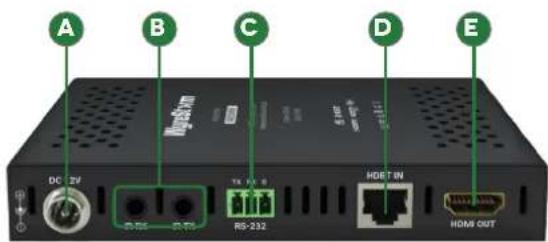
| A | Power Input | 5.5mm Screw Down Barrel JackConnect to the included 12V DC 2A power supply to the transmitter or receiver. A power supply is not required on the other end as it will be powered using PoH. |
| B | IR TXIR RX | IR TX-3.5mm (1/8in) Mono Jack: Connect to the supplied IR emitter to control a local device from the remote display location via HDBaseTIR RX-3.5mm (1/8in) Stereo Jack: Connect to the supplied IR receiver to send IR to the remote display location via HDBaseT.See IR TX/RX Guidelines for more information. |
| C | RS-232 | 1x RS-232: 3-pin Phoenix |
| D | HDBT In | 8-pin RJ-45 femaleConnect the matrix HDBT Out to receivers HDBT In. |
| E | HDMI Out | 19-pin type A HDMI femaleSupports HDMI and DVI/D with adapter |
Wiring and Connections
WyreStorm recommends that all wiring for the installation is run and terminated prior to making connections to the switcher. Read through this section in it's entirety before running or terminating the wires to ensure proper operation and to avoid damaging equipment.

IMPORTANT! Wiring Guidelines
- The use of patch panels, wall plates, cable extenders, kinks in cables, and electrical or environmental interference will have an adverse effect on signal transmission which may limit performance. Steps should be taken to minimize or remove these factors completely during installation for best results.
- WyreStorm recommends the use of shielded category cable to minimize signal noise and interference.
- WyreStorm recommends using pre-terminated HDMI cables due to the complexity of these connector types. Using pre-terminated cables will ensure that these connections are accurate and will not interfere with the performance of the product.
IR TX/RX Guidelines
- Using WyreStorm infrared emitters and receivers is the best way to ensure that most IR coding formats are transmitted and received Other 3rd party emitters and receivers can be used; however, these devices must operate in the same manner as the WyreStorm devices.
- Due to differences in IR across 3rd party control systems their IR ports should never be connected directly to a NetworkHD system as an incompatibility may exist. WyreStorm offers a cable that compensates for voltage differences as well adjusts for differences in the pins used within the port. Refer to the CAB-IR-LINK product page for more information.
RS-232 Wiring
The RX-35-POH uses a 3-pin RS-232 with no hardware flow control. Most control systems and computers are DTE where pin 2 is RX, this can vary from device to device. Refer to the documentation for the connected device for pin functionally to ensure that the correct connections can be made.
Troubleshooting
No or Poor Quality Picture (snow or noisy image)
- Verify that power is being supplied to the transmitter and receiver.
- Verify that the HDBaseT cable is properly terminated following EIA568B standard.
- Verify that the output resolution of the source and display is supported by this extender.
- If transmitting 3D or 4K, verify that the HDMI cables used are 3D or 4K rated.
- Verify that all source and HDBaseT connections are not loose and are functioning properly.
Cat6 Cable Performance Guide

bar
| Time (ft) | 4K Transmission (ft) | HD Transmission (ft) | |---|---|---| | 0 | 32 | 65 | | 10 | 98 | 131 | | 20 | 131 | 164 | | 30 | 40 | 50 | | 40 | 50 | 60 | | 50 | 60 | 70 | | 60 | 70 | 80 | | 70 | 80 | 90 | | 80 | 90 | 100 | | 90 | 100 | 100 | | 100 | 100 | 100 | | 110 | 110 | 110 | | 120 | 120 | 120 | | 130 | 130 | 130 | | 140 | 140 | 140 | | 150 | 150 | 150 | | 160 | 160 | 160 | | 170 | 170 | 170 | | 180 | 180 | 180 | | 190 | 190 | 190 | | 200 | 200 | 200 | | 210 | 210 | 210 | | 220 | 220 | 220 | | 230 | 230 | 230 | | 240 | 240 | 240 | | 250 | 250 | 250 | | 260 | 260 | 260 | | 270 | 270 | 270 | | 280 | 280 | 280 | | 290 | 290 | 290 | | 300 | 300 | 300 | | 310 | 310 | 310 | | 320 | 320 | 320 | | 330 | 330 | 330 | | 340 | 340 | 340 | | 350 | 350 | 350 | | 360 | 360 | 360 | | 370 | 370 | 370 | | 380 | 380 | 380 | | 390 | 390 | 390 | | 400 | 400 | 400 | | Note: The '4K Transmission' and 'HD Transmission' values are estimated based on the visual data. The 'HD Transmission' is not explicitly labeled in the image but implied by the legend. The 'Time' labels are not present in the image.WyreStorm recommends the use of shielded cable to minimize signal noise and interference
IR TX Port Pinout
Connection for IR TX (transmit) uses a 3.5mm (1/8in) mono plug.

IR RX Port Pinout
Connection for IR RX (receive) uses a 3.5mm (1/8in) stereo jack that outputs +5V DC to power the included IR receiver.

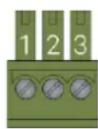
| WyreStorm Connector | 3rd Party Device | ||
| Pin 1 | TX (Transmit) ---> | To ---> RX (Receive) | |
| Pin 2 | RX (Receive) ---> | To ---> TX (Transmit) | |
| Pin 3 | G (Ground) | ---> To ---> | G (Ground) |
No or Intermittent 3rd party Device Control
- Verify that the RS-232 cables are properly terminated.
- Verify that emitters/receivers are compatible with WyreStorm IR.
- If using an IR control system, verify that it is connected using the CAB-IR-LINK cable.
Specifications
| Transmission | |
| Output Video Encoding HDBaseT Class B | |
| End to End Latency (Max) 10μs (micro seconds) | |
| Decoding Data Rate 10.2Gbps | |
| Audio and Video | |
| Inputs 1x HDBT In: 8-pin RJ-45 Female | |
| Outputs 1x HDMI Out: 19-pin type A | |
| Maximum Pixel Clock 297MHz | |
| Video Resolutions (Max) | Video Resolution HDMI Cat6 Cat6a/7 |
| 1920x1080p @60Hz 15m/49ft 70m/230ft 70m/230ft | |
| 3840x2160p @60Hz 8bit 4:2:0 5m/16ft 35m/115ft 35m/115ft | |
| 3840x2160p @24Hz 10bit 4:2:0 HDR 5m/16ft 35m/115ft 35m/115ft | |
| 4096x2160p @60Hz 8bit 4:2:0 5m/16ft 35m/115ft 35m/115ft | |
| Note: WyreStorm recommends the use of shielded category cable to minimize signal noise and interference | |
| Supported Standards | DCI | RGB | HDR10 | BT.2020 |
| Audio Formats | 2ch PCM | Up to DTS-X and Dolby Atmos |
| Maximum Sampling Rate | 192KHz |
| Communication and Control | |
| HDMI | v2.0 TMDS | HDCP 2.2 | EDID | DVI/D Supported with adapter |
| HDBaseT | HDCP 2.2 | EDID | PoH 2-way | Bidirectional IR, RS-232 |
| IR | 1x IR TX 3.5mm (1/8in) Mono | 1x IR RX 3.5mm (1/8in) Stereo | Bidirectional over HDBaseT |
| RS-232 | 1x 3-pin Phoenix Connector | Bidirectional over HDBaseT |
| Power | |
| Power Supply | 12V DC 2A (Optional) |
| Max Power Consumption | 9.3W |
| Power-over-HDBaseT (PoH) | 2 way |
| Environmental | |
| Operating Temperature | 0 ~ +45°C (32 ~ +113 °F), 10% ~ 90%, non-condensing |
| Storage Temperature | -20 ~ +70°C (-4 ~ +158 °F), 10% ~ 90%, non-condensing |
| Maximum BTU/hr | 31.7 BTU/hr |
| Dimensions and Weight | |
| Rack Units/Wall Box | <1U |
| Height | 21mm/0.82in |
| Width | 140mm/5.5in |
| Depth | 80mm/3.14in |
| Weight | 0.18kg/0.4lbs |
| Regulatory | |
| Safety and Emission | CE | FCC | RoHS | RCM | EAC |
Note: WyreStorm reserves the right to change product specification, appearance or dimensions of this product at any time without prior notice.
Warranty Information
This product is covered by a 5-year limited parts and labor warranty. During this period there will be no charge for unit repair, component replacement or complete product replacement in the event of malfunction. The decision to repair or replace will be made by the manufacturer. This limited warranty only covers defects in materials or workmanship and excludes normal wear and tear or cosmetic damage.
Visit the product page located at wyrestorm.com for additional information on this product including important technical information not provided in this document and warranty terms & conditions.


- IMPORTANT! Installation Requirements
- In the Box
- Basic Wiring Diagram
- Wiring and Connections
- IMPORTANT! Wiring Guidelines
- IR TX/RX Guidelines
- RS-232 Wiring
- Troubleshooting
- No or Poor Quality Picture (snow or noisy image)
- IR TX Port Pinout
- IR RX Port Pinout
- No or Intermittent 3rd party Device Control
- Warranty Information
Brand : WyreStorm
Model : RX-35
Category : Audio/video converter