
ATVB6.5R - Car Radio BOSS - Free user manual and instructions
Find the device manual for free ATVB6.5R BOSS in PDF.


| Product Type | Car Radio |
| Brand | BOSS |
| Model | ATVB6.5R |
| Dimensions (W x H x D) | 178 x 50 x 100 mm (Single DIN) |
| Weight | 0.5 kg (approx.) |
| Power Supply | 12V DC (negative ground) |
| Power Output | 4 x 50W peak |
| Tuner | AM/FM with presets |
| Bluetooth | Hands-free calling and audio streaming |
| USB Port | Front USB for MP3/WMA playback and charging |
| AUX Input | 3.5mm front input |
| Audio Features | Equalizer (preset and custom), bass/treble control |
| Display | LCD with adjustable backlight |
| Steering Wheel Control | Compatible (with adapter, not included) |
| Remote Control | Included (wireless) |
| Maintenance | Clean with soft, dry cloth. Avoid liquids. |
| Safety | Use correct fuse (e.g., 10A). Disconnect battery before installation. |
| Spare Parts / Repairability | Fuses, wiring harness. Contact BOSS support for service. |
| Warranty | 1 year limited (check local terms) |
Frequently Asked Questions - ATVB6.5R BOSS
User questions about ATVB6.5R BOSS
0 question about this device. Answer the ones you know or ask your own.
Ask a new question about this device
Download the instructions for your Car Radio in PDF format for free! Find your manual ATVB6.5R - BOSS and take your electronic device back in hand. On this page are published all the documents necessary for the use of your device. ATVB6.5R by BOSS.
USER MANUAL ATVB6.5R BOSS
FEATURING 6.5" MARINE SPEAKERS AND 1" WEATHERPROOF
TWEETERS WITH BUILT-IN BATTERY AND AMPLIFIER

natural_image
Exterior view of a black industrial fan with attached cable and connector (no visible text or symbols)TABLE OF CONTENTS
INFORMATION TO THE USER 2
BEFORE YOU START 4
GETTING TO KNOW YOUR ATVB6.5R 5
For the latest information about this product please visit www.bossaudio.com
TECH SUPPORT: 805-488-4853
Tech Support: www.bosssaudio.com/support/technical-support/
All rights reserved. No part of this publication may be reproduced, distributed, or transmitted in any form or by any means, including photocopying, recording, or other electronic or mechanical methods, without the prior written permission of BOSS AUDIO SYSTEMS.
All other trademarks and trade names are those of their respective owners.
Copyright © 2017 BOSS AUDIO SYSTEMS.
Thank you for purchasing this
BOSS®
AUDIO SYSTEMS
ATVB6.5R All-Terrain Sound System
Please read through these instructions carefully so you will know how to operate your model properly.
After you have finished reading the instructions, keep this document in a safe place for future reference.
THIS PACKAGE CONTAINS
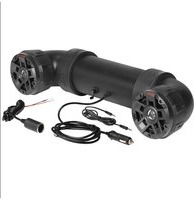
1- ATVB6.5R All-Terrain Speaker System

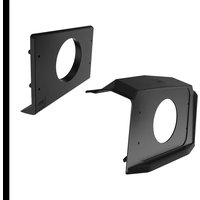
2-Mounting Straps + 2 Nylon Zip Straps + 1 Handle Straps

3- Power Accessory Extension Adaptor

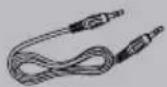
1-3.5mm Audio Line
1- User Manual

1- Warranty Card

INFORMATION TO THE USER

Bluetooth®
The Bluetooth® word mark and logos are registered trademarks owned by Bluetooth SIG, Inc. and any use of such marks is under license.
Other trademarks and trade names are those of their respective owners.


AUDIO SYSTEMS
INFORMATION TO THE USER
FCC COMPLIANCE STATEMENT
This device complies with part 15 of the FCC Rules. Operation is subject to the following two conditions:
(1) this device may not cause interference, and
(2) this device must accept any interference, including interference that may cause undesired operation of this device.
This transmitter must not be co-located or operated in conjunction with any other antenna or transmitter. The Bluetooth antenna cannot be removed (or replaced) by user. this equipment complies with FCC/ IC radiation exposure limits set forth for an uncontrolled environment and meets the FCC radio frequency (RF) Exposure Guidelines and RSS-102 of the IC radio frequency (RF) Exposure rules. This equipment has very low levels of RF energy that it deemed to comply without maximum permissive exposure evaluation (MPE). But it is desirable that it should be installed and operated keeping the radiator at least 20 cm or more away from person's body (excluding extremities: hands, wrists, feet and ankles). Alteration or modifications carried out without appropriate authorization may invalidate the user's right to operate the equipment.
NOTE: This equipment has been tested and found to comply with the limits for a Class B digital device, pursuant to Part 15 of the FCC Rules. These limits are designed to provide reasonable protection against harmful interference in a residential installation. This equipment generates, uses and can radiate radio frequency energy and, if not installed and used in accordance with the instructions, may cause harmful interference to radio communications. However, there is no guarantee that interference will not occur in a particular installation. If this equipment does cause harmful interference to radio or television reception, which can be determined by turning the equipment off and on, the user is encouraged to try to correct the interference by one or more of the following measures:
□ Relocate or reorient the receiving antenna.
□ Increase the separation between the equipment and receiver.
□ Connect the equipment into an outlet on a circuit different from that to which the receiver is connected.
□ Consult the dealer or an experienced radio/TV technician for help.

CAUTION!!
ADJUSTMENT OR ALTERATIONS OF THIS DEVICE MAY RESULT IN HAZARDOUS RADIATION EXPOSURE.
BEFORE YOU START
IMPORTANT SAFETY PRECAUTIONS
- Do not operate mobile equipment while driving a motorized vehicle - safe driving and safety consideration of others should always be your highest priority.
- In the event you should notice smoke, strange noises or odor from this product, or any other abnormal signs, immediately turn off the power and consult your dealer or the nearest authorized BOSS AUDIO SYSTEMS Service Center. Using this product in this condition may result in permanent damage to the system.
- Set your volume control at a low setting, then slowly increase the sound until you can hear it comfortably without distortion, or ear discomfort.
- BE SURE TO OBSERVE THE FOLLOWING GUIDELINES:
- Do not turn up the volume so high that you can't hear what's around you.
- Use caution or temporarily discontinue use in potentially hazardous situations.
INSTALLATION PRECAUTIONS
WARNING - Always consult a professional installer
- Professional installation recommended. Do not attempt to service this product by yourself.
- Servicing of this product by persons without professional training and experience in electronic equipment and motorized vehicle accessories may be dangerous and could expose you to the risk of electric shock, Injury or other hazards.
- Contact BOSS Audio Systems for any installation, service questions or requests.
- The ATVB6.5R can be powered from a vehicles cigarette lighter / auxiliary power port, or hard wired directly to the battery through an optional relay / accessory switch
- When wiring directly to the vehicles battery, be sure to disconnect the batteries negative terminal wire before starting any wiring procedures, it is suggested that an optional fuse and fuse holder (not included) with minimum rating of 15 Amps be in line with the positive battery terminal
- The ground cable length should not exceed 18-inches (See wiring diagram)
- The ATVB6.5R has a weather resistant design, it should not be submerged in or under water under any circumstances
- Use only the installation parts provided with the ATVB6.5R
- Wash with a mild soap or detergent and lukewarm water using a clean sponge or a soft cloth. Rinse well with clean water.
"Don'ts" - Very Important
- DON'T clean in hot sun or on very hot days.
- DON'T use abrasive or highly alkaline cleaners on the main body
- DON'T scrape the main body with razor blades, or other sharp instruments
- DON'T ever use, gasoline, acetone or carbon tetrachloride

CAUTION!!
Using other mounting methods may void this warranty


AUDIO SYSTEMS
GETTING TO KNOW YOUR ATVB6.5R

A BOSS AUDIO ATVB6.5R
1 3.5mm AUX-INPUT
2 POWER CONNECTION
3 POWER BUTTON
4 POWER DISPLAY LED
5 POWER DISPLAY BUTTON
6 BUILT-IN BATTERY
BLUETOOTH OPERATION

PAIRING & DISCOVERING A NEW BLUETOOTH CONNECTION
1) Long press the power button ③ to power on the ATVB6.5R.
2) The ATVB6.5R will automatically go in to pairing mode:
ANDROID users:
a. Go into the Settings Menu of your device
b. Enter the Bluetooth Menu
c. TURN ON Bluetooth and press SCAN
d. "BOSS ATVB6.5R" will now be displayed under AVAILABLE DEVICES
e. If prompted, enter passcode: "0000"
iOS users:
a. Go into the Settings Menu of your iOS device
b. Enter the Bluetooth Menu
c. TURN ON Bluetooth
d. "BOSS ATVB6.5R" will now be displayed
e. If prompted, enter passcode: "0000"
NOTE: You have 2 minutes before you must restart this procedure over again.
3) If BOSS ATVB6.5R is not seen, repeat the above steps to refresh the "Device List"
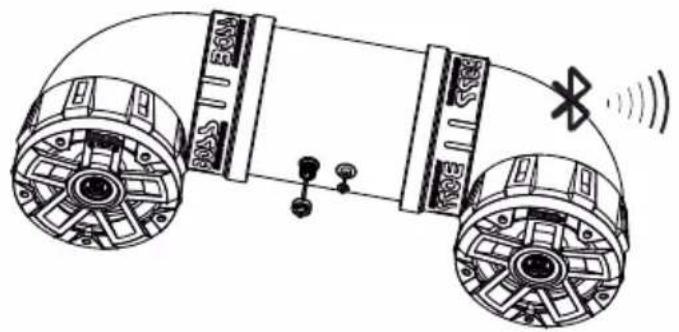
4) When the connection is successful, you are now ready to stream music from your favorite media player to the ATVB6.5R

BLUETOOTH OPERATION

natural_image
Diagram of a vehicle chassis with wheels and sensors, no text or symbols present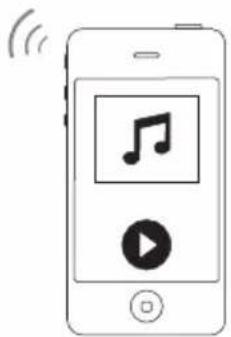
natural_image
Illustration of a smartphone displaying a music note and play button with wireless signal waves (no text or symbols)RECONNECTION
1) Power button the ATVB6.5R and your last paired Bluetooth device.
2) The unit will now automatically reconnect
3) If your device was previously paired with the ATVB6.5R, but it wasn't the last paired device:
a. Ensure no other devices are currently paired
b. Enter the Bluetooth Menu on your device being paired
c. "BOSS ATVB6.5R" will display under AVAILABLE DEVICES
d. Choose the "BOSS ATVB6.5R" to reconnect
4) If the device is out of range from the ATVB6.5R, it will disconnect automatically: a. The ATVB6.5R will automatically reconnect to the device once back in range

Tips:
To avoid battery exhaustion, be sure to occasionally run the vehicles engine while using this product.
Using this product without running the engine can drain the battery.
STREAMING MUSIC
natural_image
Diagram of a mechanical device with two wheels and a sensor, showing no text or symbols
natural_image
Illustration of a smartphone displaying music and video icons with wireless signal waves (no text or symbols)BLUETOOTH OPERATION
1) Press the PLAY/PAUSE from your devices touchscreen
VOLUME CONTROL
2) To raise or lower the volume use your device volume controls

Tips:
For maximum audio performance, ensure your device Bluetooth volume is set to a minimum 75% level before stowing
AUX INPUT

ATVB6.5R can play audio from any device that has a 3.5mm headphone audio jack.
AUX-IN OPERATION
1) Long press the power button ③ to power on the ATVB6.5R.
2) Disconnect any paired Bluetooth device by turning off Bluetooth in your devices Settings Menu
3) Connect the inclued 3.5mm AUX-IN cable ① to your devices headphone jack
4) Route the wire back to ATVB6.5R, and secure your device
VOLUME CONTROL
5) To raise or lower the volume use your device volume controls

Tips:
For maximum audio performance, ensure your device headphone volume is set to a minimum 75% level before stowing
ATVB6.5R CHARGING

1) When the LED light ④ flickers, it indicates that the battery is too low and needs to be charged.
2) After charging connection, the LED lamp has a flashing indication. When the 5 LED lamps are always bright, it indicates that the battery is full.
3) You can choose A and B, 2 adapters.

WARNING: AC110V adapter can only be used for charging, and not recommend to play music at the same time, otherwise it might be damaged.

Tips:
ATVB6.5R has no connection and will turn off automatically in 10 minutes.
TROUBLESHOOTING
| TROUBLE | CAUSE | SOLUTION |
| Unit will not turn on | Battery power low | Charging products |
| No sound is heard | Device volume is low / muted | Turn the volume level up |
| Device is paused or muted | Check your devices playing / volume status | |
| Cannot pair Bluetooth | The Bluetooth function of the device is not enabled | Refer to the user manual of the device for how to enable the Bluetooth function |
| The audio quality is poor after connection with a Bluetooth enabled device | The Bluetooth reception is poor | Move the device closer to the audio system or remove any obstacle between the device |
SUPPORT
For the latest information about this product please visit www.bossaudio.com
TECH SUPPORT:805-751-4853
Tech Support: www.bosssaudio.com/support/technical-support/
DIMENSIONS
WIRE DIAGRAM

flowchart
graph TD
    A["Chassis ground point"] --> B["Fuse and fuse holder (not included)"]
    B --> C["Recommended 12 ~ 14ga Wire (not included)"]
    C --> D["Normally open switch (not included)"]
    D --> E["Ground wire"]
    E --> F["Black Chassis ground point"]
    F --> G["QUICK RELEASE POWER ADAPTOR (INCLUDED)"]
    G --> H["POWER ADAPTOR"]
    H --> I["Replace with 10A AGC Fuse type only"]
    I --> J["Fuse is located inside the power adaptor Turn counter clockwise to open"]
    J --> K["INSERT INSERT"]
    K --> L["Power ADAPTOR INSERT"]
    L --> M["OPTIONAL DIRECT BATTERY WIRING CIRCUIT"]
SPECIFICATIONS
BLUETOOTH
• Version: 5.0 w/ EDR
• A2DP
• Range:33ft(10m)
SPEAKERS
• Dimensions: 6.5" / 165.1mm
• Cone Type: PP CARBON + RUBBER SURROUND
• Tweeter Size: 1" PEI SOFT DOME
AMPLIFIER
• ClassD
- Input impedance: 10kΩ
• Frequency Response: 45Hz-22kHz
GENERAL
• Operational Power: 12VDC (10-16V allowable)
• MAX Current Draw: 10A
• Replacement Fuse: 10A AGC TYPE
• Color: Black
• Weight: 10lbs / 4.54Kg
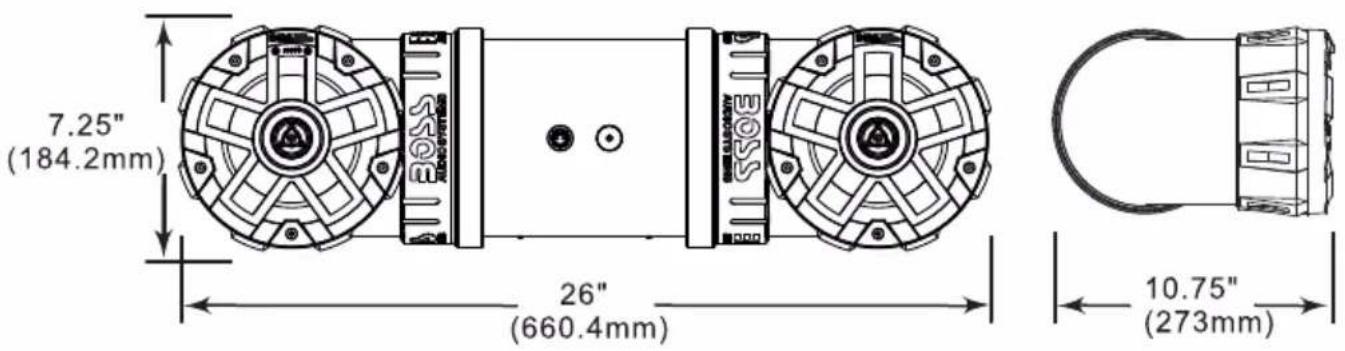
• Dimensions mm WxHxD: 660.4×184.2×273
• Dimensions Inches WxHxD: 26x7.25x10.75
SPECIFICATIONS SUBJECT TO CHANGE WITHOUT NOTICE
BOSS®
AUDIO SYSTEMS
BOSS Audio Systems
3451 Lunar Court · Oxnard, CA 93030
www.bossaudio.com
805-751-4853 Customer Service
Tech Support: www.bossaudio.com/support



0523

- TABLE OF CONTENTS
- Thank you for purchasing this
- BOSS®
- AUDIO SYSTEMS
- ATVB6.5R All-Terrain Sound System
- THIS PACKAGE CONTAINS
- INFORMATION TO THE USER
- Bluetooth®
- FCC COMPLIANCE STATEMENT
- CAUTION!!
- BEFORE YOU START
- IMPORTANT SAFETY PRECAUTIONS
- INSTALLATION PRECAUTIONS
- WARNING - Always consult a professional installer
- "Don'ts" - Very Important
- Using other mounting methods may void this warranty
- GETTING TO KNOW YOUR ATVB6.5R
- BLUETOOTH OPERATION
- PAIRING & DISCOVERING A NEW BLUETOOTH CONNECTION
- ANDROID users:
- iOS users:
- RECONNECTION
- Tips:
- STREAMING MUSIC
- VOLUME CONTROL
- AUX INPUT
- AUX-IN OPERATION
- ATVB6.5R CHARGING
- TROUBLESHOOTING
- SUPPORT
- DIMENSIONS
- WIRE DIAGRAM
- SPECIFICATIONS
- BLUETOOTH
- SPEAKERS
- AMPLIFIER
- GENERAL
Brand : BOSS
Model : ATVB6.5R
Category : Car Radio