
MI-X280 Lunatic - Loudspeaker AIWA - Free user manual and instructions
Find the device manual for free MI-X280 Lunatic AIWA in PDF.


| Product Type | Portable Bluetooth Speaker |
| Model | MI-X280 Lunatic |
| Brand | Aiwa |
| Dimensions | Approx. 300 x 150 x 150 mm |
| Weight | Approx. 1.5 kg |
| Power Source | Built-in rechargeable battery (7.4V 2200mAh) |
| Charging | USB DC 5V (Type-C) |
| Battery Life | Up to 8 hours at moderate volume |
| Bluetooth Version | V5.0 |
| Wireless Range | Up to 10 meters |
| Speaker Power Output | 20W |
| Frequency Response | 60 Hz - 20 kHz |
| Audio Inputs | Bluetooth, AUX 3.5mm, USB, FM Radio |
| Additional Features | TWS pairing, LED light effects, microphone input for karaoke |
| Controls | Buttons on top: Power, Volume, Play/Pause, Mode, EQ |
| Water Resistance | IPX5 (splash proof) |
| Color | Black with red accents |
| Accessories Included | USB charging cable, AUX cable, user manual |
| Maintenance | Clean with a soft dry cloth; avoid water ingress |
| Safety Precautions | Do not expose to extreme temperatures; do not disassemble |
| Spare Parts and Repairability | No user-serviceable parts; contact authorized service center |
Frequently Asked Questions - MI-X280 Lunatic AIWA
User questions about MI-X280 Lunatic AIWA
0 question about this device. Answer the ones you know or ask your own.
Ask a new question about this device
Download the instructions for your Loudspeaker in PDF format for free! Find your manual MI-X280 Lunatic - AIWA and take your electronic device back in hand. On this page are published all the documents necessary for the use of your device. MI-X280 Lunatic by AIWA.
USER MANUAL MI-X280 Lunatic AIWA
natural_image
Illustration of a woven basket handle with handles, no text or symbols presentImportant Safety Instructions
- Please do not place device near any form of heat sources.
- Please use the accessories specified by the manufacturer.
- Please refer all servicing/repairs to a qualified personnel should there by any form of damage to the device.
- Keep this user manual for future referencing/ troubleshooting.
- Please heed ALL safety cautions.
Safety Cautions
- Always keep device AWAY from fire and heat sources.
- Do NOT attempt to disassemble or alter the device.
- Do NOT expose device to excessive heat (Direct sunlight etc.).
- Do NOT immerse device into any form of liquids.
Unboxing

- MI-X280 Speaker
- Type-C Charging Cable
- 3.5mm Aux Cable
- User's Manual
Please refrain from using any damaged components. Contact your local authorized AIWA distributor/customer service should you need any assistance.
Product Specifications
Model Number: MI-X280
BT Version: V5.0
IP Rating: IPX5
Power Output: 2 X 30W
Frequency Response: 75\~20kHz
S/N Ratio: ≥ 80dB
Sensitivity: 95dB + 3dB
Supports: BT, AUX, TF Card, USB Card
Supported Profiles: A2DPV 1.2, AVRCPV 1.4, GAVDPV 1.2, AVDTPV 1.2, SPPV 1.2, AVCTPV 1.2
Transmission Distance (Estimated): 10 Meters (No Obstacles)
Battery: 7.2V/4000mAh (Li-on)
Playback Time: 3 - 10 Hours (Depends on Volume)
Charging Time: 3 - 4 Hours
DC Input Voltage/Current: Type C, DC 5V/2000mA
Dimensions: 316.8*190.3*112.4mm
Weight: 2630g±20g
The above are estimated values tested in a practical environment and may vary upon individual usage habits.
Product Overview

Product Overview
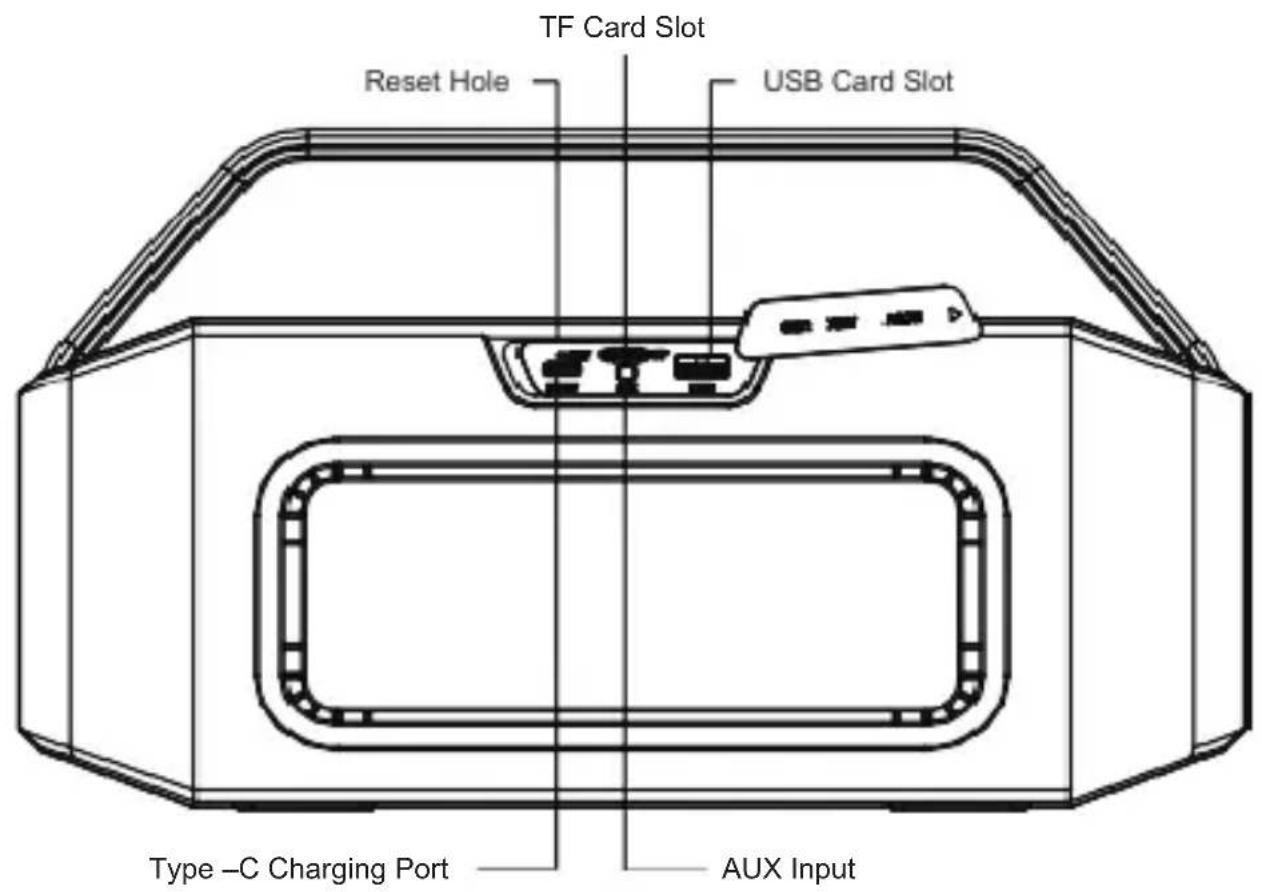
Product Usage Guide
Power ON/OFF:
Long press power button
Music Control:
Play/Pause: Click ▶ once (1)
Volume UP: Click + button
Volume DOWN: Click — button
Next Track: Press and hold + button
Previous Track: Press and hold - button
Switch in between BT playback/Aux Playback: 🔊
Call Control:
Answer/End incoming call: Click ▶
Reject incoming call: Press and hold ▶
Redial last called number: Press and hold
Sound Mode Change:
Click TIT (Sound Effect Button to switch in between Outdoor/Indoor Mode).
*Outdoor Mode: LED light blinking in blue
*Indoor Mode: LED light lights up in blue (Non-Blinking)
Playback Sources:
AUX: Connect AUX cable to the designated port and your mobile device.
*LED light lights up in green (Non-Blinking) indicates successful AUX connection
* Media control and call control functions are not usable while using AUX connection
TF Card: Insert TF card into the designated port. Playback can be commenced thereafter.
Connecting the Product
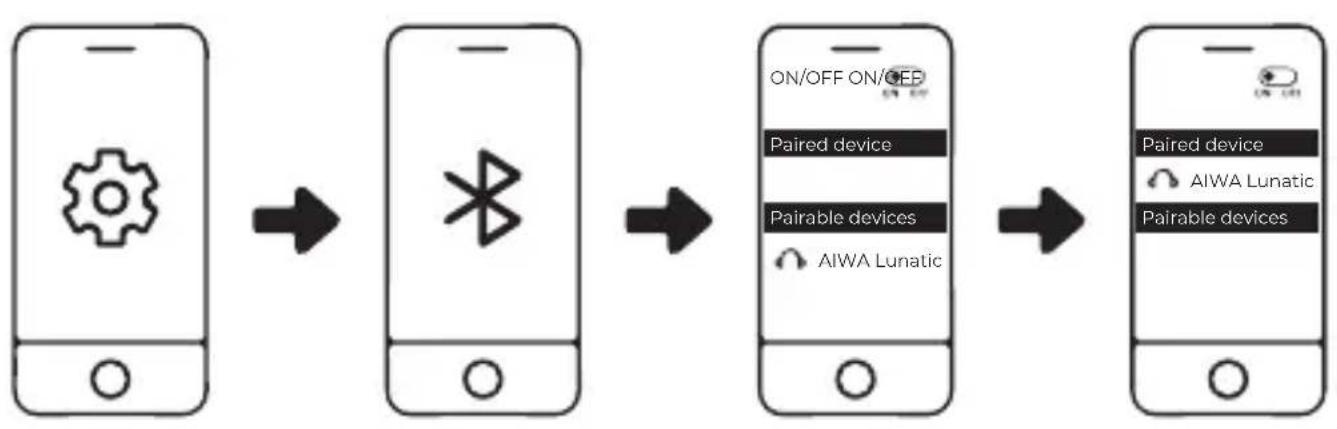
flowchart
graph LR
    A["Smartphone with gear icon"] --> B["Smartphone with Bluetooth symbol"]
    B --> C["Smartphone with ON/OFF ON/OFF labels, Paired device, Pairable devices, AIWA Lunatic"]
    C --> D["Smartphone with ON/OFF label, Paired device, AIWA Lunatic, Paired devices"]
- Turn on Bluetooth (BT) on your mobile device.
- Turn on the speaker.
- Search and connect to "AIWA Lunatic" from your mobile device.
AIWA MI-X280 LUNATIC automatically reconnects to the last connected mobile device. (Speaker maximum device memory: 8 mobile devices)
Dis-connecting the Product
Long press both + & - at the same time to disconnect.
TWS Function

TWS Operation:
- Turn on Both speakers.
- Choose one of the units to function as the "Main unit" (This will be the LEFT Side Audio Playback Channel).
- Double click ⏻ button on the "Main unit" only.* LED Indicator Light will be blinking in blue and green rapidly *
- Both speakers will now proceed to pair with each other.
- *Main unit's LED light blinking in BLUE* + *2 ^nd Speaker unit LED light lights up in BLUE (Non- blinking) * indicates successful TWS Pairing.
- Turn on Bluetooth (BT) on your mobile device.
- Search and connect to "AIWA Lunatic" from your mobile device.
- *Both unit's LED light lights up in BLUE (Non-blinking)* indicates successful connection to mobile device.
- Playback should now commence via both speaker units at the same time.
- Long press both + & - at the same time on either one of the speakers to dis-connect TWS.
Battery & Charging
Charging the speaker:
Connect Type-C charging cable to the speaker and a suitable power source.
*Low Battery Warning: Flashing Red LED Indicator Lights
*White LED Indicator Lights reflects the battery level accordingly.
Approximate charging time: 3-4 Hours
Please fully charge up the speaker prior to first-time usage.
Troubleshooting
Unable to connect to device:
- Please check if your mobile device supports A2DP profile
- Please ensure the speaker is not connected to other devices
- Please ensure the speaker is within 10m from the device
- Please ensure the speaker is in pairing mode
(LED Indicator light blinking blue)
No sound is coming out of the speaker:
- Please ensure your device is connected to the speaker. (LED Indicator should be in blue (Non-blinking)).
- Please ensure the music volume is at an audible level on both your mobile device and speaker.
Perform a factory reset if the function buttons are not working/ any form of abnormalities are observed during speaker usage: Insert a small pin into the designated reset hole and hold it for two (2) seconds until the LED Lights extinguishes.
aiwa®
Japan est1951
Aiwa Electronics Int'l Co., Ltd. Explore more at www.int-aiwa.com
- Important Safety Instructions
- Safety Cautions
- Unboxing
- Product Specifications
- Product Overview
- Product Usage Guide
- Sound Mode Change:
- Playback Sources:
- Connecting the Product
- Dis-connecting the Product
- TWS Function
- TWS Operation:
- Battery & Charging
- Charging the speaker:
- Troubleshooting
- Unable to connect to device:
- No sound is coming out of the speaker:
- aiwa®
- Japan est1951
Brand : AIWA
Model : MI-X280 Lunatic
Category : Loudspeaker